Data-Driven Framework in Selenium
A Data-Driven Framework in Selenium is an automation framework where test data is separated from test scripts. The automation logic remains reusable, while input values are supplied from external data sources such as Excel, CSV, JSON, XML, databases, REST APIs, or TestNG DataProviders. Instead of writing separate test methods for every input combination, the same test method runs multiple times with different datasets.
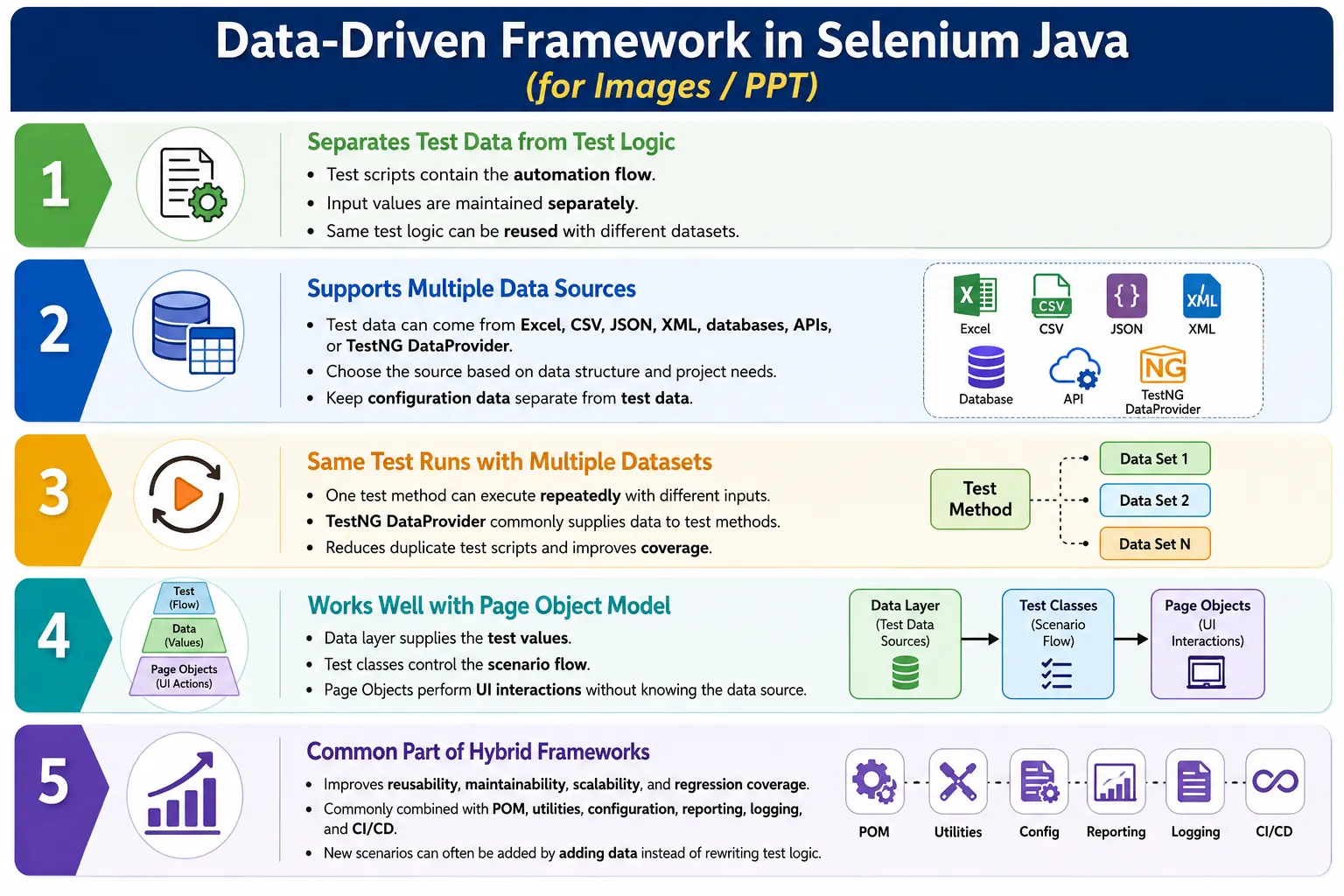
This framework type is one of the most widely used designs in real Selenium projects because most applications need the same business flow to be verified with many data combinations. Login must be tested with different users. Registration must be tested with different valid and invalid values. Search must be tested with many keywords. Payment must be tested with different payment methods. A Data-Driven Framework makes this practical by keeping the test flow stable and changing only the data.
1. What Is a Data-Driven Framework?
A Data-Driven Framework is an automation architecture where test logic and test data are separated. The test script describes what should happen, and the external data source provides the values used during execution. This means one test can execute many times without duplicating automation code.
For example, a login test does not need separate methods for admin, manager, employee, customer, and guest users. The test method can accept username and password as parameters. The data provider supplies those values from an external source. The same login logic then runs repeatedly with different user credentials.
Test Logic
  Separate From
    Test Data
      Supplied By
        Excel, CSV, JSON, Database, API, or DataProvider
The framework becomes easier to maintain because changes to input data do not require changes to Java test logic. If a new user must be tested, a new row can be added to the data file. The test method remains unchanged.
2. Why Do We Need a Data-Driven Framework?
Without data-driven design, automation code becomes repetitive. Suppose a team needs to verify login for admin, manager, employee, customer, and guest users. A beginner may create five separate test methods, where each method contains the same login steps but different username and password values. This creates duplicate code and increases maintenance effort.
Without Data-Driven Framework
  LoginTest_Admin
  LoginTest_Manager
  LoginTest_Employee
  LoginTest_Customer
  LoginTest_Guest
With a Data-Driven Framework, one login test runs with five datasets. Only the input changes. The automation logic stays the same. This improves code reuse and keeps the framework cleaner.
With Data-Driven Framework
  One Login Test
    Five Data Sets
      Five Executions
This approach is especially useful for regression testing because the same flow can be executed against many conditions without writing many duplicate scripts.
3. Core Idea
The core idea of a Data-Driven Framework is separation of concerns. Test logic should describe the business action. Test data should provide the values. A login test should not permanently contain a hardcoded username and password. A registration test should not permanently contain one email address, one phone number, and one password. The test should receive these values from a data source.
Hardcoded Approach
  Test
    Fixed Values
      Single Execution
Data-Driven Approach
Test
External Data
Execute Row 1
Execute Row 2
Execute Row 3
Execute Row 4This makes the test reusable and makes the data easier to update. The framework becomes flexible because testers can add more test coverage by adding more data, not by copying code.
4. Data-Driven Framework Architecture
A typical Data-Driven Framework has several layers. The external data source stores test inputs. A data reader utility reads the file or system. A TestNG DataProvider supplies the data to the test method. The test method calls Page Object methods. Selenium WebDriver performs browser actions. Reports and logs capture the result.
Excel, JSON, CSV, Database, or API
  Data Reader Utility
    TestNG DataProvider
      Test Class
        Page Objects
          Selenium WebDriver
            Browser
              Reports and Logs
This architecture separates responsibilities clearly. Data reader utilities know how to read data. DataProviders know how to pass data to tests. Test classes know the scenario. Page Objects know the UI behavior. WebDriver interacts with the browser. Reports and logs describe what happened.
5. Supported Data Sources
A Data-Driven Framework can read from many sources. The right source depends on the project, dataset size, team comfort, and maintenance needs. Excel is common in manual testing teams because non-programmers understand spreadsheets. CSV is simple and lightweight. JSON is structured and developer-friendly. Databases are useful when test data must come from enterprise systems. APIs are useful when the framework needs dynamic or service-backed data.
- Excel files for tabular business data.
- CSV files for simple lightweight datasets.
- JSON files for structured object-style data.
- XML files for legacy or integration-driven systems.
- Properties files for configuration values.
- SQL databases such as MySQL or PostgreSQL.
- NoSQL databases such as MongoDB.
- REST APIs for dynamic test data.
- TestNG DataProvider for small in-code datasets.
Configuration data and test data should not be mixed. Browser name, URL, timeout, and environment belong in configuration. Usernames, product names, form values, and expected results belong in test data.
6. Example Without Data-Driven Framework
The following style duplicates the same login flow. It may work for two users, but it becomes difficult when twenty users or fifty validation combinations are needed.
@Test
public void loginAdmin() {
    loginPage.login("admin", "admin123");
}

@Test
public void loginUser() {
    loginPage.login("user", "user123");
}
The problem is not only duplicate code. The problem is that the test design does not scale. If the login process changes, multiple test methods may need updates. If more users are added, more test methods may be created. The framework becomes larger without becoming smarter.
7. Example With Data-Driven Framework
With data-driven design, the test method accepts input values as parameters. The data source supplies the username and password. The login logic is written once and executed many times.
@Test(dataProvider = "loginData")
public void login(String username, String password) {
    loginPage.login(username, password);
}
This is the essential advantage of data-driven testing. The test method becomes generic, and the data controls the variations. If five users are supplied, the test runs five times. If fifty users are supplied, the test runs fifty times. The test logic does not need to be copied.
8. Excel Data Source
Excel is one of the most common data sources in Selenium frameworks because many testing teams already use spreadsheets. A login sheet may contain username, password, expected result, and role columns. Apache POI is commonly used in Java to read Excel files and convert rows into data arrays for TestNG.
LoginData.xlsx
  Username  Password   ExpectedResult
  admin     admin123   success
  user      user123    success
  guest     guest123   success
  invalid   badpass    failure
Excel File
Apache POI
Object Array
DataProvider
Test MethodExcel is useful when business users or manual testers maintain datasets. However, large Excel files can become slow or messy if not managed carefully. Sheet names, column names, and data formats should be consistent.
9. CSV Data Source
CSV is simpler than Excel. It is plain text, lightweight, easy to version-control, and easy to review in code repositories. CSV works well for simple tabular data where formatting, formulas, and multiple sheets are not needed.
Username,Password,ExpectedResult
admin,admin123,success
user,user123,success
guest,guest123,success
invalid,badpass,failure
A CSV utility can read each line, split values safely, and return the dataset to a DataProvider. CSV is a good choice when the data is simple and the team wants a file format that is easy to diff during code review.
10. JSON Data Source
JSON is useful when test data has structure. A registration scenario may need user details, address details, preferences, and expected messages. JSON can represent nested data more naturally than CSV. Libraries such as Jackson or Gson are commonly used in Java frameworks to read JSON data.
[
  {
    "username": "admin",
    "password": "admin123",
    "expectedResult": "success"
  },
  {
    "username": "user",
    "password": "user123",
    "expectedResult": "success"
  }
]
JSON is especially useful when UI automation and API automation share similar data models. It also works well when test data needs to be represented as objects rather than simple rows.
11. Database Data Source
Some enterprise systems store test data in databases. A framework may query a database to fetch active users, product records, account data, order status, or transaction details. Database-driven data is useful when test data must reflect backend state or when tests need to verify data written by the application.
Database Table
  SQL Query
    Result Set
      DataProvider
        Test Method
Database use should be handled carefully. Tests should not depend on unstable production-like data unless that data is controlled. Queries should be clear, credentials should be secure, and test data cleanup should be planned. Database data can be powerful, but it also increases framework complexity.
12. TestNG DataProvider Example
TestNG DataProvider is the most common mechanism for supplying data to Selenium tests in Java. It can return a two-dimensional object array where each row represents one execution and each column represents one parameter.
@DataProvider(name = "users")
public Object[][] users() {
    return new Object[][] {
        {"admin", "admin123"},
        {"user", "user123"},
        {"guest", "guest123"}
    };
}

@Test(dataProvider = "users")
public void login(String username, String password) {
    loginPage.login(username, password);
}
This example keeps data inside Java code, so it is best for small datasets or demonstrations. In enterprise frameworks, the DataProvider often calls ExcelUtil, CsvUtil, JsonUtil, or DatabaseUtil and returns data read from an external source.
13. Data Reader Layer
A strong Data-Driven Framework does not read files directly inside test methods. Instead, it uses a separate data reader layer. This layer is responsible for opening files, reading rows, converting values, handling empty cells, validating columns, and returning data in the format required by TestNG.
- ExcelUtil reads Excel sheets and converts rows into datasets.
- CsvUtil reads CSV files and handles simple tabular data.
- JsonUtil reads JSON arrays or objects and maps them to Java models.
- DatabaseUtil executes queries and converts results into datasets.
- ApiDataUtil calls REST endpoints when dynamic data is needed.
This separation keeps test methods clean. Tests should not care whether data came from Excel, JSON, CSV, or database. Tests should receive meaningful values and execute the scenario.
14. Framework Folder Structure
A Data-Driven Framework usually has separate folders for pages, tests, utilities, test data, configuration, reports, and resources. This structure makes data ownership clear and prevents test classes from becoming overloaded with file-handling code.
AutomationFramework
  pages
  tests
  utilities
    ExcelUtil.java
    CsvUtil.java
    JsonUtil.java
    DatabaseUtil.java
  testdata
    LoginData.xlsx
    Users.json
    Products.csv
  config
    config.properties
  reports
  logs
  resources
The testdata folder should be treated as part of the framework. It should be version-controlled unless it contains secrets or environment-specific sensitive values. Sensitive values should be masked, encrypted, or supplied securely through environment variables or secret management tools.
15. Execution Flow
The execution flow starts when TestNG identifies a test method that uses a DataProvider. The DataProvider calls the data reader utility. The utility reads the external file or system. The data is returned to TestNG. TestNG invokes the test method once for each dataset. The test method passes values to Page Object methods, and Selenium performs browser actions.
TestNG
  DataProvider
    Data Reader Utility
      External Data Source
        Test Method
          Page Object
            Browser Execution
              Report Result
This flow is powerful because it separates "how to test" from "what data to use." The test method handles the business flow, and the data layer handles variation.
16. Real Project Example
Consider an e-commerce login feature. The business wants login tested for admin, manager, customer, guest, locked user, invalid user, and blank credentials. Without data-driven testing, the team may create many separate tests. With data-driven testing, the team creates one login scenario and supplies many rows of data.
One Login Test
  admin credentials
  manager credentials
  customer credentials
  guest credentials
  locked user credentials
  invalid credentials
  blank username
  blank password
The same approach applies to registration forms, search filters, product categories, payment methods, account types, address validation, role-based access, and API payloads. Any scenario with repeated logic and changing inputs is a candidate for data-driven design.
17. Integration with Page Object Model
Data-Driven Frameworks work best with Page Object Model. The test receives data, and the page object performs UI actions. The page object should not know where the data came from. It should simply receive values and use them on the page.
Excel or JSON
  DataProvider
    LoginTest
      LoginPage.login(username, password)
        Browser
This separation is important. If page objects start reading Excel or JSON directly, the page layer becomes coupled to the data layer. That makes the framework harder to change. A clean design keeps data reading in utilities, test flow in tests, and UI interaction in page objects.
18. Integration with Hybrid Framework
In enterprise projects, a Data-Driven Framework is usually part of a Hybrid Framework. The framework combines Page Object Model, data-driven execution, reusable utilities, driver management, configuration files, reporting, logging, and CI/CD support. Data-driven design handles input variation, but other layers handle maintainability and execution quality.
Hybrid Framework
  Page Object Model
  Data-Driven Testing
  DriverFactory
  Utilities
  Reports
  Logs
  Configuration
  TestNG
  CI/CD
This is why interview answers should avoid saying that a Data-Driven Framework alone is always the final architecture. In real projects, it is usually one important part of a broader hybrid design.
19. Advantages
The main advantage of a Data-Driven Framework is reuse. A single test can cover many input combinations. This reduces duplicate code and improves maintainability. Adding new test coverage often becomes as simple as adding new data rows. The framework also becomes easier for non-developers to support when data is stored in readable files such as Excel or CSV.
- Eliminates duplicate test scripts.
- Improves code reuse.
- Makes test maintenance easier.
- Supports large-scale regression testing.
- Allows quick addition of new datasets.
- Separates test logic from test data.
- Supports positive, negative, and boundary scenarios.
- Allows non-developers to update test data when appropriate.
- Works well with TestNG, POM, and Hybrid Frameworks.
For applications with many forms, roles, products, or validation rules, data-driven design is not optional. It is required for practical coverage.
20. Disadvantages
A Data-Driven Framework also has challenges. The initial setup requires effort because data readers, DataProviders, file structure, and validation rules must be created. External data files must be maintained carefully. Large datasets can become difficult to understand if naming and organization are poor. Data quality becomes part of automation quality.
- Initial framework setup takes time.
- External data files must be maintained.
- Large datasets require strong organization.
- Invalid or outdated data can cause false failures.
- Excel reading can be slower for very large files.
- Database-backed data may introduce environment dependency.
- Debugging can be harder if reports do not show dataset details.
The solution is not to avoid data-driven testing. The solution is to manage test data with the same discipline used for code.
21. Data-Driven Framework vs Data-Driven Testing
Data-driven testing is the testing technique where the same test runs with different data. A Data-Driven Framework is the complete architecture that supports that technique. The framework includes data reader utilities, DataProviders, folder structure, test data files, page objects, reporting, and maintenance rules.
| Data-Driven Testing | Data-Driven Framework |
|---|---|
| Testing technique. | Complete framework architecture. |
| Same test, different data. | Includes readers, DataProviders, and structure. |
| Focuses on execution variation. | Focuses on reusable implementation. |
| One concept. | Full project design. |
22. Data-Driven Framework vs Modular Framework
A Modular Framework separates the application into functional modules. A Data-Driven Framework separates data from test logic. These are different concerns, and modern projects often use both together.
| Modular Framework | Data-Driven Framework |
|---|---|
| Separates application into modules. | Separates test data from logic. |
| Focuses on application organization. | Focuses on data reuse. |
| Examples include login, cart, and payment modules. | Examples include login data, product data, and payment data. |
A login module can use data-driven design to execute with many users. A cart module can use data-driven design to execute with many products. The two designs complement each other.
23. Data-Driven Framework vs Keyword-Driven Framework
In a Data-Driven Framework, data controls the input values. In a Keyword-Driven Framework, keywords control the actions. Data-driven design supplies values such as username, password, product, and expected message. Keyword-driven design supplies commands such as CLICK, TYPE, SELECT, and VERIFY.
| Data-Driven Framework | Keyword-Driven Framework |
|---|---|
| Data controls variations. | Keywords control actions. |
| Examples include username and password. | Examples include CLICK and VERIFY. |
| Simpler and very common. | More complex and less common. |
| Best for repeated flows with changing values. | Best when actions must be externally described. |
24. Common Beginner Mistakes
Beginners often create data-driven tests but still keep data handling in the wrong place. A common mistake is reading Excel directly inside the test method. Another mistake is mixing configuration values with test data. Some teams create one file with browser name, URL, username, password, product, and expected messages all together. This creates confusion because configuration and scenario data change for different reasons.
- Hardcoding data inside test scripts.
- Creating one test method for every user.
- Reading Excel directly inside test methods.
- Mixing configuration data with test data.
- Duplicating datasets across multiple files.
- Using Excel for tiny static datasets where DataProvider is enough.
- Not showing data values in reports when failures occur.
- Not validating required columns before execution.
Good data-driven design keeps tests clean, data organized, and reports understandable.
25. Enterprise Best Practices
Enterprise Data-Driven Frameworks should treat test data as a managed asset. Keep test data outside Java code. Create reusable data readers. Use TestNG DataProvider to pass datasets. Choose Excel, JSON, CSV, database, or API based on project need. Keep Page Objects independent of data source. Store configuration separately in properties files or environment variables. Validate datasets before execution.
- Use meaningful file names and sheet names.
- Keep test data version-controlled where safe.
- Do not store sensitive production credentials in plain files.
- Separate positive, negative, and boundary datasets clearly.
- Include expected results in data where useful.
- Log the dataset used for failed tests.
- Review data files as part of code review.
- Use consistent column names across files.
The goal is to make data easy to update without making the framework fragile.
26. Real Enterprise Architecture
A real enterprise architecture combines external data sources, data reader utilities, TestNG DataProviders, test classes, Page Objects, Selenium WebDriver, browser execution, reports, and logs. Each layer has a clear responsibility.
Excel, JSON, CSV, Database, or API
  Data Reader Utilities
    TestNG DataProvider
      Test Classes
        Page Objects
          Selenium WebDriver
            Browser
              Reports and Logs
This architecture scales because the test method does not depend directly on one file type. If the project moves from Excel to JSON, the reader layer changes, but the test logic can remain stable if the DataProvider contract remains the same.
27. Reporting in Data-Driven Frameworks
Reporting is especially important in data-driven testing because the same test method runs multiple times. A report that only says login failed is not enough. It should say which dataset failed, which username was used, what expected result was configured, what actual result appeared, which browser and environment were used, and whether screenshots or logs are available.
Without dataset-level reporting, debugging becomes slow. Engineers may need to rerun the test or inspect the data manually. Good reports make the data visible enough to diagnose failures quickly while avoiding exposure of sensitive values such as passwords, tokens, or card numbers.
A practical report should include a dataset identifier. This can be a row number, test case ID, scenario name, user role, or data key. For example, a login failure with dataset ID LOGIN_NEG_004 is easier to investigate than a generic login failure. The dataset identifier can be stored in the data file and passed into the test along with the input values. Reports, logs, and screenshots can then use that identifier to connect execution evidence back to the exact data row.
Good reporting also helps identify whether a failure is caused by application behavior, automation code, environment instability, or bad data. If many rows fail at the same page action, the application or locator may have changed. If only one row fails, the data may be wrong or the application may have a scenario-specific defect. This distinction is important in large regression suites where hundreds of data combinations may run in one build.
28. Data Management Strategy
Data management is one of the most important parts of a Data-Driven Framework. Test data should be meaningful, stable, and reusable. If data depends on previous test executions, cleanup must be handled. If data must be unique, the framework may need timestamped values or generated identifiers. If data is shared across parallel tests, collisions must be avoided.
For example, registration tests should not repeatedly use the same email address if the application requires uniqueness. Order tests should not depend on a product that may go out of stock unless the test environment controls product availability. Payment tests should use controlled test cards or mock payment systems. Data-driven testing succeeds only when the data itself is reliable.
Data should also be classified by purpose. Positive data verifies successful flows. Negative data verifies validation and error handling. Boundary data verifies edge values. Role-based data verifies permissions. Environment-specific data supports different test environments. When all data is mixed in one file without labels, the suite becomes difficult to understand. Clear classification makes it easier to run only the data needed for a smoke test, regression suite, or release validation.
Another important strategy is data cleanup. Some tests create records such as users, orders, tickets, invoices, or transactions. If those records remain forever, the environment becomes polluted and future tests may fail. Cleanup can be handled through UI steps, database scripts, APIs, or environment reset processes. The best approach depends on the system, but the framework should treat cleanup as part of the test lifecycle rather than an afterthought.
29. Parallel Execution Considerations
Data-driven suites often run many test iterations, so teams commonly execute them in parallel to save time. Parallel execution makes data design more important. If two tests use the same user account at the same time, one test may change the user's state while another test is still running. If two tests use the same cart, order, or file name, results may become unpredictable. These failures are not always application defects; they are often test data design problems.
To support parallel execution, data should be isolated where needed. Each test thread may need its own user, product, account, or generated identifier. Downloaded files and screenshots should have unique names. Database records should not conflict. If shared data is unavoidable, tests should avoid modifying it or should use locking and cleanup rules carefully. A Data-Driven Framework that supports parallel execution well can scale much better in CI/CD pipelines.
30. Choosing the Right Data Source
Choosing a data source should be based on maintainability, not habit. Excel is useful when business users need to review and update rows. CSV is useful when data is simple and code review visibility matters. JSON is useful when data has nested structure. Databases are useful when test data must match backend state. APIs are useful when data must be created dynamically before execution. TestNG DataProvider is useful for small fixed datasets or examples.
A common enterprise mistake is using Excel for everything. Excel can be useful, but it is not always the best option. Small static data may be clearer directly in a DataProvider. Structured user profiles may be easier in JSON. Large backend-driven datasets may belong in a database. The best framework supports more than one source while keeping the test method independent from the source.
31. Interview Perspective
A short interview answer is: a Data-Driven Framework is an automation framework where test data is stored externally, and the same test script executes multiple times using different datasets. It improves reusability, maintainability, scalability, and coverage.
A stronger real-time answer is: in my Selenium framework, I use a data-driven approach where test data is stored in Excel, JSON, or CSV files depending on project requirements. Reusable utility classes such as ExcelUtil, CsvUtil, and JsonUtil read the data and supply it to TestNG DataProviders. Test methods remain generic and call Page Object methods with different datasets. Configuration values such as URLs, browsers, and environment names are stored separately in properties files. This design minimizes duplicate code and allows new scenarios to be added by updating external data instead of rewriting tests.
In interviews, also mention that Data-Driven Frameworks are commonly part of Hybrid Frameworks. They are usually combined with POM, utilities, reports, logs, configuration management, and CI/CD execution. That answer sounds closer to real project experience than a definition-only answer.
32. Key Takeaway
A Data-Driven Framework transforms Selenium automation from hardcoded scripts into reusable, scalable, and maintainable tests. It separates test logic from test data, allowing the same test to execute with many datasets. It supports Excel, CSV, JSON, databases, APIs, and TestNG DataProviders. It is ideal for login, forms, search, payment, validation, regression, and API-related scenarios.
External Test Data
  Data Reader Utility
    TestNG DataProvider
      Reusable Test Script
        Page Object Model
          Selenium WebDriver
            Browser
The most important rule is to keep data outside the test logic while keeping the framework readable and maintainable. Data sources should be organized, validated, and reported clearly. Page Objects should not know where data comes from. Test classes should focus on scenario flow. Data readers should handle file or system access. In modern Selenium projects, a Data-Driven Framework is usually implemented as part of a Hybrid Framework alongside Page Object Model, reusable utilities, configuration management, reporting, logging, and CI/CD integration.