CSV Data Handling in Selenium Java
CSV, or Comma-Separated Values, is one of the simplest and most efficient formats for storing tabular test data. In Selenium automation, CSV files are commonly used for Data-Driven Testing because they are lightweight, easy to edit, easy to version control, and simple to process using Java. A CSV file is especially useful when the data is flat, such as login credentials, search keywords, product names, employee records, API input rows, or expected result combinations.
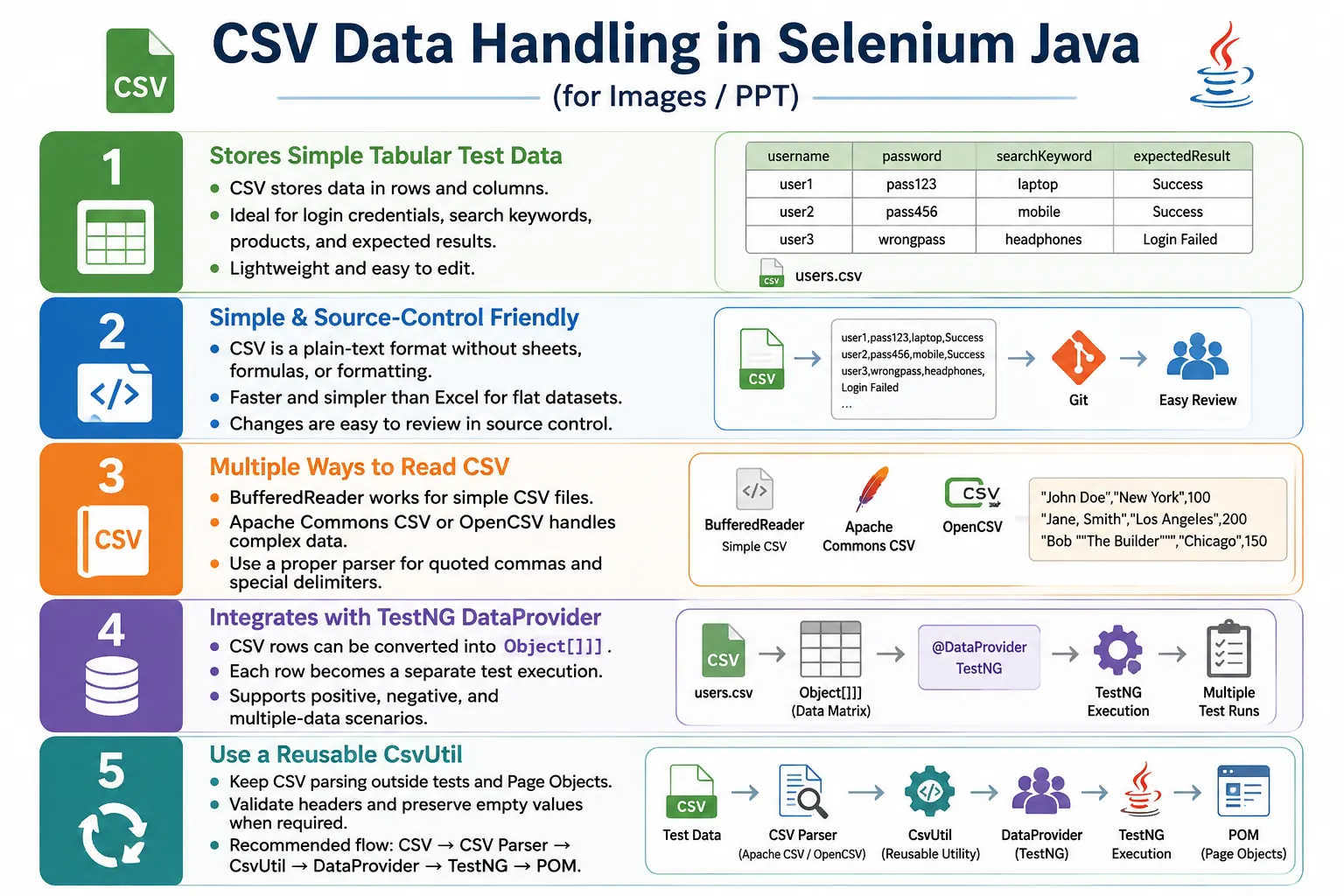
Unlike Excel, CSV does not support multiple sheets, formulas, merged cells, formatting, colors, or workbook-level features. It stores plain text only. That simplicity is often an advantage. CSV files are fast to read, readable in text editors, supported by spreadsheet tools, and friendly to source control diffs. For Selenium frameworks that need lightweight data-driven execution, CSV can be a very practical choice.
1. What Is a CSV File?
A CSV file is a plain text file where each line represents a row and each value is separated by a delimiter, usually a comma. The first row often contains headers that describe each column.
Username,Password,ExpectedResult
admin,admin123,success
user,user123,success
admin,wrongpass,failure
The file extension is usually .csv. Because it is plain text, it can be opened in Notepad, VS Code, Excel, Google Sheets, or any text editor. In Java, it can be read using built-in classes such as BufferedReader or dedicated parsing libraries such as Apache Commons CSV and OpenCSV.
2. Why Use CSV Files?
CSV files are useful when you want to separate test data from automation logic without introducing the complexity of Excel or JSON. Instead of hardcoding values in test methods, store rows in a CSV file and feed them to tests through a DataProvider.
// Avoid hardcoding repeated data
loginPage.login("admin", "admin123");
Username,Password
admin,admin123
user,user123
guest,guest123CSV is easy to edit, fast to read, and excellent for simple datasets. It is also source-control friendly because changes appear as plain text diffs. This makes it easier to review test data changes in pull requests compared with binary spreadsheet files.
3. CSV vs Excel
Excel and CSV are both used for tabular data, but they are not the same. Excel is a workbook format with sheets, formatting, formulas, and richer metadata. CSV is plain text. If your data needs multiple sheets, formulas, or business-user formatting, Excel may be better. If your data is simple rows and columns, CSV is often simpler.
| CSV | Excel |
|---|---|
| Plain text | Workbook format |
| One table per file | Multiple sheets supported |
| No formatting | Formatting supported |
| Fast and lightweight | Larger and more feature-rich |
| Read with BufferedReader or CSV parser | Read with Apache POI |
4. Project Structure
CSV files should be stored in a predictable test data folder. In Maven projects, src/test/resources/testdata is a common location.
AutomationFramework
  src
    test
      resources
        testdata
          LoginData.csv
          Products.csv
          Employees.csv
  pages
  tests
  utilities
  pom.xml
Keeping data under resources makes it available during local execution and CI execution. It also keeps test data separate from Java classes.
5. Reading CSV With BufferedReader
Java provides built-in classes for reading text files. For a simple CSV file that does not contain quoted commas or advanced formatting, BufferedReader can be enough.
BufferedReader reader =
        new BufferedReader(
                new FileReader(
                        "src/test/resources/testdata/LoginData.csv"
                )
        );
BufferedReader reads the file line by line. Each line can then be split into values.
6. Reading One Line
The first call to readLine() reads the first line in the file. If the file contains headers, the first line may be Username,Password.
String line =
        reader.readLine();

System.out.println(line);
Output can be Username,Password. This is usually a header row, not actual test data.
7. Reading All Lines
To read all lines, use a loop until readLine() returns null.
String line;

while ((line = reader.readLine()) != null) {
    System.out.println(line);
}

reader.close();
This prints every row in the file. In real code, prefer try-with-resources so the reader closes automatically.
8. Splitting CSV Values
For simple CSV files, each row can be split using comma.
String line =
        "admin,admin123,success";

String[] values =
        line.split(",");

String username = values[0];
String password = values[1];
String expectedResult = values[2];
This works for simple rows, but it does not handle quoted commas correctly. For complex CSV files, use a real CSV parser.
9. Skipping Header Row
Most CSV files use the first row as a header. The automation utility should usually skip it before reading test data.
try (BufferedReader reader =
             new BufferedReader(
                     new FileReader(
                             "src/test/resources/testdata/LoginData.csv"))) {

    reader.readLine();

    String line;

    while ((line = reader.readLine()) != null) {
        String[] values =
                line.split(",");

        System.out.println(values[0]);
        System.out.println(values[1]);
    }
}
If the header is not skipped, the test may try to use Username and Password as actual login data.
10. Preserving Empty Values
Basic split(",") can drop trailing empty values. If empty values are valid test inputs, use split(",", -1). This preserves empty fields.
String line =
        "admin,,failure";

String[] values =
        line.split(",", -1);

String username = values[0];
String password = values[1];
String result = values[2];
This is useful for negative testing where blank username or blank password is intentional.
11. Trimming Values
CSV data may contain spaces. If the row is admin , admin123 , success , the values include spaces unless trimmed.
String[] values =
        line.split(",");

String username =
        values[0].trim();

String password =
        values[1].trim();
Trimming should be a conscious utility decision. Sometimes spaces are meaningful test data. In most login and search datasets, trimming is helpful.
12. CSV in Selenium Login Test
CSV values can be passed to Selenium page objects. A simple loop can read each row and execute login.
while ((line = reader.readLine()) != null) {
    String[] values =
            line.split(",");

    loginPage.login(
            values[0],
            values[1]
    );
}
This demonstrates the idea, but a reusable framework should not keep CSV reading logic inside test methods. Create a utility and use TestNG DataProvider.
13. Creating a CsvUtil
A reusable CsvUtil class centralizes CSV parsing logic. Tests should not repeatedly open files, skip headers, split rows, and close readers.
public class CsvUtil {

    public static List<String[]> readCsv(String filePath)
            throws IOException {

        List<String[]> data =
                new ArrayList<>();

        try (BufferedReader reader =
                     new BufferedReader(
                             new FileReader(filePath))) {

            reader.readLine();

            String line;

            while ((line = reader.readLine()) != null) {
                data.add(line.split(",", -1));
            }
        }

        return data;
    }
}
This version skips the header row, preserves empty values, closes the reader automatically, and returns rows to the caller.
14. CSV With TestNG DataProvider
To use CSV for data-driven testing, convert the rows into Object[][] and return them from a DataProvider.
public static Object[][] getCsvData(String filePath)
        throws IOException {

    List<String[]> rows =
            readCsv(filePath);

    Object[][] data =
            new Object[rows.size()][];

    for (int i = 0; i < rows.size(); i++) {
        data[i] = rows.get(i);
    }

    return data;
}
@DataProvider(name = "csvLoginData")
public Object[][] csvLoginData()
throws IOException {
return CsvUtil.getCsvData(
"src/test/resources/testdata/LoginData.csv"
);
}15. Selenium Test Using CSV DataProvider
@Test(dataProvider = "csvLoginData")
public void loginTest(String username,
                      String password,
                      String expectedResult) {

    LoginPage loginPage =
            new LoginPage(driver);

    loginPage.login(username, password);

    System.out.println(
            "Expected result: " + expectedResult
    );
}
The test receives one CSV row per execution. The same test can run with valid users, invalid users, and expected result values stored in the file.
16. Why Simple split Is Not Always Enough
Simple splitting fails when values contain commas inside quotes. For example, John,"Software Engineer, Senior" represents two columns, but split(",") treats it as three values. This is a classic CSV parsing issue.
If your data can contain commas, quotes, line breaks, or custom delimiters, use a dedicated CSV parser such as Apache Commons CSV or OpenCSV. These libraries understand CSV rules better than manual splitting.
17. Apache Commons CSV Dependency
Apache Commons CSV is a robust library for reading CSV files in Java.
<dependency>
    <groupId>org.apache.commons</groupId>
    <artifactId>commons-csv</artifactId>
    <version>1.11.0</version>
</dependency>
It supports headers, custom delimiters, quoted fields, trimming, and safer parsing.
18. Reading CSV With Apache Commons CSV
try (Reader reader =
             Files.newBufferedReader(
                     Paths.get("src/test/resources/testdata/LoginData.csv"))) {

    Iterable<CSVRecord> records =
            CSVFormat.DEFAULT
                    .builder()
                    .setHeader()
                    .setSkipHeaderRecord(true)
                    .build()
                    .parse(reader);

    for (CSVRecord record : records) {
        System.out.println(record.get("Username"));
        System.out.println(record.get("Password"));
    }
}
Accessing values by header name is more readable than using fixed indexes. It also reduces risk if column order changes.
19. Validating Required Columns
A mature CSV utility should validate required headers before test execution. If a login test requires Username, Password, and ExpectedResult, the framework should fail early if any column is missing.
Map<String, Integer> headers =
        parser.getHeaderMap();

if (!headers.containsKey("Username")
        || !headers.containsKey("Password")) {
    throw new IllegalArgumentException(
            "Required CSV columns are missing."
    );
}
Clear validation errors are better than array index failures or missing-value failures later inside Selenium tests.
20. Reading CSV Into Custom Objects
For larger datasets, custom objects improve readability. Instead of passing three separate strings, create a LoginData class.
public class LoginData {

    private final String username;
    private final String password;
    private final String expectedResult;

    public LoginData(String username,
                     String password,
                     String expectedResult) {
        this.username = username;
        this.password = password;
        this.expectedResult = expectedResult;
    }

    public String getUsername() {
        return username;
    }

    public String getPassword() {
        return password;
    }

    public String getExpectedResult() {
        return expectedResult;
    }
}
The CSV utility can map each record to a LoginData object and pass that object to the test.
21. CSV vs JSON
| CSV | JSON |
|---|---|
| Tabular data | Hierarchical data |
| Rows and columns | Objects and arrays |
| Lightweight | More flexible |
| Good for flat datasets | Better for nested data |
22. Writing Results to CSV
CSV can also be used for simple output reports. For example, a framework can write test name and status to a result file.
try (BufferedWriter writer =
             Files.newBufferedWriter(
                     Paths.get("test-output/results.csv"))) {

    writer.write("testName,status");
    writer.newLine();
    writer.write("validLogin,PASS");
    writer.newLine();
    writer.write("invalidLogin,FAIL");
}
For full reporting, use proper reporting tools. CSV output is useful for lightweight exports, debugging, or integration with other systems.
23. OpenCSV as an Alternative
OpenCSV is another popular Java library for CSV parsing. It is commonly used when a project needs better parsing than simple split() but does not want to build parsing logic manually. OpenCSV can handle quoted fields, escaped commas, and common CSV edge cases more reliably than basic string splitting.
<dependency>
    <groupId>com.opencsv</groupId>
    <artifactId>opencsv</artifactId>
    <version>5.10</version>
</dependency>
CSVReader reader =
new CSVReader(
new FileReader("src/test/resources/testdata/LoginData.csv")
);
List<String[]> data =
reader.readAll();OpenCSV and Apache Commons CSV solve similar problems. The choice usually depends on team preference, existing dependencies, and the level of control needed. The important point is to avoid manual parsing when CSV data includes quotes, embedded commas, or custom formatting.
24. Apache Commons CSV With Header Names
Header-based CSV reading is safer than index-based reading. If the CSV file has columns named username, password, and expectedResult, the utility can read values by name. This makes code easier to understand and reduces risk when column order changes.
String username =
        record.get("username");

String password =
        record.get("password");

String expectedResult =
        record.get("expectedResult");
This style also makes failures clearer. If the column is missing, the parser can report a missing header. With index-based access, a wrong column order may silently feed the wrong data into a test.
25. Handling Custom Delimiters
Although CSV usually means comma-separated values, some files use semicolon, tab, pipe, or another delimiter. This is common when data contains commas or when regional spreadsheet settings export semicolon-separated files. A CSV parser can handle custom delimiters cleanly.
username;password;result
admin;admin123;success
Iterable<CSVRecord> records =
CSVFormat.DEFAULT
.builder()
.setDelimiter(';')
.setHeader()
.setSkipHeaderRecord(true)
.build()
.parse(reader);If your project receives CSV files from external systems, always confirm the delimiter. Do not assume every file uses commas.
26. CSV Data Validation
CSV data should be validated before tests use it. A login CSV file may require username, password, and expectedResult columns. A product CSV file may require productId, productName, quantity, and expectedPrice. If required columns are missing, the framework should fail early with a clear message.
Validation should also check row length for simple split-based utilities. If the test expects three columns but a row has only two values, accessing the third value will fail. A better utility can report the row number and the missing column. This makes test data issues easier to fix.
For large suites, validating data before execution prevents wasted browser time. It is better to fail during DataProvider preparation than to launch a browser and fail during a page action because the password value was missing.
27. CSV With Expected Results
CSV files should often include expected result columns. This allows one test to cover both positive and negative scenarios. For login testing, one row may expect success and another row may expect failure. For search testing, one row may expect results and another may expect a no-results message.
username,password,expectedResult
admin,admin123,success
admin,wrongpass,failure
locked_user,validpass,locked
The test can read the expected result and decide which assertion to perform. This keeps the scenario data self-contained. The input and expected output live together in the same row.
28. CSV and Page Object Model
CSV handling should not be placed inside page objects. Page objects should model page behavior. They should not open files, parse rows, or decide which data source to use. The DataProvider or test data utility should read CSV files and pass values to the test. The test then calls page object methods.
This separation keeps the framework flexible. The same loginPage.login(username, password) method can be used with CSV today, Excel tomorrow, and JSON later. The page object does not change because the data source changes.
29. CSV for Positive and Negative Testing
CSV is useful for validation testing because each row can represent a different input combination. A registration form can be tested with valid data, missing email, invalid phone number, weak password, duplicate username, and boundary-length values. If the flow is the same and only data changes, CSV-driven testing is a good fit.
However, if each scenario requires a completely different workflow, do not force everything into one CSV-driven test. Data-driven design should improve readability. It should not hide meaningful business differences between scenarios.
30. CSV and CI/CD Execution
CSV files used by tests should be committed to the repository or generated by the pipeline before execution. A file that exists only on one engineer's local machine will fail in CI. Store CSV files under a stable resources folder and use relative paths or classpath loading where possible.
CI logs should identify which CSV row failed. When one DataProvider produces many test executions, a report that only says loginTest failed is not enough. Include safe identifiers such as username, productId, or row number in logs or test names. Do not log passwords or sensitive data.
31. CSV File Maintenance
CSV files should be maintained carefully. Because they are plain text, they are easy to edit, but also easy to break. A missing comma, extra delimiter, accidental blank line, or changed header can affect test execution. Keep files formatted consistently and review test data changes.
When a CSV file grows too large, consider splitting it by feature or purpose. For example, separate login-positive.csv, login-negative.csv, search-keywords.csv, and checkout-products.csv may be easier to maintain than one huge file with every dataset.
32. When CSV Is Not the Best Choice
CSV is not ideal for nested data. If a scenario requires a user with multiple addresses, roles, permissions, payment methods, and preferences, JSON may be clearer. If business users need formulas, multiple sheets, or formatted spreadsheet review, Excel may be better. If data must be queried dynamically, a database or API may be more appropriate.
Use CSV when the data is flat, tabular, lightweight, and easy to express as rows and columns. Choosing the right data source is part of framework design.
33. Reading CSV Into Domain Objects
For maintainable tests, CSV rows can be mapped into domain objects. Instead of passing many strings to a test method, pass one object that represents the row. This is useful when the dataset has more than a few columns.
@Test(dataProvider = "loginObjects")
public void loginTest(LoginData data) {
    loginPage.login(
            data.getUsername(),
            data.getPassword()
    );

    Assert.assertEquals(
            loginPage.getResult(),
            data.getExpectedResult()
    );
}
This design improves readability and makes the test method easier to extend when new columns are added.
34. CsvUtil Design Checklist
A good CsvUtil should have a clear responsibility. It should read the file, parse records, skip headers, validate required columns, preserve empty values when needed, close resources automatically, and return data in a test-friendly format. It should not contain Selenium code. It should not contain page object logic. It should not perform assertions.
The utility can expose multiple methods. One method can return Object[][] for TestNG. Another can return List<String[]>. Another can map records into custom objects. The framework can start simple and grow as needed.
35. CSV for Test Result Export
CSV is not only useful for input data. It can also be used for lightweight result export. For example, after execution, a framework can write a CSV file containing test name, status, browser, environment, start time, end time, and failure reason. This kind of output can be consumed by reporting tools, spreadsheets, dashboards, or simple scripts.
However, CSV result export should not replace proper test reports in serious frameworks. TestNG reports, Extent Reports, Allure, or CI reports provide richer details. CSV export is useful when another system needs a simple machine-readable file or when a team wants to analyze results outside the test framework.
When writing output CSV files, be careful with commas and line breaks in failure messages. A stack trace or assertion message can contain commas. A CSV writer or parser library is safer than manually concatenating strings when result values may contain special characters.
36. CSV Encoding Considerations
CSV files are plain text, so character encoding matters. In many projects, UTF-8 is the safest default. If the file contains names, addresses, non-English text, currency symbols, or special characters, reading with the wrong encoding can corrupt values. Java file readers may use platform defaults unless an explicit charset is provided.
try (BufferedReader reader =
             Files.newBufferedReader(
                     Paths.get("src/test/resources/testdata/LoginData.csv"),
                     StandardCharsets.UTF_8)) {

    // read CSV rows
}
Specifying UTF-8 makes execution more predictable across developer machines and CI agents. This is especially important for global applications and multilingual test data.
37. CSV Data and Security
CSV files should not contain real production passwords, tokens, customer records, payment card details, or sensitive personal information. Because CSV is plain text, anyone with repository access can read it. Use test-only accounts, masked values, generated data, or secure secret handling for sensitive inputs.
If a CSV file must include login data, keep it limited to safe test environments. Do not reuse real user credentials. For CI pipelines, secrets should come from secure pipeline variables or secret managers, not from committed CSV files. Test data convenience should not create a security risk.
38. CSV Row Identification
When a data-driven test fails, it should be easy to identify the row that failed. Add a meaningful scenario name or test case ID column to the CSV file. For example, testCaseId, scenarioName, or caseType can help reports and logs show exactly which row caused the failure.
testCaseId,username,password,expectedResult
LOGIN_001,admin,admin123,success
LOGIN_002,admin,wrongpass,failure
This is better than relying only on row numbers. Row numbers change when data is inserted or deleted. Scenario IDs remain stable and can be referenced in bug reports, test plans, or traceability documents.
39. Header-Based Access vs Index-Based Access
Index-based access is simple but fragile. If the test reads values[0] as username and values[1] as password, changing column order can break the test or feed wrong values silently. Header-based access is more readable and safer because the code asks for username and password by name.
For learning examples, index-based access is acceptable. For enterprise projects, header-based access through Apache Commons CSV or OpenCSV is usually better. It makes the data contract clearer and gives better error messages when required columns are missing.
40. Using CSV With Scenario Groups
Large CSV files can include a group or run mode column. This allows the DataProvider to filter rows for smoke, regression, negative, or full-suite execution. For example, a runGroup column can contain smoke, regression, or negative. The utility can load only the rows needed for the current run.
This is useful in CI/CD pipelines. Smoke runs can use a small number of critical rows. Nightly regression can use all rows. Filtering data is often more flexible than creating many separate test methods.
41. Choosing Between String Arrays and Objects
A simple CSV utility often returns String[] rows. This is fine for small examples, but it can become unclear as columns increase. A custom object such as LoginData or ProductData gives names to values and makes tests easier to read. The right choice depends on complexity.
If a CSV has two or three columns, arrays are acceptable. If it has many fields or expected results, objects are usually better. Objects also make refactoring easier because field access is explicit. A test that calls data.getExpectedResult() is clearer than a test that reads row[7].
42. CSV Review Checklist
Before using a CSV file in automation, review it for clear headers, correct delimiter, expected result columns, no accidental blank lines, no sensitive data, consistent encoding, and valid row lengths. If the CSV is maintained by multiple people, document its rules. A short README in the test data folder can explain required columns and allowed values.
CSV files are easy to edit, which is both a strength and a risk. A small accidental change can break many data-driven executions. Treat test data changes with the same discipline as code changes.
43. Common Beginner Mistakes
- Not skipping the header row.
- Using
split(",")for complex quoted CSV files. - Forgetting to close readers or writers.
- Hardcoding absolute file paths.
- Not preserving empty values with
split(",", -1). - Not validating column counts before accessing indexes.
- Putting CSV parsing logic directly inside test methods.
- Putting CSV parsing logic inside page objects.
- Using fixed indexes when header-based access would be clearer.
- Storing sensitive production credentials in CSV files.
44. Enterprise Best Practices
Store CSV files under src/test/resources. Create a reusable CsvUtil. Use try-with-resources. Skip the header row. Validate required columns. Preserve empty values when needed. Use Apache Commons CSV or OpenCSV for complex files. Keep configuration separate from CSV test data. Include expected results with input data.
Access columns by header name when possible. This makes the code more readable and reduces dependency on column order. For simple learning examples, BufferedReader and split() are acceptable. For enterprise automation, a dedicated CSV parser is safer.
Keep parsing decisions consistent across the framework. If one utility trims values, preserves empty columns, and validates headers, every CSV-driven test should benefit from the same behavior instead of reimplementing parsing differently in each test class.
45. Real Project Flow
CSV File
  BufferedReader or CSV Parser
    CsvUtil
      DataProvider
        TestNG Test
          Page Object
            Browser
This flow keeps responsibilities separated. CSV stores data. CsvUtil reads data. DataProvider supplies rows. Tests call page objects. Page objects interact with the browser.
46. Interview Perspective
A short interview answer is: CSV data handling in Selenium involves reading comma-separated text files and supplying the data to automation tests. Java's BufferedReader can be used for simple CSV files, while libraries like Apache Commons CSV or OpenCSV are preferred for quoted values and advanced CSV features.
A stronger real-time answer is: in my Selenium framework, I use CSV files for lightweight data-driven testing when the data is flat and tabular. I created a reusable CsvUtil class to read CSV files from src/test/resources, convert each row into Object[][], and supply the data through a TestNG DataProvider. For complex CSV files containing quoted fields, embedded commas, or custom delimiters, I use Apache Commons CSV or OpenCSV instead of manually splitting lines.
47. Key Takeaway
CSV is a simple, lightweight, and efficient format for storing tabular Selenium test data. It is faster and simpler than Excel for flat datasets and easier to version control because it is plain text. It works well for login data, search keywords, product rows, employee records, and expected result combinations.
Use BufferedReader for very simple CSV files, but use Apache Commons CSV or OpenCSV when values may contain commas, quotes, line breaks, or custom delimiters. Keep CSV parsing inside reusable utilities, integrate it with TestNG DataProvider, and keep page objects independent from the data source. This produces clean, maintainable data-driven Selenium tests.