Creating WebDriver Object in Selenium
Creating the WebDriver object is the moment where Selenium automation truly begins. Until this step is executed, your test code is simply a set of instructions without any connection to a real browser. The instant a WebDriver object is instantiated, a live browser session is created, a communication channel is established, and your automation script gains the ability to interact with a real application. Because of this, WebDriver object creation is not just a syntactic step—it is a foundational architectural concern that directly impacts stability, scalability, and maintainability of automation frameworks.
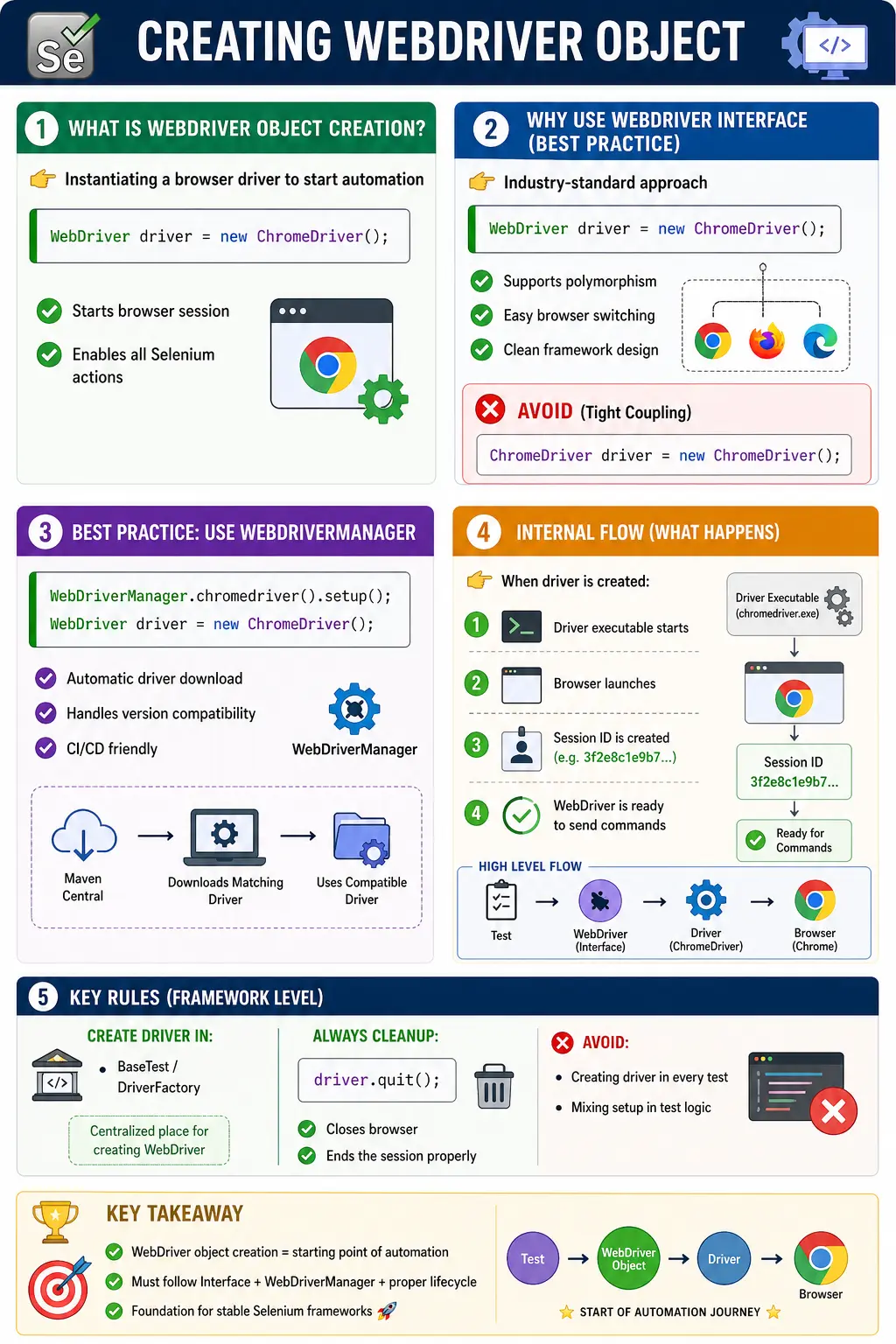
In modern Selenium projects, especially those aligned with enterprise standards, the way you create and manage the WebDriver object determines how well your tests perform under parallel execution, how resilient they are in CI/CD pipelines, and how easy they are to maintain over time. Understanding this concept deeply is essential for both interviews and real-world implementation.
A WebDriver object is not just a variable. It is the handle to an active browser automation session. Every command after creation flows through that object: opening URLs, finding elements, switching windows, handling alerts, managing cookies, taking screenshots, and finally ending the session. If this object is created in the wrong place, shared incorrectly, or not closed properly, the whole framework becomes unstable even if the test steps themselves are correct.
This is why experienced automation engineers treat WebDriver creation as a framework responsibility. A beginner script can create a driver directly inside a main method. A professional framework should centralize creation, apply configuration consistently, support browser switching, work in CI, and clean up sessions reliably. The same concept appears simple in syntax but deep in design.
What Does “Creating WebDriver Object” Mean?
At a conceptual level, creating a WebDriver object means instantiating a browser-specific driver and assigning it to a WebDriver interface reference. This operation represents the initialization of a browser automation session.
When you write:
WebDriver driver = new ChromeDriver();
you are doing several things simultaneously:
- Creating a browser driver instance
- Launching a real browser process
- Establishing a WebDriver session
- Enabling command communication between test code and browser
This single line is responsible for bridging your Java code with an actual browser instance. Without it, Selenium has no execution context.
The WebDriver object also stores the practical connection to the browser session. Once the object exists, Selenium commands are sent through it to the browser driver. If the object is null, closed, or pointing to an invalid session, commands fail. If the browser is quit and the test tries to reuse the same object, Selenium throws session-related errors. Understanding this relationship helps you read failures more accurately.
Object creation also marks the boundary between setup and execution. Before driver creation, the framework prepares dependencies, configuration, browser options, and driver resolution. After driver creation, the framework can interact with the application. This boundary is important because failures before driver creation are usually setup issues, while failures after navigation may involve waits, locators, data, or application behavior.
Why WebDriver Is Created Using an Interface
A critical design principle in Selenium is the use of the WebDriver interface as the reference type. The industry-standard approach is:
WebDriver driver = new ChromeDriver();
This design follows object-oriented principles, specifically programming to an interface, which enables polymorphism.
The benefits of this approach include:
- Decoupling test code from specific browser implementations
- Easy switching between browsers (Chrome, Firefox, Edge)
- Improved maintainability
- Framework scalability
Contrast this with poor design:
ChromeDriver driver = new ChromeDriver();
Here, the test is tightly coupled to Chrome. If you want to run the same test on Firefox, you must modify the code. In enterprise frameworks, this is unacceptable.
Using the interface ensures that your test logic remains unchanged regardless of the browser.
This pattern also supports dependency inversion in framework design. Test classes depend on the WebDriver contract, not on ChromeDriver directly. The driver factory decides which implementation to create. That means the test can run on Chrome today, Firefox tomorrow, Edge in an enterprise pipeline, or RemoteWebDriver on Selenium Grid without changing the test flow. This is the practical reason interviewers care about the WebDriver interface.
There are cases where a concrete driver type may be needed for a browser-specific feature, but those cases should be isolated. Most test code should not require ChromeDriver-specific methods. If browser-specific behavior is necessary, keep it inside the setup layer or a browser-specific utility so the rest of the framework remains portable.
Prerequisites Before Creating WebDriver Object
Before instantiating a WebDriver object, several prerequisites must be satisfied. Failure in any of these areas will result in runtime errors.
You must ensure:
- Selenium dependencies are added to the project
- The target browser is installed
- A compatible browser driver is available
- Driver configuration is properly handled
Historically, developers manually downloaded driver binaries and set system paths. However, this approach is error-prone and outdated. Modern frameworks rely on automated tools like WebDriverManager to handle driver resolution dynamically.
Modern Selenium also provides Selenium Manager, which can resolve drivers automatically in many common cases. Some teams use Selenium Manager directly, while others still use WebDriverManager because their frameworks already depend on it or because they need explicit version, proxy, cache, or offline controls. Both approaches aim to solve the same problem: Selenium needs a compatible browser driver before the WebDriver object can be created successfully.
Prerequisites should be validated early. If Java dependencies are missing, the code will not compile. If the browser is not installed, the driver cannot launch it. If driver-browser versions are incompatible, session creation may fail with SessionNotCreatedException. If corporate policy blocks driver downloads, automated resolution may fail. These are not test logic problems. They are setup prerequisites that must be handled before browser automation can begin.
Basic WebDriver Object Creation Flow
Creating a WebDriver object follows a logical sequence of steps, even though it appears as a single line of code.
The conceptual flow is:
- Configure the browser driver
- Instantiate the driver class
- Assign it to a WebDriver reference
- Launch browser session
This flow ensures that the automation environment is correctly initialized before any interaction begins.
In a framework, this flow usually happens inside a setup method rather than directly inside the test body. Configuration is read first. Browser name and execution mode are determined. Browser options are built. Driver resolution happens. Then the concrete driver is instantiated and returned as a WebDriver reference. The test receives a ready-to-use browser session without knowing all the setup details.
This layered creation flow makes debugging easier. If a test fails before the driver object is assigned, inspect driver setup. If it fails after the driver is created but before navigation, inspect browser options or session capabilities. If it fails after navigation, inspect the application state, waits, locators, or assertions. Clear setup boundaries produce clearer failure analysis.
Creating WebDriver Object with WebDriverManager (Best Practice)
In modern Selenium frameworks, WebDriverManager is the default approach for handling driver setup.
WebDriverManager.chromedriver().setup();
WebDriver driver = new ChromeDriver();
This approach eliminates several traditional problems:
- No manual driver downloads
- Automatic version compatibility
- Cross-platform support
- CI/CD readiness
By resolving the correct driver version at runtime, WebDriverManager ensures that your tests remain stable even when browsers update automatically.
Even when WebDriverManager is used, driver creation should remain centralized. Calling WebDriverManager in every test method or page object creates duplication and makes the framework harder to change. A driver factory can call WebDriverManager once during browser creation, then return the WebDriver object. Tests should not care how the driver binary was resolved.
In restricted environments, WebDriverManager may require proxy configuration, cached drivers, or offline mode. This reinforces the same design principle: hide environment-specific setup in the framework layer. Test classes should not contain proxy rules, driver cache rules, or binary path decisions. They should express business behavior.
Creating WebDriver Object for Different Browsers
One of the strengths of Selenium is its cross-browser capability. The WebDriver interface enables this flexibility.
Examples:
WebDriver driver = new ChromeDriver();
WebDriver driver = new FirefoxDriver();
WebDriver driver = new EdgeDriver();
Notice that the reference type remains WebDriver in all cases. Only the implementation changes. This is the practical application of polymorphism.
In well-designed frameworks, browser selection is often externalized using configuration files, allowing dynamic switching without code changes.
Dynamic browser selection is one of the main benefits of creating drivers through a factory. The framework can read browser=chrome, browser=firefox, or browser=edge from a properties file, Maven profile, environment variable, or CI pipeline parameter. The test remains unchanged. This makes cross-browser execution possible without duplicating test classes.
Browser selection should be validated. If the configuration says "chromee" by mistake, the factory should fail with a clear unsupported-browser error. Silent defaults can be dangerous because the suite may run in the wrong browser and produce misleading results. A strong driver factory makes browser choice explicit and diagnosable.
Creating WebDriver Object with Browser Options
In real-world scenarios, browsers are rarely launched with default configurations. Instead, they are customized using options.
Common configurations include:
- Headless execution for CI pipelines
- Disabling notifications
- Setting download directories
- Running in incognito mode
Example:
ChromeOptions options = new ChromeOptions();
options.addArguments("--headless");

WebDriver driver = new ChromeDriver(options);
Here, the WebDriver object is created after applying custom browser configurations. This pattern is essential for advanced automation setups.
Options should be built before the driver object is created because they affect how the browser session starts. Once the browser session exists, some startup options cannot be changed. For example, headless mode, incognito mode, profile selection, download directory, and certain security settings are startup-level decisions. If they are wrong, the driver may need to be recreated.
Options also differ by browser. ChromeOptions, FirefoxOptions, and EdgeOptions have similar purposes but are not identical. A good framework has browser-specific option builders instead of blindly applying Chrome arguments to every browser. This keeps cross-browser support cleaner and avoids hidden startup failures.
Creating RemoteWebDriver Object
Local driver creation starts a browser on the same machine where the test code runs. RemoteWebDriver creation starts or connects to a browser session managed somewhere else, such as Selenium Grid, Dockerized browser infrastructure, or a cloud testing platform. The reference type can still be WebDriver, but the implementation is RemoteWebDriver.
Remote execution is important for scalability. A local machine can run only a limited number of browsers. A Grid can distribute tests across nodes, operating systems, and browsers. A cloud provider can supply browser versions and platforms on demand. Creating a RemoteWebDriver object allows the same test code to participate in that distributed model.
The key difference is that remote creation requires capabilities or browser options that describe the desired session. The framework must specify browser name, platform, version, and any special settings. If the Grid or provider cannot satisfy those capabilities, session creation fails. This is another reason driver creation should live in a dedicated setup layer that can log capability details when failures occur.
What Happens Internally When WebDriver Is Created
Behind the scenes, creating a WebDriver object triggers a sequence of low-level operations.
When you execute:
WebDriver driver = new ChromeDriver();
the following happens internally:
- The ChromeDriver executable is launched
- A new browser instance is started
- A WebDriver session is initialized
- A unique session ID is generated
- A communication channel is established using the W3C WebDriver protocol
This is the point where most failures occur, especially in misconfigured environments.
Because so much happens during this single operation, startup logs matter. A good framework should log the browser requested, execution mode, local or remote endpoint, browser options, and driver-management strategy. If the driver object fails to create in CI, these logs reduce guesswork. Without them, teams often waste time inspecting page objects even though the page never opened.
The generated session ID is also important. It identifies the active browser session. In remote execution, that session ID may connect to Grid logs, video recordings, or cloud execution dashboards. Treating WebDriver creation as a traceable event improves troubleshooting in larger test systems.
Common Errors While Creating WebDriver Object
Understanding common failures helps in faster debugging.
SessionNotCreatedException
Cause:
- Driver and browser version mismatch
Solution:
- Use WebDriverManager
IllegalStateException
Cause:
- Driver path not configured
Solution:
- Avoid manual path setup
- Use automated driver management
Browser Opens and Closes Immediately
Cause:
- Runtime exception after driver creation
- Program terminates prematurely
Solution:
- Check logs
- Handle exceptions properly
NullPointerException After Setup
Cause:
- The driver variable was declared but never assigned
- Driver creation failed but the test continued
- A local driver variable shadowed the class-level driver variable
Solution:
- Use consistent driver scope
- Fail fast when driver creation fails
- Avoid redeclaring driver inside setup methods when a class field already exists
NoSuchSessionException
Cause:
- The browser session was already quit
- The browser crashed after creation
- The framework reused an invalid driver object
Solution:
- Review lifecycle and teardown order
- Do not reuse drivers after quit()
- Create a fresh driver per test where isolation is required
Where WebDriver Object Should Be Created (Framework Rule)
In small scripts, developers often create WebDriver objects inside test methods. This is not acceptable in real projects.
Wrong Approach
- Creating driver inside each test method
- Repeating setup logic
Correct Approach
- Centralize driver creation in BaseTest or DriverFactory
- Initialize once per test execution
- Destroy after test completion
This design supports:
- Parallel execution
- Clean resource management
- Maintainable architecture
The right location for WebDriver creation depends on the framework style, but the responsibility should be centralized. A BaseTest class can manage lifecycle hooks. A DriverFactory can decide which driver to create. A ConfigReader can provide browser and environment values. A BrowserOptionsFactory can build ChromeOptions, FirefoxOptions, or EdgeOptions. Keeping these responsibilities separate creates a framework that is easier to maintain than one large setup method filled with every decision.
Tests should receive a ready driver or use page objects that already have access to the active driver. They should not know how driver binaries are downloaded, whether the browser is headless, or whether execution is local or remote. Those are infrastructure details. Test code should describe user behavior and expected outcomes.
WebDriver Object Lifecycle
The WebDriver object follows a defined lifecycle.
Stage	Action
Initialization	Driver object is created
Execution	Browser executes commands
Teardown	driver.quit() is called
Cleanup	Session is destroyed
It is critical to always call:
driver.quit();
instead of close(), because quit() terminates the entire session and frees resources.
Understanding close() versus quit() is essential. close() closes the current browser window only. If multiple windows exist, the session may continue. quit() ends the entire WebDriver session and closes all associated windows. In teardown, quit() is usually the correct choice because it releases the session completely and prevents leftover browser processes.
The lifecycle must also consider failure evidence. If a test fails, the framework may need to capture a screenshot, current URL, page source, or browser logs before quitting the driver. If teardown quits the browser too early, that evidence is lost. Good frameworks capture failure artifacts first and then quit the driver safely.
WebDriver Creation and Parallel Execution
In modern frameworks, tests often run in parallel. This introduces complexity in driver management.
To handle this:
- Each thread must have its own WebDriver instance
- ThreadLocal is used to isolate sessions
- DriverFactory manages thread-safe driver creation
Incorrect driver sharing leads to:
- Session conflicts
- Test failures
- Unpredictable behavior
ThreadLocal is commonly used because it associates one WebDriver instance with one execution thread. When a test asks for the driver, it receives the driver belonging to its own thread rather than another test's browser. This is important in TestNG parallel execution where several tests may run at the same time. Without thread isolation, one test can accidentally interact with another test's browser.
Parallel execution also changes cleanup requirements. Each thread must quit its own driver and remove it from ThreadLocal storage after the test ends. If ThreadLocal values are not removed, memory leaks or stale references can appear in long-running suites. A robust DriverFactory provides getDriver, setDriver, quitDriver, and removeDriver style methods to manage this lifecycle clearly.
WebDriver Creation in CI/CD Pipelines
In CI environments:
- No manual setup is allowed
- Execution must be fully automated
- Browser and driver compatibility must be guaranteed
Best practices include:
- Using WebDriverManager
- Running tests in headless mode
- Using containerized environments (Docker)
Proper WebDriver creation ensures consistent execution across environments.
In CI/CD, WebDriver creation must be non-interactive. The test cannot depend on a developer opening an IDE, accepting browser prompts, downloading drivers manually, or changing machine-level paths. Everything should be controlled through Maven dependencies, driver management, browser options, environment variables, container images, or Grid capabilities.
Headless mode is common in pipelines because build agents often do not have a visible desktop. However, headless browser creation still needs compatible browsers, drivers, and options. If the browser starts locally but fails in CI, compare browser version, driver resolution, operating system, display support, sandbox arguments, and network restrictions. The driver creation layer should log enough information to make this comparison possible.
Design Considerations for Scalable Frameworks
Creating a WebDriver object is not just about launching a browser—it is about designing a scalable system.
Key considerations include:
- Centralized driver management
- Configurable browser selection
- Environment-based execution
- Thread safety for parallel runs
A poorly designed driver setup leads to flaky tests and high maintenance cost.
Scalable frameworks usually treat WebDriver creation as configuration-driven. The same code can run with browser=chrome locally, browser=edge in an enterprise pipeline, execution=remote on Grid, or headless=true in CI. This prevents hardcoded execution assumptions and makes the framework adaptable. As the application and team grow, this flexibility becomes more valuable.
Another design consideration is page object construction. Page objects should not create their own WebDriver object. They should receive the driver created by the framework. This ensures all page objects interact with the same browser session. If every page object creates its own driver, one test flow can accidentally open several independent browsers and lose session state.
Reporting also depends on driver creation. Failure screenshots, browser logs, and current URLs are captured through the active WebDriver object. If the driver is not managed centrally, reporting utilities may not know which browser session to inspect. Centralized driver management makes evidence collection reliable.
WebDriver Object Scope
Scope is one of the most important practical decisions when creating a WebDriver object. A driver can be a local variable inside a method, a class-level field, a protected field in a base class, a ThreadLocal value, or an object returned by a factory. Each scope has consequences. A local variable is simple for small demos, but it is hard to share with page objects and teardown methods. A class-level field is common in TestNG or JUnit tests because setup, test methods, and teardown can all access the same session. A ThreadLocal value is useful when tests run in parallel.
The scope should match the framework lifecycle. If the driver is created in @BeforeMethod and quit in @AfterMethod, a class-level or framework-managed reference works well. If the driver is created inside a test method, teardown may not be able to close it consistently. If the driver is static and shared by all tests, parallel execution becomes unsafe. Choosing the right scope prevents many subtle failures.
Variable shadowing is a scope-related bug that appears often in beginner frameworks. A class may declare WebDriver driver; at the top, but setup may accidentally declare WebDriver driver = new ChromeDriver(); inside the method. That creates a new local variable instead of assigning the class field. The browser opens, so setup looks successful, but the test method still sees the class field as null. This leads to NullPointerException and confusion. The correct assignment is driver = new ChromeDriver(); without redeclaring the type inside setup.
Passing WebDriver to Page Objects
Once the WebDriver object is created, it should be passed into page objects that need to interact with the application. A page object should not create its own WebDriver. It should receive the existing driver through a constructor and use that session for all element interactions. This keeps the test flow inside one browser session from beginning to end.
For example, after setup creates the driver, a test may create LoginPage loginPage = new LoginPage(driver);. The login page stores that driver and uses it to find username, password, and login button elements. When the test later creates HomePage homePage = new HomePage(driver);, it passes the same driver. This means both page objects operate in the same browser window, same cookies, same session, and same application state.
If each page object creates a new driver internally, the test loses continuity. The login page may open one browser, the home page may open another browser, and the test state becomes meaningless. This is why WebDriver creation belongs in framework setup, while page objects should focus only on page behavior.
WebDriver Creation and Configuration Files
In scalable frameworks, browser creation is usually controlled by configuration. A config.properties file, Maven profile, environment variable, or CI parameter may define browser=chrome, headless=true, execution=remote, baseUrl=https://qa.example.com, and timeout=10. The driver factory reads these values and creates the correct WebDriver object.
This approach avoids hardcoding execution decisions in Java test classes. A local tester can run Chrome in headed mode. A CI pipeline can run Chrome headlessly. A nightly suite can run Firefox or Edge. The same test code can support all of these modes if the driver creation layer reads configuration properly.
Configuration-driven creation also improves interview answers. It shows that you understand Selenium beyond a single new ChromeDriver() line. In real automation, the framework must adapt to environments. WebDriver creation is the point where that adaptation happens.
Creating WebDriver Object for Smoke, Regression, and Cross-Browser Suites
Different test suites may need different browser creation strategies. A smoke suite may run quickly in one browser to validate basic application health. A regression suite may run in headless mode on CI. A cross-browser suite may run the same tests across Chrome, Firefox, and Edge. The WebDriver creation layer should support these variations without duplicating test logic.
For smoke tests, the framework may create one browser per test to keep isolation high. For regression tests, it may use parallel execution to reduce total runtime. For cross-browser tests, it may read browser values from TestNG parameters or a data provider. In every case, the test scenario should remain focused on business behavior while the framework supplies the correct WebDriver instance.
This design makes test execution flexible. Teams can choose browser coverage based on risk. They can run a small suite on every commit, a larger suite nightly, and a cross-browser suite before release. The same WebDriver creation architecture supports all of these execution patterns.
Logging WebDriver Creation Details
Professional frameworks should log driver creation details because startup failures are common in Selenium automation. Useful details include selected browser, execution mode, headless flag, remote URL, browser version when available, operating system, Selenium version, and driver-management approach. These details help diagnose failures quickly, especially in CI/CD pipelines where engineers cannot watch the browser open.
Logging does not need to be noisy, but it should capture enough information to answer basic questions. Which browser was requested? Was the run local or remote? Was headless mode enabled? Which environment URL was used? Did the framework use WebDriverManager, Selenium Manager, or preinstalled drivers? Without this information, teams often spend unnecessary time reproducing pipeline failures locally.
When RemoteWebDriver is used, logging capabilities is even more important. Browser version, platform name, session ID, and Grid node details can connect a failed test to remote logs, screenshots, or videos. WebDriver creation is therefore not only a setup action; it is also an observability event.
Interview Perspective
A concise answer:
Creating a WebDriver object means instantiating a browser-specific driver class and assigning it to a WebDriver interface reference to start a browser automation session.
A strong real-world answer:
In Selenium, we create a WebDriver object using browser-specific implementations like ChromeDriver or FirefoxDriver, typically managed through WebDriverManager, to establish a browser session that executes automation commands in a scalable and maintainable way.
Interviewers often probe deeper into:
- Why WebDriver is an interface
- How driver lifecycle is managed
- Best practices for framework design
Common Beginner Mistakes
Some frequent mistakes include:
- Using concrete driver types instead of WebDriver interface
- Creating driver inside test methods
- Not calling quit()
- Mixing driver setup logic with test logic
- Ignoring browser options
These mistakes lead to unstable and unscalable automation frameworks.
Another mistake is variable shadowing. For example, a class may declare protected WebDriver driver, but the setup method may accidentally write WebDriver driver = new ChromeDriver();. That creates a new local variable and leaves the class-level driver null. The test then fails with NullPointerException. The fix is to assign the existing field: driver = new ChromeDriver();.
Beginners also sometimes create a new driver every time they need to open a page. That breaks test flow because each driver has a separate browser session. A single test scenario should normally use one driver session from setup to teardown. Create the driver once, pass it to page objects, perform the scenario, collect evidence if needed, and quit it at the end.
Key Takeaway
Creating the WebDriver object is the foundation of Selenium automation. It establishes the browser session, enables interaction, and defines how your framework behaves under different conditions.
A well-designed WebDriver creation strategy ensures:
- Stability
- Scalability
- Maintainability
- CI/CD compatibility
One-Line Insight
WebDriver object creation is where automation begins; get it right, and everything else becomes easier.
1. Basic WebDriver Object Creation (Most Common)
import org.openqa.selenium.WebDriver;
import org.openqa.selenium.chrome.ChromeDriver;
class Demo {
    public static void main(String[] args) {
        WebDriver driver = new ChromeDriver();
        driver.get("https://example.com");
        driver.quit();
    }
}
Key Point
- Program to interface, not implementation
2. WebDriver Creation with WebDriverManager
import io.github.bonigarcia.wdm.WebDriverManager;
import org.openqa.selenium.WebDriver;
import org.openqa.selenium.chrome.ChromeDriver;
class Demo {
    public static void main(String[] args) {
        WebDriverManager.chromedriver().setup();
        WebDriver driver = new ChromeDriver();
        driver.get("https://example.com");
        driver.quit();
    }
}
3. Creating WebDriver with Browser Options
import org.openqa.selenium.*;
import org.openqa.selenium.chrome.*;
class Demo {
    public static void main(String[] args) {
        ChromeOptions options = new ChromeOptions();
        options.addArguments("--start-maximized");
WebDriver driver = new ChromeDriver(options);
        driver.get("https://example.com");
        driver.quit();
    }
}
4. Headless WebDriver Object (CI/CD)
ChromeOptions options = new ChromeOptions();
options.addArguments("--headless=new");
WebDriver driver = new ChromeDriver(options);
Used In
- Jenkins
- GitHub Actions
5. Creating WebDriver for Firefox
import org.openqa.selenium.WebDriver;
import org.openqa.selenium.firefox.FirefoxDriver;
WebDriver driver = new FirefoxDriver();
6. Creating WebDriver for Edge
import org.openqa.selenium.WebDriver;
import org.openqa.selenium.edge.EdgeDriver;
WebDriver driver = new EdgeDriver();
7. Dynamic Browser Selection (Switch Case)
WebDriver driver;
String browser = "chrome";
switch (browser.toLowerCase()) {
    case "chrome":
        driver = new ChromeDriver();
        break;
    case "firefox":
        driver = new FirefoxDriver();
        break;
    case "edge":
        driver = new EdgeDriver();
        break;
    default:
        throw new IllegalArgumentException("Invalid browser");
}
Interview Favorite
8. WebDriver Creation Using Browser Factory (Best Practice)
public class DriverFactory {
public static WebDriver createDriver(String browser) {
        switch (browser.toLowerCase()) {
            case "chrome":
                return new ChromeDriver();
            case "firefox":
                return new FirefoxDriver();
            case "edge":
                return new EdgeDriver();
            default:
                throw new RuntimeException("Unsupported browser");
        }
    }
}

WebDriver driver = DriverFactory.createDriver("chrome");
9. WebDriver Object in TestNG (@BeforeMethod)
public class TestDemo {
WebDriver driver;
@BeforeMethod
    public void setup() {
        driver = new ChromeDriver();
    }
@Test
    public void openPage() {
        driver.get("https://example.com");
    }
@AfterMethod
    public void teardown() {
        driver.quit();
    }
}
10. WebDriver Object in JUnit 5
class DemoTest {
WebDriver driver;
@BeforeEach
    void setup() {
        driver = new ChromeDriver();
    }
@AfterEach
    void teardown() {
        driver.quit();
    }
}
11. Creating WebDriver as Class-Level Variable
public class BaseTest {
    protected WebDriver driver;
}
Why
- Reusable across test classes
12. Creating WebDriver in Base Class (Framework Style)
public class BaseTest {
protected WebDriver driver;
@BeforeMethod
    public void init() {
        driver = new ChromeDriver();
    }
@AfterMethod
    public void cleanup() {
        driver.quit();
    }
}
13. WebDriver Creation Using System Property (Old Way)
System.setProperty("webdriver.chrome.driver", "C:\\drivers\\chromedriver.exe");
WebDriver driver = new ChromeDriver();
Note
- Replaced by Selenium Manager / WebDriverManager
14. Creating RemoteWebDriver Object (Selenium Grid)
import org.openqa.selenium.remote.RemoteWebDriver;
import java.net.URL;
WebDriver driver =
    new RemoteWebDriver(
        new URL("http://localhost:4444"),
        new ChromeOptions()
    );
15. WebDriver Creation Using Capabilities (Legacy)
DesiredCapabilities caps = new DesiredCapabilities();
caps.setBrowserName("chrome");
WebDriver driver = new RemoteWebDriver(new URL("http://localhost:4444"), caps);
16. Thread-Safe WebDriver Creation (Parallel Tests)
private static ThreadLocaldriver = new ThreadLocal<>(); driver.set(new ChromeDriver()); WebDriver wd = driver.get();
Used In
- Parallel execution
17. WebDriver Creation Inside Utility Method
public static WebDriver getDriver() {
    return new ChromeDriver();
}
18. Anti-Pattern: Creating Driver Inside Test Step
@Test
public void test() {
    WebDriver driver = new ChromeDriver(); // bad practice
}
Why
- Hard to manage lifecycle
19. WebDriver Creation with Environment Variable
String browser = System.getenv("BROWSER");
WebDriver driver = browser.equals("firefox")
    ? new FirefoxDriver()
    : new ChromeDriver();
20. Interview Trap: Wrong Type
ChromeDriver driver = new ChromeDriver(); // tight coupling
WebDriver driver = new ChromeDriver();    // preferred
21. Creating WebDriver Once per Class
@BeforeClass
public void setup() {
    driver = new ChromeDriver();
}
Used When
- Tests can share browser
22. Creating WebDriver Per Test (Recommended)
@BeforeMethod
public void setup() {
    driver = new ChromeDriver();
}
Why
- Test isolation
- Stability
23. WebDriver Creation + Timeout Setup
driver = new ChromeDriver();
driver.manage().timeouts()
      .implicitlyWait(Duration.ofSeconds(10));
24. WebDriver Creation + Cookie Cleanup
driver = new ChromeDriver();
driver.manage().deleteAllCookies();
25. Interview Summary – Creating WebDriver Object
WebDriver driver = new ChromeDriver();
Key Points
- Always use WebDriver interface
- One driver per test (recommended)
- Use factory for scalability
- RemoteWebDriver for Grid
- Manage lifecycle carefully