Configuration Management in Selenium Framework
Configuration Management in a Selenium framework is the process of storing, organizing, loading, validating, and using framework settings outside the automation code. Instead of hardcoding values such as application URL, browser, environment, timeout, headless mode, download path, report path, grid URL, retry count, language, or API base URL inside Java classes, these values are externalized into configuration files, environment variables, Maven parameters, TestNG parameters, or CI/CD secret stores.
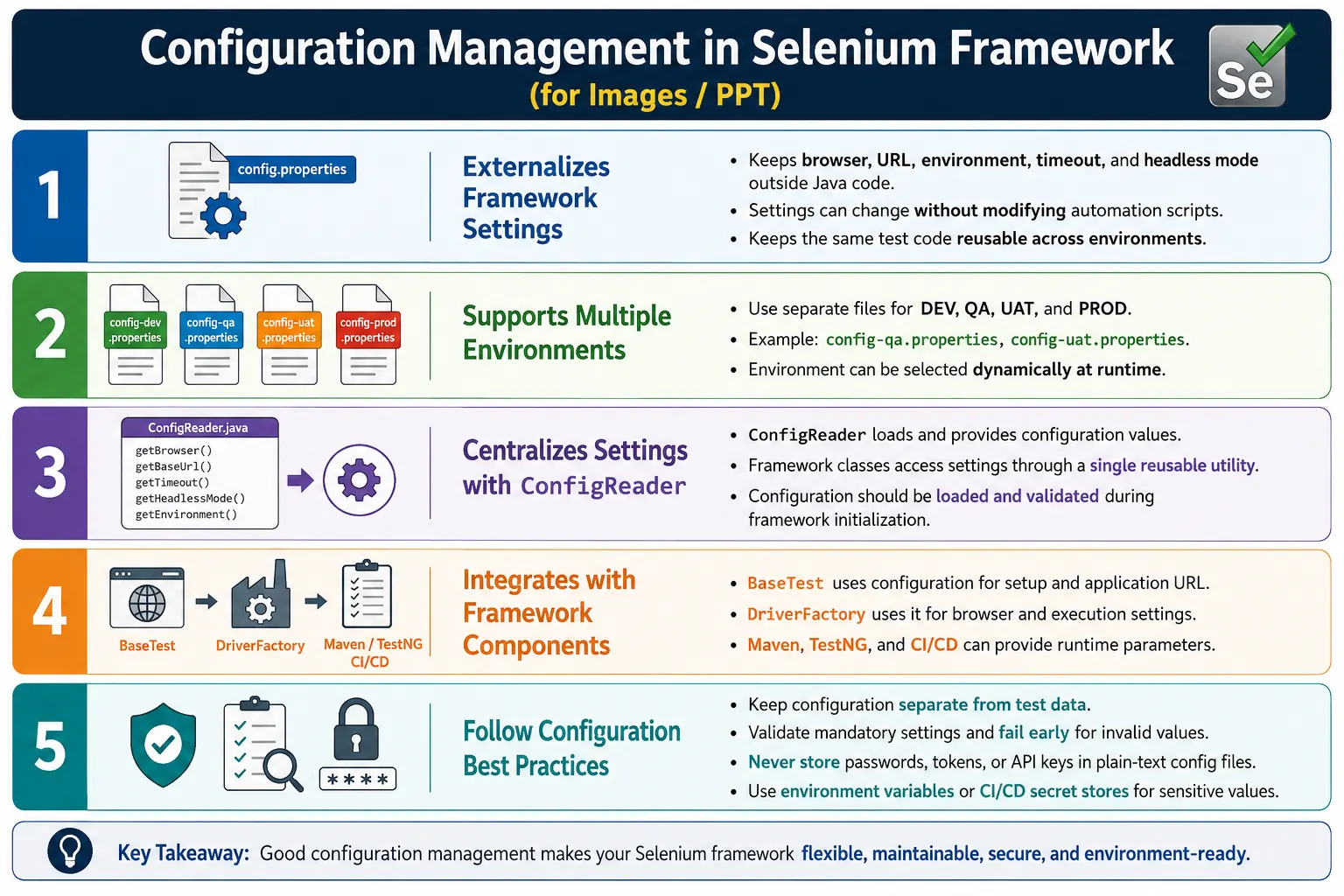
Configuration Management is a core part of every enterprise Hybrid Framework because the same automation code must run in different conditions. A tester may run Chrome locally against QA. A pipeline may run headless Chrome against UAT. A nightly build may run tests on Selenium Grid. A release validation suite may run against staging. The test code should not be edited for each run. Only configuration should change.
1. What Is Configuration Management?
Configuration Management is the practice of externalizing framework settings so those settings can be changed without modifying automation code. The framework reads runtime values from a configuration source and uses those values during execution. This keeps code stable and makes execution flexible.
For example, instead of writing a fixed QA URL directly inside a test or BaseTest class, the framework reads the URL from a configuration file. If the team wants to run against UAT, the configuration changes. The Java code stays the same.
driver.get(ConfigReader.get("url"));This small change has a large impact. The test no longer belongs to one environment. It can run anywhere the correct configuration is available.
2. Why Configuration Management Is Needed
Most applications have several environments such as development, QA, UAT, staging, and production-like environments. Each environment may have a different URL, login endpoint, API base URL, timeout requirement, test user, browser strategy, grid setup, or feature flag. Without configuration management, engineers must edit Java code whenever they switch environments. That is slow and risky.
Without Configuration Management
  Change Java Code
    Compile Again
      Run Tests
        Repeat for Every Environment
With Configuration Management
Change Config File or Parameter
Run Tests
Same Java CodeConfiguration Management also supports CI/CD. A Jenkins pipeline can pass environment as a parameter. Maven can pass browser as a system property. Docker execution can pass values through environment variables. The framework becomes automation-ready rather than local-machine dependent.
3. Problems Without Configuration Management
Hardcoded configuration causes maintenance problems. If the URL is hardcoded in BaseTest, switching from QA to UAT requires a code change. If timeout values are hardcoded in many page classes, tuning synchronization becomes difficult. If browser name is hardcoded, running cross-browser tests requires editing code. If report paths are hardcoded for one machine, CI execution may fail.
driver.get("https://qa.example.com");
driver.manage().timeouts().implicitlyWait(Duration.ofSeconds(20));
The biggest risk is accidental execution against the wrong environment. If code is edited manually, a tester may forget to revert a URL or commit an environment-specific value. Configuration files and parameters reduce that risk by making execution context explicit.
4. Core Idea
The core idea is to separate framework settings from framework code. Java code should ask for values. Configuration sources should provide those values. This makes code reusable and execution context configurable.
Java Code
  Reads Runtime Values From
    Configuration File
      Environment Variable
        Maven Parameter
          CI/CD Secret Store
Configuration Management is not only about properties files. Properties files are common, but the broader idea is external control of execution settings.
5. What Can Be Configured?
Many framework settings can be externalized. Common values include application URL, browser, environment name, timeout, headless mode, download path, screenshot path, report path, API base URL, retry count, language, grid URL, remote execution flag, browser version, platform name, and test suite selection.
- Application URL and API base URL.
- Browser name and browser version.
- Execution environment such as dev, qa, uat, or staging.
- Timeout values for waits and page loading.
- Headless mode and browser window size.
- Download, screenshot, log, and report paths.
- Selenium Grid or remote WebDriver URL.
- Retry count, language, and feature toggles.
The guiding rule is simple: if a value changes by environment, machine, pipeline, browser, or execution mode, it probably belongs in configuration.
6. Configuration File Example
A simple properties file can store common settings. Java properties files are easy to read, easy to version-control, and common in Selenium Java frameworks.
environment=QA
browser=chrome
url=https://qa.example.com
timeout=20
headless=false
downloadPath=downloads/
screenshotPath=screenshots/
reportPath=reports/
retryCount=2
This file describes how the framework should run. The tests do not need to know these values directly. BaseTest, DriverFactory, ConfigReader, reports, and utilities can read them as needed.
7. Multiple Environment Files
Enterprise frameworks often keep separate configuration files for each environment. This avoids mixing QA, UAT, and production-like values in one file. It also makes review easier because each environment has a dedicated file.
config-dev.properties
config-qa.properties
config-uat.properties
config-prod.properties
The QA file may use Chrome and the QA URL. The UAT file may use Edge and the UAT URL. The framework selects the file at runtime based on an environment parameter.
config-qa.properties
  url=https://qa.example.com
  browser=chrome

config-uat.properties
  url=https://uat.example.com
  browser=edge
8. Project Structure
Configuration files usually live under test resources or a config folder. A ConfigReader utility reads the selected file. BaseTest and DriverFactory consume the loaded values. This keeps configuration organized and separate from Java source files.
AutomationFramework
  src
    test
      resources
        config
          config-dev.properties
          config-qa.properties
          config-uat.properties
          config-prod.properties
  utilities
    ConfigReader.java
  base
    BaseTest.java
  driver
    DriverFactory.java
  tests
This layout makes configuration easy to locate and easy to maintain.
9. ConfigReader Utility
A ConfigReader is a reusable utility that loads the selected configuration file and returns property values by key. It centralizes configuration reading so framework classes do not each open properties files manually.
public class ConfigReader {

    private static Properties properties;

    public static void loadConfig(String env) throws IOException {
        properties = new Properties();

        try (FileInputStream file = new FileInputStream(
                "src/test/resources/config/config-" + env.toLowerCase() + ".properties")) {
            properties.load(file);
        }
    }

    public static String get(String key) {
        return properties.getProperty(key);
    }
}
In enterprise frameworks, ConfigReader often validates required keys, supports default values, and allows environment variables or system properties to override file values.
10. Loading Configuration
Configuration is commonly loaded once during framework initialization. In TestNG, @BeforeSuite is a natural place to load configuration because it runs before the suite begins. The selected environment may come from Maven, TestNG XML, or a default value.
@BeforeSuite
public void initialize() throws IOException {
    ConfigReader.loadConfig("qa");
}
Loading configuration repeatedly in every test method is usually unnecessary. Load once, validate it, and then let framework classes read values as needed.
11. Reading Values
After configuration is loaded, framework classes can read values by key. Browser, URL, timeout, and headless mode are common examples.
String browser = ConfigReader.get("browser");
String url = ConfigReader.get("url");
String timeoutValue = ConfigReader.get("timeout");
String values often need conversion. Timeout becomes an integer. Headless becomes a boolean. Missing or invalid values should fail early with clear messages.
12. Browser Selection
Browser selection is one of the most common configuration uses. The framework reads browser from config and DriverFactory creates the matching WebDriver instance. Changing the browser should require only a configuration change.
String browser = ConfigReader.get("browser");

switch (browser.toLowerCase()) {
    case "chrome":
        driver = new ChromeDriver();
        break;
    case "firefox":
        driver = new FirefoxDriver();
        break;
    case "edge":
        driver = new EdgeDriver();
        break;
    default:
        throw new IllegalArgumentException("Unsupported browser: " + browser);
}
In a cleaner design, this switch belongs inside DriverFactory rather than BaseTest.
13. Opening the Application
The application URL should come from configuration. The same test code can then run against QA, UAT, staging, or any other environment.
driver.get(ConfigReader.get("url"));This keeps the test suite environment-agnostic. Tests validate behavior. Configuration decides where that behavior is exercised.
14. Reading Timeout Values
Timeout values should also be configurable. Different environments may have different response times. A local run may need a shorter timeout, while a remote grid or CI environment may need a longer one.
int timeout = Integer.parseInt(ConfigReader.get("timeout"));

WebDriverWait wait = new WebDriverWait(
        driver,
        Duration.ofSeconds(timeout)
);
Centralized timeout configuration prevents one page object from waiting for ten seconds while another waits for thirty seconds without reason.
15. Boolean Configuration Values
Boolean configuration values control flags such as headless mode, remote execution, screenshot on pass, retry enabled, and video recording enabled. Java can parse these values from string properties.
boolean headless = Boolean.parseBoolean(ConfigReader.get("headless"));Boolean keys should be named clearly. Values such as true and false are easier to understand than yes, no, on, off, or mixed styles.
16. Headless Browser Example
Headless mode is often controlled by configuration because local debugging may need a visible browser, while CI execution may need headless mode.
ChromeOptions options = new ChromeOptions();

if (headless) {
    options.addArguments("--headless=new");
}

driver = new ChromeDriver(options);
This gives the framework flexibility without duplicating browser setup code.
17. Environment Switching
Maven system properties are commonly used to select an environment. The command can pass an env value. Java reads that value and defaults to QA if none is provided.
mvn test -Denv=uatString env = System.getProperty("env", "qa");
ConfigReader.loadConfig(env);If env is uat, the framework loads config-uat.properties. If no env is passed, it loads QA by default. This is simple and CI-friendly.
18. Configuration Flow
The configuration flow starts from a file or parameter. ConfigReader loads values. BaseTest uses those values. DriverFactory creates the browser. The browser opens the configured application.
Properties File
  ConfigReader
    BaseTest
      DriverFactory
        Browser
          Application
This flow makes configuration a controlled input to framework execution.
19. Integration with BaseTest
BaseTest commonly uses configuration for browser, URL, timeout, and setup behavior. It should not hardcode these values. It should read them through ConfigReader or receive them through parameters.
@BeforeMethod
public void setUp() {
    driver = DriverFactory.getDriver(ConfigReader.get("browser"));
    driver.get(ConfigReader.get("url"));
}
This keeps BaseTest generic and reusable across environments.
20. Integration with DriverFactory
DriverFactory uses configuration to decide which driver to create. It may also read headless mode, remote execution flag, grid URL, browser version, and platform. This makes DriverFactory flexible.
ConfigReader
  Browser Name
    DriverFactory
      ChromeDriver
      FirefoxDriver
      EdgeDriver
      RemoteWebDriver
A well-designed DriverFactory is driven by configuration rather than hardcoded assumptions.
21. Integration with Hybrid Framework
Configuration controls many layers of a Hybrid Framework. BaseTest uses it for setup. DriverFactory uses it for browsers. Utilities use it for paths and timeouts. Reports use it for output locations. Data readers may use it to locate files. CI pipelines use it to select environment and suite.
Properties File
  ConfigReader
    BaseTest
      DriverFactory
        Page Objects
          Utilities
            Browser
Configuration is therefore not a minor detail. It is a framework-wide control mechanism.
22. Configuration Management vs Test Data
Configuration and test data must be kept separate. Configuration controls framework execution. Test data controls test scenarios. Browser, URL, timeout, headless mode, environment, and download path are configuration. Username, password, product, search keyword, address, and payment details are test data.
| Configuration | Test Data |
|---|---|
| Browser and URL. | Username and password. |
| Timeout and headless mode. | Products and search keywords. |
| Environment and grid URL. | Payment details and form values. |
| Properties, environment variables, CI parameters. | Excel, JSON, CSV, database, API data. |
Mixing these creates confusion. A configuration file should not become a place to store dozens of test users.
23. Sensitive Values and Secrets
Sensitive credentials should not be stored in plain text configuration files that are committed to source control. Passwords, tokens, API keys, database credentials, and secret URLs should be handled through environment variables, CI/CD secret stores, vault tools, or secure configuration services.
A properties file can contain a key name or indicate that a secret should be read from an environment variable, but the actual secret should not be exposed. This protects the project and reduces security risk.
24. Validating Missing Keys
ConfigReader should validate mandatory keys. If browser, URL, or timeout is missing, the framework should fail early with a clear message. It is better to fail during initialization than to fail later with a confusing null pointer or unsupported browser error.
Validation can also check value formats. Timeout should be numeric. Headless should be true or false. Browser should be one of the supported values. Environment name should map to an existing file.
25. Override Priority
Enterprise frameworks often support override priority. A default value may exist in a properties file. A Maven parameter may override that value. An environment variable may override both. This allows local defaults while giving CI pipelines control over execution.
Default Config File
  Overridden By Maven Parameter
    Overridden By Environment Variable
      Overridden By CI Secret
The override order should be documented. If the team does not know which value wins, debugging configuration issues becomes difficult.
26. Common Beginner Mistakes
Common mistakes include hardcoding values, using one configuration file for every environment, storing sensitive passwords in plain text, using configuration files for large test data, not validating missing keys, and loading configuration repeatedly in every test method.
- Hardcoding URLs and browsers inside Java classes.
- Using one large config file for every environment.
- Storing credentials directly in committed files.
- Putting test users and product data into config.
- Not validating mandatory properties.
- Using inconsistent key names across environments.
- Changing Java code for every environment switch.
27. Best Practices
Keep configuration outside Java code. Create a reusable ConfigReader. Store configuration under a predictable resource folder. Use separate files for different environments. Read configuration once during framework initialization. Validate mandatory properties. Keep test data separate from configuration. Use environment variables or secret stores for sensitive values. Support Maven and CI/CD parameters for environment selection.
- Use clear and consistent property names.
- Keep environment files aligned in structure.
- Document required keys and default values.
- Fail early when mandatory values are missing.
- Do not commit secrets in plain text.
- Use parameters for CI/CD flexibility.
- Keep configuration small and purposeful.
28. Real Enterprise Folder Structure
A real enterprise Selenium framework usually separates base classes, driver management, configuration files, utilities, pages, tests, and TestNG configuration.
AutomationFramework
  base
    BaseTest.java
  config
    config-dev.properties
    config-qa.properties
    config-uat.properties
    config-prod.properties
  utilities
    ConfigReader.java
  driver
    DriverFactory.java
  pages
  tests
  testng.xml
This organization makes configuration easy to review and easy to change without touching test code.
29. Real Enterprise Workflow
In CI/CD, the workflow usually starts with Jenkins or another pipeline tool. The pipeline triggers a Maven command and passes an environment parameter. ConfigReader loads the matching file. BaseTest uses the loaded values. DriverFactory creates the browser. The browser opens the configured application.
Jenkins
  Maven Command
    Environment Parameter
      ConfigReader
        BaseTest
          DriverFactory
            Browser
              Application
This workflow is repeatable and suitable for enterprise execution because code does not change between environments.
30. Configuration in Local and CI Runs
Local runs and CI runs often need different settings. A local run may use a visible Chrome browser and a shorter suite. A CI run may use headless mode, remote browser execution, and longer timeouts. Configuration Management allows both without changing code.
This also helps debugging. If a test fails only in CI, the team can compare configuration values such as browser, headless mode, window size, timeout, grid URL, and environment. Configuration becomes part of failure analysis.
31. Designing Configuration Keys
Configuration key design matters more than it appears. Poorly named keys make a framework difficult to understand. A key named url is acceptable in a small framework, but app.url may be clearer in a larger framework. A key named wait is vague, while timeout.explicit or timeout.pageLoad explains exactly what the value controls. Consistent names reduce confusion when many engineers maintain the same framework.
Good configuration keys are predictable. Browser-related settings can share a prefix such as browser.name, browser.headless, and browser.windowSize. Report-related settings can use report.path and report.name. Download-related settings can use download.path. This makes the configuration file easier to scan and reduces accidental duplication.
32. Default Values
Some configuration values may have safe defaults. For example, if no browser is provided, the framework may default to Chrome. If no environment is provided, the framework may default to QA. If no timeout is provided, the framework may default to twenty seconds. Defaults make local execution easier, but they should be used carefully.
Mandatory values should not be silently guessed when guessing could be dangerous. For example, running tests against production should never happen because a default environment was chosen accidentally. Defaults are useful for low-risk settings, but critical settings should be explicit and validated.
33. Configuration Validation
Validation should happen early during framework startup. If the browser value is unsupported, the framework should fail before tests begin. If the URL is missing, the framework should fail with a clear message. If timeout is not numeric, the framework should report the invalid key and value. Early validation saves time because failures are easier to understand at startup than halfway through a test run.
A strong ConfigReader can expose helper methods such as getRequired, getInt, getBoolean, and getOptional. These methods convert values and provide useful errors. That is better than letting every class parse strings in its own way. Centralized validation makes configuration behavior consistent across the framework.
34. Configuration and TestNG XML
TestNG XML can also supply configuration values. Browser and environment are commonly passed through TestNG parameters. This is useful when different suites need different values. For example, a smoke suite can run on Chrome in QA, while a cross-browser suite can run Chrome, Edge, and Firefox.
<parameter name="browser" value="chrome"/>
<parameter name="env" value="qa"/>
The framework should define how TestNG parameters interact with properties files. One common design is that TestNG or Maven parameters select the environment, and the selected properties file provides the remaining values. Another design lets TestNG parameters override properties file values. The important part is that the rule is consistent.
35. Configuration and Maven Profiles
Maven profiles can support different execution modes. A framework may define profiles for smoke tests, regression tests, local execution, grid execution, or headless execution. Maven properties can pass values into TestNG or Java system properties. This makes command-line execution cleaner.
mvn test -Denv=qa -Dbrowser=chrome -Dheadless=trueThis command clearly states how the framework should run. It is also suitable for CI/CD tools because pipeline jobs can inject the same values. Configuration Management connects local execution, Maven execution, TestNG execution, and pipeline execution into one consistent model.
36. Configuration and Selenium Grid
When a framework supports Selenium Grid or remote execution, configuration becomes even more important. The framework may need keys such as execution.remote, grid.url, browser.name, browser.version, and platform.name. DriverFactory can read these values and decide whether to create a local WebDriver or RemoteWebDriver.
This allows the same tests to run locally or remotely. A developer can use local Chrome. A CI pipeline can use Selenium Grid. A cloud provider can be configured with remote URL and capabilities. The test classes do not change because the execution target is controlled by configuration.
37. Configuration and Reports
Reports should include configuration values. When a test fails, the report should show browser, environment, application URL, headless mode, platform, and suite name. These details help debugging. A failure in Chrome headless on UAT may behave differently from a failure in Edge visible mode on QA. Without configuration details in reports, engineers may waste time guessing execution context.
Report paths and names can also come from configuration. A pipeline may store reports in one location, while local execution may store them in another. The framework should create report folders if they do not exist and should avoid overwriting reports from parallel or repeated runs.
38. Configuration Troubleshooting
Configuration problems are common in automation frameworks. A file may be missing. A key may be misspelled. A value may have extra spaces. A timeout may be non-numeric. A browser name may not match supported options. A CI job may pass the wrong environment. A secret may not be available in the pipeline. These failures should produce clear messages.
One useful practice is logging the selected environment and non-sensitive configuration values at startup. Do not log passwords, tokens, or secret values. But logging browser, URL, environment, timeout, headless mode, and grid mode can make troubleshooting faster. When a run fails, the first question is often "What configuration did this run use?"
39. Configuration Governance
In large teams, configuration files need governance. New keys should be reviewed. Duplicate keys should be avoided. Old keys should be removed when no longer used. Environment files should stay aligned, meaning if QA has a required key, UAT and staging should usually have that key too. Otherwise, the framework may work in one environment and fail in another.
Configuration changes should be code-reviewed like Java changes. A wrong URL, timeout, or feature flag can affect many tests. If configuration files are treated casually, automation stability suffers. Treating configuration as part of the framework keeps execution predictable.
40. Choosing a Configuration Format
Java properties files are common because they are simple and easy to load with the standard Properties class. They work well for flat key-value settings such as browser, URL, timeout, and headless mode. YAML and JSON are also possible. YAML is readable for nested configuration, while JSON is structured and familiar to developers. The best format depends on the team's needs, the complexity of configuration, and the libraries already used in the framework.
For many Selenium frameworks, properties files are enough. If configuration becomes nested, such as multiple browser capabilities, cloud provider settings, mobile settings, and environment-specific API details, YAML or JSON may be easier to organize. The format is less important than consistency. Once a format is chosen, the team should use it predictably and avoid mixing too many configuration styles without a reason.
41. Environment-Specific Configuration
Environment-specific configuration should describe what changes between environments, not duplicate unrelated values unnecessarily. QA, UAT, and staging may have different URLs, API endpoints, users, feature flags, and timeout needs. Browser defaults, report paths, and screenshot settings may stay the same. Some teams keep a common config file for shared values and environment-specific files for differences. Others keep complete files per environment. Either approach can work if the rule is clear.
The most important point is consistency. If browser, url, timeout, and headless are required in QA, they should also be available in UAT. Missing keys create environment-only failures. Keeping environment files aligned makes the framework easier to support.
42. Configuration and Framework Documentation
Configuration should be documented. New team members should know which keys are required, which keys are optional, what default values exist, how to select an environment, how to override values from Maven, and how secrets are supplied in CI/CD. Without documentation, configuration becomes tribal knowledge, and every new engineer must learn by trial and error.
A short README section is often enough. It can show example commands, supported browsers, available environments, required properties, and secret handling rules. Good documentation prevents mistakes and makes the framework easier to run locally and in pipelines.
43. Interview Perspective
A short interview answer is: Configuration Management is the process of externalizing framework settings such as browser, URL, timeout, headless mode, grid URL, and environment into configuration files or parameters, allowing the same automation code to run across different environments without modification.
A stronger real-time answer is: in my Selenium Hybrid Framework, I use separate properties files for each environment, such as config-dev.properties, config-qa.properties, and config-uat.properties. A reusable ConfigReader loads the appropriate file during framework initialization based on a Maven parameter or TestNG configuration. BaseTest retrieves values like browser, URL, timeout, and headless mode from ConfigReader, while DriverFactory creates the appropriate browser instance. Sensitive values are managed using environment variables or CI/CD secret management rather than storing them directly in files.
44. Configuration Management Workflow
The workflow begins with a configuration file or parameter. ConfigReader loads and validates the values. BaseTest and DriverFactory consume those values. Selenium creates the browser and opens the correct application environment.
Properties File
  ConfigReader
    BaseTest
      DriverFactory
        WebDriver
          Browser
            Application
This workflow gives the framework flexibility and makes automation execution predictable.
45. Key Takeaway
Configuration Management enables a Selenium framework to run across different environments, browsers, and execution settings without changing automation code. It externalizes framework settings into properties files, environment variables, Maven parameters, TestNG parameters, or CI/CD secrets. It keeps code stable and makes execution flexible.
Configuration File
  ConfigReader
    Framework Settings
      Browser
      URL
      Timeout
      Environment
      Headless
      Download Path
        Automation Execution
The most important rules are to keep configuration separate from code, keep test data separate from configuration, validate mandatory values, support multiple environments, and never store sensitive credentials in plain text. A clean configuration strategy makes Selenium Hybrid Frameworks more maintainable, scalable, secure, and CI/CD-ready.