Common POM Mistakes in Selenium Java
The Page Object Model is one of the most useful design patterns in Selenium automation, but it is also one of the most commonly misused. Many automation engineers create page classes and assume that the framework is now following POM correctly. In reality, POM is not only about creating classes with page names. It is about separating responsibilities, hiding page mechanics, exposing meaningful user actions, and keeping test code readable and maintainable. When those principles are ignored, a POM framework can become just as difficult to maintain as raw Selenium scripts.
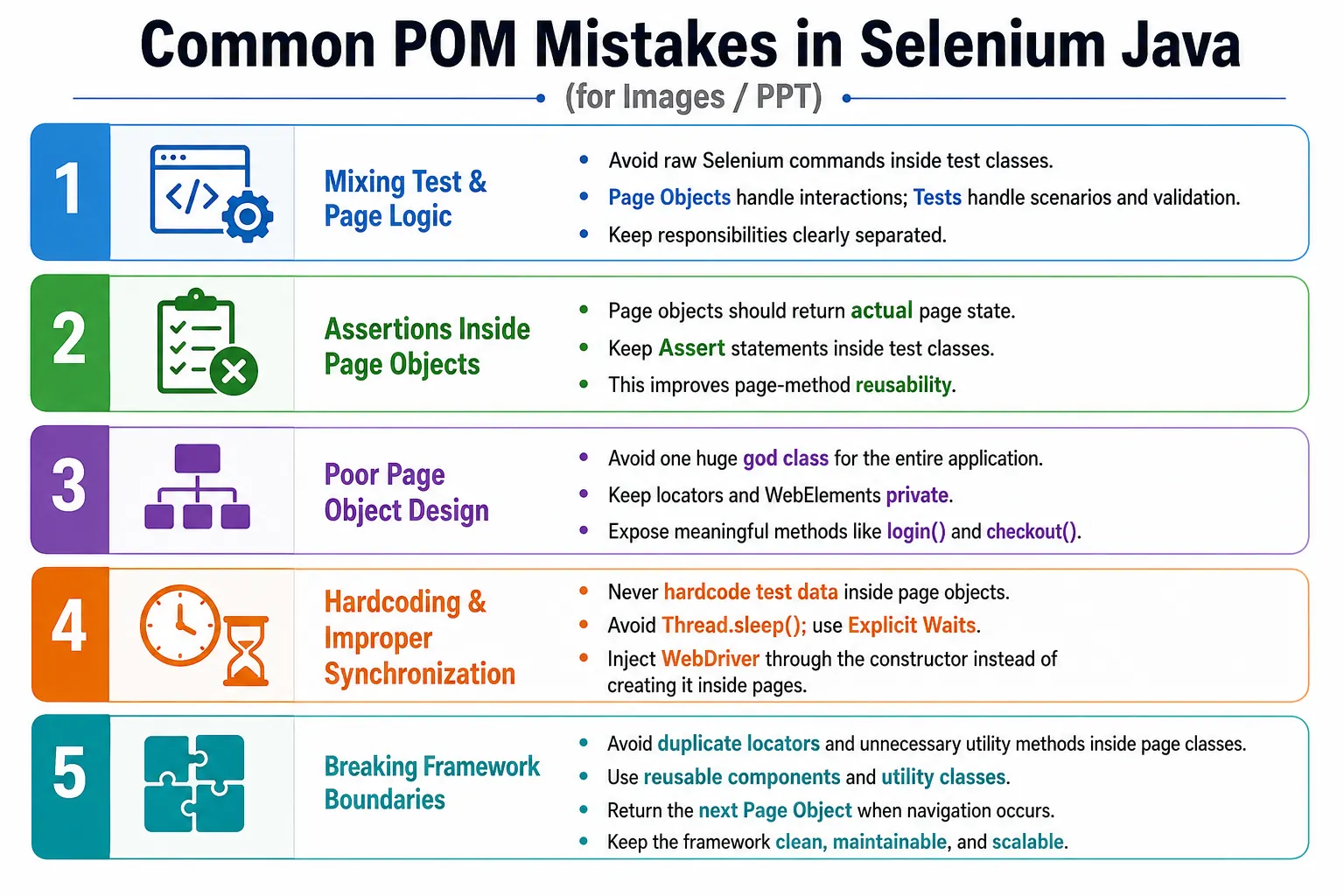
Common POM mistakes usually appear slowly. A framework may start clean with a login page and a home page. Later, more tests are added, more locators are copied, more utility methods are pushed into page objects, and more assertions are mixed into page classes. After a few months, the test suite becomes hard to modify. A small UI change breaks many tests. New team members cannot understand where code belongs. Debugging takes longer than actual testing. Understanding these mistakes helps you build cleaner, scalable, and enterprise-ready Selenium frameworks.
1. Mixing Test Logic and Page Logic
The most common POM mistake is mixing test logic and page logic. Test logic means the scenario, test data choice, and assertions. Page logic means how to interact with a page: enter text, click buttons, read messages, wait for elements, and navigate to the next page. When test classes contain raw Selenium calls, the test becomes tightly coupled to the page structure.
@Test
public void verifyLogin() {
    driver.findElement(By.id("username")).sendKeys("admin");
    driver.findElement(By.id("password")).sendKeys("admin123");
    driver.findElement(By.id("login")).click();

    Assert.assertEquals(driver.getTitle(), "Dashboard");
}
This code works, but it is not a clean POM test. The test class knows locator details and browser interaction details. If the username field locator changes, this test must change. If twenty tests use the same login code, twenty tests may require updates. The correct approach is to move page interaction into a page object and keep the test focused on the scenario and validation.
@Test
public void verifyLogin() {
    HomePage homePage =
            loginPage.login("admin", "admin123");

    Assert.assertEquals(
            homePage.getPageTitle(),
            "Dashboard"
    );
}
In the corrected version, the test is easier to read. It says that the user logs in and verifies the dashboard. The test no longer cares about element IDs, click order, or sendKeys calls. Those details belong to LoginPage.
2. Keeping Assertions Inside Page Objects
Another serious mistake is putting assertions inside page objects. A page object should expose page state, not decide whether a test passed or failed. Assertions belong to test classes because expected results can vary from one scenario to another. The same page title, message, or count may be used in multiple tests with different expectations.
public void verifyDashboard() {
    Assert.assertEquals(
            driver.getTitle(),
            "Dashboard"
    );
}
This method makes the page object responsible for testing. It reduces reusability because the expected value is fixed inside the page class. If another test wants to verify a different title or check the title after a different workflow, the method is less useful. A cleaner page object returns the actual value.
public String getPageTitle() {
    return driver.getTitle();
}
Assert.assertEquals(
homePage.getPageTitle(),
"Dashboard"
);This pattern keeps responsibilities clear. The page object knows how to get the title. The test knows what title is expected. That separation makes the method reusable in positive tests, negative tests, smoke tests, and regression tests.
3. Creating One Huge Page Object
Some teams create a single large class such as ApplicationPage or CommonPage and place all application locators and actions in it. This is often called a god class. It may contain login, search, cart, checkout, payment, reports, admin, settings, and user profile methods in one file. At first, it may feel convenient because everything is available in one place. Over time, it becomes one of the hardest files to maintain.
ApplicationPage.java
  login()
  searchProduct()
  addToCart()
  checkout()
  makePayment()
  generateReport()
  updateUserSettings()
  manageAdminRole()
The problem is that this class has too many reasons to change. A login change modifies it. A search change modifies it. A report change modifies it. A payment change modifies it. Merge conflicts become common when multiple automation engineers edit the same class. The file grows to thousands of lines and becomes difficult to understand.
The correct design is to create focused page objects. Each important page or major page area should have its own class. LoginPage handles login. SearchPage handles search. CartPage handles cart behavior. CheckoutPage handles checkout. This keeps ownership clear and makes changes easier to localize.
4. Making WebElements Public
Public WebElements break encapsulation. If a page object exposes fields directly, test classes can manipulate elements without using page methods. This spreads Selenium operations across the project and defeats the purpose of POM.
@FindBy(id = "username")
public WebElement username;
With this design, any test can call loginPage.username.sendKeys("admin"). That means the test still knows about page internals. If the page needs a wait before typing, trimming input, clearing the field first, or handling a dynamic render, every test must remember to do it correctly.
WebElements should be private. Page methods should describe the action that the user or test needs to perform.
@FindBy(id = "username")
private WebElement username;

public void enterUsername(String user) {
    username.clear();
    username.sendKeys(user);
}
This hides the element and controls interaction through the page class. If the username behavior changes later, only the method needs to change.
5. Exposing Selenium API Everywhere
A related mistake is exposing Selenium objects through getter methods. Some page objects keep elements private but provide methods such as getLoginButton(). The test then calls loginPage.getLoginButton().click(). This is only slightly better than public WebElements because the test still performs Selenium actions directly.
public WebElement getLoginButton() {
    return loginButton;
}
The page object should expose behavior, not Selenium internals. A better method is clickLogin() or, even better, a business method such as login(username, password) when the complete user action is needed.
public void clickLogin() {
    loginButton.click();
}
This design gives the page class control over synchronization, logging, screenshots, exception handling, and implementation changes. Test classes remain clean and business-focused.
6. Duplicating Locators Across Pages
Duplicate locators are a silent maintenance problem. When the same locator appears in multiple page classes or test classes, every UI change becomes risky. The engineer may update one copy and miss another. Some tests pass while others fail for the same page change, which wastes debugging time.
Each locator should have one clear owner. If the login button belongs to the login page, it should be in LoginPage. If the logout button belongs to a header used across many pages, it may belong to HeaderComponent. If a search field belongs to a reusable search component, place it there. The goal is not simply to reduce lines of code. The goal is to make locator ownership obvious.
When a locator changes, you should know exactly where to update it. That is one of the strongest practical benefits of POM.
7. Hardcoding Test Data Inside Page Objects
Page objects should not own test data. A page object represents page behavior. Test data belongs to the test, data provider, fixture, configuration, database setup, API setup, or external file. Hardcoding data inside page methods makes the page object less reusable.
public void login() {
    username.sendKeys("admin");
    password.sendKeys("admin123");
    loginButton.click();
}
This method can only log in with one user. It cannot support invalid login tests, role-based tests, locked-user tests, data-driven tests, or environment-specific credentials. A better method accepts data as parameters.
public HomePage login(String usernameValue, String passwordValue) {
    userField.sendKeys(usernameValue);
    passwordField.sendKeys(passwordValue);
    loginButton.click();

    return new HomePage(driver);
}
Now the same page method can support many scenarios. TestNG DataProvider, JSON, Excel, CSV, API-generated data, and configuration values can all use the same page method.
8. Creating WebDriver Inside Page Objects
A page object should not create the browser. Driver creation belongs to the framework setup layer, such as a base test, driver factory, or test lifecycle manager. Creating WebDriver inside page objects causes multiple browser instances, poor resource management, and difficult parallel execution.
public LoginPage() {
    driver = new ChromeDriver();
}
This design tightly couples the page object to Chrome and prevents the test framework from controlling browser setup. It also makes remote execution, grid execution, cloud execution, and cross-browser testing harder. A page object should receive the driver through constructor injection.
public LoginPage(WebDriver driver) {
    this.driver = driver;
}
Constructor injection makes page objects reusable across local, remote, parallel, and cloud execution environments. It also makes ownership clear: the test framework manages the browser, and the page object uses the browser.
9. Using Thread.sleep
Thread.sleep() is one of the most common reasons Selenium frameworks become slow and unstable. It pauses for a fixed time regardless of whether the page is ready. If the element is ready in one second but the sleep is five seconds, the test wastes four seconds. If the element takes six seconds, the test still fails. Fixed waiting is both inefficient and unreliable.
Thread.sleep(5000);
loginButton.click();
The correct approach is to wait for a condition. If the test needs to click a button, wait until the button is clickable. If the test needs to read a message, wait until the message is visible. If the test needs the loader to disappear, wait for invisibility.
WebDriverWait wait =
        new WebDriverWait(
                driver,
                Duration.ofSeconds(10)
        );

wait.until(
        ExpectedConditions.elementToBeClickable(loginButton)
).click();
Explicit waits make tests faster and more stable because they synchronize with application behavior instead of guessing time.
10. Not Using Explicit Waits
Some page methods directly click or type without checking whether the element is ready. This may work on a fast local machine and fail in CI, remote grid, or slower test environments. Modern pages often load asynchronously. Elements may exist in the DOM before they are visible, visible before they are enabled, or enabled before overlays disappear.
Without explicit waits, tests often fail with NoSuchElementException, ElementNotInteractableException, ElementClickInterceptedException, or TimeoutException. Good page objects include safe interaction methods, usually through a base page or wait utility.
protected WebElement waitForClickable(By locator) {
    return wait.until(
            ExpectedConditions.elementToBeClickable(locator)
    );
}
When all page methods use consistent wait helpers, the framework becomes more predictable. Synchronization becomes a framework concern rather than something each test writer handles differently.
11. Returning Void After Navigation
When a page action opens another page, the method should usually return the next page object. Returning void hides navigation and forces the test to manually create or guess the next page object. This weakens readability.
public void login(String user, String pass) {
    loginButton.click();
}
After this method, the test does not clearly show where the user is. A better method models the navigation result.
public HomePage login(String user, String pass) {
    type(username, user);
    type(password, pass);
    click(loginButton);

    return new HomePage(driver);
}
This makes the test flow natural. Login leads to home page. Checkout leads to payment page. Payment leads to confirmation page. The page object return type documents expected navigation.
12. Creating Too Many Tiny Methods
Small methods are not always bad, but tests should not be forced to repeat low-level page steps every time. If every test must call enterUsername(), enterPassword(), and clickLogin(), the test is still describing mechanics instead of user intent. A business method such as login(username, password) is usually clearer.
Low-level helper methods can exist inside the page object when they support reuse, but public page methods should often represent meaningful user actions. Good POM design hides unnecessary step-by-step details while still keeping the behavior understandable.
13. Keeping Utility Methods Inside Page Objects
Page objects should not become utility containers. Methods for screenshots, Excel reading, file download verification, logging setup, report generation, browser preferences, and API calls usually do not belong inside page classes. They should be placed in focused utility classes or framework services.
ScreenshotUtil
ScrollUtil
ExcelUtil
WaitUtil
FileUtil
ReportUtil
This separation keeps page classes focused on page behavior. It also makes utilities reusable across pages and tests. If screenshot logic changes, update ScreenshotUtil. If Excel reading changes, update ExcelUtil. Page objects should not need to change because a reporting library changed.
14. Using Poor Method Names
Poor method names make a framework difficult to read. Names such as click1(), buttonClick(), methodA(), and doStuff() do not communicate intent. A reader should not need to open every method implementation to understand what a test does.
Use business-oriented names. Good examples include login(), logout(), searchProduct(), addToCart(), proceedToCheckout(), applyCoupon(), and getOrderNumber(). Clear method names make tests readable and reduce onboarding time for new team members.
15. Not Using Constructor Injection
Sometimes page objects declare a driver but never initialize it correctly. This causes NullPointerException or inconsistent behavior. Constructor injection solves this by making the driver requirement explicit.
private WebDriver driver;

public LoginPage(WebDriver driver) {
    this.driver = driver;
}
When a page object cannot be created without a driver, the design is clearer. The framework creates the browser session first and then creates page objects that operate within that session.
16. Storing Business Logic in Tests
Tests should describe scenarios, but they should not repeatedly implement application workflows with raw Selenium actions. If every test knows how to search for a product, select it, add it to cart, and proceed to checkout, then workflow logic is duplicated. When the workflow changes, many tests must change.
The page layer should expose reusable actions. For long journeys, a workflow helper can coordinate several page objects. The test should remain focused on the scenario and expected result. This keeps test classes concise and easier to review.
17. Ignoring Reusable Components
Many applications contain reusable UI sections: headers, footers, menus, sidebars, search bars, filters, tables, product cards, and modal dialogs. A common mistake is duplicating those locators and methods in every page where the component appears. This creates unnecessary repetition.
Reusable components should be modeled as component classes when they have meaningful behavior or appear across many pages. For example, HeaderComponent can handle profile menu and logout. MenuComponent can handle navigation. TableComponent can handle row and column operations. Components keep page objects smaller and reduce duplication.
18. Poor Folder Structure
A framework with all Java files in one folder becomes difficult to navigate. Tests, page objects, utilities, listeners, reports, data providers, and base classes should not be mixed randomly. Folder structure communicates architecture.
src/test/java
  base
  pages
  components
  tests
  utilities
  listeners
  reports
  resources
This structure helps engineers know where code belongs. It also makes code reviews easier. A reviewer can quickly identify whether a utility was incorrectly placed in a page class or whether a test contains low-level page mechanics.
19. Catching and Ignoring Exceptions
Some page methods catch all exceptions and do nothing. This is dangerous because it hides real failures. A test may continue after a failed click or failed type operation, and the actual error becomes harder to identify.
public void clickLogin() {
    try {
        loginButton.click();
    } catch (Exception e) {
    }
}
This code makes debugging worse. If the click fails, the framework should usually report that failure. Exceptions should be handled only when there is a valid recovery strategy or when the method is intentionally checking an optional condition. Required actions should fail clearly.
public void clickLogin() {
    loginButton.click();
}
Letting the exception surface often provides the best diagnostic information: element not found, element not clickable, stale element, intercepted click, or timeout.
20. Not Reusing Page Objects Correctly
Creating page objects repeatedly without reason can make test code noisy. At the same time, reusing stale page objects after navigation or refresh can also cause problems if the class stores outdated elements. The correct approach depends on the design. If page objects store only driver and locators, they are usually lightweight. If they store WebElement references, they may become stale after DOM changes.
Create page objects when entering a page or when the method returns a page after navigation. Avoid unnecessary repeated construction inside the same flow, but do not over-optimize object creation. Page objects should be simple and cheap. The bigger concern is using them consistently and not sharing them across unrelated tests or threads.
21. Using Static WebDriver or Static Page Objects
Static driver fields are a common source of parallel execution problems. If multiple tests run at the same time and share one static driver, one test can affect another test's browser session. Static page objects create similar risks because they may hold state from the wrong test execution.
For scalable frameworks, each test should have its own driver instance, often managed through a driver factory or ThreadLocal pattern. Page objects should be created with the driver for the current test. This prevents test sessions from interfering with each other.
22. Hiding Too Much in Page Methods
Page methods should simplify tests, but they should not hide important scenario decisions. A method named completeOrder() may be too broad if it logs in, searches, adds to cart, checks out, pays, and verifies the order internally. The test becomes short, but it also becomes unclear. If the test fails, it is harder to know which business step failed.
For very long workflows, use workflow helpers with clear names and keep page objects focused. The test should still communicate the scenario. POM is not about making tests as short as possible. It is about making tests understandable and maintainable.
23. Wrong vs Correct Comparison
| Wrong Practice | Correct Practice |
|---|---|
| Assertions in page objects | Assertions in test classes |
| Public WebElements | Private elements with business methods |
| One huge page class | One page per class |
Thread.sleep() |
Explicit waits |
| Hardcoded data | Parameters or DataProvider |
| Duplicate locators | Single locator ownership |
Returning void |
Return next page object after navigation |
| Creating WebDriver in pages | Inject WebDriver through constructor |
| Generic method names | Business-oriented method names |
| Catching all exceptions | Let failures surface unless recovery is valid |
24. Correct Enterprise Design
A clean Selenium framework keeps responsibilities separated. Tests coordinate scenarios and assertions. Page objects model page behavior. Components model reusable page sections. Utilities handle common technical operations. The driver layer manages browsers. Reports and listeners handle execution events. When these boundaries are respected, the framework is easier to maintain.
Test Class
  Page Objects
    Reusable Components
      Utility Classes
        WebDriver
          Browser
This structure prevents page classes from becoming overloaded. It also helps teams scale. Different engineers can work on tests, pages, utilities, and reports without constantly modifying the same files.
25. Common Beginner Mistakes Summary
- Mixing test logic and page logic.
- Putting assertions inside page objects.
- Creating huge page classes.
- Making WebElements public.
- Exposing Selenium API directly to tests.
- Duplicating locators across pages and tests.
- Hardcoding test data inside page methods.
- Creating WebDriver inside page objects.
- Using
Thread.sleep()instead of explicit waits. - Returning
voidafter navigation. - Keeping utilities inside page classes.
- Using poor method names.
- Catching and ignoring exceptions.
- Ignoring reusable components.
26. How to Fix a Weak POM Framework
If a framework already has these mistakes, it does not need to be rewritten completely in one step. Start with the most painful areas. Move repeated login code into LoginPage. Make public elements private. Move assertions from page classes to tests. Replace repeated sleeps with explicit wait helpers. Split the largest page class into smaller page objects. Move screenshot, Excel, and file utilities out of page classes.
Refactoring should be controlled and incremental. Fix one page or one flow at a time. Update tests that use that flow. Run the suite. Continue with the next area. This reduces risk and helps the team learn the improved pattern. A framework becomes better through consistent cleanup, not through one large risky rewrite.
27. Code Review Checklist for POM Mistakes
POM mistakes are easiest to prevent during code review. Reviewers should not only check whether the test passes. They should check whether the code belongs in the correct layer. A passing test can still damage the framework if it introduces public elements, repeated locators, sleeps, hardcoded data, or assertions inside page objects. Good reviews protect maintainability before bad patterns spread across the suite.
A practical review starts with the test class. The test should read like a business scenario. If the test contains many driver.findElement() calls, locator definitions, wait objects, JavaScript snippets, or repeated setup steps, then page logic has leaked into the test. The test should mostly call page methods, pass test data, and assert outcomes.
Next, review the page object. Locators should be private. Methods should have meaningful names. Required actions should use explicit waits. Methods that navigate should return the next page object when appropriate. Page objects should not read Excel, create WebDriver, write reports, decide test assertions, or catch and ignore broad exceptions. If the page class is growing too large, check whether reusable sections should become component classes.
Finally, review the framework structure. Utility methods should be placed in utilities, listeners should handle execution events, reports should handle reporting, and driver setup should remain in the driver layer. This review habit keeps the POM design healthy as more people contribute to the automation project.
28. Real Project Warning Signs
In real projects, weak POM design usually shows clear warning signs. One warning sign is that a small locator change requires edits in many test classes. Another warning sign is that new engineers cannot tell where to add a method. If one person adds a method to a page class, another adds a similar method to a utility class, and another writes raw Selenium code inside a test, the framework has no consistent design rule.
Another warning sign is frequent flaky failures caused by timing. If many tests fail randomly in CI but pass locally, the framework may be missing consistent explicit waits. If engineers respond by adding more Thread.sleep() calls, the suite becomes slower without becoming truly stable. The correct fix is to understand the application state and wait for meaningful conditions.
A third warning sign is that page objects become difficult to open and understand. If a page class has hundreds of locators and dozens of unrelated methods, it may need to be split. Some logic may belong to components. Some journey-level methods may belong to workflow helpers. Some technical actions may belong to utilities. Large files are not automatically wrong, but a page class with mixed responsibilities is a long-term maintenance risk.
29. Refactoring Example
Consider a test suite where ten tests perform login by typing directly into username and password fields. The first refactoring step is to create LoginPage with private locators and a login() method. The second step is to update those tests to call the page method. The third step is to make the method return HomePage after successful navigation. After that, invalid login scenarios can use a separate method that returns LoginPage and exposes the error message.
This small refactoring already improves the framework. Login locators now have one owner. Tests are shorter. The application navigation is clearer. Data is passed from tests instead of being hardcoded in the page class. If the login button locator changes tomorrow, the engineer updates one page object instead of ten tests.
The same approach can be applied to search, cart, checkout, reports, user management, and other repeated flows. Refactoring does not need to be dramatic. Good POM design grows through repeated small improvements that remove duplication and clarify responsibility.
30. Interview Perspective
A short interview answer is: common POM mistakes include mixing test logic and page logic, placing assertions inside page objects, creating large page classes, exposing WebElements, hardcoding data, using Thread.sleep(), duplicating locators, creating WebDriver inside page classes, and not returning page objects after navigation.
A stronger real-time answer is: when designing Selenium frameworks, I avoid putting assertions in page classes and keep them in test classes. Each page object represents one page, keeps locators or elements private, and exposes business methods such as login(), searchProduct(), or checkout(). I inject WebDriver through constructors, use explicit waits instead of sleeps, return the next page object after navigation, and move reusable technical functionality such as waits, screenshots, scrolling, and Excel reading into utility classes. This keeps the framework maintainable, readable, and scalable.
If the interviewer asks why these mistakes matter, the best answer is maintainability. Selenium code is easy to write but hard to maintain when responsibilities are mixed. POM mistakes create duplicate code, fragile tests, unclear failures, and expensive UI-change maintenance. A good POM framework reduces those problems by keeping each responsibility in the right layer.
31. Key Takeaway
A good Page Object Model is not defined by the number of page classes. It is defined by clear separation of responsibilities, private locators, reusable business methods, stable synchronization, clean test classes, and maintainable framework structure. The most damaging POM mistakes are the ones that break those boundaries.
Keep test decisions in tests. Keep page interactions in page objects. Keep reusable UI sections in components. Keep technical helpers in utilities. Keep browser management in the driver layer. When this structure is followed consistently, Selenium automation becomes easier to read, easier to debug, easier to extend, and more reliable in real project execution.