close() vs quit()
Both close() and quit() are browser termination commands in Selenium WebDriver, but they differ fundamentally in scope and impact. Using the wrong one leads to hanging sessions, memory leaks, and Grid failures.
Browser termination looks like a small topic when you are learning Selenium for the first time. After all,
both commands seem to close something in the browser. In a real automation framework, however, the
difference between close() and quit() affects test isolation, resource cleanup,
parallel execution, Selenium Grid availability, CI pipeline stability, and the reliability of later tests.
A test may pass functionally and still damage the execution environment if it does not clean up its browser
session correctly.
The simplest way to remember the distinction is this: close() is window-level control, while
quit() is session-level termination. close() closes the window or tab that the
driver is currently focused on. quit() tells WebDriver to end the entire browser session and
release the resources connected to that session. This is why close() can be useful during a
multi-window test, but quit() is the correct choice at the end of a test.
Interviewers ask this question because it reveals whether a candidate understands WebDriver lifecycle
management. A beginner may say both methods close the browser. A practical automation engineer explains
current window versus all windows, active session versus terminated session, child-window handling versus
teardown, and why quit() is essential in CI and Grid execution. This article explains the
difference from that real-project perspective.
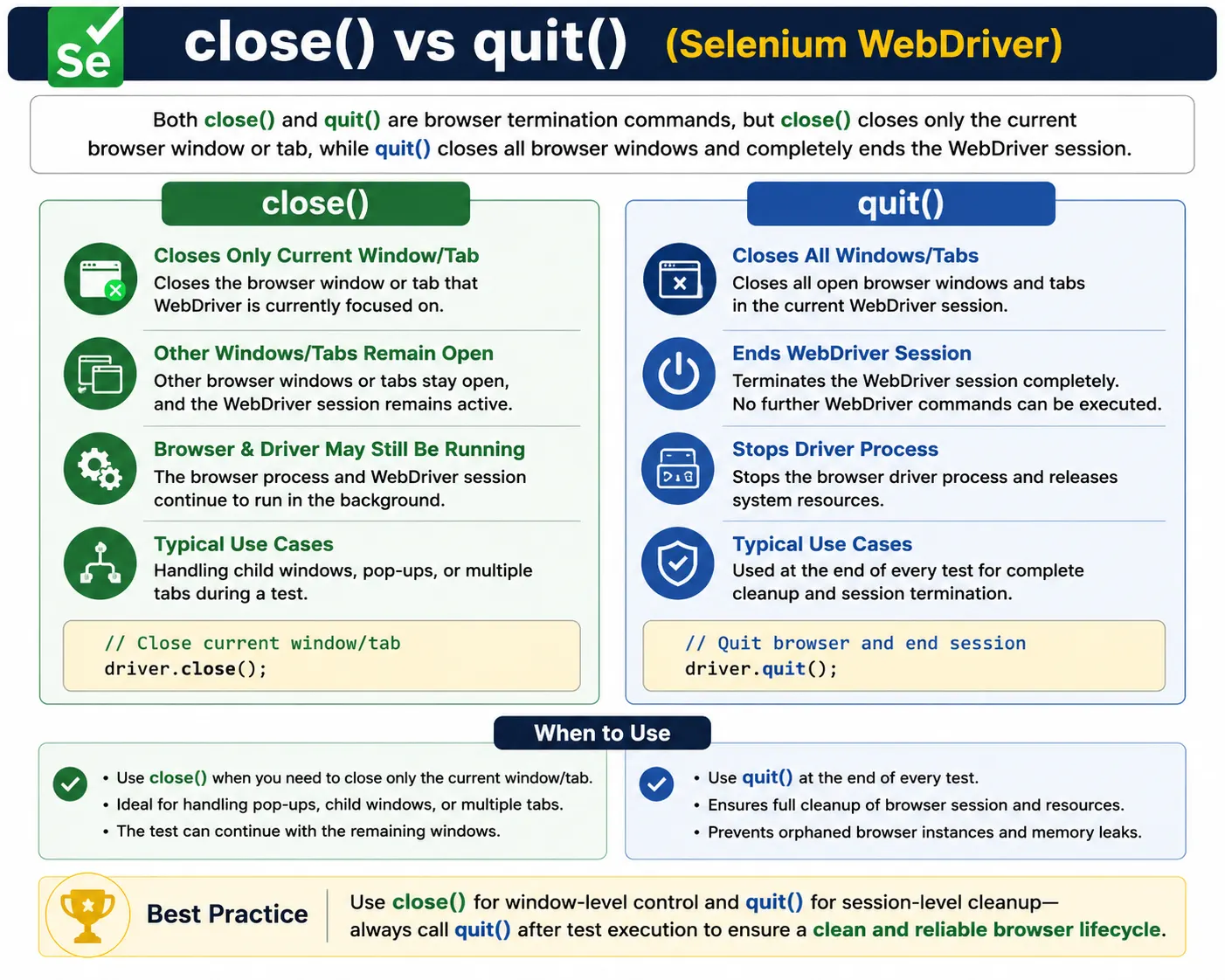
1. close() Method
Definition:
close() closes only the current browser window or tab that WebDriver is focused on.
Key Characteristics:
- Closes one window/tab only
- WebDriver session remains active
- Other windows/tabs stay open
- Browser process may still be running
Typical Use Cases:
- Closing a child window or popup
- Closing a single tab while continuing the test
- Managing multi-window workflows
Important Note:
If you call close() on the last open window, behavior can vary:
- Browser window closes
- WebDriver session may still exist
- Subsequent commands often fail
The key phrase in the definition is "current browser window or tab." WebDriver always has a current window
context. When close() is called, Selenium asks the browser to close that focused window. If the
test has opened a child window, popup, or extra tab and switched to it, close() is the right
tool to close only that child context. After closing it, the test should switch back to a remaining valid
window before continuing.
close() is not a complete cleanup strategy. It may leave the WebDriver session alive, and it
may leave other windows open. In some drivers and browser states, closing the last window makes later
commands fail because there is no active browsing context left. This is why close() can be
confusing in single-window demonstrations. It may visually appear to do the same thing as
quit(), but the internal session cleanup is not the same.
A good use of close() is narrow and intentional. For example, a test clicks a link that opens a
terms-and-conditions popup. The test switches to that popup, verifies the title, closes only the popup, and
then switches back to the parent window. That is window management inside a running test. It is different
from ending the entire test session.
2. quit() Method
Definition:
quit() closes all browser windows and tabs and terminates the WebDriver session completely.
Key Characteristics:
- Closes all windows
- Ends the entire WebDriver session
- Stops the browser driver process
- Frees system resources
Typical Use Cases:
- End of a test
- Test teardown (@AfterMethod, @AfterClass)
- CI/CD cleanup
- Selenium Grid executions
quit() is mandatory at the end of every test.
quit() is the lifecycle command that ends the WebDriver session. When it is called, Selenium
tells the browser driver that automation is finished. The driver closes every window associated with the
session, terminates the session ID, and releases resources. After quit(), the driver object
should not be used again. Any later WebDriver command belongs to a new session and requires a new driver
instance.
This makes quit() the correct teardown command. Whether a test passes, fails, or throws an
exception, the framework should still try to call quit(). The test result and the browser
lifecycle are separate concerns. A failed assertion should not leave Chrome, Firefox, Edge, ChromeDriver,
GeckoDriver, or a remote Grid session running in the background. The cleanup should happen reliably through
@AfterMethod, @AfterEach, a finally block, or the framework's equivalent teardown
mechanism.
In a single local test, skipping quit() may only leave one visible browser behind. In a large
suite, the impact compounds quickly. Dozens or hundreds of tests can leave orphan processes, consume memory,
occupy ports, slow down the machine, and eventually cause unrelated tests to fail. In remote execution, the
effect is worse because sessions may remain allocated on Grid nodes or cloud providers.
3. Side-by-Side Comparison
| Aspect | close() | quit() |
|---|---|---|
| Scope | Current window/tab | All windows/tabs |
| WebDriver session | Remains active | Fully terminated |
| Browser process | May continue | Fully stopped |
| Resource cleanup | Partial | Complete |
| Recommended at test end | No | Yes |
This comparison explains why the two methods should not be treated as interchangeable. The fact that both
can make a browser window disappear does not mean they perform the same cleanup. close() is
scoped to the current window. quit() is scoped to the entire automation session. Scope is the
most important difference.
Another important difference is what happens after the command. After a correct close() in a
multi-window workflow, the test may continue by switching to another open window. After quit(),
the test should not continue using that driver. The session is finished. If the framework needs another
browser, it should create a new WebDriver instance through the normal setup flow.
4. Behavior in Multi-Window Scenarios
With close():
- Close a child window
- Switch back to the main window
- Continue execution safely
With quit():
- All windows close immediately
- Any further WebDriver command fails
- Session is destroyed
Rule of thumb:
Use close() during a test; use quit() after a test.
Multi-window scenarios are where close() earns its place. Web applications often open external
pages, reports, authentication screens, help articles, advertisements, payment pages, or document previews in
a new tab or window. The test may need to verify something in that child window and then return to the parent
application. Calling quit() in that situation would destroy the whole session and prevent the
test from continuing. Calling close() while focused on the child window closes only that child.
The important detail is focus. close() acts on the current window handle. If the test forgets
to switch to the child window before calling close(), it may close the parent window by
mistake. After closing a child window, the test must switch back to a remaining window handle. Otherwise,
WebDriver may still point to a closed context, and the next command can fail with a window or session-related
exception.
A reliable multi-window pattern is to store the parent handle, open the child window, collect all handles,
switch to the child, perform validation, call close(), and switch back to the parent. This
pattern is more verbose than a single close() call, but it makes ownership clear and avoids
accidentally closing the wrong window.
5. Impact in Selenium Grid & CI/CD
Using close() incorrectly:
- Orphaned browser sessions
- Nodes remain busy
- Pipeline instability
- “Max sessions reached” errors
Using quit() correctly:
- Clean session teardown
- Predictable parallel execution
- Stable CI pipelines
In Grid, always prefer quit() for teardown.
Selenium Grid and CI/CD environments make lifecycle discipline non-negotiable. A Grid node has limited
browser slots. When a test starts a remote session, one of those slots becomes occupied. If teardown does
not call quit(), the node may continue to believe the session is active or the browser process
may remain running. Eventually new tests can fail with capacity errors even though no useful test is using
the browser anymore.
CI agents have similar resource limits. They may run many test classes, retry failed jobs, or execute
browser tests in containers. If each failed test leaves behind a browser process, the agent becomes slower
and less predictable. Memory usage climbs, CPU usage increases, and later failures may look like Selenium
timing issues when the real problem is poor cleanup. quit() protects the environment for the
next test.
This is also important for cloud browser providers. Remote providers allocate sessions, record videos,
capture logs, and bill usage based on browser sessions. A missing quit() may cause sessions to
stay open until provider-side timeout. That wastes execution time and can delay pipeline completion. A clean
quit() tells the provider that the test is finished and the session can be finalized.
6. Common Beginner Mistakes
- Using close() instead of quit() at test end
- Calling close() without switching window focus
- Calling quit() in the middle of a test
- Forgetting teardown altogether
These lead to flaky tests and environment issues, not code bugs.
The most common beginner mistake is using close() in teardown because the visible browser
window disappears during a local run. That can feel correct, especially when there is only one window. The
problem appears later when driver processes remain, sessions behave inconsistently, or Grid nodes are not
released properly. Visual disappearance is not the same as complete WebDriver cleanup.
Another mistake is calling quit() too early. If a test closes the full session in the middle of
a workflow and then tries to continue, WebDriver has no active session. This leads to
NoSuchSessionException or similar errors. If a test only needs to close a popup, use
close() after switching to that popup. Reserve quit() for the end of the test or
for intentionally abandoning the full session.
A third mistake is forgetting null checks and exception-safe cleanup. If browser creation fails, a teardown
method that blindly calls driver.quit() may throw a null pointer exception. If the test throws
an exception before the normal end, cleanup still needs to run. Good frameworks handle teardown defensively:
if the driver exists, quit it; if it has already been quit, do not treat cleanup failure as the main test
behavior unless the framework specifically needs to report it.
7. Framework Best Practice
- Initialize WebDriver in setup (@BeforeMethod)
- Execute test steps
- Always call driver.quit() in teardown (@AfterMethod)
- Use close() only for specific window/tab handling
This pattern ensures clean lifecycle management.
A framework should have one clear owner for browser lifecycle. Setup creates the driver, tests use it, and
teardown destroys it. Page objects should not call quit(), because page objects represent pages
or components, not infrastructure. Utility methods should not secretly close the whole browser session
unless their name and purpose make that explicit. Hidden lifecycle operations make tests difficult to debug.
In TestNG, @AfterMethod is commonly used when each test method gets a fresh browser. In JUnit
5, @AfterEach serves the same purpose. In Cucumber, teardown often happens in an
@After hook. The exact framework does not matter as much as the rule: every created WebDriver
session must have a reliable path to quit().
Parallel execution requires extra care. If a framework uses ThreadLocal to store drivers, the
teardown must quit the driver for the current thread and then remove the ThreadLocal reference. Otherwise,
stale driver references can leak into later tests. Clean teardown means both terminating the browser session
and cleaning the framework's reference to it.
8. Interview Perspective
Short Answer:
close() closes the current browser window, while quit() closes all windows and ends the WebDriver session.
Real-Time Answer:
In Selenium, close() is used to close a specific window or tab, whereas quit() is used to terminate the entire browser session and release resources. In real projects, quit() is always used in test teardown.
A stronger interview answer includes examples. You can say that close() is useful when a test
opens a child window, validates it, closes only that child window, and switches back to the parent.
quit() is used in teardown because it closes every window, ends the session, stops the driver
process, and releases local or remote resources. In Selenium Grid, failing to call quit() can
leave nodes busy and cause later tests to wait or fail.
Interviewers may also ask why the difference is not obvious in a single-window demo. The answer is that both commands may close the visible browser window, but their internal cleanup scope is different. A single-window visual result can hide the session-level difference. This is why real framework teardown should be based on lifecycle semantics, not on what the browser window looks like during a demo.
9. Key Takeaway
- close() means window-level control
- quit() means session-level termination
- End-of-test means always quit()
- Grid/CI means never skip quit()
If you remember only one rule: Always use quit() in teardown.
The deeper takeaway is that browser cleanup is part of test reliability. A test is not complete just because
its assertions passed. It is complete when it has also released the resources it created. Selenium tests
create expensive resources: browsers, driver processes, remote sessions, logs, downloads, profiles, and
sometimes video recordings. quit() is the standard way to tell Selenium that the session is
finished.
Use close() only when the current window or tab should be closed while the session continues.
Use quit() when the session should end. If you apply that rule consistently, your local runs,
parallel suites, CI jobs, and Grid executions become much more predictable.
10. How WebDriver Session Lifecycle Works
To understand why quit() matters, it helps to understand the WebDriver session lifecycle. When
a browser is launched, Selenium creates a session with a unique session ID. Every command sent through the
driver is associated with that session. The browser driver knows which browser process, windows, tabs, and
automation context belong to the session. As long as the session is alive, WebDriver can send commands such
as click, type, navigate, get title, switch windows, and capture screenshots.
close() does not mean "end the WebDriver session." It means "close the current browsing
context." If other browsing contexts remain, the session may still be valid. If no browsing contexts remain,
the session can become unusable even though cleanup may not be as complete as a deliberate
quit(). This is why calling close() on the last window is not a reliable teardown
strategy. It leaves too much behavior dependent on driver and browser implementation details.
quit() is explicit. It says the automation session is over. The driver no longer has a valid
session ID to use for future commands. This explicit ending is what frameworks need. Test lifecycle should
be deterministic: a driver is created at setup, used during the test, and terminated at teardown. Anything
else creates uncertainty.
11. Debugging close() and quit() Problems
Lifecycle problems often appear as confusing failures in later tests. A suite may report that a browser cannot be launched, a Grid node is unavailable, an element cannot be found, or a session does not exist. The root cause may be a previous test that did not clean up correctly. When debugging, inspect running browser and driver processes after the suite ends. If many processes remain, teardown is probably incomplete.
In Grid, check whether sessions remain active after tests finish. If the Grid UI shows sessions stuck on
nodes, the framework may be using close() instead of quit(), failing before
teardown, or losing the driver reference. In CI, review teardown logs. A useful framework logs when it starts
a driver, what browser is used, when it quits the session, and whether teardown completed successfully.
For NoSuchSessionException after cleanup, check whether the test is trying to use the driver
after quit(). This may happen when an after hook tries to capture a screenshot after teardown,
or when one utility method quits the driver before another utility tries to read the title or URL. The order
of cleanup operations matters. Capture failure evidence first, then quit the browser session.
12. Screenshot and Reporting Order
Many frameworks capture screenshots, browser logs, page source, or video metadata when a test fails. These
actions require an active WebDriver session. If the framework calls quit() before collecting
failure evidence, screenshots and logs may fail. The correct order is usually: detect failure, capture
evidence, attach evidence to the report, and then call quit().
This does not mean delaying cleanup indefinitely. It means placing cleanup in the right sequence. A teardown
method can use a try/finally pattern: try to capture diagnostics if needed, and finally call
quit(). That way, even if screenshot capture fails, the browser still gets cleaned up. Cleanup
should be resilient because teardown runs when the test is already in an abnormal state.
Reporting tools such as ExtentReports, Allure, Surefire reports, or custom logs are most useful when they include lifecycle details. If a test fails during teardown, the report should make that clear. If a browser was already closed before screenshot capture, the report should not hide that fact. Good reporting turns lifecycle errors into actionable debugging information.
13. Parallel Execution and ThreadLocal Cleanup
Parallel execution magnifies the importance of quit(). In a single-threaded suite, a leaked
browser may be annoying. In a parallel suite, leaked sessions can block other tests, consume Grid capacity,
and create failures that appear unrelated to the original leak. Each parallel test should own its own driver
session, and each session should be quit by the same lifecycle path that created it.
Java Selenium frameworks often use ThreadLocal<WebDriver> to isolate drivers per test
thread. Teardown should call getDriver().quit() for the current thread and then remove the
ThreadLocal value. Removing the reference is important because thread pools may reuse threads. Without
removal, a later test may see a stale reference to a driver session that has already been quit.
In parallel execution, close() should be used only inside well-controlled window handling for
the current test's own session. It should not be used as a general cleanup command. If a shared driver is
accidentally used by multiple tests, either close() or quit() can disrupt another
test. The real fix is not choosing a different termination method; the fix is giving every parallel test a
separate driver instance.
14. Practical Decision Checklist
Ask one question before choosing the method: do you want to close one window and continue, or end the entire
automation session? If the answer is one window or tab, use close() after switching to the
correct window. If the answer is end the test session, use quit(). If the test is in teardown,
the answer should almost always be quit().
Also consider the environment. Local debugging may tolerate a leftover browser for a short time, but CI and
Grid execution cannot. Remote sessions must be released. Parallel workers must not inherit stale driver
state. Build agents must remain clean for the next job. These operational concerns are the reason
quit() is not just a recommendation but a framework standard.
Finally, consider the failure path. If a test fails halfway through, will teardown still run? If browser creation fails, will teardown handle a null driver? If screenshot capture fails, will the browser still be quit? These questions separate demo code from production-quality automation. Robust Selenium frameworks are built around predictable cleanup.
15. Common Exceptions After Incorrect Termination
Incorrect use of close() and quit() often appears through exceptions that do not
mention cleanup directly. NoSuchSessionException is the most common example. It means the
driver command was sent after the WebDriver session was no longer valid. This can happen after
quit(), after closing the last available browser window, or after a browser crash. The fix is
not to retry the same command on the same driver. The correct fix is to understand why the session ended and
create a new driver only through the normal setup flow.
NoSuchWindowException can happen when the session still exists but the current window context
no longer does. This is common after closing a child window and forgetting to switch back to the parent
window. The session is alive, but WebDriver is focused on a window handle that is no longer valid. The
solution is to store valid window handles, close only the intended child, and switch back to a known open
window before continuing.
UnreachableBrowserException, driver service errors, or connection refused messages can also
appear when browser processes are killed unexpectedly or when driver processes remain in a bad state. These
errors can be confusing because they may show up in a later test, not in the test that caused the leak. That
is why lifecycle logging and consistent teardown are valuable. They help connect the visible exception to
the actual cleanup problem.
16. Recovery After close() in Multi-Window Tests
When using close() correctly, recovery means switching the driver focus to a remaining open
window. A safe multi-window flow starts by storing the parent handle. After the child window opens, the test
identifies the child handle, switches to it, performs verification, closes it, and switches back to the
parent handle. The switch back step is not optional. Without it, the next command may target a closed window
context.
Tests should also verify that the expected number of windows exists before and after closing a child window. If a popup is expected, wait until the number of window handles increases. After closing it, wait until the number decreases. This makes the test more stable because window creation and closing can take a moment, especially in remote browsers or slower CI agents. Immediate handle access without waits can cause flaky behavior.
Recovery does not mean calling quit() after every close(). If the test should
continue in the parent window, switching back is the recovery. If the test is finished, teardown will call
quit(). Keeping those responsibilities separate makes multi-window tests easier to reason
about.
17. Anti-Patterns to Avoid
One anti-pattern is placing driver.quit() inside a page object method such as
logout() or closePopup(). Logging out of the application is not the same as ending
the browser session. Closing a popup is not the same as ending the test. Page object methods should model
page behavior. Browser lifecycle should stay in the framework layer.
Another anti-pattern is calling close() and assuming the framework is clean because the browser
window is no longer visible. This is especially risky when tests open multiple tabs or when execution runs
remotely where the tester cannot see the browser. The cleanup decision should be based on session lifecycle,
not on visual observation.
A third anti-pattern is swallowing teardown exceptions silently. Teardown should be resilient, but if
quit() consistently fails, the framework should log enough information to investigate. Silent
cleanup failures can hide infrastructure problems until the pipeline becomes unstable. A good framework
tries to quit, logs cleanup failures clearly, and avoids masking the original test failure with noisy
teardown errors when possible.
18. Production-Ready Teardown Checklist
A production-ready Selenium framework should apply a consistent teardown checklist. First, capture evidence
if the test failed and the driver session is still valid. Second, close any test-specific resources such as
temporary files or downloaded artifacts if the framework owns them. Third, call driver.quit()
once for the active session. Fourth, clear the driver reference, especially when using ThreadLocal storage.
Fifth, log that teardown completed.
The checklist should handle partial setup failure. If driver creation failed, there may be no driver to
quit. If the browser crashed, quit() may throw an exception. If the session was already closed
by an earlier failure, cleanup should not create a confusing second failure. Defensive teardown code checks
whether the driver reference exists and handles cleanup errors with clear logging.
This checklist is simple, but it prevents many real-world issues. Browser automation is resource-heavy. Every test that starts a browser must be responsible for ending it. When cleanup is predictable, failures are easier to diagnose, CI agents remain healthier, Grid capacity is released on time, and the team can trust the suite to run repeatedly without manual cleanup.
19. close() - Close Current Browser Window
WebDriver driver = new ChromeDriver();
driver.get("https://example.com");
driver.close(); // closes only the current window
Key Point
- Ends current window
- WebDriver session may still exist
20. quit() - Close All Browser Windows
WebDriver driver = new ChromeDriver();
driver.get("https://example.com");
driver.quit(); // closes all windows and ends session
Key Point
- Ends entire browser session
- Frees system resources
21. Single Window Scenario (Both Look Same)
WebDriver driver = new ChromeDriver();
driver.get("https://example.com");
driver.close(); // browser closes
// driver.quit(); would also close browser
Interview Trap
- Difference is not visible with one window
22. Multiple Windows - close()
WebDriver driver = new ChromeDriver();
driver.get("https://example.com");
// assume a new tab/window is opened
driver.close();
Result
- Only current active window closes
- Other windows remain open
23. Multiple Windows - quit()
WebDriver driver = new ChromeDriver();
driver.get("https://example.com");
// multiple tabs/windows open
driver.quit();
Result
- All windows closed
- WebDriver session destroyed
24. close() Inside Window Switch Logic
String parent = driver.getWindowHandle();
for (String win : driver.getWindowHandles()) {
    driver.switchTo().window(win);
    if (!win.equals(parent)) {
        driver.close(); // closes child window
    }
}
driver.switchTo().window(parent);
Real-World Use
- Close pop-ups or ads
25. quit() After Test Completion (Best Practice)
try {
    driver.get("https://example.com");
} finally {
    driver.quit(); // always recommended
}
Why
- Prevents orphan browser processes
26. Using close() First, Then quit()
driver.close(); // closes current window
driver.quit();  // closes remaining windows & session
Valid
- But usually redundant
27. What Happens If You Use close() Only?
driver.close();
// driver.get("https://google.com"); // session may be invalid
Possible Exception
- NoSuchSessionException
28. What Happens If You Use quit() First?
driver.quit();
driver.get("https://example.com"); // invalid after quit
Exception
- NoSuchSessionException
29. close() in TestNG @AfterMethod (Not Recommended)
@AfterMethod
public void teardown() {
    driver.close(); // may leave other windows open
}
30. quit() in TestNG @AfterMethod (Recommended)
@AfterMethod
public void teardown() {
    driver.quit(); // clean shutdown
}
31. close() in Popup Handling Test
driver.switchTo().window(childWindow);
driver.close(); // close popup only
driver.switchTo().window(parentWindow);
32. Parallel Execution Risk Using close()
// Parallel tests
driver.close(); // may affect shared session
Recommendation
- Use one driver per test
- Always use quit()
33. Memory & Resource Impact
driver.close(); // browser closes, driver process may still run
driver.quit();  // browser + driver process terminated
34. Selenium Grid Context
driver.quit(); // releases node back to GridImportant
- close() does not release Grid node properly
35. Framework Base Class Example
public class BaseTest {
    protected WebDriver driver;

    @AfterMethod
    public void tearDown() {
        if (driver != null) {
            driver.quit(); // always
        }
    }
}
36. Common Interview Question Code
driver.close();
driver.quit();
Answer
- close() means current window
- quit() means all windows + session
37. Exception Scenario Demo
driver.close();
driver.findElement(By.id("x")); // may throw exception
38. Interview Summary - close() vs quit()
driver.close(); // current window only
driver.quit(); // all windows + ends session| Aspect | close() | quit() |
|---|---|---|
| Closes current window | Yes | No |
| Closes all windows | No | Yes |
| Ends WebDriver session | No | Yes |
| Releases system resources | No | Yes |
| Recommended in teardown | No | Yes |