className Locator
The className locator identifies elements using the HTML class attribute. It is useful in specific scenarios but must be used carefully, as misuse is a common source of flaky tests.
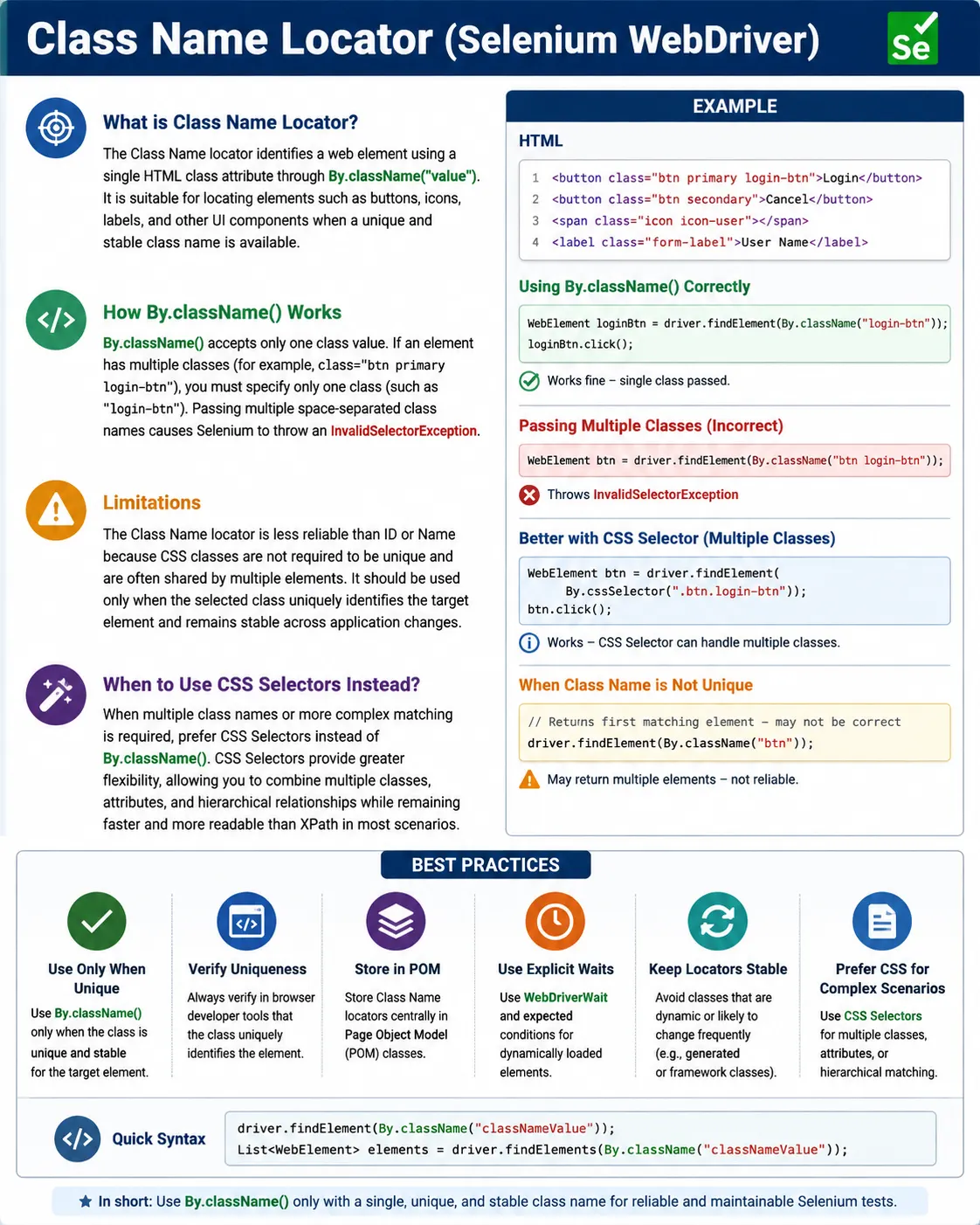
Understanding the className Locator in Selenium WebDriver
The className locator is a Selenium WebDriver strategy used to identify elements by one value from the HTML class attribute. It looks simple, and the syntax is easy to remember, but it must be used with care. Many web elements contain class attributes because classes are heavily used for styling, layout, component behavior, and frontend framework conventions. That makes className convenient in some situations, but it also makes it risky when testers assume class values are unique or stable. A professional Selenium test should use className only when the chosen class clearly identifies the intended element within the current search scope.
Selenium tests cannot click, type, or read page content until WebDriver has located an element in the browser's Document Object Model. A locator tells Selenium how to perform that search. With By.className("login-btn"), Selenium searches for an element whose class attribute contains login-btn as one class token. If a matching element is found, Selenium returns a WebElement, and the test can then call methods such as click(), sendKeys(), clear(), getText(), getAttribute(), isDisplayed(), isEnabled(), or isSelected(). The locator identifies the target; the WebElement method performs or verifies the behavior.
The most important rule is that By.className() accepts only one class value. This is one of the most common interview traps and one of the most common beginner mistakes. If an element has class="btn primary login-btn", the element has three separate classes: btn, primary, and login-btn. A Selenium locator such as By.className("login-btn") is valid because it passes one class token. A locator such as By.className("btn primary") is invalid because it passes a space-separated list. If you need to match multiple classes together, use a CSS selector such as .btn.primary instead of By.className().
This single-class rule exists because className is not a CSS selector. It is a specific Selenium locator strategy for one class name. A class attribute may contain several classes separated by spaces, but Selenium's className locator takes one of those tokens. This distinction matters in code reviews and interviews. Many testers see the full class attribute in developer tools, copy the entire value, and paste it into By.className(). The test then fails because the locator contains spaces. The correct action is to choose one class token or switch to CSS when the full combination is required.
The className locator works best when a single class is stable, meaningful, and unique in the relevant context. For example, a custom application may use a class such as login-btn, error-message, user-avatar, product-card, or modal-title. If that class is intentionally attached to a specific element or a repeated component type, By.className() can be readable and useful. The key is to understand whether the class identifies behavior or only styling. A class that represents a stable component role is stronger than a class that only represents a color, margin, grid position, or responsive layout.
The biggest limitation is that classes are not required to be unique. In fact, they are designed to be reusable. A class named button may appear on every button in the application. A class named card may appear on every card. A class named active may appear on the current menu item, selected tab, expanded accordion, or highlighted row. If a test uses findElement(By.className("card")), Selenium returns the first matching element, not necessarily the product card or article card the test intended. This can make tests pass or fail for the wrong reason.
Because classes are often reused, className is frequently better with findElements() than with findElement(). A test may want all product cards, all menu items, all error messages, all table badges, or all visible alerts. In those cases, By.className() can collect a meaningful group. The test can count the elements, iterate through their text, filter by displayed state, or inspect attributes. However, if the test needs one exact action, such as clicking the checkout button, a more specific locator is usually safer unless the class value is truly unique.
Styling-based classes are especially fragile. Many applications use CSS frameworks or utility-first styling where classes describe appearance: text-blue-600, mt-4, flex, rounded, shadow, btn-primary, active, hidden, or grid-cols-3. These classes may change when designers adjust the UI without changing functionality. If a Selenium test depends on styling classes, it may fail even though the user workflow still works. Automation locators should prefer stable business or component identifiers over visual implementation details.
Auto-generated classes are even riskier. Some CSS modules, build tools, and component libraries create class names that look like Button_root__3Xk9a, css-1abc23, MuiButton-root, or ng-star-inserted. Some of these may be stable enough within a library version, while others change with builds, dependency upgrades, or component structure. A tester should not assume that a generated class is safe. If important elements do not have stable IDs, names, or data attributes, it is often better to ask the development team for test-friendly hooks instead of building the suite around generated styling classes.
CSS selectors are usually the better choice when class-based matching needs more precision. By.className("alert") can match any element with the alert class. By.cssSelector(".alert.error") can match an element that has both alert and error classes. By.cssSelector("div.alert.error") can restrict the tag as well. By.cssSelector("#loginForm .alert.error") can scope the match inside a form. CSS selectors can combine classes, attributes, tags, and hierarchy. This flexibility is why many real Selenium frameworks prefer CSS selectors over className for class-based element lookup.
That does not mean className is useless. It is still simple and readable when the page provides a strong single class. For example, By.className("success-msg") may be a clean locator for a unique success message. By.className("product-card") may be a good collection locator for listing cards. By.className("menu-item") may be useful when reading all menu labels. The method becomes problematic only when it is used as a shortcut without checking uniqueness, stability, and purpose.
Scoping makes className much safer. Instead of searching the entire page for a class named logo, a test can first locate the header and then search inside it. Instead of finding all card elements globally, a test can locate the results container and then find product-card elements inside it. Instead of clicking the first button with class submit, a test can locate the target form and then search within that form. Scoped locators reduce accidental matches and make the test express page structure more clearly.
The Page Object Model is the right place to manage className locators. Tests should not be filled with raw class values, especially because class names are often connected to frontend implementation. A page object can expose methods such as getErrorMessage(), getProductCards(), clickLogin(), isModalVisible(), or selectMenuItem(). The page object can decide whether to use className, CSS, XPath, ID, name, or data-test. If a class changes later, the update is localized to the page object or component class rather than scattered across many tests.
Component objects are particularly useful with className. Many UI systems use repeated components such as cards, alerts, tabs, menus, modals, badges, and table rows. A component object can locate a root element with a stable selector and then use className inside that root to find parts of the component. For example, a ProductCard object may search for title, price, rating, and add-to-cart elements inside one card. The class names may be reusable across cards, but scoped to one card they become predictable.
Explicit waits remain important. A className locator can be correct and still fail if the element is not present or ready when Selenium searches. A toast message may appear after an API call. A modal may animate into view. Cards may load after scrolling. A button class may change when the application enables or disables it. Use WebDriverWait with conditions such as visibilityOfElementLocated, elementToBeClickable, or presenceOfElementLocated depending on the scenario. The className locator identifies what to find; the wait defines when it is valid to continue.
A common anti-pattern is using className to detect state when a better method exists. For a checkbox, use isSelected() when it is a native selectable control. For a disabled button, use isEnabled() when the disabled state is exposed natively. For visible content, use isDisplayed(). Class changes can be useful when testing custom components, such as a selected tab represented by an active class, but they should not replace native WebElement state methods when those methods accurately represent the behavior. Good tests choose the most direct source of truth.
Some custom components do require class-based state checks. A tab might add selected, active, or current to the selected tab. A toast might use success, warning, or error classes. A validation field might add invalid after a failed submit. In these cases, getAttribute("class") can be useful after locating the element. However, state class names should be stable and meaningful. If a CSS framework controls the state class purely for styling, consider whether an ARIA attribute such as aria-selected, aria-expanded, aria-checked, or role provides a better semantic source of truth.
Debugging className failures should be systematic. First, confirm that the locator uses only one class token. Second, inspect whether the class exists on the target element in the current environment. Third, check how many elements share that class. Fourth, verify whether the element is visible, enabled, inside a frame, inside a shadow root, or rendered after an asynchronous operation. Fifth, decide whether className is still the right locator or whether CSS, XPath, ID, name, or data-test would be more stable. This order prevents random locator rewriting and leads to better fixes.
In interviews, a short answer is that className locates elements by one CSS class value. A stronger answer explains that it cannot accept multiple class names separated by spaces, that classes are not guaranteed to be unique, and that CSS selectors should be used when multiple classes or more context are needed. A practical answer adds that className should be used sparingly, preferably inside page objects, after checking uniqueness and avoiding dynamic or styling-only classes.
The decision between className and CSS selector is a frequent real-world choice. If the locator is a single, stable, unique class, By.className("login-btn") is readable and fine. If the element requires a combination of classes, a tag restriction, a parent section, an attribute, or a relationship, CSS is better. For example, .btn.primary, button.login-btn, form#loginForm .login-btn, and [data-test='login-button'] are CSS selectors, not className locators. Understanding this difference prevents many avoidable Selenium errors.
A useful review checklist for className locators is simple. Does the locator contain only one class value? Is the class stable across builds and environments? Is it unique in the chosen scope? Does it describe a functional or component purpose rather than only a visual style? Would a stable ID, name, data-test attribute, CSS selector, or XPath be clearer? If the answers are favorable, className may be acceptable. If not, the locator should be improved before it becomes part of the suite.
In summary, By.className() is a useful but limited Selenium locator. It is easy to read and can work well for a unique functional class or for collecting groups of similar elements. It becomes fragile when used with multiple class values, non-unique styling classes, generated framework classes, or direct clicks on broad matches. Use it deliberately, scope it when needed, prefer CSS selectors for multi-class matching, and keep locator details in page objects. That approach keeps class-based Selenium automation practical and maintainable.
Real-Project Patterns for className Locators
In real projects, className locators appear most often around repeated UI components. Product cards, menu items, alert banners, validation messages, tabs, badges, chips, table rows, and modal sections may all share meaningful class values. In these situations, the class is not meant to identify one element; it is meant to identify a group of similar elements. A test can use findElements(By.className("product-card")) to count products, collect their titles, verify that at least one item is displayed, or filter the list to the card that contains a specific product name. This is a good use of className because the locator matches the component pattern.
The problem starts when a group locator is treated like a unique locator. If a page has twenty product cards, driver.findElement(By.className("product-card")) returns only the first one. That may be acceptable if the test intentionally wants the first card, but most business scenarios need a specific card. The stable pattern is to collect the cards, filter by meaningful content, and then interact within the matched card. The locator finds the collection, while the filtering step identifies the business target. This keeps automation aligned with what a user actually sees and chooses.
Alerts and validation messages are another common use case. A form may display messages with classes such as error-message, success-message, warning-banner, or field-error. These classes can be useful when they represent application state rather than only color or spacing. A test can submit an invalid form and then verify that the expected error message appears. However, if every field error has the same class, the test should either collect all messages or scope the lookup to the specific field group. Otherwise, the test may read the first error on the form instead of the error related to the field under test.
Modals also show why context matters. Many modals contain a title, close button, primary action, secondary action, and message area. These inner elements may reuse classes across every modal in the application. A global search for modal-title or primary-button can accidentally find a hidden modal, an inactive template, or the wrong dialog. A better page object first locates the visible modal root, then searches inside it by className or CSS selector. This scoped approach makes the class values useful without depending on global uniqueness.
Dynamic state classes require careful interpretation. A tab may have a class named active when selected. A menu item may have selected when it represents the current page. A collapsible panel may use open or expanded. These classes can be useful for validation, but they are not always the best source of truth. If the component also exposes aria-selected, aria-current, or aria-expanded, those attributes may be more semantic and more stable. A tester should inspect the component and choose the state indicator that most accurately reflects the user behavior.
CSS frameworks can make className locators tempting but fragile. A Bootstrap button may have classes like btn, btn-primary, and btn-lg. A Tailwind element may have many utility classes for color, padding, width, and layout. A Material UI component may contain generated or framework-specific classes. These values can change because of design decisions, dependency upgrades, or build configuration. If the class does not describe business purpose, it is usually a poor locator for critical automation. Test-friendly attributes or semantic locators are better contracts for long-lived tests.
In teams where testers can collaborate with developers, className should not be the only answer to missing IDs. If an important element has no stable locator, ask for a data-test, data-testid, data-qa, or stable semantic ID. This is especially useful for primary buttons, important form fields, menu entries, status messages, and repeated row actions. A stable test hook is less likely to change during visual redesign. It also makes the intended automation target explicit in the markup, which improves maintainability for the whole team.
That said, className can still support useful page health checks. A test may verify that a result page displays one or more result-card elements after a search. It may verify that an alert-error class appears after invalid login. It may verify that the navigation contains menu-item elements. These checks are useful when the class represents a component or state that the application intentionally controls. The test should still avoid exact counts unless the count is a real requirement, because new content or layout changes can alter the number of matching elements without breaking the feature.
Page object method names should hide className details. A method named getVisibleErrorMessages() is clearer than a test that directly searches for error-message. A method named getProductCards() is clearer than repeated findElements calls in test classes. A method named isSaveButtonDisabled() can internally decide whether to check a disabled attribute, isEnabled(), aria-disabled, or a disabled class. This abstraction is not about hiding code for its own sake. It keeps the test focused on the requirement and gives the framework one place to adapt when the UI implementation changes.
Synchronization can be class-based too, but it must be intentional. Some applications add a loading class while a section is refreshing and remove it when data is ready. Others add visible, open, expanded, selected, or loaded classes after interaction. A wait can observe these class changes with getAttribute("class") or a custom ExpectedCondition. This is useful when class changes are the most reliable indicator of UI state. However, if a standard Selenium condition such as visibility or clickability describes the requirement better, prefer that. State classes should support the test, not make it more coupled to styling than necessary.
Another useful practice is to log match counts for broad className locators when debugging. If a test expected one element but findElements(By.className("alert")) returns five, the problem is not Selenium. The locator is too broad for a single action. The fix may be a scoped search, a CSS selector with more conditions, a data-test attribute, or a Page Object method that filters visible elements. Logging the count and text of candidates quickly reveals whether the class is being reused in ways the test did not consider.
In responsive applications, className locators can behave differently across viewport sizes. Desktop and mobile navigation may both be present in the DOM, with one hidden. Both may contain the same menu-item or nav-link class. A test that searches globally may find a hidden desktop item while running in mobile mode, or a hidden mobile item while running in desktop mode. A robust framework scopes searches to the active navigation container and filters by displayed state when needed. This is another reason broad className locators should be reviewed carefully.
There is also a difference between using className for discovery and using it for action. During exploration, a tester may collect all elements with a class to understand page structure. That is fine. In committed automation code, the locator should be stable enough for repeated execution. A quick locator used during manual debugging should not automatically become a permanent framework locator. Before adding it to a page object, confirm that it survives refresh, role differences, environment differences, and likely UI redesign.
className locators can be useful in negative tests as well. After submitting invalid data, a test may verify that a field receives an invalid class or that an error message class appears. After correcting the data, it may verify that the error class is removed. This kind of validation can be meaningful when the class is part of the component's state model. Still, the test should pair visual-state validation with business validation when needed. For example, an error class appearing is useful, but the message text and blocked submission behavior may also need assertions.
Code review should treat className locators as a stability risk that may be acceptable with evidence. Reviewers should ask whether the class is single, stable, purposeful, and unique in scope. They should reject locators that contain spaces, generated hashes, pure layout utilities, or vague classes such as btn, card, row, col, active, hidden, and container when used for direct interaction. They should also encourage CSS selectors when multiple classes or parent context are required. This review discipline prevents small locator choices from turning into frequent pipeline failures.
For interview preparation, it helps to explain className with both syntax and judgment. The syntax is driver.findElement(By.className("classValue")). The judgment is knowing that classValue must be one class token, that class names are often reused, that styling classes can change, and that CSS selectors are better for combinations. A candidate who can explain these tradeoffs demonstrates practical Selenium knowledge beyond memorizing locator names.
The simplest mental model is this: use className when a single class represents a meaningful element or group in the current context. Do not use it when the class is only visual, generated, duplicated without control, or part of a multi-class expression. If more precision is needed, move to CSS selector or XPath. If long-term stability is needed and the DOM lacks good hooks, request a test-friendly attribute. This keeps className in its proper place as a useful secondary locator rather than an unreliable default.
In Selenium, className is considered a secondary locator, not a primary one.
1. What Is a className Locator
Definition: The className locator finds elements using the value of the HTML class attribute.
Example HTML:
<button class="btn primary login-btn">Login</button>Conceptually:
- Strategy means className
- Value means single class value
2. Important Rule (Very Critical)
Invalid: Wrong
By.className("btn primary login-btn");

Valid: Correct
By.className("login-btn");
Rule: className accepts only one class, not multiple classes separated by spaces.
If you pass multiple classes, Selenium throws an exception.
3. When className Locator Works Best
Use className when:
- A single, unique class identifies the element
- Class name is stable and meaningful
- No reliable id or name is available
Common use cases:
- Buttons with unique classes
- Icons
- Labels
- Static UI components
4. Limitations of className Locator
- Classes are not required to be unique
- Same class is often shared by many elements
- Styling changes can break locators
- Cannot match multiple classes together
Because of this, className is less reliable than ID or Name.
5. className vs CSS Selector (Important Comparison)
| Aspect | className | CSS Selector |
|---|---|---|
| Single class | Valid: Yes | Valid: Yes |
| Multiple classes | Invalid: No | Valid: Yes |
| Flexibility | Low | High |
| Readability | Medium | High |
| Recommendation | Limited use | Preferred |
Best practice: If you need to match multiple classes, use CSS selector, not className.
6. className in Page Object Model (POM)
- Use className only after verifying uniqueness
- Define it inside page classes
- Avoid using it in test logic directly
This limits impact when UI styling changes.
7. Common Beginner Mistakes
- Passing multiple class values
- Assuming class names are unique
- Using className instead of CSS selector
- Using auto-generated CSS framework classes
These mistakes cause element mismatch and flakiness.
8. Real-Project Best Practices
- Prefer ID means Name means CSS means XPath (in that order)
- Use className only for unique, functional classes
- Avoid layout/styling-only classes
- Validate uniqueness using browser dev tools
9. Interview Perspective
Short Answer: The className locator identifies elements using the HTML class attribute and works only with a single class value.
Real-Time Answer: In Selenium, className is used to locate elements by a single CSS class. Since classes are not guaranteed to be unique and multiple classes cannot be combined, it is used cautiously and often replaced by CSS selectors in real projects.
10. Key Takeaway
- className works with one class only
- Classes are often non-unique
- Limited flexibility
- Prefer CSS selectors for multi-class matching
- Use className sparingly-CSS selectors are usually the better choice.
11. className Locator Examples (Practical)
1. Basic className Locator
driver.findElement(By.className("login-btn"));Key Point: Matches a single CSS class.
2. className with click()
driver.findElement(By.className("submit")).click();3. className with sendKeys()
driver.findElement(By.className("search-input"))
      .sendKeys("Selenium");
4. className with clear() + sendKeys()
WebElement input = driver.findElement(By.className("email"));
input.clear();
input.sendKeys("test@example.com");
5. className with getText()
String msg =
    driver.findElement(By.className("success-msg"))
          .getText();

Assert.assertTrue(msg.contains("Success"));
6. className with getAttribute()
String classes =
    driver.findElement(By.className("alert"))
          .getAttribute("class");

System.out.println(classes);
7. className with isDisplayed()
Assert.assertTrue(
    driver.findElement(By.className("logo")).isDisplayed()
);
8. className with Explicit Wait (Best Practice)
WebDriverWait wait =
    new WebDriverWait(driver, Duration.ofSeconds(10));

WebElement btn =
    wait.until(ExpectedConditions.elementToBeClickable(
        By.className("login-btn")
    ));

btn.click();
9. className with findElements() (Multiple Matches)
List<WebElement> cards =
    driver.findElements(By.className("card"));

System.out.println(cards.size());
Important: className is often non-unique.
10. Loop Through Elements by className
List<WebElement> items =
    driver.findElements(By.className("menu-item"));

for (WebElement item : items) {
    System.out.println(item.getText());
}
11. Safe Optional Element Check
List<WebElement> popups =
    driver.findElements(By.className("popup-close"));

if (!popups.isEmpty()) {
    popups.get(0).click();
}
12. className Inside a Parent Element (Chaining)
WebElement header = driver.findElement(By.id("header"));
header.findElement(By.className("logo")).click();
13. className Inside Frame
driver.switchTo().frame("contentFrame");
driver.findElement(By.className("submit")).click();
driver.switchTo().defaultContent();
14. After Page Refresh (Stale Fix)
WebElement btn = driver.findElement(By.className("save"));
driver.navigate().refresh();

// btn.click(); Invalid: stale
btn = driver.findElement(By.className("save"));
btn.click();
15. className Stored as By (Framework Style)
By loginBtn = By.className("login-btn");
driver.findElement(loginBtn).click();
16. className in Page Object Model (POM)
@FindBy(className = "login-btn")
WebElement loginBtn;

public void clickLogin() {
    loginBtn.click();
}
17. Invalid: Common Interview Mistake (Multiple Classes)
// HTML: class="btn primary"
driver.findElement(By.className("btn primary")); // Invalid: invalid
Correct:
driver.findElement(By.className("btn")); // Valid: one class only18. Fix for Multiple Classes means Use CSS Selector
driver.findElement(By.cssSelector(".btn.primary")).click();19. className vs CSS Selector (Equivalent)
driver.findElement(By.className("login-btn"));
driver.findElement(By.cssSelector(".login-btn"));
Interview Note: Prefer className() when class is single & stable.
20. When NOT to Use className
- Invalid: Multiple classes required
- Invalid: Dynamic / auto-generated classes
- Invalid: Non-unique UI patterns
21. className with Actions Class
Actions actions = new Actions(driver);
WebElement item = driver.findElement(By.className("menu-item"));
actions.moveToElement(item).click().perform();
22. className for Validation Only
Assert.assertTrue(
    driver.findElement(By.className("error")).isDisplayed()
);
23. className vs ID vs Name (Interview)
- ID means best & fastest
- Name means good for forms
- className means OK if single & stable
24. className for Lists / Cards UI
List<WebElement> products =
    driver.findElements(By.className("product-card"));

Assert.assertTrue(products.size() > 0);
25. Interview Summary - className Locator
driver.findElement(By.className("classValue"));Key Points:
- Accepts only one class
- Often non-unique
- Simple & readable
- Avoid when element has multiple classes
- Use CSS Selector when multiple classes are needed