Advanced CSS Selectors
Advanced CSS selectors enable you to build precise, performant, and readable locators for modern web applications. They are the preferred choice when attribute-based selection and hierarchy are sufficient, offering speed advantages over XPath. In Selenium, advanced CSS selectors are widely used for stable day-to-day automation, with XPath reserved for text-based or ancestor traversal needs.
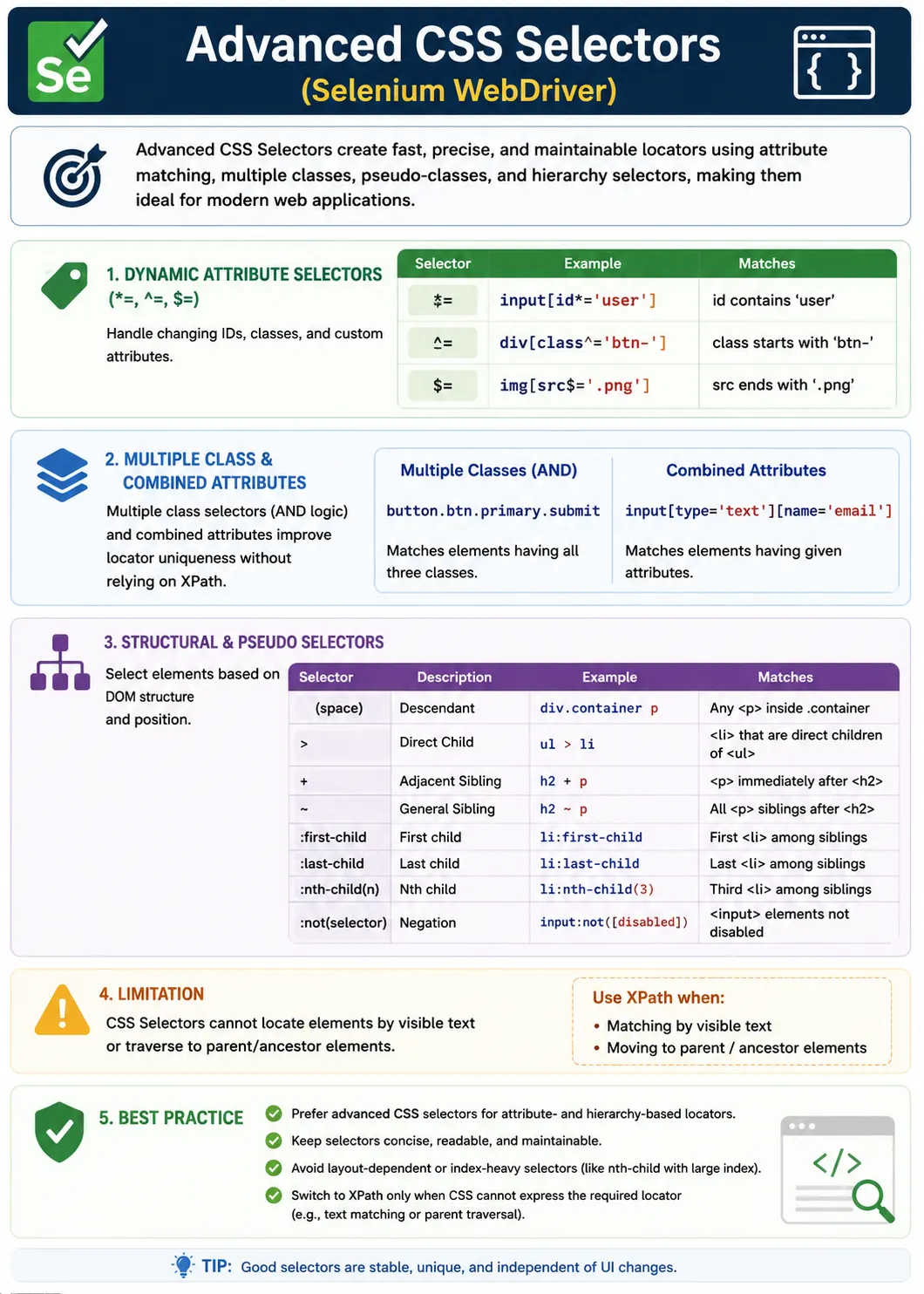
Understanding Advanced CSS Selectors in Selenium
Advanced CSS selectors are used in Selenium when basic locators are not enough, but the page can still be described cleanly through attributes, classes, hierarchy, and structural relationships. A simple selector such as #username or .login-btn is useful when the element has a stable id or class. Real applications, however, often require more precision. A page may have several buttons with the same class, multiple forms with similar inputs, generated ids with stable prefixes, repeated cards, dynamic components, and disabled variants of the same control. Advanced CSS selectors help testers handle these situations without immediately switching to XPath.
CSS selectors are attractive in Selenium because they are browser-native, concise, and familiar to frontend developers. The browser already uses CSS selector logic to apply styles, so Selenium can use that same querying capability to find elements. Advanced selectors extend this usefulness by supporting partial attribute matches, multiple class matching, child and descendant relationships, sibling combinators, and pseudo-classes such as first-child, last-child, nth-child, nth-of-type, and not. These features allow CSS to handle many practical locator problems while keeping the expression readable.
The purpose of advanced CSS is not to write long or complicated selectors. The purpose is to write selectors that are specific enough to identify the correct element and simple enough to maintain. A reliable selector should describe the element's stable identity or context, not every incidental wrapper around it. If a selector depends on several layout containers, generated classes, or raw indexes, it may work today but fail during a normal UI update. Advanced CSS selectors are most valuable when they reduce ambiguity without over-specifying the page structure.
Why Advanced CSS Selectors Matter
Precision Without Excessive Complexity
Advanced CSS selectors matter because many elements cannot be located safely by one simple clue. A class such as primary may appear on multiple buttons. An input[type='text'] selector may match several fields. A link selector may return many navigation links. By combining tag, class, id, and attribute information, a tester can narrow the locator to the exact target. For example, input[type='text'][name='email'] is much more precise than input, and button.btn.primary is clearer than a broad class-only selector.
Precision is especially important in automated tests because Selenium usually interacts with the first matching element when findElement is used. A selector that accidentally matches multiple elements may still pass for a while if the first match happens to be correct. That is a fragile coincidence, not a reliable design. Advanced selectors help avoid that situation by adding meaningful constraints. They let the locator say not just find a button, but find the submit-style button inside this form or the enabled primary button in this component.
Good selector precision also improves debugging. When a test fails, a readable selector tells the engineer what the test expected to find. A selector such as form#loginForm input[name='username'].required communicates the form context, the field name, and a required-field state. That is much easier to reason about than a long generated XPath or an unclear class selector. Locator readability matters because automation suites are maintained by teams over time, not by one person on the day the test is written.
Fast Browser-Native Selection
CSS selectors are often discussed as faster than XPath. In practice, browser engines are highly optimized for CSS selection, and simple CSS selectors are very efficient. However, the larger benefit is not only raw speed. It is the combination of speed, clarity, and maintainability. A short, stable CSS selector avoids unnecessary DOM traversal and makes the test easier to review. In a large test suite, small improvements in locator quality reduce failure noise and investigation time.
Performance should still be understood pragmatically. A reliable XPath can be better than a brittle CSS selector, and a poor CSS selector can be expensive if it is broad or causes repeated waits. The real performance problem in Selenium is often not the selector engine; it is locator failure, timeout, retry, and rerun cost. Advanced CSS selectors support performance by making locators clear and targeted. A selector that finds the correct element quickly and consistently is faster in the way that matters to a test team.
Advanced Attribute Selectors
Contains, Starts With, and Ends With
Attribute selectors are among the most useful advanced CSS features in Selenium. Exact attribute selectors match values directly, such as input[name='email'] or button[type='submit']. Partial attribute selectors are useful when values are partly dynamic. The contains operator, written *=, matches when an attribute includes a value anywhere. The starts-with operator, written ^=, matches when an attribute begins with a value. The ends-with operator, written $=, matches when an attribute ends with a value.
These selectors are especially helpful when dealing with generated ids, file names, href values, data attributes, and framework-generated names that still contain a stable piece. For example, an id might be user_7392 today and user_9811 tomorrow. A selector such as input[id^='user_'] can handle the changing suffix while still expressing the expected prefix. A selector such as img[src$='.png'] can match images by extension if that is the relevant stable clue. These patterns are similar in purpose to XPath functions such as contains and starts-with.
Partial attribute matching must be used carefully. A selector such as div[class*='col'] may match a large number of layout elements because col is common in CSS frameworks. A dynamic selector should ignore unstable parts, but it should not become vague. If a partial match is broad, combine it with a tag, parent context, second attribute, or stable data attribute. Precision remains the goal. Flexibility is useful only when it preserves the correct identity of the target element.
Using Data Attributes as Automation Hooks
In mature test automation projects, data attributes are often the best foundation for CSS selectors. Attributes such as data-testid, data-test, data-qa, or data-cy are usually added specifically to support testing. They are less likely to change during visual redesigns because they are not tied to styling. A selector such as button[data-test='login-submit'] is much stronger than one based on a generated class or a chain of layout containers. It describes the purpose of the element in a stable way.
When data attributes are available, advanced CSS becomes cleaner. A test can locate a container by a data attribute and then use simple selectors inside that container. If a product card has data-test='product-card', the page object can first collect product cards and then find buttons, prices, and labels inside each card. This approach supports component-based testing and keeps selectors readable. It also creates a clear contract between developers and automation engineers.
Multiple Class Matching
Why CSS Handles Classes Better Than className
CSS selectors have a major advantage over Selenium's className locator because CSS can match multiple classes on the same element. The className locator expects one class name. A CSS selector such as button.btn.primary means a button element that has both btn and primary classes. This is useful when each class alone is too broad but the combination identifies the element clearly. It is a common and practical pattern in Selenium projects.
The important detail is that multiple classes are written without spaces when they must belong to the same element. button.btn.primary is not the same as button .btn .primary. The first selector describes one button with multiple classes. The second describes a descendant structure, where an element with class primary is inside an element with class btn, which is inside a button. This distinction is frequently tested in interviews and often causes mistakes in real scripts.
Multiple class selectors are best when the classes are semantic and stable. Classes such as login-button, submit-action, product-card, or error-message may be meaningful. Classes such as mt-2, col-md-6, text-center, or generated hashes are usually styling details. Styling classes may change when the UI design changes, even though the application behavior remains the same. A good selector should depend on behavior-oriented or component-oriented classes whenever possible.
Pseudo-Classes for Structural Precision
first-child and last-child
Pseudo-classes allow CSS selectors to describe structural positions. first-child selects an element if it is the first child of its parent. last-child selects an element if it is the last child of its parent. These can be useful in menus, lists, breadcrumb trails, navigation bars, and simple repeated structures where the order is stable and meaningful. For example, selecting the first menu item may be valid if the requirement is explicitly about the first item.
The caution is that position-based selectors are only reliable when position is part of the expected behavior. If a new menu item is added before the target, first-child will point to a different item. This is similar to index-based XPath risk. Use first-child and last-child when the test intention is tied to first or last position, not merely because the target currently appears there. If a stable attribute exists, it is usually better than positional selection.
nth-child and nth-of-type
nth-child and nth-of-type provide more specific positional matching. nth-child checks the element's position among all children of the parent. nth-of-type checks the element's position among siblings of the same tag type. This distinction matters when a parent contains mixed tags. For example, if a container has an h3, a p, and several div elements, div:nth-of-type(2) is different from div:nth-child(2). Understanding this difference prevents accidental matches.
Positional pseudo-classes are useful for simple grids and lists, but they should not be the first choice for business-critical actions when stable attributes or data values exist. A selector such as table tr:nth-child(2) may work in a controlled example, but a real table can change due to sorting, filtering, pagination, or new records. If the test needs the row for a specific user, CSS alone may not be the best tool because CSS cannot match visible text. In that situation, XPath may be more appropriate.
The not Pseudo-Class
The not pseudo-class is one of the most useful advanced CSS selectors for Selenium. It excludes elements that match a condition. For example, button:not([disabled]) selects buttons that do not have the disabled attribute. This is helpful when the page contains active and inactive versions of similar controls. It can also be used to ignore placeholder elements, disabled buttons, or hidden variants when those states are represented by attributes or classes.
not should be used as part of a precise selector, not as a substitute for proper waits. An element may not have the disabled attribute but still be covered by an overlay or not yet clickable. Selenium still needs explicit waits for visibility and clickability when interaction readiness matters. The selector can identify a structurally enabled element, while the wait confirms that the browser is ready for the action.
Structural Combinators
Descendant and Direct Child Combinators
Structural combinators control how a selector moves through the DOM. The descendant combinator is a space. It selects matching elements at any depth inside a parent. For example, form input selects all input elements anywhere inside a form. This is flexible and works well when the page has wrapper elements. The direct child combinator is the greater-than symbol. It selects only immediate children. For example, form > input selects inputs that are direct children of the form.
The choice between descendant and direct child depends on the stability of the component structure. Descendant is more tolerant of layout wrappers. Direct child is more precise when the immediate relationship is stable and meaningful. Overusing direct child can make selectors fragile if developers add wrapper divs. Overusing broad descendant selectors can match unintended nested elements. The best selector uses just enough hierarchy to narrow the search without copying the whole page structure.
Adjacent and General Sibling Combinators
CSS sibling combinators are useful when related elements appear beside each other under the same parent. The adjacent sibling combinator, written +, selects the next immediate sibling. A selector such as label + input means an input immediately after a label. This is useful in simple forms where labels and fields are direct neighbors. The general sibling combinator, written ~, selects following siblings that share the same parent, even if they are not immediately next to the anchor element.
Sibling combinators can make CSS more relationship-aware, but they are not as flexible as XPath axes. CSS can move from one sibling to a following sibling, but it cannot move upward to a parent and then back down in the same way XPath can. CSS also cannot locate a label by visible text and then move to an input. If the form has stable classes or attributes on labels and inputs, CSS may work well. If the only stable clue is visible text, XPath is usually required.
Building Reliable Advanced CSS Selectors
Layering Selectors Without Over-Specifying
A strong advanced CSS selector layers meaningful clues. It may start with a stable container, add a tag, and include one or two important attributes or classes. For example, form#loginForm input[name='username'].required gives context, element type, name, and state. This is precise but still readable. The selector does not list every div between the form and the input. It focuses on relevant identity rather than incidental structure.
Over-specification is a common problem. A selector that mirrors the visual layout can break when the UI is refactored. Layout wrappers, grid classes, spacing classes, and design-system containers change frequently. The behavior of the page may stay the same while the selector fails. A shorter selector based on stable attributes is often better than a longer selector based on DOM shape. Advanced CSS should simplify locator design, not make it more brittle.
Validating Uniqueness in DevTools
Every advanced selector should be checked for uniqueness before it is committed to a framework. Browser developer tools can show how many elements match a selector. If the selector matches zero elements, the syntax or context may be wrong. If it matches many elements, the selector may need additional conditions or a scoped parent. If it matches exactly one element, it is easier to trust. When multiple matches are expected, the test should use findElements intentionally and assert the expected count or iterate through the collection.
Uniqueness should also be evaluated in realistic states. A selector may be unique on an empty page but not after data loads. It may be unique on desktop but not on mobile if responsive components render duplicates. It may be unique before a modal opens but not after. Reliable selector design includes checking the page state in which the test will run, not only the initial DOM snapshot.
Advanced CSS in Page Object Model
Centralizing Locator Strategy
Advanced CSS selectors belong in Page Object Model classes rather than scattered throughout test methods. A page object can expose clear methods such as enterEmail, clickPrimarySubmit, openUserMenu, or getProductCards. The selector remains close to the page structure, while the test reads like a business workflow. If a selector changes, it is updated in one page class rather than across many tests.
Page objects also make scoped selectors easier to use. A method can first locate a container using one selector and then find a child element inside it using another selector. This is useful for repeated components such as cards, rows, panels, and modals. The child selector only needs to be unique inside its container, which keeps it shorter and more maintainable. Scoped advanced CSS is often cleaner than one very long page-level selector.
Selector Naming and Review
Locator names and method names should explain intent. A selector stored as submitButton, activeTab, or productCard is easier to understand than a raw string. During code review, advanced CSS selectors should be evaluated for stability, not only correctness. Reviewers should ask whether the selector uses generated classes, whether it is too broad, whether it depends on layout, and whether CSS is the right tool for the requirement. This prevents fragile locators from entering the suite.
Limits of Advanced CSS Selectors
Visible Text and Upward Traversal
Advanced CSS selectors are powerful, but they cannot do everything. The most important limitations are visible text matching and upward traversal. CSS cannot directly select an element because its visible text is Save, Profile, or Error. CSS also cannot start from a child and move up to a parent or ancestor. XPath is better for those requirements because it supports text functions and axes such as parent and ancestor.
Knowing when to switch to XPath is part of advanced locator skill. If a field has no stable attributes but has a stable visible label, XPath may express the label-to-input relationship more clearly. If a table row must be found by visible customer name, XPath is often better. If a parent card must be located based on text inside it, XPath axes may be required. CSS should be the default for attribute-based selection, not a forced solution for every locator problem.
When CSS Remains the Better Choice
CSS remains the better choice when the element has stable attributes, semantic classes, data attributes, or simple downward structure. It is concise and easy to maintain. For example, button[data-test='save'], input[name='email'], div.product-card button.add-to-cart, and button:not([disabled]) are all clean CSS selector use cases. These locators are readable and do not require XPath's additional relational power.
Common Anti-Patterns
Using Generated Framework Classes
One common anti-pattern is relying on generated classes from frontend frameworks. These classes may include hashes, numbers, or build-specific fragments. They can change during deployment without any functional change to the page. If a class looks generated, use it cautiously. Look for a stable data attribute, semantic class, id, name, or aria label instead. If none exists, request a stable automation hook.
Index-Heavy Selectors
Another anti-pattern is using nth-child or nth-of-type simply to force uniqueness. Position-based selectors are fragile when the page can reorder elements or insert new content. They are acceptable when order is the actual behavior being tested, such as the first item in a sorted list or the last row in a log. Otherwise, prefer attributes, scoped containers, or another locator strategy.
Using CSS When Text Is Required
A third anti-pattern is forcing CSS selectors into text-based requirements. If the test must find an element by visible text, XPath is usually more appropriate. Trying to work around this limitation with broad class selectors can create weaker automation. Good locator strategy is practical. Use CSS where CSS is expressive, and use XPath where XPath expresses the requirement better.
Interview Perspective on Advanced CSS Selectors
Short Interview Answer
Advanced CSS selectors use partial attribute matches, multiple classes, pseudo-classes, and combinators to locate elements precisely in Selenium. They are fast, readable, and preferred for attribute-based locators when text matching or parent traversal is not required.
Detailed Interview Answer
In Selenium, advanced CSS selectors help build stable locators for modern web pages by combining tags, ids, classes, attributes, and structure. Selectors such as *=, ^=, and $= support dynamic attributes. Multiple class selectors allow precise class matching. Pseudo-classes such as nth-child and not help select by position or exclude disabled elements. Combinators such as space, greater-than, plus, and tilde control descendant, direct child, adjacent sibling, and general sibling relationships. CSS is excellent for these cases, while XPath is still needed for visible text and ancestor traversal.
Real Project Explanation
In a real Selenium framework, advanced CSS selectors are commonly used in Page Object Model classes for form fields, buttons, cards, menu items, active states, disabled states, and scoped component searches. They keep test code readable and perform well when stable attributes are available. The best selectors avoid generated classes, unnecessary ancestor chains, and fragile indexes. They are validated in DevTools and reviewed as part of framework quality.
Practical Guidelines for Advanced CSS Selectors
Start with Stable Attributes
Begin with stable ids, names, aria labels, roles, and data attributes. If a value is partly dynamic, use partial attribute matching. If the target appears inside a stable container, scope the selector to that container. If the selector becomes long, look for a better hook or split the search into a parent and child lookup.
Use Structure Only When It Adds Meaning
Use child, descendant, and sibling combinators when the relationship is meaningful and stable. Do not copy the full DOM path just because CSS can express it. A selector should be resilient to harmless layout changes. The less it depends on visual wrappers, the better it usually is.
Know When CSS Reaches Its Limit
Switch to XPath when the locator must use visible text, find a parent or ancestor, locate a table row by cell text, or express a relationship CSS cannot represent. This is not a weakness in the automation design. It is correct tool selection. Advanced CSS selectors and XPath complement each other in strong Selenium frameworks.
The key takeaway is that advanced CSS selectors give Selenium testers a fast, expressive, and maintainable way to locate elements when attributes and downward structure are enough. They support dynamic attributes, multiple classes, pseudo-classes, exclusions, and sibling relationships. Used well, they keep locators short and stable. Used carelessly, they can become just as brittle as any other locator. The skill is writing selectors that are precise, meaningful, and aligned with how the page is expected to change.
1. Attribute-Based Advanced Selectors (Dynamic-Friendly)
1.1 Contains (*=) - Most Used
Matches elements whose attribute contains a value.
input[id*='user']Use when: IDs/classes have dynamic suffixes.
1.2 Starts With (^=)
Matches attributes that start with a value.
div[id^='order_']Use when: Auto-generated IDs share a fixed prefix.
1.3 Ends With ($=)
Matches attributes that end with a value.
img[src$='.png']Use when: File extensions or stable endings exist.
2. Multiple Class Matching (Major Advantage over className)
CSS supports AND-ing classes naturally.
button.btn.primary.submitMatches:
<button class="btn primary submit">...</button>Best practice: Prefer this over XPath when classes are stable.
3. Pseudo-Classes for Precision
3.1 :first-child, :last-child
ul li:first-child
ul li:last-child
Use when: DOM order is stable.
3.2 :nth-child(n) / :nth-of-type(n)
table tr:nth-child(2)
div.card:nth-of-type(3)
Note: nth-of-type is safer when mixed tags exist.
3.3 :not() - Exclusion (Very Useful)
button:not([disabled])Use when: You must avoid disabled/hidden variants.
4. Structural Combinators (Hierarchy Control)
4.1 Descendant (space)
form inputFinds inputs anywhere inside the form.
4.2 Direct Child (>)
form > inputFinds only immediate children.
Use for precision and performance.
4.3 Adjacent Sibling (+)
label + inputSelects the next immediate sibling.
Common pattern: label means field.
4.4 General Sibling (~)
h3 ~ buttonSelects all following siblings of the same parent.
5. Combining Selectors for Uniqueness (Recommended Pattern)
Layer selectors to reduce ambiguity without over-specifying:
form#loginForm input[name='username'].requiredCombines:
- ID (context)
- Attribute
- Class
6. What Advanced CSS Still Cannot Do (Know the Limits)
CSS cannot:
- Match visible text
- Traverse upward to parents/ancestors
- Perform complex relational logic like XPath axes
Rule: If you need text matching or ancestor traversal means use XPath.
7. Performance & Maintainability Guidance
- Prefer short, intention-revealing selectors
- Avoid chaining too many ancestors
- Favor attributes over indexes
- Validate uniqueness in DevTools
- Centralize selectors in Page Objects
8. Common Anti-Patterns
- Over-specific selectors tied to layout
- Relying on auto-generated framework classes
- Index-heavy selectors when attributes exist
- Using CSS when text matching is required
9. Interview Perspective
Short Answer: Advanced CSS selectors use attributes, pseudo-classes, and combinators to precisely locate elements with better performance than XPath.
Real-Time Answer: In Selenium, advanced CSS selectors leverage partial attribute matches, multiple classes, and structural combinators to create fast and maintainable locators. They are preferred for attribute-based identification, while XPath is used when text or ancestor traversal is needed.
10. Key Takeaway
- Advanced CSS selectors are fast and expressive
- Excellent for dynamic attributes and class combinations
- Use pseudo-classes and combinators for precision
- Know when to switch to XPath
- Default to CSS for speed and clarity-switch to XPath only when CSS cannot express the requirement.
11. Interview-Ready Advanced CSS Selector Examples
1. Multiple Classes (Very Common)
driver.findElement(
    By.cssSelector("button.btn.primary")
).click();
Matches
<button class="btn primary">2. Attribute Contains (*=)
driver.findElement(
    By.cssSelector("input[id*='user']")
).sendKeys("admin");
Equivalent to XPath contains().
3. Attribute Starts With (^=)
driver.findElement(
    By.cssSelector("div[id^='menu_']")
);
4. Attribute Ends With ($=)
driver.findElement(
    By.cssSelector("input[id$='_name']")
);
5. Multiple Attribute Conditions
driver.findElement(
    By.cssSelector("input[type='text'][name='email']")
).sendKeys("test@example.com");
6. Direct Child Selector (>)
driver.findElement(
    By.cssSelector("form#loginForm > input")
);
Direct child only.
7. Descendant Selector (Space)
driver.findElement(
    By.cssSelector("form#loginForm input")
);
Any depth inside form.
8. Adjacent Sibling Selector (+)
driver.findElement(
    By.cssSelector("label + input")
).sendKeys("admin");
Matches
Input immediately after label.
9. General Sibling Selector (~)
driver.findElement(
    By.cssSelector("label ~ input")
);
Matches
All input siblings after label.
10. nth-child() Selector
driver.findElement(
    By.cssSelector("ul#menu li:nth-child(3)")
).click();
11. nth-of-type() Selector
driver.findElement(
    By.cssSelector("table tr:nth-of-type(2)")
);
12. first-child
driver.findElement(
    By.cssSelector("ul#menu li:first-child")
).click();
13. last-child
driver.findElement(
    By.cssSelector("ul#menu li:last-child")
).click();
14. :not() Selector (Interview Favorite ⭐)
driver.findElement(
    By.cssSelector("button:not(.disabled)")
).click();
15. Dynamic Table Row Selection
driver.findElement(
    By.cssSelector("table#users tr:nth-child(2) td:nth-child(3)")
).getText();
16. Combining ID + Class + Attribute
driver.findElement(
    By.cssSelector("input#username.form-control[type='text']")
);
17. Complex Nested Structure
driver.findElement(
    By.cssSelector("div.card > div.card-body > button.primary")
).click();
18. Partial Match on data-* Attribute
driver.findElement(
    By.cssSelector("button[data-test*='login']")
).click();
Best Practice
Use data-test attributes when available.
19. Context-Based Advanced CSS (Chaining)
WebElement card = driver.findElement(By.className("product-card"));

card.findElement(
    By.cssSelector("button.add-to-cart")
).click();
20. Safe Multi-Element Advanced Selector
List<WebElement> products =
    driver.findElements(By.cssSelector("div.product-card"));

System.out.println(products.size());
21. Advanced CSS After Refresh (Stale Fix)
WebElement btn =
    driver.findElement(By.cssSelector("button.save.primary"));

driver.navigate().refresh();

btn =
    driver.findElement(By.cssSelector("button.save.primary"));
btn.click();
22. CSS Selector in Page Object Model (POM)
@FindBy(css = "button.btn.primary")
WebElement submitBtn;
23. Invalid: Common Interview Mistake
By.cssSelector("//input[@id='username']"); // Invalid: XPath syntaxCorrect
By.cssSelector("#username"); // Valid: CSS syntax24. Advanced CSS vs XPath (Interview)
CSS:
✔ Faster
✔ Cleaner syntax
✔ Great for dynamic attributes
Invalid: Cannot navigate upward
Invalid: Cannot use text()
XPath:
✔ Can navigate parent/ancestor
✔ Can match text()
25. Interview Summary - Advanced CSS Selectors
driver.findElement(By.cssSelector("complexCssExpression"));Key Points
- Use
*=,^=,$=for dynamic attributes - Use
>for direct child - Use
+or~for sibling navigation - Use
:not()for exclusions - Prefer CSS over XPath when possible