Absolute vs Relative XPath
Understanding the difference between Absolute XPath and Relative XPath is critical for writing stable, maintainable Selenium locators. In real projects, wrong XPath choice is one of the biggest reasons for flaky tests.
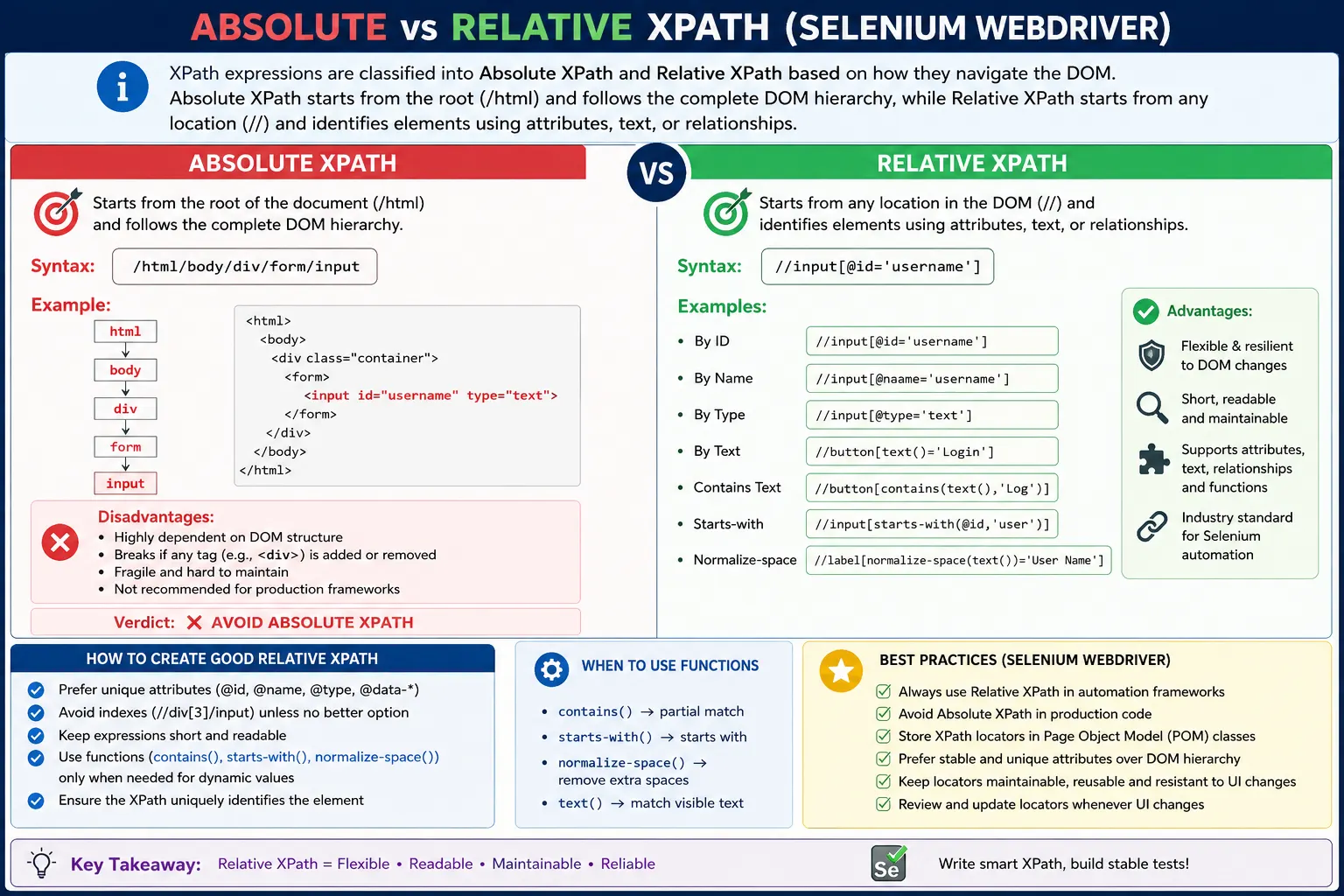
Understanding Absolute XPath and Relative XPath
XPath is powerful because it can describe the location of an element inside the DOM tree in more than one way. The two most important styles are absolute XPath and relative XPath. Both can technically locate elements, but they behave very differently in real Selenium automation. Absolute XPath describes the full route from the root of the document to the target element. Relative XPath describes the target by using a meaningful starting point, attributes, text, functions, or relationships. The difference is not just syntax. It directly affects test stability, readability, and maintenance cost.
Selenium tests fail often when locators are tied too closely to page layout. A page may receive a new wrapper div, a banner may be inserted above a form, a framework may add a container, or responsive design may rearrange the DOM. If the test uses an absolute XPath that depends on every parent node in the exact order, even a harmless structure change can break the locator. The application may still work perfectly for users, but the automated test fails before it can validate the feature. This is why understanding absolute versus relative XPath is a practical skill, not only an interview topic.
Absolute XPath starts from the root node, usually html, and follows the full DOM hierarchy down to the element. It commonly looks like /html/body/div[2]/div/form/div[1]/input. This expression says that Selenium must start at html, go into body, then the second div, then another div, then form, then the first div, and finally the input. The locator is tightly coupled to the current physical structure of the page. If any level changes, the path may point to the wrong element or no element at all.
Relative XPath starts from a broader search context and looks for elements that match a condition. It commonly begins with double slash. An expression like //input[@name='username'] says, "Find an input element anywhere in the current search context where the name attribute is username." Another expression, //form[@id='loginForm']//input[@type='password'], says, "Find the password input inside the login form." These locators are not tied to every wrapper and layout element. They are tied to meaningful attributes and relationships, which makes them more maintainable.
Browser developer tools often make absolute XPath easy to copy. A tester can right-click an element and copy an XPath. Unfortunately, generated XPath is frequently absolute or index-heavy. It may work immediately, which makes it tempting for beginners, but it is usually not a good framework locator. Generated paths describe where the element happened to be at that moment. They do not describe why that element matters. Professional automation locators should express stable identity or context, not temporary layout coordinates.
Relative XPath is preferred because it can survive ordinary UI changes. If a new div is added around the login form, //input[@name='username'] may still work. If the form moves from the center of the page to the right side, //button[normalize-space()='Login'] may still work. If a table gains a new wrapper, an XPath that finds a row by cell text may still work. Relative XPath is not automatically perfect, but it gives testers the tools to write locators based on stable facts rather than fragile positions.
The best relative XPath usually uses attributes that describe purpose. Stable attributes include id, name, type, href, placeholder, aria-label, role, and data-test style attributes when they are intentionally maintained. For example, //input[@id='email'] is clear when the ID is stable. //button[@type='submit'] can be useful inside a specific form. //a[@href='/profile'] identifies a navigation destination. //div[@data-test='toast-message'] uses a test-friendly hook. These expressions are much easier to understand than a long absolute path through nested div elements.
Relative XPath can also use visible text. This is useful when text is part of the requirement or when the page lacks stable attributes. Expressions such as //a[text()='Login'], //button[normalize-space()='Submit'], and //span[contains(text(),'Error')] locate elements by what users see. Text-based XPath should still be used carefully because copy can change, whitespace can vary, and localization can translate labels. When text is stable and meaningful, it can be a strong locator clue. When text is frequently edited, a stable attribute may be better.
One of the strongest reasons to use relative XPath is relationship-based locating. Some pages do not provide a unique attribute on the target element, but the target can be identified by nearby content. A table may contain a row for a customer named John, and the test needs the Edit button in that same row. A card may contain a product title, and the test needs the Add to Cart button inside the card. A label may say Password, and the test needs the input beside it. Relative XPath can express these relationships. Absolute XPath cannot express business meaning in the same maintainable way.
Absolute XPath is often mistaken for being more accurate because it gives the full path. In automation, full path does not mean better. It usually means more fragile. A locator should be specific enough to identify the intended element, but not so dependent on layout that it breaks when a harmless container changes. Accuracy in Selenium is about matching the right element for the right reason. Relative XPath can be accurate because it uses attributes, text, and context that describe the target. Absolute XPath is often only precise about position, and position is not always stable.
Indexes are a major warning sign in both absolute and relative XPath. Absolute XPath often contains indexes such as div[2], div[4], input[1], and li[3]. Relative XPath can also use indexes, such as (//input[@type='text'])[1]. Indexes are not always wrong, but they should be used only when position is truly part of the requirement. If a test validates the first search result, an index may be meaningful. If the index is only used because the locator could not identify the element clearly, it is fragile. Prefer attributes, labels, or parent context before relying on position.
Relative XPath does not mean simply placing double slash in front of anything. A locator like //div[3]/span[2] is relative by syntax, but it is still fragile because it depends on indexes and generic tags. A good relative XPath uses meaningful conditions. //div[@class='product-card']//button[normalize-space()='Add to Cart'] is better than //div[3]/button[1], and a data-test attribute would be better still if available. Syntax alone does not guarantee maintainability. The expression must be designed well.
In real frameworks, relative XPath belongs in page objects or component classes. Tests should not contain long XPath expressions directly. A page object can expose a method such as enterUsername(), clickLogin(), editUser(), or openOrderDetails(). Internally it may use XPath, CSS, ID, or another strategy. This keeps test logic focused on user behavior and keeps locator maintenance localized. When the DOM changes, the page object changes, not every test.
Component scoping makes relative XPath even stronger. If a WebElement represents a form, modal, card, row, or section, Selenium can search inside that element using an XPath that begins with .//. The dot means "start from this current element." Without the dot, // searches from the document root. A scoped expression like row.findElement(By.xpath(".//button[normalize-space()='Edit']")) is usually safer than a global search for every Edit button on the page. It connects the action to the correct row.
Relative XPath also works well with dynamic attributes. Some elements have IDs that change slightly on every render, such as user_123 or menu_456. Direct ID locators may fail, but XPath functions such as contains() and starts-with() can use the stable part of the value. For example, //input[starts-with(@id,'user_')] can locate an input with a stable prefix. This should be used thoughtfully. If a stable data-test attribute can be added, that is usually cleaner than relying on generated fragments. But when the DOM cannot be changed, XPath functions are practical tools.
Absolute XPath has a narrow place in learning and debugging. It can help beginners visualize the DOM tree. It can be useful for one-time inspection when experimenting in browser developer tools. It may work for a quick throwaway script against a static HTML page. But it should not be committed into a professional Selenium framework. The cost appears later, when small UI changes create repeated failures. A stable suite is built with locators that are intended to survive change.
A useful review rule is to treat absolute XPath as a code smell. If a locator starts with /html/body, ask why. If it contains several indexes through divs, ask whether an attribute, text, label, table row, parent section, or data-test hook would be better. If the expression is too long to understand quickly, simplify it or move the logic into a component method. The goal is not to ban XPath. The goal is to ban XPath that describes layout more than behavior.
Explicit waits are important regardless of XPath type. A relative XPath can still fail if the element is not yet present or visible. A modal may open after animation, a result table may load after an API call, or a button may become enabled after validation. Use WebDriverWait with conditions such as presenceOfElementLocated, visibilityOfElementLocated, elementToBeClickable, or a custom condition. Locator quality and synchronization quality work together. A strong relative XPath without proper waits can still produce flaky tests.
Stale element issues are also unrelated to absolute versus relative syntax. If a page re-renders after an action, a previously found WebElement may become stale even if the XPath is still correct. The solution is to locate the element again after the update or store the By locator and resolve it at the moment of use. Dynamic frontend frameworks make this common. A locator can be stable while the element reference is not.
When debugging a failing XPath, check the current page state first. The test may be on the wrong URL, the wrong tab, the wrong frame, or the wrong step. Then test the XPath in developer tools and count matches. Confirm that it finds the intended visible element, not a hidden duplicate. If it matches nothing, inspect whether attributes changed, text changed, or the element has not loaded yet. This disciplined debugging approach is faster than replacing one fragile XPath with another.
In interviews, the short answer is that absolute XPath starts from the root of the DOM and is fragile, while relative XPath starts from anywhere in the DOM and uses conditions to locate elements more flexibly. A stronger answer explains that absolute XPath depends on full hierarchy, relative XPath uses attributes, text, functions, and relationships, and real automation frameworks prefer relative XPath because it is more stable and readable. A practical answer adds that even relative XPath can be bad if it is index-heavy or too broad.
The key takeaway is simple: do not copy absolute XPath into automation code. Use relative XPath that expresses stable identity or context. Prefer attributes over indexes, meaningful text over layout paths, and scoped searches over global guesses. XPath is one of Selenium's strongest tools when it is written around page behavior. It becomes one of Selenium's weakest points when it is copied from the browser without thought.
How XPath Choice Affects Real Automation Maintenance
The difference between absolute and relative XPath becomes most visible after the first few weeks of a test automation project. At the beginning, both locators may appear to work. A copied absolute XPath can locate the login button, enter text in a field, or click a menu item during a demo. The problem appears later, when the application receives ordinary UI changes. A designer may add a wrapper div for spacing, a developer may insert a validation message above an input field, or the team may move a button into a reusable component. None of these changes necessarily alter the user's workflow, but they can completely break a DOM-position-based XPath. This is why experienced automation engineers judge a locator not by whether it works once, but by whether it expresses the reason the element is important to the test.
A stable relative XPath usually survives because it is connected to the business meaning of the element. If a checkout page has a button with text such as Place Order, the useful fact is not that the button happens to be the second button inside the third div of the fourth section. The useful fact is that it is the control used to place the order. A relative XPath can express that meaning through visible text, a role-based attribute, a test id, or a relationship to a nearby label. When the locator is written around meaning, the page can change its internal layout without destroying the automation script. This is the practical reason relative XPath is not merely shorter; it is more aligned with how users and testers understand the page.
Maintenance cost is also affected by how easy a locator is to read during failure analysis. When a test fails, the person investigating it may not be the same person who created it. If the locator is an absolute XPath that spans the entire document, the failure gives very little information. The engineer must open the page, inspect the DOM, and count through each level to understand what the locator was trying to find. A relative XPath such as the input next to the Email label or the button inside the shipping address panel immediately communicates intent. That readability reduces debugging time, especially in large suites where failures must be triaged quickly during regression cycles.
XPath design should also account for the difference between uniqueness and stability. A locator can be unique today and still be fragile tomorrow. For example, an expression that selects the fifth row in a table may be unique, but it depends on the row order staying exactly the same. If the application sorts rows differently or adds a new record, the test may select the wrong row while still finding an element. That kind of false success is worse than a clear failure because it can make the automation validate the wrong behavior. A better relative XPath identifies the row by customer name, order number, status, or another value connected to the scenario. Uniqueness matters, but meaningful uniqueness matters more.
In enterprise applications, tables, grids, accordions, modal dialogs, and repeated cards make locator strategy especially important. These screens often contain many similar controls. A page may have several Edit buttons, multiple Save buttons, or repeated labels such as Name and Status. A global XPath that searches for the first matching button can easily interact with the wrong part of the page. The stronger pattern is to first identify the correct container and then locate the element inside that container. XPath supports this style well because it can move from a parent section to a child control, or from known text to a nearby action. This makes the test match the human workflow: first find the correct record, then perform the action on that record.
Relative XPath is also useful when HTML is valid but not automation friendly. Many real applications do not provide clean ids for every element. Some ids are generated dynamically, some classes are produced by CSS frameworks, and some elements have no direct identifying attribute at all. In such cases, testers should avoid jumping straight to absolute XPath. A relative XPath can still use partial attributes, normalized text, ancestor containers, following siblings, and descendant elements to create a stable locator. The goal is to use the most reliable evidence available in the DOM, not the longest path available from the browser.
Collaboration with developers can improve XPath quality even further. If a page is difficult to automate because all locators are unstable, the best solution may not be a clever XPath. The best solution may be to add stable automation attributes such as data-testid, data-qa, or data-test. These attributes give the automation suite a clear contract with the application. Even then, XPath remains valuable because it can combine stable attributes with relationships. For example, a test can locate a product card by its data attribute and then find the Add to Cart button inside that card. This combination keeps locators both reliable and expressive.
There is also a performance dimension, although it is often misunderstood. Modern browser engines are very good at evaluating XPath, and the difference between a reasonable XPath and a reasonable CSS selector is rarely the main bottleneck in an automation suite. The bigger performance problem comes from unreliable locators that trigger repeated waits, retries, and stale element failures. An absolute XPath that breaks after a small DOM change may cause the test to wait until timeout. A relative XPath that targets the correct element quickly is usually faster in practice because it reduces uncertainty. Good locator design improves performance by reducing failure noise and unnecessary searching.
Absolute XPath sometimes appears attractive because it is easy to generate automatically. Browser developer tools can copy it with a menu option, and beginners naturally trust generated output. However, generated XPath is not written with test intent in mind. The browser does not know whether the element is a login button, a profile link, a table action, or a temporary placeholder. It simply describes one path through the current DOM. Automation code needs something more durable than a snapshot. It needs a locator that will still make sense after common refactoring, responsive layout changes, and content updates.
A good practical rule is to treat absolute XPath as an inspection aid, not as production automation code. It can help you understand where an element lives in the DOM, but it should not usually be the final locator. Once you have inspected the element, rewrite the locator in relative form. Look for attributes first, then visible text, then stable parent-child relationships, and only then consider position-based expressions. This order keeps the locator close to the element's identity and away from incidental structure.
XPath should also be reviewed as part of code quality. In strong automation teams, locators are not treated as minor details hidden inside scripts. They are part of the framework's reliability. During code review, a long absolute XPath should raise the same concern as duplicated logic or unclear assertions. Reviewers should ask whether the locator would survive a layout wrapper, whether it could match more than one element, whether it depends on translated text, and whether it is scoped to the right component. These questions prevent unstable tests from entering the suite.
Internationalization and content changes introduce another practical consideration. XPath expressions based on visible text are often readable, but they can become fragile if the application supports multiple languages or frequently changes labels. In such cases, stable attributes may be better than exact text. If text must be used, normalize-space can reduce failures caused by extra whitespace, and contains can help when only part of the text is stable. The important point is not that one XPath technique is always best. The important point is that the locator should be chosen based on how the page changes in the real application.
Shadow DOM, iframes, and modern component libraries can further shape XPath decisions. Selenium cannot locate elements inside an iframe until the driver switches into that frame, and XPath cannot cross certain component boundaries in the same way a human visually scans a page. When a locator fails, the issue may not be the XPath syntax at all; the element may be inside a different browsing context or rendered after an asynchronous update. This is why XPath strategy should be paired with correct context switching and explicit waits. Locator quality and synchronization quality work together.
For interview answers, the clean explanation is that absolute XPath starts from the root of the document and follows the complete DOM hierarchy, while relative XPath starts from a chosen point and identifies elements using attributes, text, or relationships. Absolute XPath is fragile because it depends heavily on page structure. Relative XPath is preferred because it is shorter, more readable, and more stable when written carefully. A strong answer should also mention that relative XPath can still be bad if it overuses indexes or vague contains expressions. The real skill is not choosing relative XPath blindly, but writing relative XPath with stable intent.
In daily Selenium work, this distinction affects the trustworthiness of the whole test suite. A suite filled with absolute XPath may pass on the day it is created and become expensive within a few releases. A suite built with thoughtful relative XPath, page object methods, stable attributes, and clear scoping can support regular UI change without constant repair. That stability is what automation is meant to provide. Tests should give the team fast feedback about product behavior, not consume time because locators were tied to accidental DOM structure.
In Selenium, Relative XPath is the industry standard.
1. Absolute XPath
Definition: Absolute XPath starts from the root of the DOM (/html) and traverses the entire hierarchy to reach an element.
Syntax:
/html/body/div/form/inputCharacteristics:
- Starts with a single slash /
- Uses exact DOM structure
- Includes every parent node
Disadvantages of Absolute XPath (Major Issues)
- Extremely fragile
- Breaks if:
- A <div> is added
- Layout changes
- UI framework updates
- Hard to read and maintain
- Never used in professional frameworks
Verdict: Invalid: Avoid Absolute XPath in automation.
2. Relative XPath
Definition: Relative XPath starts from any node in the DOM and searches for matching elements based on attributes, text, or relationships.
Syntax:
//input[@id='username']Characteristics:
- Starts with double slash //
- Independent of full DOM hierarchy
- Uses attributes and functions
- Much more stable
Advantages of Relative XPath
- Resilient to DOM changes
- Readable and maintainable
- Supports:
- Dynamic attributes
- Text matching
- DOM relationships
- Preferred in real projects
Verdict: Valid: Always use Relative XPath.
3. Side-by-Side Comparison
| Aspect | Absolute XPath | Relative XPath |
|---|---|---|
| Starts with | / | // |
| DOM dependency | Full path | Partial |
| Stability | Very Low | High |
| Maintainability | Poor | Good |
| Industry usage | Invalid: Never | Valid: Always |
4. Example Comparison
Absolute XPath (Bad):
/html/body/div[2]/div/form/div[1]/inputRelative XPath (Good):
//input[@name='username']Even if layout changes, the relative XPath remains valid.
5. When Absolute XPath Might Appear (Rare Case)
- Quick debugging
- One-time experiments
- Learning XPath structure
Warning:️ Never commit absolute XPath to a test framework.
6. Best Practices for Relative XPath
- Prefer attribute-based XPath
- Use contains() or starts-with() for dynamic values
- Keep XPath expressions short
- Avoid index-based XPath unless unavoidable
- Combine attributes for uniqueness
7. Common Beginner Mistakes
- Copy-pasting absolute XPath from browser dev tools
- Thinking absolute XPath is more "accurate"
- Writing long, unreadable XPath
- Using indexes instead of attributes
These lead to high maintenance cost.
8. Interview Perspective
Short Answer: Absolute XPath starts from the root of the DOM and is fragile, while relative XPath starts anywhere in the DOM and is more stable.
Real-Time Answer: In Selenium, absolute XPath depends on the complete DOM hierarchy and breaks easily when the UI changes, whereas relative XPath uses attributes and is resilient to layout changes, making it the preferred choice in real-world automation.
9. Key Takeaway
- Absolute XPath = fragile
- Relative XPath = stable
- Never use absolute XPath in real projects
- Attributes > indexes
- Readability matters
- If you remember only one rule: Never use absolute XPath in Selenium automation.
10. Absolute vs Relative XPath - Practical Examples
1. Absolute XPath - Basic Example Invalid:
driver.findElement(
    By.xpath("/html/body/div[2]/form/input[1]")
).sendKeys("admin");
Why Bad
- Breaks if any DOM level changes
- Hard to read & maintain
2. Relative XPath - Basic Example Valid:
driver.findElement(
    By.xpath("//input[@id='username']")
).sendKeys("admin");
Why Good
- Independent of DOM depth
- Stable & readable
3. Absolute XPath for Button Invalid:
driver.findElement(
    By.xpath("/html/body/div[1]/div[2]/button")
).click();
4. Relative XPath for Same Button Valid:
driver.findElement(
    By.xpath("//button[text()='Login']")
).click();
5. Absolute XPath with Index (Very Fragile) Invalid:
driver.findElement(
    By.xpath("/html/body/div[2]/ul/li[3]/a")
).click();
Problem
- UI reorder means test fails
6. Relative XPath with Attribute (Stable) Valid:
driver.findElement(
    By.xpath("//a[@href='/profile']")
).click();
7. Absolute XPath for Input Field Invalid:
driver.findElement(
    By.xpath("/html/body/form/div/input[2]")
).sendKeys("secret");
8. Relative XPath Using Parent means Child Valid:
driver.findElement(
    By.xpath("//form[@id='loginForm']/input[@type='password']")
).sendKeys("secret");
9. Absolute XPath After UI Change (Breaks) Invalid:
// New wrapper div added means XPath breaks
/html/body/div[3]/form/input[1]
10. Relative XPath Survives UI Change Valid:
driver.findElement(
    By.xpath("//form[@id='loginForm']//input[@name='username']")
);
11. Absolute XPath Generated by Browser Invalid:
/html/body/div/div[2]/div[1]/div/form/buttonInterview Note
- Auto-generated XPaths are not recommended
12. Relative XPath Using contains() Valid:
driver.findElement(
    By.xpath("//button[contains(text(),'Log')]")
).click();
13. Absolute XPath for Table Cell Invalid:
driver.findElement(
    By.xpath("/html/body/table/tbody/tr[2]/td[3]")
).getText();
14. Relative XPath for Table Cell by Content Valid:
driver.findElement(
    By.xpath("//tr[td[text()='John']]/td[3]")
).getText();
15. Absolute XPath vs Relative XPath (Same Element)
// Invalid: Absolute
/html/body/div[1]/form/input[1]

// Valid: Relative
//form[@id='loginForm']//input[@name='username']
16. Relative XPath with normalize-space() Valid:
driver.findElement(
    By.xpath("//button[normalize-space()='Submit']")
).click();
Why
- Handles extra spaces in text
17. Absolute XPath in Dynamic Pages Invalid:
/html/body/div[4]/div[2]/spanFails When
- Ads / banners load dynamically
18. Relative XPath with Context (.) Valid:
WebElement card = driver.findElement(By.className("product-card"));
card.findElement(By.xpath(".//button[text()='Add to Cart']"))
    .click();
19. Relative XPath with Index (Last Option) Warning:️
driver.findElement(
    By.xpath("(//input[@type='text'])[1]")
).sendKeys("value");
Rule
- Use index only if no better option
20. Invalid: Common Interview Mistake
By.xpath("/div/input"); // Invalid: invalid absolute XPath

By.xpath("//div/input"); // Valid: relative XPath
21. Performance Perspective (Interview)
- Absolute XPath means slow + fragile
- Relative XPath means faster + stable
22. Relative XPath Stored as By (Framework Style)
By username = By.xpath("//input[@id='username']");
driver.findElement(username).sendKeys("admin");
23. Relative XPath in Page Object Model (POM)
@FindBy(xpath = "//button[text()='Login']")
WebElement loginBtn;
24. When Absolute XPath Is Acceptable (Rare)
- ✔ Static HTML pages
- ✔ One-time scripts
- ✔ No UI changes expected
25. Interview Summary - Absolute vs Relative XPath
Absolute XPath
- Invalid: Starts from root (/html/body)
- Invalid: Very fragile
- Invalid: Hard to maintain
Relative XPath
- Valid: Starts with //
- Valid: Stable & flexible
- Valid: Preferred in automation