What Is Maven?
Introduction
In modern software development, building an application involves much more than simply writing source code. Developers must compile code, manage external libraries, run automated tests, package applications, generate reports, and deploy artifacts to various environments. As projects grow larger and teams become more distributed, performing these activities manually becomes increasingly difficult, time-consuming, and error-prone. This challenge led to the creation of build automation tools, and among them, Maven became one of the most widely adopted solutions in the Java ecosystem.
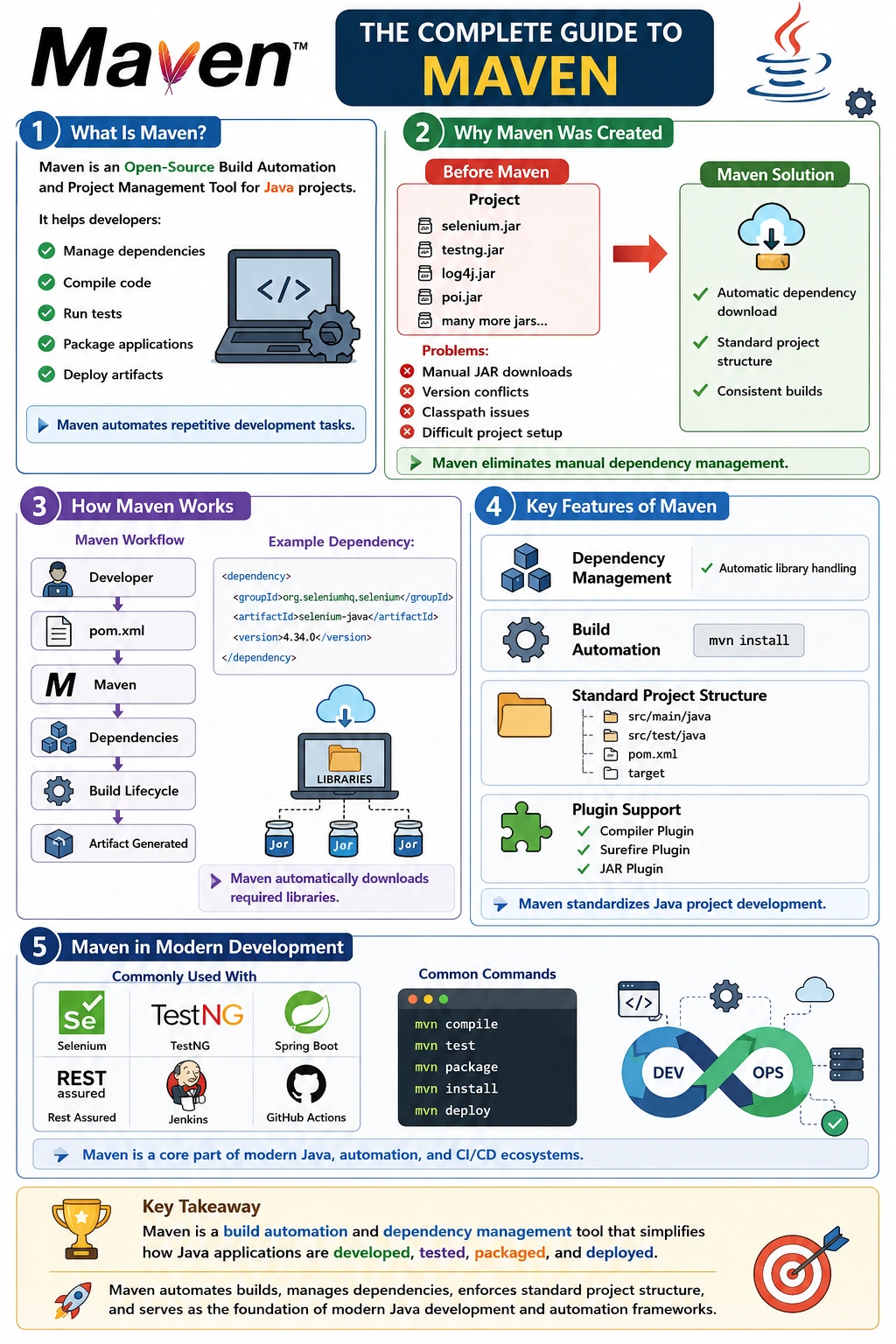
Maven is an open-source Build Automation and Project Management Tool primarily used for Java applications. It provides a standardized way to build, test, package, and manage software projects. Instead of manually downloading libraries, configuring classpaths, writing custom build scripts, and coordinating project structures across teams, Maven automates these tasks through a simple configuration file called the Project Object Model (POM).
Today, Maven is used by millions of developers worldwide and serves as the backbone of countless Java applications, Selenium automation frameworks, Spring Boot projects, REST API testing frameworks, enterprise systems, and CI/CD pipelines. Understanding Maven is essential for any Java developer, automation engineer, or software tester because it significantly simplifies project management and improves development productivity.
Understanding Maven in Simple Terms
At its core, Maven is a tool that automates the software build process. Instead of manually performing repetitive tasks such as compiling code, downloading dependencies, running tests, packaging JAR files, and deploying applications, developers can instruct Maven to perform these tasks automatically.
A simple way to think about Maven is as a project manager for software development. Just as a project manager coordinates resources, schedules, and deliverables, Maven coordinates source code, libraries, build configurations, testing activities, and deployment processes.
In practical terms, Maven allows developers to focus on writing business logic while it handles the infrastructure required to build and maintain applications consistently across different environments.
What Does Maven Mean?
Interestingly, Maven is not officially an acronym.
The name originates from the Yiddish language, where the word "Maven" means "expert" or "accumulator of knowledge."
This name was intentionally chosen by the Apache Software Foundation because Maven acts as a central repository of project knowledge. It stores information about dependencies, plugins, build configurations, project structure, reporting settings, and deployment requirements in a single location.
Rather than scattering project information across multiple configuration files, Maven centralizes everything into one manageable structure.
The Challenges Before Maven
To understand why Maven became so popular, it is important to examine how Java projects were managed before Maven existed.
In traditional Java development, developers manually downloaded external libraries and stored them inside project folders.
A typical project might contain:
Project
 ├── selenium.jar
 ├── testng.jar
 ├── log4j.jar
 ├── apache-poi.jar
 ├── jackson.jar
 ├── commons-io.jar
 └── many more jars...
While this approach worked for small projects, it quickly became problematic as applications grew.
Developers faced several challenges:
- Manual library downloads
- Dependency version conflicts
- Missing JAR files
- Classpath configuration issues
- Difficult project setup for new team members
- Complex build processes
- Inconsistent project structures
If one developer updated a library version without informing the team, builds could fail unexpectedly. Setting up a new project often required hours of downloading and configuring dependencies manually.
Organizations needed a more reliable and standardized solution.
How Maven Solves These Problems
Maven introduced the concept of dependency management.
Instead of manually downloading libraries, developers simply declare dependencies inside a configuration file.
For example:
<dependency>
    <groupId>org.seleniumhq.selenium</groupId>
    <artifactId>selenium-java</artifactId>
    <version>4.34.0</version>
</dependency>
Once this dependency is added, Maven automatically:
- Downloads the required library
- Downloads dependent libraries
- Stores them locally
- Adds them to the classpath
- Maintains version information
This eliminates the need for manual JAR management.
A developer can clone a project from Git, execute a Maven command, and immediately begin development without manually configuring dozens of dependencies.
Maven's Role in the Software Development Lifecycle
Modern software development follows a sequence of activities.
A typical workflow looks like:
Write Code
     ↓
Compile Code
     ↓
Run Tests
     ↓
Package Application
     ↓
Generate Artifact
     ↓
Deploy
Before Maven, developers often executed each step manually or used custom scripts.
Maven automates this entire lifecycle.
A single command can trigger multiple stages automatically, ensuring consistent builds across development, testing, staging, and production environments.
This automation reduces human error and significantly improves efficiency.
Key Features of Maven
Dependency Management
Dependency management is perhaps Maven's most famous feature.
Modern applications rely on numerous external libraries.
For example, a Selenium automation framework may require:
- Selenium
- TestNG
- Apache POI
- Log4j
- Jackson
- Extent Reports
Managing these manually can be challenging.
Maven handles this automatically through dependency declarations.
When a project is built, Maven checks whether required dependencies are available locally. If not, it downloads them from remote repositories automatically.
This process ensures that all developers work with the same library versions.
Build Automation
Another major feature is build automation.
Without Maven, developers might need to execute separate commands for:
- Compilation
- Testing
- Packaging
- Deployment
Maven combines these activities into a single workflow.
For example:
mvn installThis command automatically:
- Validates the project
- Compiles source code
- Executes tests
- Packages the application
- Installs the artifact locally
Build automation reduces repetitive work and ensures consistent execution across environments.
Standard Project Structure
One of Maven's most valuable contributions is standardization.
Maven enforces a common project layout.
Project
 ├── src
 │   ├── main
 │   │   ├── java
 │   │   └── resources
 │   └── test
 │       ├── java
 │       └── resources
 ├── pom.xml
 └── target
This structure offers several benefits:
- Easier onboarding
- Consistent organization
- Reduced confusion
- Better maintainability
- Improved collaboration
When developers encounter a Maven project, they immediately understand where source code, test code, and resources are located.
Plugin Architecture
Maven itself provides a framework for executing tasks.
Actual functionality is delivered through plugins.
Common plugins include:
| Plugin | Purpose |
|---|---|
| Compiler Plugin | Compiles Java code |
| Surefire Plugin | Executes tests |
| Jar Plugin | Creates JAR files |
| War Plugin | Creates WAR files |
| Deploy Plugin | Deploys artifacts |
Plugins make Maven highly extensible.
Organizations can customize build processes by adding or configuring plugins as needed.
Transitive Dependency Management
A particularly powerful feature of Maven is transitive dependency management.
Suppose Selenium requires additional libraries internally.
When Selenium is declared as a dependency:
<dependency>
    <groupId>org.seleniumhq.selenium</groupId>
    <artifactId>selenium-java</artifactId>
    <version>4.34.0</version>
</dependency>
Maven automatically downloads all supporting libraries required by Selenium.
Developers do not need to identify or manage these dependencies manually.
This dramatically simplifies project setup.
Core Components of Maven
POM (Project Object Model)
The heart of Maven is the POM file.
The file is named:
pom.xmlPOM stands for:
Project Object Model
This file contains:
- Project information
- Dependency definitions
- Plugin configurations
- Build settings
- Repository information
- Profiles
- Reporting configurations
Every Maven project contains a POM file.
It serves as the central source of project configuration.
Repositories
Repositories store Maven artifacts.
Maven supports three repository types.
Local Repository
Stored on the developer's machine.
Typically located in:
.m2/repositoryCentral Repository
Managed by Maven.
Contains thousands of open-source libraries.
Remote Repository
Hosted by organizations.
Used for internal libraries and enterprise artifacts.
Repositories enable Maven to locate and download dependencies automatically.
Build Lifecycle
Maven provides a predefined build lifecycle.
Major phases include:
validate
compile
test
package
verify
install
deploy
Each phase performs a specific task.
Executing a later phase automatically executes all preceding phases.
For example:
mvn packageTriggers:
validate
compile
test
package
This structured lifecycle ensures consistency across projects.
Maven Architecture Overview
The internal workflow of Maven can be visualized as:
Developer
    ↓
 pom.xml
    ↓
 Maven
    ↓
 Dependency Resolver
    ↓
 Local Repository
    ↓
 Remote Repository
    ↓
 Build Lifecycle
    ↓
 Artifact Generated
When Maven executes, it reads the POM file, resolves dependencies, downloads missing artifacts, executes build phases, and generates the final output.
This architecture makes Maven highly efficient and reliable.
Maven in Selenium Automation Projects
Maven is heavily used in Selenium automation frameworks.
A typical framework combines:
Selenium
    +
TestNG
    +
Maven
    +
Git
    +
Jenkins
The Maven workflow often looks like:
mvn testMaven performs:
Read pom.xml
      ↓
Download Dependencies
      ↓
Compile Framework
      ↓
Execute Tests
      ↓
Generate Reports
This automation makes Selenium frameworks easier to maintain and integrate with CI/CD pipelines.
Common Maven Commands
Several commands are used frequently.
Compile Source Code
mvn compileCompiles application source files.
Execute Tests
mvn testRuns automated tests.
Package Application
mvn packageCreates deployable artifacts such as JAR or WAR files.
Install Artifact
mvn installBuilds the project and stores artifacts in the local repository.
Deploy Artifact
mvn deployPublishes artifacts to a remote repository.
These commands form the foundation of Maven-based development.
Advantages of Maven
Benefits for Developers
Developers benefit from:
- Automated dependency management
- Faster project setup
- Consistent project structure
- Reduced manual configuration
- Easier maintenance
Benefits for Teams
Teams gain:
- Standardized development practices
- Better collaboration
- Reduced configuration conflicts
- Simplified onboarding
Benefits for Organizations
Organizations enjoy:
- Reproducible builds
- Improved quality control
- Easier CI/CD integration
- Better release management
- Increased productivity
These advantages explain Maven's widespread adoption across enterprises.
Maven and Modern DevOps
Maven integrates naturally with modern DevOps practices.
Tools such as:
- Jenkins
- GitHub Actions
- GitLab CI
- Azure DevOps
- Bamboo
can invoke Maven commands during automated build pipelines.
Example:
Git Commit
      ↓
Jenkins Trigger
      ↓
mvn clean test
      ↓
mvn package
      ↓
Deployment
This integration enables continuous integration and continuous delivery.
Limitations of Maven
Despite its strengths, Maven has some limitations.
Common challenges include:
- Verbose XML configuration
- Steep learning curve for beginners
- Complex dependency conflicts
- Slower builds for large projects
- Less flexibility compared to Gradle
However, for most enterprise Java projects, Maven remains one of the most reliable and mature solutions available.
Conclusion
Maven is far more than a dependency management tool. It is a complete build automation and project management framework that standardizes how Java applications are developed, tested, packaged, and deployed. By automating repetitive tasks, managing dependencies, enforcing project structure, and supporting a consistent build lifecycle, Maven significantly improves developer productivity and software quality.
Today, Maven is deeply integrated into Java development, Selenium automation, Spring Boot applications, API testing frameworks, enterprise systems, and DevOps pipelines. Its ability to simplify complex build processes and provide reproducible, maintainable project structures has made it a cornerstone of modern software development.
For developers, testers, and automation engineers, mastering Maven is essential because it serves as the foundation upon which professional Java projects are built and maintained.