Exception
An exception in Java is an unexpected or abnormal event that occurs while a program is running and disrupts the normal flow of execution. A Java program normally executes statements one after another, but when something goes wrong, such as division by zero, invalid input, a missing file, a null object access, or a failed network operation, the normal flow cannot continue safely. Java represents that abnormal condition as an exception object and gives the program a structured way to handle it.
Exception handling is one of the most important reliability features in Java. Without exception handling, a small runtime problem can terminate the entire program abruptly. With proper handling, the program can show a meaningful message, recover if possible, release resources, log diagnostic information, and continue or stop gracefully. This is why exception handling is not just an interview topic; it is a practical skill required for production-ready Java applications.
In Java, exceptions are objects. When an abnormal condition occurs, the JVM creates an exception object that contains information about the problem. This object travels through the call stack until suitable handling code is found. If no handler is found, the program terminates abnormally and prints exception information, commonly known as a stack trace. Understanding this flow helps developers write code that fails predictably instead of failing silently or crashing without context.
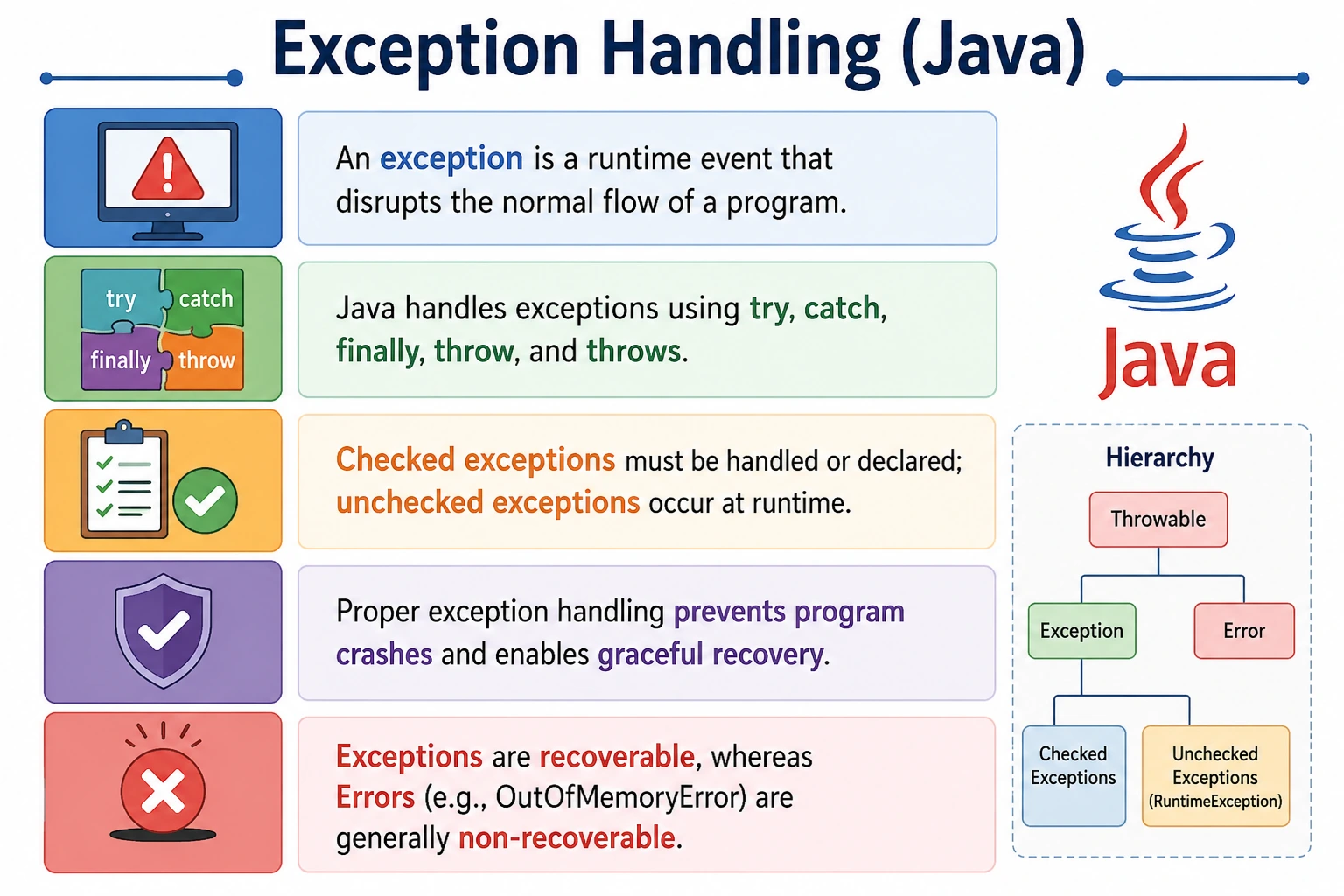
Exceptions are a high-frequency Java interview topic because they connect core language concepts such as the
exception hierarchy, checked and unchecked exceptions, try, catch,
finally, throw, throws, exception propagation, custom exceptions, and
best practices for reliable code. A strong explanation should show both syntax knowledge and practical
judgment about when to handle an exception, when to declare it, and when to let it propagate.
What Is an Exception?
An exception is an abnormal condition that occurs during program execution. It may be caused by invalid input, unavailable resources, incorrect assumptions, programming mistakes, or external system failures. If the exception is not handled, it interrupts the normal path of the program and can cause termination.
Java treats exceptions as objects because that allows information about the problem to be packaged and passed through the program. The exception object may include the exception type, message, stack trace, and cause. The type tells what kind of problem occurred. The stack trace shows where it happened and which method calls led to it. This is extremely useful during debugging and production troubleshooting.
int a = 10 / 0; // ArithmeticException
In this example, division by zero is not valid for integer arithmetic. Java creates an
ArithmeticException. If the exception is not handled, the program stops at that point and the
statements after it do not execute. If it is handled inside a try-catch block, the program can
respond gracefully.
Why Exceptions Occur
Exceptions occur when a program reaches a condition it cannot handle through normal statement execution. Some exceptions come from programming mistakes, such as accessing an array index that does not exist or calling a method on a null reference. Others come from external conditions, such as a missing file, database connection failure, network timeout, permission problem, or invalid user input.
Not every exception means the code is poorly written. A file may be missing because a user selected the wrong path. A network request may fail because the server is temporarily unavailable. A database connection may fail because credentials changed or the service is down. Good Java programs expect these possibilities and handle them in a way that protects the user experience and system stability.
At the same time, some exceptions do indicate defects in the program logic. A NullPointerException
may reveal that the code did not validate an object before using it. An
ArrayIndexOutOfBoundsException may reveal an incorrect loop condition. Exception handling should
not hide these problems. It should make them visible, diagnosable, and controlled.
Exception vs Error (Important Distinction)
Java separates exceptions from errors. Both are subclasses of Throwable, but they represent
different kinds of problems. An exception usually represents a condition that application code may handle or
recover from. An error usually represents a serious JVM or system-level problem that application code should
not normally try to handle.
| Aspect | Exception | Error |
|---|---|---|
| Nature | Recoverable | Non-recoverable |
| Occurs due to | Program logic / runtime issues | JVM or system failure |
| Handling | Can be handled | Should not be handled |
| Example | NullPointerException | OutOfMemoryError |
For example, NullPointerException is an exception. It may be caused by application logic and can
often be prevented or handled. OutOfMemoryError is an error. It indicates that the JVM cannot
allocate required memory. Catching such errors casually is usually a bad practice because the application may
be in an unstable state. In interviews, this distinction shows that you understand Java's failure model, not
just the syntax of try-catch.
Exception Hierarchy (Interview Favorite)
Throwable
 |-- Exception
 |    |-- Checked Exceptions
 |    |    |-- IOException
 |    |-- Unchecked Exceptions
 |         |-- RuntimeException
 |              |-- NullPointerException
 |              |-- ArithmeticException
 |              |-- ArrayIndexOutOfBoundsException
 |-- Error
The root of Java's exception hierarchy is Throwable. Under it, the two major branches are
Exception and Error. Most application-level handling deals with subclasses of
Exception. Within exceptions, Java distinguishes checked exceptions and unchecked exceptions.
Checked exceptions are verified by the compiler. Unchecked exceptions are subclasses of
RuntimeException and are not forced by the compiler.
Types of Exceptions in Java
Checked Exceptions (Compile-Time)
Checked exceptions are exceptions that the compiler forces the programmer to handle or declare. They usually
represent conditions outside the direct control of the program, such as file access problems, database
issues, interrupted operations, or class loading failures. The compiler checks whether the code handles the
exception with try-catch or declares it with throws.
FileReader fr = new FileReader("file.txt"); // IOException
Common checked exceptions include IOException, SQLException, and
ClassNotFoundException. The idea behind checked exceptions is that the caller should consciously
decide how to respond to predictable external problems.
Unchecked Exceptions (Runtime)
Unchecked exceptions occur at runtime and are not enforced by the compiler. They are usually subclasses of
RuntimeException. These exceptions often indicate programming mistakes or invalid assumptions,
such as using a null reference, accessing an invalid array index, parsing invalid numeric text, or dividing
by zero.
int[] arr = new int[3];
System.out.println(arr[5]); // ArrayIndexOutOfBoundsException
Common unchecked exceptions include NullPointerException, ArithmeticException,
NumberFormatException, and ArrayIndexOutOfBoundsException. Good code should prevent
many unchecked exceptions through validation, clear control flow, and defensive programming rather than
catching them everywhere.
Errors
Errors represent serious JVM or system-level problems. Examples include OutOfMemoryError and
StackOverflowError. Application code generally should not attempt normal recovery from these
problems. They indicate that the runtime environment itself may be unable to continue safely.
What Happens When an Exception Occurs
When an exception occurs, Java creates an exception object and interrupts the current normal flow. The JVM
then searches for a matching catch block. It starts in the current method. If no suitable handler
exists there, the exception propagates to the calling method. This process continues up the call stack until
a handler is found or the exception reaches the top of the stack.
If a matching handler is found, the exception is handled and the program can continue according to the logic written after the handler. If no handler is found, the program terminates abnormally. This behavior is called exception propagation, and it explains why exceptions may appear to be thrown in one method but handled in another.
Why Exception Handling Is Important
Exception handling is important because it allows programs to fail gracefully. A user should not see a raw stack trace when they enter invalid input. A file-processing program should report that a file is missing instead of crashing without explanation. A web application should log a server-side exception and return a controlled response instead of exposing sensitive internal details.
Exception handling also improves reliability by giving the program a chance to recover. Recovery may mean retrying an operation, using a fallback value, asking the user for corrected input, rolling back a transaction, closing a resource, or stopping safely with a clear message. Even when recovery is not possible, proper handling helps debugging by preserving meaningful diagnostic information.
Exception Handling Keywords (Preview)
Java provides five main keywords for exception handling. The try block contains code that may
throw an exception. The catch block handles a specific exception type. The finally
block contains cleanup code that should run after the try-catch flow. The throw keyword is used
to explicitly throw an exception object. The throws keyword is used in a method declaration to
announce that a method may pass an exception to its caller.
These keywords are covered in more detail in later exception-handling topics, but the basic idea is that Java separates risky code, handling logic, cleanup logic, explicit throwing, and method-level declaration into clear language constructs.
Exception vs Bug vs Error
The terms bug, exception, and error are sometimes used loosely, but in Java they should be understood separately. A bug is a mistake in the code or design. An exception is a runtime event that represents an abnormal condition. An error is a serious problem related to the JVM or system environment. A bug may cause an exception, but not every exception is necessarily caused by a bug.
| Term | Meaning |
|---|---|
| Bug | Coding mistake |
| Exception | Runtime abnormal event |
| Error | JVM/system failure |
Common Beginner Misconceptions
A common beginner misconception is thinking that all exceptions are errors. In Java, Error has a
specific meaning and represents serious runtime-level problems. Exceptions are usually application-level
abnormal conditions and may often be handled or prevented.
Another misconception is that unchecked exceptions can be ignored because the compiler does not force
handling. Unchecked exceptions still matter. They often point to bugs or missing validation. Catching generic
Exception everywhere is also a poor habit because it hides intent and may swallow problems that
should be fixed. Good exception handling is specific, meaningful, and close to where recovery is possible.
Interview-Ready Answers
Short Answer
An exception is an abnormal event that occurs during program execution and disrupts normal flow.
Detailed Answer
In Java, an exception is an object that represents an error condition occurring at runtime. Java provides an exception handling mechanism using try-catch blocks to handle such events gracefully and prevent program termination.
A complete answer should also mention that exceptions are part of the Throwable hierarchy.
Checked exceptions must be handled or declared, while unchecked exceptions occur at runtime and are not
compiler-enforced. Exceptions are different from errors, which usually represent serious JVM or system-level
failures.
Practical Exception Handling Mindset
Good exception handling starts with understanding whether recovery is possible. If the program can correct the condition, retry safely, ask for new input, or use a fallback, handling the exception locally may be appropriate. If the current method does not know how to recover, it may be better to let the exception propagate to a higher layer that has more context.
In production applications, exceptions should usually be logged with enough context to support debugging, but user-facing messages should remain clear and safe. A user does not need to see internal class names, SQL details, stack traces, or server paths. The system should communicate what the user can do next while the internal logs preserve technical detail for developers.
Exception handling should not be used as normal control flow. If a condition can be checked simply, such as whether a string is empty or an index is within bounds, validation is usually better than relying on an exception. Exceptions are for abnormal conditions, not ordinary branching logic.
Checked vs Unchecked Decision Making
The distinction between checked and unchecked exceptions is not only a compiler rule; it reflects different kinds of failure. Checked exceptions are useful when the caller can reasonably be expected to handle or acknowledge the problem. File access, database access, and network operations often fail for reasons outside the program's control, so Java forces the developer to make a decision. The method can catch the exception and recover, or it can declare the exception and let the caller handle it.
Unchecked exceptions usually indicate problems that should be prevented through better code. A
NullPointerException often means the program used an object reference before ensuring it was
valid. An ArrayIndexOutOfBoundsException often means the loop or index calculation is wrong. A
NumberFormatException may mean user input was not validated before parsing. These exceptions are
not compiler-enforced because handling them everywhere would clutter code; instead, the preferred approach
is usually prevention through validation and clear logic.
This does not mean unchecked exceptions are never caught. A boundary layer, such as a web controller, job runner, or top-level application handler, may catch unchecked exceptions to log them and return a controlled response. The key is that catching should have a purpose. Catching an unchecked exception and doing nothing hides defects and makes debugging harder.
Exception Propagation in Detail
Exception propagation is the process by which an exception moves from the method where it occurs to the
calling methods until a handler is found. Suppose method main() calls service(),
and service() calls repository(). If repository() throws an exception
and does not handle it, the exception moves back to service(). If service() also
does not handle it, the exception moves back to main(). If main() handles it, the
program can recover there. If no method handles it, the JVM terminates the program abnormally.
Propagation is useful because the method where an exception occurs is not always the best place to handle it. A low-level file-reading method may know that a file cannot be opened, but it may not know what message the user should see or whether the operation should be retried. A higher-level service or user interface layer may have better context. Java allows exceptions to move upward so the right layer can decide what to do.
However, propagation should still be intentional. If a method declares checked exceptions with
throws, it is part of that method's contract. Callers must understand that the method may fail
in a specific way. For unchecked exceptions, documentation and good naming help communicate failure cases
because the compiler does not force handling.
Graceful Recovery and User Experience
Good exception handling improves user experience. A user who enters invalid data should receive a clear message explaining what needs to be corrected. A user who tries to upload a file that is too large should receive a controlled validation message, not an application crash. A service that cannot reach another system may show a temporary failure message and ask the user to try again later.
Graceful recovery does not always mean continuing as if nothing happened. Sometimes the safest response is to stop the current operation, roll back changes, and inform the caller that the action could not be completed. In a payment system, for example, if a transaction fails halfway through, the system must avoid duplicate charges or inconsistent records. Exception handling must protect data integrity as well as application uptime.
User-facing messages and developer-facing logs should be different. Users need simple, actionable language. Developers need technical details such as exception type, message, stack trace, request ID, user context, and relevant input values. A mature system separates these concerns so it remains both user-friendly and debuggable.
Common Exception Handling Practices
A good practice is to catch specific exceptions whenever possible. Catching FileNotFoundException
communicates more intent than catching a generic Exception. Specific handling lets the program
respond differently to different problems. A missing file, invalid input, and database failure should not
always be treated the same way.
Another good practice is to preserve the original cause when wrapping exceptions. Sometimes a lower-level exception is converted into a higher-level application exception. When doing this, the original exception should be passed as the cause so the stack trace remains useful. Losing the original cause makes production debugging much harder.
Resource cleanup is also important. Files, streams, sockets, and database connections should be closed even
when exceptions occur. Java provides finally and try-with-resources for this purpose. A program
that handles the visible exception but leaks resources can still become unreliable over time.
Exception Handling in Layered Applications
In layered applications, exceptions should be handled at the level that has enough context to make a useful decision. A repository layer may catch database-specific exceptions only to add context or convert them into application-specific exceptions. A service layer may decide whether an operation can be retried or rolled back. A controller or API layer may convert exceptions into user-facing messages or HTTP responses.
This layered approach avoids two extremes. The first extreme is catching every exception too early, where the code does not know how to respond and may hide the real problem. The second extreme is letting every exception escape without context, which can produce poor user messages and weak logs. Good exception design balances local handling, meaningful propagation, and clear boundaries.
For interview purposes, it is useful to say that exceptions should be handled where recovery is possible. If recovery is not possible at the current level, the exception should be propagated with enough context for a higher layer to handle it properly.
Designing Custom Exceptions
Java allows developers to create custom exceptions for application-specific failure cases. A custom exception
is useful when standard Java exceptions do not express the business meaning clearly. For example,
InsufficientBalanceException, InvalidAgeException, or
PaymentDeclinedException communicates more clearly than a generic Exception.
Custom exceptions should be meaningful and not excessive. Creating a separate exception class for every tiny condition can make the code harder to manage. A custom exception is most useful when callers need to distinguish that failure type or when the name improves readability significantly. The choice between checked and unchecked custom exceptions depends on whether callers are expected to recover or explicitly handle the condition.
A business rule violation that the caller can correct may be modeled as a checked exception in some designs. A programming misuse or invalid method argument is often modeled as an unchecked exception. The important point is consistency within the project.
Exception Handling Anti-Patterns
One of the most harmful anti-patterns is swallowing exceptions. This happens when code catches an exception and does nothing with it. The program may appear to continue, but the real problem is hidden. Later, the system may fail in a different place, making the original cause difficult to find. If an exception is caught, the code should handle it, log it, convert it with context, or make a deliberate recovery decision.
Another anti-pattern is catching Exception everywhere. Generic catch blocks may look convenient,
but they often hide the difference between recoverable and non-recoverable situations. Specific exceptions
communicate intent and allow better handling. A file-not-found situation, invalid input, and database outage
usually require different responses.
Using exceptions for normal logic is also poor practice. For example, repeatedly trying an invalid array index and catching the exception instead of checking the boundary is inefficient and unclear. Normal expected conditions should be handled with validation and conditional logic. Exceptions should represent abnormal conditions that interrupt the expected path.
Interview Explanation Strategy
In interviews, explain exceptions in a structured way. Start with the definition: an exception is an abnormal
event that occurs during program execution and disrupts normal flow. Then explain that Java represents
exceptions as objects under the Throwable hierarchy. After that, distinguish exceptions from
errors and checked exceptions from unchecked exceptions.
A strong answer should also mention what happens when an exception occurs. The JVM creates an exception object and searches for a matching handler. If a handler is found, the exception is handled. If not, the exception propagates up the call stack and may terminate the program. This shows that you understand the runtime flow, not just definitions.
Finally, connect exception handling to real-world reliability. Good exception handling prevents uncontrolled crashes, supports graceful recovery, improves debugging, protects resources, and helps applications provide safe user-facing behavior. This makes the answer practical and interview-ready.
Exception Handling Examples (Quick Reference)
1. Basic try-catch
class Demo {
    public static void main(String[] args) {
        try {
            int a = 10 / 0;
        } catch (ArithmeticException e) {
            System.out.println("Division by zero");
        }
    }
}
Output
Division by zero
2. Exception Without Handling (Program Crash)
class Demo {
    public static void main(String[] args) {
        int a = 10 / 0;
        System.out.println("End");
    }
}
Explanation
- Unhandled exception
- Program terminates abnormally
3. Multiple catch Blocks
class Demo {
    public static void main(String[] args) {
        try {
            String s = null;
            System.out.println(s.length());
        } catch (ArithmeticException e) {
            System.out.println("Math error");
        } catch (NullPointerException e) {
            System.out.println("Null error");
        }
    }
}
Output
Null error
4. Catch Order Matters (Most Specific First)
class Demo {
    public static void main(String[] args) {
        try {
            int[] a = new int[2];
            a[5] = 10;
        } catch (ArrayIndexOutOfBoundsException e) {
            System.out.println("Array error");
        } catch (Exception e) {
            System.out.println("Generic error");
        }
    }
}
Output
Array error
5. Wrong Catch Order (Compile-Time Error)
class Demo {
    public static void main(String[] args) {
        try {
            int a = 10 / 0;
        }
        // catch (Exception e) {}
        // catch (ArithmeticException e) {} // Unreachable
    }
}
Explanation
Parent exception must be last.
6. finally Block Always Executes
class Demo {
    public static void main(String[] args) {
        try {
            int a = 10 / 0;
        } catch (Exception e) {
            System.out.println("Catch");
        } finally {
            System.out.println("Finally");
        }
    }
}
Output
Catch
Finally
7. finally Without catch
class Demo {
    public static void main(String[] args) {
        try {
            System.out.println("Try");
        } finally {
            System.out.println("Finally");
        }
    }
}
Output
Try
Finally
8. finally Not Executed (System.exit)
class Demo {
    public static void main(String[] args) {
        try {
            System.exit(0);
        } finally {
            System.out.println("Finally");
        }
    }
}
Explanation
- JVM terminates immediately
- finally not executed
9. Checked Exception (Compile-Time)
import java.io.FileInputStream;

class Demo {
    public static void main(String[] args) {
        // FileInputStream f = new FileInputStream("a.txt"); // Compile error
    }
}
Explanation
Checked exception must be handled or declared.
10. Handling Checked Exception with throws
import java.io.FileInputStream;
import java.io.FileNotFoundException;

class Demo {
    static void read() throws FileNotFoundException {
        new FileInputStream("a.txt");
    }

    public static void main(String[] args) throws FileNotFoundException {
        read();
    }
}
11. Handling Checked Exception with try-catch
import java.io.FileInputStream;

class Demo {
    public static void main(String[] args) {
        try {
            new FileInputStream("a.txt");
        } catch (Exception e) {
            System.out.println("File not found");
        }
    }
}
Output
File not found
12. Unchecked Exception Example
class Demo {
    public static void main(String[] args) {
        int[] a = new int[2];
        a[5] = 10;
    }
}
Explanation
- Unchecked exception
- No compile-time checking
13. Exception Propagation
class Demo {
    static void m1() {
        m2();
    }

    static void m2() {
        int a = 10 / 0;
    }

    public static void main(String[] args) {
        try {
            m1();
        } catch (Exception e) {
            System.out.println("Handled in main");
        }
    }
}
Output
Handled in main
14. throw Keyword
class Demo {
    static void check(int age) {
        if (age < 18) {
            throw new ArithmeticException("Not eligible");
        }
        System.out.println("Eligible");
    }

    public static void main(String[] args) {
        check(15);
    }
}
Output
Exception in thread "main" java.lang.ArithmeticException: Not eligible
15. Custom Exception (User-Defined)
class InvalidAgeException extends Exception {
    InvalidAgeException(String msg) {
        super(msg);
    }
}

class Demo {
    static void check(int age) throws InvalidAgeException {
        if (age < 18) {
            throw new InvalidAgeException("Under age");
        }
    }

    public static void main(String[] args) throws InvalidAgeException {
        check(16);
    }
}
16. Custom Exception Handling
class InvalidAmountException extends RuntimeException {
    InvalidAmountException(String msg) {
        super(msg);
    }
}

class Demo {
    static void pay(int amount) {
        if (amount <= 0) {
            throw new InvalidAmountException("Invalid amount");
        }
        System.out.println("Paid");
    }

    public static void main(String[] args) {
        try {
            pay(-10);
        } catch (InvalidAmountException e) {
            System.out.println(e.getMessage());
        }
    }
}
Output
Invalid amount
17. return in try vs finally
class Demo {
    static int test() {
        try {
            return 10;
        } finally {
            return 20;
        }
    }

    public static void main(String[] args) {
        System.out.println(test());
    }
}
Output
20
18. Exception with catch (Exception e)
class Demo {
    public static void main(String[] args) {
        try {
            String s = null;
            System.out.println(s.length());
        } catch (Exception e) {
            System.out.println("Handled");
        }
    }
}
Output
Handled
19. Multiple Exceptions in Single Catch (Java 7+)
class Demo {
    public static void main(String[] args) {
        try {
            int[] a = new int[2];
            a[5] = 10;
        } catch (ArrayIndexOutOfBoundsException | NullPointerException e) {
            System.out.println("Array or Null error");
        }
    }
}
Output
Array or Null error
20. Interview Summary – Exception Handling
class Demo {
    public static void main(String[] args) {
        try {
            int a = 10 / 0;
        } catch (ArithmeticException e) {
            System.out.println("Exception handled");
        }
        System.out.println("Program continues");
    }
}
Key Points
- Prevents abnormal termination
- Separates error handling from logic
- Supports recovery & graceful flow
Output
Exception handled
Program continues
Key Takeaway
Exceptions are runtime problems, not system failures. Proper exception handling ensures robust, stable, and maintainable Java applications.