Variable Arguments (Varargs) in Java
Variable arguments, commonly referred to as varargs, are a language feature introduced in Java 5 that allow methods to accept a variable number of arguments of the same type. This capability addresses a common design challenge: how to write flexible method signatures when the number of inputs is not known in advance. Instead of forcing callers to wrap inputs in arrays or providing multiple overloaded methods for different argument counts, varargs provide a concise and expressive alternative.
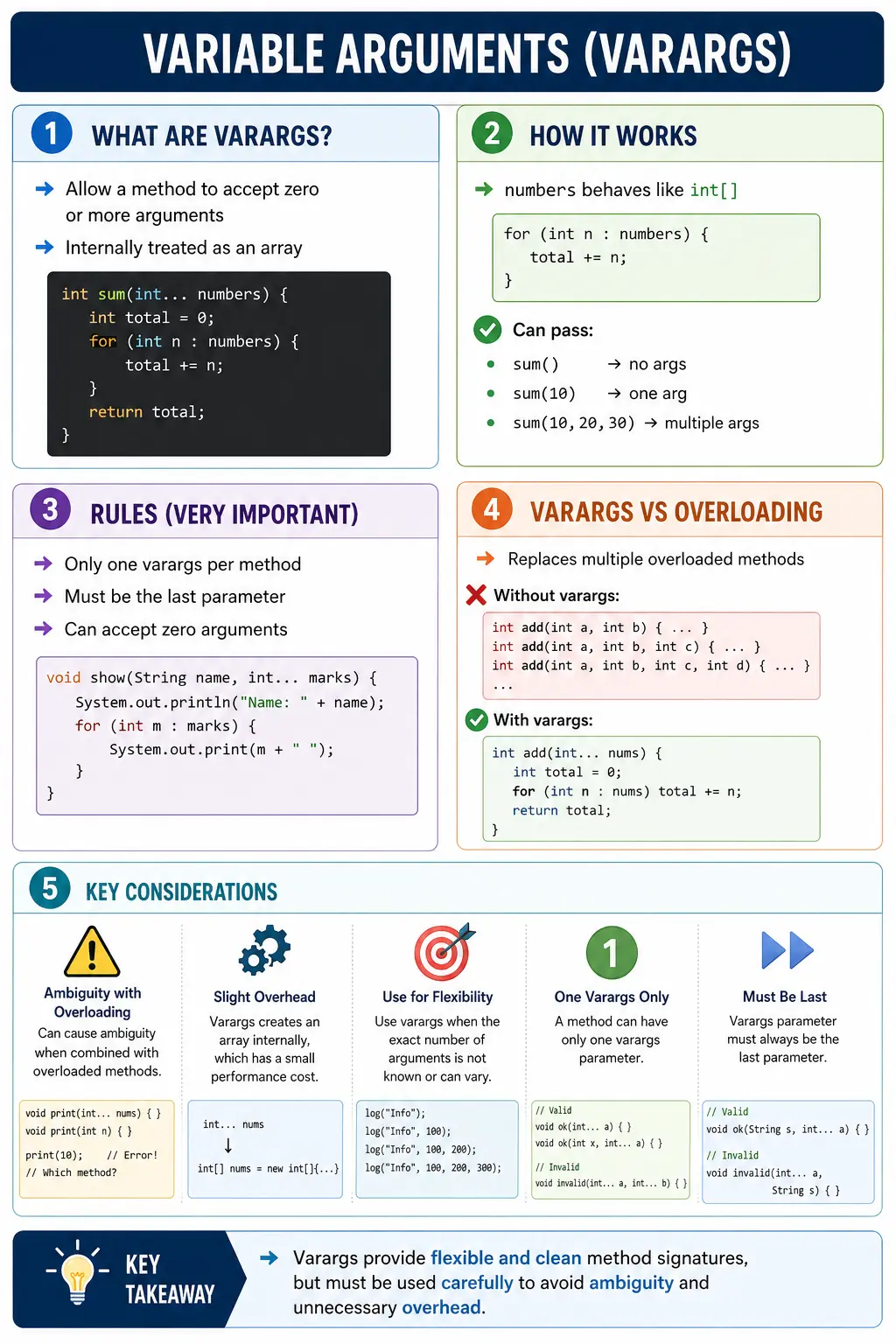
At first glance, varargs look like syntactic sugar, and in many ways they are, but their implications go deeper. They influence API design, method overloading behavior, performance characteristics, and readability. A strong grasp of varargs helps you write cleaner, more maintainable code and avoid subtle ambiguities that can arise during compilation. Because of these nuances, varargs are a frequent topic in technical interviews and code reviews.
What Are Varargs?
Varargs enable a method to accept zero or more arguments of a specific type. Instead of declaring a fixed number of parameters, the method uses a special syntax with three dots, written as an ellipsis, to indicate that it can accept a variable-length argument list. This means the caller can pass no values, one value, or many values without changing the method name or creating several overloaded versions.
Conceptually, varargs allow multiple inputs to be treated as one logical group. Internally, Java represents that group as an array. This is the key idea behind the feature. Varargs improve the calling experience, but inside the method they behave like an ordinary array. The method can check length, access indexes, loop through values, and pass the parameter to other methods that expect an array.
int sum(int... numbers) {
    // numbers is treated as an int[]
}
Here, numbers is not a new data structure. It is an int array created or supplied by the compiler depending on how the method is called. This dual nature, flexible input from the caller and array behavior inside the method, is what makes varargs useful. They simplify method calls without removing the predictability of arrays.
Why Varargs Were Introduced
Before varargs, developers had two common options when a method needed a variable number of inputs. They could require callers to create an array, or they could write multiple overloaded methods. Both options worked, but both had drawbacks. Requiring arrays made simple calls verbose. Writing many overloaded methods created duplicated code and became difficult to maintain as the number of supported argument counts increased.
For example, a sum method could be overloaded for two numbers, three numbers, four numbers, and so on. This quickly becomes repetitive. The actual logic is the same: add all numbers. The only difference is how many inputs arrive. Varargs solve this by allowing one method to handle all counts cleanly.
Varargs also improve readability at the call site. A method call such as sum(10, 20, 30) is easier to read than creating an array only to pass it immediately. This matters in API design because clear method calls reduce friction for users of the code.
Basic Syntax and Structure
The syntax for defining a varargs method places three dots after the data type and before the parameter name:
returnType methodName(dataType... variableName) {
    // method body
}
The ellipsis belongs to the parameter type. It tells the compiler that the method can receive a variable number of values of that type. A typical implementation looks like this:
int sum(int... numbers) {
    int total = 0;
    for (int n : numbers) {
        total += n;
    }
    return total;
}
This method can be invoked with different numbers of arguments:
sum();             // no arguments
sum(10);           // one argument
sum(10, 20, 30);   // multiple arguments
In each call, Java gives the method an array. When no arguments are supplied, the method receives an empty array, not null. When one argument is supplied, the method receives an array with one element. When several arguments are supplied, the method receives an array containing all of them in order.
Varargs as Arrays
One of the most important aspects of varargs is that they are internally treated as arrays. This means that inside the method body, a varargs parameter supports normal array operations. You can read its length, access values using indexes, use an enhanced for-each loop, or pass it to another method that accepts an array.
void display(String... values) {
    System.out.println(values.length);
}
In this method, values behaves exactly like a String[]. If the caller writes display("A", "B"), values.length is 2. If the caller writes display(), values.length is 0. The method should handle both cases deliberately.
Because varargs become arrays, array-related rules still apply. Array indexes start at zero. Accessing an index that does not exist causes ArrayIndexOutOfBoundsException. The array can be iterated using a normal for loop or an enhanced for-each loop. If the array element type is a reference type, elements may be null unless the method validates them.
Passing Arrays to Varargs Methods
Since varargs are implemented as arrays, callers can pass an existing array directly to a varargs method. This keeps varargs compatible with traditional array-based code.
int[] arr = {1, 2, 3};
sum(arr);
In this case, Java does not need to package separate arguments into a new array because the caller already supplied an array. This is useful when values are already stored in an array, generated dynamically, or collected from another method. The same method can support convenient direct calls and array-based calls.
This compatibility also means the method should not assume how the values were supplied. Whether the caller used sum(1, 2, 3) or sum(arr), the method simply sees an int array. Good varargs methods focus on processing the array consistently rather than depending on the call style.
Combining Varargs with Fixed Parameters
Varargs can be used alongside regular parameters, but there is a strict rule: the varargs parameter must be the last parameter in the method signature. This allows the compiler to clearly separate fixed arguments from the variable-length portion.
void show(String name, int... marks) { }
This is valid because Java knows the first argument belongs to name, and all remaining int values belong to marks. The following form is invalid:
void show(int... marks, String name) { } // Compile-time error
If varargs were allowed before other parameters, the compiler would not know how many values should be placed into the varargs array and which value should be reserved for the following parameter. Keeping varargs last removes that ambiguity.
A practical example is a student reporting method. The student's name is required, but the number of scores may vary:
void printDetails(String name, int... scores) {
    System.out.println("Name: " + name);
    for (int s : scores) {
        System.out.println(s);
    }
}
This method can be called for a student with no scores, one score, or many scores. The required parameter communicates what must always be supplied, and the varargs parameter handles optional repetition.
Rules and Constraints of Varargs
Varargs are flexible, but they follow clear rules. Only one varargs parameter is allowed in a method. The varargs parameter must appear last. It can accept zero or more arguments. Inside the method, it behaves like an array. These rules are simple, but violating them leads to compile-time errors or confusing overload behavior.
Only one varargs parameter is allowed because two variable-length groups would be ambiguous. If a method accepted int... numbers and String... names together, the compiler would not be able to determine where one group ended and the other began in many calls. Java avoids that confusion by allowing only one varargs parameter.
The "last parameter" rule is equally important. Fixed parameters must come before the varargs parameter. This makes the method signature readable and gives the compiler a predictable argument-matching process. When you design a varargs method, think of the varargs parameter as the optional repeated tail of the argument list.
Varargs vs Method Overloading
Before varargs were introduced, developers often relied on method overloading to support different numbers of arguments. Overloading is still useful, but it is not always the best solution when every overloaded method performs the same logic on a different number of inputs.
int add(int a, int b) { return a + b; }
int add(int a, int b, int c) { return a + b + c; }
With varargs, this can be simplified:
int add(int... nums) {
    int total = 0;
    for (int n : nums) {
        total += n;
    }
    return total;
}
The varargs version reduces duplication and scales naturally. It does not matter whether the caller passes two, three, or ten values. The method loops through the array and processes all values. This is exactly the kind of situation where varargs are useful.
However, varargs should not replace every overloaded method. Overloading is better when different argument lists represent different meanings or require different behavior. Varargs are best when the arguments are the same type, have the same meaning, and are processed as a collection.
Varargs and Overloading Ambiguity
When varargs are combined with method overloading, the compiler may struggle to determine which method should be invoked. This can lead to ambiguity errors, especially when two methods can both accept the same call.
void test(int a, int... b) { }
void test(int... a) { }
A call such as test(10) can match both methods. The first method can treat 10 as the fixed parameter a and use an empty varargs array. The second method can treat 10 as the first element of the varargs array. Since both interpretations are possible, the compiler reports an ambiguity.
This is why varargs should be used carefully in overloaded APIs. A good method set should make the intended call obvious. If overloaded varargs methods require the compiler or the reader to guess, the API is probably too clever. Clear method names or distinct parameter types are usually better than ambiguous overloads.
Compiler Preference in Method Matching
Java method resolution follows a preference order. When choosing among overloaded methods, the compiler generally prefers an exact fixed-parameter match over a varargs match. This means that if one method accepts exactly two int parameters and another accepts int... values, a call with two int arguments usually selects the fixed-parameter method.
This behavior is useful because it allows developers to provide specialized overloads for common cases while keeping a varargs method as a flexible fallback. For example, a method with two fixed arguments might use optimized logic, while the varargs method handles all other counts.
Even with this preference, overloaded varargs should remain simple. If the overload set becomes hard to predict, readability suffers. In interviews, it is enough to explain that exact matches are preferred, but ambiguous varargs overloads can still cause compile-time errors.
Varargs in the main Method
The main method itself can use varargs syntax:
public static void main(String... args) {
    System.out.println(args.length);
}
This is functionally equivalent to:
public static void main(String[] args)
The JVM recognizes both forms because String... is implemented as String[]. This example reinforces the idea that varargs are array-based. The syntax is more flexible at the source-code level, but the runtime representation is still an array.
Zero Arguments and Empty Arrays
A varargs method can be called with no values for the varargs parameter. In that case, the parameter receives an empty array. This is important because empty and null are not the same. If the caller simply omits varargs values, the method should expect an array with length zero.
Methods should handle this case intentionally. A sum method may return zero for no numbers. A print method may print nothing. A validation method may reject empty input if at least one value is required. The correct behavior depends on the business meaning of the method.
If a caller explicitly passes null, behavior can be different, especially with reference-type varargs. For example, display((String[]) null) passes a null array, not an empty array. Good APIs should document whether null is allowed and should validate inputs when needed.
Varargs with Object Types
Varargs work with primitive types and reference types. A method can accept String..., Object..., Integer..., Student..., or any other valid Java type. With object types, each element in the varargs array is a reference. The array itself may contain null values unless the method prevents them.
Object varargs are common in logging, formatting, and utility methods. A logging method may accept a message template and multiple values. A formatting method may accept a pattern and a variable number of replacement objects. Object... is especially flexible because every reference type can be treated as Object, but that flexibility comes with less type specificity.
When using Object..., be careful with readability and type safety. The method may need to inspect object types at runtime, which can make logic more complex. If all values should be of a specific type, use that specific type in the varargs parameter instead of Object.
Varargs, Generics, and Warnings
Varargs with generics can introduce warnings because varargs are implemented using arrays, while generics use type erasure. Arrays know their element type at runtime, but generic type information is partly erased. This mismatch can create heap pollution risks in advanced code.
For beginner and intermediate Java learning, the main idea is that generic varargs should be used carefully. You may see annotations such as @SafeVarargs on certain methods. This annotation tells the compiler that the method does not perform unsafe operations with the varargs parameter. It is commonly used on final, static, or private methods where the implementation can be verified as safe.
You do not need to memorize every advanced generic warning to understand varargs, but you should know that varargs are arrays internally. That internal array behavior is the reason generic varargs require extra caution.
Performance Considerations
While varargs improve flexibility and readability, they can introduce a small performance overhead. When separate arguments are passed, Java creates an array to hold them. In most applications, this overhead is negligible and should not stop you from using varargs where they improve API clarity.
However, in performance-critical code, repeated varargs calls inside tight loops may create many short-lived arrays. This can increase allocation pressure and garbage collection work. If a method is called millions of times in a hot path, an array-based or fixed-parameter design may be more efficient.
Performance should be considered in context. For normal application code, readability and API usability often matter more. For low-level libraries, high-frequency utilities, or performance-sensitive loops, measure before deciding. Varargs are convenient, but they are not automatically the fastest option.
Practical Use Cases
Varargs are particularly useful when the number of inputs is variable or optional. Utility methods are a common example. A method that calculates a sum, average, maximum, or minimum can naturally accept many values of the same type. The caller should not need to build an array manually for simple cases.
Logging frameworks also use varargs-style APIs because log messages often contain a variable number of values. Formatting methods use similar patterns. Test automation utilities may use varargs to accept multiple expected values, multiple tags, or multiple validation messages. In each case, the arguments form a repeated group with the same role.
Varargs can also make builder-style or helper methods easier to use. For example, a method that creates a list of roles can accept createRoles("ADMIN", "USER", "AUDITOR"). The call reads naturally and avoids temporary array creation in user code.
Varargs in Testing and Automation
Varargs are especially useful in Java test automation because test helpers often need flexible input. A validation helper may check that a page contains several expected messages. A data helper may create a user with any number of roles. An assertion helper may accept multiple expected values and verify them in one readable call. These use cases work well because the values are repeated, optional, and usually share the same meaning.
For example, a helper named assertVisibleTexts(String... texts) can allow a test to pass one expected label in one scenario and five expected labels in another. The test case remains readable because the caller writes the expected values directly. Inside the helper, the method loops through the array and validates each value. This reduces boilerplate without hiding the intent of the test.
However, test helpers should not use varargs to hide unclear design. If a method accepts many unrelated values through Object..., the test becomes harder to understand and easier to misuse. A good automation helper should make the meaning of every argument obvious. Varargs help when they represent a natural list; they hurt when they become a container for random data.
Null Handling with Varargs
Zero arguments and null arguments are different cases. When a caller omits varargs values, Java supplies an empty array. When a caller explicitly passes null in certain forms, the method may receive null or may receive an array containing a null element. This distinction can surprise beginners, especially with reference-type varargs such as String... or Object....
For example, show() gives the method an empty String array. show((String[]) null) gives the method a null array. show((String) null) gives the method an array with one null element. These calls have different meanings and can produce different behavior if the method does not validate input carefully.
Good varargs methods should decide their null policy. Some methods may reject null values and throw IllegalArgumentException. Others may ignore null values. Some may treat null as meaningful input. The important point is to avoid accidental NullPointerException caused by assuming the varargs parameter can never be null. In normal calls it is not null, but explicit null calls can still occur.
Varargs vs Arrays in API Design
Varargs and arrays are closely related, but they are not always equally suitable for API design. Varargs are best when the caller normally supplies a short list of values directly in the method call. Arrays are better when the caller already has a collection of values, when the input is large, or when the method should make array usage explicit.
For example, max(10, 20, 30) reads naturally as a varargs call. But if a program processes thousands of numbers already stored in an array, passing the array directly is more natural. A varargs method can support both forms, but the public API should still communicate intent. If the method fundamentally processes a data set, an array or collection parameter may be clearer. If the method accepts optional repeated values, varargs may be clearer.
Collections are another alternative. A List parameter may be better when the caller needs dynamic size, collection operations, or generic type behavior. Varargs are convenient, but they are not a replacement for every collection-based design. Choosing between varargs, arrays, and collections depends on how the method will be used and what kind of input best represents the problem.
Readability and Maintainability
The biggest benefit of varargs is often readability. A method call with direct values can be compact and expressive. But readability depends on restraint. A call with two or three repeated values is usually clear. A call with twenty values may become hard to scan. If a varargs call grows too long, it may be better to create a named array, list, or configuration object.
Maintainability also depends on method naming. A method named addRoles(String... roles) is clear because every argument is a role. A method named process(Object... values) is vague because the caller cannot easily know what each value means. Varargs should make repeated input easier, not make parameter meaning weaker.
When reviewing code, ask whether the varargs method makes the call site easier to understand. If it does, the feature is being used well. If it hides structure, encourages unrelated values, or creates ambiguous overloads, a more explicit method signature is better.
API Design Guidelines
Use varargs when the arguments are optional, repeated, and share the same meaning. A method named printNames(String... names) is clear because every argument is a name. A method with unrelated values forced into varargs is less clear. Varargs should represent a natural list of values, not a shortcut for avoiding proper parameter design.
Keep fixed required parameters before the varargs parameter. This creates a clean signature such as log(String message, Object... values) or createUser(String name, String... roles). The required data appears first, and the optional repeated data appears last.
Avoid overloading varargs methods in ways that create ambiguity. If two varargs signatures look similar, prefer different method names or clearer parameter types. API users should be able to predict which method will run without studying compiler resolution rules.
Document zero-argument behavior. If a varargs method can be called with no values, decide what that means. Empty input may be valid, or it may be an error. Either way, the behavior should be intentional and tested.
Common Beginner Mistakes
Despite their simple syntax, varargs can lead to several common errors. One frequent mistake is placing the varargs parameter before other parameters. Java does not allow this because the varargs parameter must be last. Another mistake is trying to declare more than one varargs parameter in the same method. Java allows only one.
Another issue is creating ambiguous overloaded methods. Varargs can make method calls flexible, but that flexibility can confuse overload resolution. If a call can match more than one method equally well, the compiler may reject it. Beginners often find this surprising because each method looks valid by itself.
Developers also sometimes forget that varargs can accept zero arguments. If the method immediately accesses nums[0] without checking length, it can fail when called with no values. Always consider the empty array case.
Finally, there is a misconception that varargs are always faster or more efficient than arrays. In reality, varargs are arrays internally and may create an array at the call site. They are mainly a readability and API design feature, not a performance optimization.
Interview Perspective
Varargs are a common interview topic because they test understanding of method design, arrays, overloading, and compiler behavior. A concise answer is: varargs allow a method to accept a variable number of arguments of the same type.
A stronger answer explains that varargs are implemented as arrays, can accept zero or more arguments, and must be declared as the last parameter. It should also mention that only one varargs parameter is allowed per method. If the interviewer asks about overloading, explain that varargs can create ambiguity and should be used carefully with overloaded methods.
A complete answer includes a practical example. A sum(int... numbers) method can accept sum(), sum(10), or sum(10, 20, 30). Inside the method, numbers behaves like an int array. This example demonstrates both the caller-side flexibility and the internal array behavior.
Key Takeaway
Variable arguments provide a flexible and elegant way to design methods that handle varying input sizes. They reduce the need for repetitive overloaded methods and make method calls cleaner when the arguments form a natural list. Inside the method, varargs behave like arrays, which makes them familiar and easy to process.
Use varargs with discipline. Keep the varargs parameter last, use only one per method, handle zero arguments, and avoid ambiguous overloads. Varargs are best for optional repeated values of the same meaning. When used in the right place, they improve readability without sacrificing structure.
One-Line Insight
Varargs turn multiple inputs into a single array, making methods flexible without sacrificing structure.
1. Basic Varargs Method
class Demo {
static void sum(int... nums) {
int total = 0;
for (int n : nums) {
total += n;
}
System.out.println(total);
}
public static void main(String[] args) {
sum(1, 2, 3);
}
}
Explanation
- Varargs treated as array
- Output: 6
2. Calling Varargs with No Arguments
class Demo {
static void show(int... nums) {
System.out.println(nums.length);
}
public static void main(String[] args) {
show();
}
}
Explanation
- Creates empty array
- Output: 0
3. Varargs with Single Argument
class Demo {
static void print(int... nums) {
System.out.println(nums[0]);
}
public static void main(String[] args) {
print(10);
}
}
Explanation
- Works like one-element array
- Output: 10
4. Varargs Internally Is an Array
class Demo {
static void test(int... nums) {
System.out.println(nums.getClass().getName());
}
public static void main(String[] args) {
test(1, 2);
}
}
Explanation
- Varargs compiled as array
- Output: [I
5. Passing Array to Varargs Method
class Demo {
static void show(int... nums) {
for (int n : nums) System.out.print(n + " ");
}
public static void main(String[] args) {
int[] a = {1, 2, 3};
show(a);
}
}
Explanation
- Array fits varargs
- Output: 1 2 3
6. Varargs Must Be Last Parameter
class Demo {
static void test(String name, int... nums) {
System.out.println(name);
}
// static void test(int... nums, String name) // invalid
}
Explanation
- Compile-time rule
- Varargs must be last
7. Only One Varargs Allowed
class Demo {
// static void test(int... a, int... b) // invalid
}
Explanation
- Only one varargs parameter allowed per method
8. Varargs with Other Parameters
class Demo {
static void show(String msg, int... nums) {
System.out.println(msg + " " + nums.length);
}
public static void main(String[] args) {
show("Count:", 1, 2, 3);
}
}
Explanation
- Normal parameters first
- Output: Count: 3
9. Varargs in Method Overloading (Exact Match Wins)
class Demo {
static void show(int a) {
System.out.println("int");
}
static void show(int... a) {
System.out.println("varargs");
}
public static void main(String[] args) {
show(5);
}
}
Explanation
- Exact match preferred
- Output: int
10. Overloading Varargs vs Array
class Demo {
static void show(int[] a) {
System.out.println("array");
}
static void show(int... a) {
System.out.println("varargs");
}
public static void main(String[] args) {
show(new int[]{1, 2});
}
}
Explanation
- Array is more specific
- Output: array
11. Varargs and Autoboxing
class Demo {
static void show(Integer... nums) {
System.out.println(nums.length);
}
public static void main(String[] args) {
show(1, 2, 3);
}
}
Explanation
- Autoboxing applies
- Output: 3
12. Varargs with null Argument
class Demo {
static void show(int... nums) {
System.out.println(nums);
}
public static void main(String[] args) {
show(null);
}
}
Explanation
- null treated as array reference
- Throws NullPointerException on access
13. Avoiding NullPointerException in Varargs
class Demo {
static void show(int... nums) {
if (nums == null) {
System.out.println("Null array");
return;
}
System.out.println(nums.length);
}
public static void main(String[] args) {
show(null);
}
}
Explanation
- Defensive coding
- Output: Null array
14. Varargs in Enhanced for-loop
class Demo {
static void display(String... values) {
for (String s : values) {
System.out.print(s + " ");
}
}
public static void main(String[] args) {
display("Java", "Selenium", "API");
}
}
Explanation
- Easy iteration
- Output: Java Selenium API
15. Varargs with Generic Type
class Demo {
static  void print(T... items) {
for (T t : items) {
System.out.print(t + " ");
}
}
public static void main(String[] args) {
print(1, "Java", 3.5);
}
}
Explanation
- Generic varargs
- Output: 1 Java 3.5
16. Varargs Used for Logging Utility
class Logger {
static void log(String level, String... messages) {
for (String msg : messages) {
System.out.println(level + ": " + msg);
}
}
public static void main(String[] args) {
log("INFO", "Started", "Running", "Completed");
}
}
Explanation
- Real-world usage
- Output:
INFO: Started
INFO: Running
INFO: Completed
17. Varargs with Method Chaining
class Demo {
static int sum(int... nums) {
int total = 0;
for (int n : nums) total += n;
return total;
}
public static void main(String[] args) {
System.out.println(sum(1, 2) + sum(3, 4));
}
}
Explanation
- Returns value
- Output: 10
18. Varargs vs Overloading Confusion
class Demo {
static void show(int a, int b) {
System.out.println("two args");
}
static void show(int... a) {
System.out.println("varargs");
}
public static void main(String[] args) {
show(1, 2);
}
}
Explanation
- Fixed arguments preferred
- Output: two args
19. Performance Note on Varargs
class Demo {
static void show(int... nums) {
// Creates array internally
}
}
Explanation
- Avoid heavy use in performance-critical loops
20. Interview Summary – Varargs
class Demo {
static void test(int... nums) {
nums[0] = 99;
}
public static void main(String[] args) {
int[] a = {1, 2};
test(a);
System.out.println(a[0]);
}
}
Explanation
- Varargs is array reference
- Output: 99