User-Defined Packages in Java
User-defined packages in Java are packages created by developers to organize their own application classes, interfaces, enums, annotations, and related types. They help a codebase move from a set of scattered files to a structured application with clear responsibilities. In small beginner programs, it is common to write a few classes in the default package. In real Java development, that approach does not scale. Once an application contains business logic, utilities, models, services, tests, configuration classes, and integration code, a package structure becomes essential.
A user-defined package acts as a namespace. It gives a class a full identity beyond its simple class name.
A class named User inside com.bank.account is different from a class named
User inside com.shop.customer. This means developers can use meaningful class names
without worrying that every project dependency or internal module will collide with the same name. The package
name becomes part of the fully qualified class name and tells Java exactly which class is being referenced.
User-defined packages also create design boundaries. Java access modifiers such as default access and protected access are influenced by packages. Classes in the same package can collaborate more closely, while classes outside the package may only see what is intentionally made public. This makes packages important not only for file organization, but also for encapsulation, modularity, maintainability, and long-term code quality.
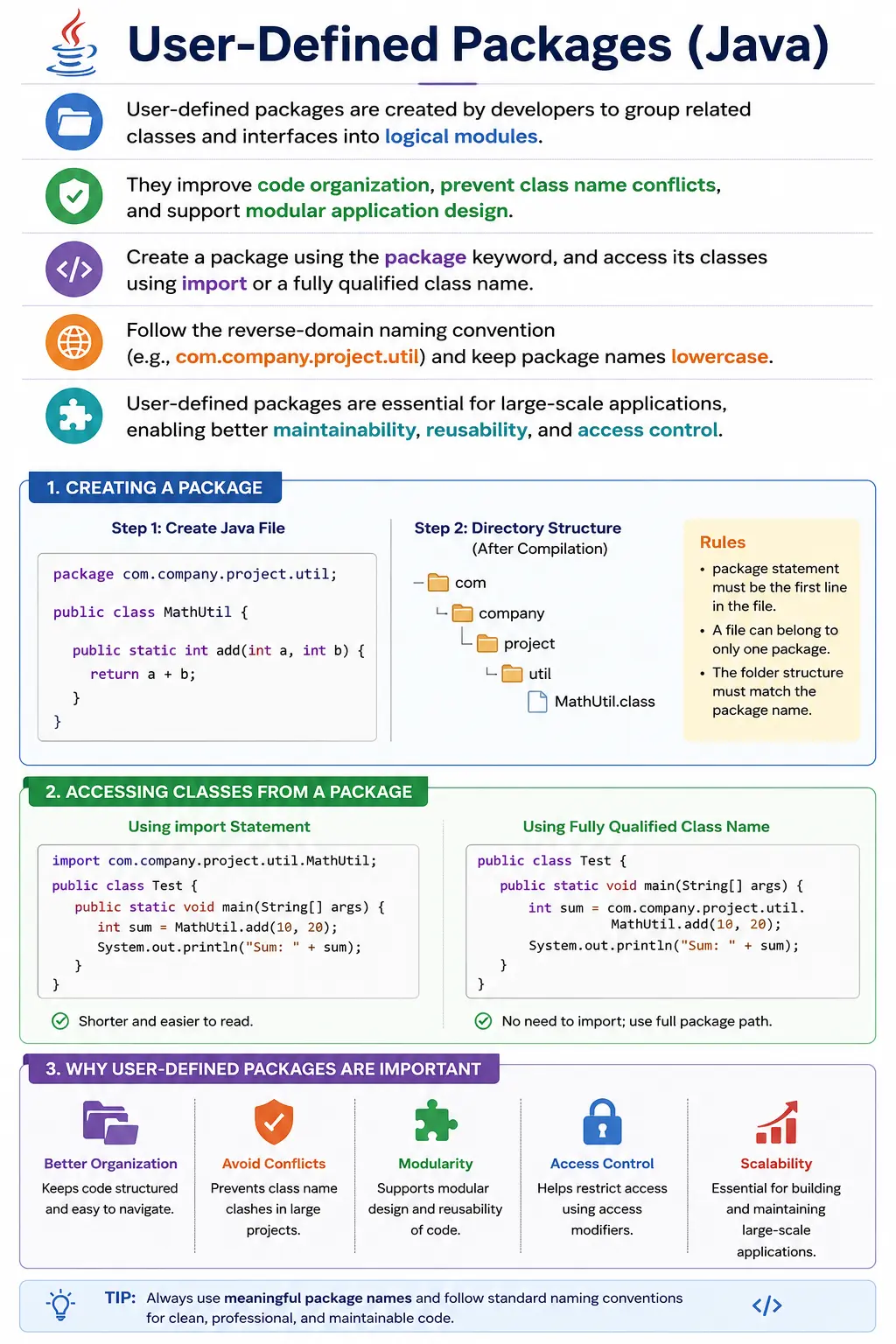
What Is a User-Defined Package?
A user-defined package is a package declared by the developer using the package keyword. It
groups related classes and interfaces under a logical name chosen by the project. Unlike built-in packages
such as java.lang, java.util, and java.io, user-defined packages are
not provided by the Java platform. They are part of the application or library being developed.
The package declaration appears at the top of a Java source file. If a class belongs to
com.mycompany.project.util, the source file begins with that package declaration. The compiler
uses this package information to place the compiled class in the correct namespace. Developers and tools also
use the package name to import and reference the class from other parts of the application.
A package should normally represent a meaningful area of responsibility. For example, a banking application may have packages for account services, loan processing, customer management, payments, security, and reporting. An automation framework may have packages for pages, tests, utilities, base classes, configuration, and data providers. The exact structure depends on the project, but the goal is always the same: related code should live together, and unrelated code should not be mixed without reason.
package com.mycompany.project.util;
Why User-Defined Packages Are Needed
User-defined packages are needed because real applications grow quickly. A project that starts with three classes may later contain hundreds of files. Without packages, developers struggle to find code, identify ownership, understand dependencies, and safely make changes. Packages divide the application into smaller areas so that the codebase remains navigable.
Packages also prevent class name conflicts. Many applications naturally need classes with common names such
as User, Account, Order, Payment, Service,
or Config. If every class existed in one global namespace, these names would collide. Packages
allow each class to keep a clear identity. com.app.customer.User and
com.app.audit.User can exist separately because their packages are different.
Another important purpose is readability. A package name gives context before the class is even opened. A
class called PaymentValidator inside com.app.payment.validation is easier to
understand than the same class placed in an unrelated or generic folder. The package tells the reader what
the class is likely responsible for and how it fits into the application.
Packages also support layered architecture and modular design. A project may separate controllers, services, repositories, models, exceptions, utilities, and configuration classes. This separation helps developers avoid mixing concerns. For example, a repository package should mainly deal with data access, while a service package should focus on business logic. The package structure becomes a visible map of the application.
Finally, packages help enforce access control. Classes and members with no access modifier are package-private and can only be accessed from the same package. This allows developers to hide internal helper classes from the rest of the application while still allowing nearby related classes to use them. In this way, packages support encapsulation at a broader level than a single class.
Creating a User-Defined Package
Creating a user-defined package begins with the package keyword. The package statement must be
the first non-comment statement in the Java source file. It appears before import statements and before the
class declaration. A source file can belong to only one package, so only one package declaration is allowed.
1. Using the package Keyword
package com.example.util;
public class MathUtil {
    public static int add(int a, int b) {
        return a + b;
    }
}
In this example, MathUtil belongs to com.example.util. The package name indicates
that the class is part of a utility area under an example application namespace. Because the class is declared
public, it can be accessed from outside the package if it is imported or referenced using its fully qualified
name.
The package statement should match the intended directory structure. In a typical project, a class declared
in com.example.util is stored under a matching path such as
com/example/util/MathUtil.java beneath the source root. IDEs and build tools usually manage this
structure automatically, but understanding the relationship is important when compiling from the command
line.
2. Compile and Create the Directory Structure
javac -d . MathUtil.java
The -d option tells the Java compiler where to place generated class files. When the package is
com.example.util, the compiler creates the corresponding folder structure and places the class
file inside it.
com/
 |-- example/
     |-- util/
         |-- MathUtil.class
Accessing User-Defined Package Classes
After a class is placed in a package, other classes can access it in different ways. The most common options are using the fully qualified class name, importing the exact class, or importing all public classes from a package using a wildcard. The choice affects readability and maintainability.
1. Using Fully Qualified Name
com.example.util.MathUtil.add(2, 3);
A fully qualified name includes the package name and class name together. This removes ambiguity because the code states exactly which class is being used. It is useful when two packages contain classes with the same simple name, but it can make code longer if used repeatedly.
2. Using import Statement
import com.example.util.MathUtil;
MathUtil.add(2, 3);
An import statement allows the program to use the class name directly. This is the most common approach in normal Java code because it balances clarity and convenience. The import appears near the top of the file, after the package declaration and before the class declaration.
3. Using Wildcard Import
import com.example.util.*;
A wildcard import imports public classes directly inside that package, but it does not import classes from
sub-packages. For example, import com.example.util.*; does not import
com.example.util.internal.*. In small examples, wildcard imports may look convenient. In large
projects, explicit imports are often clearer because readers can see exactly which classes are used.
Package Naming Conventions (Very Important)
Package naming conventions matter because package names are visible throughout a project. They appear in source files, imports, logs, stack traces, documentation, JAR contents, and sometimes public APIs. A confusing package name can make code harder to understand even when the classes themselves are well written.
Java package names are normally written in lowercase. This avoids confusion with class names, which usually
use PascalCase. Many organizations use reverse-domain naming to create globally unique package names. For
example, a company that owns example.com may use packages starting with
com.example. After that root, teams add project, module, feature, or layer names.
com.company.project.layer
Examples:
- com.amazon.payment.service
- org.apache.commons.lang
User-Defined Packages and Access Modifiers
Packages and access modifiers work together. The access modifier determines where a class, constructor, method, or field can be accessed from. Because default access is limited to the same package, packages become visibility boundaries. This is one of the most important practical reasons to understand user-defined packages.
| Modifier | Same Class | Same Package | Subclass (diff pkg) | Everywhere |
|---|---|---|---|---|
| private | Yes | No | No | No |
| default | Yes | Yes | No | No |
| protected | Yes | Yes | Yes | No |
| public | Yes | Yes | Yes | Yes |
A public class is accessible from everywhere, provided it is available on the classpath or module path. A package-private class is accessible only inside the same package. This allows a package to expose a small public API while keeping helper classes internal.
Sub-Packages (Clarification)
A sub-package is a package whose name appears under another package name, but Java treats it as a separate
package. This is a common beginner confusion. com.bank.account may look like it is inside
com.bank, but it does not automatically get access to package-private members of
com.bank. The relationship is naming-based, not access-based.
com.bank
 |-- account
 |-- loan
Sub-packages are still useful because they provide hierarchical organization. A banking application may group
account code under com.bank.account and loan code under com.bank.loan. The names
communicate structure, but the access rules remain independent.
Creating Multiple Classes in Same Package
Multiple classes can belong to the same package. In fact, this is the normal case. A package is usually a group of related classes, not a one-class container. One source file can contain only one public top-level class, and the file name must match that public class. Other top-level classes in the same file are possible, but they cannot be public.
package com.app.service;
public class UserService { }
class HelperService { }
In this example, UserService is public and can be accessed from outside the package. The helper
class has default access, so it is available only to classes in the same package. This is useful when a helper
exists only to support the package's internal implementation.
Packaging into JAR (Real-World Usage)
Packages also matter when Java classes are distributed as libraries. A JAR file can contain compiled classes arranged according to their package structure. Other applications can add the JAR to the classpath and import the public classes. This is how many Java libraries and frameworks are reused across projects.
jar cf app-utils.jar com/example/util/*.class
When a JAR is created, the package structure inside the archive must remain consistent. If a class belongs to
com.example.util, the compiled class should appear under com/example/util inside
the JAR. This allows the JVM to locate the class when it is referenced by its fully qualified name.
Packages in Real Project Architecture
In real Java projects, package design often reflects application architecture. A layer-based structure may
include packages such as controller, service, repository,
model, exception, and config. This style is easy for beginners to
understand because each package corresponds to a technical role.
A feature-based structure organizes code by business area. For example, an e-commerce project may have
packages such as customer, catalog, cart, order, and
payment. Each feature package may contain its own services, models, repositories, and
validators. This style can be easier to maintain in larger applications because all code for a feature is
closer together.
There is no single perfect package structure for every project. The best structure depends on the size of the application, the framework being used, team standards, and long-term maintainability needs. A good package structure should make it easy to find code, understand responsibility, and avoid unnecessary dependencies.
Packages and Dependency Direction
User-defined packages help show dependency direction. A service package may depend on a repository package because services often need data access. A controller package may depend on a service package because controllers handle requests and call business logic. However, if repository classes start depending on controller classes, the design becomes harder to reason about. Package imports can reveal these design problems quickly.
Clean dependency direction improves maintainability. When packages have clear responsibilities, changes in one area are less likely to break unrelated areas. Testing also becomes easier because packages with fewer dependencies are simpler to isolate. A package structure should therefore support the architecture instead of merely grouping files by habit.
User-Defined Packages in Automation Frameworks
User-defined packages are very common in Java-based automation frameworks. A Selenium or API testing
framework may contain packages such as base, pages, tests,
utils, config, reports, and data. Each package has a
clear purpose. Page classes represent screens, test classes contain test flows, utility classes support
reusable operations, and configuration classes handle environment settings.
This structure helps teams maintain automation code as the application grows. Without packages, all test classes, helper methods, page objects, and configuration logic would be mixed together. That makes the framework difficult to extend and debug. Good package design is one reason professional automation frameworks remain readable after hundreds of test cases are added.
User-Defined Packages and Testing
Package structure also affects unit testing. Test classes are commonly placed in the same package as the
class under test, but under a separate test source folder such as src/test/java. This allows test
classes to access package-private members when necessary while keeping the production source structure clean.
This can be useful when a package has internal helper classes that should not be public. The production code can keep those helpers package-private, and tests in the same package can still validate behavior. However, tests should not depend excessively on internal details. Good tests usually focus on visible behavior, while package-private access is reserved for cases where internal collaboration genuinely needs coverage.
Refactoring User-Defined Packages
Package structures may need to change as a project grows. A package named util may become too
broad if it contains unrelated helpers. A package named service may become too large if every
business feature places all logic there. Refactoring packages can improve clarity, but it must be done with
care because package names are part of fully qualified class names.
IDE refactoring tools can move classes and update imports automatically, but developers should still run tests afterward. Package changes can affect imports, configuration, reflection, serialization, documentation, build scripts, and external callers. A package should be renamed or moved only when the new structure makes responsibility clearer.
Best Practices for User-Defined Packages
A good package name should be lowercase, meaningful, and stable. It should describe responsibility rather
than temporary implementation detail. Names such as com.app.payment and
com.app.customer communicate business purpose. Names such as misc,
newmodule, or temp usually become confusing over time.
Packages should not become dumping grounds. If a package contains unrelated classes, developers lose the benefit of organization. It is better to split broad packages into smaller meaningful packages when responsibility becomes unclear. At the same time, unnecessary over-nesting should be avoided. A package name should be clear, not excessively long.
Public classes should be chosen carefully. Everything public becomes easier for other packages to depend on. If a class is only meant to support internal package logic, package-private access may be better. This keeps the package's public surface small and makes future refactoring easier.
Package Structure in Maven and Gradle Projects
Modern Java projects usually rely on build tools such as Maven or Gradle. These tools expect a predictable
source layout. Production code is commonly placed under src/main/java, while test code is placed
under src/test/java. Inside those source roots, the folder structure follows the package name.
A class in com.app.payment.service usually appears in a folder path such as
src/main/java/com/app/payment/service.
This convention is important because it allows IDEs, compilers, build tools, and test runners to locate source files consistently. When package declarations and folder paths do not match, developers may see import errors, compilation failures, or confusing IDE warnings. Build tools can automate much of the work, but the developer still needs to understand why the structure exists.
Maven and Gradle also make package organization important during dependency management. When a project is packaged into a JAR file, the compiled classes are stored using their package paths. Another project can then use those classes by adding the JAR as a dependency and importing public classes. This is one reason package names should be stable and meaningful: they become part of how other code identifies and uses the library.
User-Defined Packages and Team Collaboration
Packages are especially valuable when multiple developers work on the same project. A clear package structure
reduces confusion about where new code should be added. If a developer is working on payment validation, a
package such as com.app.payment.validation provides an obvious location. If another developer is
working on report generation, a reporting package keeps that work separate. This separation reduces accidental
mixing of responsibilities.
Package names also make code reviews easier. Reviewers can quickly notice when a class is placed in the wrong package or when a package starts depending on a layer it should not know about. For example, a utility package that imports controller classes may indicate poor dependency direction. A model package that contains database connection logic may indicate mixed responsibilities. These problems are easier to see when packages are designed with intention.
In long-running projects, package structure becomes a form of documentation. New team members can understand the major areas of the application by scanning package names. They can see which features exist, which layers are used, and where tests are likely located. Good package design reduces onboarding time because the codebase explains itself more clearly.
Package Naming Anti-Patterns
A package name should not be treated as a random folder label. One common anti-pattern is creating vague
packages such as common, misc, general, or helpers.
These names are tempting because they seem flexible, but they often become dumping grounds for unrelated
logic. Over time, no one knows whether a class belongs there, and the package becomes harder to maintain.
Another anti-pattern is naming packages after temporary ideas. Names such as newfeature,
sprint5, trial, or latest lose meaning quickly. A package name should
describe a stable business or technical responsibility, not a temporary development phase. Good examples are
payment, customer, auth, reporting,
validation, and configuration.
Overly deep package structures can also become a problem. A package name with too many levels may be precise but difficult to read. The goal is not to create the longest hierarchy possible. The goal is to create enough structure to make responsibility clear without adding unnecessary navigation overhead. Good package design is balanced: not too flat, not too deep, and not too vague.
Package-Private Access as a Design Tool
Package-private access is often overlooked by beginners because it does not use a visible keyword. If a class, method, constructor, or field has no access modifier, it has default access and is visible only within the same package. This is not a weakness; it is a useful design tool. It allows related classes inside a package to collaborate without exposing every internal detail publicly.
For example, a package may expose a public PaymentService class while keeping helper classes
such as PaymentRuleEvaluator or PaymentFormatter package-private. Outside code uses
the public service. Internal helpers remain hidden. This keeps the package's external API small and makes it
easier to change internal implementation later.
This idea connects packages directly to encapsulation. Encapsulation is not only about private fields inside a class. It is also about exposing only the necessary parts of a module or package. User-defined packages give developers a practical way to decide which code is public and which code is internal to a specific area of the application.
Common Beginner Mistakes
Beginners often forget to place the package statement at the top of the file. If imports or class declarations appear before the package statement, the code will not compile correctly. Another frequent mistake is creating a package declaration that does not match the folder structure, especially when compiling from the command line.
Another common mistake is assuming that sub-packages inherit access from parent packages. In Java,
com.app and com.app.service are separate packages. Package-private members in one
are not automatically visible in the other. This surprises many beginners because the names look
hierarchical, but Java access rules treat them independently.
Beginners also overuse wildcard imports, use uppercase letters in package names, or place too many unrelated classes in a broad package. These issues may not always cause immediate compilation errors, but they make a project harder to understand as it grows. Package design should be treated as part of code quality.
Interview Perspective
In interviews, a strong explanation should say that a user-defined package is a package created by the
developer using the package keyword. It groups related classes and interfaces, avoids naming
conflicts, supports access control, and improves project organization. The answer should also mention that
package names commonly follow lowercase reverse-domain naming conventions.
A stronger answer includes practical details: the package statement must be the first statement in the source file, imports are used to access classes from other packages, wildcard imports do not include sub-packages, sub-packages are independent, and compiled classes should follow the matching directory structure. These details show real coding understanding rather than only theory.
Interview-Ready Answers
Short Answer
A user-defined package is a package created by developers to organize application classes.
Detailed Answer
In Java, user-defined packages are created using the package keyword to group related classes and interfaces. They help organize large applications, avoid naming conflicts, and enforce access control. Developers commonly follow reverse domain naming conventions when creating packages.
Key Takeaway
User-defined packages bring structure and scalability to Java applications. They are essential for clean architecture, modular development, access control, team collaboration, reusable libraries, automation frameworks, and enterprise-level Java projects. A well-designed package structure makes code easier to find, easier to test, and easier to maintain as the application grows.
User-Defined Package Examples
1. Creating a Simple User-Defined Package
package com.app.util;

public class MathUtil {
    public static int add(int a, int b) {
        return a + b;
    }
}
Explanation
- Package statement must be the first line
- Class is public, so it is accessible outside the package
2. Using User-Defined Package Class
import com.app.util.MathUtil;

class Demo {
    public static void main(String[] args) {
        System.out.println(MathUtil.add(2, 3));
    }
}
Output
5
3. Package with Multiple Classes
package com.app.model;

public class User {
    public String name = "Admin";
}

package com.app.model;

public class Role {
    public String role = "ADMIN";
}
4. Accessing Multiple Classes from Same Package
import com.app.model.User;
import com.app.model.Role;

class Demo {
    public static void main(String[] args) {
        User u = new User();
        Role r = new Role();
        System.out.println(u.name + " - " + r.role);
    }
}
Output
Admin - ADMIN
5. Using import package.*
import com.app.model.*;

class Demo {
    public static void main(String[] args) {
        User u = new User();
        System.out.println(u.name);
    }
}
Explanation
- Imports all public classes
- Not recommended in large codebases
6. Default (No Modifier) Access in User Package
package com.app.internal;

class Helper {
    void help() {
        System.out.println("Internal help");
    }
}

package com.app.client;

// Helper h = new Helper(); // not accessible
Explanation
- Default access is limited to the same package
7. protected Access Across Packages (Inheritance)
package p1;

public class Base {
    protected void show() {
        System.out.println("Protected method");
    }
}

package p2;

import p1.Base;

class Child extends Base {
    public static void main(String[] args) {
        new Child().show();
    }
}
Output
Protected method
8. Same Class Name in Different Packages
package p1;
public class Test {
    public void show() {
        System.out.println("p1 Test");
    }
}

package p2;
public class Test {
    public void show() {
        System.out.println("p2 Test");
    }
}
9. Resolving Name Conflict Using Fully Qualified Name
class Demo {
    public static void main(String[] args) {
        p1.Test t1 = new p1.Test();
        p2.Test t2 = new p2.Test();
        t1.show();
        t2.show();
    }
}
Output
p1 Test
p2 Test
10. Static Import from User-Defined Package
package com.app.util;

public class Constants {
    public static final int TIMEOUT = 30;
}

import static com.app.util.Constants.TIMEOUT;

class Demo {
    public static void main(String[] args) {
        System.out.println(TIMEOUT);
    }
}
Output
30
11. Nested (Sub) Packages
package com.app.service.auth;

public class AuthService {
    public void login() {
        System.out.println("Login success");
    }
}

import com.app.service.auth.AuthService;

class Demo {
    public static void main(String[] args) {
        new AuthService().login();
    }
}
Output
Login success
12. Directory Structure Matching Package
src/
 |-- com/
     |-- app/
         |-- service/
             |-- auth/
                 |-- AuthService.java
Explanation
- Folder structure must match package name
13. Compiling User-Defined Package
javac -d . MathUtil.java
Explanation
- -d . creates package directories automatically
14. Running Class from User Package
java com.app.util.MathUtil
Explanation
- Fully qualified class name required
15. Creating JAR from User Package
jar cf app-util.jar com/app/util/*.class
16. Using User Package from JAR
javac -cp app-util.jar Demo.java
java  -cp .;app-util.jar Demo
17. User Package + Interface
package com.app.api;

public interface Service {
    void execute();
}

package com.app.impl;

import com.app.api.Service;

public class ServiceImpl implements Service {
    public void execute() {
        System.out.println("Executed");
    }
}
18. Real-World Automation Framework Package Structure
com.framework
 |-- base
 |-- pages
 |-- tests
 |-- utils
 |-- config
Explanation
- Improves modularity & maintainability
19. Access Rule Summary Example
package p1;

public class A {
    public int x = 10;
    protected int y = 20;
    int z = 30;
    private int w = 40;
}

package p2;

import p1.A;

class Demo extends A {
    void test() {
        System.out.println(x); // accessible
        System.out.println(y); // accessible
        // System.out.println(z); // not accessible
        // System.out.println(w); // not accessible
    }
}
20. Interview Summary: User-Defined Packages
package com.demo;

public class Test {
    public static void main(String[] args) {
        System.out.println("User-defined package");
    }
}
Key Points
- Organizes related classes
- Prevents name conflicts
- Controls access
- Essential for real projects
Output
User-defined package