Two-Dimensional Arrays
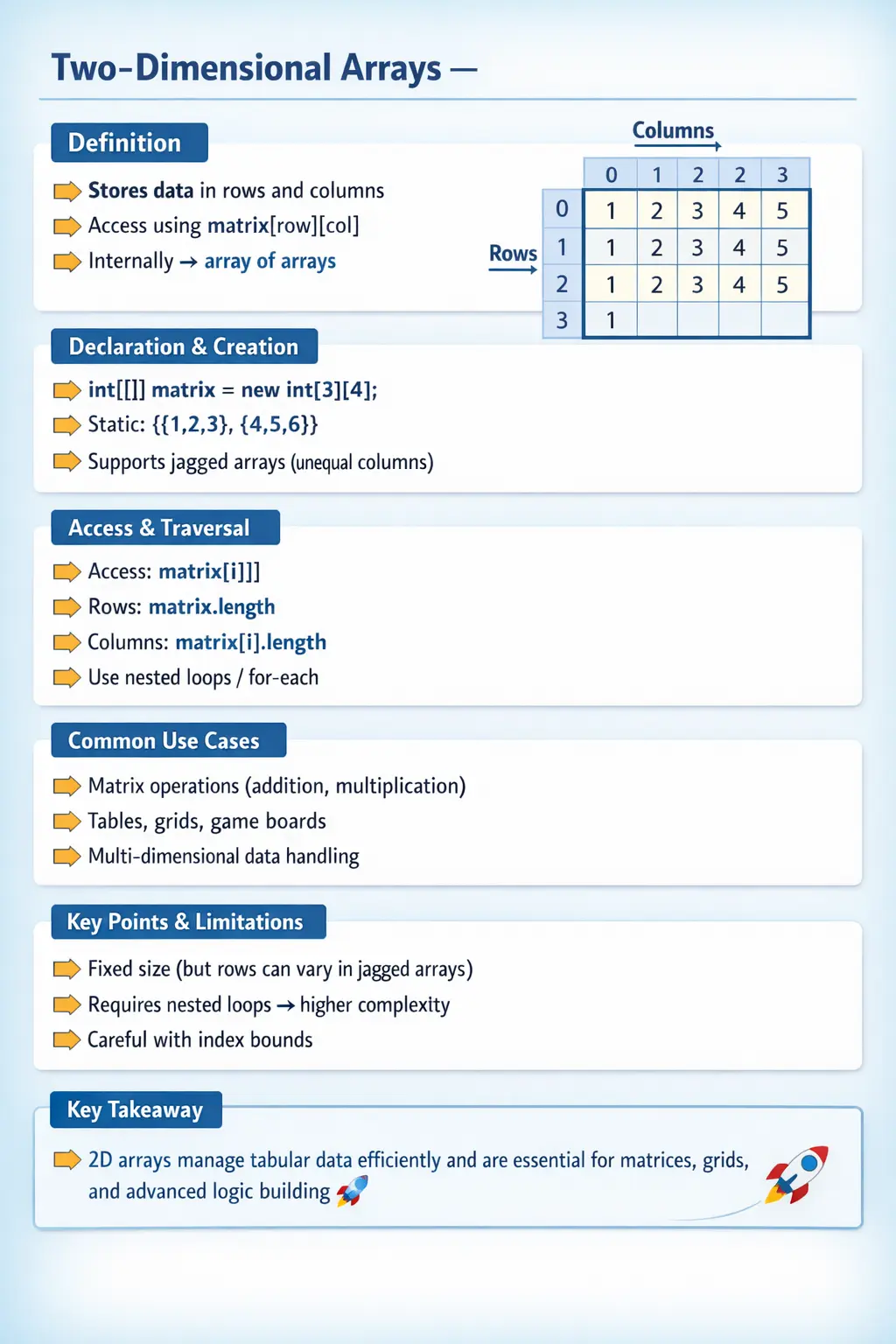
A two-dimensional array in Java represents one of the most important extensions of the basic array concept. While a one-dimensional array allows you to store data in a linear sequence, a two-dimensional array introduces a tabular structure, enabling developers to organize data in rows and columns. This makes it highly suitable for representing matrices, grids, tables, and multi-level datasets.
Understanding two-dimensional arrays is essential not only for core Java programming but also for solving real-world problems involving structured data. From mathematical computations to game development and data processing, 2D arrays provide a powerful and flexible way to manage information. They are also a frequent topic in technical interviews because they test both conceptual understanding and logical thinking.
What Is a Two-Dimensional Array?
A two-dimensional array is essentially an array of arrays. Instead of storing individual values directly, it stores references to other arrays. Each of these inner arrays represents a row, and each element within those arrays represents a column value.
This structure allows data to be accessed using two indices. The first index specifies the row, and the second index specifies the column within that row. This dual-index access pattern is what differentiates 2D arrays from their one-dimensional counterparts.
An important characteristic of two-dimensional arrays in Java is that they are not strictly rectangular. Since each row is an independent array, it is possible to have rows of different lengths. This is known as a jagged or irregular array, and it provides additional flexibility compared to traditional matrix representations.
Why Two-Dimensional Arrays Are Important
Two-dimensional arrays are widely used because many real-world problems involve tabular or grid-based data. For example, spreadsheets, seating arrangements, game boards, and image pixels can all be represented using 2D arrays.
They allow developers to model relationships between data points in a structured way. Instead of managing multiple one-dimensional arrays, a single 2D array can encapsulate the entire dataset, making the code more organized and easier to maintain.
In algorithm design, two-dimensional arrays are used extensively in problems related to matrices, dynamic programming, pathfinding, and graph traversal. Their importance extends beyond basic programming into advanced problem-solving domains.
Declaration and Creation of 2D Arrays
Declaring a two-dimensional array in Java involves specifying two sets of square brackets. This indicates that the variable will reference a collection of arrays rather than individual values.
The preferred syntax places the brackets next to the data type, improving readability and aligning with industry standards. Once declared, the array must be instantiated using the new keyword, where both the number of rows and columns are specified.
When a 2D array is created with fixed dimensions, memory is allocated for each row and column. Each element is automatically initialized with a default value based on its data type. This ensures that the array is in a consistent state before any values are explicitly assigned.
Understanding Default Values
Like one-dimensional arrays, two-dimensional arrays assign default values to elements upon creation. Numeric types are initialized to zero, boolean values to false, characters to a null character, and object references to null.
This behavior simplifies initialization, as developers do not need to manually assign values to every element unless required. However, relying on default values without understanding them can lead to logical errors, especially in conditional checks.
Initialization Techniques
Two-dimensional arrays can be initialized either statically or dynamically. Static initialization is used when all values are known at the time of declaration. This approach is concise and commonly used for predefined datasets.
Dynamic initialization involves creating the array first and then assigning values to individual elements. This method is more flexible and is typically used when data is generated at runtime or read from external sources.
Both approaches are widely used in real-world applications, and choosing the right one depends on the context and requirements of the program.
Accessing Elements in a 2D Array
Accessing elements in a two-dimensional array requires two indices. The first index represents the row, and the second index represents the column. This allows precise control over data retrieval and manipulation.
Because arrays use zero-based indexing, the first element is accessed using index [0][0]. Attempting to access an index outside the valid range results in an ArrayIndexOutOfBoundsException.
Understanding index boundaries is critical when working with 2D arrays, especially in nested loops where both row and column indices are involved.
Length Property in Two-Dimensional Arrays
The length property plays a crucial role in navigating 2D arrays. The length of the outer array represents the number of rows, while the length of each inner array represents the number of columns in that row.
This distinction is particularly important in jagged arrays, where each row may have a different number of columns. Using the correct length property ensures that loops iterate safely without exceeding array boundaries.
Traversing a Two-Dimensional Array
Traversal of a 2D array typically involves nested loops. The outer loop iterates through rows, while the inner loop iterates through columns within each row.
This nested iteration reflects the structure of the array and allows processing of every element. It is commonly used in operations such as printing matrices, performing calculations, and transforming data.
The enhanced for-each loop provides an alternative approach for traversal. It simplifies iteration by eliminating index management, making the code more readable. However, it is best suited for read-only operations where index access is not required.
Jagged Arrays and Their Flexibility
One of the unique features of Java’s two-dimensional arrays is the ability to create jagged arrays. In a jagged array, each row can have a different number of columns.
This flexibility is useful in scenarios where data is unevenly distributed. For example, storing varying numbers of test scores for different students or representing triangular matrices.
However, jagged arrays require careful handling during traversal, as each row may have a different length. This makes it essential to use dynamic length checks rather than assuming uniform dimensions.
Performing Operations on 2D Arrays
Two-dimensional arrays are often used for performing matrix operations. These include addition, subtraction, multiplication, and transposition.
Matrix addition, for example, involves iterating through corresponding elements of two arrays and storing the result in a third array. Such operations demonstrate the practical utility of nested loops and index-based access.
These types of problems are commonly encountered in interviews, as they test both conceptual understanding and coding ability.
Memory Representation of 2D Arrays
Unlike traditional matrices, Java implements two-dimensional arrays as arrays of references. Each row is a separate array stored in memory, and the outer array holds references to these rows.
This design allows flexibility in row sizes but also means that memory is not strictly contiguous for the entire structure. Understanding this concept helps explain why jagged arrays are possible and how memory is allocated.
Thinking in Rows and Columns
The easiest way to understand a two-dimensional array is to think in terms of rows and columns. The first index selects the row, and the second index selects the column inside that row. This is similar to reading a table, where a row identifies a record and a column identifies a specific value in that record. For example, in a student marks table, each row may represent a student, while each column may represent a subject mark.
This row-column thinking helps developers avoid one of the most common sources of confusion: mixing up the order of indexes. In Java, matrix[row][column] means first go to the selected row, then access the selected value within that row. Reversing these ideas can produce wrong results or runtime exceptions. When the data represents a meaningful domain, choosing variable names such as rowIndex, columnIndex, studentIndex, and subjectIndex makes the code easier to read than using only i and j everywhere.
Two-dimensional arrays become much easier when the developer understands the structure before writing loops. Ask what each row means, what each column means, whether every row has the same number of columns, and whether the operation must visit every cell or only selected cells. These questions turn a nested-loop problem into a clear data-processing task. The syntax remains the same, but the intention becomes much more visible.
Rectangular Arrays vs Jagged Arrays
A rectangular two-dimensional array has the same number of columns in every row. This is the structure most people imagine when they think of a matrix. For example, a 3 by 4 array has three rows and four columns in each row. Rectangular arrays are useful for grids, fixed tables, mathematical matrices, boards, and any data where every row follows the same shape.
A jagged array is different because each row can have a different length. Java supports this naturally because a two-dimensional array is an array of arrays. The outer array stores row references, and each row can point to an inner array of any length. This is useful when the data itself is uneven. For example, one student may have marks for five tests while another has marks for three tests. One department may have ten employees while another has four. A jagged array can represent this without wasting space on unused columns.
The flexibility of jagged arrays also creates responsibility. Code should not assume that matrix[0].length applies to every row. That assumption may work for rectangular arrays but fail for jagged arrays. Safe traversal uses matrix.length for the number of rows and matrix[row].length for the number of columns in the current row. This pattern is one of the most important practical habits when working with Java 2D arrays.
How Nested Loops Match the Data Structure
Two-dimensional array traversal usually requires nested loops because the data itself has two levels. The outer loop moves through the rows, and the inner loop moves through the columns of the current row. This mirrors the structure of the array. The outer array contains row arrays, and each row array contains values. When the loop structure matches the data structure, the code becomes easier to reason about.
In a rectangular matrix, the inner loop may appear to use a fixed column count, but it is still better to read the length of the current row. This keeps the code correct even if the array later becomes jagged. In a jagged array, this is essential. The row length can change from one iteration of the outer loop to the next, so the inner loop must be based on the current row rather than a hardcoded value.
Nested loops should also remain focused. A common mistake is putting too much business logic inside both loops. If the loop must calculate totals, update objects, validate rules, and print formatting all at once, the logic becomes difficult to follow. It is often cleaner to separate the operation into helper methods. The nested loop should control traversal, while methods should express the work done for each element, row, or table.
Access Patterns in Two-Dimensional Arrays
Different problems require different access patterns. The most basic pattern is row-wise traversal, where the program processes every row from left to right. This is common for printing tables, calculating row totals, or validating every cell. Another pattern is column-wise traversal, where the program processes one column across all rows. This is useful for calculating subject averages, comparing values across records, or extracting a particular field from each row.
Some problems require diagonal traversal, especially in square matrices. For example, matrix[i][i] accesses the primary diagonal because the row index and column index are the same. The secondary diagonal can be accessed using matrix[i][n - 1 - i] in a square matrix. These patterns are common in interview questions because they test whether the developer understands the relationship between indexes and structure.
Other problems involve neighboring cells. Grid-based logic, games, pathfinding, and image processing often require checking the cells above, below, left, and right of a current position. These problems require careful boundary checks because not every cell has all neighbors. A cell in the middle of a grid has more neighbors than a cell on an edge or corner. Good 2D array logic respects these boundaries instead of assuming every surrounding position exists.
Row Totals, Column Totals, and Aggregation
Aggregation is one of the most practical uses of two-dimensional arrays. A program may need to calculate the total marks of each student, the average sales for each region, the total quantity in each warehouse, or the sum of all values in a matrix. These problems are usually solved by initializing a result variable and updating it during traversal.
For row totals, the result variable is commonly reset at the beginning of each outer-loop iteration. The inner loop adds values from the current row. After the inner loop finishes, the row total is available. For column totals, the structure may be reversed: the outer loop selects a column, and the inner loop moves through rows. This distinction is important because the position of initialization determines what is being accumulated.
Aggregation logic also highlights why clear variable names matter. Names such as rowTotal, columnTotal, grandTotal, highestMark, and averageScore explain what the loop is calculating. Without meaningful names, nested loops can quickly become a wall of indexes and numbers. In professional code, readability is not optional. It directly affects the ability to validate and maintain calculations.
Using 2D Arrays with Object References
Two-dimensional arrays are not limited to primitive values. They can also store object references. A String[][] can represent a table of text values. A Seat[][] can represent a theater seating layout. A Cell[][] can represent a board game. A TestData[][] can represent combinations of test inputs. In these cases, each position in the 2D array holds a reference to an object, or null if no object has been assigned.
This object-reference behavior is powerful because each cell can represent rich data rather than a single number. For example, a seat object may contain row number, seat number, booking status, price category, and customer details. The 2D array provides the grid structure, while the object stores the details for each position. This mirrors many real-world systems where location and state both matter.
However, object arrays require careful null handling. Creating a Seat[][] array allocates the outer and inner array structures, but it does not automatically create Seat objects for every cell unless the developer does so. Trying to call a method on a null cell causes NullPointerException. A good developer understands the difference between creating the array structure and creating the objects stored inside it.
2D Arrays in Automation and Test Data
For learners interested in software testing and automation, two-dimensional arrays are especially useful for representing test data tables. Each row can represent one test case, and each column can represent a particular input or expected result. For example, a login test data table may include username, password, expected message, and expected status. This structure is simple, readable, and close to how manual testers think about test cases.
Although real automation projects may use Excel files, CSV files, JSON, databases, or TestNG data providers, the underlying concept is similar. Test data is organized into rows and columns, and the test logic processes each row. A 2D array helps beginners understand data-driven testing before moving to external data sources. It teaches how repeated execution can be powered by structured input.
Two-dimensional arrays can also represent combinations. For example, a cross-browser testing matrix may store browsers in one dimension and operating systems in another. A validation matrix may store input values and expected outcomes. When explained this way, 2D arrays become more than a Java syntax topic. They become a practical way to organize testing logic and business scenarios.
Performance Considerations with 2D Arrays
Because two-dimensional arrays are usually processed with nested loops, performance should be considered when the data grows. If an array has 1,000 rows and 1,000 columns, a full traversal touches 1,000,000 elements. That may be acceptable for simple arithmetic but expensive if each iteration performs complex work, logging, database calls, or object creation. The size of the data and the cost of the inner-loop operation both matter.
Performance problems often come from repeated work inside nested loops. If a value does not change during the inner loop, it should usually be calculated outside the inner loop. If a lookup is performed repeatedly, a map or set may be more efficient. If only a specific row or column is needed, the program should not scan the entire matrix. Efficient 2D array code starts by understanding exactly which cells must be visited.
At the same time, performance should not make the code unreadable. Clear traversal with correct bounds is more important than clever shortcuts that are hard to maintain. Optimization should be guided by realistic data and actual performance needs. For interview and beginner programs, correctness and clarity come first. For production systems, clarity remains important, but developers must also be aware of how nested loops scale.
Testing and Debugging Two-Dimensional Array Code
Testing 2D array code requires boundary awareness. A good test set includes an empty outer array, a single-row array, a single-column array, a normal rectangular array, and a jagged array if the program is expected to support jagged data. For matrix operations, test small known matrices where the expected result can be calculated manually. This makes it easier to identify whether the loop logic is correct.
Debugging usually starts by checking row and column indexes. If the program throws ArrayIndexOutOfBoundsException, inspect the loop conditions and confirm whether the inner loop uses the current row's length. If the result is wrong but no exception occurs, print or inspect the current row, column, current value, and running result. This reveals whether the program is visiting the wrong cells or applying the wrong calculation.
It is also useful to separate traversal errors from business logic errors. First confirm that the loop visits exactly the cells it should. Then confirm that the operation performed on each cell is correct. In nested loops, mixing these concerns can make debugging slow. A systematic approach helps developers solve 2D array problems with confidence.
When to Use and When to Avoid 2D Arrays
Two-dimensional arrays are a good choice when the data naturally behaves like a table, grid, matrix, or fixed layout. If each position has meaning based on a row and column, a 2D array can express the structure clearly. Examples include a game board, a timetable, a seating chart, a multiplication table, or a fixed test data matrix. In these cases, indexed access is simple, traversal is predictable, and the code closely matches the shape of the problem.
However, 2D arrays are not always the best structure. If the data represents real business objects with many named fields, a list of objects may be clearer than a 2D array. For example, storing employee name, salary, department, joining date, and manager as columns in a 2D string array can become confusing because each column position must be remembered. A class such as Employee with meaningful fields is usually better. The array may store positions, but objects express meaning.
Similarly, if the number of rows changes frequently or data must be inserted and removed often, collections may be more suitable. Arrays work best when size is known or relatively stable. If dynamic growth is important, ArrayList or other collection types reduce manual resizing effort. A strong Java developer does not use a 2D array just because it is possible. The developer checks whether the structure makes the code clearer and whether the fixed-size behavior matches the requirement.
This decision-making is valuable in interviews as well. Explaining syntax is useful, but explaining when the structure fits shows deeper understanding. Two-dimensional arrays are excellent for structured indexed data, matrix operations, and grid-like problems. They are less suitable when the data is highly dynamic, object-rich, or better represented through collections and domain classes. Knowing both sides helps developers write practical Java programs rather than only syntactically correct ones.
Common Use Cases
Two-dimensional arrays are used in a wide range of applications. They are ideal for representing grids, such as chessboards or tic-tac-toe boards. They are also used in image processing, where each element represents a pixel.
In business applications, 2D arrays can represent tables of data, such as financial records or student grades. In algorithms, they are used for dynamic programming, graph representation, and pathfinding problems.
Common Beginner Mistakes
Beginners often make mistakes when working with two-dimensional arrays. One common error is assuming that all rows have the same number of columns, which is not always true in Java.
Incorrect loop boundaries can also lead to runtime exceptions. Confusing row and column indices is another frequent issue, especially in nested loops.
Hardcoding array sizes instead of using the length property reduces flexibility and increases the risk of errors. Ignoring the behavior of jagged arrays can also lead to unexpected results.
Arrays in Real-World Development
In real-world development, two-dimensional arrays are used in scenarios that involve structured data. They are often used in backend processing, data analysis, and simulation models.
In automation testing, they can be used to represent test data matrices or combinations of inputs. They are also used in frameworks that require multi-dimensional data handling.
Their ability to represent structured information makes them a valuable tool in both simple and complex applications.
Interview Perspective
From an interview standpoint, two-dimensional arrays are a critical topic. Candidates are expected to understand their structure, traversal, and common operations.
A short answer would describe a 2D array as an array of arrays used to store data in rows and columns. A detailed answer would include concepts such as memory representation, jagged arrays, and nested iteration.
Interviewers often ask problems involving matrix operations, traversal patterns, and edge cases. Demonstrating a clear understanding of these concepts is essential for success.
Key Takeaway
Two-dimensional arrays extend the concept of linear data storage into a structured, tabular format. They allow developers to represent complex data relationships and perform multi-level processing efficiently.
By mastering their declaration, initialization, traversal, and operations, developers can build a strong foundation for advanced programming concepts. Two-dimensional arrays are not just an academic topic; they are a practical tool used in real-world applications and technical interviews alike.
A solid understanding of 2D arrays is essential for writing efficient, scalable, and maintainable Java programs.
1. Declare and Initialize a 2D Array (Literal)
int[][] matrix = {
{1, 2, 3},
{4, 5, 6}
};
Explanation
- 2 rows and 3 columns.
- Each inner {} represents a row.
2. Create a 2D Array with Fixed Size
int[][] matrix = new int[2][3];
Explanation
- Creates 2 rows and 3 columns.
- Default value for int elements is 0.
3. Assign Values to a 2D Array
int[][] matrix = new int[2][2];
matrix[0][0] = 10;
matrix[0][1] = 20;
matrix[1][0] = 30;
matrix[1][1] = 40;
Explanation
- Accessed using matrix[row][column].
- Index starts from 0.
4. Access a Single Element
int[][] matrix = {{1, 2}, {3, 4}};
System.out.println(matrix[1][0]);
Explanation
- Accesses element in 2nd row, 1st column.
- Output: 3
5. Traverse 2D Array Using Nested for Loops
int[][] matrix = {{1, 2}, {3, 4}};
for (int i = 0; i < matrix.length; i++) {
for (int j = 0; j < matrix[i].length; j++) {
System.out.print(matrix[i][j] + " ");
}
System.out.println();
}
Explanation
- Outer loop → rows.
- Inner loop → columns.
6. Traverse 2D Array Using Enhanced for-each
int[][] matrix = {{1, 2}, {3, 4}};
for (int[] row : matrix) {
for (int val : row) {
System.out.println(val);
}
}
Explanation
- Cleaner syntax.
- Best for read-only traversal.
7. Find Number of Rows and Columns
int[][] matrix = {{1, 2, 3}, {4, 5, 6}};
System.out.println(matrix.length);        // rows
System.out.println(matrix[0].length);     // columns
Explanation
- matrix.length → number of rows.
- matrix[row].length → columns in that row.
8. Sum of All Elements in 2D Array
int[][] matrix = {{1, 2}, {3, 4}};
int sum = 0;
for (int[] row : matrix) {
for (int val : row) {
sum += val;
}
}
System.out.println(sum);
Explanation
- Adds all elements.
- Output: 10
9. Row-Wise Sum
int[][] matrix = {{1, 2}, {3, 4}};
for (int i = 0; i < matrix.length; i++) {
int rowSum = 0;
for (int j = 0; j < matrix[i].length; j++) {
rowSum += matrix[i][j];
}
System.out.println("Row " + i + " sum = " + rowSum);
}
Explanation
- Calculates sum for each row separately.
10. Column-Wise Sum
int[][] matrix = {{1, 2}, {3, 4}};
for (int col = 0; col < matrix[0].length; col++) {
int colSum = 0;
for (int row = 0; row < matrix.length; row++) {
colSum += matrix[row][col];
}
System.out.println("Column " + col + " sum = " + colSum);
}
Explanation
- Fixes column index.
- Iterates rows.
11. Find Maximum Element in 2D Array
int[][] matrix = {{1, 9}, {3, 4}};
int max = matrix[0][0];
for (int[] row : matrix) {
for (int val : row) {
if (val > max) {
max = val;
}
}
}
System.out.println(max);
Explanation
- Tracks largest value.
- Output: 9
12. Find Minimum Element in 2D Array
int[][] matrix = {{1, 9}, {3, 4}};
int min = matrix[0][0];
for (int[] row : matrix) {
for (int val : row) {
if (val < min) {
min = val;
}
}
}
System.out.println(min);
Explanation
- Tracks smallest value.
- Output: 1
13. Matrix Addition
int[][] a = {{1, 2}, {3, 4}};
int[][] b = {{5, 6}, {7, 8}};
int[][] sum = new int[2][2];
for (int i = 0; i < 2; i++) {
for (int j = 0; j < 2; j++) {
sum[i][j] = a[i][j] + b[i][j];
}
}
Explanation
- Adds corresponding elements.
- Common interview question.
14. Matrix Multiplication (Basic)
int[][] a = {{1, 2}, {3, 4}};
int[][] b = {{2, 0}, {1, 2}};
int[][] result = new int[2][2];
for (int i = 0; i < 2; i++) {
for (int j = 0; j < 2; j++) {
for (int k = 0; k < 2; k++) {
result[i][j] += a[i][k] * b[k][j];
}
}
}
Explanation
- Uses three nested loops.
- Very common advanced interview example.
15. Transpose of a Matrix
int[][] matrix = {{1, 2, 3}, {4, 5, 6}};
int[][] transpose = new int[3][2];
for (int i = 0; i < matrix.length; i++) {
for (int j = 0; j < matrix[i].length; j++) {
transpose[j][i] = matrix[i][j];
}
}
Explanation
- Rows become columns.
- Output matrix size changes.
16. Diagonal Elements of Square Matrix
int[][] matrix = {{1, 2}, {3, 4}};
for (int i = 0; i < matrix.length; i++) {
System.out.println(matrix[i][i]);
}
Explanation
- Diagonal condition: row == column.
- Output: 1 4
17. Check if Matrix Is Square
int[][] matrix = {{1, 2}, {3, 4}};
boolean isSquare = true;
for (int i = 0; i < matrix.length; i++) {
if (matrix[i].length != matrix.length) {
isSquare = false;
break;
}
}
System.out.println(isSquare);
Explanation
- Rows = columns.
- Output: true
18. Jagged Array (Irregular 2D Array)
int[][] jagged = {
{1, 2},
{3, 4, 5},
{6}
};
Explanation
- Each row can have different column sizes.
- Supported in Java.
19. Traverse Jagged Array
int[][] jagged = {
{1, 2},
{3, 4, 5},
{6}
};
for (int i = 0; i < jagged.length; i++) {
for (int j = 0; j < jagged[i].length; j++) {
System.out.println(jagged[i][j]);
}
}
Explanation
- Inner loop uses jagged[i].length.
- Avoids out-of-bounds errors.
20. Interview Summary Example (2D Array Traversal)
int[][] matrix = {{1, 2}, {3, 4}};
for (int i = 0; i < matrix.length; i++) {
for (int j = 0; j < matrix[i].length; j++) {
System.out.print(matrix[i][j] + " ");
}
}
Explanation
- Demonstrates:
- ○ Declaration
- ○ Indexing
- ○ Nested loops
- Extremely common interview question.