try-catch
The try-catch construct in Java is the foundation of exception handling. It allows a program to
run code that may fail, detect an exception when it occurs, and respond in a controlled way instead of
terminating abruptly. In real applications, failure is not unusual. A user may enter invalid data, a file may
be missing, a network call may fail, a database may be unavailable, or a calculation may reach an invalid
condition. Without exception handling, these situations can stop the program immediately and create a poor
user experience. With try-catch, Java gives developers a structured way to separate normal
business logic from recovery logic.
This topic is especially important because it appears in almost every Java interview and in almost every
real Java application. Beginners often learn the syntax quickly, but the deeper skill is knowing where to use
try-catch, what type of exception to catch, how much code to place inside the try
block, and how to avoid hiding defects accidentally. A strong Java developer does not simply wrap code in
try-catch to make errors disappear. Instead, they use exception handling to make failures
visible, meaningful, traceable, and recoverable when recovery is possible.
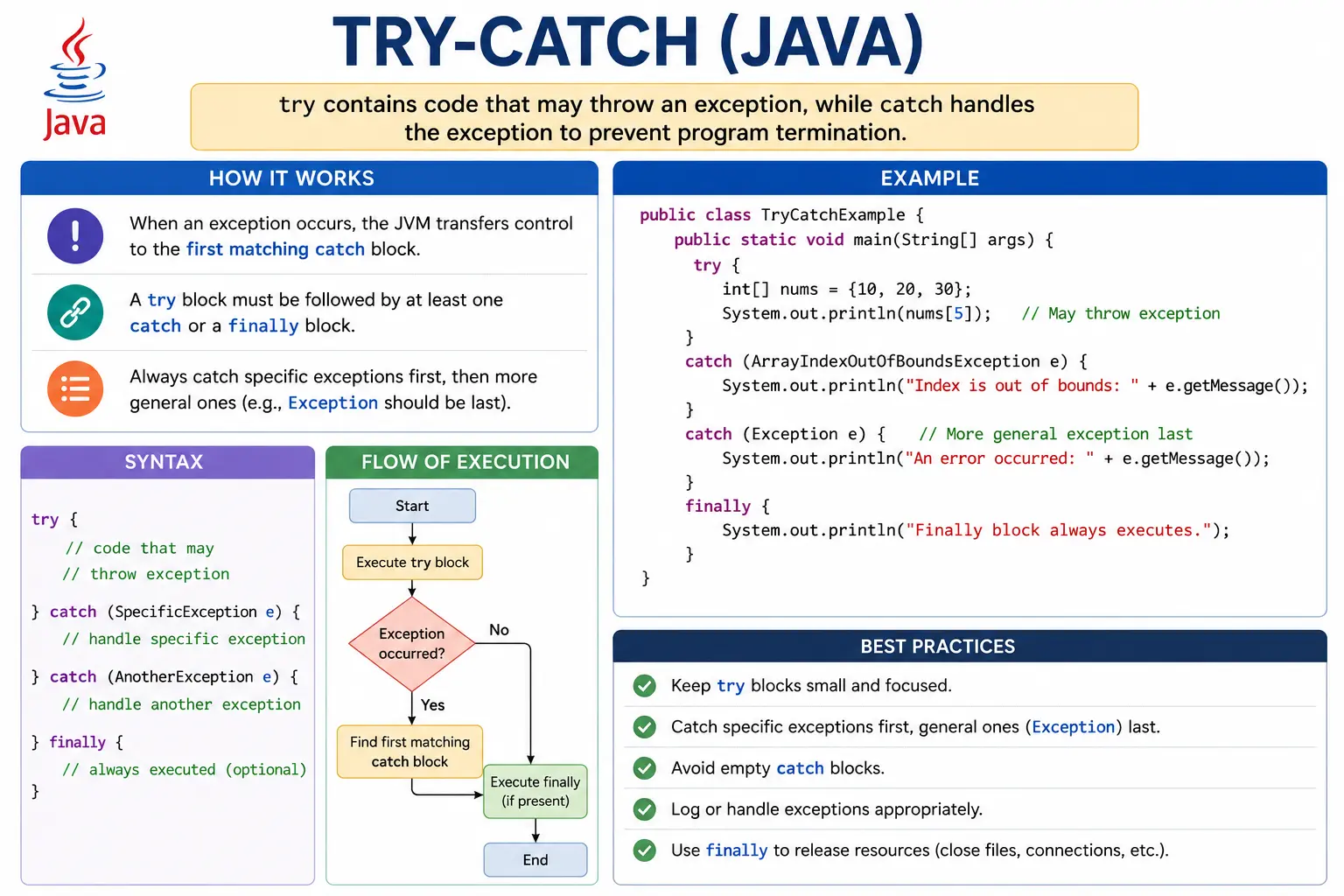
The main idea is simple: put risky code inside the try block and put handling code inside the
matching catch block. If the risky code succeeds, the catch block is skipped. If an
exception occurs, Java creates an exception object and transfers control to the first compatible
catch block. After the exception is handled, the program can continue from the statement after
the try-catch structure. This controlled flow is what prevents abnormal termination.
What Is try-catch?
In Java, try-catch is a language construct used to handle exceptions. The try block
contains code that might throw an exception. The catch block defines what should happen if a
particular type of exception occurs. This design keeps regular program logic readable while still giving the
program a planned response to unexpected conditions.
For example, dividing one integer by another is normal logic, but division by zero is invalid. Reading a file
is normal logic, but the file may not exist. Calling a method on an object is normal logic, but the reference
may be null. These situations are different from ordinary if conditions because they interrupt
the normal flow of execution. When an exception is thrown, Java does not simply move to the next line. It
searches for a suitable handler. A catch block is that handler.
The purpose of try-catch is not only to stop crashes. It also helps the application communicate
failures clearly. A console program can print a helpful message. A web application can show a user-friendly
error page. A backend service can log the technical details and return a controlled response. A desktop
application can ask the user to correct input and try again. In all these cases, try-catch
changes failure from an uncontrolled event into a managed part of program behavior.
Basic Syntax
The basic syntax contains one try block followed by one or more catch blocks. The
exception type in the parentheses tells Java which kind of exception that block can handle. The variable,
commonly named e, refers to the exception object created by the JVM. Through that object, the
program can read the message, print the stack trace, or pass the exception to a logging framework.
try {
    // risky code
} catch (ExceptionType e) {
    // handling code
}
The try block should contain only the code that is actually at risk. This keeps the source of
the exception clear. If a large method is wrapped in a single broad try block, it becomes harder
to understand which statement failed and what recovery action is appropriate. A focused try
block improves readability and makes defect analysis easier.
How try-catch Works (Execution Flow)
Execution begins at the first statement inside the try block. If every statement executes
successfully, Java ignores the catch blocks and continues after the entire
try-catch structure. This is important because a catch block is not a normal part of
the successful path. It runs only when a matching exception occurs.
If an exception is thrown inside the try block, the remaining statements inside that block are
skipped. Java immediately creates an exception object that contains information about the failure, including
the exception type, message, and stack trace. The JVM then checks the available catch blocks from
top to bottom. The first block whose exception type matches the thrown exception is executed. Once that block
finishes, execution continues after the try-catch statement unless the catch block itself throws
another exception, returns from the method, or terminates the program.
This flow explains why catch order matters. Java does not search for the most specific catch block after reading all options. It chooses the first compatible block it encounters. If a parent exception type appears before a child exception type, the child block becomes unreachable. The compiler detects this problem and rejects the code.
Basic Example
A simple example is division by zero. The expression 10 / 0 is syntactically valid, so the code
compiles. At runtime, however, integer division by zero throws an ArithmeticException. By
catching that specific exception, the program can print a meaningful message and continue.
try {
    int result = 10 / 0;
} catch (ArithmeticException e) {
    System.out.println("Cannot divide by zero");
}
Output:
Cannot divide by zero
The result is that the exception is handled and the program can continue execution. In a real application, the handling code might ask the user for a valid value, return a validation error, log the event, or choose a safe fallback.
Syntax Rules (Very Important)
1. try Must Be Followed by catch or finally
A try block cannot exist by itself. Java requires it to be followed by at least one
catch block, a finally block, or both. The reason is logical: if Java allowed a
standalone try block, it would not provide any handling or cleanup behavior. It would simply be
an unnecessary wrapper around ordinary code.
try {
    // code
} catch (Exception e) {
    // handling
}
This form is valid because the risky code has a handler. The following form is invalid because the
try block is not followed by catch or finally.
try {
    // code
}
2. Code Inside try Must Be Exception-Prone
Java allows harmless code inside a try block, but doing so is usually meaningless. A
try block should communicate risk. When another developer reads the code, they should be able to
understand why exception handling is present. Wrapping safe code without reason adds noise and makes the code
look more complicated than it really is.
try {
    System.out.println("Hello");
}
This compiles, but it is not useful unless there is a real exception risk in the actual code. Good exception handling is intentional, not decorative.
Multiple catch Blocks
A single try block can be followed by multiple catch blocks when different failure
types require different responses. This is common when one operation can fail for several reasons. For
example, a method may parse a number, access an array, and call a method on an object. Each operation can
throw a different exception type, and each type may deserve a different message or recovery action.
try {
    int[] arr = new int[3];
    System.out.println(arr[5]);
} catch (ArithmeticException e) {
    System.out.println("Arithmetic error");
} catch (ArrayIndexOutOfBoundsException e) {
    System.out.println("Array index error");
}
Only the first matching catch block is executed. After Java handles the exception, it does not
continue checking the remaining catch blocks. This is another reason to arrange catch blocks carefully and to
keep each block focused on a specific failure type.
Catch Block Ordering Rule (Interview Favorite)
Catch blocks must be ordered from specific to general. A child exception type must appear before its parent
exception type. For example, ArithmeticException is a subclass of
RuntimeException, which is a subclass of Exception. If Exception
appears first, it can catch every ArithmeticException, making the later arithmetic-specific
block unreachable.
catch (Exception e) { }
catch (ArithmeticException e) { } // unreachable
The correct order places the more specific exception first and the more general fallback later.
catch (ArithmeticException e) { }
catch (Exception e) { }
This rule is a common interview question because it tests both exception handling and inheritance knowledge. The compiler error is not arbitrary. It protects the developer from writing a catch block that can never run.
Using Exception Object (e)
The variable inside the catch block refers to the exception object. Most examples name it
e, but any valid variable name can be used. This object contains details about what went wrong.
The most common methods are getMessage(), toString(), and
printStackTrace().
catch (Exception e) {
    System.out.println(e.getMessage());
}
Common methods:
- getMessage()
- printStackTrace()
- toString()
getMessage() returns the detail message associated with the exception. toString()
usually returns the exception class name along with the message. printStackTrace() prints the
method call path that led to the exception, which is useful during development but should be replaced with
proper logging in production systems. In professional applications, logging the exception with context is
more useful than simply printing it to the console.
Single catch with Multiple Exceptions (Java 7+)
Java 7 introduced multi-catch, which allows one catch block to handle multiple unrelated
exception types. This is useful when different exceptions require the same handling logic. Instead of writing
duplicate catch blocks, developers can separate exception types with the pipe character.
try {
    // risky code
} catch (ArithmeticException | NullPointerException e) {
    System.out.println("Handled");
}
Multi-catch reduces duplication, but the listed exception types must be unrelated. You cannot catch
Exception and IOException together in the same multi-catch because
IOException is already a subclass of Exception. Java prevents that because the
broader type would make the narrower type redundant.
Nested try-catch
A nested try-catch structure means placing one try-catch inside another. This can
be useful when an inner operation has its own recovery logic, while the outer operation still needs a
broader safety net. For example, a file-processing method might handle parsing errors inside a loop while an
outer catch handles file access errors. However, nested structures should be used carefully because they can
become difficult to read when overused.
try {
    try {
        int x = 10 / 0;
    } catch (ArithmeticException e) {
        System.out.println("Inner catch");
    }
} catch (Exception e) {
    System.out.println("Outer catch");
}
The inner catch handles the arithmetic problem first. If the inner catch does not handle a thrown exception, the exception can propagate outward and be handled by the outer catch if the type matches. This gives fine-grained control, but in many real projects the same clarity can be achieved by extracting risky logic into smaller methods.
try-catch Without finally
A try-catch block does not always need a finally block. If there is no cleanup work
such as closing a resource, releasing a lock, or resetting a state, then finally may not be
necessary. Many simple exception-handling examples use only try and catch.
try {
    int x = 10 / 2;
} catch (Exception e) {
    System.out.println("Error");
}
In modern Java, resource cleanup is often handled with try-with-resources, especially for files,
streams, sockets, and database objects. Still, understanding plain try-catch is essential
because it is the base mechanism behind exception handling.
Where try-catch Should Be Used
The best place to use try-catch is where the program can do something meaningful with the
failure. Meaningful handling may include showing a clear message, retrying an operation, using fallback data,
logging technical details, converting a low-level exception into an application-specific exception, or
stopping the current workflow safely. Catching an exception without a plan usually makes code weaker, not
stronger.
For example, a controller layer in a web application may catch a service exception and return a proper error response. A service layer may catch a database exception and wrap it in a business exception. A batch job may catch an exception for one record, log it, and continue processing the remaining records. In each case, the catch block has a reason. It is not hiding the problem; it is handling it according to the needs of the application.
Where try-catch Should Not Be Used
try-catch should not be used as a replacement for validation. If a program can check whether a
value is valid before using it, validation is usually better than allowing an exception and catching it later.
For example, checking whether a divisor is zero before division is clearer than catching
ArithmeticException after the failure. Checking whether a reference is null is often clearer
than catching NullPointerException.
Exceptions should also not be used for normal control flow. If a condition is expected and common, represent it with ordinary logic. Exception handling is more expensive and less readable than normal condition checks. It should represent exceptional situations, not routine decisions.
Checked and Unchecked Exceptions in try-catch
Both checked and unchecked exceptions can be handled with try-catch. Checked exceptions are
enforced by the compiler, so Java requires the method to catch them or declare them with throws.
Unchecked exceptions are not enforced by the compiler, but they can still be caught when there is a useful
recovery strategy.
For checked exceptions, try-catch is often mandatory when the current method chooses to handle
the problem directly. For unchecked exceptions, try-catch should be used more selectively.
Catching every runtime exception can hide programming errors. If a NullPointerException occurs
because the code made a wrong assumption, the better fix is usually to correct the logic, not to catch the
exception everywhere.
Logging and Error Messages
A catch block should preserve useful diagnostic information. In small examples, developers often use
System.out.println() or printStackTrace(). These are fine for learning, but real
applications should use a logging framework and include enough context to investigate the issue. A message
such as "error occurred" is not useful. A better log message explains what operation failed and includes the
exception object so the stack trace is preserved.
User-facing messages should be different from developer-facing logs. Users usually do not need stack traces, class names, SQL details, or internal server paths. They need a clear, safe explanation and a possible next action. Developers need the technical details in logs. Good exception handling separates these audiences.
Common Beginner Mistakes
One common beginner mistake is catching Exception everywhere. Although this may appear safe, it
often makes code vague. Specific catch blocks communicate intent. If a block catches
NumberFormatException, the reader understands that parsing failed. If it catches
FileNotFoundException, the reader understands that a file could not be located. A broad
Exception catch should generally be reserved for boundary layers or fallback handlers where
broad protection is intentional.
Another serious mistake is an empty catch block. An empty catch block swallows the exception, meaning the program silently ignores a failure. This makes debugging extremely difficult because the real cause disappears. If an exception is intentionally ignored, the code should explain why, but most of the time the exception should be logged, handled, or rethrown.
Incorrect catch ordering is also common. Parent exception classes must come after child exception classes.
Overusing nested try-catch blocks is another issue because it creates deeply indented and hard
to maintain code. Finally, beginners sometimes place too much code inside the try block. This
makes it hard to know which statement caused the exception and may accidentally catch failures that should
have been handled differently.
Best Practices (Real-World)
The first best practice is to catch the most specific exception that you can handle correctly. Specific
handling makes code clearer and prevents unrelated failures from being treated as the same problem. The
second best practice is to keep the try block small. Place only the risky statements inside it,
and keep unrelated logic outside.
The third best practice is to log exceptions properly. A catch block should not destroy the original cause. If you wrap an exception in a new exception, pass the original exception as the cause. This preserves the stack trace and helps debugging. The fourth best practice is to avoid using exceptions for ordinary decisions such as loop termination or input checks. Use conditionals for normal logic and exceptions for exceptional situations.
The fifth best practice is to handle exceptions at the right layer. Low-level code may not know how to show a user message, while high-level code may not know how to recover from a database error directly. Sometimes the best action is to rethrow the exception or wrap it in a domain-specific exception. Good exception handling is not about catching as early as possible. It is about catching where meaningful action is possible.
try-catch in Real Applications
In enterprise applications, try-catch often appears around integration points. File upload,
email sending, payment processing, report generation, database operations, API calls, and message queue
processing can all fail for reasons outside the immediate control of the code. These are strong candidates
for structured exception handling because the application must respond predictably.
Consider a payment flow. If payment authorization fails because the external gateway is unavailable, the application should not crash with a technical stack trace. It should log the gateway failure, mark the transaction state carefully, and show the user a controlled message. In a batch-processing flow, if one record contains invalid data, the system may log that record and continue with the next one. In a login flow, invalid credentials should usually be handled through validation logic, not by relying on exceptions.
This distinction shows that try-catch is part of application design. It influences user
experience, system reliability, monitoring, debugging, and operational support. A well-designed catch block
does not simply say "handled." It protects the application from inconsistent state and gives the team enough
information to understand what happened.
Interview Perspective
In interviews, a basic answer is that try-catch is used to handle exceptions and prevent
abnormal termination. A stronger answer explains that the try block contains risky code, the
catch block handles a matching exception, and Java transfers control to the first compatible
catch block when an exception occurs. It is also valuable to mention that catch blocks should be ordered from
specific to general and that empty catch blocks are a bad practice.
A practical interview answer should include judgment. You can say that try-catch should be used
where meaningful handling is possible, not everywhere. You can also mention that checked exceptions must be
handled or declared, while unchecked exceptions can be caught when recovery is useful but should often be
prevented through validation and correct logic. This shows that you understand both syntax and real-world
usage.
Exception Propagation and try-catch
Exception propagation is the process by which an exception moves up the call stack when it is not handled in
the current method. If a method throws an exception and does not catch it, Java returns control to the method
that called it. If the caller also does not handle it, the exception continues moving upward until a matching
catch block is found or the program terminates. Understanding this behavior is important because
not every method should catch every exception immediately.
In a clean design, low-level methods often focus on performing a specific operation and may allow exceptions
to propagate when they do not have enough context to recover. Higher-level methods usually understand the
business operation better and can decide whether to retry, show a message, cancel the workflow, or convert
the failure into a meaningful application response. This is why try-catch is closely related to
method design. Catching too low can hide useful information. Catching too high can make recovery less
specific. Good code chooses the layer that can make the best decision.
Rethrowing Exceptions
Sometimes a catch block should not fully consume an exception. It may need to log additional context and then rethrow the same exception or throw a new one. Rethrowing is useful when the current method can add information but cannot complete recovery. For example, a repository method may catch a database exception, add the name of the operation that failed, and throw a custom data-access exception to the service layer.
When wrapping an exception, the original exception should be passed as the cause. This preserves the stack trace and keeps debugging possible. Losing the original cause is a serious mistake because it removes the exact location and reason for the failure. A professional catch block either handles the exception meaningfully, logs it with context, rethrows it with the original cause, or converts it into a controlled response. It should not simply create a vague new exception and discard the details.
Catching Exception vs Catching Throwable
Beginners sometimes ask why code should not simply catch Throwable. In Java,
Throwable is the parent of both Exception and Error. Exceptions
represent conditions that application code may reasonably handle. Errors usually represent serious problems
such as JVM failures, memory exhaustion, or class-loading issues that normal application logic should not try
to recover from. Catching Throwable can accidentally trap these serious system-level problems.
For ordinary application code, catch specific exception types whenever possible. If a broader fallback is
needed at a boundary layer, catching Exception may be acceptable. Catching
Throwable should be rare and reserved for infrastructure-level code that has a very specific
reason, such as a framework boundary that must log all failures before shutting down. This distinction shows
that exception handling is not only syntax; it is also about respecting the meaning of the exception
hierarchy.
Designing Clean catch Blocks
A clean catch block should be short, specific, and purposeful. It should not contain large amounts of unrelated business logic. If handling is complex, move the recovery logic into a clearly named method. This keeps the main code readable while still making the failure response easy to understand. Good catch blocks often follow a predictable pattern: record useful context, choose a recovery action, preserve diagnostic details, and leave the application in a safe state.
It is also important to think about what happens after the catch block. Continuing execution is safe only if the program state is still valid. If a required operation failed, continuing blindly can create incorrect results. For example, if loading account data fails, the program should not proceed as if the account exists. In such cases, the catch block should stop the current operation, return an error response, or throw another exception. Graceful handling does not always mean continuing; sometimes it means stopping safely.
Interview-Ready Answers
Short Answer
try-catch is used to handle exceptions and prevent abnormal termination of a Java program.
Detailed Answer
In Java, the try block contains code that may throw an exception, and the
catch block handles the matching exception. When an exception occurs, the JVM creates an
exception object, skips the remaining statements in the try block, and transfers control to the
first compatible catch block. This allows the program to recover, log the problem, show a
meaningful message, or continue safely depending on the situation.
Key Takeaway
try-catch separates normal logic from error-handling logic. Proper use makes Java applications
more stable, readable, and fault-tolerant. Poor use can hide defects, make debugging harder, and create noisy
code. The goal is to catch specific exceptions at the right layer, handle them meaningfully, preserve useful
diagnostic details, and let the program continue only when continuing is safe.
try-catch Examples (with Output)
1. Simple try-catch
class Demo {
    public static void main(String[] args) {
        try {
            int a = 10 / 0;
        } catch (ArithmeticException e) {
            System.out.println("Arithmetic exception caught");
        }
    }
}
Output
Arithmetic exception caught
2. try Without Exception
class Demo {
    public static void main(String[] args) {
        try {
            int a = 10 / 2;
            System.out.println("No error");
        } catch (Exception e) {
            System.out.println("Error");
        }
    }
}
Output
No error
3. Multiple catch Blocks
class Demo {
    public static void main(String[] args) {
        try {
            String s = null;
            System.out.println(s.length());
        } catch (ArithmeticException e) {
            System.out.println("Arithmetic");
        } catch (NullPointerException e) {
            System.out.println("Null pointer");
        }
    }
}
Output
Null pointer
4. Correct Catch Order (Specific to General)
class Demo {
    public static void main(String[] args) {
        try {
            int[] a = new int[2];
            a[5] = 10;
        } catch (ArrayIndexOutOfBoundsException e) {
            System.out.println("Array issue");
        } catch (Exception e) {
            System.out.println("General issue");
        }
    }
}
Output
Array issue
5. Wrong Catch Order (Compile-Time Error)
class Demo {
    public static void main(String[] args) {
        try {
            int a = 10 / 0;
        }
        // catch (Exception e) {}
        // catch (ArithmeticException e) {} // unreachable
    }
}
Explanation
Parent exception must be last
6. Single catch for Multiple Exceptions (Java 7+)
class Demo {
    public static void main(String[] args) {
        try {
            int[] a = new int[2];
            a[3] = 5;
        } catch (ArrayIndexOutOfBoundsException | NullPointerException e) {
            System.out.println("Array or Null issue");
        }
    }
}
Output
Array or Null issue
7. Nested try-catch
class Demo {
    public static void main(String[] args) {
        try {
            try {
                int a = 10 / 0;
            } catch (ArithmeticException e) {
                System.out.println("Inner catch");
            }
        } catch (Exception e) {
            System.out.println("Outer catch");
        }
    }
}
Output
Inner catch
8. try-catch-finally Flow
class Demo {
    public static void main(String[] args) {
        try {
            int a = 10 / 0;
        } catch (Exception e) {
            System.out.println("Catch");
        } finally {
            System.out.println("Finally");
        }
    }
}
Output
Catch
Finally
9. finally Executes Without Exception
class Demo {
    public static void main(String[] args) {
        try {
            System.out.println("Try");
        } catch (Exception e) {
            System.out.println("Catch");
        } finally {
            System.out.println("Finally");
        }
    }
}
Output
Try
Finally
10. finally with return
class Demo {
    static int test() {
        try {
            return 10;
        } catch (Exception e) {
            return 20;
        } finally {
            return 30;
        }
    }

    public static void main(String[] args) {
        System.out.println(test());
    }
}
Output
30
11. Exception Propagation to Caller
class Demo {
    static void m1() {
        m2();
    }

    static void m2() {
        int a = 10 / 0;
    }

    public static void main(String[] args) {
        try {
            m1();
        } catch (Exception e) {
            System.out.println("Handled in main");
        }
    }
}
Output
Handled in main
12. Catching Parent Exception
class Demo {
    public static void main(String[] args) {
        try {
            String s = null;
            s.length();
        } catch (Exception e) {
            System.out.println("Exception caught");
        }
    }
}
Output
Exception caught
13. Rethrowing Exception
class Demo {
    static void test() {
        try {
            int a = 10 / 0;
        } catch (ArithmeticException e) {
            System.out.println("Handled");
            throw e;
        }
    }

    public static void main(String[] args) {
        try {
            test();
        } catch (Exception e) {
            System.out.println("Rethrown");
        }
    }
}
Output
Handled
Rethrown
14. Exception Object Methods
class Demo {
    public static void main(String[] args) {
        try {
            int a = 10 / 0;
        } catch (Exception e) {
            System.out.println(e.getMessage());
        }
    }
}
Output
/ by zero
15. printStackTrace()
class Demo {
    public static void main(String[] args) {
        try {
            String s = null;
            s.length();
        } catch (Exception e) {
            e.printStackTrace();
        }
    }
}
Explanation
Prints exception name, message, and call stack
16. Catch Block Without Exception Occurring
class Demo {
    public static void main(String[] args) {
        try {
            System.out.println("Safe code");
        } catch (Exception e) {
            System.out.println("Catch");
        }
    }
}
Output
Safe code
17. Try-Catch in Loop
class Demo {
    public static void main(String[] args) {
        int[] a = {10, 20};

        for (int i = 0; i <= a.length; i++) {
            try {
                System.out.println(a[i]);
            } catch (ArrayIndexOutOfBoundsException e) {
                System.out.println("Index error");
            }
        }
    }
}
Output
10
20
Index error
18. Catching Specific vs Generic Exception
class Demo {
    public static void main(String[] args) {
        try {
            int a = 10 / 0;
        } catch (ArithmeticException e) {
            System.out.println("Specific catch");
        }
    }
}
Output
Specific catch
19. try Cannot Exist Alone
class Demo {
    public static void main(String[] args) {
        // try { int a = 10; }  // invalid
    }
}
Explanation
try must be followed by catch or finally
20. Interview Summary: try-catch
class Demo {
    public static void main(String[] args) {
        try {
            int a = 10 / 0;
        } catch (Exception e) {
            System.out.println("Handled");
        }
        System.out.println("Program continues");
    }
}
Key Points
- Prevents abnormal termination
- Catch order matters
- finally usually executes
- Supports graceful error handling
Output
Handled
Program continues