TreeSet in Java
TreeSet is an implementation of the Set interface that stores unique elements in
sorted order. It is used when an application needs duplicate elimination and ordering at the same time.
Unlike HashSet, which does not guarantee order, and LinkedHashSet, which preserves
insertion order, TreeSet automatically arranges elements according to natural ordering or a custom
comparator.
TreeSet is backed by a self-balancing tree structure, commonly described as a Red-Black Tree. This internal structure allows the collection to remain sorted as elements are inserted and removed. The tradeoff is that common operations are generally O(log n), not average O(1) like HashSet. For many business workflows, that tradeoff is worthwhile because the collection always remains sorted without requiring a separate sort step.
This is a high-frequency interview topic because TreeSet connects several core Java ideas: the
Set contract, sorted collections, SortedSet, NavigableSet,
Comparable, Comparator, null handling, duplicate behavior, and performance
complexity. A strong answer should explain not only that TreeSet sorts elements, but also how it decides the
order and when it should be preferred over other set implementations.
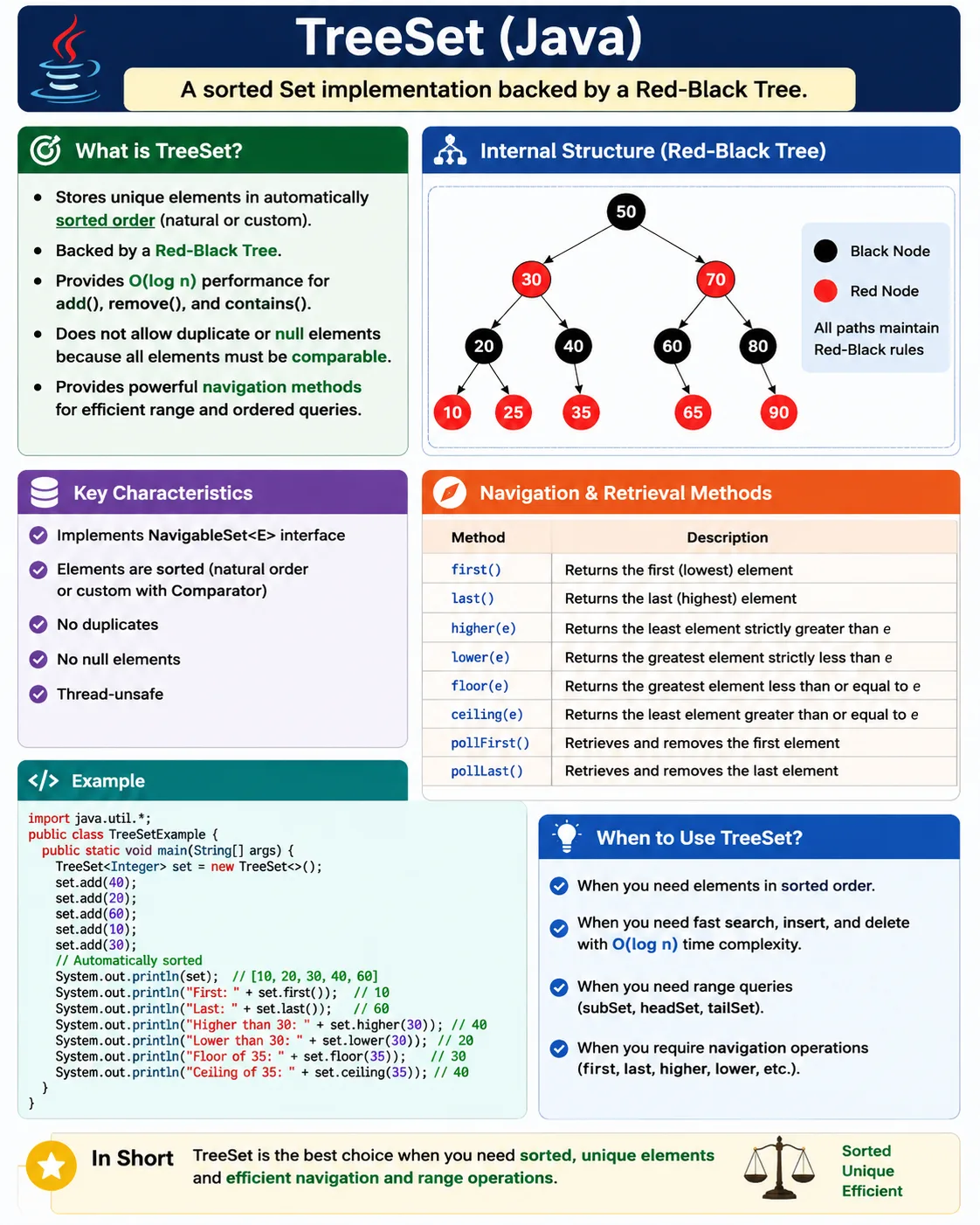
What Is TreeSet?
TreeSet is a class in the java.util package. It implements
NavigableSet, which extends SortedSet, which extends Set. Because it
is a set, it stores unique elements only. Because it is a sorted set, it maintains elements in sorted order.
By default, that order is natural ascending order for values such as numbers and strings.
For integers, natural ordering means smaller numbers come before larger numbers. For strings, natural
ordering means lexicographic alphabetical order based on Unicode comparison rules. If natural ordering is not
what the application needs, a custom Comparator can be supplied when the TreeSet is created.
TreeSet generally does not allow null values because sorting requires comparison. Java cannot compare null
with normal values using natural ordering, so attempting to add null normally causes a
NullPointerException. This is an important difference from HashSet and LinkedHashSet, which
allow one null element.
Set<Integer> set = new TreeSet<>();
Position in Collection Hierarchy
TreeSet sits deeper in the collection hierarchy than HashSet because it supports sorted and navigable
behavior. The SortedSet interface adds sorted-set operations, while NavigableSet
adds methods for finding nearby elements such as lower, higher, floor, and ceiling values.
Iterable
   |-- Collection
        |-- Set
             |-- SortedSet
                   |-- NavigableSet
                         |-- TreeSet
This hierarchy explains why TreeSet is more than a duplicate-removal collection. It is also useful for range operations and ordered lookups. If a program needs the smallest value, largest value, values less than a threshold, or the next value after a given key, TreeSet provides direct methods for those questions.
How TreeSet Works Internally
TreeSet is backed by a self-balancing Red-Black Tree. A tree-based structure keeps elements arranged so that searching, inserting, and removing can be performed efficiently while preserving sorted order. The tree balances itself as values are added or removed, preventing it from degenerating into a simple linear chain in normal operation.
TreeSet decides where each element belongs by comparing it with existing elements. If no comparator is
provided, the elements must implement Comparable. If a comparator is provided, TreeSet uses that
comparator instead of natural ordering. This comparison logic is not optional because sorting is the core
behavior of TreeSet.
The same comparison logic also affects uniqueness. If the comparison says two elements are equal, TreeSet
treats them as duplicates and stores only one. This means TreeSet uniqueness is based on comparison order,
not only on equals. This is an important distinction from HashSet, where uniqueness depends on
hashCode and equals.
Key Characteristics of TreeSet
The first characteristic of TreeSet is automatic sorting. The collection is sorted after every insertion and removal. Developers do not need to call a separate sort method before iteration. The second characteristic is uniqueness. Like all sets, TreeSet does not store duplicate elements.
The third characteristic is that null values are generally not allowed. The fourth characteristic is logarithmic performance for common operations. TreeSet is usually slower than HashSet and LinkedHashSet for simple membership checks, but it provides sorted traversal and range-based operations that those hash-based sets do not provide directly.
TreeSet is not synchronized by default. If multiple threads modify the same TreeSet, external synchronization or an appropriate concurrent approach is required. For ordinary method-local usage, this is usually not a concern, but shared mutable collections should always be designed carefully.
Creating a TreeSet
TreeSet can be created using natural ordering or custom ordering. Natural ordering is the default behavior.
The element type must be comparable, such as Integer, String, or a custom class
that implements Comparable.
Natural Ordering
TreeSet<Integer> set = new TreeSet<>();
set.add(30);
set.add(10);
set.add(20);

System.out.println(set); // [10, 20, 30]
In the natural-ordering example, the values are inserted as 30, 10, and 20, but the output is sorted as 10, 20, and 30. The insertion order is not preserved because TreeSet's purpose is sorted order.
Custom Ordering with Comparator
TreeSet<Integer> set = new TreeSet<>((a, b) -> b - a);
set.add(10);
set.add(30);
set.add(20);

System.out.println(set); // [30, 20, 10]
With a comparator, the developer can define a different order. The example above sorts integers in descending order. In real projects, comparators can sort objects by name, date, priority, score, length, or any other business rule.
Important Sorted and Navigable Methods
TreeSet provides methods that are not available on a plain Set reference. first returns the
smallest element, and last returns the largest element according to the current ordering.
lower, higher, floor, and ceiling are navigational
methods that help find nearby values around a target.
set.first();        // smallest element
set.last();         // largest element
set.lower(20);      // < 20
set.higher(20);     // > 20
set.floor(20);      // <= 20
set.ceiling(20);    // >= 20
Duplicate Handling Example
TreeSet does not allow duplicates. In the following example, "Java" is added twice, but only one
value is stored. The duplicate is ignored rather than treated as an exception.
TreeSet<String> set = new TreeSet<>();
set.add("Java");
set.add("Java");

System.out.println(set); // [Java]
For TreeSet, duplicate detection is tied to comparison. If two values compare as equal, TreeSet considers them duplicates. This is especially important when using custom comparators, because a comparator that compares only one field may cause objects with the same field value to be treated as duplicates.
Null Handling
TreeSet generally does not allow null because it must compare elements to keep them sorted. A null value cannot be compared using normal natural ordering, so adding null causes a runtime exception.
TreeSet<String> set = new TreeSet<>();
set.add(null); // NullPointerException
This is a key interview difference between TreeSet and hash-based sets. HashSet and LinkedHashSet can allow one null because they do not need to sort values. TreeSet needs comparison, so null is not normally a valid element.
Performance Complexity
TreeSet performance is different from HashSet performance because TreeSet must keep elements sorted. Adding a value is not just a storage operation; TreeSet must compare the value and place it in the correct position in the tree. Removing and searching also depend on tree traversal. For this reason, common operations are O(log n) rather than average O(1).
This does not mean TreeSet is inefficient. It means TreeSet solves a different problem. If sorted order and range navigation are required, TreeSet can be more appropriate than adding values to a HashSet and sorting them repeatedly later. The performance cost buys continuously maintained order.
| Operation | Time Complexity |
|---|---|
| add | O(log n) |
| remove | O(log n) |
| contains | O(log n) |
| iteration | O(n) |
TreeSet vs HashSet vs LinkedHashSet
HashSet, LinkedHashSet, and TreeSet all prevent duplicates, but they differ in ordering behavior and performance. HashSet is usually the fastest for simple uniqueness because it does not maintain order. LinkedHashSet preserves insertion order with slightly more overhead. TreeSet maintains sorted order and supports range navigation, but its operations are usually slower than hash-based sets.
The right choice depends on the requirement. If order does not matter, use HashSet. If insertion order matters, use LinkedHashSet. If sorted order or range queries matter, use TreeSet. This comparison is one of the clearest ways to demonstrate practical Java collection knowledge in interviews.
| Feature | HashSet | LinkedHashSet | TreeSet |
|---|---|---|---|
| Order | None | Insertion | Sorted |
| Performance | Fastest | Fast | Slowest |
| Null allowed | One | One | No |
| Internal DS | HashMap | LinkedHashMap | Red-Black Tree |
When to Use TreeSet
Use TreeSet when sorted data is required at all times. It is useful when values must be displayed in ascending order, when duplicate elimination and sorting are both needed, or when the application frequently asks for values near a boundary. Examples include sorted product codes, ranked scores, ordered timestamps, alphabetically arranged names, or unique numeric thresholds.
TreeSet is also valuable for range-style operations. Methods such as headSet,
tailSet, and subSet make it easy to work with values below, above, or between
limits. This is useful in scheduling, pricing, validation ranges, leaderboard cutoffs, and data filtering
logic.
When Not to Use TreeSet
Do not use TreeSet when order does not matter. HashSet is usually simpler and faster for basic uniqueness and membership testing. Do not use TreeSet when null values must be stored, because TreeSet needs comparison logic and null cannot normally participate in natural ordering.
TreeSet is also not the best choice when maximum insert performance is the main goal and sorted output is rarely needed. In that situation, a HashSet may be used for storage and values can be sorted only when output is required. The best collection is the one that matches the most important operation in the workflow.
Common Beginner Mistakes
A common beginner mistake is adding null values to TreeSet and expecting it to behave like HashSet.
TreeSet requires comparison, so null usually causes a NullPointerException. Another mistake is
adding custom objects without implementing Comparable or providing a Comparator.
Without comparison logic, TreeSet cannot decide how to sort those objects.
Beginners also sometimes assume TreeSet is faster than HashSet because it is more feature-rich. In reality, TreeSet usually has slower basic operations because it maintains sorted order. It should be chosen for ordering and navigation needs, not merely for duplicate removal.
A more subtle mistake is writing a comparator that does not represent the intended uniqueness rule. If a comparator compares strings only by length, then two different strings of the same length may be treated as duplicates. The comparator defines both ordering and equality from TreeSet's perspective, so it must be designed carefully.
TreeSet in Real Projects
TreeSet is useful in real projects when sorted unique values are part of the business behavior. A reporting module may collect unique dates and display them in chronological order. A product system may collect unique price thresholds and process them from smallest to largest. A workflow engine may maintain unique priority levels and always process them in order.
Range operations are another practical strength. Suppose a pricing engine needs all discount thresholds below
a customer purchase amount. A TreeSet can use headSet to retrieve those thresholds directly. If
a scheduling system needs the next available time after a requested time, ceiling or
higher can provide the nearby value without manually scanning a list.
Test automation can also use TreeSet when expected output must be sorted. For example, if a page should show unique status names alphabetically, collecting the displayed values into a TreeSet can help compare sorted uniqueness. However, testers should still be careful: using TreeSet for comparison may hide an ordering defect if the original UI order is supposed to be validated exactly.
Comparable vs Comparator in TreeSet
TreeSet needs a comparison rule for every element it stores. There are two common ways to provide that rule.
The first is Comparable, where the class defines its own natural ordering through the
compareTo method. This is appropriate when the class has one obvious default order. For example,
integers naturally sort by numeric value, and strings naturally sort lexicographically.
The second approach is Comparator, where the ordering rule is supplied from outside the class.
This is useful when different parts of the application need different orderings. A list of users may be
sorted by ID in one screen, by name in another screen, and by registration date in a report. Rather than
forcing the class to have only one natural order, comparators allow each use case to define the order it
needs.
In TreeSet, comparison is not only about display order. It also affects uniqueness. If a comparator returns
zero for two objects, TreeSet treats them as duplicates. This can surprise beginners. For example, a
comparator that sorts strings only by length may treat "Java" and "Code" as the
same element because both have four characters. A careful comparator should include a tie-breaker when two
different values can share the primary comparison field.
Range Views and Boundary Logic
One of TreeSet's strongest practical advantages is its support for range views. Methods such as
headSet, tailSet, and subSet let a program work with a portion of the
sorted set without manually filtering every value. This is useful when data is naturally threshold-based or
time-based.
Consider a validation rule where discount levels exist at 100, 500, 1000, and 5000. If the customer purchase amount is 1200, a TreeSet can quickly expose the eligible discount thresholds below or equal to that amount. Similarly, a scheduling feature can use TreeSet to find the next available slot after a requested time. These operations are more expressive than scanning a list because the collection itself understands sorted order.
Range views should still be used carefully. Some TreeSet range methods return views backed by the original set, so changes through the view can affect the original collection. This is powerful, but it requires clear intent. If an independent copy is needed, the range view should be copied into a new collection.
Design Tradeoffs
TreeSet is a good example of choosing a collection based on behavior rather than habit. It is not the fastest set for simple lookup, but it provides automatic sorting and navigation. If the application repeatedly needs sorted output, TreeSet can simplify the design. If the application only needs uniqueness and occasionally sorts the data, HashSet plus a separate sorting step may be simpler.
The key question is whether sorted order is part of the data structure's ongoing responsibility. If yes, TreeSet is a strong candidate. If sorting is only a presentation concern at the very end of a workflow, it may be better to store values in a hash-based collection and sort only when rendering output. Clear collection choice makes code easier to read because the data structure itself communicates the intent.
TreeSet Examples
The following examples show common TreeSet behavior. They cover natural sorting, duplicate handling, null handling, custom comparators, iteration, removal, range views, navigational methods, custom objects, and interview-focused points.
1. Creating a TreeSet (Natural Sorting)
This example creates a TreeSet of integers. The values are inserted in mixed order, but TreeSet prints them in ascending order because integers have a natural ordering.
import java.util.*;

class Demo {
    public static void main(String[] args) {
        TreeSet<Integer> set = new TreeSet<>();
        set.add(30);
        set.add(10);
        set.add(20);
        System.out.println(set);
    }
}
Output
[10, 20, 30]
2. TreeSet Does Not Allow Duplicates
TreeSet follows the Set contract, so duplicates are not stored. Adding "Java" twice still
results in a size of one.
import java.util.*;

class Demo {
    public static void main(String[] args) {
        TreeSet<String> set = new TreeSet<>();
        set.add("Java");
        set.add("Java");
        System.out.println(set.size());
    }
}
Output
1
3. TreeSet Does Not Allow null
TreeSet usually rejects null values because it must compare every element. The commented line below would
cause a NullPointerException.
import java.util.*;

class Demo {
    public static void main(String[] args) {
        TreeSet<Integer> set = new TreeSet<>();
        // set.add(null); // NullPointerException
        System.out.println("Null not allowed");
    }
}
4. Sorting Strings Alphabetically
Strings have natural ordering, so TreeSet can sort them automatically. The values are inserted as Banana, Apple, and Orange, but the output appears alphabetically. This is useful for unique labels, names, codes, and menu values that must be displayed in sorted order.
import java.util.*;

class Demo {
    public static void main(String[] args) {
        TreeSet<String> set = new TreeSet<>();
        set.add("Banana");
        set.add("Apple");
        set.add("Orange");
        System.out.println(set);
    }
}
Output
[Apple, Banana, Orange]
5. Sorting in Reverse Order (Comparator)
A comparator changes the ordering rule. Here Comparator.reverseOrder() sorts integers in
descending order. The set still rejects duplicates; only the sorting direction changes.
import java.util.*;

class Demo {
    public static void main(String[] args) {
        TreeSet<Integer> set = new TreeSet<>(Comparator.reverseOrder());
        set.add(10);
        set.add(30);
        set.add(20);
        System.out.println(set);
    }
}
Output
[30, 20, 10]
6. Custom Sorting Using Comparator
Custom comparators allow TreeSet to sort values using business-specific rules. This example sorts strings by length. Because the comparator controls comparison, it also affects which values are considered duplicates.
import java.util.*;

class Demo {
    public static void main(String[] args) {
        TreeSet<String> set =
            new TreeSet<>((a, b) -> a.length() - b.length());
        set.add("Java");
        set.add("API");
        set.add("Automation");
        System.out.println(set);
    }
}
Output
[API, Java, Automation]
In production code, a comparator should usually include a tie-breaker. If two different strings have the same length and the comparator returns zero, TreeSet may treat them as duplicates even though their text differs.
7. Iterating Using for-each
Iteration over a TreeSet follows sorted order. A for-each loop is the simplest traversal style when the code only needs to read each value.
import java.util.*;

class Demo {
    public static void main(String[] args) {
        TreeSet<Integer> set =
            new TreeSet<>(Arrays.asList(1, 2, 3));
        for (int x : set) {
            System.out.println(x);
        }
    }
}
8. Iterating Using Iterator
An iterator also follows the TreeSet ordering. It provides explicit traversal control and is useful when removal during iteration is required.
import java.util.*;

class Demo {
    public static void main(String[] args) {
        TreeSet<String> set =
            new TreeSet<>(Arrays.asList("A", "B", "C"));
        Iterator<String> it = set.iterator();
        while (it.hasNext()) {
            System.out.println(it.next());
        }
    }
}
9. Removing Elements
Removing an element does not disturb TreeSet's sorted behavior. After removal, the remaining elements are still stored and iterated in order.
import java.util.*;

class Demo {
    public static void main(String[] args) {
        TreeSet<Integer> set =
            new TreeSet<>(Arrays.asList(10, 20, 30));
        set.remove(20);
        System.out.println(set);
    }
}
Output
[10, 30]
10. first() and last()
The first and last methods return the smallest and largest elements according to
the TreeSet's ordering. If a custom comparator is used, these methods follow that comparator's definition of
first and last.
import java.util.*;

class Demo {
    public static void main(String[] args) {
        TreeSet<Integer> set =
            new TreeSet<>(Arrays.asList(10, 20, 30));
        System.out.println(set.first());
        System.out.println(set.last());
    }
}
Output
10
30
11. headSet() for Elements Less Than a Given Value
headSet returns a sorted view of elements less than the given boundary. In this example,
elements below 30 are returned. This method is useful for thresholds, limits, and cutoff-based logic.
import java.util.*;

class Demo {
    public static void main(String[] args) {
        TreeSet<Integer> set =
            new TreeSet<>(Arrays.asList(10, 20, 30, 40));
        System.out.println(set.headSet(30));
    }
}
Output
[10, 20]
12. tailSet() for Elements Greater Than or Equal
tailSet returns elements greater than or equal to the given value. It is useful when a workflow
needs all eligible values from a minimum point onward.
import java.util.*;

class Demo {
    public static void main(String[] args) {
        TreeSet<Integer> set =
            new TreeSet<>(Arrays.asList(10, 20, 30, 40));
        System.out.println(set.tailSet(30));
    }
}
Output
[30, 40]
13. subSet() for a Range View
subSet returns values within a range. In this common form, the lower boundary is included and
the upper boundary is excluded. Range views are one of the practical advantages TreeSet has over hash-based
sets.
import java.util.*;

class Demo {
    public static void main(String[] args) {
        TreeSet<Integer> set =
            new TreeSet<>(Arrays.asList(10, 20, 30, 40));
        System.out.println(set.subSet(20, 40));
    }
}
Output
[20, 30]
14. Navigational Methods (lower, higher, floor, ceiling)
Navigational methods answer nearby-value questions. lower finds the greatest value strictly less
than the target. higher finds the least value strictly greater than the target.
floor and ceiling include equality when a matching value exists.
import java.util.*;

class Demo {
    public static void main(String[] args) {
        TreeSet<Integer> set =
            new TreeSet<>(Arrays.asList(10, 20, 30));
        System.out.println(set.lower(20));
        System.out.println(set.higher(20));
        System.out.println(set.floor(25));
        System.out.println(set.ceiling(25));
    }
}
Output
10
30
20
30
15. Polling Elements (pollFirst, pollLast)
pollFirst removes and returns the first element. pollLast removes and returns the
last element. These methods are useful when sorted values must be consumed from either end of the set.
import java.util.*;

class Demo {
    public static void main(String[] args) {
        TreeSet<Integer> set =
            new TreeSet<>(Arrays.asList(10, 20, 30));
        System.out.println(set.pollFirst());
        System.out.println(set.pollLast());
        System.out.println(set);
    }
}
Output
10
30
[20]
16. Converting List to TreeSet (Sort + Remove Duplicates)
Converting a list to a TreeSet removes duplicates and sorts the remaining values. This is useful when input data may be repeated and the final output must be unique and ordered.
import java.util.*;

class Demo {
    public static void main(String[] args) {
        List<Integer> list = Arrays.asList(3, 1, 2, 2);
        TreeSet<Integer> set = new TreeSet<>(list);
        System.out.println(set);
    }
}
Output
[1, 2, 3]
17. Custom Objects with Comparable
Custom objects can be stored in TreeSet when they implement Comparable. The
compareTo method defines the natural ordering for the class. In this example, users are ordered
by ID.
class User implements Comparable<User> {
    int id;
    User(int id) { this.id = id; }

    public int compareTo(User u) {
        return this.id - u.id;
    }
}

import java.util.*;

class Demo {
    public static void main(String[] args) {
        TreeSet<User> set = new TreeSet<>();
        set.add(new User(2));
        set.add(new User(1));
        System.out.println(set.size());
    }
}
Output
2
If two users compare as equal, TreeSet stores only one of them. This means the comparison method must reflect the intended business identity, not just a convenient sorting shortcut.
18. Custom Objects with Comparator
A Comparator can be supplied when the class itself does not implement Comparable or when a different sorting rule is needed for a specific use case. This keeps the domain class flexible while still allowing TreeSet to sort the objects.
import java.util.*;

class User {
    int id;
    User(int id) { this.id = id; }
}

class Demo {
    public static void main(String[] args) {
        TreeSet<User> set =
            new TreeSet<>((a, b) -> a.id - b.id);
        set.add(new User(2));
        set.add(new User(1));
        System.out.println(set.size());
    }
}
19. Performance Note (Concept)
TreeSet operations are logarithmic because the collection maintains a balanced tree. This is slower than average HashSet lookup, but it provides sorted traversal and range operations without needing a separate sort after each change.
TreeSet<Integer> set = new TreeSet<>();
Explanation
- Backed by Red-Black Tree
- Operations are O(log n)
- Slower than HashSet, faster ordered access
20. Interview Summary for TreeSet
This final example reinforces the central behavior of TreeSet: sorted unique elements. The output order is based on natural string ordering, not insertion order.
import java.util.*;

class Demo {
    public static void main(String[] args) {
        TreeSet<String> set = new TreeSet<>();
        set.add("Sorted");
        set.add("Unique");
        System.out.println(set);
    }
}
Key Points
- Sorted set
- No duplicates
- No null allowed
- Uses Red-Black Tree
- Supports navigational methods
Interview-Ready Answers
Short Answer
TreeSet is a Set implementation that stores elements in sorted order.
Detailed Answer
In Java, TreeSet implements the NavigableSet interface and stores unique elements in sorted order using a Red-Black Tree. It does not allow null elements and provides logarithmic-time performance for basic operations.
A complete interview answer should also mention that TreeSet uses natural ordering through
Comparable or custom ordering through Comparator. It supports methods such as
first, last, lower, higher, floor,
ceiling, headSet, tailSet, and subSet, making it useful
for sorted and range-based logic.
Key Takeaway
Use TreeSet when you need sorted, unique elements. It is the right set implementation when the
application needs automatic ordering, range queries, smallest or largest values, or nearby-value navigation.
Avoid TreeSet when order does not matter and maximum lookup performance is the main concern; in that case,
HashSet is usually better. Choose TreeSet for sorted behavior, not merely for duplicate removal.