TreeMap in Java
TreeMap is an implementation of the Map interface that stores key-value pairs in
sorted key order. It is used when a Java program needs map behavior and ordered traversal at the same time.
A HashMap gives fast unordered lookup, and a LinkedHashMap gives predictable insertion order, but TreeMap
keeps keys sorted automatically.
TreeMap is backed by a self-balancing Red-Black Tree. This internal structure allows TreeMap to maintain sorted keys while entries are added, removed, and searched. The tradeoff is performance: common operations are usually O(log n), not average O(1) like HashMap. In return, TreeMap provides sorted traversal and rich navigation methods.
This topic is common in interviews because it connects map behavior, sorted ordering, natural ordering, custom comparators, null-key restrictions, range views, and navigation APIs. A strong TreeMap explanation should make clear that TreeMap sorts by keys, not by values.
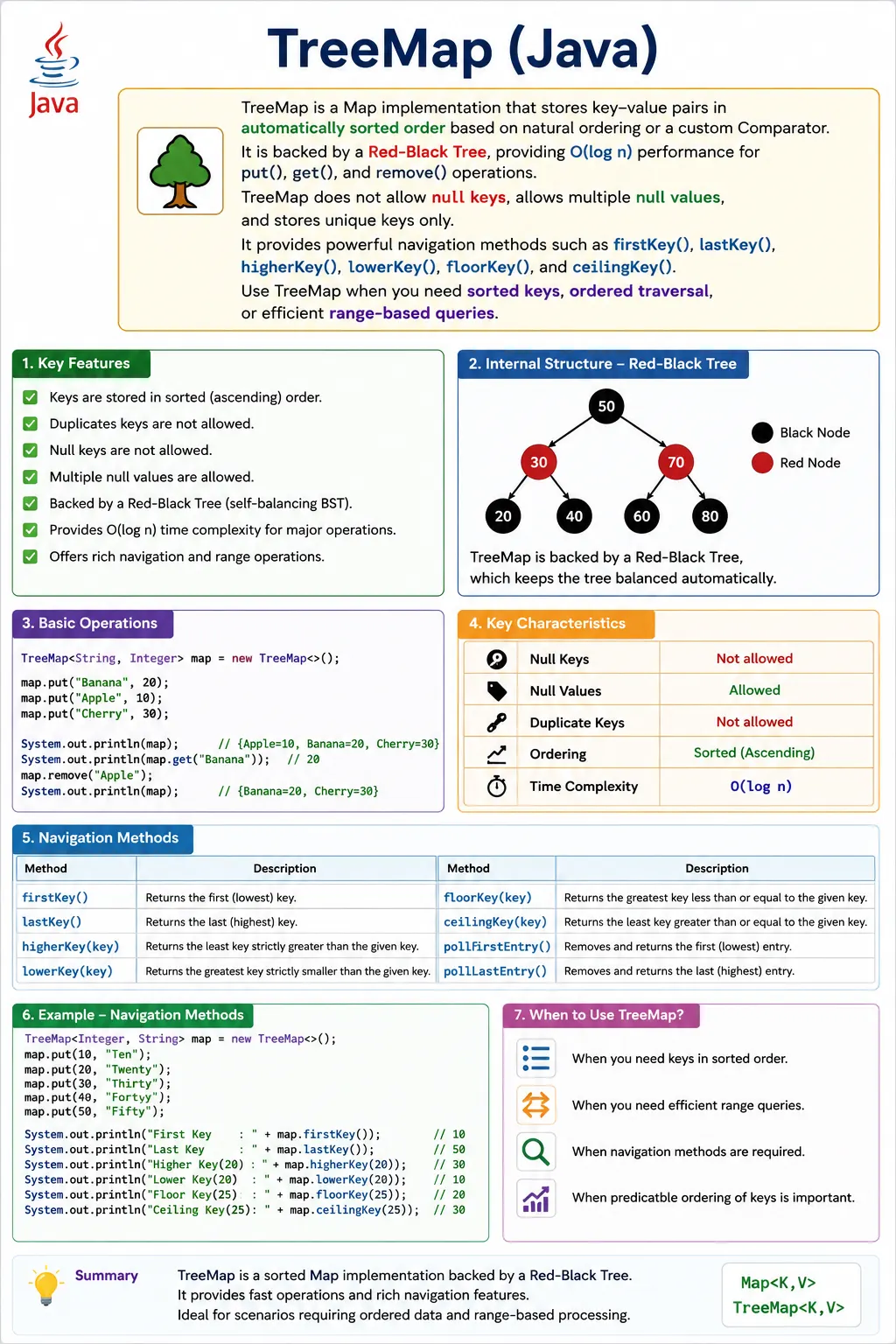
What Is TreeMap?
TreeMap is a class in the java.util package. It implements
NavigableMap, which extends SortedMap, which extends Map. Because it
is a map, it stores key-value pairs. Because it is a sorted map, it stores those entries according to sorted
key order.
TreeMap keys are ordered either by natural ordering through Comparable or by a custom
Comparator supplied during construction. Values are not used for sorting. Multiple keys can map
to the same value, but duplicate keys are not allowed. If the same key is inserted again, the old value is
replaced.
TreeMap generally does not allow null keys because keys must be compared. Null values are allowed because values are not used for key ordering. This distinction is important when comparing TreeMap with HashMap and LinkedHashMap.
Map<Integer, String> map = new TreeMap<>();
Position in Map Hierarchy
TreeMap sits under NavigableMap and SortedMap. This hierarchy explains why TreeMap
has methods beyond ordinary map operations. It can retrieve first and last keys, find nearby keys, and return
range views.
Map
 |-- SortedMap
       |-- NavigableMap
             |-- TreeMap
How TreeMap Works Internally
TreeMap is backed by a Red-Black Tree, which is a self-balancing binary search tree. Each entry is placed according to key comparison. The tree balances itself as entries are inserted and removed, helping keep lookup, insertion, and deletion efficient.
TreeMap compares keys using either natural ordering or a custom comparator. If no comparator is provided, the
keys must implement Comparable. If a comparator is provided, TreeMap uses that comparator to
decide where keys belong and whether two keys should be considered equal.
This comparison rule affects both ordering and uniqueness. If a comparator returns zero for two different key objects, TreeMap treats them as the same key and replaces the value. This is why comparator design is critical for TreeMap correctness.
Key Characteristics of TreeMap
The first key characteristic is sorted-key order. TreeMap always iterates entries according to key order. The second characteristic is unique keys. Like every map, a key can exist only once. A later put operation with the same key replaces the old value.
The third characteristic is logarithmic performance. TreeMap is usually slower than HashMap and LinkedHashMap for simple get and put operations, but it provides sorted traversal and range operations. The fourth characteristic is that TreeMap is not synchronized by default. Shared concurrent modification requires a separate concurrency strategy.
Creating a TreeMap
TreeMap can be created with natural key ordering or custom key ordering. Natural ordering is used when the key
type already knows how to compare itself, such as Integer or String.
Natural Ordering with Comparable
TreeMap<Integer, String> map = new TreeMap<>();
map.put(3, "Java");
map.put(1, "Python");
map.put(2, "C++");
System.out.println(map); // {1=Python, 2=C++, 3=Java}
In the example above, entries are inserted in the order 3, 1, and 2, but the map prints keys in ascending order.
Custom Ordering with Comparator
TreeMap<Integer, String> map =
    new TreeMap<>((a, b) -> b - a);
map.put(1, "Java");
map.put(3, "Python");
map.put(2, "C++");
System.out.println(map); // {3=Python, 2=C++, 1=Java}
With a comparator, TreeMap can sort keys in a custom order. The example above sorts integer keys in descending order.
Important TreeMap Methods
TreeMap includes navigational methods that help locate important keys. firstKey and
lastKey return the smallest and largest keys. lowerKey, higherKey,
floorKey, and ceilingKey help find nearby keys around a target.
map.firstKey();     // smallest key
map.lastKey();      // largest key
map.lowerKey(2);    // < 2
map.higherKey(2);   // > 2
map.floorKey(2);    // <= 2
map.ceilingKey(2);  // >= 2
Duplicate Key Behavior
TreeMap does not allow duplicate keys. If the same key is inserted again, the old value is replaced. The key remains in sorted position, and the map contains only one mapping for that key.
map.put(1, "Java");
map.put(1, "Python");
System.out.println(map); // {1=Python}
This replacement behavior is the same fundamental rule used by other Map implementations. Duplicate keys update values; they do not create multiple entries.
Null Handling
TreeMap generally does not allow null keys because keys must be compared to maintain sorted order. Null values are allowed because values are not part of the key comparison process.
map.put(null, "Java"); // NullPointerException
This is one of the most important differences between TreeMap and HashMap. HashMap allows one null key, while TreeMap normally rejects null keys.
Performance Complexity
TreeMap performance is based on tree operations. put, get, and
remove are O(log n) because TreeMap must navigate the tree using key comparison. Iteration is
O(n) because every entry must be visited.
This is slower than average HashMap lookup, but TreeMap gives automatic sorted-key behavior. If sorted output is needed repeatedly, TreeMap may simplify the design because the map is always maintained in sorted order.
| Operation | Time Complexity |
|---|---|
| put | O(log n) |
| get | O(log n) |
| remove | O(log n) |
| iteration | O(n) |
TreeMap vs HashMap vs LinkedHashMap
HashMap, LinkedHashMap, and TreeMap all store key-value pairs, but they differ mainly in ordering and performance. HashMap is fastest for unordered lookup. LinkedHashMap preserves insertion order. TreeMap sorts keys and supports navigation methods.
The right implementation depends on the requirement. Use HashMap when order does not matter, LinkedHashMap when insertion order matters, and TreeMap when sorted keys or range queries matter.
| Feature | HashMap | LinkedHashMap | TreeMap |
|---|---|---|---|
| Order | None | Insertion | Sorted |
| Performance | Fastest | Fast | Slower |
| Null key | One | One | No |
| Internal DS | Hash table | Hash table + list | Red-Black Tree |
When to Use TreeMap
Use TreeMap when sorted keys are required. It is useful for alphabetical lookup tables, numeric ranges, ordered thresholds, timestamp-based keys, leaderboard rankings, and any workflow where entries must be processed by key order.
TreeMap is also valuable when range queries are needed. Methods such as headMap,
tailMap, and subMap allow a program to work with keys below, above, or between
boundaries without manually scanning every entry.
When Not to Use TreeMap
Do not use TreeMap when order does not matter and maximum lookup performance is the goal. HashMap is usually better for simple key-based retrieval. Do not use TreeMap when null keys must be stored, because TreeMap normally requires keys to be comparable.
TreeMap may also be unnecessary for heavy write operations when sorted output is rarely needed. In that case, a HashMap plus sorting at output time may be simpler. The collection should match the most important behavior of the workflow.
Common Beginner Mistakes
A common beginner mistake is adding null keys and expecting TreeMap to behave like HashMap. TreeMap sorts
keys, so null keys generally fail. Another mistake is using custom key objects without implementing
Comparable or providing a Comparator.
Beginners also sometimes expect insertion order. TreeMap does not preserve insertion order; it sorts keys. Another subtle mistake is writing a comparator that compares only one field and accidentally treats different keys as equal.
Interview-Ready Answers
Short Answer
TreeMap is a Map implementation that stores keys in sorted order.
Detailed Answer
In Java, TreeMap implements the NavigableMap interface and stores key-value pairs in sorted order using a Red-Black Tree. It does not allow null keys, provides logarithmic-time operations, and supports advanced navigation methods.
A complete answer should mention that TreeMap sorts by keys, not values. It uses natural ordering through
Comparable or custom ordering through Comparator. It is slower than HashMap for
simple lookup but useful for sorted traversal and range queries.
TreeMap in Real Projects
TreeMap appears in real projects when ordered keys matter. A reporting module may use dates as keys and display entries chronologically. A pricing system may use numeric thresholds as keys and find the closest applicable threshold. A dictionary-like feature may use strings as keys and display entries alphabetically.
TreeMap is also useful for range-driven business logic. A system can ask for all entries below a limit, all entries after a starting key, or entries between two boundaries. These operations are clearer with TreeMap than with a HashMap followed by manual filtering and sorting.
How to Think About TreeMap During Design
The best way to decide whether TreeMap belongs in a design is to ask whether ordering is part of the problem itself. If the business requirement says that records must be shown alphabetically, dates must be processed chronologically, slabs must be evaluated by threshold, or the nearest available key must be found, TreeMap is often a natural fit. The sorted structure directly supports the language of the requirement.
If ordering is only a display preference, the decision is less automatic. For example, if an application performs thousands of fast lookups and only occasionally prints a sorted report, storing everything in a HashMap and sorting at report time may be reasonable. But if sorted access is required throughout the workflow, repeatedly sorting HashMap keys becomes noisy and inefficient. In that case, TreeMap keeps the design cleaner because the data remains ordered from the beginning.
Another useful design question is whether the program needs exact lookup or boundary lookup. HashMap is built for exact key lookup. TreeMap can perform exact lookup too, but it also answers boundary questions such as previous key, next key, floor key, ceiling key, and keys within a range. When those questions appear in the requirement, TreeMap is not just a sorted map; it becomes a business-rule helper.
TreeMap Examples
The following examples show TreeMap from the most basic usage to the methods that make it different from other Map implementations. Read them with one idea in mind: TreeMap is not just a place to store data. It is a sorted structure that continuously organizes entries by key. Every insertion, lookup, and range operation is influenced by that ordering rule.
In interviews, TreeMap examples are often used to test whether you understand the difference between hashing, insertion order, and sorted order. A candidate who says that TreeMap stores data like HashMap but in sorted order is only partly correct. The deeper answer is that TreeMap uses key comparison for structure, lookup, replacement, and navigation. The examples below make that behavior visible.
1. Creating a TreeMap (Natural Sorting by Key)
The simplest TreeMap uses natural ordering. For integer keys, natural ordering means ascending numeric order. Notice that the entries are inserted as 3, 1, and 2, but the printed output is arranged as 1, 2, and 3. This proves that TreeMap does not preserve insertion sequence.
import java.util.*;

class Demo {
    public static void main(String[] args) {
        TreeMap<Integer, String> map = new TreeMap<>();
        map.put(3, "C");
        map.put(1, "A");
        map.put(2, "B");
        System.out.println(map);
    }
}
Output
{1=A, 2=B, 3=C}
This automatic ordering is useful when the output must always be sorted by key. Without TreeMap, you might store entries in a HashMap and sort the keys every time you need to display them. TreeMap avoids that repeated sorting step by maintaining order as part of its internal structure.
2. TreeMap Does NOT Allow Duplicate Keys
Like every Map implementation, TreeMap requires each key to be unique. When the same key is inserted again, TreeMap does not create another entry. Instead, it replaces the value associated with that key.
import java.util.*;

class Demo {
    public static void main(String[] args) {
        TreeMap<Integer, String> map = new TreeMap<>();
        map.put(1, "Java");
        map.put(1, "Selenium");
        System.out.println(map);
    }
}
Output
{1=Selenium}
The important point is that duplicate detection is based on key comparison. If a comparator says two keys are equal, TreeMap treats them as the same key even if the actual objects are different. This is why comparator design matters so much when using custom object keys.
3. TreeMap Does NOT Allow null Keys
TreeMap normally rejects null keys because it must compare keys to decide where they belong in the tree. A null key cannot be compared with ordinary keys using natural ordering, so inserting one leads to a NullPointerException.
import java.util.*;

class Demo {
    public static void main(String[] args) {
        TreeMap<Integer, String> map = new TreeMap<>();
        // map.put(null, "X"); // NullPointerException
        System.out.println("Null key not allowed");
    }
}
This behavior is a common interview difference between HashMap and TreeMap. HashMap permits one null key because it uses hashing, while TreeMap depends on ordering. When key order is part of the data structure, keys must be comparable.
4. TreeMap Allows Multiple null Values
Although TreeMap rejects null keys, it can store null values. Values do not control the tree structure. They are simply data associated with keys, so TreeMap does not need to compare them.
import java.util.*;

class Demo {
    public static void main(String[] args) {
        TreeMap<Integer, String> map = new TreeMap<>();
        map.put(1, null);
        map.put(2, null);
        System.out.println(map);
    }
}
Output
{1=null, 2=null}
This distinction is practical. A map of employee IDs to optional middle names, for example, may have many null values while still using sorted employee IDs as keys. The key must be valid for ordering; the value may be absent.
5. Sorting Keys in Reverse Order
TreeMap does not have to use ascending order. By passing a comparator, you can define the key order yourself.
The example below uses Comparator.reverseOrder() so the largest key appears first.
import java.util.*;

class Demo {
    public static void main(String[] args) {
        TreeMap<Integer, String> map =
            new TreeMap<>(Comparator.reverseOrder());
        map.put(1, "A");
        map.put(3, "C");
        map.put(2, "B");
        System.out.println(map);
    }
}
Output
{3=C, 2=B, 1=A}
Reverse ordering is useful in dashboards, rankings, and reports where the most recent or largest key should appear at the top. Because the ordering rule is attached to the TreeMap itself, every traversal follows that rule consistently.
6. Custom Sorting Using Comparator
A comparator can apply any ordering rule that makes sense for the business requirement. Here, string keys are sorted by their length instead of alphabetically. This shows how TreeMap can support custom ordering beyond natural sorting.
import java.util.*;

class Demo {
    public static void main(String[] args) {
        TreeMap<String, Integer> map =
            new TreeMap<>((a, b) -> a.length() - b.length());
        map.put("Java", 1);
        map.put("API", 2);
        map.put("Automation", 3);
        System.out.println(map);
    }
}
Output
{API=2, Java=1, Automation=3}
This example is also a warning. The comparator uses only string length. If two different strings have the same length, TreeMap may treat them as equal keys because the comparator returns zero. A production comparator should usually include a tie-breaker, such as comparing alphabetically when lengths are the same.
7. Iterating Using entrySet()
The entrySet() method is the most useful way to iterate when both keys and values are needed.
In a TreeMap, iteration follows sorted key order automatically.
import java.util.*;

class Demo {
    public static void main(String[] args) {
        TreeMap<Integer, String> map = new TreeMap<>();
        map.put(1, "A");
        map.put(2, "B");

        for (Map.Entry<Integer, String> e : map.entrySet()) {
            System.out.println(e.getKey() + " -> " + e.getValue());
        }
    }
}
This pattern is common in reporting code because each entry can be printed, transformed, or exported with both its key and value available. For TreeMap, no separate sorting step is required before iteration.
8. Iterating Using keySet()
Use keySet() when only the keys are needed. The returned keys appear in the same order maintained
by the TreeMap, which means natural or comparator-based sorted order.
import java.util.*;

class Demo {
    public static void main(String[] args) {
        TreeMap<Integer, String> map = new TreeMap<>();
        map.put(10, "X");
        map.put(20, "Y");

        for (Integer key : map.keySet()) {
            System.out.println(key);
        }
    }
}
This is useful when keys represent IDs, timestamps, names, or thresholds and the program needs to process
those keys in order. If values are later needed, they can be retrieved with get(key), although
entrySet() is usually better when both are required.
9. Iterating Using values()
The values() method returns only values, but the order of those values still follows sorted key
order. This is sometimes surprising to beginners because values themselves are not sorted.
import java.util.*;

class Demo {
    public static void main(String[] args) {
        TreeMap<Integer, String> map = new TreeMap<>();
        map.put(1, "Java");
        map.put(2, "API");

        for (String value : map.values()) {
            System.out.println(value);
        }
    }
}
If the map stores roll numbers as keys and student names as values, values() returns names in
roll-number order, not alphabetical name order. TreeMap always orders by key unless a separate value-sorting
operation is performed.
10. firstKey() and lastKey()
The methods firstKey() and lastKey() give direct access to the lowest and highest
keys according to the TreeMap ordering rule. They are simple methods, but they are very useful when the first
or last boundary matters.
import java.util.*;

class Demo {
    public static void main(String[] args) {
        TreeMap<Integer, String> map = new TreeMap<>();
        map.put(10, "A");
        map.put(20, "B");
        map.put(30, "C");

        System.out.println(map.firstKey());
        System.out.println(map.lastKey());
    }
}
Output
10
30
In a date-based TreeMap, firstKey() may represent the oldest date and lastKey()
may represent the latest date. In a score-based TreeMap, they may represent minimum and maximum scores. The
meaning depends on the key domain and comparator.
11. headMap() - Keys Less Than Given Key
The headMap() method returns a view of entries whose keys are less than the given key. This is
one of the major reasons to choose TreeMap over HashMap. HashMap cannot efficiently provide ordered key
ranges because it does not maintain sorted order.
import java.util.*;

class Demo {
    public static void main(String[] args) {
        TreeMap<Integer, String> map = new TreeMap<>();
        map.put(10, "A");
        map.put(20, "B");
        map.put(30, "C");

        System.out.println(map.headMap(20));
    }
}
Output
{10=A}
This can support use cases such as finding all orders below a price limit, all records before a date, or all scores below a threshold. TreeMap makes the boundary condition part of the collection API.
12. tailMap() - Keys Greater Than or Equal
The tailMap() method returns entries from a starting key to the end of the map. By default, the
starting key is included. This is useful when a program needs all entries from a certain threshold onward.
import java.util.*;

class Demo {
    public static void main(String[] args) {
        TreeMap<Integer, String> map = new TreeMap<>();
        map.put(10, "A");
        map.put(20, "B");
        map.put(30, "C");

        System.out.println(map.tailMap(20));
    }
}
Output
{20=B, 30=C}
A billing system might use this style of logic to find all pricing rules from a certain slab onward. A log viewer might use it to show all events after a given timestamp. The operation stays readable because the data structure understands ordered boundaries.
13. subMap() - Range of Keys
The subMap() method returns entries between two key boundaries. In the common two-argument form,
the starting key is included and the ending key is excluded. This half-open range style is common in Java
APIs.
import java.util.*;

class Demo {
    public static void main(String[] args) {
        TreeMap<Integer, String> map = new TreeMap<>();
        map.put(10, "A");
        map.put(20, "B");
        map.put(30, "C");
        map.put(40, "D");

        System.out.println(map.subMap(20, 40));
    }
}
Output
{20=B, 30=C}
Range queries are where TreeMap becomes especially powerful. If keys represent dates, IDs, price levels, or
version numbers, subMap() can express a business question directly: give me the entries between
these two limits.
14. Navigational Methods (lowerKey, higherKey)
Navigational methods help locate neighboring keys. lowerKey() returns the greatest key strictly
less than the given key, while higherKey() returns the smallest key strictly greater than the
given key.
import java.util.*;

class Demo {
    public static void main(String[] args) {
        TreeMap<Integer, String> map = new TreeMap<>();
        map.put(10, "A");
        map.put(20, "B");
        map.put(30, "C");

        System.out.println(map.lowerKey(20));
        System.out.println(map.higherKey(20));
    }
}
Output
10
30
These methods are useful when exact matches are not enough. For example, an application may need the previous available appointment slot, the next configured threshold, or the next version after a selected version.
15. floorKey() and ceilingKey()
floorKey() and ceilingKey() are similar to lower and higher, but they allow equality.
floorKey() returns the greatest key less than or equal to the target. ceilingKey()
returns the smallest key greater than or equal to the target.
import java.util.*;

class Demo {
    public static void main(String[] args) {
        TreeMap<Integer, String> map = new TreeMap<>();
        map.put(10, "A");
        map.put(20, "B");
        map.put(30, "C");

        System.out.println(map.floorKey(25));
        System.out.println(map.ceilingKey(25));
    }
}
Output
20
30
These methods are especially useful for rule matching. If a discount applies to the highest threshold not
greater than the purchase amount, floorKey() can find the correct rule. If the system needs the
next available minimum level, ceilingKey() can find it.
16. pollFirstEntry() and pollLastEntry()
The methods pollFirstEntry() and pollLastEntry() remove and return the first or last
entry. Unlike firstEntry() and lastEntry(), these methods modify the map.
import java.util.*;

class Demo {
    public static void main(String[] args) {
        TreeMap<Integer, String> map = new TreeMap<>();
        map.put(10, "A");
        map.put(20, "B");
        map.put(30, "C");

        System.out.println(map.pollFirstEntry());
        System.out.println(map.pollLastEntry());
        System.out.println(map);
    }
}
Output
10=A
30=C
{20=B}
This behavior is useful when TreeMap is used like an ordered work queue. A program can repeatedly remove the smallest or largest key and process entries in priority order. Because polling changes the map, it should be used only when removal is intended.
17. Converting HashMap to TreeMap (Sorting)
A common practical pattern is to collect data in a HashMap and then convert it to TreeMap when sorted output is needed. The TreeMap constructor accepts another map and inserts its entries using sorted key order.
import java.util.*;

class Demo {
    public static void main(String[] args) {
        HashMap<Integer, String> hashMap = new HashMap<>();
        hashMap.put(3, "C");
        hashMap.put(1, "A");

        TreeMap<Integer, String> treeMap = new TreeMap<>(hashMap);
        System.out.println(treeMap);
    }
}
This approach is useful when most operations are simple lookups but a final report or display requires sorted keys. For frequent sorted access, it may be better to use TreeMap throughout. For rare sorted output, a temporary TreeMap can be enough.
18. Custom Object as Key using Comparable
When custom objects are used as TreeMap keys, Java needs a way to compare them. One option is to implement
Comparable in the key class. The compareTo() method then defines natural ordering
for that object type.
class User implements Comparable<User> {
    int id;
    User(int id) { this.id = id; }

    public int compareTo(User u) {
        return this.id - u.id;
    }
}

import java.util.*;

class Demo {
    public static void main(String[] args) {
        TreeMap<User, String> map = new TreeMap<>();
        map.put(new User(2), "B");
        map.put(new User(1), "A");
        System.out.println(map.size());
    }
}
Output
2
In real applications, the comparison logic should be carefully designed. If users are compared only by ID, then users with the same ID are considered the same key. If multiple fields matter, the comparison should include those fields consistently. Poor comparison logic can cause entries to be overwritten unexpectedly.
19. Performance Note (Concept)
This declaration looks simple, but it creates a map with a very specific performance profile. TreeMap is not constant-time like average HashMap operations. It is logarithmic because the tree must stay balanced as keys are inserted, removed, and searched.
TreeMap<Integer, String> map = new TreeMap<>();
Explanation
- Backed by Red-Black Tree
- Time complexity: O(log n)
- Slower than HashMap, but sorted
The trade-off is intentional. TreeMap gives predictable sorted traversal and range-navigation methods. If the application only needs to fetch values by exact key, HashMap is usually better. If the application repeatedly asks ordered questions, TreeMap becomes the cleaner and more expressive choice.
20. Interview Summary - TreeMap
A compact TreeMap example is enough to demonstrate the core interview points. The inserted order below is 2 then 1, but the output is sorted by key. From that one behavior, you can explain natural ordering, sorted traversal, and the difference from HashMap.
import java.util.*;

class Demo {
    public static void main(String[] args) {
        TreeMap<Integer, String> map = new TreeMap<>();
        map.put(2, "Sorted");
        map.put(1, "ByKey");
        System.out.println(map);
    }
}
Key Points
- Sorted by keys
- No null keys
- Duplicate keys overwrite values
- Supports navigation methods
- Uses Red-Black Tree
A strong interview answer should connect these points instead of listing them separately. TreeMap is useful when key order is part of the requirement. It stores mappings like other Map implementations, but it arranges them using key comparison. This design gives sorted traversal and range-based methods, while making simple lookup slower than HashMap.
The safest final summary is this: choose TreeMap when sorted keys, nearest-key lookup, or range queries are required. Choose HashMap when order does not matter and speed is the priority. Choose LinkedHashMap when insertion order matters. Understanding that selection logic is more valuable than memorizing method names.