throws Keyword
The throws keyword in Java is used in a method signature to declare exceptions that a method
might pass to its caller. It does not throw an exception by itself, and it does not handle an exception
either. Instead, it communicates a contract: this method may fail in a particular way, and the caller must be
prepared to handle that possibility or pass the responsibility further upward. This is especially important
for checked exceptions, where the compiler enforces handling or declaration.
This topic is frequently asked in Java interviews because it is often confused with throw. The
difference is simple but important. throw is used inside a method body to actually throw an
exception object. throws is used in the method declaration to announce that a method may throw
one or more exception types. One is an action; the other is a declaration. Understanding this difference helps
developers write cleaner APIs and manage exception propagation correctly.
In real Java applications, throws appears most often in methods that deal with files, databases,
network calls, reflection, serialization, or other operations that can fail for reasons outside the immediate
control of the code. A method that reads a file may not know what to do if the file is missing. A method that
executes a database query may not know whether the caller wants to retry, show an error, or stop the
transaction. By declaring throws, the method keeps its own logic focused and allows a higher
layer to decide the best response.
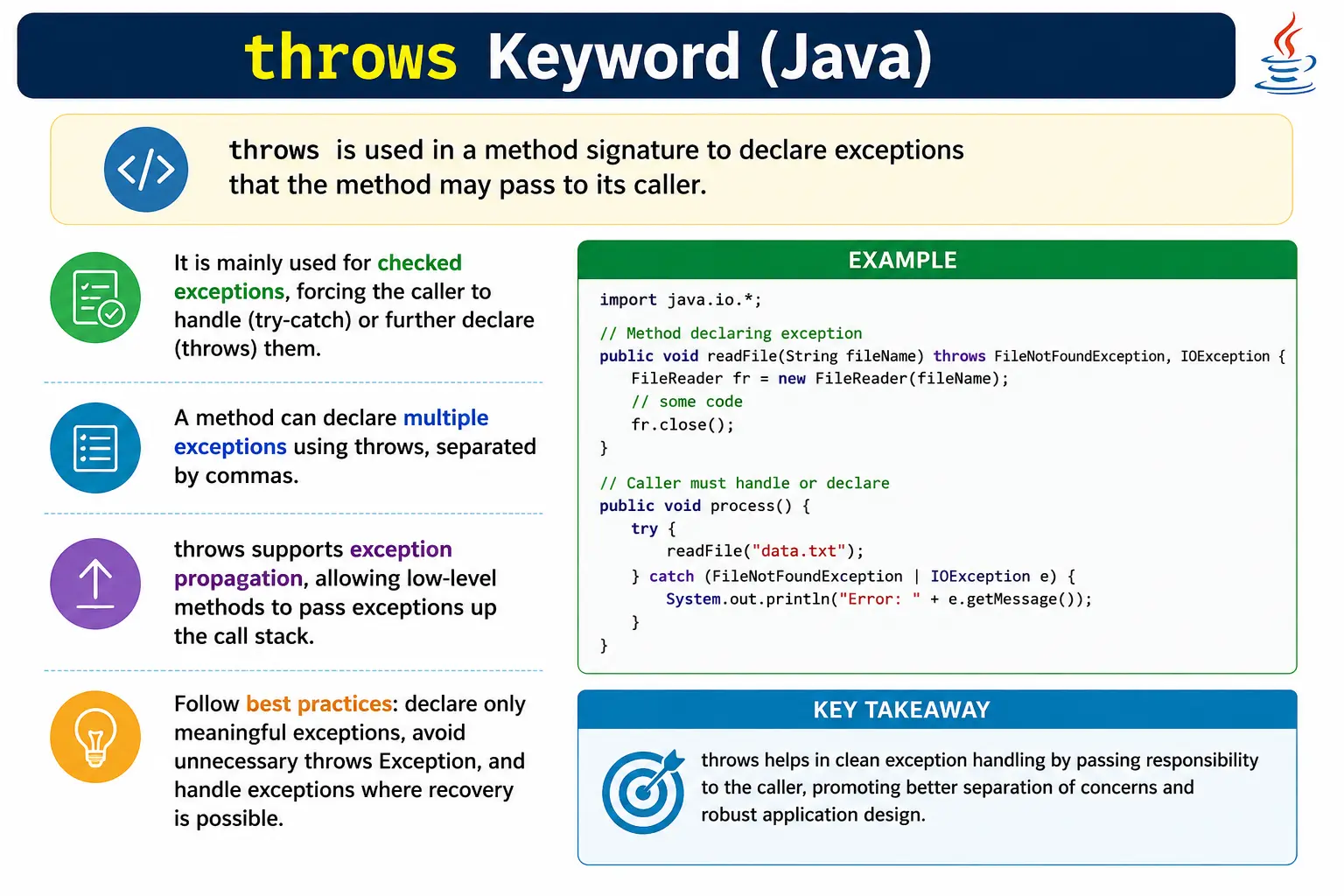
What Is the throws Keyword?
The throws keyword is part of a method declaration. It appears after the method parameter list
and before the method body. It lists the exception types that the method may pass to its caller. For checked
exceptions, this declaration is part of compile-time safety. If a method declares a checked exception, the
caller must handle it with try-catch or declare it again using throws.
It is important to understand that throws does not solve the exception. It only moves the
responsibility. A method that declares throws IOException is saying, "I may encounter an I/O
problem, and I am not handling it here." The caller then becomes responsible for deciding what should happen.
This can be a good design when the current method does not have enough context to recover meaningfully.
returnType methodName() throws ExceptionType {
    // method body
}
Why throws Is Needed
throws is needed because some failures cannot or should not be handled at the place where they
occur. A low-level method may know how to read bytes from a file, but it may not know whether the application
should show a message, create a new file, use default data, retry later, or stop the workflow. Passing the
exception to the caller allows the decision to be made at a layer that understands the business context.
The keyword also makes method contracts visible. When a method signature includes
throws IOException, callers immediately know that I/O failure is part of using the method. This
is clearer than hiding the exception inside the method or converting every failure into a vague runtime
exception. For checked exceptions, the compiler reinforces this contract by forcing callers to respond.
Another reason throws is useful is that it keeps method logic clean. A method should not catch an
exception if it cannot handle it meaningfully. Catching only to print a message and continue incorrectly is
worse than declaring the exception and letting it propagate. Good Java code handles exceptions at the layer
where meaningful recovery or reporting is possible.
Basic Example (Checked Exception)
In this example, creating a FileReader may fail if the file does not exist or cannot be opened.
Because file operations can throw checked exceptions, the method declares that possibility using
throws IOException. This satisfies the compiler and informs the caller that file reading can
fail.
void readFile() throws IOException {
    FileReader fr = new FileReader("data.txt");
}
The compiler forces the caller to handle or declare IOException. This is the core behavior of
checked exceptions in Java.
Handling a Method That Uses throws
When calling a method that declares a checked exception, the caller has two main choices. The caller can
handle the exception using try-catch, or the caller can declare the same exception using
throws and pass the responsibility further upward. Both are valid, but they mean different
things in application design.
Option 1: Handle Using try-catch
Use try-catch when the caller has enough context to recover, log, show a message, or take a
meaningful action.
try {
    readFile();
} catch (IOException e) {
    System.out.println("File error");
}
Option 2: Declare Using throws
Use throws when the caller also cannot handle the exception meaningfully and wants to pass it to
a higher layer.
void process() throws IOException {
    readFile();
}
In this case, the exception propagates upward. At some level, it should be handled or converted into a controlled response.
throws with Multiple Exceptions
A method can declare multiple exception types after throws, separated by commas. This is useful
when a method performs different risky operations that can fail in different ways. For example, a method may
read a file and update a database, so it might declare both IOException and
SQLException.
void process() throws IOException, SQLException {
    // code
}
Multiple declared exceptions make the contract more explicit. However, developers should avoid declaring exceptions that the method does not actually throw or propagate. Unnecessary declarations create noise and make APIs harder to use.
throws with Unchecked Exceptions
Java allows methods to declare unchecked exceptions using throws, but it is not required.
Unchecked exceptions are subclasses of RuntimeException, and the compiler does not force callers
to handle or declare them. Because of this, declaring unchecked exceptions is usually unnecessary unless the
declaration is being used as documentation for an important API behavior.
void test() throws ArithmeticException {
    int x = 10 / 0;
}
This code is allowed, but throws ArithmeticException is optional. In most cases, unchecked
exceptions should be documented through clear method contracts and validation behavior rather than listed
repeatedly in method signatures.
throws and Method Overriding (Important Rule)
Method overriding has strict rules for checked exceptions. An overriding method cannot declare broader checked exceptions than the overridden method. It can declare the same checked exception, a narrower subclass exception, or no checked exception at all. This rule protects polymorphism. A caller using a parent-class reference should not suddenly be forced to handle broader checked exceptions because a child implementation changed the contract.
class A {
    void show() throws IOException { }
}
class B extends A {
    void show() throws FileNotFoundException { } // allowed
}
This is valid because FileNotFoundException is a subclass of IOException. The child
method narrows the declared exception instead of broadening it.
throws vs throw (Interview Favorite)
The difference between throws and throw is one of the most important interview
points in Java exception handling. throws appears in a method signature and declares possible
exceptions. throw appears inside a method body and actually throws an exception object.
| Aspect | throws | throw |
|---|---|---|
| Used in | Method signature | Method body |
| Purpose | Declares exceptions | Throws exception |
| Number allowed | Multiple | One at a time |
| Handles exception | No | No |
| Role | Inform caller | Create exception |
A method can use both. For example, it may use throw new IOException() inside the method and
declare throws IOException in the method signature. The throw statement causes the
exception, while throws informs the caller.
Exception Propagation Using throws
Exception propagation means an exception moves up the call stack until it is handled. The
throws keyword makes this propagation explicit for checked exceptions. Each method that does not
handle the checked exception must declare it, until some caller finally catches it.
void a() throws IOException {
    b();
}
void b() throws IOException {
    c();
}
void c() throws IOException {
    throw new IOException();
}
The exception flows from c() to b(), then to a(), and eventually to
whichever caller handles it. This is useful when low-level methods should not decide how the application
responds to the failure.
When to Use throws
Use throws when the current method cannot handle the exception meaningfully. This often happens
in low-level code such as DAO classes, file utilities, network clients, parsing utilities, and integration
helpers. These methods often know that something failed, but they do not know the correct business response.
Use throws when the exception is truly part of the method contract. If callers need to know that
a file operation, database operation, or integration call can fail, declaring the checked exception makes
that risk visible. It also helps testing because expected failure paths can be identified from the method
signature.
When NOT to Use throws
Do not use throws simply to avoid writing a catch block. If the current method has enough
context to handle the exception correctly, it should handle it. Passing every exception upward without
thought can make error handling harder to follow and can push too much responsibility to higher layers.
Also avoid declaring unnecessary unchecked exceptions. Since the compiler does not enforce unchecked
exceptions, listing them in every method signature can make code noisy. If an unchecked exception represents
an important API behavior, document it clearly, but do not treat throws RuntimeException as a
substitute for good validation and clear method contracts.
throws and API Design
A method signature is part of an API contract. When it declares checked exceptions, it affects every caller.
This means throws should be used thoughtfully. Too many checked exceptions can make an API
difficult to use because every caller must handle or declare them. Too few declared exceptions can hide
important failure modes. Good API design balances clarity with usability.
A common design approach is to let low-level code declare technical checked exceptions and let higher layers
translate them into application-specific exceptions. For example, a repository method may deal with
SQLException, while a service layer may convert it into a custom
DataAccessException or business exception. This keeps low-level technical details from leaking
too far into business code.
throws in Layered Applications
In layered applications, exception responsibility should be clear. Utility and infrastructure layers may declare checked exceptions because they perform technical operations. Service layers may catch those exceptions, add business context, and either recover or throw a more meaningful application exception. Controller or API layers may convert exceptions into user-facing responses.
This layered handling prevents every method from knowing too much about every failure. A file utility does
not need to know how a web page should display an error. A controller does not need to know the exact file
access details. The throws keyword allows exceptions to move to the layer that can make the best
decision.
throws with Custom Exceptions
Custom checked exceptions can also be declared using throws. This is useful when a recoverable
business or application failure should be visible to callers. For example, a method may declare
throws InvalidFileFormatException if callers are expected to select another file or show a
specific message to the user.
Custom unchecked exceptions do not require throws, but they may still be documented. Many modern
applications use unchecked custom exceptions for business-rule failures and handle them centrally. Whether a
custom exception is checked or unchecked depends on whether the caller is expected to recover directly.
throws and Documentation
The throws clause can be supported by documentation comments. In JavaDoc, the
@throws tag explains when a method may throw a particular exception. This is especially useful
for public APIs. The method signature tells callers what exception type may occur, while the documentation
explains the condition that triggers it.
Good documentation avoids vague statements such as "throws exception if error occurs." It should describe the real condition, such as "throws IOException if the input file cannot be opened" or "throws InvalidOrderStateException if the order has already been shipped." This makes exception contracts easier to understand and test.
throws and Testing
Methods that declare exceptions should be tested for both success and failure paths. If a method declares
throws IOException, tests should cover what happens when the file is valid and what happens when
the file is missing or unreadable. If a service method declares a custom checked exception, tests should
verify the condition that triggers that exception.
Testing exception behavior is important because throws is part of the method contract. If callers
rely on a specific exception type, changing that exception type can break behavior. Unit tests help protect
that contract.
throws and Exception Responsibility
The most important design question around throws is responsibility. A method should either
handle an exception because it can make a meaningful decision, or declare the exception because another layer
is better suited to handle it. Problems appear when methods catch exceptions without recovering, or when they
declare exceptions endlessly without any layer ever converting them into a useful outcome.
A useful way to think about responsibility is to ask who understands the consequence of the failure. A file
utility may know that opening a file failed, but it may not know whether the user should choose another file
or whether the application should stop. A service method may know that a report cannot be generated, but it
may not know how the UI should display the error. throws allows these decisions to be deferred
until the correct layer.
throws and Checked Exception Discipline
Checked exceptions can improve reliability when they are used with discipline. They force developers to
acknowledge recoverable failures. However, if every method simply declares throws Exception, the
benefit is lost. The caller still has to handle something, but the signature no longer communicates what kind
of failure may occur. Specific checked exceptions are more useful than broad declarations.
For example, throws FileNotFoundException communicates a precise file availability problem.
throws IOException communicates a broader I/O problem. throws Exception says almost
nothing useful. There are cases where broad declarations appear in examples or framework methods, but normal
application code should be as specific as practical.
throws and Method Overriding in Practice
The overriding rule for checked exceptions protects callers that use polymorphism. Suppose a parent class
method declares throws IOException. Code that calls that method through a parent reference is
prepared for IOException. If a child class were allowed to override the method and declare
throws Exception, the caller would suddenly need to handle a broader checked exception than the
parent contract promised. Java prevents this.
The child method may declare the same checked exception, a subclass checked exception, or no checked exception. It may also throw unchecked exceptions without declaring them because unchecked exceptions are not part of compiler-enforced checked exception contracts. This distinction is a common interview topic because it tests both inheritance and exception handling.
throws with Functional Interfaces and Lambdas
Checked exceptions become especially visible when working with lambdas. A lambda can throw a checked
exception only if the functional interface method declares that exception. For example, a lambda assigned to a
custom interface whose method declares throws IOException can throw
IOException. A lambda assigned to Runnable cannot throw
IOException directly because Runnable.run() does not declare it.
This is not a special lambda rule; it follows the same method-contract principle. The lambda implementation must obey the throws clause of the abstract method it implements. When checked exceptions appear in stream or lambda code, developers often handle them inside the lambda, wrap them in unchecked exceptions, or design a custom functional interface that declares the checked exception.
throws in Framework-Based Applications
In framework-based applications, developers may not always expose checked exceptions directly to the top layer. Frameworks often encourage converting low-level checked exceptions into framework-specific or application-specific unchecked exceptions. For example, data access frameworks may wrap SQL-related checked exceptions so service code does not need to declare database-specific exceptions everywhere.
This does not make throws irrelevant. It means exception contracts are managed at architectural
boundaries. Low-level libraries still use checked exceptions. Application services may translate them. API
layers may handle translated exceptions centrally. Understanding throws helps developers follow
what is happening when exceptions cross those boundaries.
Maintaining throws Clauses Over Time
As code evolves, method signatures should be reviewed. A method may continue declaring an exception that it no longer throws after refactoring. Another method may start calling a new checked-exception API and need a new declaration or local handling. Keeping throws clauses accurate prevents confusion and keeps public contracts trustworthy.
Public APIs require extra care because changing a throws clause can affect callers. Adding a new checked exception to a public method may force callers to update their code. Removing or narrowing exceptions is usually easier for callers, but it should still reflect actual behavior. Exception declarations are not decorative; they are part of the method's contract.
throws and Clean Error Boundaries
A clean error boundary is a layer where exceptions are deliberately handled, translated, logged, or converted
into a response. The throws keyword helps exceptions reach that boundary without forcing every
intermediate method to handle failures it does not understand. This is useful in applications with clear
layers, such as controllers, services, repositories, utilities, and integration clients.
For example, a repository method may declare a checked exception from a file or database operation. A service
method may catch that exception and throw a business-specific exception with more context. A controller may
catch the business exception and return a user-friendly response. Each layer has a responsibility. The
repository reports the technical failure, the service interprets it, and the controller communicates it.
throws allows that responsibility to move cleanly through the call chain.
Without clean boundaries, applications often end up with scattered catch blocks, repeated logging, vague messages, or exceptions swallowed too early. Declaring exceptions thoughtfully helps avoid that. It also makes code easier to test because each layer can be tested for how it propagates, translates, or handles failures. In professional Java development, exception handling is not only about satisfying the compiler; it is about creating predictable failure behavior.
Common Beginner Mistakes
One common beginner mistake is confusing throw and throws. Another is declaring
throws Exception everywhere. This makes method contracts vague and forces callers to handle
broad exceptions without knowing what actually went wrong. Specific exception declarations are clearer.
Beginners also sometimes propagate exceptions endlessly and never handle them at a meaningful layer. At some point, an application must translate failures into logs, messages, retries, error responses, or business decisions. Another mistake is declaring unchecked exceptions unnecessarily, which adds noise without compiler benefit.
Best Practices
Declare specific checked exceptions rather than broad Exception whenever possible. Use
throws when the current method cannot handle the exception meaningfully. Handle exceptions where
recovery or reporting can be done properly. Avoid using throws as a way to avoid thinking about
error handling.
Keep method signatures clean. If many technical exceptions leak through several layers, consider wrapping them in a meaningful application exception at an appropriate boundary. Document public exception contracts clearly, and test both normal and exceptional paths.
Interview Perspective
In interviews, a strong answer should say that throws is used in a method signature to declare
exceptions that the method may pass to its caller. It is mainly important for checked exceptions because the
compiler forces callers to handle or declare them. It does not throw an exception and does not handle an
exception by itself.
A complete answer should also compare it with throw. throw is used inside a method
body to actually throw one exception object. throws is used in the method signature to declare
one or more possible exceptions. Mentioning method overriding rules for checked exceptions makes the answer
stronger.
Interview-Ready Answers
Short Answer
The throws keyword is used to declare exceptions that a method may pass to its caller.
Detailed Answer
In Java, the throws keyword is used in a method declaration to specify exceptions that the
method does not handle itself. It informs callers about possible failures and enforces handling of checked
exceptions through try-catch or further propagation. It is part of the method contract and helps
decide where exception handling responsibility belongs.
Examples and Interview Scenarios
1. Basic Use of throws (Checked Exception)
import java.io.FileInputStream;
import java.io.FileNotFoundException;

class Demo {
    static void readFile() throws FileNotFoundException {
        new FileInputStream("data.txt");
    }

    public static void main(String[] args) throws FileNotFoundException {
        readFile();
    }
}
Explanation
- Method declares responsibility to caller
- Compiler is satisfied
2. Handling throws Exception Using try-catch
import java.io.FileInputStream;
import java.io.FileNotFoundException;

class Demo {
    static void readFile() throws FileNotFoundException {
        new FileInputStream("data.txt");
    }

    public static void main(String[] args) {
        try {
            readFile();
        } catch (FileNotFoundException e) {
            System.out.println("File not found");
        }
    }
}
Output
File not found
3. Multiple Exceptions in throws
import java.io.IOException;
import java.sql.SQLException;

class Demo {
    static void process() throws IOException, SQLException {
        throw new IOException();
    }

    public static void main(String[] args) throws IOException, SQLException {
        process();
    }
}
Explanation
- Multiple checked exceptions can be declared
4. throws with Unchecked Exception (Optional)
class Demo {
    static void test() throws ArithmeticException {
        int a = 10 / 0;
    }

    public static void main(String[] args) {
        test();
    }
}
Explanation
- throws is optional for unchecked exceptions
5. Exception Propagation Using throws
class Demo {
    static void m1() throws Exception {
        throw new Exception("Error");
    }

    static void m2() throws Exception {
        m1();
    }

    public static void main(String[] args) {
        try {
            m2();
        } catch (Exception e) {
            System.out.println("Handled in main");
        }
    }
}
Output
Handled in main
6. throws in Method Overriding (Same Exception)
import java.io.IOException;

class A {
    void show() throws IOException {}
}

class B extends A {
    void show() throws IOException {}
}
Explanation
- Same checked exception allowed
7. throws in Method Overriding (Narrower Exception)
import java.io.IOException;
import java.io.FileNotFoundException;

class A {
    void show() throws IOException {}
}

class B extends A {
    void show() throws FileNotFoundException {}
}
Explanation
- Subclass of checked exception is allowed
8. Removing throws in Overridden Method
import java.io.IOException;

class A {
    void show() throws IOException {}
}

class B extends A {
    void show() {}   // allowed
}
Explanation
- Child can remove checked exception
9. Widening Checked Exception (Not Allowed)
import java.io.IOException;

class A {
    void show() throws IOException {}
}

class B extends A {
    // void show() throws Exception {}  // compile-time error
}
Explanation
- Cannot widen checked exception
10. throws with Constructor
import java.io.IOException;

class Demo {
    Demo() throws IOException {
        throw new IOException("Constructor error");
    }

    public static void main(String[] args) throws IOException {
        new Demo();
    }
}
11. throws in Interface Method
import java.io.IOException;

interface Service {
    void process() throws IOException;
}

class Impl implements Service {
    public void process() throws IOException {
        throw new IOException();
    }
}
Explanation
- Implementing class must respect interface contract
12. Interface Implementation Removing throws
import java.io.IOException;

interface Service {
    void process() throws IOException;
}

class Impl implements Service {
    public void process() {}   // allowed
}
13. throws with main Method
import java.io.FileNotFoundException;

class Demo {
    public static void main(String[] args) throws FileNotFoundException {
        throw new FileNotFoundException();
    }
}
Explanation
- JVM handles exception if uncaught
14. throws with Custom Checked Exception
class MyException extends Exception {
    MyException(String msg) {
        super(msg);
    }
}

class Demo {
    static void test() throws MyException {
        throw new MyException("Custom error");
    }

    public static void main(String[] args) throws MyException {
        test();
    }
}
15. throws vs Handling (Design Difference)
class Demo {
    static void risky() throws Exception {
        throw new Exception();
    }

    static void safe() {
        try {
            risky();
        } catch (Exception e) {
            System.out.println("Handled");
        }
    }

    public static void main(String[] args) {
        safe();
    }
}
Output
Handled
16. throws with RuntimeException
class Demo {
    static void test() throws RuntimeException {
        throw new RuntimeException("Error");
    }

    public static void main(String[] args) {
        test();
    }
}
Explanation
- Legal but unnecessary
17. throws with Method Returning Value
import java.io.IOException;

class Demo {
    static int read() throws IOException {
        throw new IOException();
    }

    public static void main(String[] args) throws IOException {
        read();
    }
}
18. throws and Lambda (Checked Exception Not Allowed Directly)
interface Task {
    void run();
}

class Demo {
    public static void main(String[] args) {
        Task t = () -> {
            // throw new IOException(); // not allowed
            throw new RuntimeException();
        };
        t.run();
    }
}
Explanation
- Lambda cannot throw checked exception unless interface allows it
19. Common Interview Trap
class Demo {
    static void test() throws Exception {
        throw new Exception();
    }

    public static void main(String[] args) {
        // test(); // compile-time error
    }
}
Explanation
- Caller must handle or declare
20. Interview Summary: throws Keyword
class Demo {
    static void process() throws Exception {
        throw new Exception("Failure");
    }

    public static void main(String[] args) {
        try {
            process();
        } catch (Exception e) {
            System.out.println(e.getMessage());
        }
    }
}
Key Points
- Declares exception to caller
- Mainly for checked exceptions
- Supports exception propagation
- Does not throw exception itself
Output
Failure
Key Takeaway
throws declares responsibility; it does not handle errors. Use it to create clean method
contracts, communicate checked exceptions clearly, and support controlled exception propagation. Handle
exceptions where meaningful recovery or reporting is possible, and avoid broad or unnecessary declarations
that make APIs harder to understand.