throw Keyword
The throw keyword in Java is used to explicitly create and pass an exception object to the JVM.
It allows developers to signal an exceptional condition manually when a rule is violated, an input is
invalid, an object is in the wrong state, or a method cannot continue safely. In simple terms,
throw is how Java code says, "This situation is not acceptable, and normal execution should stop
here." The JVM then begins the normal exception-handling process by searching for a matching
catch block or propagating the exception to the caller.
This keyword is a high-frequency Java interview topic because it is often confused with
throws. The difference is important. throw is an action inside a method body. It
actually throws an exception object. throws is a declaration in a method signature. It tells the
caller that a method may throw certain checked exceptions. A developer who understands this distinction can
write clearer validation logic, cleaner APIs, and better custom exceptions.
The throw keyword is not only for technical errors. It is also useful for enforcing business
rules. If a user is under age, if an amount is negative, if a required object is missing, if a role is not
authorized, or if an operation is attempted in an invalid state, the method can use throw to
stop the workflow and make the failure explicit. This is much better than allowing the program to continue
with invalid data and produce incorrect results later.
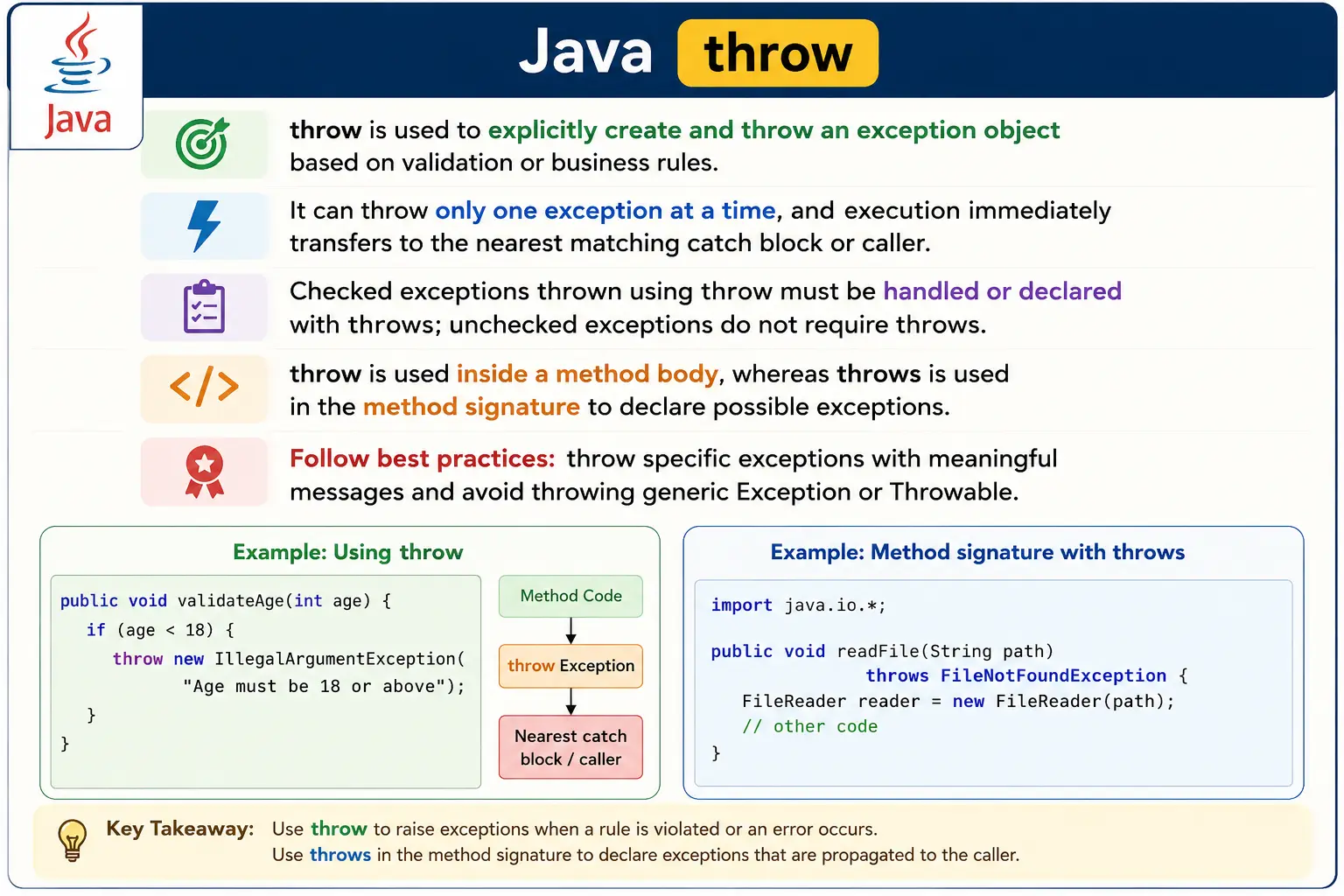
What Is the throw Keyword?
The throw keyword explicitly throws an exception object. That object must be an instance of
Throwable or one of its subclasses, such as Exception,
RuntimeException, IOException, IllegalArgumentException, or a custom
exception class. Java does not allow throwing ordinary objects such as strings, integers, or plain custom
classes that do not extend Throwable.
When a throw statement executes, normal execution stops immediately at that point. Java does not
continue to the next statement in the same block. Instead, it creates or uses the exception object provided
in the statement and transfers control to exception-handling logic. If the current method has a matching
catch block, that catch block handles it. If not, the exception propagates to the caller. This
continues up the call stack until a matching handler is found or the program terminates.
A throw statement can throw only one exception object at a time. This makes sense because a
single execution point can fail for one immediate reason. If a method needs to report multiple validation
problems, it should usually collect them into a result object, a list of validation messages, or a custom
exception that contains multiple details. It should not try to throw several exceptions from one statement.
throw new ExceptionType("message");
Why throw Is Needed
The throw keyword is needed because not every exceptional condition is automatically detected by
the JVM. The JVM can detect arithmetic errors, invalid array access, null dereferencing, and many runtime
failures. But it cannot know your business rules. It cannot know that a user must be at least eighteen years
old, that a payment amount must be positive, that an account must be active, or that an order cannot be
cancelled after shipment. Those rules belong to the application, so the application must enforce them.
Without throw, a method might continue after detecting invalid input. That can cause deeper
failures later in the program, often far away from the original cause. Throwing an exception at the point of
violation makes the problem immediate and clear. It supports fail-fast behavior, which means the program
fails as soon as it detects an invalid condition instead of continuing in a corrupted or misleading state.
throw also helps API design. A method can define its expectations through validation and throw a
meaningful exception when the caller violates those expectations. For example, a method that transfers money
can throw IllegalArgumentException when the amount is negative, or a custom
InsufficientBalanceException when the account does not have enough funds. This makes the API
contract clearer.
Basic Syntax
The basic syntax uses the keyword throw followed by an exception object. Most commonly, the
exception object is created directly with new. The message passed to the constructor should
explain the reason for the failure in a way that helps developers diagnose the problem.
throw new ArithmeticException("Invalid operation");
The message is optional for many exception classes, but it is strongly recommended. An exception without a
message forces developers to inspect the code or stack trace to understand the cause. A clear message such as
"Division by zero is not allowed" or "Age must be 18 or above" makes the failure
easier to understand immediately.
Simple Example
In the following example, the method validates age before allowing the normal flow to continue. If the age is
less than eighteen, the method throws an exception manually. The line after the if block runs
only when the rule is satisfied.
void checkAge(int age) {
    if (age < 18) {
        throw new ArithmeticException("Not eligible to vote");
    }
    System.out.println("Eligible to vote");
}
The exception is raised manually, and control shifts to the caller or to the nearest matching
catch block. If no handler exists, the program terminates with the exception details.
Using throw with try-catch
A manually thrown exception can be handled with a normal try-catch block. There is no separate
exception-handling mechanism for exceptions thrown by the JVM and exceptions thrown manually by application
code. Once an exception is thrown, Java uses the same matching and propagation rules.
try {
    throw new NullPointerException("Null value");
} catch (NullPointerException e) {
    System.out.println(e.getMessage());
}
Output:
Null value
The catch block receives the exception object and can access its message through
getMessage(). In real applications, catch blocks may log the exception, convert it into a user
response, rethrow it, or recover from it depending on the situation.
throw with Checked Exceptions (Important)
When throwing a checked exception, the method must either handle it using try-catch or declare it
using throws. This is because checked exceptions are verified by the compiler. If a method
explicitly throws IOException, Java requires the method signature to tell callers about that
possibility unless the exception is caught inside the same method.
void readFile() throws IOException {
    throw new IOException("File not found");
}
The throws IOException declaration is required here because IOException is a checked
exception. The compiler enforces handling so that callers cannot accidentally ignore predictable recoverable
failures.
throw with Unchecked Exceptions
Unchecked exceptions do not require a throws declaration. These exceptions are subclasses of
RuntimeException. They usually represent programming mistakes, invalid arguments, violated
preconditions, or runtime conditions that the compiler does not force callers to handle.
void divide(int a, int b) {
    if (b == 0) {
        throw new ArithmeticException("Division by zero");
    }
}
No throws declaration is required because ArithmeticException is unchecked. However,
this does not mean the exception is unimportant. It means Java allows the method to signal invalid use
without forcing every caller to catch or declare it.
throw vs throws (Interview Favorite)
The difference between throw and throws is one of the most common Java exception
interview questions. throw is used inside a method body to actually throw an exception object.
throws is used in a method signature to declare that the method may pass certain exceptions to
its caller.
| Aspect | throw | throws |
|---|---|---|
| Purpose | Throws an exception | Declares possible exceptions |
| Used in | Method body | Method signature |
| Exceptions | One at a time | Multiple allowed |
| Object creation | Yes | No |
| Role | Cause exception | Inform caller |
A simple way to remember the difference is this: throw creates or raises the exception;
throws declares responsibility. A method can use both together when it throws a checked
exception and declares that checked exception in its signature.
Throwing Custom Exceptions (Preview)
Custom exceptions make the throw keyword more expressive. Instead of throwing a generic
Exception or using a built-in exception that does not fully describe the business problem, a
developer can create a domain-specific exception class. This makes error handling clearer for both callers
and maintainers.
class InvalidAgeException extends Exception {
    InvalidAgeException(String msg) {
        super(msg);
    }
}

throw new InvalidAgeException("Age must be >= 18");
This approach enables domain-specific error handling. A caller can catch
InvalidAgeException separately from other failures and respond with a message or workflow that
matches the business rule.
Important Rules of throw (Interview-Oriented)
The first rule is that only objects derived from Throwable can be thrown. The second rule is
that a single throw statement throws only one exception object. The third rule is that execution
stops immediately after throw. Any ordinary statement placed directly after an unconditional
throw statement is unreachable, and the compiler reports an error.
throw new Exception();
// System.out.println("Hello"); // unreachable
This unreachable-code rule is important because it protects the developer from writing logic that can never
execute. If code needs to run before throwing the exception, it must appear before the throw
statement. If cleanup must run after a throw, it belongs in a finally block or in a
try-with-resources structure.
throw and Program Flow
The throw keyword changes program flow immediately. It does not behave like a method call that
returns a normal value. Once the exception is thrown, Java abandons the current normal path and starts
looking for exception-handling code. This means any state changes that must happen before failure should be
completed before the throw statement, and any cleanup that must happen after failure should be
placed in a reliable cleanup mechanism.
If the thrown exception is caught in the same method, execution can continue after the catch block. If it is not caught, the exception propagates to the caller. This propagation can continue through many method calls. Understanding this flow helps developers decide whether an exception should be handled locally or allowed to move to a higher layer that has more context.
throw for Validation
Validation is one of the most common uses of throw. A method often has preconditions: values
must not be null, numbers must be within a range, collections must not be empty, users must have permission,
and objects must be in a valid state. When these preconditions are violated, throwing a specific exception
makes the failure explicit.
For invalid method arguments, IllegalArgumentException is commonly used. For invalid object
state, IllegalStateException is often more appropriate. For authorization failures,
SecurityException or a custom security exception may be used depending on the application. The
chosen exception type should communicate the meaning of the failure.
throw and Custom Business Rules
Business applications often need exceptions that are more meaningful than built-in Java exceptions. For
example, a banking system may define InsufficientBalanceException. An e-commerce system may
define OutOfStockException. A registration system may define
DuplicateUserException. These custom exceptions allow the code to express business failures in
business language.
Throwing custom exceptions also improves caller behavior. A caller can catch a business-specific exception and show a user-friendly message. It can also distinguish between expected business failures and unexpected technical failures. This is much cleaner than catching a generic exception and inspecting text messages to guess what happened.
throw with Rethrowing
The throw keyword can also rethrow an exception that was already caught. Rethrowing is useful
when a method wants to add logging or context but does not want to fully handle the failure. The catch block
can record what happened and then use throw e; or throw a new exception that wraps the original
cause.
When wrapping exceptions, it is important to preserve the original cause. A custom exception constructor can
accept the original exception and pass it to super(message, cause). This keeps the stack trace
and root cause available for debugging. Throwing a new exception without the original cause can hide the real
problem.
throw and finally
If a throw statement executes inside a try block, any associated
finally block executes before the exception leaves the method. This allows cleanup to happen
even when normal execution stops. For example, a method may throw an exception after detecting invalid data,
but still release a lock or close a resource before the exception propagates.
Developers should be careful when throwing exceptions from finally itself. An exception thrown
from finally can hide an earlier exception thrown from the try block. This makes
debugging harder and is usually avoided unless there is a clear reason.
Choosing the Right Exception Type
Choosing the right exception type is a major part of using throw well. Use
IllegalArgumentException when a caller passes an invalid argument. Use
IllegalStateException when the object is not in the correct state for the requested operation.
Use checked exceptions when the caller is expected to recover from an external or predictable failure. Use
custom exceptions when a business rule needs a name that built-in exceptions cannot express clearly.
Avoid throwing Exception or Throwable directly in ordinary application code. These
types are too broad and force callers to handle vague failures. Specific exception types create clearer
contracts and better handling logic.
Error Messages in throw Statements
A good exception message should explain what rule was violated and include safe, useful context. For example,
"Amount must be greater than zero" is better than "Invalid". If an ID, field name,
or limit helps debugging and does not expose sensitive information, include it. Clear messages save time
during testing, logging, and production support.
At the same time, exception messages should not expose passwords, tokens, credit card numbers, internal SQL queries, or other sensitive details. Developer-facing logs and user-facing messages may need different levels of detail. The exception message should be useful but safe.
throw in Real Applications
In real Java applications, throw appears in service methods, validators, APIs, constructors,
utility methods, and framework code. A service method may throw a business exception when a requested action
violates a rule. A constructor may throw IllegalArgumentException if required values are missing.
A REST API may throw a custom exception that is later converted into an HTTP response by a global exception
handler.
This pattern keeps code clean. The method that detects the problem throws a meaningful exception. A higher layer decides how to communicate that problem to the user or client. This separation avoids mixing low-level validation with presentation logic and keeps exception handling consistent across the application.
throw in Constructors
Constructors can also use throw to prevent invalid objects from being created. This is an
important object-oriented design practice. If an object requires a non-null name, a positive amount, or a
valid configuration value, the constructor can validate those requirements immediately and throw an exception
when they are violated. This keeps the object from entering the program in an invalid state.
For constructor validation, unchecked exceptions such as IllegalArgumentException are commonly
used when the caller passes invalid values. This makes the contract clear: the constructor expects valid
arguments, and invalid arguments are caller errors. Allowing invalid objects to exist often creates more
complicated failures later, so throwing early is usually better.
throw in Service and API Layers
In service-layer code, throw is often used to enforce business rules. For example, a method that
approves a loan may throw a custom exception if the applicant is not eligible. A method that cancels an order
may throw an exception if the order has already shipped. A method that updates a profile may throw an
exception if the user is not authorized. These exceptions communicate that the requested operation cannot
proceed for a defined reason.
In API-based applications, thrown exceptions are often handled by a centralized exception handler. The service
throws a meaningful exception, and the controller or framework maps that exception to an HTTP status code and
response body. For example, IllegalArgumentException might become a 400 Bad Request response,
while a custom ResourceNotFoundException might become a 404 response. This keeps service code
focused on business rules while response formatting remains centralized.
throw and Fail-Fast Design
Fail-fast design means detecting invalid conditions as early as possible and stopping the operation
immediately. The throw keyword supports this style naturally. Instead of allowing invalid input
to move deeper into the system, a method validates the input at the boundary and throws a clear exception if
something is wrong.
This approach improves debugging because the exception occurs near the real cause. If invalid data is allowed to travel through several layers, the eventual failure may appear in a completely different place. That makes root-cause analysis harder. Throwing early with a specific message keeps the failure connected to the rule that was violated.
Checked vs Unchecked Selection When Using throw
A common design question is whether to throw a checked exception or an unchecked exception. Use checked exceptions when the failure is recoverable and the caller is expected to make a decision. File access, external integration, and operations dependent on the environment may fit this category. Use unchecked exceptions when the failure represents invalid use of the method, a violated precondition, or a programming mistake.
Many modern Java applications prefer unchecked custom exceptions for business-rule violations because they keep method signatures cleaner and allow centralized handling. This does not mean checked exceptions are bad. It means the decision should match the caller's responsibility. If every caller must consciously recover, a checked exception may be appropriate. If the failure should normally be handled at a higher boundary, unchecked exceptions may be cleaner.
Testing Code That Uses throw
Code that uses throw should be tested carefully. Unit tests should verify both the successful
path and the failure path. If a method should throw IllegalArgumentException for a negative
amount, the test should assert that the exception is thrown and that the message is meaningful. Testing only
the happy path leaves validation behavior unverified.
Exception tests are especially important for business rules. A payment method should reject invalid amounts.
A registration method should reject duplicate usernames. A permission check should reject unauthorized users.
These are not secondary behaviors; they protect the correctness of the application. The throw
keyword makes such rules explicit, and tests should confirm that the rules are enforced.
Readability and Maintainability
A method with many scattered throw statements can become hard to read if validation is not
organized well. For simple methods, direct validation is fine. For larger workflows, validation can be moved
into helper methods with clear names. For example, validateAmount(amount) or
ensureUserCanCancel(order, user) can keep the main business flow readable while still throwing
meaningful exceptions when rules fail.
Good exception design also avoids surprising callers. Method documentation, names, and exception types should help callers understand what can go wrong. A method that throws a clear custom exception is easier to use than a method that throws vague runtime exceptions with unclear messages. Maintainable code treats exceptions as part of the method contract, even when they are unchecked.
Common Beginner Mistakes
One common beginner mistake is confusing throw with throws. Remember that
throw actually throws an exception, while throws declares possible exceptions in
the method signature. Another mistake is throwing a checked exception without handling it or declaring it.
The compiler will reject that code.
Beginners also sometimes use throw for normal control flow. Exceptions should represent
exceptional or invalid situations, not ordinary decisions that can be handled with if,
else, loops, or return values. Another mistake is throwing generic Exception with a
vague message. This makes callers less clear and debugging harder.
Best Practices
Throw specific exceptions that match the problem. Use unchecked exceptions for programming errors, invalid arguments, and violated preconditions. Use checked exceptions when the caller is expected to recover from a predictable external failure. Use custom exceptions when the business concept deserves its own name.
Include clear messages and preserve root causes when wrapping exceptions. Avoid throwing
Exception or Throwable directly. Avoid using exception messages as the only way to
distinguish business failures. Prefer meaningful exception types over fragile string comparisons.
Interview Perspective
In interviews, a strong answer should say that throw is used inside a method body to explicitly
throw an exception object. It can throw only one exception object at a time, and that object must be a
subclass of Throwable. If the thrown exception is checked, it must be handled or declared using
throws. If it is unchecked, no declaration is required.
A practical answer should also explain when to use throw: validation, business-rule enforcement,
custom exceptions, and rethrowing after logging or adding context. Mentioning the difference between
throw and throws usually strengthens the answer because that is the most common
confusion around this keyword.
Interview-Ready Answers
Short Answer
The throw keyword is used to explicitly throw an exception object in Java.
Detailed Answer
In Java, the throw keyword allows developers to manually create and throw an exception based on
specific conditions. It is used inside method bodies and transfers control to the nearest matching
catch block or to the caller through propagation. Checked exceptions thrown using
throw must be handled or declared using throws, while unchecked exceptions do not
require declaration.
throw Keyword Examples (Interview-Friendly)
1. Basic throw with Unchecked Exception
class Demo {
    public static void main(String[] args) {
        throw new ArithmeticException("Invalid operation");
    }
}
Output
Exception in thread "main" java.lang.ArithmeticException: Invalid operation
2. throw Inside Method
class Demo {
    static void validate(int age) {
        if (age < 18) {
            throw new ArithmeticException("Not eligible");
        }
        System.out.println("Eligible");
    }

    public static void main(String[] args) {
        validate(15);
    }
}
Output
Exception in thread "main" java.lang.ArithmeticException: Not eligible
3. throw with Checked Exception (Must Declare)
import java.io.IOException;

class Demo {
    static void read() throws IOException {
        throw new IOException("IO problem");
    }

    public static void main(String[] args) throws IOException {
        read();
    }
}
Explanation
Checked exception requires throws.
4. Handling Thrown Checked Exception
import java.io.IOException;

class Demo {
    static void read() throws IOException {
        throw new IOException("File error");
    }

    public static void main(String[] args) {
        try {
            read();
        } catch (IOException e) {
            System.out.println("Handled");
        }
    }
}
Output
Handled
5. throw with Custom Checked Exception
class InvalidAgeException extends Exception {
    InvalidAgeException(String msg) {
        super(msg);
    }
}

class Demo {
    static void check(int age) throws InvalidAgeException {
        if (age < 18) {
            throw new InvalidAgeException("Under age");
        }
    }

    public static void main(String[] args) throws InvalidAgeException {
        check(16);
    }
}
6. throw with Custom Unchecked Exception
class InvalidAmountException extends RuntimeException {
    InvalidAmountException(String msg) {
        super(msg);
    }
}

class Demo {
    static void pay(int amt) {
        if (amt <= 0) {
            throw new InvalidAmountException("Invalid amount");
        }
    }

    public static void main(String[] args) {
        pay(-10);
    }
}
7. throw Inside catch (Rethrowing)
class Demo {
    static void test() {
        try {
            int a = 10 / 0;
        } catch (ArithmeticException e) {
            System.out.println("Caught");
            throw e;
        }
    }

    public static void main(String[] args) {
        try {
            test();
        } catch (Exception e) {
            System.out.println("Rethrown");
        }
    }
}
Output
Caught
Rethrown
8. Converting Checked to Unchecked Using throw
import java.io.IOException;

class Demo {
    static void test() {
        try {
            throw new IOException();
        } catch (IOException e) {
            throw new RuntimeException(e);
        }
    }

    public static void main(String[] args) {
        test();
    }
}
Explanation
Common practice in frameworks.
9. throw in Constructor
class Demo {
    Demo(int x) {
        if (x < 0) {
            throw new IllegalArgumentException("Negative value");
        }
    }

    public static void main(String[] args) {
        new Demo(-5);
    }
}
10. throw with Method Return Type
class Demo {
    static int divide(int a, int b) {
        if (b == 0) {
            throw new ArithmeticException("Divide by zero");
        }
        return a / b;
    }

    public static void main(String[] args) {
        divide(10, 0);
    }
}
11. throw vs throws (Side-by-Side)
class Demo {
    static void m1() throws Exception {
        throw new Exception();
    }

    static void m2() {
        throw new RuntimeException();
    }
}
Explanation
throw creates exception
throws declares exception
12. throw in Overridden Method (Checked Rule)
import java.io.IOException;

class A {
    void show() throws IOException {}
}

class B extends A {
    // void show() throws Exception {} // not allowed
}
Explanation
Cannot widen checked exception.
13. throw in Overridden Method (Unchecked Allowed)
class A {
    void show() {}
}

class B extends A {
    void show() {
        throw new RuntimeException();
    }
}
14. throw in Lambda Expression
interface Calc {
    int div(int a, int b);
}

class Demo {
    public static void main(String[] args) {
        Calc c = (a, b) -> {
            if (b == 0) throw new ArithmeticException();
            return a / b;
        };
        c.div(10, 0);
    }
}
15. throw with finally (Finally Executes First)
class Demo {
    static void test() {
        try {
            throw new RuntimeException();
        } finally {
            System.out.println("Finally");
        }
    }

    public static void main(String[] args) {
        test();
    }
}
Output
Finally
Exception in thread "main" java.lang.RuntimeException
16. throw in finally Overrides Exception
class Demo {
    static void test() {
        try {
            throw new ArithmeticException();
        } finally {
            throw new NullPointerException();
        }
    }

    public static void main(String[] args) {
        test();
    }
}
Explanation
Exception from finally dominates.
17. Conditional throw (Validation Pattern)
class Demo {
    static void login(String user) {
        if (!"admin".equals(user)) {
            throw new SecurityException("Access denied");
        }
        System.out.println("Access granted");
    }

    public static void main(String[] args) {
        login("guest");
    }
}
18. throw and Method Propagation
class Demo {
    static void m1() {
        throw new RuntimeException("Error");
    }

    public static void main(String[] args) {
        try {
            m1();
        } catch (RuntimeException e) {
            System.out.println(e.getMessage());
        }
    }
}
Output
Error
19. Common Interview Trap
class Demo {
    static void test() {
        throw new RuntimeException();
        // System.out.println("After"); // unreachable
    }
}
Explanation
Code after throw is unreachable.
20. Interview Summary: throw Keyword
class Demo {
    static void check(int x) {
        if (x < 0) {
            throw new IllegalArgumentException("Invalid");
        }
        System.out.println("Valid");
    }

    public static void main(String[] args) {
        check(-1);
    }
}
Key Points
- Explicitly throws exception
- Used for validation & custom errors
- Works with checked & unchecked exceptions
- Common in frameworks & APIs
Key Takeaway
throw creates the problem; throws declares the responsibility. Use throw to enforce rules and signal failures explicitly and clearly.