Thread Lifecycle in Java
The Thread Lifecycle in Java describes the various states a thread goes through from creation to termination. Understanding these states is essential for multithreading, debugging, performance tuning, and interviews.
A thread is not simply "running" or "stopped." During its lifetime, it may be created but not started,
eligible for execution, waiting for a lock, waiting for another thread, sleeping for a fixed time, or fully
completed. Java represents these conditions through the Thread.State enum. Knowing these states
helps developers understand why a thread appears stuck, why a program does not exit, why a synchronized block
is not entered, or why calling start() twice fails.
Thread lifecycle is especially important in Java because the JVM cooperates with the operating-system scheduler. Java code starts and coordinates threads, but the actual CPU scheduling is handled below the application level. This means a thread can be eligible to run without actively executing at that exact moment. That distinction is one of the biggest reasons the RUNNABLE state is often misunderstood.
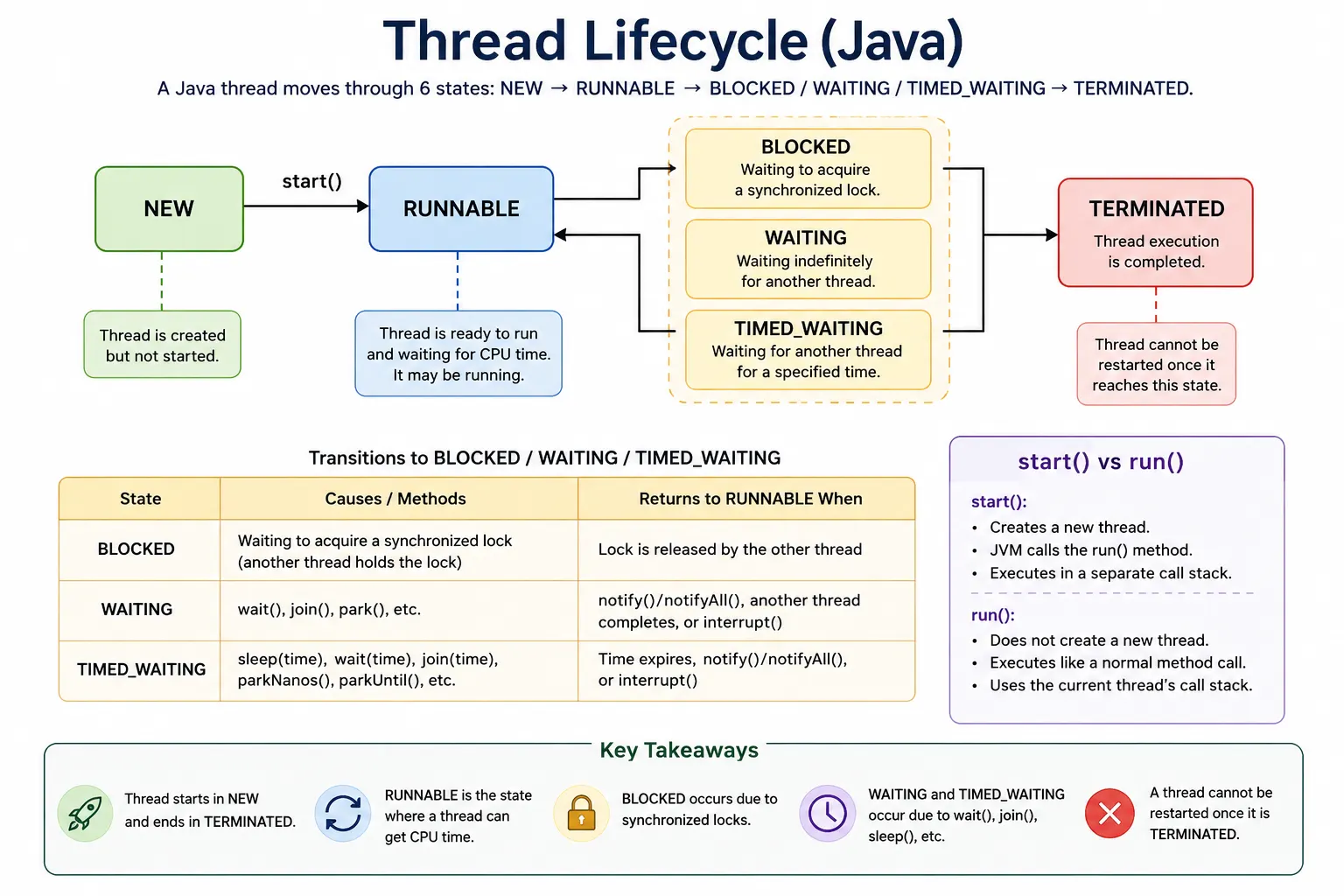
What Is Thread Lifecycle?
The thread lifecycle represents the state transitions of a thread during its execution in the JVM.
Java defines thread states in the Thread.State enum.
A lifecycle begins when a Thread object is created and ends when its run() method
finishes or exits because of an uncaught exception. Between those two points, the thread can move through
different states depending on method calls, lock availability, waiting conditions, timeouts, and scheduling.
Understanding these transitions is not just theoretical. When debugging a production issue, a thread dump may show threads in BLOCKED, WAITING, or TIMED_WAITING states. A developer who understands the lifecycle can identify whether a thread is waiting for a lock, sleeping, waiting for another thread to finish, or already terminated.
Thread States in Java
Java has 6 official thread states:
- NEW
- RUNNABLE
- BLOCKED
- WAITING
- TIMED_WAITING
- TERMINATED
These six states cover the major lifecycle conditions visible through Thread.getState(). They do
not expose every internal operating-system detail, but they provide enough information for Java-level
debugging and reasoning. The states are intentionally broad. For example, Java does not separate "ready" and
"running" into two different states; both are represented as RUNNABLE.
NEW State
A thread enters the NEW state when a Thread object has been created but
start() has not yet been called. At this point, the object exists in memory, but the JVM has not
created a separate execution path for it. The thread is not eligible for CPU scheduling.
Thread t = new Thread(); // NEW
This distinction matters because creating a Thread object is not the same as starting a thread. The object
can store the task, name, priority, daemon setting, and other properties, but no concurrent work begins until
start() is called.
RUNNABLE State
A thread enters RUNNABLE after start() is called. In Java, RUNNABLE means the thread is either
running or ready to run. The JVM has handed the thread to the scheduler, but the thread may not be executing
on the CPU at the exact moment you inspect its state.
t.start(); // RUNNABLE
This is a common interview trap. In many operating-system diagrams, "ready" and "running" are separate. In Java's thread state model, both are shown as RUNNABLE. Therefore, seeing RUNNABLE does not prove that the thread is actively using the CPU; it may simply be ready and waiting for scheduler time.
BLOCKED State
A thread enters BLOCKED when it is waiting to acquire a monitor lock. This usually happens with
synchronized methods or synchronized blocks. If one thread already owns a lock, another thread
that tries to enter the same synchronized section must wait.
synchronized (lock) {
    // critical section
}
BLOCKED is specifically about lock acquisition. It is not the same as WAITING. A blocked thread wants to enter a synchronized region but cannot because another thread holds the monitor. Once the lock becomes available and the scheduler allows it, the thread can return to RUNNABLE.
WAITING State
A thread enters WAITING when it waits indefinitely for another thread's action. There is no timeout. The thread remains waiting until another action occurs, such as a notification, interruption, or completion of another thread being joined.
Common causes include Object.wait() without a timeout, Thread.join() without a
timeout, and lower-level parking mechanisms such as LockSupport.park().
obj.wait(); // WAITING
WAITING is used for coordination. The thread is not competing for CPU while it waits. It is paused until the required event occurs. Because there is no timeout, a waiting thread can remain waiting forever if no other thread wakes it correctly.
TIMED_WAITING State
TIMED_WAITING means the thread is waiting for a specified amount of time. Unlike WAITING, this state has a timeout. When the timeout expires, the thread can become eligible to continue, usually by returning to RUNNABLE.
Common causes include Thread.sleep(time), Object.wait(time),
Thread.join(time), and timed parking methods.
Thread.sleep(1000); // TIMED_WAITING
TIMED_WAITING is common in polling, scheduled delays, retry logic, and examples that demonstrate thread states. It is also common in thread dumps, where sleeping worker threads or timed waits may appear normal rather than problematic.
TERMINATED State
A thread enters TERMINATED when its execution is complete. This happens when the run() method
finishes normally or exits because of an uncaught exception. Once a thread is terminated, it cannot be
restarted.
// run() method ends
Calling start() again on the same Thread object causes
IllegalThreadStateException. If the same task needs to run again, create a new Thread object or
submit the task again to an executor service.
Thread Lifecycle Flow (Conceptual)
NEW
 start()
RUNNABLE
 lock unavailable
BLOCKED
 lock acquired
RUNNABLE
 wait()
WAITING
 notify()
RUNNABLE
 sleep(time)
TIMED_WAITING
 time expires
RUNNABLE
 run() ends
TERMINATED
The lifecycle is not always a single straight line. A thread can move between RUNNABLE and waiting states many times before it finally terminates. A worker thread may run, wait for a queue item, wake up, process work, sleep, compete for a lock, and continue again. The final state is TERMINATED, but the path can vary based on program logic.
Important Notes (Interview Traps)
Several lifecycle details are repeatedly tested in interviews. Calling start() creates a new
call stack and begins a new thread. Calling run() directly does not start a new thread; it simply
executes a normal method on the current thread.
Another important difference is between sleep() and wait(). Sleep pauses the
current thread for a time but does not release a monitor lock. Wait releases the monitor and pauses until
notification or timeout. BLOCKED and WAITING are also different: BLOCKED means waiting for a lock, while
WAITING means waiting for another thread action.
Thread State vs Method Mapping
| Method | Resulting State |
|---|---|
start() |
RUNNABLE |
sleep() |
TIMED_WAITING |
wait() |
WAITING |
join() |
WAITING |
| synchronized lock unavailable | BLOCKED |
run() completes |
TERMINATED |
Interview-Ready Answers
Short Answer
Thread lifecycle represents the various states a thread goes through during execution.
Detailed Answer
In Java, a thread goes through six states: NEW, RUNNABLE, BLOCKED, WAITING, TIMED_WAITING, and TERMINATED. These states represent thread creation, execution readiness, lock waiting, indefinite waiting, timed waiting, and completion. The JVM manages these transitions based on thread behavior and synchronization.
A strong answer should also explain that RUNNABLE in Java includes both ready and running, BLOCKED means waiting for a monitor lock, WAITING means waiting indefinitely for another action, and TIMED_WAITING means waiting with a timeout. The lifecycle helps developers analyze thread dumps, deadlocks, responsiveness issues, and synchronization problems.
Key Takeaway
Threads move through well-defined states controlled by JVM and OS scheduler. Understanding thread lifecycle is critical for writing correct, efficient, and deadlock-free multithreaded programs.
The most useful practical habit is to connect each state to its cause. NEW is before start. RUNNABLE is after start and eligible for execution. BLOCKED is lock contention. WAITING is indefinite coordination. TIMED_WAITING is timed delay or timed coordination. TERMINATED is completed execution.
Why Thread Lifecycle Matters in Real Projects
Thread lifecycle knowledge becomes valuable when a program does not behave as expected. A server may stop responding because many request threads are BLOCKED on the same lock. A background worker may appear idle because it is WAITING on a queue. A scheduled task may show TIMED_WAITING because it is sleeping between retries. Without lifecycle knowledge, these observations look confusing. With lifecycle knowledge, they become diagnostic clues.
In production debugging, developers often inspect thread dumps. A thread dump lists thread names, stack traces, and states. If many threads are BLOCKED on the same monitor, the issue may be lock contention. If threads are WAITING forever, a notification or condition may be missing. If many threads are RUNNABLE but CPU usage is high, the application may be doing heavy computation or spinning in loops.
Thread lifecycle also helps with design. Instead of creating threads manually and guessing their behavior, modern Java code often uses executor services, thread pools, blocking queues, futures, and higher-level concurrency utilities. These tools still rely on the same underlying lifecycle states. Understanding the lifecycle makes those abstractions easier to reason about.
Thread Lifecycle and Debugging
Thread states are most useful when they help explain a real problem. Suppose an application becomes slow under load. If thread dumps show many threads in BLOCKED state on the same monitor, the issue may be excessive synchronization or a long-running critical section. The fix may involve reducing the synchronized area, using a more suitable concurrent collection, or redesigning shared state so fewer threads compete for the same lock.
If many threads are in WAITING state, the interpretation depends on context. Worker threads waiting on a blocking queue may be perfectly normal because they are idle until work arrives. But application threads waiting forever for a notification may indicate a missed notify, incorrect condition check, or a coordination bug. The state alone gives a clue, but the stack trace and program logic explain whether it is healthy or problematic.
TIMED_WAITING is also not automatically bad. Threads often sleep between retries, wait with timeouts, or pause inside scheduled workflows. However, too many timed waits may reveal inefficient polling. Instead of repeatedly sleeping and checking a condition, a program may be better designed with blocking queues, futures, callbacks, or scheduled executors.
RUNNABLE requires careful interpretation. A few RUNNABLE threads may simply mean active work. Many RUNNABLE threads combined with high CPU usage may suggest CPU-bound processing, infinite loops, inefficient algorithms, or thread starvation. Many RUNNABLE threads with low CPU usage may indicate native I/O or scheduler-related behavior. Thread state must be read together with CPU metrics, stack traces, logs, and workload behavior.
Lifecycle Design Best Practices
A good Java concurrency design minimizes unnecessary state confusion. One best practice is to avoid manually creating large numbers of threads. Creating a thread for every small task can increase memory usage and scheduling overhead. Executor services and thread pools allow tasks to reuse a controlled number of worker threads, making lifecycle management more predictable.
Another best practice is to avoid holding locks longer than necessary. A thread that sleeps, performs slow
I/O, or calls external services while holding a lock can cause other threads to become BLOCKED. Critical
sections should be short and focused. If a thread must wait for a condition, wait(),
Condition, or higher-level concurrency tools are usually better than sleeping while holding a
monitor.
Developers should also prefer clear coordination mechanisms. Low-level wait() and
notify() are powerful but easy to misuse. For many real projects, BlockingQueue,
CountDownLatch, Semaphore, CompletableFuture, and executor services
express intent more clearly. These tools do not remove the lifecycle; they help manage lifecycle transitions
in a safer and more structured way.
Finally, thread lifecycle should be considered during shutdown. User threads keep the JVM alive, while daemon threads do not. Long-running worker threads should have a clean shutdown strategy, such as interruption, shutdown flags, executor shutdown methods, or poison-pill messages in queues. Without a shutdown plan, an application may hang because threads never leave WAITING or RUNNABLE states.
Thread Lifecycle States (Reference)
- NEW
- RUNNABLE
- BLOCKED
- WAITING
- TIMED_WAITING
- TERMINATED
NEW State (Thread Created but Not Started)
This example creates a Thread object and immediately prints its state. Since start() has not
been called, the thread remains in NEW state.
class Demo {
    public static void main(String[] args) {
        Thread t = new Thread(() -> System.out.println("Run"));
        System.out.println(t.getState());
    }
}
Output
NEW
The task exists as an object, but no separate execution has started. This is why creating a thread and starting a thread are two different lifecycle steps.
RUNNABLE State (After start())
After start() is called, the thread becomes RUNNABLE. It may execute immediately or wait for CPU
time depending on scheduling.
class Demo {
    public static void main(String[] args) {
        Thread t = new Thread(() -> {
            System.out.println(Thread.currentThread().getState());
        });
        t.start();
    }
}
Explanation
The JVM and operating system scheduler decide when the thread actually runs. Therefore, observed output can vary slightly, especially in small examples where the thread finishes very quickly.
IllegalStateException (Calling start() Twice)
A Thread object can be started only once. Once it has moved beyond NEW, calling start() again is
illegal.
class Demo {
    public static void main(String[] args) {
        Thread t = new Thread();
        t.start();
        // t.start(); // IllegalThreadStateException
    }
}
This is different from reusing a task. If you want the same logic to run again, create a new Thread or submit a Runnable to an executor again.
TERMINATED State (Thread Finished Execution)
This example starts a thread, waits for it to finish using join(), and then prints its state.
class Demo {
    public static void main(String[] args) throws Exception {
        Thread t = new Thread(() -> System.out.println("Done"));
        t.start();
        t.join();
        System.out.println(t.getState());
    }
}
Output
TERMINATED
The join() call ensures the main thread waits until the worker thread completes. After the
worker finishes, its state is TERMINATED.
TIMED_WAITING Using sleep()
Thread.sleep() places the current thread into TIMED_WAITING for the specified duration.
class Demo {
    public static void main(String[] args) throws Exception {
        Thread t = new Thread(() -> {
            try {
                Thread.sleep(1000);
            } catch (Exception e) {}
        });
        t.start();
        Thread.sleep(100);
        System.out.println(t.getState());
    }
}
Output
TIMED_WAITING
The main thread sleeps briefly before checking the worker's state, giving the worker time to enter sleep. This kind of timing-based example is useful for learning but should not be used as a synchronization strategy in production code.
WAITING State Using join()
A thread enters WAITING when it calls join() without a timeout and waits for another thread to
complete.
class Demo {
    public static void main(String[] args) throws Exception {
        Thread t1 = new Thread(() -> {
            try {
                Thread.sleep(500);
            } catch (Exception e) {}
        });

        Thread t2 = new Thread(() -> {
            try {
                t1.join();
            } catch (Exception e) {}
        });

        t1.start();
        t2.start();
        Thread.sleep(100);
        System.out.println(t2.getState());
    }
}
Output
WAITING
Here, t2 waits for t1 to finish. Since no timeout is supplied, t2
remains in WAITING until t1 completes or the wait is interrupted.
WAITING Using wait()
Object.wait() also places a thread into WAITING when no timeout is provided. The call must occur
inside a synchronized block because the thread must own the monitor before it can wait on it.
class Demo {
    static final Object lock = new Object();

    public static void main(String[] args) throws Exception {
        Thread t = new Thread(() -> {
            synchronized (lock) {
                try {
                    lock.wait();
                } catch (Exception e) {}
            }
        });

        t.start();
        Thread.sleep(100);
        System.out.println(t.getState());
    }
}
Output
WAITING
When wait() is called, the thread releases the monitor and waits for notification. This is a
major difference from sleep(), which does not release a monitor lock.
BLOCKED State (Waiting for Monitor Lock)
This example creates lock contention. The first thread enters the synchronized block and holds the lock while sleeping. The second thread tries to enter the same synchronized block and becomes BLOCKED.
class Demo {
    static final Object lock = new Object();

    public static void main(String[] args) throws Exception {
        Thread t1 = new Thread(() -> {
            synchronized (lock) {
                try {
                    Thread.sleep(500);
                } catch (Exception e) {}
            }
        });

        Thread t2 = new Thread(() -> {
            synchronized (lock) {
                System.out.println("Got Lock");
            }
        });

        t1.start();
        Thread.sleep(100);
        t2.start();
        Thread.sleep(100);

        System.out.println(t2.getState());
    }
}
Output
BLOCKED
The second thread is not waiting for notification; it is waiting to acquire the monitor. That is why its state is BLOCKED rather than WAITING.
Transition: NEW to RUNNABLE to TERMINATED
A short-lived thread may move through the basic lifecycle quickly: NEW before start, RUNNABLE after start, and TERMINATED after completion.
class Demo {
    public static void main(String[] args) throws Exception {
        Thread t = new Thread(() -> System.out.println("Work"));
        System.out.println(t.getState()); // NEW
        t.start();
        t.join();
        System.out.println(t.getState()); // TERMINATED
    }
}
This is the simplest lifecycle path. More complex threads may enter BLOCKED, WAITING, or TIMED_WAITING many times before termination.
RUNNABLE Does NOT Mean Running Always
This example shows why RUNNABLE should not be interpreted as "definitely running on CPU at this instant." Java uses RUNNABLE for both ready and running conditions.
class Demo {
    public static void main(String[] args) {
        Thread t = new Thread(() -> {
            while (true) {}
        });
        t.start();
        System.out.println(t.getState());
    }
}
Explanation
A thread in RUNNABLE may be executing, waiting for CPU time, or repeatedly becoming scheduled and descheduled. The state alone does not prove continuous CPU execution.
sleep() Does NOT Release Lock
Sleep pauses the current thread, but it does not release any monitor lock the thread already owns.
class Demo {
    static final Object lock = new Object();

    public static void main(String[] args) {
        new Thread(() -> {
            synchronized (lock) {
                try {
                    Thread.sleep(1000);
                } catch (Exception e) {}
            }
        }).start();
    }
}
Explanation
If another thread needs the same lock, it remains BLOCKED until the sleeping thread exits the synchronized block and releases the monitor.
wait() Releases Lock
Unlike sleep(), wait() releases the monitor before entering the waiting state. This
allows another thread to enter the synchronized block and eventually call notify() or
notifyAll().
class Demo {
    static final Object lock = new Object();

    public static void main(String[] args) {
        new Thread(() -> {
            synchronized (lock) {
                try {
                    lock.wait();
                } catch (Exception e) {}
            }
        }).start();
    }
}
This behavior is central to inter-thread communication. A thread waits because it cannot continue until some condition changes, and another thread needs access to the same monitor to change that condition and notify the waiter.
notify() Moves Thread to RUNNABLE
Calling notify() wakes one thread waiting on the same monitor. The notified thread does not run
immediately. It first has to reacquire the monitor, then it can continue.
class Demo {
    static final Object lock = new Object();

    public static void main(String[] args) throws Exception {
        Thread t = new Thread(() -> {
            synchronized (lock) {
                try {
                    lock.wait();
                } catch (Exception e) {}
                System.out.println("Resumed");
            }
        });

        t.start();
        Thread.sleep(500);

        synchronized (lock) {
            lock.notify();
        }
    }
}
This means notification is only part of the transition. The thread moves out of WAITING, but it may still need to compete for the lock before becoming truly runnable. This is why wait/notify code must be written carefully, usually with condition checks in loops.
join() Causes WAITING
When one thread calls join() on another thread, the calling thread waits until the target thread
finishes. In this example, the main thread waits for t.
class Demo {
    public static void main(String[] args) throws Exception {
        Thread t = new Thread(() -> {
            try {
                Thread.sleep(500);
            } catch (Exception e) {}
        });

        t.start();
        t.join();
        System.out.println("Main resumed");
    }
}
Join is useful when one task depends on another task's completion. It should be used carefully in UI threads or request-handling threads because waiting can reduce responsiveness.
Daemon Thread Lifecycle
Daemon threads are background threads that do not keep the JVM alive by themselves. When all user threads finish, the JVM can exit even if daemon threads are still running.
class Demo {
    public static void main(String[] args) {
        Thread t = new Thread(() -> {
            while (true) {}
        });
        t.setDaemon(true);
        t.start();
        System.out.println("Main ends");
    }
}
Explanation
When the main thread ends, the JVM may exit and daemon threads stop. This is useful for background support work, but daemon threads should not be used for tasks that must complete reliably, such as saving critical data.
Thread Lifecycle with Exception
A thread can terminate normally or because of an uncaught exception. Either way, once execution exits the
run() method, the thread reaches TERMINATED.
class Demo {
    public static void main(String[] args) throws Exception {
        Thread t = new Thread(() -> {
            int x = 10 / 0;
        });
        t.start();
        t.join();
        System.out.println(t.getState());
    }
}
Output
TERMINATED
The exception kills the worker thread, but after join() returns, its state is still TERMINATED.
In real applications, uncaught exceptions should be logged and handled through proper error-handling
strategies.
Checking Thread State Repeatedly
Thread state can be checked using getState(). This example repeatedly prints the state while
the thread is alive.
class Demo {
    public static void main(String[] args) throws Exception {
        Thread t = new Thread(() -> {
            try {
                Thread.sleep(300);
            } catch (Exception e) {}
        });
        t.start();

        while (t.isAlive()) {
            System.out.println(t.getState());
            Thread.sleep(100);
        }
    }
}
State observations are timing-sensitive. A thread may move from one state to another between checks. This is why thread dumps and repeated observations are often more useful than a single state check.
Lifecycle Trap (Calling run() Directly)
Calling run() directly is one of the most common beginner mistakes. It does not create a new
thread or move the Thread object through the normal lifecycle.
class Demo {
    public static void main(String[] args) {
        Thread t = new Thread(() -> System.out.println("Thread"));
        t.run(); // No new thread
    }
}
Explanation
The code inside run() executes like an ordinary method call on the current thread. To create a
new call stack and start the lifecycle, call start().
Interview Summary - Thread Lifecycle
A compact lifecycle summary is useful in interviews, but it should be explained with meaning. A thread starts
in NEW, becomes RUNNABLE after start(), may temporarily enter waiting or blocked states, returns
to RUNNABLE when the condition is resolved, and finally reaches TERMINATED.
NEW -> RUNNABLE -> (WAITING / BLOCKED / TIMED_WAITING) -> RUNNABLE -> TERMINATED
Key Points
start() moves a thread from NEW to RUNNABLE. sleep() causes TIMED_WAITING.
wait() and join() can cause WAITING when no timeout is used. Lock contention causes
BLOCKED. When execution ends, the thread becomes TERMINATED and cannot be restarted.
The practical lesson is that thread state tells a story. RUNNABLE suggests the thread is eligible for execution. BLOCKED suggests lock contention. WAITING suggests coordination. TIMED_WAITING suggests a timed pause. TERMINATED means the work is over. Reading that story correctly is a core skill for Java concurrency.
For interviews, avoid explaining the lifecycle as memorized labels only. Connect each state to the method or
event that causes it. Mention that start() begins execution, run() alone does not,
sleep() keeps locks, wait() releases locks, and a terminated thread cannot be
restarted. That explanation shows practical understanding rather than simple definition recall.