Ternary Operator in Java
The ternary operator in Java is one of the simplest yet most powerful constructs available to developers for making decisions in code. At first glance, it appears to be nothing more than a compact replacement for an if-else statement. However, when used correctly, it significantly improves code readability, reduces verbosity, and enhances expressiveness. At the same time, when misused, it can make code harder to understand and maintain.
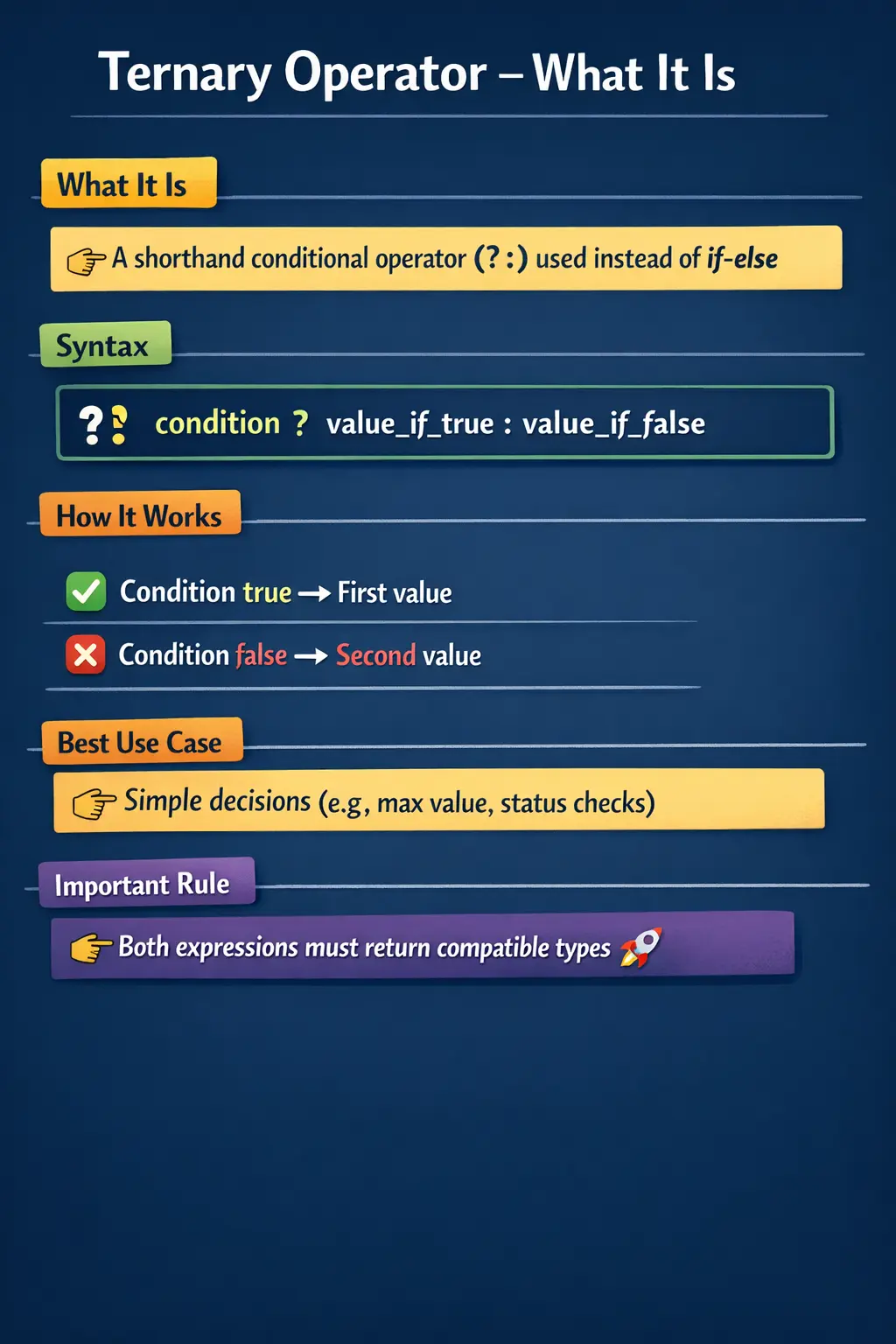
In real-world Java development, especially in clean and modern codebases, the ternary operator is frequently used for concise conditional assignments. It is also a common topic in interviews because it tests a developer’s understanding of conditional logic, type compatibility, and expression evaluation.
Understanding the Ternary Operator
The ternary operator is a conditional operator that evaluates a boolean expression and returns one of two values based on the result. It is called “ternary” because it operates on three operands: a condition, an expression if the condition is true, and an expression if the condition is false.
The syntax is straightforward:
condition ? expression1 : expression2;The operator works by first evaluating the condition. If the condition evaluates to true, the first expression is executed and returned. If the condition evaluates to false, the second expression is executed instead.
Unlike traditional if-else statements, the ternary operator is an expression, not a statement. This means it always returns a value, which can be directly assigned to a variable or used within another expression.
How the Ternary Operator Works Internally
To fully understand the ternary operator, it is important to look beyond its syntax and examine how it behaves during execution. When the Java compiler encounters a ternary expression, it evaluates the condition first. Based on the result, it evaluates only one of the two expressions—not both.
This behavior is similar to short-circuit evaluation in logical operators. Only the relevant branch is executed, which can improve performance and prevent unnecessary computations.
For example, when comparing two numbers to determine the maximum value, the ternary operator evaluates the condition and directly returns the appropriate value without executing both branches.
This selective execution is one of the reasons the ternary operator is efficient and widely used.
Basic Usage and Practical Understanding
Consider a simple example where two integer values are compared to find the maximum. Using traditional if-else, you would write multiple lines of code, declare a variable, and assign values within conditional blocks.
With the ternary operator, the same logic can be expressed in a single line. This reduces boilerplate code and makes the intention clearer.
This is particularly useful in scenarios where the logic is straightforward and does not require multiple steps. In such cases, the ternary operator provides a clean and elegant solution.
Ternary Operator vs If-Else
One of the most important aspects of understanding the ternary operator is knowing when to use it instead of an if-else statement. While both serve the same purpose—making decisions—they differ significantly in structure and readability.
The if-else statement is more verbose and better suited for complex logic involving multiple operations, nested conditions, or side effects such as logging or method calls. It provides clarity and flexibility at the cost of additional lines of code.
The ternary operator, on the other hand, is ideal for simple conditions where only a value needs to be returned. It reduces code length and improves readability when used appropriately.
However, it is important to avoid overusing the ternary operator. When conditions become complex or nested, readability suffers, and the code becomes difficult to maintain.
Using Ternary Operator with Different Data Types
One of the strengths of the ternary operator is its ability to work seamlessly with different data types. It is not limited to numeric values; it can also be used with strings, objects, and even method calls.
For example, determining whether a user is an adult or minor based on age can be expressed using a ternary operator that returns string values. This makes the code concise and easy to understand.
Similarly, the ternary operator can be used to invoke different methods based on a condition. In such cases, it acts as a decision-making mechanism that selects the appropriate method to execute.
This flexibility makes the ternary operator a versatile tool in Java programming.
Nested Ternary Operator
The ternary operator also supports nesting, allowing multiple conditions to be evaluated within a single expression. This can be useful in scenarios where more than two outcomes need to be handled.
For example, finding the maximum of three numbers can be achieved using nested ternary expressions. While this demonstrates the power of the operator, it also highlights its limitations.
Nested ternary operators can quickly become difficult to read and understand, especially for developers who are not familiar with the logic. This is why they should be used sparingly and only when the logic remains clear.
In most cases, complex nested conditions are better handled using traditional control structures such as if-else or switch statements.
Ternary Operator with Assignment
One of the most common use cases of the ternary operator is assigning values to variables based on a condition. This is where the operator truly shines.
Instead of writing multiple lines to assign a value conditionally, the ternary operator allows you to perform the assignment in a single expression. This is particularly useful in initializing variables, setting default values, or handling simple business logic.
For example, displaying a welcome message based on a user’s login status can be achieved with a single line using the ternary operator. This not only reduces code length but also makes the intent immediately clear.
Type Compatibility Rules
A critical aspect of using the ternary operator is understanding type compatibility. Both expressions in the ternary operator must return compatible types. If they do not, the code will fail to compile.
Java uses type promotion rules to determine the resulting type of the expression. If both expressions are of different but compatible types, Java promotes them to a common type.
However, if the types are incompatible, such as mixing integers with non-convertible types, a compilation error occurs. This is a common mistake among beginners.
Understanding these rules ensures that the ternary operator is used correctly and prevents unexpected errors.
Common Mistakes and Pitfalls
Despite its simplicity, the ternary operator is often misused. One of the most common mistakes is using it for complex logic. While it may reduce the number of lines, it can make the code harder to read and maintain.
Another mistake is forgetting parentheses in nested ternary expressions. This can lead to incorrect evaluation order and unexpected results.
Mixing incompatible data types is another common issue. Developers sometimes assume that Java will automatically handle type conversion, but this is not always the case.
Overusing the ternary operator is also a problem. While it is a powerful tool, it should not replace all conditional logic. Readability should always be the priority.
Real-World Usage and Best Practices
In real-world applications, the ternary operator is widely used in scenarios where concise decision-making is required. It is commonly found in UI logic, data formatting, and conditional assignments.
Best practices suggest using the ternary operator only when the condition is simple and the resulting expressions are easy to understand. If the logic becomes complex, it is better to use traditional control structures.
Maintaining readability is the key principle. Code should be easy to understand not only for the original developer but also for others who may work on it in the future.
Interview Perspective
From an interview standpoint, the ternary operator is a frequently asked topic. Interviewers expect candidates to understand its syntax, behavior, and appropriate use cases.
A short answer typically defines it as a conditional operator that evaluates a condition and returns one of two values. A detailed answer includes its syntax, advantages, and comparison with if-else.
Candidates are often tested on nested ternary expressions, type compatibility, and evaluation order. Demonstrating clarity and proper usage can leave a strong impression.
Final Thoughts
The ternary operator is a small but powerful feature in Java that enhances code conciseness and readability when used correctly. It simplifies conditional assignments and reduces boilerplate code, making it a valuable tool for developers.
However, like any powerful tool, it must be used with care. Overuse or misuse can lead to confusing and hard-to-maintain code. The key is to strike a balance between conciseness and clarity.
Understanding when to use the ternary operator—and when to avoid it—is what distinguishes a good developer from a great one. By mastering this operator, you not only improve your coding style but also strengthen your understanding of conditional logic in Java.
Why the Ternary Operator Is an Expression
The most important difference between the ternary operator and an if-else statement is that the ternary operator is an expression. An expression produces a value. A statement performs an action. This distinction explains why ternary expressions can be assigned to variables, passed as method arguments, returned from methods, or used inside another expression. The operator is not just a shorter way to write branching logic; it is a value-producing form of conditional decision-making.
For example, a line such as String label = isActive ? "Active" : "Inactive"; evaluates a condition and directly produces the value that should be stored in label. With if-else, the same logic requires declaring the variable first and assigning it inside separate blocks. Both approaches are valid, but the ternary version expresses a simple conditional value more directly.
This expression-based nature is also why ternary should not be used for full procedural logic. If each branch needs to perform multiple actions, log messages, call several methods, or update different parts of state, an if-else block is usually clearer. The ternary operator is strongest when the question is, "Which value should this expression produce?"
Conditional Assignment as the Main Use Case
The most practical use of the ternary operator is conditional assignment. Many programs need to assign one value when a condition is true and another value when it is false. This appears in labels, messages, statuses, defaults, grades, validation results, UI text, configuration values, and simple business decisions. The ternary operator handles these cases concisely.
Consider a system that displays a user status. If the user is logged in, the display text should be "Welcome"; otherwise, it should be "Please log in." This is a direct two-outcome value decision. Writing a full if-else block is not wrong, but it adds structure that may not be necessary. A ternary expression keeps the assignment close to the condition and makes the output obvious.
Conditional assignment is also useful for default values. If a name is available, use it. If not, use "Guest." If a configuration value exists, use it. If not, use a safe default. These patterns appear frequently in real Java applications, especially when working with user input, optional data, API responses, and display formatting.
Selective Evaluation and Side Effects
The ternary operator evaluates the condition first and then evaluates only the selected branch. If the condition is true, the true expression is evaluated and the false expression is ignored. If the condition is false, the false expression is evaluated and the true expression is ignored. This matters when branches contain method calls, calculations, or operations that could be expensive or unsafe.
For example, if a ternary expression chooses between getCachedValue() and calculateValue(), only one method runs. This avoids unnecessary work. It can also prevent errors when one branch would be unsafe under certain conditions. A null-safe pattern such as name != null ? name : "Guest" works because the branch that uses the variable directly is selected only when the condition allows it.
Even though only one branch is evaluated, developers should avoid using ternary expressions mainly for side effects. A ternary expression should produce a value. If the branches exist mostly to perform actions, update state, or trigger behavior, an if-else statement communicates the intention better. Clean code separates value selection from procedural control flow.
Ternary Operator and Type Inference
The result type of a ternary expression depends on the types of the second and third operands. If both branches return the same type, the result type is simple. If the branches return different but compatible numeric types, Java applies promotion rules. For example, if one branch returns an int and the other returns a double, the result becomes a double.
This behavior can be helpful, but it can also surprise beginners. A ternary expression may produce a wider type than expected. If the result is assigned to a narrower variable, compilation may fail or an explicit cast may be required. When object types are involved, Java looks for a compatible common type. If the branches are unrelated in a way that cannot be assigned to the target type, the code will not compile.
Good practice is to keep both result expressions conceptually aligned. If the ternary is assigning a message, both branches should return strings. If it is assigning a number, both branches should represent the same kind of number. Mixed types may be legal, but they should not make the expression harder to reason about.
Ternary Operator with Null Handling
Null handling is one of the cleanest practical uses of the ternary operator. Java programs often receive values that may be missing: names, labels, configuration values, optional IDs, wrapper numbers, and API fields. The ternary operator can provide a direct fallback. A common pattern is String display = name != null ? name : "Guest";.
This pattern is readable because it mirrors the requirement: use the real value if it exists; otherwise, use a default. It also avoids repeated if-else blocks for simple fallback assignments. With wrapper values, the ternary operator can prevent unsafe unboxing. For example, int count = value != null ? value : 0; ensures that a null Integer is not directly unboxed.
However, null handling should still be intentional. A default value can hide missing data if used carelessly. If null indicates an error or an incomplete business process, silently replacing it with a default may be wrong. The ternary operator makes fallback easy, but the developer must still decide whether fallback is appropriate.
Ternary Operator with Boolean Results
A common beginner pattern is writing boolean result = condition ? true : false;. This is valid Java, but it is usually unnecessary because the condition itself already produces a boolean value. The expression can be simplified to boolean result = condition;. Similarly, condition ? false : true can often be simplified to !condition.
This mistake happens because learners first understand the ternary operator as a two-branch replacement for if-else, then apply it even when no real value selection is needed. In clean Java code, ternary should add clarity. If it simply wraps a condition in true and false outputs, it adds noise rather than value.
There are rare cases where a ternary returning boolean values may improve readability, especially when branch expressions are named constants or method calls. But for direct true/false results, prefer the simpler boolean expression. This makes code shorter and clearer.
Nested Ternary Expressions
Nested ternary expressions allow more than two outcomes, but they should be used cautiously. A simple nested ternary such as classifying a number as positive, negative, or zero can be readable if formatted clearly. However, deeply nested ternaries quickly become difficult to understand because the reader must track multiple conditions and branches in one expression.
Nested ternary expressions are right-associative, meaning they group from right to left unless parentheses clarify the structure. Without formatting and parentheses, nested ternaries can look like a puzzle. This is why many teams discourage them except for very small, obvious cases. The goal of code is communication, not compression.
If the logic has several business outcomes, an if-else-if ladder, switch expression, or separate method may be better. A ternary expression should help the reader see the result quickly. When it makes the reader slow down and decode the structure, it has gone beyond its useful role.
Ternary Operator in Return Statements
The ternary operator is often useful in return statements when a method simply chooses between two return values. For example, a method may return a display label based on a flag, a status string based on a score, or a default value when an input is missing. This can make small utility methods concise and expressive.
A return statement such as return score >= 60 ? "Pass" : "Fail"; is usually clear because the method's purpose is simple and the ternary expression directly represents the return decision. Writing a full if-else block would also be correct, but it may add unnecessary ceremony.
However, if the method needs validation, logging, multiple calculations, or several branches, the ternary operator may not be enough. Return statements should remain readable. A one-line return is useful when the condition and outcomes are simple; otherwise, structured control flow is easier to maintain.
Ternary Operator in UI and Formatting Logic
Many real-world ternary expressions appear in display logic. A web application may show "Active" or "Inactive" based on a user flag. A report may show "Passed" or "Failed" based on a score. A UI may choose a CSS class, label, icon name, or warning message based on a simple condition. These are natural ternary use cases because they involve selecting one value from two alternatives.
Formatting logic benefits from ternary expressions when the rule is small and obvious. For example, choosing between singular and plural text, showing a fallback name, or selecting a status label can be concise. The expression stays close to the value being produced, which can improve readability.
At the same time, UI logic can become messy if ternaries are nested heavily inside templates or string construction. If display rules become complex, move them into a named method or view model property. The ternary operator should simplify display decisions, not hide business rules inside presentation code.
Ternary Operator in Business Rules
Business rules often require conditional values. A discount rate may be 10 percent for premium customers and 0 for regular customers. A shipping fee may be waived when the order total crosses a threshold. A grade may be "Pass" when the score meets the minimum requirement and "Fail" otherwise. These are all simple two-outcome decisions where the ternary operator can be effective.
The danger is oversimplifying business logic. Real business rules often grow. A discount may depend on customer type, region, date, coupon validity, and order category. At that point, a ternary expression is no longer the right tool. A rule engine, separate method, strategy object, or clear conditional block may be more maintainable.
A good guideline is to use ternary for simple value selection, not complex policy. If the rule can be explained in one short sentence, ternary may work. If it requires a paragraph, separate the logic into named code structures. Business rules should remain visible and testable.
Readability and Formatting
Formatting matters when using the ternary operator. A short ternary expression can fit comfortably on one line. A longer expression should be split across multiple lines so that the condition, true result, and false result are easy to scan. Consistent formatting prevents the operator from becoming visually confusing.
Parentheses can also help. Although not always required, wrapping the condition in parentheses can improve readability, especially when relational and logical operators are involved. For example, (age >= 18 && hasId) ? "Allowed" : "Denied" makes the condition boundary clear.
Readability should always win over cleverness. If a ternary expression needs comments to explain its structure, it may be better as an if-else block. The best ternary expressions are self-explanatory: one condition, two clear values, no hidden side effects.
Testing Ternary Logic
Ternary logic should be tested like any other conditional logic. At minimum, tests should cover the true branch and the false branch. If the condition includes boundary values, tests should cover values just below, at, and just above the boundary. For example, if score >= 60 decides pass or fail, test 59, 60, and 61.
Null-handling ternaries should include null and non-null inputs. Numeric ternaries should include type-sensitive cases when promotion or autoboxing may occur. Nested ternaries should be tested for each possible outcome because the structure can hide missed branches. If testing a ternary feels difficult, that may be a sign that the expression is too complex and should be refactored.
Good tests focus on the business meaning of the outcome, not merely the syntax. A test should assert that an adult user gets the adult label, a missing name gets the guest label, or a passing score gets the pass status. This keeps the test aligned with behavior and protects the code if the implementation later changes from ternary to if-else.
Best Practices for the Ternary Operator
Use the ternary operator for simple conditional value selection. Keep the condition short, keep both outcomes clear, and avoid side effects in the branches. If the expression becomes long, nested, or difficult to format cleanly, use if-else instead. The purpose of ternary is readability through conciseness, not conciseness at any cost.
Keep both result expressions compatible and conceptually similar. Returning a string in one branch and a number in another usually indicates unclear design. Avoid redundant boolean ternaries such as condition ? true : false. Use direct boolean expressions instead.
For nested ternaries, be conservative. One level of nesting may be acceptable for simple classification, but deeper nesting usually hurts maintainability. Prefer named methods or structured control flow for complex decisions. The ternary operator is a clean tool when used for clean problems.
How to Explain the Ternary Operator in Interviews
A strong interview answer starts with the definition: the ternary operator is Java's conditional operator that evaluates a boolean condition and returns one of two values. Its syntax is condition ? valueIfTrue : valueIfFalse. It is called ternary because it uses three operands.
The answer should mention that the ternary operator is an expression, not a statement, and therefore it returns a value. It is useful for simple conditional assignments and return values. Only the selected branch is evaluated after the condition is checked, which makes it efficient and safe for certain fallback patterns.
The best answers also discuss limitations: avoid complex or deeply nested ternaries, ensure both result expressions are type-compatible, avoid using it for side-effect-heavy logic, and prefer if-else when readability is better. Including examples such as even/odd, max of two numbers, null fallback, and nested classification shows practical understanding.
Ternary Operator Syntax
condition ? expressionIfTrue : expressionIfFalse;
	• Works as a compact if–else
	• Returns a value
1. Basic Ternary Example
int a = 10;
int b = 20;
int max = (a > b) ? a : b;
System.out.println(max);
Explanation
	• Condition a > b is false
	• b is assigned to max
2. Ternary with Equality Check
int n = 10;
String result = (n == 10) ? "Ten" : "Not Ten";
System.out.println(result);
Explanation
	• Equality comparison inside ternary
	• Common interview example
3. Even or Odd Using Ternary
int n = 7;
String type = (n % 2 == 0) ? "Even" : "Odd";
System.out.println(type);
Explanation
	• Replaces a simple if–else
	• Improves conciseness
4. Positive, Negative, or Zero (Nested Ternary)
int n = -5;
String result = (n > 0) ? "Positive"
: (n < 0) ? "Negative"
: "Zero";
System.out.println(result);
Explanation
	• Nested ternary evaluates left to right
	• Equivalent to multiple if–else
5. Ternary with Method Calls
int age = 17;
String status = (age >= 18) ? getAdultLabel() : getMinorLabel();
System.out.println(status);
Explanation
	• Only one method is executed
	• Efficient due to conditional evaluation
6. Ternary with Boolean Condition
boolean isAdmin = true;
String role = isAdmin ? "ADMIN" : "USER";
System.out.println(role);
Explanation
	• Direct boolean condition
	• Very readable use case
7. Ternary vs If–Else (Equivalent)
int a = 5;
int b = 10;
int min = (a < b) ? a : b;
Explanation
	• Compact alternative to if–else
	• Preferred for simple conditions
8. Type Promotion in Ternary
int a = 10;
double result = (a > 5) ? 10 : 10.5;
System.out.println(result);
Explanation
	• int promoted to double
	• Result type is double
9. Ternary with Wrapper and Primitive
Integer a = 10;
int result = (a != null) ? a : 0;
System.out.println(result);
Explanation
	• Prevents NullPointerException
	• Safe unboxing pattern
10. Ternary with null Return
String name = null;
String display = (name != null) ? name : "Guest";
System.out.println(display);
Explanation
• Common null-handling pattern11. Nested Ternary Readability Trap
int a = 5, b = 10, c = 15;
int max = (a > b) ? ((a > c) ? a : c)
: ((b > c) ? b : c);
System.out.println(max);
Explanation
	• Works correctly
	• Hard to read → avoid deep nesting
12. Ternary in Assignment Expression
int score = 75;
String grade = (score >= 60) ? "Pass" : "Fail";
System.out.println(grade);
Explanation
• Very common real-world use13. Ternary with Arithmetic Expression
int x = 10;
int y = (x > 5) ? x * 2 : x / 2;
System.out.println(y);
Explanation
• Different expressions evaluated based on condition14. Ternary with Logical Operators
int age = 25;
boolean hasID = true;
String status = (age >= 18 && hasID) ? "Allowed" : "Denied";
System.out.println(status);
Explanation
	• Logical condition inside ternary
	• Combines relational + logical ops
15. Ternary with Boolean Result
int x = 10;
boolean isPositive = (x > 0) ? true : false;
System.out.println(isPositive);
Explanation
	• Redundant but valid
	• Usually simplified to x > 0
16. Ternary Inside Print Statement
int temp = 30;
System.out.println((temp > 25) ? "Hot" : "Cool");
Explanation
	• Inline evaluation
	• Reduces variable usage
17. Ternary with Characters
char ch = 'A';
String type = (ch >= 'A' && ch <= 'Z') ? "Uppercase" : "Not Uppercase";
System.out.println(type);
Explanation
• Character range checks using ternary18. Ternary and Autoboxing
Integer a = null;
Integer result = (a != null) ? a : 0;
System.out.println(result);
Explanation
	• 0 is autoboxed to Integer
	• Null-safe pattern
19. Invalid Use of Ternary (Statements Not Allowed)
// (x > 0) ? System.out.println("Yes") : System.out.println("No"); // invalidExplanation
• Ternary expects expressions, not statements20. Interview Summary Example
int a = 10;
int b = 20;
int result = (a > b) ? a : (a == b) ? a : b;
System.out.println(result);
Explanation
	• Nested ternary with multiple conditions
	• Common output-based interview question