synchronized Keyword in Java
The synchronized keyword in Java is used to control concurrent access to shared resources. It ensures that only one thread at a time executes a critical section of code protected by the same lock, thereby preventing race conditions and ensuring data consistency. This is a very high-frequency interview topic in Java multithreading.
The keyword looks simple, but it represents one of the most important ideas in Java concurrency. When multiple threads work inside the same process, they can share objects and memory. This sharing is powerful, but it is also risky. If two threads update the same value at the same time, the final result may depend on timing rather than logic. The synchronized keyword gives Java developers a built-in way to control that timing around critical sections.
A synchronized section is not just a code block with special syntax. It is a controlled region protected by a monitor lock. A thread must acquire the correct lock before it can enter. Other threads that need the same lock must wait until the lock is released. This mutual exclusion is what prevents two threads from modifying protected shared data at the same time.
In interviews, synchronized is often discussed together with race conditions, object locks, class locks,
reentrancy, wait(), notify(), deadlocks, and the difference between
synchronized and volatile. A strong answer should explain both correctness and
tradeoffs. The keyword can make code thread-safe when used properly, but overusing it or locking the wrong
object can reduce performance or fail to protect the data at all.
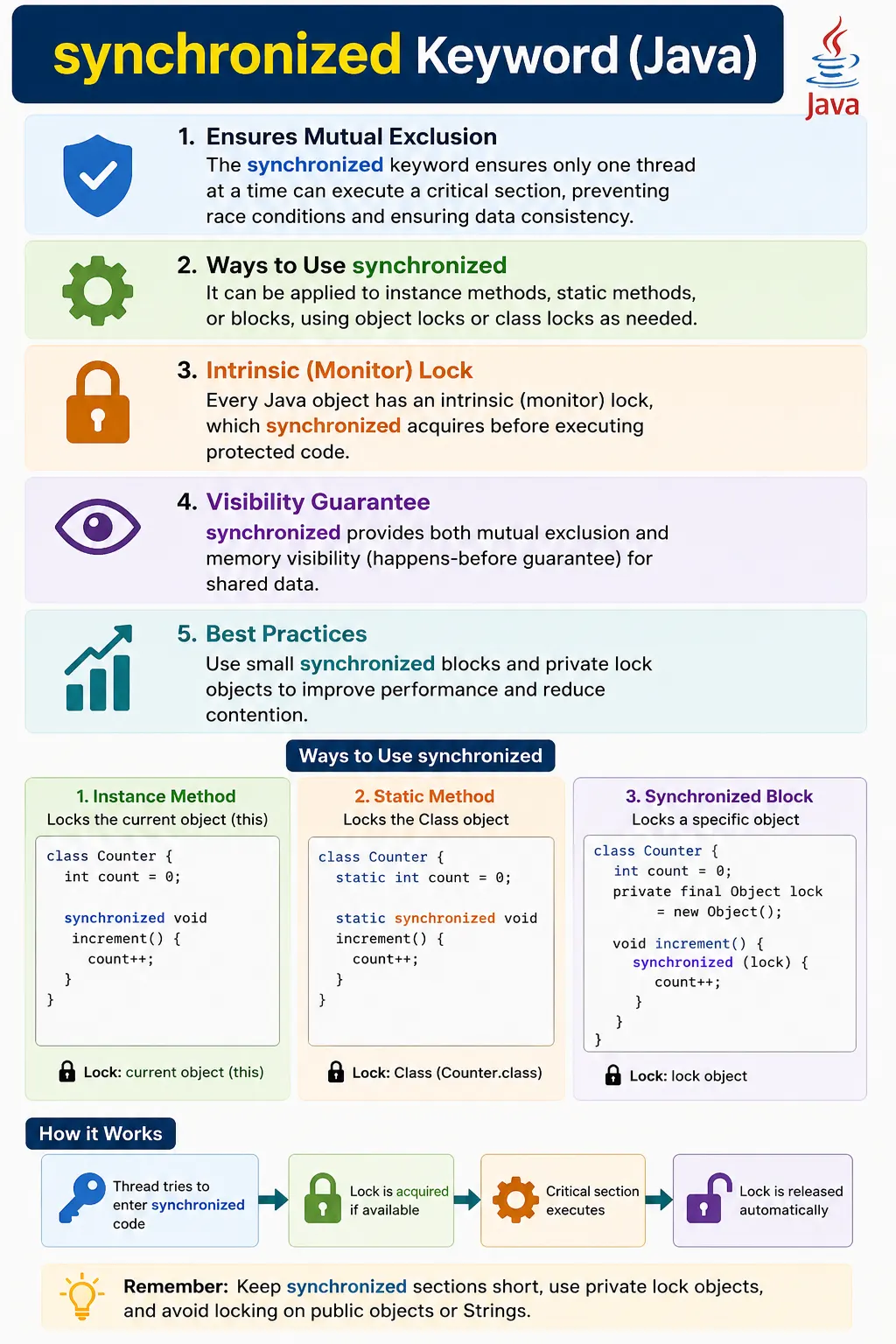
Why the synchronized Keyword Exists
Java applications often need multiple tasks to happen at the same time. One thread may handle user requests, another may process files, another may update a cache, and another may run background cleanup. These threads can access the same objects. If all shared objects were read-only, there would be little risk. The problem starts when shared objects are mutable and more than one thread can change them.
Consider a shared counter. The expression count++ appears to be one operation, but internally it
is a read, a calculation, and a write. Two threads can read the same old value, calculate the same new value,
and write back the same result. One update is lost. This is a race condition. The synchronized keyword
prevents this by allowing only one thread at a time to execute the protected increment operation for the same
lock.
The goal of synchronized is not to slow down threads or make all code sequential. Its purpose is to protect the parts of a program where shared mutable data must remain consistent. If a section of code does not access shared mutable state, it usually does not need synchronization. If it does, the developer must decide which lock protects that state and how small the protected section can safely be.
Critical Sections and Mutual Exclusion
A critical section is a part of code where shared data is read or modified in a way that must not be interrupted by another thread doing the same kind of operation. The synchronized keyword creates mutual exclusion around that section. Mutual exclusion means only one thread can execute the protected section for a given lock at a time.
The lock is the key detail. Two synchronized blocks only exclude each other if they use the same lock. If
every thread synchronizes on a different object, there is no coordination. This is why
synchronized (new Object()) inside a frequently called method is a common mistake. A new lock is
created each time, so threads are not competing for the same monitor.
Good synchronization starts by identifying the shared data and then choosing a lock that is shared by every
path that accesses that data. For instance data, the lock may be this or a private lock object.
For static data, the lock must be shared across all instances, often the class object or another static lock.
Monitor Locks and Intrinsic Locks
Every Java object has an intrinsic lock, also called a monitor lock. The synchronized keyword uses this lock automatically. When a thread enters a synchronized instance method, it acquires the monitor lock of the current object. When it enters a synchronized static method, it acquires the monitor lock associated with the class object. When it enters a synchronized block, it acquires the monitor lock of the object specified in the parentheses.
This built-in lock is released automatically when execution leaves the synchronized method or block. It is released even if an exception occurs. That automatic release makes synchronized easier to use than manual locking APIs, where developers must remember to unlock in a finally block.
The lock does two important jobs. First, it provides mutual exclusion, so only one thread can hold the lock at a time. Second, it provides memory visibility. Changes made by one thread before releasing a synchronized lock become visible to another thread that later acquires the same lock. This happens-before relationship is a major reason synchronized is more than just a blocking mechanism.
Visibility and Happens-Before Guarantee
Multithreading is not only about two threads executing at the same time. It is also about whether one thread can see changes made by another thread. Modern processors and JVM optimizations may cache values or reorder instructions in ways that are valid for single-threaded logic but surprising in concurrent code. Without a visibility guarantee, one thread may read a stale value even after another thread has updated it.
The synchronized keyword provides a happens-before relationship. When a thread exits a synchronized block, its changes are flushed in a way that another thread can see after acquiring the same lock. This means synchronized protects both atomicity and visibility when used consistently. Atomicity prevents overlapping updates; visibility prevents stale reads.
This is also why every access to a shared variable must follow the same synchronization rule. If one method writes a value inside a synchronized block but another method reads it without synchronization, the visibility guarantee may be broken. Thread safety requires discipline across all access paths, not just one method.
What Does synchronized Do?
- Acquires a monitor lock before executing code
- Allows mutual exclusion
- Releases the lock automatically when execution exits
- Ensures visibility of shared data (happens-before guarantee)
Monitor Lock (Intrinsic Lock)
- Every Java object has a monitor (intrinsic) lock
- synchronized uses this lock internally
- A thread must own the lock to enter synchronized code
Ways to Use synchronized
1️⃣ Synchronized Instance Method
Locks the current object (this).
class Counter {
    int count = 0;

    synchronized void increment() {
        count++;
    }
}
✔ Only one thread per object can execute this method at a time
2️⃣ Synchronized Block (Recommended)
Locks a specific object and limits the critical section.
class Counter {
    int count = 0;

    void increment() {
        synchronized (this) {
            count++;
        }
    }
}
✔ Better performance
✔ Fine-grained locking
3️⃣ Synchronized Static Method
Locks the class-level lock.
class Counter {
    static int count = 0;

    static synchronized void increment() {
        count++;
    }
}
✔ Lock used: Counter.class
✔ Shared across all instances
Object Lock vs Class Lock (Interview Favorite)
| Usage | Lock Acquired |
|---|---|
| Instance synchronized method | this |
| Synchronized block | Specified object |
| Static synchronized method | ClassName.class |
How synchronized Works (Execution Flow)
- Thread requests lock
- If lock available → thread enters block/method
- Other threads are BLOCKED
- Thread exits synchronized code
- Lock is released automatically
Visibility Guarantee (Important)
- Changes made inside synchronized block
- Are visible to other threads after lock release
✔ Solves visibility issues
✔ Prevents stale reads
synchronized and Thread States
- Waiting for lock → BLOCKED
- Inside synchronized code → RUNNABLE
What synchronized Does NOT Do
- Does NOT guarantee fairness
- Does NOT prevent deadlocks
- Does NOT improve performance
- Does NOT replace good design
Common Mistakes
- Synchronizing entire methods unnecessarily
- Synchronizing on wrong object
- Using this as lock in public APIs
- Overusing synchronized causing performance issues
Best Practices (Production-Grade)
- Prefer synchronized blocks over methods
- Keep synchronized code minimal
- Avoid synchronizing on mutable/public objects
- Use private final lock objects if needed
private final Object lock = new Object();

synchronized (lock) {
    // critical section
}
synchronized vs volatile (Quick Contrast)
| Aspect | synchronized | volatile |
|---|---|---|
| Mutual exclusion | ✔ Yes | ❌ No |
| Visibility | ✔ Yes | ✔ Yes |
| Atomicity | ✔ Yes | ❌ No |
| Performance | Slower | Faster |
Advanced synchronized Scenarios
1. synchronized Method (Instance Lock)
class Counter {
    int count = 0;

    synchronized void increment() {
        count++;
    }
}
Explanation
- Lock acquired on current object (this).
- Only one thread per object can execute this method.
2. Non-synchronized Method Runs in Parallel
class Demo {
    synchronized void syncMethod() {
        System.out.println("Synchronized");
    }

    void normalMethod() {
        System.out.println("Not synchronized");
    }
}
Explanation
- normalMethod() can run parallel with syncMethod().
3. synchronized Block (Preferred)
class Counter {
    int count = 0;

    void increment() {
        synchronized (this) {
            count++;
        }
    }
}
Why preferred
- Locks only critical section.
- Better performance than full method sync.
4. Synchronizing on a Custom Lock Object
class Counter {
    int count = 0;
    private final Object lock = new Object();

    void increment() {
        synchronized (lock) {
            count++;
        }
    }
}
Best practice
- Avoid locking this.
- Safer for large classes.
5. Two Threads, Same Object → Blocked
class Demo {
    synchronized void work() {
        System.out.println(Thread.currentThread().getName());
    }

    public static void main(String[] args) {
        Demo d = new Demo();
        new Thread(d::work).start();
        new Thread(d::work).start();
    }
}
Explanation
- Same object → same lock → one thread at a time.
6. Two Objects → No Blocking
class Demo {
    synchronized void work() {
        System.out.println(Thread.currentThread().getName());
    }

    public static void main(String[] args) {
        new Thread(() -> new Demo().work()).start();
        new Thread(() -> new Demo().work()).start();
    }
}
Explanation
- Different objects → different locks.
7. static synchronized Method (Class Lock)
class Printer {
    static synchronized void print() {
        System.out.println(Thread.currentThread().getName());
    }
}
Explanation
- Lock acquired on Class object.
- Blocks all threads across all instances.
8. Instance Lock vs Class Lock Together
class Test {
    synchronized void instanceMethod() {
        System.out.println("Instance lock");
    }

    static synchronized void staticMethod() {
        System.out.println("Class lock");
    }
}
Key Point
- Instance lock ≠ Class lock.
- Can run in parallel.
9. synchronized(this) vs synchronized(ClassName.class)
synchronized (this) {
    // object-level lock
}

synchronized (Test.class) {
    // class-level lock
}
10. synchronized with Runnable
class Task implements Runnable {
    int count = 0;

    public synchronized void run() {
        count++;
        System.out.println(count);
    }
}
Explanation
- Synchronization applies on Runnable object.
11. synchronized and sleep() (Important Trap)
class Demo {
    synchronized void work() throws Exception {
        Thread.sleep(1000);
    }
}
Key Point
- sleep() ❌ does NOT release lock.
12. synchronized and wait()
class Demo {
    synchronized void work() throws Exception {
        wait();
    }
}
Key Point
- wait() ✅ releases lock.
13. Illegal Monitor State (Common Interview Trap)
class Demo {
    void work() throws Exception {
        // wait(); // ❌ IllegalMonitorStateException
    }
}
Rule
- wait() / notify() must be inside synchronized.
14. notify() vs notifyAll()
class Demo {
    synchronized void resumeOne() {
        notify();
    }

    synchronized void resumeAll() {
        notifyAll();
    }
}
15. Over-Synchronization (Bad Practice)
class Demo {
    synchronized void hugeMethod() {
        // long running logic
    }
}
Problem
- Reduces concurrency.
- Use smaller synchronized blocks.
16. synchronized Is Reentrant
class Demo {
    synchronized void m1() {
        m2();
    }

    synchronized void m2() {
        System.out.println("Reentrant lock");
    }
}
Explanation
- Same thread can re-enter lock.
17. synchronized with Multiple Methods
class Demo {
    synchronized void m1() {}
    synchronized void m2() {}
}
Explanation
- Same object → same lock.
- Only one method runs at a time.
18. ❌ Synchronizing on New Object (Useless)
synchronized (new Object()) {
    // No real synchronization
}
Why wrong
- New object every time → no shared lock.
19. synchronized vs AtomicInteger
// synchronized
synchronized void increment() { count++; }

// atomic
AtomicInteger count = new AtomicInteger();
count.incrementAndGet();
Interview Note
- Atomic → faster, lock-free.
20. Interview Summary – synchronized
synchronized
Key Points
- Provides mutual exclusion.
- Uses intrinsic locks.
- Object lock vs Class lock.
- Reentrant.
- Can cause deadlock if misused.
Interview-Ready Answers
Short Answer
synchronized ensures that only one thread accesses a critical section at a time.
Detailed Answer
In Java, the synchronized keyword is used to acquire an intrinsic lock on an object or class before executing critical code. It prevents race conditions, ensures data consistency, and provides memory visibility guarantees by enforcing happens-before relationships.
Choosing Between Synchronized Method and Synchronized Block
A synchronized method is simple and readable. It is useful when the entire method is a critical section and all of its work must be protected by the same lock. For small methods that only update shared state, this can be perfectly acceptable. The method signature clearly shows that the method is synchronized, which can help readers understand that concurrency control is part of its behavior.
A synchronized block is more flexible. It allows the developer to choose the lock object and protect only a specific part of the method. This is usually preferred when a method performs both shared and non-shared work. For example, calculating a local value may not need a lock, but updating a shared counter does. Locking only the update keeps the critical section smaller and improves concurrency.
The choice should not be based on style alone. It should be based on the shared data being protected. If the whole method works with shared mutable state, a synchronized method may be clean. If only a few statements need protection, a synchronized block is usually better. If different pieces of state can be protected independently, separate private lock objects may reduce unnecessary blocking.
Why Private Final Lock Objects Are Often Better
Synchronizing on this is common in examples, but it has a design drawback. If external code has
access to the object, that external code can also synchronize on the same object. This can create accidental
blocking or even deadlock if outside code holds the object's monitor longer than expected.
A private final lock object gives the class better control. Since the lock is private, outside code cannot acquire it directly. Since it is final, the lock reference cannot accidentally be replaced. This makes the synchronization policy clearer and safer for large classes.
private final Object lock = new Object();

void update() {
    synchronized (lock) {
        // critical section
    }
}
This pattern is especially useful when a class has multiple independent shared resources. Each resource can have its own lock, allowing unrelated operations to proceed in parallel. However, adding many locks increases design complexity, so the benefit should be real and understandable.
Reentrancy in synchronized
Java's intrinsic locks are reentrant. Reentrant means that a thread that already owns a lock can acquire the same lock again. This matters when one synchronized method calls another synchronized method on the same object. Without reentrancy, the thread would block itself. With reentrancy, the call works normally.
Reentrancy is convenient because object-oriented code often breaks behavior into multiple methods. A public synchronized method may call a private synchronized helper method, or one synchronized operation may reuse another. Java tracks how many times the same thread has acquired the lock and fully releases it only when the matching exits have occurred.
Reentrancy does not mean locks are harmless. Other threads still cannot enter synchronized sections protected by the same lock until the owning thread fully exits. A reentrant design can still hold a lock for too long if the call chain is large or includes slow operations.
sleep(), wait(), notify(), and synchronized
The relationship between synchronized and methods such as sleep(), wait(), and
notify() is a common interview area. Calling Thread.sleep() does not release a
monitor lock. If a thread sleeps inside a synchronized method, it continues to hold the lock while sleeping.
Other threads waiting for that lock remain blocked.
The wait() method is different. A thread must own the object's monitor before it can call
wait(). When it waits, it releases that monitor and enters a waiting state until another thread
calls notify() or notifyAll() on the same object. This is why wait and notify must
be used inside synchronized code. Calling them without owning the monitor causes
IllegalMonitorStateException.
In modern Java, many programs avoid low-level wait/notify and use higher-level utilities such as blocking queues, latches, semaphores, futures, or executors. Still, wait and notify remain important for understanding how monitor-based communication works.
Performance and Over-Synchronization
The synchronized keyword improves correctness, but it can reduce concurrency if used too broadly. A long synchronized method may block many threads even when only a small part of the method actually needs protection. This can turn a multithreaded program into a mostly sequential program around one heavily contended lock.
Over-synchronization also makes code harder to reason about. If every method is synchronized, developers may assume the class is thread-safe even when operations across multiple methods are not atomic together. For example, checking a value in one synchronized method and updating it in another synchronized method may still be unsafe if another thread can change the state between the two calls.
Good synchronized code protects invariants. An invariant is a rule that must remain true for an object, such as "count should never be negative" or "total should equal the sum of all items." Synchronization should protect the complete operation that keeps the invariant valid, not just random individual lines.
Deadlock Risk
The synchronized keyword can contribute to deadlocks when multiple locks are acquired in different orders. A deadlock occurs when Thread A holds one lock and waits for another, while Thread B holds the second lock and waits for the first. Neither thread can move forward, and the program may appear frozen.
The simplest prevention technique is consistent lock ordering. If all code always acquires lock A before lock B, circular waiting becomes less likely. Another technique is to reduce nested locking. If a design can be changed so that only one lock is needed at a time, it is often easier to maintain.
Deadlock risk is one reason synchronized should be used precisely. Adding locks without a clear ownership strategy may fix one race condition while creating a more serious liveness problem. Correct concurrent design must consider both safety and progress.
synchronized vs volatile
The volatile keyword and the synchronized keyword both deal with visibility, but they are not
interchangeable. Volatile ensures that reads and writes of a variable are visible across threads. It does not
provide mutual exclusion for a block of code. Synchronized provides both visibility and mutual exclusion.
Volatile can be useful for simple flags, such as a boolean variable used to stop a worker thread. It is not
enough for compound operations such as count++, because the read-modify-write sequence still
needs atomicity. Synchronized can protect that full sequence.
The right choice depends on the operation. If a thread only needs to publish a simple latest value or flag, volatile may be enough. If multiple statements must execute as one protected operation, synchronized or another locking mechanism is usually needed.
synchronized in Testing and Automation
The synchronized keyword is also relevant for QA automation and test frameworks. Parallel test execution can create shared-state problems just like application code. If multiple test threads update the same report object, write to the same file, use the same test data, or share the same browser driver, results can become unpredictable.
Synchronization can protect shared reporting or logging code, but it should not be used to hide poor test isolation. In many automation designs, the better solution is to give each test its own driver instance, data set, and output context. Use synchronized only for truly shared resources that must be updated safely.
Understanding synchronized helps testers explain why parallel tests sometimes fail only when run together. The failure may not be in the application under test. It may be in the automation framework's shared state. This is a valuable distinction in real debugging.
Interview-Ready Explanation
A short interview answer can be: the synchronized keyword ensures that only one thread at a time can execute a protected critical section for the same lock. It prevents race conditions and helps maintain data consistency.
A detailed answer should add that synchronized acquires an intrinsic monitor lock on an object or class.
Synchronized instance methods lock this, static synchronized methods lock the class object, and
synchronized blocks lock the specified object. The lock is released automatically when execution leaves the
synchronized section.
A strong answer should also mention visibility and tradeoffs. Synchronization provides a happens-before relationship, so changes made before releasing a lock become visible to a thread that later acquires the same lock. However, synchronized does not guarantee fairness, does not prevent deadlocks, and can reduce performance if overused. It should protect shared data carefully and minimally.
Production Guidelines for Using synchronized
In production code, synchronized should be treated as a precise tool rather than a general safety blanket. The first question should always be: what shared mutable state am I protecting? If that question cannot be answered clearly, adding synchronized may only hide the real design issue. Good synchronization policies are written around data ownership. One object should be responsible for protecting its own state, and all access paths should follow the same locking rule.
The second question is whether sharing can be avoided. If each thread can work with independent data, the program becomes easier to reason about and may not need locks. This is why immutable objects, local variables, request-scoped objects, and per-thread test data are so useful. Avoiding shared mutable state is often better than synchronizing access to it.
The third question is whether synchronized is the right abstraction. For a simple critical section, it may be
ideal. For a counter, AtomicInteger may be clearer. For a producer-consumer workflow, a blocking
queue may be safer than manual wait and notify. For a cache or lookup table under concurrent access,
ConcurrentHashMap may be a better fit than synchronizing a regular map.
Documentation also matters. If a class is thread-safe because of synchronized blocks, that design should be obvious to future maintainers. If a lock must always be acquired before accessing certain fields, keep those fields private and place the locking code close to the data. Avoid exposing internal locks unless there is a very strong reason. Hidden lock contracts are easy to break during future changes.
Finally, synchronized code should be reviewed with both correctness and progress in mind. Correctness asks whether shared data stays consistent. Progress asks whether threads can continue without unnecessary blocking, starvation, or deadlock. A synchronized solution that is correct but blocks too much may still be a poor production design. A solution that is fast but unsafe is also unacceptable. Good concurrency balances both.
Key Takeaway
synchronized protects shared data, not threads. Use it sparingly and precisely to achieve correctness without sacrificing performance.