super Keyword
The super keyword in Java is a special reference used inside a child class to refer to its
immediate parent class. It appears only in inheritance-based code, because its purpose is to connect the
child class with the superclass from which it inherits. When a subclass inherits fields and methods from a
parent class, there are times when the child needs to reach back to the parent version of something. The
child may need to call a parent constructor, access a hidden parent variable, or run a parent method that has
been overridden. The super keyword gives Java a clear way to express that intention.
In simple terms, super means "refer to the immediate parent part of this object." It does not
create a new object and it does not refer to some separate superclass instance floating somewhere in memory.
A child object contains the inherited parent portion and the child-specific portion together. When code uses
super, it is asking Java to look at the parent portion of the current object instead of the
child portion. This idea becomes important when parent and child classes contain members with the same name
or when the child class wants to build on top of parent behavior instead of replacing it completely.
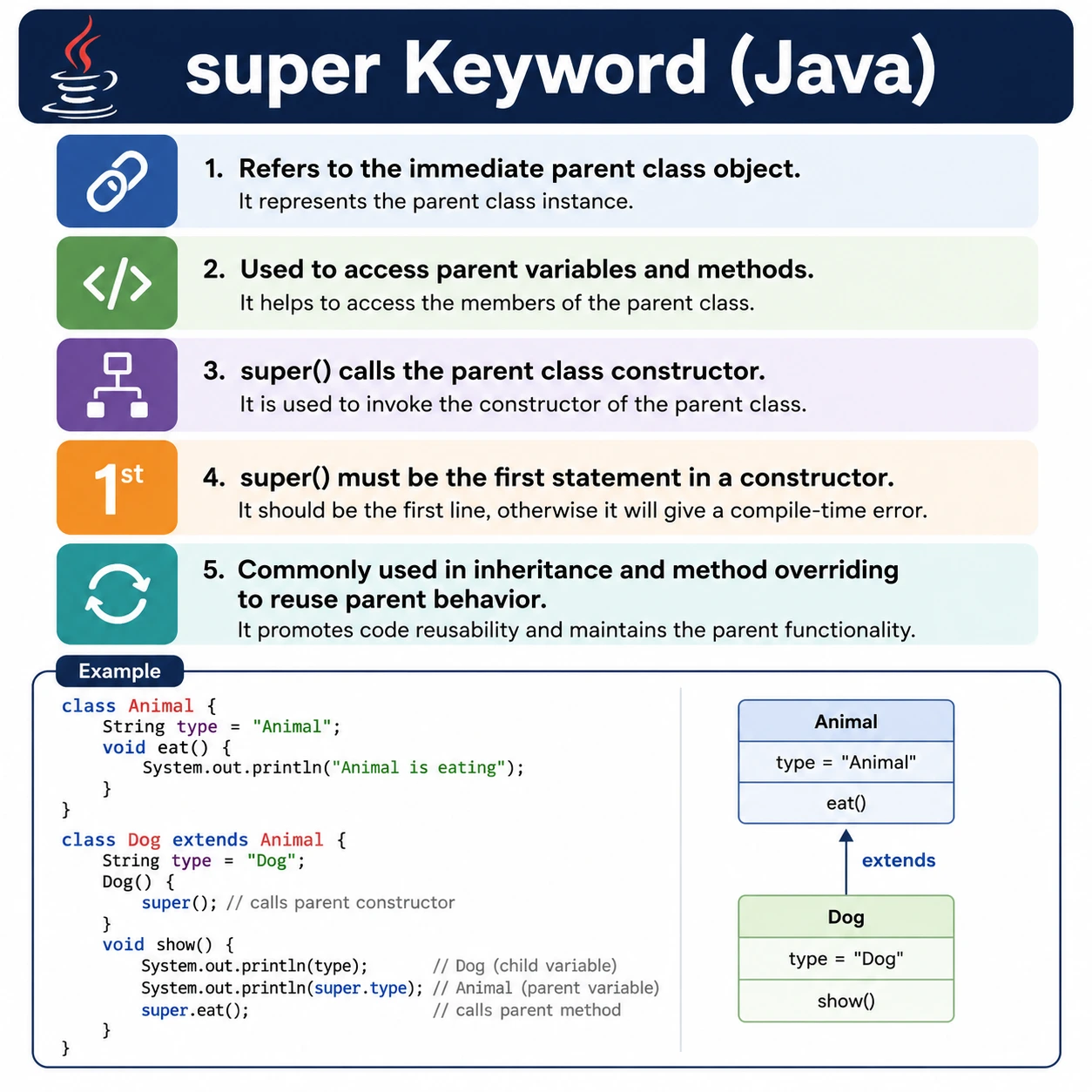
The super keyword is a high-frequency Java interview topic because it sits at the intersection
of inheritance, constructor chaining, method overriding, variable hiding, and object initialization. Many
beginners learn the syntax quickly, but interviews usually test whether the developer understands why
super() must be the first statement in a constructor, why super cannot be used in a
static context, and how super.methodName() behaves when a method is overridden. Understanding
these details makes inheritance much easier to reason about.
What Is super?
super is a keyword that refers to the immediate superclass of the current object. If class
B extends class A, then inside class B, super refers to
the parent class A. It is used only from an instance context because it depends on an actual
object being created. A static method belongs to the class itself, not to a particular object, so Java does
not allow super inside static methods or static blocks.
The most common reason to use super is to remove ambiguity. A child class may define a field
with the same name as a parent field. In that case, writing the field name normally refers to the child
field. Writing super.fieldName tells Java to access the parent field. Similarly, if a child
class overrides a parent method, calling the method normally from inside the child uses the child version.
Calling super.methodName() invokes the parent version directly.
Because super always refers to the immediate parent, it does not skip levels in a multilevel
inheritance hierarchy. If C extends B and B extends A,
then super inside C refers to B, not directly to A. This
keeps inheritance behavior predictable. Each class communicates directly with its immediate parent rather
than reaching through the entire hierarchy.
Why super Is Needed
Inheritance allows a child class to reuse and specialize parent behavior. That reuse creates a practical
question: what should happen when the child class defines a member with the same name as a member in the
parent class? Java needs a precise way to distinguish between the child member and the parent member.
Without super, the child class would have no clean way to refer to a hidden parent field or an
overridden parent method from within the child.
class Parent {
    int x = 10;
}
class Child extends Parent {
    int x = 20;
    void show() {
        System.out.println(x);        // 20 (child)
        System.out.println(super.x);  // 10 (parent)
    }
}
In this example, both Parent and Child contain a variable named x.
Inside the Child class, writing x refers to the child variable because the child
variable hides the parent variable. Writing super.x explicitly accesses the parent variable.
This is the cleanest way to resolve the naming conflict.
The same idea applies to methods, but the impact is more important. A child class often overrides a parent
method to provide more specific behavior. Sometimes the child wants to run the parent logic first and then
add extra behavior. In that case, super.methodName() avoids duplication. The child does not
rewrite the parent logic; it calls the parent implementation and then extends it.
Uses of super Keyword (Very Important)
1. Access Parent Class Variables
The first use of super is to access a parent class variable when the child class has a variable
with the same name. This situation is called variable hiding. Field access in Java is resolved by reference
type and scope, not by runtime polymorphism. When a child field hides a parent field, the parent field still
exists, but the child field takes priority when accessed directly from the child class.
super.variableName;
Example:
class Parent {
    int a = 10;
}
class Child extends Parent {
    int a = 20;
    void display() {
        System.out.println(super.a); // 10
    }
}
Although Java allows field hiding, it should be used carefully. In most production code, using the same field name in a parent and child class can make the design harder to read. A developer may not immediately know which value is being used. If the field names represent different concepts, they should usually have different names. If they represent the same concept, the design should usually keep the field in one place and expose it through methods.
2. Call Parent Class Methods
The second use of super is to call a parent class method from a child class. This is most useful
when the child overrides a method but still wants to reuse part of the parent implementation. Without
super, calling the method from inside the overriding method would call the child method again,
which can lead to recursion or incorrect behavior. With super.methodName(), the child class can
explicitly invoke the parent implementation.
class Parent {
    void show() {
        System.out.println("Parent method");
    }
}
class Child extends Parent {
    void show() {
        super.show();
        System.out.println("Child method");
    }
}
This approach allows method extension rather than complete replacement. The parent method may contain common setup, validation, logging, or general behavior. The child method can keep that common behavior and add specialized steps. This is a practical pattern when the parent behavior is still correct but not complete enough for the child class.
3. Call Parent Class Constructor (super())
The third and most important use is calling a parent class constructor. Constructors are responsible for
initializing objects. When a child object is created, Java must initialize the parent part before the child
part. This is why every child constructor either explicitly or implicitly calls a parent constructor. The
call is written as super() for a no-argument parent constructor or super(arguments)
for a parameterized parent constructor.
class Parent {
    Parent() {
        System.out.println("Parent constructor");
    }
}
class Child extends Parent {
    Child() {
        super();
        System.out.println("Child constructor");
    }
}
Output:
Parent constructor
Child constructor
The output shows the constructor order clearly. Even though the program creates a Child object,
the parent constructor runs first. This guarantees that inherited state is initialized before the child class
begins its own initialization. If the parent class has required values, the child constructor must pass those
values using super(arguments).
Important Rules for super()
The rules for super() are strict because constructor execution order must be unambiguous.
First, a call to super() or super(arguments) must be the first statement inside a
constructor. Java does not allow any normal statement before it because the parent part of the object must be
initialized before the child constructor performs its own work. Even a simple print statement before
super() causes a compile-time error.
Second, a constructor can call only one parent constructor. You cannot call super() twice, and
you cannot call both super() and this() in the same constructor. The reason is that
both constructor calls must be the first statement. A constructor can either delegate to another constructor
in the same class using this(), or it can directly call the parent constructor using
super(). It cannot do both directly in the same constructor.
Third, if no constructor call is written explicitly, the compiler automatically inserts
super(). This works only when the parent class has an accessible no-argument constructor. If the
parent class defines only parameterized constructors, the child constructor must explicitly call one of them.
This is one of the most common constructor-related compilation errors in Java inheritance.
super(10);
super() vs this()
super() and this() are both constructor calls, but they serve different purposes.
super() calls a constructor of the immediate parent class. this() calls another
constructor of the same class. Both are used for constructor chaining, but they chain in different
directions. this() chains within the current class, while super() moves from the
current class to the parent class.
| Feature | super() | this() |
|---|---|---|
| Refers to | Parent class | Current class |
| Constructor call | Parent constructor | Current class constructor |
| Position | First statement | First statement |
| Used for | Inheritance | Constructor chaining |
| Combination | Cannot use both together in the same constructor | |
A constructor that uses this() may still eventually cause a parent constructor to run, because
the constructor it calls must either call another constructor or call super(). The important
rule is that each constructor has exactly one first constructor call path. This keeps object initialization
predictable and prevents partially initialized parent or child state.
Where super Cannot Be Used
super cannot be used in a static context. Static methods and static blocks belong to the class,
not to an individual object. Since super refers to the parent portion of the current object,
it requires an object context. There is no current object inside a static method unless one is explicitly
created and referenced through a variable.
static void test() {
    // super.x; // Compile-time error
}
This rule is similar to the rule for this. Both this and super depend
on an instance. If a method is static, it can be called without creating an object, so Java cannot allow
direct access to instance-based references there.
super and Method Overriding (Runtime Polymorphism)
Method overriding normally participates in runtime polymorphism. If a parent reference points to a child
object and an overridden method is called, Java executes the child version. The super keyword is
different. When a child class explicitly calls super.methodName(), Java directly invokes the
immediate parent implementation from inside the child. It does not perform the usual runtime dispatch to the
child override.
class Animal {
    void sound() {
        System.out.println("Animal sound");
    }
}
class Dog extends Animal {
    void sound() {
        System.out.println("Dog barks");
    }
    void callParent() {
        super.sound();
    }
}
This does not mean super breaks polymorphism in the whole program. It simply gives the child
class a way to reuse parent behavior during its own implementation. Code outside the class still experiences
normal polymorphic behavior when it calls overridden methods through parent references.
super Keyword vs this Keyword (Interview Favorite)
The keywords this and super are often compared because both are references used
inside instance code. this refers to the current object from the perspective of the current
class. super refers to the immediate parent part of that same object. They are related, but they
solve different problems. this is commonly used to access current class fields, call current
class constructors, or pass the current object. super is used to access parent class members or
call parent constructors.
| Aspect | this | super |
|---|---|---|
| Refers to | Current object | Parent object |
| Access | Current class members | Parent class members |
| Constructor call | this() | super() |
| Static usage | No | No |
In interviews, a strong answer should explain that this() and super() are
constructor calls, while this and super are object references. The parentheses
matter. super can be used with fields and methods, but super() specifically calls
a parent constructor. Similarly, this refers to the current object, while this()
calls another constructor in the current class.
How super Fits into Object Initialization
Object initialization in Java follows a clear sequence. When a child object is created, memory is allocated for the entire object, including inherited fields. Java then initializes the parent class portion before the child class portion. Parent field initialization and parent constructor execution happen before child field initialization and child constructor execution. This order ensures that inherited behavior has a valid foundation before the child class begins to use or extend it.
The super() call is the visible part of this rule. Even when it is not written, it is still
conceptually present if Java inserts it automatically. This is why a child class cannot avoid parent
construction. A child object is also a parent object from the type system's point of view, so the parent
state must be initialized. If the parent constructor performs validation or requires mandatory data, the
child class must respect that contract.
This behavior is especially important in real codebases where parent classes manage common state. For
example, an Employee superclass may require an employee ID and name. A Manager
subclass should pass those values to the parent constructor using super(id, name), then
initialize manager-specific fields such as department or approval level. This keeps shared employee state in
the parent class and specialized manager state in the child class.
Good Design Practices with super
The super keyword is useful, but heavy use of it can sometimes reveal a design problem. If a
child class constantly accesses parent fields directly, the parent class may be exposing too much internal
detail. Good object-oriented design usually prefers behavior-based access through methods instead of direct
state manipulation. Protected fields may be convenient, but protected methods often provide better control.
Calling parent methods with super is often a clean design when the child extends behavior in a
small and clear way. For example, a parent validate() method may check common rules, and a child
method may call super.validate() before checking child-specific rules. This avoids repeating
common validation logic while still allowing specialization. The important condition is that the parent
behavior must remain meaningful for every child that calls it.
Developers should also avoid creating inheritance hierarchies only to use super. The keyword
exists to support inheritance, but it is not a reason to introduce inheritance by itself. If a class only
needs to use another class's service, composition is usually better. Inheritance should represent a true IS-A
relationship; super should then be used to coordinate parent and child behavior inside that
relationship.
super with Variables, Methods, and Constructors
A helpful way to understand super is to separate its three practical forms. When it is used as
super.variableName, it accesses a field from the immediate parent class. When it is used as
super.methodName(), it calls a method implementation from the immediate parent class. When it is
used as super() or super(arguments), it calls a parent constructor. These uses are
related, but they are not interchangeable.
Accessing parent variables is usually the least common use in well-designed code. It is mainly useful for learning and for rare cases where a child field intentionally hides a parent field. In day-to-day development, direct field hiding is often avoided because it reduces clarity. Calling parent methods is more common because it supports extension of behavior. Calling parent constructors is unavoidable in inheritance because every child object must initialize its parent part.
This difference matters in interviews. If an interviewer asks about super, do not answer only
that it calls a parent constructor. That is just one use. A complete answer says that super can
access parent variables, call parent methods, and invoke parent constructors. Then it should explain that
super() specifically refers to constructor invocation and must be the first statement in a
constructor.
Common Traps Around super
One common trap is assuming super can access members from any ancestor class. In a multilevel
hierarchy, super refers only to the immediate parent. If class C extends
B and class B extends A, then super inside
C points to B. Class C cannot directly write a special keyword to
skip B and access A. If behavior from A is needed, class
B must expose it or call it as part of its own method.
Another trap is confusing overridden methods with hidden fields. Instance methods are polymorphic. If a child
overrides a parent method, Java chooses the method implementation based on the runtime object type. Fields do
not behave that way. If a child field has the same name as a parent field, field access is resolved using
the reference type and scope. This is why super.x is useful for fields, while
super.show() is useful for bypassing an overridden method inside the child.
A third trap is believing that super() is optional in every situation. It is optional only when
the compiler can safely insert a no-argument parent constructor call. If the parent has no accessible
no-argument constructor, the child must explicitly call an available parent constructor with matching
arguments. The compile-time error is not about inheritance being broken; it is about incomplete object
initialization.
Another frequent mistake is trying to use super from a static method. Static methods do not run
against a current object, so there is no current parent portion to refer to. If a static method needs to use
behavior from another class, it should call static members through the class name or create an object and
use instance methods through that object. It should not try to use super.
Real-World Example of super Usage
Imagine an application that manages different types of employees. A base Employee class stores
common details such as employee ID, name, and base salary. A Manager class extends
Employee and adds a department and bonus calculation. The Manager constructor can
call super(id, name, salary) to initialize the common employee details, then initialize the
department field in the manager class. This keeps shared employee initialization in one place.
The same child class may override a method such as calculatePay(). The parent method may
calculate normal salary, while the child method may call super.calculatePay() and then add a
manager bonus. This is a clean use of inheritance because the child is still an employee, and the parent
calculation remains part of the child calculation. The child does not duplicate the base salary logic; it
extends it.
In testing or debugging such code, super also makes intention visible. When a developer reads
super.calculatePay(), it is clear that the child method intentionally includes parent behavior.
This is better than copying the parent code into the child method, because copying creates duplicate logic
and makes future corrections harder.
super and Access Modifiers
The ability to use super does not ignore Java access rules. A child class can use
super only to access parent members that are visible from the child class. Public members are
accessible. Protected members are accessible from subclasses, including subclasses in different packages.
Package-private members are accessible only if the child class is in the same package. Private members are
not directly accessible through super.
This point is important because some beginners think super is a special bypass for
encapsulation. It is not. If a parent field is private, writing super.fieldName from the child
class causes a compile-time error. The child must use a visible method provided by the parent class. This
preserves the parent class's control over its internal state.
In well-designed inheritance, parent classes usually expose protected or public methods for behavior that subclasses are expected to reuse. They keep implementation details private. This allows subclasses to extend the parent safely without depending on every internal field.
Best Practices for Interview and Project Use
In interviews, explain super in a structured way. Start by saying that it refers to the
immediate parent class object in an instance context. Then describe the three uses: accessing parent
variables, calling parent methods, and invoking parent constructors. After that, mention the rules:
super() must be the first statement in a constructor, super cannot be used in a
static context, and it cannot access private parent members directly.
In project code, use super when it makes the parent-child relationship clearer. Use
super() to pass required initialization data to the parent. Use super.methodName()
when the child behavior is truly an extension of parent behavior. Avoid using super to patch a
poor inheritance hierarchy. If the child class depends too heavily on parent internals, revisit the design.
A concise mental model is this: this looks at the current class view of the object, while
super looks at the immediate parent class view of the same object. Once this model is clear,
most examples involving variable hiding, method overriding, constructor chaining, and static restrictions
become much easier to understand.
super Keyword Examples (With Output)
1. Using super to Access Parent Variable
class A {
    int x = 10;
}

class B extends A {
    int x = 20;

    void show() {
        System.out.println(super.x);
    }

    public static void main(String[] args) {
        new B().show();
    }
}
Explanation: super.x accesses parent variable.
Output: 10
2. Variable Hiding Without super
class A {
    int x = 10;
}

class B extends A {
    int x = 20;

    void show() {
        System.out.println(x);
    }

    public static void main(String[] args) {
        new B().show();
    }
}
Explanation: Child variable hides parent variable.
Output: 20
3. Using super to Call Parent Method
class A {
    void show() {
        System.out.println("Parent");
    }
}

class B extends A {
    void show() {
        super.show();
        System.out.println("Child");
    }

    public static void main(String[] args) {
        new B().show();
    }
}
Explanation: super.show() calls parent version.
Output:
Parent
Child
4. Overriding Without super
class A {
    void show() {
        System.out.println("A");
    }
}

class B extends A {
    void show() {
        System.out.println("B");
    }

    public static void main(String[] args) {
        new B().show();
    }
}
Explanation: Parent method completely overridden.
Output: B
5. super() Calling Parent Constructor
class A {
    A() {
        System.out.println("Parent Constructor");
    }
}

class B extends A {
    B() {
        super();
        System.out.println("Child Constructor");
    }

    public static void main(String[] args) {
        new B();
    }
}
Explanation: super() calls parent constructor.
Output:
Parent Constructor
Child Constructor
6. Implicit super() Call
class A {
    A() {
        System.out.println("Parent");
    }
}

class B extends A {
    B() {
        System.out.println("Child");
    }

    public static void main(String[] args) {
        new B();
    }
}
Explanation: Compiler inserts super() automatically.
Output:
Parent
Child
7. Calling Parameterized Parent Constructor
class A {
    A(int x) {
        System.out.println(x);
    }
}

class B extends A {
    B() {
        super(10);
    }

    public static void main(String[] args) {
        new B();
    }
}
Explanation: Required when parent has no default constructor.
Output: 10
8. Compile Error Without super() (Parameterized Parent)
class A {
    A(int x) {}
}

class B extends A {
    // B() {}  // Compile-time error
}
Explanation: Parent has no no-arg constructor, so super(x) is mandatory.
9. super() Must Be First Statement
class A {
    A() {}
}

class B extends A {
    B() {
        // System.out.println("Hi");
        // super();   // Compile-time error
    }
}
Explanation: super() must be the first line in constructor.
10. Using super in Multilevel Inheritance
class A {
    void show() {
        System.out.println("A");
    }
}

class B extends A {
    void show() {
        super.show();
        System.out.println("B");
    }
}

class C extends B {
    void show() {
        super.show();
        System.out.println("C");
    }

    public static void main(String[] args) {
        new C().show();
    }
}
Explanation: Calls flow upward through hierarchy.
Output:
A
B
C
11. super Cannot Access Child Members
class A {}

class B extends A {
    int x = 10;

    void test() {
        // super.x; // Compile-time error
    }
}
Explanation: super refers only to parent members.
12. super with Method Overriding + Variables
class A {
    int x = 10;

    void show() {
        System.out.println("A");
    }
}

class B extends A {
    int x = 20;

    void show() {
        System.out.println(super.x);
        super.show();
        System.out.println(x);
    }

    public static void main(String[] args) {
        new B().show();
    }
}
Explanation: Demonstrates full usage.
Output:
10
A
20
13. super with final Method
class A {
    final void show() {
        System.out.println("Final");
    }
}

class B extends A {
    void test() {
        super.show();
    }

    public static void main(String[] args) {
        new B().test();
    }
}
Explanation: final methods can be called but not overridden.
Output: Final
14. super with Static Methods (Not Polymorphic)
class A {
    static void show() {
        System.out.println("A");
    }
}

class B extends A {
    static void show() {
        System.out.println("B");
    }

    void test() {
        super.show();
    }

    public static void main(String[] args) {
        new B().test();
    }
}
Explanation: Static methods are hidden.
Output: A
15. Constructor Execution Order (Real Interview Favorite)
class A {
    A() {
        System.out.println("A");
    }
}

class B extends A {
    B() {
        System.out.println("B");
    }
}

class C extends B {
    C() {
        System.out.println("C");
    }

    public static void main(String[] args) {
        new C();
    }
}
Explanation: Constructors execute from top to bottom through the inheritance chain.
Output:
A
B
C
16. super vs this (Side by Side)
class A {
    int x = 10;
}

class B extends A {
    int x = 20;

    void show() {
        System.out.println(this.x);
        System.out.println(super.x);
    }

    public static void main(String[] args) {
        new B().show();
    }
}
Explanation: this refers to the current object, while super refers to the parent object.
Output:
20
10
17. super in Copy-Style Constructor
class A {
    int x;

    A(int x) {
        this.x = x;
    }
}

class B extends A {
    B(int x) {
        super(x);
    }

    public static void main(String[] args) {
        B b = new B(15);
        System.out.println(b.x);
    }
}
Explanation: Parent initialization reused.
Output: 15
18. super Cannot Be Used in Static Context
class A {
    int x = 10;
}

class B extends A {
    static void test() {
        // super.x; // Compile-time error
    }
}
Explanation: super needs object context.
19. Common Interview Trap
class A {
    void show() {
        System.out.println("A");
    }
}

class B extends A {
    static void show() {
        System.out.println("B");
    }
}
Explanation: This is not overriding. Static methods cannot override instance methods.
20. Interview Summary – super Keyword
class A {
    int x = 10;
    void show() {
        System.out.println("A");
    }
}

class B extends A {
    void display() {
        System.out.println(super.x);
        super.show();
    }

    public static void main(String[] args) {
        new B().display();
    }
}
Explanation:
- Access parent variables
- Call parent methods
- Invoke parent constructors
Output:
10
A
Common Beginner Mistakes
- Using super in static methods
- Forgetting super() when parent has no default constructor
- Calling super() not as first statement
- Confusing super with this
- Expecting super to access grandparent directly
Interview-Ready Answers
Short Answer
The super keyword refers to the immediate parent class object and is used to access parent class members.
Detailed Answer
In Java, the super keyword is used in inheritance to access parent class variables, methods, and constructors. It helps resolve naming conflicts, supports constructor chaining, and allows invoking overridden parent methods. super() must be the first statement in a constructor.
Key Takeaway
The super keyword enables controlled access to parent class behavior. Proper use of super ensures correct initialization, clean overriding, and predictable inheritance behavior.