StringBuffer
The StringBuffer class in Java is a foundational component for handling mutable string operations in a thread-safe manner. While many developers begin their journey with the String class, they soon encounter its limitations, particularly its immutability. This is where StringBuffer becomes relevant. It is specifically designed for scenarios where strings need to be modified frequently and where multiple threads may interact with the same object concurrently.
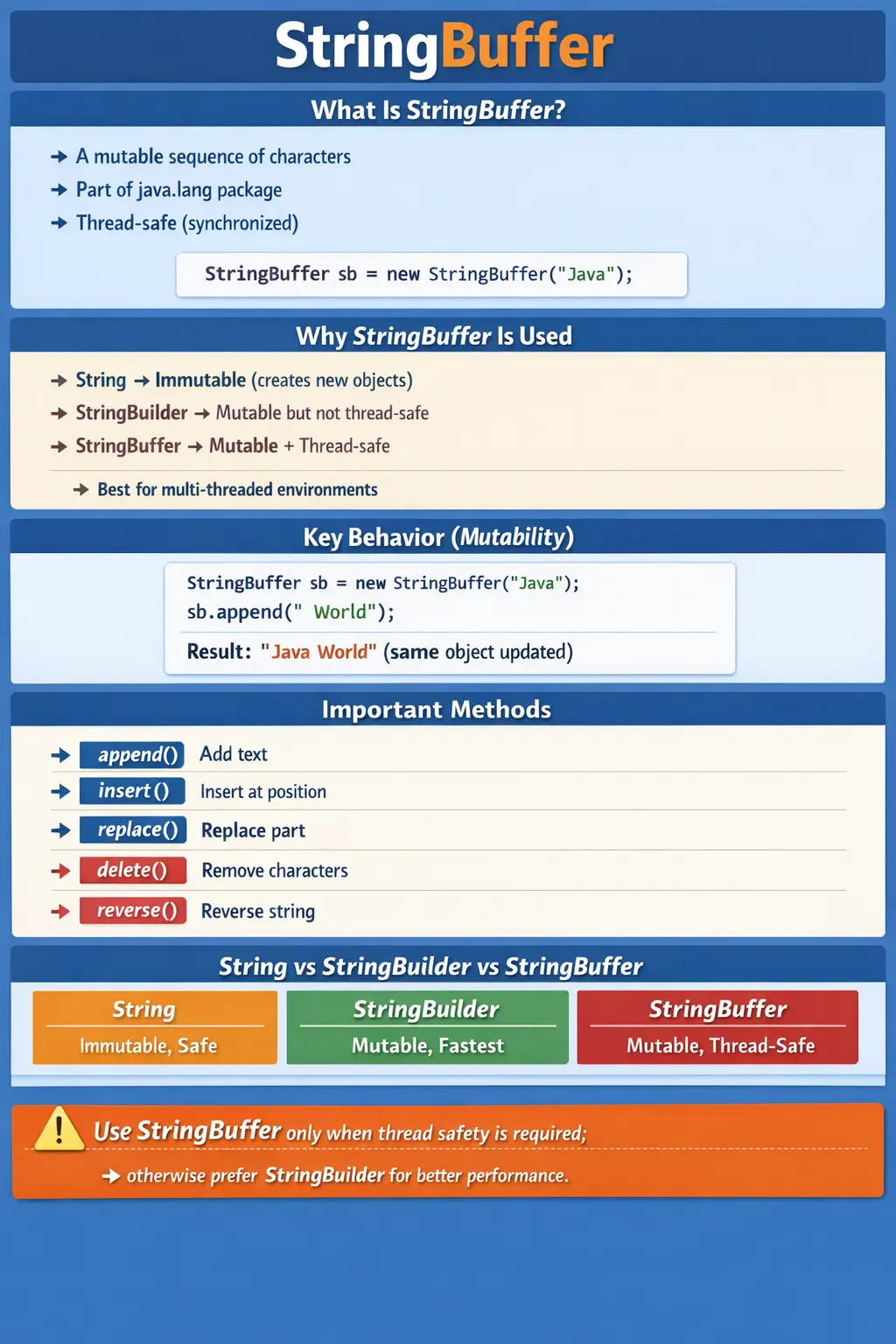
Understanding StringBuffer is not just about learning another class; it is about understanding how Java balances performance, safety, and memory efficiency. In real-world applications, especially in legacy systems and multi-threaded environments, StringBuffer plays a crucial role. It is also a frequently discussed topic in interviews, particularly when comparing it with String and StringBuilder.
What Is StringBuffer?
StringBuffer is a mutable sequence of characters provided by the java.lang package. Unlike String, which creates a new object every time it is modified, StringBuffer allows direct modification of its internal character array. This means operations like appending, inserting, or deleting characters do not result in new object creation.
Another defining characteristic of StringBuffer is that it is thread-safe. All of its major methods are synchronized, which ensures that only one thread can access a method at a time. This prevents data inconsistency when multiple threads attempt to modify the same string simultaneously.
A simple example illustrates its usage:
StringBuffer sb = new StringBuffer("Java");
sb.append(" World");
In this case, the original object is modified rather than creating a new one, making it more efficient than repeated string concatenation using String.
Why StringBuffer Exists
To understand why StringBuffer exists, it is important to consider the limitations of the String class. Strings in Java are immutable, meaning once a string is created, it cannot be changed. Any modification results in the creation of a new object. While this design improves security and thread safety, it becomes inefficient when frequent modifications are required.
For example, concatenating strings inside a loop using String can lead to excessive object creation, which negatively impacts performance and memory usage.
To address this, Java introduced mutable alternatives:
- StringBuilder for high-performance, single-threaded scenarios
- StringBuffer for thread-safe, multi-threaded scenarios
StringBuffer bridges the gap between immutability and concurrency by allowing modifications while ensuring thread safety through synchronization.
Key Characteristics of StringBuffer
The behavior of StringBuffer can be summarized through its core characteristics. It is mutable, meaning its content can be changed without creating new objects. It is synchronized, ensuring thread safety in concurrent environments. It allows efficient string manipulation, making it suitable for dynamic string operations.
However, this thread safety comes at a cost. Because methods are synchronized, there is a performance overhead compared to non-synchronized alternatives like StringBuilder. This trade-off is central to deciding when to use StringBuffer.
How StringBuffer Works Internally
Internally, StringBuffer maintains a resizable array of characters. When a new StringBuffer object is created, it allocates a certain capacity. As characters are added, the buffer grows dynamically.
When you perform an operation like append(), the new characters are added to the existing array. If the capacity is exceeded, a new larger array is created, and the existing content is copied into it.
For example:
StringBuffer sb = new StringBuffer("Java");
sb.append(" Programming");
Here, the same object is modified, and no new StringBuffer object is created. This is fundamentally different from how String works.
Constructors of StringBuffer
StringBuffer provides multiple constructors to accommodate different use cases. The default constructor initializes the buffer with a capacity of 16 characters. Another constructor allows initializing the buffer with a specific string, while a third allows specifying a custom capacity.
For example:
StringBuffer sb1 = new StringBuffer();
StringBuffer sb2 = new StringBuffer("Java");
StringBuffer sb3 = new StringBuffer(50);
These constructors give developers control over initial capacity, which can help optimize performance by reducing the need for frequent resizing.
Capacity Concept (Critical for Performance)
One of the most important aspects of StringBuffer is its capacity management. Capacity refers to the amount of storage available before the buffer needs to be resized.
By default, the capacity is 16. When initialized with a string, the capacity becomes 16 plus the length of the string.
When the capacity is exceeded, the buffer grows using the formula:
newCapacity = (oldCapacity * 2) + 2
This resizing strategy ensures that the buffer grows efficiently without frequent reallocations. However, in performance-critical applications, it is often recommended to initialize the buffer with an appropriate capacity to minimize resizing overhead.
Commonly Used Methods
StringBuffer provides a rich set of methods for string manipulation. The append() method is used to add content to the end of the buffer. The insert() method allows inserting characters at a specific position. The replace() method replaces a portion of the string, while delete() removes characters.
The reverse() method is particularly useful for reversing the sequence of characters. Additionally, methods like length() and capacity() provide information about the current state of the buffer.
These methods enable a wide range of operations without creating new objects, making StringBuffer efficient for dynamic string handling.
Example Program
A simple example demonstrates multiple operations:
StringBuffer sb = new StringBuffer("Java");
sb.append(" Programming");
sb.insert(4, " Core");
sb.replace(0, 4, "Core");
sb.reverse();
System.out.println(sb);
In this example, all operations modify the same object. This highlights the key advantage of StringBuffer over String.
StringBuffer vs StringBuilder vs String
Understanding the differences between these three classes is essential. String is immutable and thread-safe by design, but inefficient for frequent modifications. StringBuilder is mutable and faster but not thread-safe. StringBuffer is mutable and thread-safe but slower due to synchronization.
In modern applications, StringBuilder is often preferred for single-threaded scenarios because of its superior performance. However, StringBuffer remains relevant when thread safety is required.
When to Use StringBuffer
StringBuffer should be used in scenarios where multiple threads need to modify the same string object. It is particularly useful in legacy systems, shared resources, and applications where thread safety is critical.
For example, in a multi-threaded logging system where multiple threads append messages to a shared buffer, StringBuffer ensures that the data remains consistent.
When NOT to Use StringBuffer
Despite its advantages, StringBuffer is not always the best choice. In single-threaded applications, the synchronization overhead is unnecessary and can degrade performance. In such cases, StringBuilder is a better alternative.
Similarly, for simple string operations or infrequent modifications, using String may be sufficient and more readable.
Choosing the right class depends on the specific requirements of the application, particularly the need for thread safety versus performance.
Mutable Text and Why It Matters
The main reason StringBuffer exists is that not all text processing fits the immutable model of String. A String object is safe and predictable because it cannot be changed after creation. That design is excellent for stable values such as names, labels, keys, messages, and configuration constants. However, some programs build text gradually. They append values, insert separators, delete temporary content, replace parts, and construct output from many small pieces. In those cases, creating a new String object after every change can be wasteful.
StringBuffer solves this by keeping a mutable sequence of characters. Instead of replacing the object every time new content is added, it modifies the existing buffer. This makes it useful for constructing long text, assembling messages, building reports, preparing log entries, or handling repeated concatenation. The object acts like a flexible character container rather than a fixed text value.
This difference is important for learners because StringBuffer changes the mental model. With String, every apparent modification produces a new object. With StringBuffer, append(), insert(), delete(), and replace() change the same object and return a reference to that object. If multiple variables refer to the same StringBuffer, changes through one reference are visible through the other reference. That behavior is powerful, but it must be used carefully.
Thread Safety Through Synchronization
Thread safety is the defining feature that separates StringBuffer from StringBuilder. StringBuffer methods are synchronized, which means only one thread can execute a synchronized method on the same object at a time. This protects the internal character data from being modified inconsistently when multiple threads use the same buffer. Without such protection, two threads appending at the same time could interfere with each other and produce corrupted output.
Synchronization is useful when the same mutable object is genuinely shared across threads. A shared buffer used by multiple worker threads, a legacy utility that collects output from concurrent processes, or a shared text accumulator in a controlled multi-threaded context may benefit from StringBuffer. The synchronized methods provide a built-in safety layer, reducing the risk of data races on the buffer's internal state.
However, synchronization does not mean all surrounding logic is automatically safe. StringBuffer protects its individual method calls, but complex sequences of operations may still need broader design consideration. For example, checking length and then appending based on that length are two separate operations. Another thread could modify the buffer between those calls. Thread-safe classes help, but developers must still understand the full workflow when shared mutable state is involved.
Performance Trade-Offs
StringBuffer is usually more efficient than repeated String concatenation when many modifications are required, but it is not always the fastest mutable option. Because its major methods are synchronized, each operation carries synchronization overhead. In single-threaded code, that overhead provides no benefit. This is why StringBuilder is generally preferred for modern single-threaded string construction.
The trade-off is straightforward. String offers immutability and simplicity. StringBuilder offers mutable text with high performance but no built-in synchronization. StringBuffer offers mutable text with synchronization but lower performance than StringBuilder in most single-threaded scenarios. Choosing correctly means understanding whether shared-thread access is actually present. If there is no shared mutable access, StringBuilder is usually the better choice.
Performance decisions should also consider the size and frequency of text operations. For a few simple concatenations, String is fine and often the most readable. For repeated appends in a loop, a builder-style class is better. For repeated appends in a shared multi-threaded context, StringBuffer may be justified. The best choice is not based on one class being universally superior; it is based on matching the class to the workload.
Capacity, Length, and Resizing
StringBuffer has both length and capacity. Length represents how many characters are currently stored in the buffer. Capacity represents how many characters can be stored before the internal array needs to grow. These two values are related but not the same. A new empty StringBuffer has length 0 and default capacity 16. A buffer initialized with text has length equal to the text length, while its capacity is usually 16 plus that length.
Capacity matters because resizing has a cost. When the buffer grows beyond its current capacity, Java creates a larger internal character array and copies the existing content into it. This is still more efficient than repeatedly creating new String objects, but unnecessary resizing can be avoided when the expected size is known. Supplying an initial capacity can improve performance for large text construction.
For example, if a program is building a report expected to contain thousands of characters, creating a StringBuffer with a larger initial capacity is more efficient than relying on repeated automatic growth. On the other hand, setting very large capacities everywhere wastes memory. Capacity planning is useful when there is a realistic estimate of output size. It is not necessary for small or occasional string operations.
How StringBuffer Methods Behave
StringBuffer methods are designed around modifying the existing buffer. append() adds content to the end. insert() places content at a specific index. delete() removes a range. replace() substitutes one range with new content. reverse() changes the order of characters in the same object. These methods make StringBuffer useful for building and editing text in stages.
Because the object is mutable, method calls can be chained. For example, a developer can append one value, append a separator, and append another value in one expression. Chaining works because many methods return the same StringBuffer reference after modification. This can make code concise, but long chains should still remain readable. If the text-building logic has business meaning, splitting it into meaningful steps may be clearer.
Index-based methods require boundary awareness. insert(), delete(), replace(), charAt(), and setCharAt() depend on valid positions. An incorrect index can cause StringIndexOutOfBoundsException. This is similar to array boundary handling. Developers should know the current length before performing index-based changes, especially when indexes are calculated dynamically from user input or earlier logic.
StringBuffer in Legacy and Modern Java
StringBuffer has been part of Java for a long time, and it appears frequently in older codebases, libraries, and interview materials. Before StringBuilder was introduced, StringBuffer was the main mutable string class available for efficient modification. As Java evolved, StringBuilder became the preferred mutable option for non-threaded scenarios because it avoids synchronization overhead.
This historical context explains why StringBuffer is still important. Many enterprise applications have long lifetimes. Developers may maintain systems written years ago where StringBuffer is used heavily. Understanding the class helps them read, debug, and safely modify legacy code. It also helps them decide whether replacing StringBuffer with StringBuilder is appropriate in a specific part of the application.
In modern Java, StringBuffer is not the default choice for every dynamic string operation. It is a specialized choice. When thread safety is required at the buffer-method level, it remains useful. When code is single-threaded or uses local variables inside a method, StringBuilder usually offers better performance. Knowing this distinction is exactly what interviewers expect when they ask about String, StringBuffer, and StringBuilder.
Real-World Use Cases
StringBuffer can be useful in systems where multiple threads contribute to shared text output. A legacy logging utility, a shared diagnostic buffer, or a synchronized text collector may use StringBuffer to preserve consistency. It can also be found in older frameworks that were designed when StringBuffer was the standard mutable string tool.
Another practical use case is building long strings when thread safety is part of the requirement. For example, a shared reporting component might collect messages from different execution paths. If that shared buffer is intentionally accessed by multiple threads, StringBuffer provides synchronized operations. However, this design should still be evaluated carefully, because shared mutable state can become a broader concurrency concern.
For automation and testing learners, StringBuffer may appear when generating dynamic messages, constructing reports, creating reusable output text, or studying interview examples. In most automation scripts, StringBuilder is usually enough because the builder is local to one method or one thread. Still, knowing StringBuffer helps learners explain the thread-safe alternative clearly and recognize it in existing code.
StringBuffer and Method Design
When a method receives a StringBuffer, it receives a reference to a mutable object. If the method appends, deletes, or replaces content, the caller sees those changes. This is different from passing a String, where modifications produce new objects and do not change the original string. Developers should be careful when passing StringBuffer objects between methods because changes can happen through any reference.
Good method design makes this behavior clear. If a method is intended to modify the buffer, its name should communicate that purpose, such as appendErrorDetails or buildReportBody. If a method only needs the text value, it may be better to accept String rather than StringBuffer. Accepting the most appropriate type reduces unnecessary coupling and prevents accidental mutation.
Returning a StringBuffer from a method can also expose internal mutable state. If a class stores a StringBuffer field and returns it directly, external code can modify the internal content. In many designs, returning the final string through toString() is safer. This protects the object's internal state and keeps mutation controlled. Mutability is useful, but uncontrolled mutability can create maintenance problems.
Debugging StringBuffer Issues
StringBuffer bugs often involve unexpected content changes. Because the object is mutable, the same buffer may be modified in several places. If the final output contains extra text, missing text, or text in the wrong order, trace every method that receives or shares the buffer reference. Unlike String, the original object can change over time, so debugging must follow the object's mutation history.
Index-related errors are another common issue. insert(), delete(), replace(), and setCharAt() all require valid positions. If text is built dynamically, an index that was valid earlier may become invalid after deletion or replacement. Checking the current length before index-based operations helps prevent runtime exceptions. During debugging, printing both length and content at key steps can quickly reveal where the buffer changes unexpectedly.
Concurrency issues can still occur around multi-step logic. Even though individual methods are synchronized, a sequence of method calls may not be atomic as a whole. If correctness depends on a full sequence being uninterrupted, additional synchronization or a different design may be needed. StringBuffer reduces risk for individual operations, but it does not replace careful concurrent programming.
Choosing Between String, StringBuilder, and StringBuffer
The most practical way to choose between String, StringBuilder, and StringBuffer is to ask three questions. First, will the text change frequently? If the answer is no, String is usually the simplest and best choice. Second, if the text changes frequently, is the builder object local to one method or one thread? If yes, StringBuilder is usually preferred because it avoids synchronization overhead. Third, if the same mutable text object is shared across threads, StringBuffer becomes a reasonable choice because its synchronized methods protect individual modifications.
This decision tree is more useful than memorizing that one class is faster or safer. String is immutable and safe to share because it cannot change. StringBuilder is mutable and fast because it avoids synchronization. StringBuffer is mutable and synchronized, which makes it safer for shared access but slower than StringBuilder in single-threaded code. Each class solves a different problem. Choosing correctly shows that the developer understands context, not only syntax.
In real code, local text construction is very common. A method may build a query message, report line, file path, CSV row, or validation summary. If that buffer is created inside the method and not shared with other threads, StringBuilder is usually enough. Using StringBuffer in this case works, but it adds synchronization that provides no practical benefit. This is why many modern style guides prefer StringBuilder unless thread safety is clearly required.
StringBuffer is still valid when shared mutable access is intentional. The important word is intentional. Accidentally sharing a mutable buffer across unrelated parts of an application can make code difficult to reason about. If multiple threads need to collect output, it may be better to design the flow carefully, use thread-safe queues, logging frameworks, or controlled synchronization rather than simply assuming StringBuffer solves the whole concurrency problem. StringBuffer is a tool, not a complete architecture.
Interview-Ready Decision Example
In an interview, a strong explanation of StringBuffer should begin with the core definition: StringBuffer is a mutable, synchronized sequence of characters. Then explain the contrast. String is immutable, so frequent modifications create new objects. StringBuilder is mutable and faster but not synchronized. StringBuffer is mutable and synchronized, making it suitable when thread-safe modification is needed.
A practical example makes the answer stronger. Suppose several threads append diagnostic information to the same shared text buffer. Using String could create unnecessary objects and would not represent a shared mutable builder. Using StringBuilder could be unsafe if the same object is modified concurrently. StringBuffer provides synchronized append operations, making it the better choice among the three for that specific scenario. This example shows why StringBuffer exists rather than only listing features.
The answer should also mention the trade-off. Synchronization improves safety for individual operations, but it adds overhead. Therefore, StringBuffer should not be used automatically for every string-building task. In single-threaded code, StringBuilder is usually better. For simple fixed text or small concatenations, String is often enough. This balanced explanation is what interviewers usually expect because it reflects real engineering judgment.
Best Practices for Using StringBuffer
The first best practice is to use StringBuffer only when its thread-safe behavior is actually needed. If no shared multi-threaded modification exists, prefer StringBuilder for dynamic text construction. The second best practice is to provide an initial capacity when the approximate output size is known. This reduces resizing and copying, especially when building large content.
The third best practice is to keep buffer ownership clear. Avoid passing the same StringBuffer through many unrelated methods unless that design is intentional. Mutable objects are harder to track than immutable strings because any method that receives the reference can change the content. Clear method names, limited scope, and returning final strings with toString() can reduce accidental mutation.
The fourth best practice is to be careful with index-based operations. Insert, delete, replace, and setCharAt are useful, but they rely on valid positions. When the buffer content changes, indexes may shift. If the logic depends on positions, calculate them carefully and validate the current length. The fifth best practice is to avoid assuming that synchronization of individual methods makes an entire multi-step process atomic. If several operations must happen together without interruption, the broader sequence may need additional coordination.
Common Beginner Mistakes
Many beginners misuse StringBuffer due to a lack of understanding of its purpose. One common mistake is using it in single-threaded applications where StringBuilder would be more efficient.
Another mistake is assuming that StringBuffer is always faster than String. While it avoids object creation, its synchronized methods introduce overhead that can make it slower in certain scenarios.
Confusing immutability with thread safety is another frequent issue. While String is thread-safe due to immutability, it does not support efficient modification.
Avoiding these mistakes requires a clear understanding of how each class works and when to use it.
Interview Perspective
In interviews, StringBuffer is often discussed in comparison with String and StringBuilder. A strong answer should highlight its mutability, thread safety, and performance trade-offs.
Candidates are typically expected to explain why StringBuffer is synchronized and how that affects performance. They should also be able to justify when to use it and when to avoid it.
Providing real-world scenarios, such as multi-threaded logging or shared resource handling, can strengthen the answer and demonstrate practical understanding.
Key Takeaway
StringBuffer is a mutable, thread-safe class designed for scenarios where strings need to be modified frequently in a multi-threaded environment. It eliminates the inefficiencies of immutable strings while ensuring data consistency through synchronization.
However, this thread safety comes at the cost of performance. For most modern applications, StringBuilder is preferred unless thread safety is explicitly required.
Ultimately, mastering StringBuffer is about understanding trade-offs between immutability and mutability, between performance and safety, and between simplicity and scalability. Knowing when and how to use it is a key step toward writing efficient and robust Java applications.
1. Creating a StringBuffer Object
StringBuffer sb = new StringBuffer("Java");
Explanation
- Creates a mutable sequence of characters.
- Stored in heap memory.
- Thread-safe (synchronized).
2. Default StringBuffer Constructor
StringBuffer sb = new StringBuffer();
System.out.println(sb.length());
Explanation
- Creates empty buffer.
- Initial length = 0.
- Default capacity = 16.
3. StringBuffer with Initial Capacity
StringBuffer sb = new StringBuffer(50);
System.out.println(sb.capacity());
Explanation
- Capacity reserved upfront.
- Improves performance when size is known.
4. Appending Strings (append())
StringBuffer sb = new StringBuffer("Java");
sb.append(" Selenium");
System.out.println(sb);
Explanation
- Modifies the same object.
- No new object created.
- Output: Java Selenium
5. Appending Different Data Types
StringBuffer sb = new StringBuffer("Count: ");
sb.append(10);
sb.append(true);
System.out.println(sb);
Explanation
- Supports int, boolean, char, double, etc.
- Output: Count: 10true
6. Inserting Text (insert())
StringBuffer sb = new StringBuffer("Java");
sb.insert(4, " Selenium");
System.out.println(sb);
Explanation
- Inserts at specified index.
- Output: Java Selenium
7. Deleting Characters (delete())
StringBuffer sb = new StringBuffer("Java Selenium");
sb.delete(4, 13);
System.out.println(sb);
Explanation
- Deletes substring between indices.
- Output: Java
8. Deleting Single Character (deleteCharAt())
StringBuffer sb = new StringBuffer("Javva");
sb.deleteCharAt(3);
System.out.println(sb);
Explanation
- Removes character at index.
- Output: Java
9. Reversing String (reverse())
StringBuffer sb = new StringBuffer("Java");
sb.reverse();
System.out.println(sb);
Explanation
- Reverses characters in place.
- Output: avaJ
10. Replacing Substring (replace())
StringBuffer sb = new StringBuffer("Java Automation");
sb.replace(5, 15, "Selenium");
System.out.println(sb);
Explanation
- Replaces characters between indices.
- Output: Java Selenium
11. Finding Length
StringBuffer sb = new StringBuffer("Java");
System.out.println(sb.length());
Explanation
- Returns number of characters.
- Output: 4
12. Finding Capacity
StringBuffer sb = new StringBuffer("Java");
System.out.println(sb.capacity());
Explanation
- Capacity = 16 + length of initial string.
- Output: 20
13. Ensuring Capacity (ensureCapacity())
StringBuffer sb = new StringBuffer();
sb.ensureCapacity(50);
System.out.println(sb.capacity());
Explanation
- Ensures minimum capacity.
- Avoids frequent resizing.
14. Character Access (charAt())
StringBuffer sb = new StringBuffer("Java");
System.out.println(sb.charAt(1));
Explanation
- Index-based character access.
- Output: a
15. Setting Character (setCharAt())
StringBuffer sb = new StringBuffer("Java");
sb.setCharAt(1, 'o');
System.out.println(sb);
Explanation
- Modifies character at index.
- Output: Jova
16. Converting StringBuffer to String
StringBuffer sb = new StringBuffer("Java");
String s = sb.toString();
System.out.println(s);
Explanation
- Creates immutable String.
- Common when returning values.
17. String Immutability vs StringBuffer Mutability
String s = "Java";
s.concat(" Selenium");
System.out.println(s);
StringBuffer sb = new StringBuffer("Java");
sb.append(" Selenium");
System.out.println(sb);
Explanation
- String remains unchanged.
- StringBuffer changes in place.
- Output:
- ○ Java
- ○ Java Selenium
18. Thread Safety Demonstration (Conceptual)
StringBuffer sb = new StringBuffer("Test");
sb.append(" Safe");
Explanation
- All methods are synchronized.
- Safe for multi-threaded environments.
- Slower than StringBuilder.
19. Using StringBuffer in Loop (Performance Friendly)
StringBuffer sb = new StringBuffer();
for (int i = 1; i <= 5; i++) {
sb.append(i);
}
System.out.println(sb);
Explanation
- Avoids multiple String objects.
- Output: 12345
20. Comparing StringBuffer Objects
StringBuffer sb1 = new StringBuffer("Java");
StringBuffer sb2 = new StringBuffer("Java");
System.out.println(sb1.equals(sb2));
Explanation
- equals() not overridden.
- Compares references.
- Output: false
21. Correct Way to Compare StringBuffer Content
StringBuffer sb1 = new StringBuffer("Java");
StringBuffer sb2 = new StringBuffer("Java");
System.out.println(sb1.toString().equals(sb2.toString()));
Explanation
- Convert to String for content comparison.
- Output: true
22. StringBuffer with Null Handling
StringBuffer sb = new StringBuffer();
sb.append((String) null);
System.out.println(sb);
Explanation
- Appends literal "null".
- Output: null
23. StringBuffer Substring
StringBuffer sb = new StringBuffer("Automation");
String sub = sb.substring(0, 4);
System.out.println(sub);
Explanation
- Returns a String, not StringBuffer.
- Output: Auto
24. Clearing a StringBuffer
StringBuffer sb = new StringBuffer("Java");
sb.setLength(0);
System.out.println(sb.length());
Explanation
- Clears content.
- Output: 0
25. Interview Summary Example (StringBuffer)
StringBuffer sb = new StringBuffer("Java");
sb.append(" Test");
System.out.println(sb);
Explanation
- Demonstrates:
- ○ Mutability
- ○ Heap storage
- ○ Thread safety
- Very common interview discussion topic.