String Pool Concept
The String Pool, officially known as the String Constant Pool (SCP), is one of the most important internal mechanisms in Java that directly impacts memory management, performance, and the behavior of string comparison. While the String class appears simple on the surface, its interaction with the String Pool introduces subtle but critical differences in how objects are created, stored, and reused. For anyone aiming to master Core Java, especially from an interview and real-world application perspective, understanding the String Pool is not optional; it is essential.
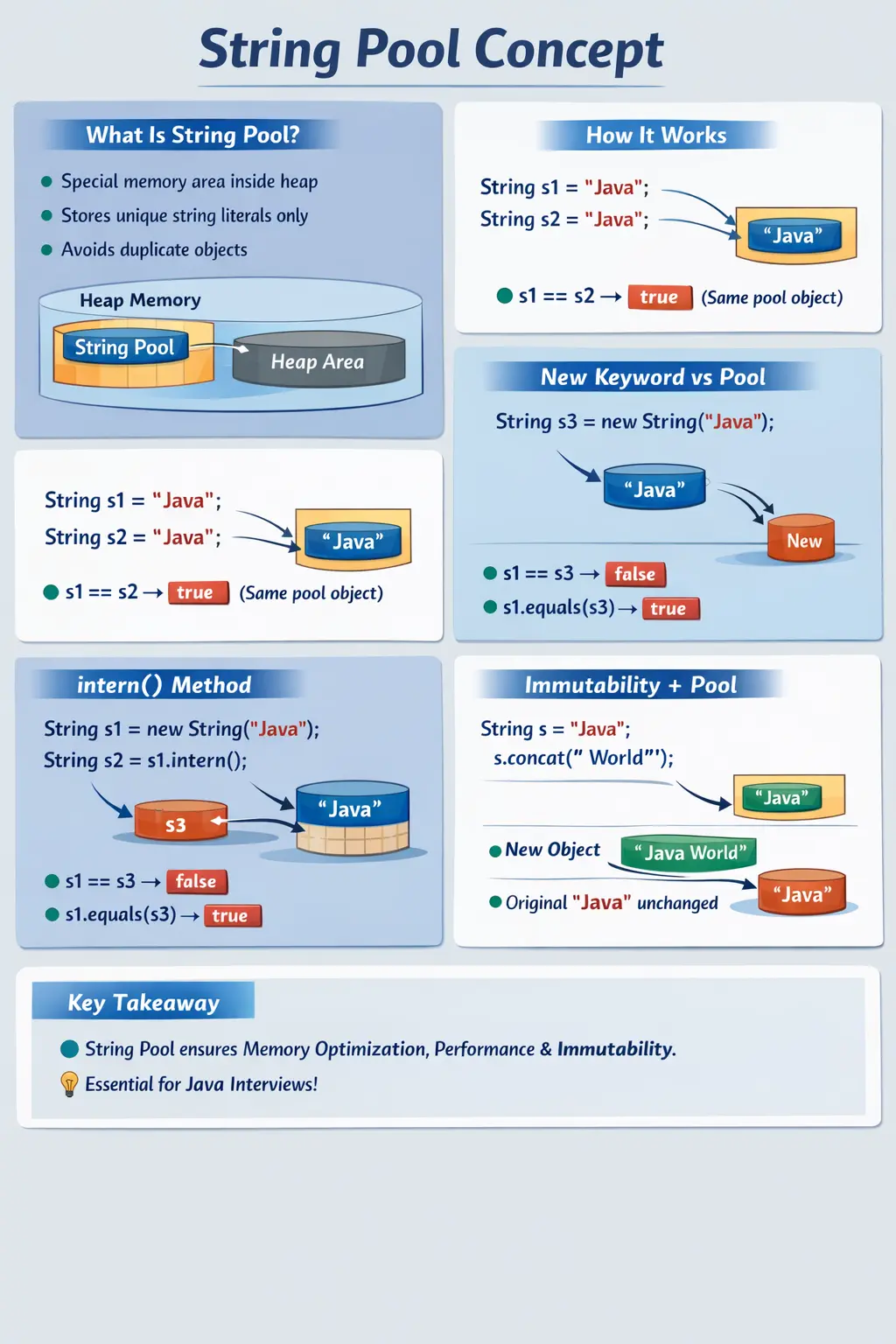
At its core, the String Pool exists to solve a very practical problem: strings are used extremely frequently in Java programs. Without optimization, every string creation would lead to a new object in memory, quickly resulting in excessive memory consumption and degraded performance. The String Pool addresses this by ensuring that identical string literals are stored only once and reused wherever possible.
What Is the String Pool?
The String Pool is a special memory region inside the Java heap where unique string literals are stored. Unlike regular heap objects, strings in the pool are managed in such a way that duplicate values are avoided. If a string literal already exists in the pool, Java does not create a new object; instead, it reuses the existing one.
For example, when you write two variables like String s1 = "Java"; and String s2 = "Java";, both variables refer to the same object in the String Pool. This is not just an optimization; it is a deliberate design choice that enables efficient memory usage and faster comparisons.
The key idea is that the pool maintains a single copy of each unique string literal. Any number of references can point to that single object, eliminating redundancy and improving performance.
Why Java Uses the String Pool
The introduction of the String Pool is driven by both performance and memory considerations. Strings are among the most commonly used objects in Java applications. They are used in logging, configuration, user input, database queries, API communication, and many other areas.
If every string creation resulted in a new object, memory consumption would increase rapidly, especially in large-scale applications. By storing only one copy of each unique string literal, the String Pool significantly reduces memory usage.
Another important benefit is faster comparison. When two string references point to the same pooled object, the == operator can be used for quick reference comparison. Although equals() is still the correct method for content comparison, the pooling mechanism makes certain operations more efficient.
Additionally, the String Pool supports immutability. Since strings are immutable, they can be safely shared across different parts of an application without the risk of accidental modification.
How Strings Are Stored in Java
To fully understand the String Pool, it is necessary to examine how strings are created and stored in Java. There are two primary ways to create strings: using literals and using the new keyword.
When a string is created using a literal, such as "Java", it is stored in the String Pool. If the same literal is used again, Java reuses the existing object. This means that multiple references can point to the same memory location.
On the other hand, when a string is created using the new keyword, such as new String("Java"), a new object is always created in the heap, even if the same value already exists in the pool. This leads to multiple objects with identical content but different memory references.
This distinction is crucial because it directly affects how strings behave during comparison and memory usage.
Reference Comparison vs Content Comparison
One of the most common sources of confusion in Java is the difference between reference comparison and content comparison. The String Pool plays a significant role in this distinction.
When using the == operator, Java compares the memory references of two objects. If both references point to the same object, the result is true. This is often the case with string literals stored in the pool.
However, when using the equals() method, Java compares the actual content of the strings. This method returns true if the sequence of characters is the same, regardless of where the objects are stored in memory.
For example, two string literals with the same value will return true when compared using == because they reference the same pooled object. However, a string created using new will not match the pooled string using ==, even though their content is identical. In such cases, equals() must be used.
Understanding this difference is critical for avoiding logical errors in real-world applications.
Relationship Between Immutability and the String Pool
The String Pool relies heavily on the immutability of strings. Since strings cannot be modified after creation, it is safe for multiple references to share the same object. If strings were mutable, changing the value through one reference would affect all other references pointing to the same object, leading to unpredictable behavior.
For example, if a string literal "Java" is stored in the pool and referenced by multiple variables, any modification to that string would impact all references. Immutability prevents this by ensuring that any modification results in a new object rather than altering the existing one.
This design not only preserves data integrity but also enables efficient reuse of string objects. It is one of the key reasons why the String Pool works effectively.
The intern() Method
The intern() method is an advanced feature of the String class that allows developers to explicitly place a string into the String Pool. When this method is called on a string object, Java checks if an equivalent string already exists in the pool. If it does, the existing reference is returned. Otherwise, the string is added to the pool.
This method is particularly useful in memory-sensitive applications where duplicate strings may be created dynamically. By using intern(), developers can ensure that identical strings share the same memory reference, reducing overall memory usage.
The intern() method also plays a role in understanding how the JVM manages string literals internally. It provides a way to bridge the gap between heap-allocated strings and pooled strings.
Compile-Time vs Runtime Behavior
The behavior of the String Pool also depends on whether strings are created at compile time or runtime. When string literals are combined at compile time, the Java compiler optimizes the expression and stores the result directly in the pool.
For example, concatenating two string literals results in a single pooled string. However, when concatenation involves variables, the operation occurs at runtime, and the resulting string is created in the heap rather than the pool.
This distinction is important because it affects both performance and memory usage. Compile-time optimizations reduce object creation, while runtime operations may lead to additional objects unless explicitly managed.
String Pool as a Memory Optimization
The String Pool is best understood as a memory optimization built around a very common reality: Java programs use repeated text constantly. Class names, package names, log messages, status values, keys, labels, roles, URLs, test data, and configuration entries often appear again and again. If every repeated literal created a separate object, the application would waste memory storing identical character sequences. The pool reduces this waste by keeping one shared instance for each unique literal.
This does not mean developers should think of the pool as a magical replacement for all memory management decisions. It is a specific optimization for string literals and interned strings. It works well because strings are immutable. The JVM can safely share a pooled literal across many references because no part of the program can change that object after creation. If a string operation appears to modify the value, Java creates another string rather than changing the pooled object.
In practical terms, the pool allows frequently used text to behave like shared constants. A literal such as "ACTIVE" can appear in several classes, but Java does not need to create a new literal object for every occurrence. This helps memory usage and keeps commonly repeated values efficient. However, good code should still avoid unnecessary string creation, repeated transformations, and excessive runtime concatenation when performance matters.
Literal Creation Step by Step
When Java sees a string literal such as "Java", it checks whether an equivalent literal already exists in the String Pool. If it exists, the reference to the existing pooled object is reused. If it does not exist, a new pooled string object is created. This means that two variables assigned the same literal usually point to the same object. That is why == may return true for two identical literals.
This behavior can surprise beginners because it makes == appear to work for strings in some examples. The problem is that it works only when both references point to the same object, which is often true for literals but not guaranteed for all string creation paths. Once new String(), runtime concatenation, substring operations, external input, or API responses are involved, references may differ even when content is identical.
The correct lesson is not that == sometimes works for strings. The correct lesson is that == checks identity and equals() checks content. The String Pool explains why two literals may share identity. It does not change the rule that business string comparison should use equals() or equalsIgnoreCase() depending on the requirement. This mental separation prevents many logical bugs.
new String() and Object Creation
The new keyword explicitly creates a new object. When code uses new String("Java"), the literal "Java" is still handled by the pool, but the new expression creates an additional String object in heap memory. The variable assigned to the expression points to the heap object, not necessarily the pooled literal. This is why a literal reference and a new String reference can contain the same characters but fail a == comparison.
In normal application code, new String("value") is rarely necessary. It consumes extra memory without adding practical value in most situations. A literal is shorter, clearer, and pool-friendly. The new form is useful mainly for learning, testing, and interviews because it demonstrates the difference between object identity and content equality. It is a teaching tool more often than a production necessity.
Understanding new String() also helps developers read memory-related interview questions. When an interviewer asks how many objects may be created by new String("Java"), the expected explanation often includes the pooled literal and the heap object. The exact answer may depend on whether the literal already exists in the pool, but the important point is that the new keyword forces heap object creation.
Why equals() Remains the Correct Comparison
The String Pool can make reference comparison look tempting, but equals() remains the correct comparison for string content. A program usually cares whether usernames, roles, messages, file names, environment values, or API responses contain the same characters. It does not usually care whether two variables point to the same object. Content equality is the business meaning; reference equality is an implementation detail.
For example, a user may type "admin" into a form. That value is created at runtime and may not refer to the pooled literal "admin". If code checks input == "admin", the comparison may fail even though the user typed the expected text. If code checks "admin".equals(input), the content is compared correctly and the null-safe constant-first pattern protects against NullPointerException.
There are rare cases where reference comparison is useful for understanding pooling or for highly specialized identity checks, but those are not common business scenarios. The safe rule for day-to-day development is simple: use equals() for exact content comparison and equalsIgnoreCase() when the requirement explicitly allows case-insensitive comparison. The String Pool explains memory reuse; it does not replace proper comparison practice.
intern() in Practical Terms
The intern() method allows a string created outside the pool to be connected to the pool. When intern() is called, Java checks whether an equal string already exists in the pool. If it exists, the pooled reference is returned. If it does not exist, the string is added to the pool and that pooled reference is returned. This is why intern() can make reference comparison return true in examples where it would otherwise return false.
In practical development, intern() should be used carefully. It can reduce memory usage when a program creates many duplicate strings dynamically, especially if those duplicates are long-lived and repeated heavily. However, interning everything blindly can create its own memory pressure because interned strings remain managed through the pool. The method is powerful, but it is not a general-purpose shortcut for normal string handling.
For most beginner and intermediate Java code, the main value of intern() is conceptual. It proves that the pool is accessible and that references can be unified when the same content is interned. In interviews, explaining intern() clearly shows that you understand the difference between pooled strings, heap strings, references, and content equality. In production, the decision to use intern() should be based on measured memory behavior, not habit.
Compile-Time Concatenation and Constant Folding
The Java compiler performs certain optimizations before the program runs. When two string literals are concatenated directly, such as "Ja" + "va", the compiler can combine them into "Java" at compile time. The result is treated as a literal and can be stored in the String Pool. This is called constant folding. Because no runtime calculation is needed, the pooled reference may match the normal literal "Java".
Runtime concatenation is different. If a variable is involved, Java cannot always know the final value at compile time. The expression is evaluated while the program runs, and the result may be a heap object unless it is explicitly interned or optimized in a way that still preserves the same reference. This is why examples involving final variables can behave differently from examples involving normal variables. A final compile-time constant may allow the compiler to fold the expression into a literal.
This area is common in interviews because it tests whether the candidate understands more than syntax. The important explanation is that string pool behavior depends on when and how the string is created. Literal expressions known at compile time can be pooled directly. Runtime results are created during execution and do not automatically become the same pooled reference unless intern() or specific compiler behavior applies.
String Pool and Immutability Working Together
The String Pool and immutability are inseparable concepts. Pooling would be unsafe if strings could be modified. Imagine if two variables pointed to the same pooled object "Java" and one part of the program changed that object to "Python". Every other reference to "Java" would suddenly see "Python", causing serious data corruption. Immutability prevents this entire category of problems.
Because strings cannot change, Java can safely reuse them. A method that receives a string can read it without worrying that another method will alter the same object. A pooled literal can be referenced by many classes and threads without synchronization. This design supports memory efficiency, thread safety, and predictable behavior at the same time.
It also explains why string modification methods return new strings. When trim(), replace(), toUpperCase(), or concat() appears to change text, the original object remains untouched. The result is a new string value. This rule applies whether the original string came from the pool or from the heap. The pool optimizes storage; immutability controls behavior.
String Pool in Real Applications
In real applications, developers do not usually manage the String Pool directly, but they benefit from it constantly. Static text values, constants, labels, log messages, and configuration keys are commonly written as literals. Java automatically pools those values, reducing duplicate storage. This is especially useful in large applications where the same terms appear across many classes.
Testing and automation code also benefits from pooling. Browser names, environment labels, expected messages, status values, and locator fragments may repeat throughout a framework. Using literals and constants keeps these values readable and pool-friendly. However, automation code should still compare strings with equals(), because actual values from browsers, files, APIs, or reports are often created at runtime.
The pool also helps developers reason about memory behavior during debugging. If an application creates a huge number of duplicate runtime strings, interning or better data normalization may be considered. If code uses new String() repeatedly, that may be a sign of unnecessary object creation. Understanding the pool gives developers a sharper eye for memory-sensitive string usage.
Debugging String Pool Confusion
When string comparison behaves unexpectedly, the first debugging step is to identify whether the code is comparing references or content. If == is used, the result depends on whether both variables point to the same object. If equals() is used, the result depends on the actual characters. Many bugs disappear once the comparison method is corrected.
The second step is to identify how each string was created. Was it a literal, a new String object, a runtime concatenation, a substring, a value from user input, a value read from a file, or an API response? The creation path explains whether the value is likely pooled or heap-created. This is especially useful when studying examples that seem inconsistent. The examples are not random; they are showing different creation paths.
The third step is to inspect hidden differences in content. Sometimes equals() returns false not because of the pool, but because the strings contain different characters, extra spaces, different case, newlines, or invisible Unicode differences. In such cases, printing lengths and surrounding values with markers can reveal the issue. Not every string bug is a pool bug, so debugging should separate reference identity from content quality.
Best Practices Around the String Pool
The first best practice is to use string literals for fixed text values instead of new String(). Literals are readable, efficient, and automatically pooled. The second best practice is to use equals() for content comparison. Even if pooled literals make == return true in simple examples, equals() is the reliable choice for real business logic.
The third best practice is to use constants for repeated meaningful values. For example, role names, status codes, environment names, and configuration keys should not be scattered as random literals across the codebase. Constants improve maintainability and still benefit from pooling. If a value changes later, it can be updated in one place.
The fourth best practice is to avoid unnecessary interning. intern() is useful in specific memory-sensitive scenarios, but it should not be applied everywhere. The fifth best practice is to understand runtime-generated strings. Values from input, APIs, files, databases, and concatenation should be treated as normal strings whose content must be compared properly. These habits keep string code clean and predictable.
Common Misconceptions About the String Pool
There are several misconceptions about the String Pool that can lead to confusion. One common belief is that the pool exists outside the heap. In reality, the String Pool is part of the heap memory, although it is managed differently.
Another misconception is that all strings are automatically added to the pool. This is not true. Only string literals are added by default. Strings created using the new keyword remain in the heap unless explicitly interned.
Some developers also assume that the == operator compares content. This is incorrect, as it only compares references. Misunderstanding this can lead to subtle bugs in applications.
Clarifying these misconceptions is essential for developing a correct mental model of how strings work in Java.
Common Beginner Mistakes
Many beginners struggle with the String Pool because of its implicit behavior. One of the most common mistakes is using == for string comparison instead of equals(). This often leads to incorrect results when comparing heap-allocated strings.
Another mistake is overusing the new keyword when creating strings. This bypasses the String Pool and results in unnecessary object creation, increasing memory usage.
Ignoring immutability is another issue. Developers may expect strings to change after modification operations, not realizing that a new object is created instead.
These mistakes can be avoided by understanding the underlying concepts and applying best practices consistently.
Practical Implications in Real-World Applications
In real-world applications, the String Pool plays a significant role in performance optimization. Applications that handle large volumes of textual data can benefit from reduced memory usage and faster execution when strings are reused effectively.
Frameworks and libraries also rely on the String Pool for efficient string handling. For example, configuration keys, log messages, and frequently used constants are often stored as string literals, ensuring they are pooled and reused.
Understanding the String Pool also helps in debugging issues related to memory and performance. Developers can make informed decisions about when to use string literals, when to use new, and when to apply intern().
Interview Perspective
From an interview perspective, the String Pool is a high-priority topic. Candidates are often asked to explain how strings are stored, the difference between literal and heap allocation, and the role of the intern() method.
A strong answer should demonstrate a clear understanding of memory management, immutability, and comparison behavior. Providing examples and explaining the reasoning behind design decisions can significantly strengthen the response.
Interviewers often use questions about the String Pool to assess a candidate’s depth of knowledge in Java and their ability to reason about internal mechanisms.
Key Takeaway
The String Pool is a powerful optimization mechanism in Java that ensures efficient memory usage and performance by storing only one copy of each unique string literal. It works in conjunction with string immutability to provide safe and predictable behavior across applications.
Understanding how strings are stored, how they are compared, and how they interact with the pool is essential for writing efficient and correct Java code. It is also a critical topic for interviews, as it reflects a deeper understanding of Java’s internal architecture.
Mastering the String Pool concept allows developers to avoid common pitfalls, optimize their applications, and confidently handle one of the most fundamental aspects of Java programming.
1. String Literal Stored in String Pool
String s1 = "Java";
String s2 = "Java";
Explanation
- Both literals point to same object in String Constant Pool (SCP).
- Memory is reused.
- s1 == s2 → true.
2. String Created Using new Keyword (Heap)
String s1 = new String("Java");
String s2 = new String("Java");
Explanation
- Two different objects in heap memory.
- Not stored in SCP by default.
- s1 == s2 → false.
3. Literal vs new Keyword Comparison
String s1 = "Java";
String s2 = new String("Java");
System.out.println(s1 == s2);
System.out.println(s1.equals(s2));
Explanation
- == compares reference → false
- .equals() compares content → true
- Classic interview question
4. String Pool Reuse Demonstration
String a = "Selenium";
String b = "Selenium";
System.out.println(a == b);
Explanation
- Both refer to same pooled object.
- Output: true.
5. Heap Object with Same Content as Pool Object
String a = "Test";
String b = new String("Test");
System.out.println(a == b);
Explanation
- a → SCP
- b → Heap
- Output: false.
6. Using intern() to Move String to Pool
String s1 = new String("Java");
String s2 = s1.intern();
String s3 = "Java";
System.out.println(s2 == s3);
Explanation
- intern() returns reference from SCP.
- Output: true.
7. intern() with Existing Pool Entry
String s1 = "Automation";
String s2 = new String("Automation").intern();
System.out.println(s1 == s2);
Explanation
- SCP already contains "Automation".
- intern() points to existing pooled object.
8. String Concatenation at Compile Time
String s1 = "Java" + "Selenium";
String s2 = "JavaSelenium";
System.out.println(s1 == s2);
Explanation
- Compile-time concatenation.
- Result stored in SCP.
- Output: true.
9. String Concatenation at Runtime (Variable)
String s1 = "Java";
String s2 = "Selenium";
String s3 = s1 + s2;
String s4 = "JavaSelenium";
System.out.println(s3 == s4);
Explanation
- Runtime concatenation creates new heap object.
- Output: false.
10. Runtime Concatenation with intern()
String s1 = "Java";
String s2 = "Selenium";
String s3 = (s1 + s2).intern();
String s4 = "JavaSelenium";
System.out.println(s3 == s4);
Explanation
- intern() moves result to SCP.
- Output: true.
11. String Pool with Final Variables
final String s1 = "Java";
String s2 = s1 + "Selenium";
String s3 = "JavaSelenium";
System.out.println(s2 == s3);
Explanation
- final enables compile-time optimization.
- Stored in SCP.
- Output: true.
12. String Pool Without final
String s1 = "Java";
String s2 = s1 + "Selenium";
String s3 = "JavaSelenium";
System.out.println(s2 == s3);
Explanation
- Runtime concatenation.
- Output: false.
13. String Pool and equals()
String s1 = new String("Test");
String s2 = "Test";
System.out.println(s1.equals(s2));
Explanation
- Content comparison only.
- Output: true.
- Pool does not affect .equals().
14. Multiple Heap Objects with Same Content
String s1 = new String("Hello");
String s2 = new String("Hello");
System.out.println(s1 == s2);
Explanation
- Two separate heap objects.
- Output: false.
15. Heap Object + Pool Object Reference Count
String s1 = "World";
String s2 = new String("World");
String s3 = s2.intern();
System.out.println(s1 == s3);
Explanation
- intern() returns pool reference.
- Output: true.
16. String Pool Memory Efficiency Example
String s1 = "QA";
String s2 = "QA";
String s3 = "QA";
Explanation
- Only one object in SCP.
- All references point to same object.
17. String Pool with Different Content
String s1 = "QA";
String s2 = "Qa";
System.out.println(s1 == s2);
Explanation
- Case-sensitive.
- Two different pool entries.
- Output: false.
18. String Pool with Substring
String s1 = "Automation";
String s2 = s1.substring(0, 4);
String s3 = "Auto";
System.out.println(s2 == s3);
Explanation
- substring() creates new object.
- Output: false.
19. Substring + intern()
String s1 = "Automation";
String s2 = s1.substring(0, 4).intern();
String s3 = "Auto";
System.out.println(s2 == s3);
Explanation
- intern() forces pool usage.
- Output: true.
20. Interview Summary Example (Most Important)
String a = "Java";
String b = new String("Java");
System.out.println(a == b);        // false
System.out.println(a.equals(b));   // true
Explanation
- == → reference comparison
- .equals() → content comparison
- Top-priority interview question