String Immutability
String immutability is one of the most fundamental design decisions in Java, yet it is frequently misunderstood or underestimated, especially by developers who are new to the language. At first glance, the concept appears simple: once a String object is created, its value cannot be changed. However, the implications of this design choice extend far beyond basic syntax. String immutability influences memory management, performance characteristics, thread safety, security, and even how the Java Virtual Machine (JVM) optimizes applications at runtime.
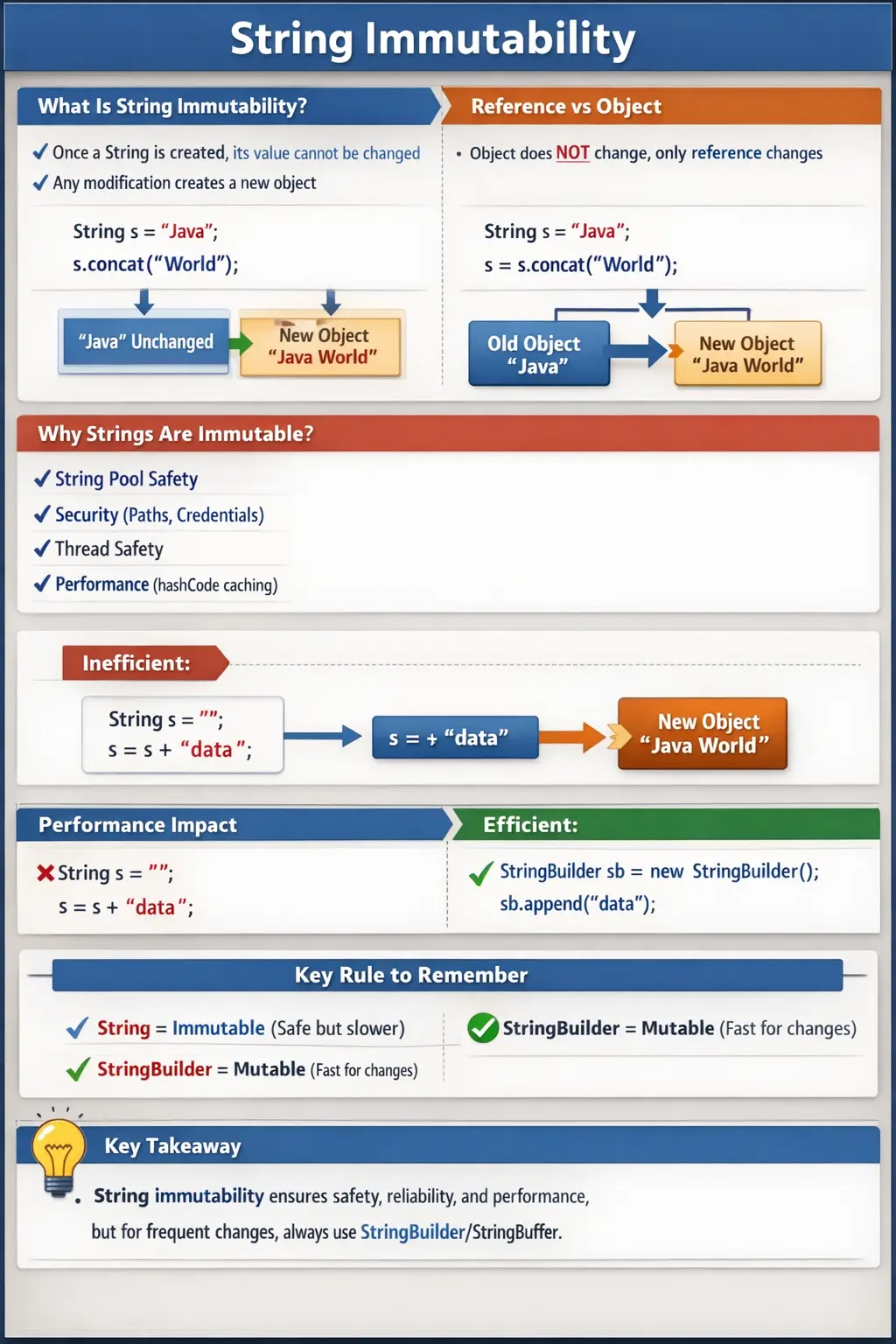
In real-world systems, String is everywhere. It is used in configuration values, URLs, database queries, log messages, API payloads, file paths, and user input. Because of this pervasive usage, Java designers made a deliberate decision to make String immutable. Understanding why this decision was made and how it affects your code is essential not only for interviews but also for writing efficient and reliable applications.
What Does Immutability Mean?
Immutability, in general, refers to an object whose state cannot be changed after it is created. In the context of Java Strings, this means that once a String object is instantiated, its sequence of characters remains fixed for the lifetime of that object.
It is important to distinguish between the object itself and the reference variable that points to it. The reference can change, but the object’s content cannot. This distinction is often the source of confusion.
Consider a simple example:
String s = "Java";
s.concat(" World");
At a glance, it might seem that the original string is modified. In reality, the concat() method creates a new String object with the value "Java World", while the original "Java" object remains unchanged. Since the new object is not assigned back to the variable s, the original reference continues to point to "Java".
This behavior becomes clearer when we explicitly assign the result:
String s1 = "Java";
String s2 = s1.concat(" World");

System.out.println(s1); // Java
System.out.println(s2); // Java World
Here, s1 still points to the original object, while s2 points to the new object. This demonstrates that immutability preserves the original data while allowing new variations to be created.
Why Strings Are Immutable in Java
String immutability is not an arbitrary restriction; it is a carefully engineered feature that provides multiple benefits. These benefits span memory optimization, security, concurrency, and performance.
String Constant Pool Safety
One of the most significant reasons for immutability is the String Constant Pool (SCP). The SCP is a special memory area where Java stores unique string literals. When multiple variables reference the same literal, they point to the same object in memory.
For example:
String a = "Test";
String b = "Test";
Both a and b refer to the same object in the pool. If strings were mutable, modifying one reference would affect all others pointing to the same object. This would lead to unpredictable behavior and data corruption.
Immutability ensures that shared references remain safe. Multiple variables can point to the same string without any risk of unintended modification.
Security Considerations
Strings are widely used in sensitive contexts, such as file paths, database connections, class loaders, and user credentials. If strings were mutable, malicious code could alter these values after validation, leading to security vulnerabilities.
For example, consider a file path used for accessing a secure resource. If the string representing the path could be modified after validation, it could redirect access to an unintended location.
By making strings immutable, Java ensures that once a value is created and validated, it cannot be altered. This provides a strong guarantee of data integrity, which is critical in secure applications.
Thread Safety
In multi-threaded environments, shared data can lead to race conditions and inconsistent states if not handled carefully. Mutable objects require synchronization mechanisms to ensure thread safety, which can introduce complexity and performance overhead.
Immutable objects, on the other hand, are inherently thread-safe. Since their state cannot change, multiple threads can safely access the same object without synchronization.
Strings benefit from this property. A single string instance can be shared across threads without any risk of concurrent modification. This simplifies design and improves performance in multi-threaded applications.
HashCode Caching and Performance
Strings are frequently used as keys in hash-based collections such as HashMap and HashSet. To optimize performance, the String class caches its hash code after it is computed for the first time.
If strings were mutable, any modification to the content would require recalculating the hash code. This would invalidate existing hash-based structures and degrade performance.
Immutability ensures that the hash code remains consistent throughout the object’s lifetime. This allows Java to cache the value and perform fast lookups, which is essential for high-performance applications.
Predictable Behavior and Reliability
Immutable objects are easier to reason about because they do not change state. This eliminates side effects, making code more predictable and easier to debug.
When a method receives a string, it can safely assume that the value will not change unexpectedly. This reliability is particularly important in APIs and frameworks, where consistent behavior is critical.
How Java Enforces String Immutability
Java enforces immutability through several design mechanisms within the String class.
First, the String class is declared as final, which prevents it from being subclassed. This ensures that its behavior cannot be altered through inheritance.
Second, the internal character array that stores the string’s data is private and final. This prevents external access or modification.
Third, the class does not provide any methods that modify the internal state. All methods that appear to change the string, such as toUpperCase(), replace(), or substring(), actually return new String objects.
Together, these mechanisms guarantee that once a string is created, its content remains unchanged.
Reference Change vs Object Change
A common misunderstanding is confusing reference reassignment with object mutation. Consider the following example:
String s = "Java";
s = s.concat(" World");
Here, a new string object "Java World" is created, and the reference s is updated to point to this new object. The original "Java" object still exists in memory, unchanged.
Immutability applies to the object itself, not to the variable referencing it. Variables can be reassigned freely, but the objects they point to remain constant.
String vs StringBuilder and StringBuffer
Because strings are immutable, repeated modifications can lead to performance issues. Each modification creates a new object, increasing memory usage and processing overhead.
To address this, Java provides mutable alternatives: StringBuilder and StringBuffer.
StringBuilder is designed for single-threaded environments and offers high performance. It allows in-place modification of character sequences without creating new objects.
StringBuffer is similar but includes synchronization, making it thread-safe at the cost of performance.
Understanding when to use each class is crucial. For frequent modifications, especially in loops, StringBuilder is the preferred choice.
Memory Impact of Immutability
Immutability can lead to inefficient memory usage if not handled properly. Consider the following pattern:
String s = "";
for (int i = 0; i < 1000; i++) {
    s = s + i;
}
Each concatenation creates a new string object, resulting in a large number of temporary objects. This increases memory consumption and can impact performance.
A more efficient approach uses StringBuilder:
StringBuilder sb = new StringBuilder();
for (int i = 0; i < 1000; i++) {
    sb.append(i);
}
This approach modifies a single object, reducing memory overhead and improving performance.
Reference Reassignment in Everyday Code
The most common confusion around String immutability happens because Java allows reference reassignment. A variable such as String message can point to one string object at first and later point to another string object. This makes it appear as if the string has changed. In reality, the reference changed, not the object. The original object remains exactly as it was.
This distinction is important when reading code. If a line says message = message.trim();, the trim() method creates or returns a string value, and the reference message is updated to point to that result. The original value is not edited in place. If a line says message.trim(); without assignment, the trimmed result is produced and then ignored. The variable still points to the original text. This is one of the most common beginner mistakes with String methods.
Thinking in terms of references and objects makes Java behavior much clearer. Variables are labels that can point to objects. Immutable objects do not change. Reassigning a label to another object is allowed. Once this model is understood, string examples that initially feel surprising become predictable. It also helps developers understand other immutable types and the broader design style of Java APIs.
String Methods Return New Values
Many String methods sound like they modify text, but they actually return new values. toUpperCase() returns an uppercase version. toLowerCase() returns a lowercase version. replace() returns a string with replacements applied. substring() returns a selected portion. trim() returns text without leading and trailing spaces. None of these methods changes the original string object.
This behavior supports safe programming. If a method receives a string argument and calls replace() on it, the caller's original string is not damaged. The method must intentionally use the returned value. This reduces accidental side effects. In large applications, avoiding hidden side effects makes code easier to reason about, test, and debug.
However, it also means developers must be disciplined. If the transformed value matters, store it or return it. For example, userInput = userInput.trim(); is meaningful because the cleaned value replaces the old reference. userInput.trim(); by itself is usually a bug because the result is discarded. Understanding return values is essential for correct string processing.
Immutability and the String Pool
The String Pool depends on immutability. Java can store one copy of a literal such as "Java" and let many references point to it because no reference can change the object. If strings were mutable, pooling would be dangerous. One variable could change a pooled value and every other variable sharing that value would observe the change. That would make common literals unreliable.
Because strings are immutable, pooling becomes safe and useful. It reduces duplicate string objects and improves memory efficiency. A literal that appears in several places in the application can be reused. This is especially valuable because strings are among the most common objects in Java programs. Configuration keys, status names, roles, log messages, and labels often repeat many times.
Pooling also explains why == may return true for two identical literals. Both references may point to the same pooled object. But this should not change normal comparison practice. Business logic should still use equals() for content comparison. The pool is a memory optimization. It is not a replacement for correct string comparison.
Immutability and Security
Security is one of the strongest reasons for string immutability. Strings are often used to represent values that must not change unexpectedly after validation. File paths, class names, URLs, database connection details, usernames, tokens, and configuration keys are all examples where consistency matters. If a value is checked and then silently modified later, the program may perform an unsafe action.
Immutability prevents that kind of in-place modification. Once a string is passed to a security-sensitive operation, the original object cannot be altered by another reference. This makes validation more meaningful. A validated string remains the same object with the same content. Any changed version must be a different string object, making the change explicit through reference assignment.
This does not mean String is always the best container for sensitive data. Passwords and secrets stored as strings may remain in memory until garbage collection. In some high-security cases, character arrays are preferred because they can be overwritten after use. Still, immutability protects many everyday security paths by ensuring that ordinary string objects cannot be silently mutated after validation.
Immutability and Thread Safety
Immutable objects are naturally easier to share between threads because their state cannot change. If multiple threads read the same string, there is no risk that one thread will modify the object while another thread is reading it. This eliminates the need for synchronization around the string object itself. In multi-threaded applications, this simplicity is extremely valuable.
Mutable shared data is one of the main causes of concurrency bugs. Developers must coordinate access, protect updates, and reason about timing. Strings avoid this problem by design. A shared string can be passed across threads, stored in caches, used as a key, or returned from APIs without worrying that its internal characters will change unexpectedly.
This property is especially important because strings are used everywhere. If String were mutable, almost every Java application would face additional concurrency complexity. By making String immutable, Java removes a large class of possible bugs. Developers can focus synchronization efforts on truly mutable shared data rather than on basic text values.
Hash-Based Collections and Immutability
Strings are frequently used as keys in maps and elements in sets. HashMap and HashSet depend on stable hash codes to locate values efficiently. If a key's content could change after insertion, its hash code could change as well. The collection might then be unable to find the key in the correct bucket, causing broken lookup behavior.
String immutability prevents this problem. Once a string is created, its content remains stable, so its hash code remains stable. Java can even cache the hash code after computing it once. This improves performance because repeated map lookups do not need to recalculate the hash value from scratch every time.
This is not just an internal technical point. Many real applications use strings as keys for configuration maps, request parameters, session data, JSON fields, localization entries, and lookup tables. Stable string behavior makes these structures reliable. Immutability is one reason strings are such a natural and trusted key type in Java collections.
Performance Trade-Offs
String immutability improves safety and enables optimizations, but it can also create temporary objects when text is modified repeatedly. This is the trade-off developers must understand. For simple operations, String is ideal. For stable values, it is clear and efficient. For a few concatenations, normal String usage is usually fine and readable. Problems appear when text is repeatedly built in loops or large dynamic operations.
StringBuilder exists for those repeated modification scenarios. It provides mutable text construction without creating a new immutable String after every append. The final String is produced when toString() is called. This pattern gives developers both performance and clean final output: mutable while building, immutable when delivered.
A strong developer does not avoid String because it is immutable. Instead, the developer uses String where immutability is useful and uses StringBuilder where repeated construction is needed. This balanced understanding is more practical than saying immutable strings are slow. Immutability is a benefit most of the time; it only requires another tool for heavy modification workflows.
String Immutability in Testing and Automation
For testing and automation learners, string immutability appears in everyday work. Expected messages, URLs, browser names, locators, environment names, report titles, and test data values are usually represented as strings. Knowing that string methods return new values helps avoid false failures. For example, actualText.trim(); does not clean actualText unless the result is assigned or compared directly.
Automation code often compares expected and actual text. Because strings are immutable, comparison should focus on content using equals(), equalsIgnoreCase(), contains(), startsWith(), or other appropriate methods. The test should also handle whitespace and case according to the requirement. Immutability keeps the original observed value stable, while transformation methods allow cleaned comparison values to be created safely.
StringBuilder becomes useful in automation when building long failure messages, execution summaries, or dynamic report content. The final message can be converted to String and stored safely. This mirrors professional Java development: String is used for stable final text, while builder classes are used for construction. Understanding immutability helps automation engineers write clearer and more reliable utilities.
Debugging String Immutability Issues
When string logic behaves unexpectedly, check whether a method result was ignored. If trim(), replace(), concat(), toUpperCase(), or substring() appears in code without assignment or direct use, the operation may have no lasting effect. This is often the root cause of bugs where a value appears not to have been cleaned or transformed.
Next, check whether the code confuses reference comparison with content comparison. Immutability and pooling can make == appear to work in some literal examples, but equals() is the correct content comparison method. If input comes from a file, browser, API, database, or user entry, it may not share the same reference as a literal even when the content matches.
Finally, check hidden characters. A string may contain spaces, tabs, newlines, or different case. Immutability does not remove these differences. Printing the length and surrounding the value with markers can help reveal invisible content. Debugging string issues becomes easier when the developer separates three questions: did I use the returned value, did I compare content correctly, and does the content contain hidden differences?
Best Practices for Working with Immutable Strings
The first best practice is to treat String methods as value-returning operations. Always use the returned result when transformation matters. The second is to use equals() for content comparison and avoid relying on == except when intentionally studying reference behavior. The third is to prefer string literals and constants for fixed values, allowing the String Pool to do its work naturally.
The fourth best practice is to use StringBuilder for repeated construction, especially inside loops. The fifth is to avoid unnecessary new String() usage because it creates extra objects without practical benefit in most code. The sixth is to handle null, empty, and blank strings deliberately. Immutability does not prevent NullPointerException when a reference itself is null.
The final best practice is to design methods clearly. If a method receives a String, it should not imply that the caller's value will be changed in place. If a method transforms text, it should return the transformed value. Clear contracts make immutable string behavior intuitive for everyone reading the code.
Interview-Ready Explanation Strategy
A strong interview explanation should begin with the simplest definition: String is immutable, which means its content cannot be changed after the object is created. Then immediately clarify the reference distinction. A String variable can be reassigned to a new object, but the original String object remains unchanged. This single clarification prevents the most common confusion around examples such as s = s.concat("Java").
After defining the concept, explain why Java made this design choice. Mention String Pool safety, security, thread safety, hash code caching, and predictable behavior. These reasons show that immutability is not just a syntax rule. It is connected to JVM optimization, safe sharing, collection performance, and reliable application design. A candidate who can explain the reasons behind the design sounds much stronger than one who only says strings cannot change.
Then give a practical example. Say that if String s = "Java"; is followed by s.concat(" Selenium");, the output of s is still "Java" because concat() returns a new String. If the returned value is assigned back with s = s.concat(" Selenium");, the reference now points to a new object. This example proves both immutability and reference reassignment in a way interviewers expect.
Finally, connect immutability to performance decisions. Explain that String is excellent for stable text and simple values, but repeated modification inside loops should use StringBuilder. If thread-safe mutable text is needed, StringBuffer may be considered. This closing point shows practical judgment. It tells the interviewer that you understand not only what immutability is, but also how it affects real coding choices.
Immutability and API Design
String immutability also improves API design. When a method accepts a String parameter, the method can safely read it without worrying that another part of the program will change the same object's content during execution. When a method returns a String, the caller receives a stable value that cannot be modified in place. This makes method contracts simpler and more reliable.
This is especially useful in frameworks and libraries. A framework may store route names, configuration keys, property values, query parameters, or messages as strings. If those values could change unexpectedly through shared references, the framework would need much more defensive copying and synchronization. Immutability reduces that burden. It allows APIs to pass text around freely with fewer side effects.
For application developers, this means String is a safe choice for representing completed values. Once a username, status, message, or key is created, it can be shared confidently. If a modified version is needed, the code creates a new value. This style encourages clean data flow: receive a value, transform it deliberately, and pass the result forward.
Common Misconceptions
Several misconceptions surround string immutability. One is the belief that methods like concat() modify the original string. In reality, they return new objects.
Another misconception is that immutability prevents reference reassignment. Variables can still point to different objects; immutability only affects the object’s content.
Some developers also assume that immutability inherently leads to poor performance. While it can introduce overhead in certain scenarios, it enables optimizations such as pooling and hash code caching that improve overall efficiency.
Finally, it is important to note that the final keyword alone does not make an object immutable. It only prevents reassignment of the reference, not modification of the object’s state.
Common Beginner Mistakes
Beginners often expect strings to change in place, leading to logical errors. They may also use string concatenation inside loops without realizing the performance implications.
Another common mistake is confusing reference reassignment with object mutation. Understanding the distinction is critical for writing correct code.
Ignoring immutability can also lead to inefficient memory usage and degraded performance, especially in large-scale applications.
Interview Perspective
String immutability is a frequent interview topic because it tests understanding of core Java concepts such as memory management, object behavior, and performance optimization.
A concise answer should explain that strings are immutable objects whose content cannot be changed after creation, and that any modification results in a new object. A more detailed answer should include reasons such as String Pool safety, thread safety, security, and hash code caching.
Providing examples and explaining real-world implications demonstrates a deeper understanding.
Key Takeaway
String immutability is a deliberate and powerful design choice in Java. It ensures safety, reliability, and performance across a wide range of applications. While it introduces certain constraints, it also enables critical optimizations and simplifies concurrent programming.
One-Line Insight
String immutability guarantees that once created, a string’s value never changes, ensuring safety, predictability, and performance across the Java ecosystem.
1. Basic String Immutability Example
String s = "Java";
s.concat(" Selenium");
System.out.println(s);
Explanation
- concat() creates a new String.
- Original string s remains unchanged.
- Output: Java
2. Correct Way to Modify a String
String s = "Java";
s = s.concat(" Selenium");
System.out.println(s);
Explanation
- Reassignment is required.
- Output: Java Selenium
3. Immutability with replace()
String s = "Java";
s.replace("a", "o");
System.out.println(s);
Explanation
- replace() does not modify original string.
- Output: Java
4. Reassignment After replace()
String s = "Java";
s = s.replace("a", "o");
System.out.println(s);
Explanation
- New string assigned back.
- Output: Jovo
5. Immutability with toUpperCase()
String s = "java";
s.toUpperCase();
System.out.println(s);
Explanation
- Original string unchanged.
- Output: java
6. toUpperCase() with Reassignment
String s = "java";
s = s.toUpperCase();
System.out.println(s);
Explanation
- New object created and assigned.
- Output: JAVA
7. Immutability with substring()
String s = "Automation";
String sub = s.substring(0, 4);
System.out.println(s);
System.out.println(sub);
Explanation
- Original string unchanged.
- Output:
- Automation
- Auto
8. Multiple Operations Still Don’t Change Original String
String s = "Test";
s.concat(" Case").toUpperCase();
System.out.println(s);
Explanation
- All operations create new objects.
- Output: Test
9. String Pool + Immutability
String s1 = "Java";
String s2 = s1.concat(" Selenium");
System.out.println(s1);
System.out.println(s2);
Explanation
- s1 remains in String Pool.
- s2 refers to a new object.
- Output:
- Java
- Java Selenium
10. Reference Change After Modification
String s1 = "Java";
String s2 = s1;
s1 = s1.concat(" Selenium");
System.out.println(s1);
System.out.println(s2);
Explanation
- s2 still points to original string.
- Output:
- Java Selenium
- Java
11. Immutability and Equality (==)
String s1 = "Java";
String s2 = s1.concat("");
System.out.println(s1 == s2);
Explanation
- concat("") returns same reference.
- Output: true
12. Immutability with Non-Empty Concatenation
String s1 = "Java";
String s2 = s1.concat(" ");
System.out.println(s1 == s2);
Explanation
- New object created.
- Output: false
13. Immutability with trim()
String s = "  Java  ";
s.trim();
System.out.println(s);
Explanation
- Original string unchanged.
- Output: Java
14. trim() with Reassignment
String s = "  Java  ";
s = s.trim();
System.out.println(s);
Explanation
- New trimmed string assigned.
- Output: Java
15. Immutability with Method Chaining
String s = "java selenium";
String result = s.toUpperCase().replace(" ", "_");
System.out.println(s);
System.out.println(result);
Explanation
- Original string unchanged.
- Output:
- java selenium
- JAVA_SELENIUM
16. Why String Is Immutable (Security Example)
String password = "secret";
String ref = password;
password = "changed";
System.out.println(ref);
Explanation
- Original value remains unchanged.
- Helps maintain security and predictability.
17. String vs StringBuilder (Mutability Comparison)
String s = "Java";
s.concat(" Test");
System.out.println(s);
StringBuilder sb = new StringBuilder("Java");
sb.append(" Test");
System.out.println(sb);
Explanation
- String → immutable → unchanged
- StringBuilder → mutable → changed
18. String Immutability in Loops (Performance Issue)
String s = "";
for (int i = 1; i <= 3; i++) {
s = s + i;
}
System.out.println(s);
Explanation
- Multiple String objects created.
- Inefficient due to immutability.
19. Efficient Alternative Using StringBuilder
StringBuilder sb = new StringBuilder();
for (int i = 1; i <= 3; i++) {
sb.append(i);
}
System.out.println(sb);
Explanation
- Uses single mutable object.
- Recommended in loops.
20. Interview Summary Example (String Immutability)
String s = "Java";
String t = s;
s = s.concat(" Selenium");
System.out.println(s);
System.out.println(t);
Explanation
- Output:
- Java Selenium
- Java
- Demonstrates:
- Immutability
- Reference behavior
- Very common interview question