Set Interface in Java
The Set interface is an important part of the Java Collections Framework. It represents a
collection that does not allow duplicate elements. Conceptually, it is similar to a mathematical set, where a
value either belongs to the set or does not. If the same logical value is added more than once, the set keeps
only one copy. This makes Set the natural choice when uniqueness matters.
Sets are used throughout real Java applications. A system may use a set to store unique user roles, unique
permissions, unique product categories, unique tags, unique email addresses, or unique IDs. Test automation
code may use a set to remove duplicate test data, track visited pages, or verify that a result list does not
contain repeated values. Whenever the business rule says "no duplicates," Set should be
considered.
The Set interface is also a high-frequency interview topic because it connects collection
behavior with object equality, hashing, ordering, sorting, null handling, and performance. A strong answer is
not just "Set does not allow duplicates." A strong answer explains how different implementations behave:
HashSet is fast but unordered, LinkedHashSet preserves insertion order, and
TreeSet stores elements in sorted order.
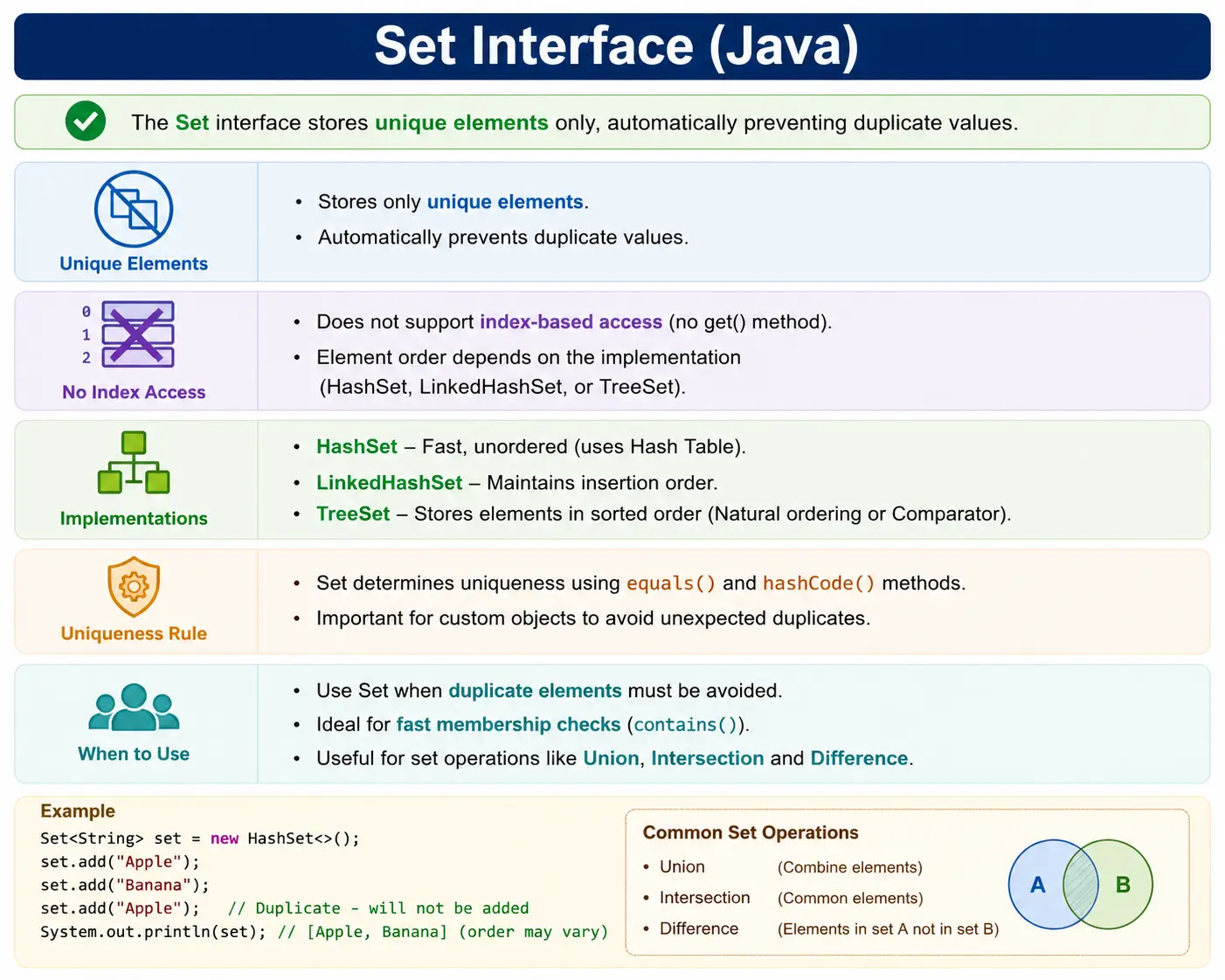
What Is the Set Interface?
Set is an interface in the java.util package. It extends
Collection, but it adds a uniqueness rule: no duplicate elements are allowed. If an element is
already present and the code tries to add the same element again, the set ignores the duplicate and the
collection remains unchanged. No exception is thrown simply because a duplicate was added.
Unlike List, a Set does not provide index-based access. There is no
get(index) method because sets are not designed around element positions. Some set
implementations preserve a predictable order, and some sort elements, but the interface itself is mainly
about uniqueness rather than indexing.
Null handling depends on implementation. HashSet and LinkedHashSet commonly allow
one null value because a duplicate null would still be considered the same value. TreeSet
generally does not allow null in modern usage because it needs to compare elements for sorting.
Set<String> set = new HashSet<>();
Position in Collection Hierarchy
In the collection hierarchy, Set extends Collection, and Collection
extends Iterable. This means a set supports common collection operations and can be used in
enhanced for-each loops. The most common implementations are HashSet,
LinkedHashSet, and TreeSet.
Iterable
   |-- Collection
        |-- Set
             |-- HashSet
             |-- LinkedHashSet
             |-- TreeSet
This hierarchy shows that all set implementations share the same broad contract, but each implementation handles ordering and performance differently. The interface tells you duplicates are not allowed. The concrete class tells you how storage, lookup, and ordering are handled.
Key Characteristics of Set
The first key characteristic of Set is uniqueness. A set accepts only one logical occurrence of
a value. This makes it ideal for duplicate removal and membership checks. When a set is used correctly, the
code no longer needs manual duplicate-checking logic before every add operation.
The second characteristic is that sets do not support positional access. You cannot ask a set for "the element
at index 2" because a set is not defined by indexes. If index-based access is required, a List
is more appropriate. If uniqueness is required, a Set is more appropriate.
The third characteristic is that equality matters. For hash-based sets, Java uses hashCode to
locate a potential bucket and equals to confirm whether two objects are logically equal. If
custom objects do not implement these methods correctly, the set may fail to remove logical duplicates.
Common Implementations of Set
The Set interface has multiple implementations because different applications need different
ordering and performance behavior. Choosing the right implementation is the practical skill. The most common
choices are HashSet, LinkedHashSet, and TreeSet.
1. HashSet
HashSet is the most commonly used set implementation. It is backed by a hash table and is
designed for fast add, remove, and contains operations on average. It does not guarantee insertion order or
sorted order. If the output order matters, HashSet is not the right choice.
HashSet is a strong default when uniqueness and fast lookup are the main requirements. It is
commonly used to remove duplicates, check whether a value has already been seen, and store membership-style
data. It commonly allows one null value.
Set<Integer> set = new HashSet<>();
2. LinkedHashSet
LinkedHashSet preserves insertion order while still preventing duplicates. This means elements
are iterated in the order they were added. It is useful when the application needs uniqueness but also wants
predictable output order. For example, removing duplicates from a list while preserving the original order is
a common use case.
Because it maintains ordering information, LinkedHashSet has slightly more overhead than
HashSet. That overhead is often acceptable when predictable iteration order improves correctness,
testing, or user-facing output.
Set<Integer> set = new LinkedHashSet<>();
3. TreeSet
TreeSet stores elements in sorted order. It is typically backed by a red-black tree structure and
provides logarithmic-time operations. It is useful when uniqueness and sorting are both required. For example,
a system may need unique account IDs displayed in sorted order or unique names processed alphabetically.
Since TreeSet sorts elements, the elements must be comparable, or a Comparator must
be provided. TreeSet generally does not allow null because null cannot be compared naturally with
other values in normal sorted operations.
Set<Integer> set = new TreeSet<>();
Important Methods of Set Interface
Set supports common collection methods such as add, remove,
contains, size, and isEmpty. These methods are enough for most
uniqueness-based workflows. The important absence is positional access. A set has no get(index)
method because index is not part of set behavior.
The return value of add is especially useful. When add returns
true, the element was not already present and was inserted successfully. When it returns
false, the set already contained an equal element, so the collection did not change. This
makes Set useful not only for storage, but also for detecting whether a value is new or already
seen.
The contains method is another reason sets are widely used in real applications. Instead of
scanning a list repeatedly to check membership, a hash-based set can usually answer the question quickly.
This is useful in validations, permission checks, duplicate detection, filtering, and algorithms that need to
remember processed values.
set.add("Java");
set.remove("Java");
set.contains("Java");
set.size();
set.isEmpty();
- No get(index)
- No positional methods
Methods such as addAll, removeAll, and retainAll become powerful
when two collections must be compared. They support common set operations without forcing the developer to
write nested loops. This makes code shorter, but more importantly, it makes the intent clearer. A reviewer
can understand "retain only common elements" much faster than reading manual comparison logic.
Duplicate Handling Example
Duplicate handling is the defining behavior of a set. In the following example, the value
"Java" is added twice. The second add operation does not create a second element because the
set already contains an equal value. This behavior is controlled by the set contract, not by extra code
written by the developer.
Set<String> set = new HashSet<>();
set.add("Java");
set.add("Java");

System.out.println(set); // [Java]
- Duplicate is ignored
- No exception is thrown
This silent duplicate rejection is important to understand. A set does not treat adding a duplicate as an
error. It simply keeps the collection unchanged. If the application needs to warn the user that a duplicate
was attempted, the developer should check the boolean result of add and handle
false as a business condition.
How Set Ensures Uniqueness
Set uniqueness is based on equality. For hash-based sets such as HashSet and
LinkedHashSet, Java uses hashCode to narrow down where an element might be stored
and equals to check whether an equivalent element already exists. If the set finds an equal
element, it does not add another copy.
This two-step process is a performance optimization. The hash code helps Java find a smaller group of
possible matches quickly. The equality check then confirms whether the new object is truly equal to an
existing object. A correct hash code alone is not enough, and a correct equals method alone is
not enough for efficient hash-based collections. They must follow the general contract together.
class Employee {
    int id;
}
If equals and hashCode are not overridden properly for custom objects, duplicates
may occur logically. Two objects may represent the same employee ID but still be treated as different objects
if equality is not defined according to the business rule.
This is one of the most common interview traps around Set. For wrapper classes and
String, equality is already well-defined. For custom classes, the developer must define what
"same" means. In a user management system, the user ID may define equality. In a product catalog, the product
code may define equality. In a banking system, the account number may define equality. The set can enforce
uniqueness only after the class communicates that rule through equals and
hashCode.
Set vs List
Set and List are often compared because both store multiple elements. The difference
is intent. Use a list when order, duplicates, and index access matter. Use a set when uniqueness and
membership checking matter. Choosing the wrong one often leads to extra code and avoidable bugs.
A list answers questions such as "what is the first item?", "what is the next item?", and "how many times did this value appear?" A set answers questions such as "is this value present?", "what are the unique values?", and "which values are common between these two groups?" Both are useful, but they solve different problems. Good Java code chooses the collection whose behavior matches the business requirement.
| Aspect | Set | List |
|---|---|---|
| Duplicates | Not allowed | Allowed |
| Order | Depends on implementation | Preserved |
| Index access | No | Yes |
| Use case | Unique data | Ordered data |
Performance Complexity
Performance depends on the implementation. HashSet is usually the fastest for general lookup,
add, and remove operations. LinkedHashSet adds insertion-order tracking with similar average
behavior. TreeSet keeps elements sorted, so its operations are usually logarithmic rather than
constant on average.
In practical terms, this means HashSet is often the best default for fast membership checks.
If a program repeatedly asks whether a value already exists, a HashSet is usually much better
than repeatedly scanning a list. However, performance should never be separated from correctness. If output
order matters, the slightly higher overhead of LinkedHashSet may be worth it. If sorted order is
required, TreeSet provides that behavior directly.
| Implementation | Add / Remove / Search |
|---|---|
| HashSet | O(1) average |
| LinkedHashSet | O(1) |
| TreeSet | O(log n) |
Iterating a Set
Sets can be iterated using a for-each loop or an Iterator. The order of iteration depends on the
implementation. A HashSet does not promise predictable order. A LinkedHashSet
iterates in insertion order. A TreeSet iterates in sorted order.
This point is important when printing results or writing tests. A test that assumes HashSet
prints values in a specific order may pass on one run and fail later. The implementation is allowed to change
the iteration order. If the expected output must be stable, choose LinkedHashSet or
TreeSet, or convert the set to a sorted list before comparison.
for (String s : set) {
    System.out.println(s);
}
or
Iterator<String> it = set.iterator();
When to Use Set
Use Set when uniqueness is required, when duplicates must be removed, when membership checking is
frequent, or when mathematical set operations such as union, intersection, and difference are useful. A set
can make code simpler because it enforces uniqueness automatically.
Sets are also useful when the question is not "where is this element?" but "is this element present?" For example, checking whether a user has a permission, whether an ID has already been processed, or whether a search result contains duplicate values are all natural set problems.
Sets are also useful in input cleanup. For example, a user may upload a file containing repeated email addresses. Converting the values into a set removes duplicates before the system sends notifications. A reporting service may receive repeated category names from different data sources and use a set to create a unique filter list. In both cases, the set expresses the business rule clearly: each value should appear only once.
When NOT to Use Set
Do not use Set when duplicates are meaningful. If repeated values must be preserved, use a
List. Do not use Set when index-based access is required. A set does not provide
positional operations. If strict insertion order is mandatory, use LinkedHashSet or choose a list
if duplicates are also needed.
A set is also not the right choice when the application needs frequency counts. If the question is "how many
times did this value appear?", a set loses information because it keeps only one occurrence. In that case, a
Map from value to count may be better. The same principle applies to audit trails, event logs,
and ordered transaction histories where repetition and sequence are part of the data.
Set and Null Handling
Null handling differs by implementation. HashSet and LinkedHashSet commonly allow
one null value. Since sets prevent duplicates, adding null multiple times still results in only one null.
TreeSet generally does not allow null because it sorts elements and cannot compare null with
non-null values under normal ordering rules.
In real applications, null values should be handled deliberately. If null is not a valid business value, it should be filtered or rejected before being added to the set. If null is allowed, downstream code must account for it during iteration and processing.
Set and Custom Objects
Sets are especially important when working with custom objects. Suppose a User object has an ID.
The business may consider two users with the same ID to be the same logical user. Java will not know that
automatically unless equals and hashCode are implemented accordingly.
If those methods are missing or incorrect, a HashSet may store multiple objects that look
duplicate from a business perspective. This is one of the most important practical lessons about sets: set
uniqueness is only as correct as the equality definition of the elements.
There is one more practical warning. Avoid changing fields that participate in equality after an object has
been added to a HashSet. If a user object's ID is used in hashCode and that ID is
changed while the object is already inside the set, the set may no longer be able to locate the object
correctly. For this reason, fields used for equality are often treated as stable identity fields.
Set Operations
Sets are useful for mathematical-style operations. addAll can create a union by adding all
elements from another collection. retainAll keeps only elements that also exist in another
collection, which represents intersection. removeAll removes elements found in another
collection, which represents difference.
These operations are useful in real applications. A system can compare two permission sets, identify common users between two groups, remove excluded IDs from a result, or merge unique tags from multiple sources. Set operations often make this logic shorter and clearer than manual loops.
Set in Real Projects
In real projects, sets are commonly used to enforce uniqueness in memory. A backend service may use a set to remove duplicate IDs before querying a database. A security module may use a set of permissions or roles. A reporting module may use a set to collect unique categories. A test automation framework may use a set to verify that displayed values are unique.
The implementation choice should follow business needs. Use HashSet when order does not matter
and fast lookup is desired. Use LinkedHashSet when original order should be preserved. Use
TreeSet when sorted uniqueness is required.
In web applications, sets frequently appear in service-layer code. They help remove duplicate request values, validate unique identifiers, and combine data from multiple sources. In automation code, testers often use sets to compare expected and actual collections without worrying about duplicates. For example, if a page is expected to show unique product names, collecting those names into a set and comparing the set size with the original list size can quickly reveal duplicate display defects.
In security-related code, sets are a natural model for roles and permissions. A user either has a permission or does not. Storing permissions in a set prevents repeated permissions from creating misleading counts or unnecessary processing. This is a good example of choosing a collection based on domain meaning rather than habit.
Common Beginner Mistakes
Beginners often expect HashSet to preserve insertion order because the output may sometimes look
ordered in small examples. That order is not guaranteed. If insertion order matters, use
LinkedHashSet. If sorted order matters, use TreeSet.
Another mistake is trying to access set elements by index. A set has no positional access. Beginners also use
mutable custom objects in hash-based sets without stable equals and hashCode
behavior. If an object's fields used for equality change after insertion, set behavior can become incorrect.
Using TreeSet with null values is another frequent issue. Since sorted sets require comparison,
null usually causes problems. Developers should understand implementation-specific behavior instead of
assuming all sets behave the same.
Interview Perspective
In interviews, a strong answer should define Set as a collection interface that does not allow
duplicate elements. It should mention that it extends Collection, has no index-based access, and
is mainly used for uniqueness and membership checking. Common implementations are HashSet,
LinkedHashSet, and TreeSet.
A stronger answer explains ordering and equality. HashSet is fast and unordered,
LinkedHashSet preserves insertion order, and TreeSet keeps sorted order.
Hash-based sets depend on equals and hashCode to enforce uniqueness correctly.
If an interviewer asks which implementation to use, answer based on requirement. Choose
HashSet for fast uniqueness with no order guarantee. Choose LinkedHashSet when
insertion order must be preserved. Choose TreeSet when sorted output is required. This style of
answer shows practical judgment instead of memorized definitions.
Interview-Ready Answers
Short Answer
The Set interface represents a collection that does not allow duplicate elements.
Detailed Answer
In Java, the Set interface extends the Collection interface and models a mathematical set. It ensures uniqueness of elements and provides implementations such as HashSet, LinkedHashSet, and TreeSet, each with different ordering and performance characteristics. It is useful when duplicate prevention and membership checking are more important than index-based access.
Set Interface Examples
The following examples show the most common ways Set is used in beginner and interview-level
Java programs. The examples are intentionally small so that the behavior of each implementation is visible.
In real projects, the same ideas appear inside services, validators, automation scripts, and data processing
utilities.
1. Creating a Set Using HashSet
A HashSet is usually the first implementation developers learn because it gives fast duplicate
prevention with simple syntax. The variable is declared using the Set interface, which keeps the
code flexible if the implementation needs to change later.
import java.util.*;

class Demo {
    public static void main(String[] args) {
        Set<String> set = new HashSet<>();
        set.add("Java");
        set.add("API");
        set.add("Java"); // duplicate
        System.out.println(set);
    }
}
Output
[Java, API]
2. Set Does Not Allow Duplicates
This example focuses on the core set rule. Even though the value 10 is added twice, the size is
still one. The second add call is ignored because the set already contains that value.
import java.util.*;

class Demo {
    public static void main(String[] args) {
        Set<Integer> set = new HashSet<>();
        set.add(10);
        set.add(10);
        System.out.println(set.size());
    }
}
Output
1
3. HashSet Does Not Maintain Insertion Order
HashSet should not be used when output order is important. The printed order may look sorted or
consistent in a small program, but that should not be treated as a guarantee. The implementation is free to
organize elements internally for hashing efficiency.
import java.util.*;

class Demo {
    public static void main(String[] args) {
        Set<String> set = new HashSet<>();
        set.add("B");
        set.add("A");
        set.add("C");
        System.out.println(set);
    }
}
Output
[A, B, C] // order may vary
4. LinkedHashSet Maintains Insertion Order
LinkedHashSet is useful when you want to remove duplicates without disturbing the original order
of values. This behavior is common in data cleanup, report preparation, and user-facing displays where the
order of first appearance should remain meaningful.
import java.util.*;

class Demo {
    public static void main(String[] args) {
        Set<String> set = new LinkedHashSet<>();
        set.add("B");
        set.add("A");
        set.add("C");
        System.out.println(set);
    }
}
Output
[B, A, C]
5. TreeSet as a Sorted Set
TreeSet keeps elements sorted according to natural ordering or a comparator. It is the right
choice when sorted uniqueness is part of the requirement. The cost is that add, remove, and search operations
are generally slower than average HashSet operations.
import java.util.*;

class Demo {
    public static void main(String[] args) {
        Set<Integer> set = new TreeSet<>();
        set.add(30);
        set.add(10);
        set.add(20);
        System.out.println(set);
    }
}
Output
[10, 20, 30]
6. TreeSet Does Not Allow null
A TreeSet must compare values to place them in sorted order. Because null cannot be compared to
normal integer values in this example, adding null would cause a runtime problem. This is why null handling
should always be checked at the implementation level.
import java.util.*;

class Demo {
    public static void main(String[] args) {
        Set<Integer> set = new TreeSet<>();
        // set.add(null); // NullPointerException
    }
}
7. HashSet Allows One null
HashSet can store one null value. Adding null more than once still produces only one null entry,
because a set cannot contain duplicates. This behavior is different from TreeSet, which normally
rejects null due to sorting requirements.
import java.util.*;

class Demo {
    public static void main(String[] args) {
        Set<String> set = new HashSet<>();
        set.add(null);
        set.add(null);
        System.out.println(set);
    }
}
Output
[null]
8. Iterating Set Using for-each
The enhanced for-each loop is the cleanest way to read every element from a set when no removal is needed during iteration. The order depends entirely on the implementation used to create the set.
import java.util.*;

class Demo {
    public static void main(String[] args) {
        Set<String> set = new HashSet<>(Arrays.asList("A", "B", "C"));
        for (String s : set) {
            System.out.println(s);
        }
    }
}
9. Iterating Set Using Iterator
An Iterator provides explicit control over traversal. It is especially useful when an element
may need to be removed during iteration, because the iterator provides a safe remove method.
import java.util.*;

class Demo {
    public static void main(String[] args) {
        Set<Integer> set = new HashSet<>(Arrays.asList(1, 2, 3));
        Iterator<Integer> it = set.iterator();
        while (it.hasNext()) {
            System.out.println(it.next());
        }
    }
}
10. Removing Element While Iterating (Safe Way)
Removing from a collection while iterating must be done carefully. Calling the set's remove method directly
inside a for-each loop can cause a concurrent modification problem. The iterator's
remove method is the safe approach for this pattern.
import java.util.*;

class Demo {
    public static void main(String[] args) {
        Set<Integer> set = new HashSet<>(Arrays.asList(1, 2, 3));
        Iterator<Integer> it = set.iterator();
        while (it.hasNext()) {
            if (it.next() == 2) {
                it.remove();
            }
        }
        System.out.println(set);
    }
}
Output
[1, 3]
11. Checking Element Existence
The contains method is one of the most practical operations on a set. It checks membership
directly and makes the code read like the business rule: if the required value is present, continue with the
operation.
import java.util.*;

class Demo {
    public static void main(String[] args) {
        Set<String> set = new HashSet<>(Arrays.asList("Java", "API"));
        System.out.println(set.contains("Java"));
    }
}
Output
true
12. Converting List to Set (Remove Duplicates)
Converting a list into a set is a common way to remove duplicates. If the original order must be preserved,
use LinkedHashSet instead of HashSet. If sorted unique values are required, use
TreeSet.
import java.util.*;

class Demo {
    public static void main(String[] args) {
        List<Integer> list = Arrays.asList(1, 2, 2, 3);
        Set<Integer> set = new HashSet<>(list);
        System.out.println(set);
    }
}
Output
[1, 2, 3]
13. Custom Objects in HashSet (equals & hashCode)
Custom objects require special attention because Java must know how to compare them logically. In this
example, two User objects with the same ID are treated as equal because both
equals and hashCode are implemented using the ID.
class User {
    int id;
    User(int id) { this.id = id; }

    public boolean equals(Object o) {
        return this.id == ((User)o).id;
    }

    public int hashCode() {
        return id;
    }
}

import java.util.*;

class Demo {
    public static void main(String[] args) {
        Set<User> set = new HashSet<>();
        set.add(new User(1));
        set.add(new User(1));
        System.out.println(set.size());
    }
}
Output
1
14. TreeSet with Custom Sorting
A comparator lets TreeSet sort values using custom logic. Here the strings are sorted in reverse
order. This is useful when natural ordering is not the same as business ordering.
import java.util.*;

class Demo {
    public static void main(String[] args) {
        Set<String> set = new TreeSet<>((a, b) -> b.compareTo(a));
        set.add("A");
        set.add("C");
        set.add("B");
        System.out.println(set);
    }
}
Output
[C, B, A]
15. Set.of() for an Immutable Set in Java 9+
Set.of creates an immutable set. Once created, elements cannot be added or removed. This is
useful for fixed values such as supported roles, allowed status codes, or configuration constants.
import java.util.*;

class Demo {
    public static void main(String[] args) {
        Set<String> set = Set.of("A", "B");
        System.out.println(set);
        // set.add("C"); // UnsupportedOperationException
    }
}
16. retainAll() for Intersection
retainAll keeps only the values that exist in both sets. This is the intersection operation. In
real applications, it can be used to find common permissions, common users, or common categories.
import java.util.*;

class Demo {
    public static void main(String[] args) {
        Set<Integer> s1 = new HashSet<>(Arrays.asList(1, 2, 3));
        Set<Integer> s2 = new HashSet<>(Arrays.asList(2, 3, 4));
        s1.retainAll(s2);
        System.out.println(s1);
    }
}
Output
[2, 3]
17. removeAll() for Difference
removeAll removes values that exist in another collection. This represents a difference
operation. It is useful when excluded values must be removed from a candidate result set.
import java.util.*;

class Demo {
    public static void main(String[] args) {
        Set<Integer> s1 = new HashSet<>(Arrays.asList(1, 2, 3));
        Set<Integer> s2 = new HashSet<>(Arrays.asList(2));
        s1.removeAll(s2);
        System.out.println(s1);
    }
}
Output
[1, 3]
18. addAll() for Union
addAll combines values from another collection. Since the target is a set, duplicates are still
removed automatically. This creates a union of unique values.
import java.util.*;

class Demo {
    public static void main(String[] args) {
        Set<Integer> s1 = new HashSet<>(Arrays.asList(1, 2));
        Set<Integer> s2 = new HashSet<>(Arrays.asList(2, 3));
        s1.addAll(s2);
        System.out.println(s1);
    }
}
Output
[1, 2, 3]
19. Thread-Safe Set
Regular set implementations such as HashSet are not synchronized by default. When multiple
threads access and modify the same set, a thread-safe option is needed. One simple approach is to wrap the
set using Collections.synchronizedSet.
import java.util.*;

class Demo {
    public static void main(String[] args) {
        Set<String> set = Collections.synchronizedSet(new HashSet<>());
        set.add("Safe");
        System.out.println(set);
    }
}
20. Interview Summary for Set Interface
This final example reinforces the main point: duplicate values are not stored twice. In an interview, connect this behavior with implementation choice, equality rules, and ordering differences.
import java.util.*;

class Demo {
    public static void main(String[] args) {
        Set<String> set = new HashSet<>();
        set.add("Unique");
        set.add("Unique");
        System.out.println(set);
    }
}
Key Points
- No duplicates
- No index-based access
- HashSet: fast and unordered
- LinkedHashSet: insertion order
- TreeSet: sorted
Key Takeaway
Use Set when uniqueness matters. It is the right collection when the application needs to store
distinct values, remove duplicates, check membership, or compare groups of elements. Choose
HashSet for fast unordered uniqueness, LinkedHashSet for uniqueness with insertion
order, and TreeSet for sorted uniqueness. The interface is simple, but the implementation choice
and equality rules determine whether the code behaves correctly in real projects.