Serialization
Serialization in Java is the process of converting an object into a byte stream so that it can be stored (file, DB) or transmitted (network) and later reconstructed back into the same object (deserialization).
Java objects normally live in memory. When a program stops, those objects disappear unless their state is saved somewhere. Serialization provides a mechanism for taking the state of an object and representing it as bytes. Those bytes can be written to a file, placed in a cache, sent across a network, or stored by another system. Later, deserialization can read the byte stream and reconstruct an object with the saved field values.
This idea is powerful because it lets an object move outside the running JVM. A user session can be replicated between servers, a cached object can be restored, or an object can be transferred in older distributed Java systems. At the same time, Java serialization must be used carefully because it can introduce compatibility, performance, and security risks. Modern applications often prefer JSON, XML, Protobuf, or other formats for external APIs, but Java serialization remains an important core Java topic and appears frequently in interviews.
The simplest way to understand serialization is to remember that it saves object state, not class behavior. The serialized byte stream contains the values of serializable instance fields. It does not store methods, static fields as object state, or active runtime behavior. During deserialization, Java creates a new object in memory and restores its saved field values.
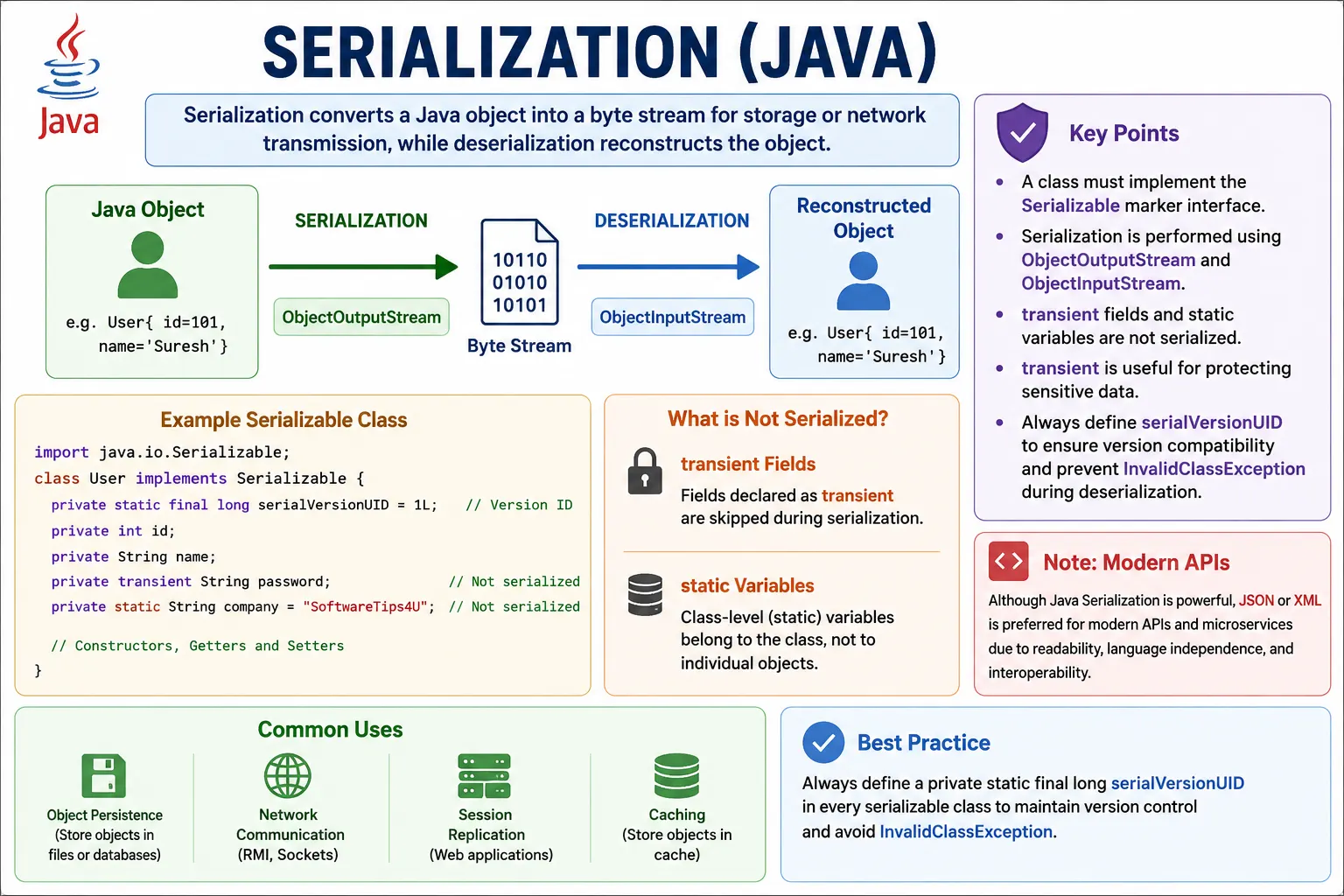
This is a high-frequency interview topic, especially around marker interfaces, serialVersionUID, and transient fields.
What Is Serialization?
Serialization converts an object into a byte stream. Deserialization performs the reverse operation: it reads a
byte stream and reconstructs an object. The class must opt in to this mechanism by implementing the
Serializable interface. Java then uses ObjectOutputStream to write the object and
ObjectInputStream to read it back.
The object being serialized may also contain references to other objects. Java attempts to serialize the full
reachable object graph. That means if an Order object has a User field, and
User has an Address field, those referenced objects also need to be serializable
unless they are marked transient. This is why serialization is not only about one class; it is
about the complete object graph.
- Converts object → byte stream
- Enables persistence and network transfer
- Reverse process is deserialization
- Implemented using Object Streams
Why Serialization Is Needed
Serialization is needed when object state must leave memory and be restored later. A desktop application might save user preferences. A server might replicate session state. A cache might store objects temporarily. A networked Java system might send objects between JVMs. Although modern systems often choose other formats for interoperability, the original Java serialization model was designed to make object persistence and object transfer straightforward inside Java-based systems.
- Save object state to file
- Send objects over network (RMI, sockets)
- Cache objects
- Session replication (web apps)
Key Interfaces & Classes
The key interface is java.io.Serializable. It is a marker interface, which means it does not
declare methods. A class implements it to tell the JVM that objects of this class are allowed to be serialized.
If a class does not implement Serializable and an attempt is made to serialize its object, Java
throws NotSerializableException.
Marker Interface
java.io.Serializable
- ✔ No methods
- ✔ Marks a class as serializable
Object Streams
Object streams perform the actual work. ObjectOutputStream writes object data to an underlying
output stream, such as FileOutputStream. ObjectInputStream reads object data from an
underlying input stream, such as FileInputStream. Object streams are built on byte streams because
serialized data is a byte representation of object state.
- ObjectOutputStream → serialize
- ObjectInputStream → deserialize
Basic Serialization Example
A basic serializable class looks like an ordinary Java class with one addition: it implements
Serializable. Once the class opts in, an object can be written through
ObjectOutputStream.writeObject(). Later, ObjectInputStream.readObject() reads the
serialized data and returns an object that must be cast to the expected type.
Serializable Class
import java.io.Serializable;
class Employee implements Serializable {
    int id;
    String name;
    Employee(int id, String name) {
        this.id = id;
        this.name = name;
    }
}
Serialization (Object → File)
ObjectOutputStream oos =
    new ObjectOutputStream(new FileOutputStream("emp.ser"));
Employee e = new Employee(1, "Java");
oos.writeObject(e);
oos.close();
Deserialization (File → Object)
ObjectInputStream ois =
    new ObjectInputStream(new FileInputStream("emp.ser"));
Employee e = (Employee) ois.readObject();
ois.close();
✔ Object state restored
✔ New object created in memory
Important Rules of Serialization
Serialization has several rules that interviewers often test. The class must implement
Serializable. Instance fields are serialized unless they are marked transient.
Static fields are not serialized as object state because they belong to the class, not to an individual
object. Constructors of the serializable class are not called during normal deserialization because Java
restores the object from serialized data rather than constructing it through the usual path.
- Class must implement Serializable
- All non-transient fields are serialized
- Static variables are NOT serialized
- Constructors are NOT called
- Parent class must be Serializable or have no-arg constructor
transient Keyword (Very Important)
The transient keyword marks a field that should not be serialized. This is useful for sensitive
data, temporary values, derived values, cached fields, or objects that cannot or should not be serialized. When
the object is deserialized, transient fields receive default values such as null, 0,
or false, unless custom deserialization logic restores them.
Marks fields not to be serialized.
class User implements Serializable {
    String username;
    transient String password;
}
✔ password not stored
✔ Value becomes default (null) after deserialization
serialVersionUID (Interview Favorite)
serialVersionUID is used to verify that the class used during deserialization is compatible with
the class that was used during serialization. Serialized data may be stored for a long time. During that time,
the Java class may change. The UID gives Java a compatibility identifier. If the UID in the stream and the UID
in the local class do not match, deserialization fails with InvalidClassException.
Used for version control of serialized classes.
private static final long serialVersionUID = 1L;
Why Needed?
- Ensures compatibility during deserialization
- Prevents InvalidClassException
- ✔ Always define explicitly
- ✔ Best practice
What Happens If Class Changes?
Class changes are one of the most important practical concerns in serialization. Adding a field, removing a
field, changing a field type, renaming a class, or changing inheritance can affect whether old serialized data
can be read. If no explicit serialVersionUID is defined, the JVM generates one based on class
details. Small changes may alter the generated value, which can break deserialization unexpectedly.
| Scenario | Result |
|---|---|
| serialVersionUID unchanged | Deserialization succeeds |
| serialVersionUID changed | ❌ InvalidClassException |
| No UID defined | JVM generates one |
Serialization Process (Conceptual Flow)
Conceptually, serialization starts when writeObject() is called. Java checks whether the object is
serializable, follows references to serializable objects, records field values, and writes metadata needed to
reconstruct the object graph. Deserialization reads that stream, creates new object instances, restores field
values, and reestablishes references where possible.
Object
 ↓ writeObject()
Byte Stream
 ↓ readObject()
Object (New Instance)
Custom Serialization (Advanced)
Custom serialization allows a class to participate in the serialization process. By defining private
writeObject() and readObject() methods with the correct signatures, a class can run
custom logic while still using default field serialization. This is useful when a transient value must be
restored, a field must be validated, or sensitive data must be transformed before writing.
Override default behavior:
private void writeObject(ObjectOutputStream oos) throws IOException {
    oos.defaultWriteObject();
}
private void readObject(ObjectInputStream ois)
        throws IOException, ClassNotFoundException {
    ois.defaultReadObject();
}
✔ Used for encryption, validation, custom logic
Serialization vs Externalization
Serializable is easy to use because Java handles most of the field-writing process automatically.
Externalizable gives the developer full control by requiring writeExternal() and
readExternal(). That control can improve performance or customize the serialized format, but it
also increases complexity. The developer must explicitly write and read every required piece of state in the
correct order.
For most beginner and interview examples, Serializable is the main focus. Externalization is more
advanced and should be used only when the additional control is truly needed. In modern systems, teams often
choose other serialization formats altogether when data must be exchanged between services or languages.
| Aspect | Serializable | Externalizable |
|---|---|---|
| Control | Less | Full |
| Methods | None | writeExternal, readExternal |
| Performance | Slower | Faster |
| Ease | Easy | Complex |
Security Concerns (Real-World)
Java serialization has serious security concerns when used with untrusted data. Deserialization is not just simple byte parsing. It can create objects and execute class-specific deserialization logic. Attackers may exploit vulnerable object graphs and libraries if an application deserializes data from untrusted sources. This is why secure coding guidelines commonly warn against deserializing untrusted Java serialized data.
- Serialized data can be tampered
- Vulnerable to deserialization attacks
- Avoid deserializing untrusted data
- ✔ Use validation
- ✔ Prefer JSON/XML for APIs
Sensitive fields also require attention. Passwords, tokens, API keys, temporary credentials, and security
answers should not be serialized by accident. Marking such fields transient prevents default
serialization from writing them. However, transient is not a complete security design by itself.
Applications must still protect files, validate inputs, and avoid exposing serialized data where it can be
tampered with.
Common Beginner Mistakes
Many beginner mistakes happen because serialization looks automatic. A developer may implement
Serializable on one class but forget that a referenced field points to another class that is not
serializable. Another developer may expect a constructor to run during deserialization and initialize fields,
then discover that those fields are missing or defaulted. Someone else may assume static fields are stored in
the serialized object even though static state belongs to the class.
- Forgetting to implement Serializable
- Not defining serialVersionUID
- Expecting static fields to serialize
- Assuming constructors run
- Serializing sensitive data without transient
Another mistake is ignoring serialVersionUID. If the class changes after data has been serialized,
deserialization may fail. Defining the UID explicitly makes version compatibility intentional. It does not
magically make every class change safe, but it avoids accidental UID changes and forces developers to think
about compatibility.
Best Practices (Production-Grade)
The first best practice is to define serialVersionUID explicitly for every serializable class.
The second is to use transient for fields that should not be stored, especially sensitive fields
and derived fields. The third is to validate objects after deserialization if their state must obey business
rules. Serialized data can become old, incomplete, or tampered with.
- Always define serialVersionUID
- Use transient for sensitive fields
- Avoid Java serialization for APIs
- Prefer JSON (Jackson) or Protobuf
- Validate deserialized objects
For public APIs and cross-language communication, avoid default Java serialization unless there is a strong reason to use it. JSON, XML, Avro, Protobuf, and other formats are usually more portable and easier to inspect. Java serialization is most appropriate when working inside Java-specific systems, legacy code, controlled persistence, or interview-focused examples.
Version Compatibility and Class Evolution
Serialized data often lives longer than the exact version of the class that created it. A class may gain a new field, remove an old field, rename a field, change a field type, or move into a different package. These changes affect whether older serialized data can still be read. This is why serialization is not just an I/O feature; it is also a compatibility contract.
Adding a new field can often be handled because the missing value from older serialized data receives a
default value during deserialization. Removing a field may also be tolerated in some cases because extra data
in the stream can be ignored. Changing a field type is more dangerous because the old data no longer matches
the expected field structure. Changing the serialVersionUID intentionally tells Java that old
serialized data should not be considered compatible.
In real projects, teams should decide whether serialized data must be backward compatible. If compatibility is required, class changes should be reviewed carefully and tested with old serialized files. If compatibility is not required, changing the UID may be acceptable because old data should fail fast instead of being restored into an object with unsafe assumptions.
Object Graph Serialization
Serialization does not stop at the first object. If the object has fields that reference other objects, Java
attempts to serialize those referenced objects too. This complete set of connected objects is called the object
graph. If any non-transient referenced object is not serializable, the process fails with
NotSerializableException.
This rule is important in real domain models. An Order may reference a Customer, a
list of OrderItem objects, and an Address. If the order is serialized, those objects
may need to be serialized as well. Collections such as ArrayList are serializable, but the
elements inside the collection must also be serializable.
Object graph serialization can be convenient, but it can also serialize more data than expected. A field may
reference a large object, a service object, or a resource that should not be stored. Marking fields
transient and designing serializable classes carefully prevents accidental persistence of
unnecessary or unsafe state.
Handling Sensitive and Derived Fields
Not every field in an object should be serialized. Passwords, tokens, session secrets, temporary keys, database
connections, file handles, loggers, thread pools, and runtime-only caches should usually be excluded. Some of
these fields are sensitive. Others are not meaningful outside the current JVM. The transient
keyword is the simplest way to exclude them from default serialization.
Derived fields are another common case. If a field can be calculated from other fields, it may not need to be stored. After deserialization, custom logic can recalculate it if needed. This keeps serialized data smaller and avoids storing values that may become stale. For example, a display name, formatted amount, or cached count may be better recalculated than serialized.
When transient fields are required after deserialization, the class should have a clear restoration strategy.
Custom readObject() logic can rebuild internal state, or the application can call an initialization
method after loading. The important point is not to assume transient fields will magically return with their
old values.
Inheritance Rules in Serialization
Inheritance adds another important rule. If a parent class implements Serializable, child classes
are serializable by inheritance. If a child class implements Serializable but the parent class
does not, Java can still serialize the child part, but the non-serializable parent must have an accessible
no-argument constructor. During deserialization, that parent constructor is called to initialize the parent
state.
This behavior often surprises beginners because constructors of serializable classes are not normally called during deserialization. The exception is the first non-serializable superclass. Java needs a normal constructor path for that part of the object. This is why interview questions often ask about parent and child serialization combinations.
Custom readObject and writeObject Usage
Custom writeObject() and readObject() methods are private methods with special
signatures recognized by Java serialization. They are not part of an interface, but the serialization mechanism
looks for them reflectively. Inside writeObject(), the class can call
defaultWriteObject() to write normal serializable fields and then write additional custom data.
Inside readObject(), it can call defaultReadObject() and then restore or validate
extra state.
This feature is powerful but should be used sparingly. It can help encrypt a field before writing, rebuild a transient cache after reading, validate object invariants, or support a controlled class evolution strategy. It can also make the code harder to understand if used for unnecessary logic. A good custom serialization design keeps the format simple and documents why the custom behavior exists.
Serialization in Real Applications
Serialization historically appeared in caching, session replication, RMI, deep-copy utilities, desktop application state, and Java-specific storage. In a web application, session objects could be serialized so they could move between servers. In a cache, objects could be stored temporarily and restored later. In a local tool, user settings could be saved without manually writing each field to a text file.
Modern application design is more selective. For communication between services, Java serialization is usually avoided because it is Java-specific and has security concerns. For APIs, JSON or Protobuf is often clearer. For long-term persistence, databases and stable schema-based formats are usually better. Still, legacy Java systems and some frameworks may use serialization internally, so developers must understand it.
When Not to Use Java Serialization
Java serialization should not be the default choice for every persistence or communication problem. It is not a good fit for public APIs because non-Java clients cannot easily consume the format. It is not ideal for long-term storage because class changes can break compatibility. It is risky for untrusted inputs because of deserialization security concerns. It can also be less readable and harder to debug than text-based formats.
For service communication, JSON is often easier to inspect and widely supported. For high-performance binary communication, Protobuf or Avro may be more suitable. For database persistence, mapping object state to tables or documents usually gives better query and versioning control. Java serialization remains useful to know, but production teams should choose it intentionally rather than automatically.
Serialization in Testing and Debugging
Testers and automation engineers may encounter serialization when working with cached objects, session
replication, serialized test fixtures, or framework internals. Understanding serialization helps explain why a
field disappears after restoration, why a password becomes null, why a class change breaks older
data, or why NotSerializableException appears during a test.
Debugging serialization issues requires checking the whole object graph, not only the top-level class. Verify
that every referenced object is serializable or marked transient. Check whether
serialVersionUID changed. Check whether the file was produced by a different version of the
class. Check whether custom readObject() logic is validating or transforming fields.
Serialization Review Checklist
A practical serialization review starts with the class declaration. Confirm that the class implements
Serializable only when serialization is truly required. Then check whether
serialVersionUID is explicitly declared. If serialized data may survive deployments, review class
changes for compatibility before releasing a new version.
Next, inspect every field. Fields that represent sensitive data, runtime-only services, caches, file handles,
database connections, threads, or calculated values should usually be transient. Referenced domain
objects should either be serializable or intentionally excluded. Collections should be reviewed twice: the
collection class may be serializable, but the elements inside the collection must also be safe to serialize.
Finally, review the source of serialized data. If data comes from outside the trusted application boundary,
default Java deserialization should generally be avoided. If the data is trusted but old, compatibility tests
should verify that older serialized files still load correctly. If custom readObject() logic
exists, it should validate the restored object so invalid state does not silently enter the application.
How to Explain Serialization in Interviews
A strong interview answer should start with the definition: serialization converts an object into a byte stream
so it can be stored or transferred, and deserialization reconstructs the object. Then mention the main classes:
ObjectOutputStream for writing and ObjectInputStream for reading. The class must
implement the marker interface Serializable.
After that, include the rules that interviewers care about. Static fields are not serialized as object state.
Transient fields are skipped and receive default values after deserialization. Constructors of serializable
classes are not called during normal deserialization. serialVersionUID controls version
compatibility and helps prevent accidental InvalidClassException.
A practical closing point is that Java serialization is powerful but should be used carefully. It is not ideal for public APIs or untrusted data. Sensitive fields should be transient, deserialized objects should be validated, and modern formats are often preferred for service communication.
Interview-Ready Answers
Short Answer
Serialization converts an object into a byte stream for storage or transmission.
Detailed Answer
In Java, serialization is the process of converting an object into a byte stream using ObjectOutputStream so that it can be persisted or sent over a network. The class must implement Serializable, and deserialization reconstructs the object using ObjectInputStream. Fields marked transient are not serialized, and serialVersionUID ensures version compatibility.
Key Takeaway
Serialization = Object persistence & transport. Powerful but risky—use carefully, define serialVersionUID, and avoid for public APIs unless required.
Serialization Interview Cheat Sheet
1. Basic Serialization (Serializable)
import java.io.*;

class User implements Serializable {
    int id;
    String name;

    User(int id, String name) {
        this.id = id;
        this.name = name;
    }
}

class Demo {
    public static void main(String[] args) throws Exception {
        User u = new User(1, "Java");

        ObjectOutputStream oos =
            new ObjectOutputStream(new FileOutputStream("user.ser"));
        oos.writeObject(u);
        oos.close();
    }
}
2. Basic Deserialization
import java.io.*;

class Demo {
    public static void main(String[] args) throws Exception {
        ObjectInputStream ois =
            new ObjectInputStream(new FileInputStream("user.ser"));

        User u = (User) ois.readObject();
        System.out.println(u.id + " " + u.name);
        ois.close();
    }
}
3. transient Keyword (Not Serialized)
import java.io.*;

class User implements Serializable {
    int id;
    transient String password;

    User(int id, String password) {
        this.id = id;
        this.password = password;
    }
}

// After deserialization
password → null
Interview Point: transient fields are ignored.
4. static Variables Are Not Serialized
import java.io.*;

class Demo implements Serializable {
    static int x = 10;
}
Explanation: static belongs to class, not object.
5. serialVersionUID (Very Important)
import java.io.*;

class User implements Serializable {
    private static final long serialVersionUID = 1L;
    int id;
}
Why:
- Prevents InvalidClassException
- Ensures version compatibility
6. Serialization Without serialVersionUID (Trap)
// JVM generates UID automatically
// Class change → deserialization fails
7. Parent Serializable, Child Not Serializable
import java.io.*;

class Parent implements Serializable {
    int x = 10;
}

class Child extends Parent {
    int y = 20;
}
Result: Child object can be serialized.
8. Parent Not Serializable, Child Serializable
import java.io.*;

class Parent {
    int x = 10;
}

class Child extends Parent implements Serializable {
    int y = 20;
}
Important:
- Parent constructor must have no-arg constructor
- Parent data is not serialized
9. Custom Serialization (writeObject / readObject)
import java.io.*;

class User implements Serializable {
    transient String password;
    int id;

    User(int id, String password) {
        this.id = id;
        this.password = password;
    }

    private void writeObject(ObjectOutputStream oos) throws Exception {
        oos.defaultWriteObject();
        oos.writeObject("ENC-" + password);
    }

    private void readObject(ObjectInputStream ois) throws Exception {
        ois.defaultReadObject();
        password = ((String) ois.readObject()).substring(4);
    }
}
10. Serialization with ArrayList
import java.io.*;
import java.util.*;

class Demo {
    public static void main(String[] args) throws Exception {
        ArrayList list = new ArrayList<>();
        list.add("Java");
        list.add("Selenium");

        ObjectOutputStream oos =
            new ObjectOutputStream(new FileOutputStream("list.ser"));
        oos.writeObject(list);
        oos.close();
    }
}
11. Deserializing ArrayList
import java.io.*;
import java.util.*;

class Demo {
    public static void main(String[] args) throws Exception {
        ObjectInputStream ois =
            new ObjectInputStream(new FileInputStream("list.ser"));

        ArrayList list =
            (ArrayList) ois.readObject();

        System.out.println(list);
        ois.close();
    }
}
12. Serialization of Multiple Objects
oos.writeObject(obj1);
oos.writeObject(obj2);

obj1 = ois.readObject();
obj2 = ois.readObject();

// Order matters
13. NotSerializableException (Common Interview Trap)
class A {
    int x = 10;
}

class B implements Serializable {
    A a = new A(); // ❌ A is not Serializable
}
Fix: class A implements Serializable {}
14. Serialization with try-with-resources
try (ObjectOutputStream oos =
         new ObjectOutputStream(new FileOutputStream("a.ser"))) {
    oos.writeObject(obj);
}
15. Serialization vs File Writing
- FileWriter → text only
- ObjectOutputStream → object graph
16. Deep Serialization (Object Graph)
class Order implements Serializable {
    User user; // user must be Serializable
}
Rule: All referenced objects must be serializable.
17. Marker Interface Concept
Serializable // no methods
Explanation: JVM uses it as a marker.
18. When NOT to Use Serialization
// Sensitive data
// Cross-language communication
// Large performance-critical systems
19. Real-World Use Cases
// Caching
// Session replication
// Deep copy of objects
20. Interview Summary – Serialization
implements Serializable
Key Points
- Converts object → byte stream
- Uses ObjectOutputStream / ObjectInputStream
- transient & static not serialized
- serialVersionUID is critical
- All referenced objects must be serializable