Runnable Interface in Java
The Runnable interface is one of the most important building blocks in Java multithreading. It
represents a task that can be executed by a thread, but it does not represent the thread itself. This
separation is the reason Runnable remains so useful: it describes what work should be done, while
Thread or an executor decides how and when that work should run.
In beginner programs, developers often learn thread creation by extending the Thread class.
That approach works, but it mixes two responsibilities in one class. A class that extends Thread becomes
both the job and the execution vehicle. Runnable avoids that design problem. A Runnable class focuses only
on the task, which makes the code easier to reuse, test, and move into modern executor-based concurrency.
Runnable is also a high-frequency interview topic because it connects several core Java ideas: interfaces,
functional interfaces, lambda expressions, thread creation, the difference between run() and
start(), shared state, synchronization, and ExecutorService. A strong answer should explain not
only the syntax, but also why Runnable leads to cleaner and more scalable multithreaded design.
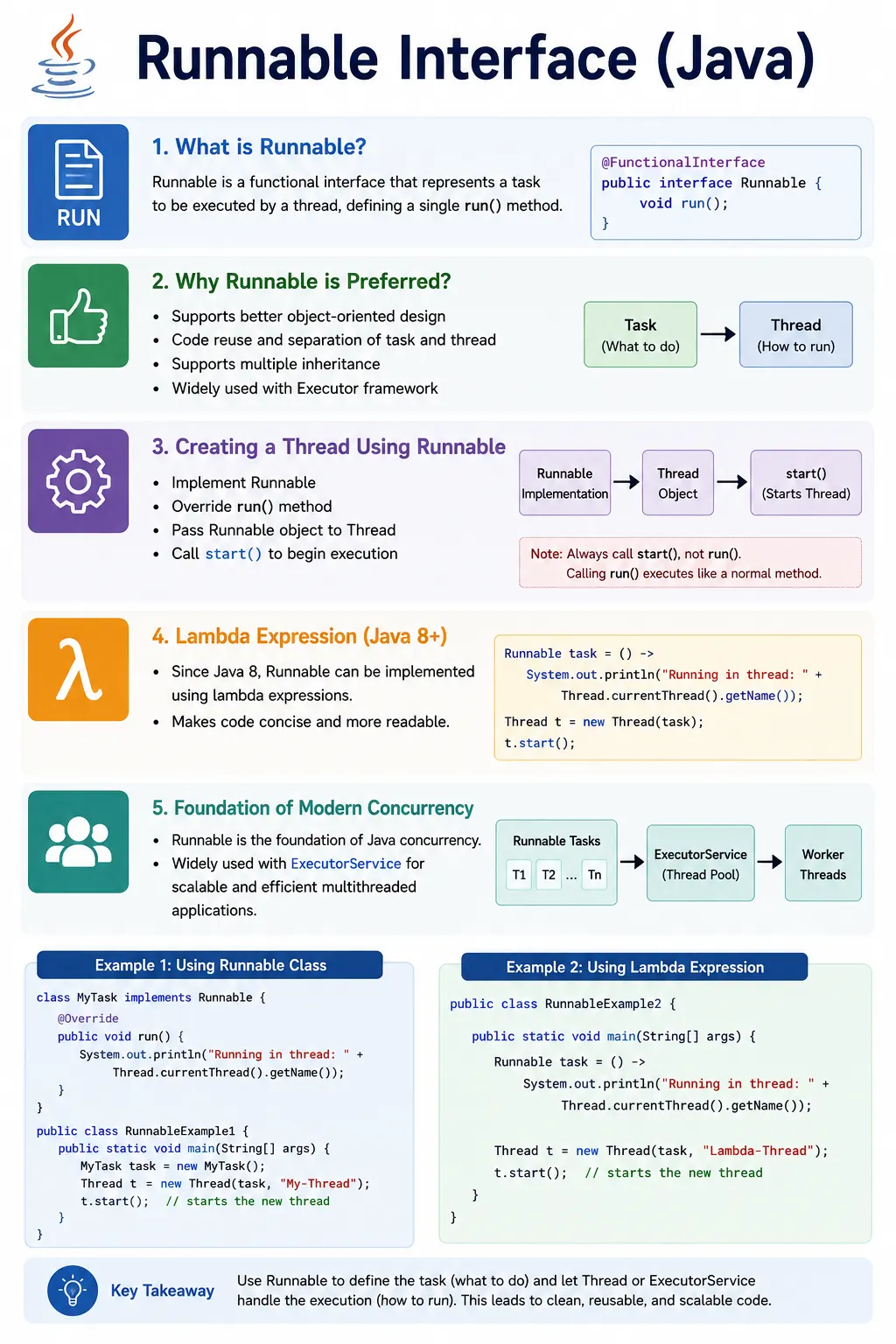
Understanding Runnable as a Task
The simplest way to understand Runnable is to think of it as a task contract. When a class implements
Runnable, it promises that it can provide a run() method. That method contains the code that
should execute when the task is started by a thread or submitted to an executor. Runnable itself does not
create a new path of execution, schedule CPU time, manage thread priority, or decide when the task begins.
It only holds the work.
This distinction matters in real software. A file-processing task, report-generation task, email-sending task, cleanup task, or automated test task is not naturally a thread. It is business or application logic that may need to run concurrently. Runnable lets that logic remain independent from the execution mechanism. The same task can run on a manually created Thread during learning, on a thread pool in production, or directly in a unit test when the goal is to verify the logic without starting a separate thread.
This is why Runnable is considered better object-oriented design than extending Thread in most situations. It separates "what to do" from "how to run it." Once that separation is clear, Java concurrency becomes much easier to reason about. Thread, ExecutorService, scheduled executors, and higher-level frameworks can all execute tasks, but Runnable remains one of the simplest ways to express the task itself.
How Runnable Fits Into Java Multithreading
When a Java application starts, the JVM creates the main thread and executes the main() method.
If the application needs additional work to happen concurrently, it can create more threads. A thread is a
lightweight execution path inside the same process. Multiple threads in the same process share memory, which
makes communication efficient but also introduces the possibility of race conditions when shared data is
modified incorrectly.
Runnable fits into this model by giving a thread something to execute. The Thread object controls the
lifecycle: it can be created, started, joined, interrupted, named, and observed. The Runnable object controls
the task logic: the statements inside run(). When start() is called on the Thread,
the JVM creates a new thread of execution and then invokes the Runnable's run() method on that
new thread.
This is also why calling run() directly does not create a new thread. Directly calling
run() simply executes the task like any other method call on the current thread. That can be
useful in tests or demonstrations, but it is not multithreading. For actual concurrent execution, the task
must be started through Thread.start() or submitted to an executor.
Why Runnable Improves Design Flexibility
Java supports single inheritance for classes. If a class extends Thread, it cannot extend
another class. This can become a design limitation quickly. A task class may already need to extend a base
class from the application, a framework, or a domain model. Implementing Runnable avoids that limitation
because a class can implement interfaces while still extending another class.
Runnable also avoids making task classes pretend to be threads. A class named InvoiceGenerator
or LogWriter should describe that responsibility. It should not have to become a Thread just
because it sometimes runs in the background. With Runnable, the class can keep its natural identity and
expose a task through run(). This keeps the design closer to the real business meaning of the
class.
Another advantage is reusability. A Runnable task can be executed by different execution strategies without
rewriting the task itself. During a simple demo, it may be wrapped in new Thread(task). In a
server application, it may be submitted to a pool. In an automation framework, it may represent one parallel
browser test. This flexibility is the practical reason interviewers often expect candidates to say that
Runnable is preferred over extending Thread.
Runnable as a Functional Interface
Runnable is marked with @FunctionalInterface because it has one abstract method:
run(). This makes it compatible with lambda expressions and method references. Before Java 8,
developers commonly used named classes or anonymous inner classes to create Runnable tasks. With lambda
expressions, short Runnable tasks became much cleaner.
A lambda expression is most useful when the task is small and readable. For example, printing a message, calling a short service method, or submitting a simple background action can be written inline. However, lambdas should not become a place to hide large blocks of business logic. If the task grows, a named class or a separate method usually communicates intent better.
Runnable's functional-interface nature is also important for modern Java APIs. Many libraries accept Runnable-like callbacks for delayed actions, asynchronous execution, scheduling, UI events, and background work. Even when developers are not manually creating Thread objects, the Runnable idea appears repeatedly: define a block of work and hand it to something else to execute.
Thread Safety and Shared Runnable Objects
A Runnable object can be shared by multiple Thread objects. This is legal and sometimes useful, but it must be understood carefully. If the Runnable has no mutable fields, sharing it is usually safe. If the Runnable contains a counter, a list, a flag, a file writer, a browser driver reference, or any other mutable state, all threads using the same Runnable may access the same state at the same time.
The danger comes from operations that look simple but are not atomic. An expression such as
count++ involves reading the current value, adding one, and writing the result back. Two threads
can overlap during those steps and lose an update. This is a race condition. Runnable does not automatically
solve this problem because Runnable is only a task contract. Thread safety must be designed separately.
A practical approach is to keep Runnable tasks stateless whenever possible. If a task needs input, pass it as constructor data and avoid modifying shared fields. If shared state is required, use synchronization, atomic variables, concurrent collections, immutable objects, or another concurrency control mechanism. The correct solution depends on what data is shared and how it is used.
Runnable in Production Code
In production Java applications, manually creating a new Thread for every task is usually not the best
approach. Threads are expensive compared with normal objects. Creating too many threads can increase memory
usage, context switching, and scheduling overhead. For that reason, production code often uses
ExecutorService, scheduled executors, application server thread pools, or framework-managed
asynchronous execution.
Runnable works naturally with these tools. Instead of creating a Thread directly, the application submits a Runnable task to an executor. The executor manages when the task runs, which worker thread executes it, whether tasks are queued, and when the pool shuts down. This keeps thread management centralized and makes the application easier to tune.
This is an important interview point. Runnable is not outdated just because executor frameworks exist. Executor frameworks made Runnable more useful by turning it into a standard task representation. The modern recommendation is not "never use Runnable." The recommendation is "use Runnable to model tasks, and prefer managed executors over uncontrolled manual thread creation in serious applications."
Exception Handling in Runnable
The run() method does not declare checked exceptions. If the task calls code that throws a
checked exception, that exception must be handled inside run(). This makes Runnable different
from Callable, whose call() method can return a value and throw checked exceptions.
Runtime exceptions can still occur inside a Runnable. If they are not handled, they can terminate the executing thread. A Thread can have an uncaught exception handler, but relying only on that handler is not a complete error-handling strategy. The task itself should handle expected failures, log useful context, and preserve important thread signals such as interruption.
Interruption is especially important. If a Runnable catches InterruptedException, a common best
practice is to restore the interrupted status by calling Thread.currentThread().interrupt().
Silently swallowing interruption can make shutdown and cancellation unreliable.
Real-World Uses of Runnable
Runnable appears in many real Java scenarios. In automation testing, a Runnable can represent a parallel Selenium test, a background data-preparation task, or a log-watching activity. In backend systems, it can represent queue polling, file processing, notification sending, cache refresh, scheduled cleanup, or report generation. In desktop applications, it can represent work that should run away from the UI thread so the interface stays responsive.
The common pattern is simple: some unit of work needs to be executed independently from the main flow. Runnable gives that work a standard shape. Because the interface is so small, it is easy to learn, but its impact is large because it appears throughout Java concurrency APIs and real application designs.
Lifecycle of a Runnable Task
A Runnable task has a simpler conceptual lifecycle than a Thread. A Runnable object is created, passed to an execution mechanism, executed, and then completed. The Thread that runs it has formal states such as NEW, RUNNABLE, BLOCKED, WAITING, TIMED_WAITING, and TERMINATED, but the Runnable itself does not move through those states. It is just an object containing code. This difference helps avoid confusion during interviews.
When a Runnable is passed to a Thread constructor, the Thread is initially in the NEW state. At this point,
the Runnable has not executed. When start() is called, the Thread becomes eligible for execution
and the JVM eventually calls the Runnable's run() method. Once run() finishes, the
Thread completes. The Runnable object may still exist if another reference points to it, but that does not
mean the same Thread can be restarted. A Thread object can be started only once.
This distinction is useful when designing reusable tasks. A Runnable object may be reused by creating new Thread objects around it, but the old Thread object cannot be started again. If the Runnable is stateless, reuse is often safe. If it stores mutable state, reuse must be designed carefully because previous execution may have changed fields inside the task.
Designing a Good Runnable Class
A good Runnable class should have a clear purpose. The run() method should not become a dumping
ground for every step in a large process. If the task requires validation, data access, business rules,
logging, and result handling, those responsibilities should usually be separated into smaller methods or
supporting classes. Runnable should coordinate the task, not hide an entire application inside one method.
Constructor injection is often a clean way to pass data into a Runnable. Instead of reading global variables or depending on mutable static state, the task receives the objects it needs when it is created. This makes the task easier to test and easier to understand. It also makes thread-safety questions more visible because the shared objects are explicit.
Naming matters as well. A class named MyTask is acceptable in a tutorial, but real code should
use names that describe intent, such as ReportExportTask, EmailNotificationTask,
TestExecutionTask, or LogCleanupTask. When multithreaded code fails, debugging is
already harder than usual. Clear class names and thread names reduce the confusion.
Another design rule is to avoid returning information through shared mutable fields unless it is truly
necessary. Since Runnable cannot return a value, beginners sometimes store results in fields and read them
later. That can work, but it introduces visibility and synchronization concerns. If a task must produce a
result, Callable, Future, or another result-handling mechanism is often more
appropriate.
Runnable in Test Automation and QA Work
For testers and automation engineers, Runnable is useful because parallel execution is common in modern test frameworks. A Runnable can represent a test scenario, data setup step, file download watcher, API polling task, or report generation activity. Even when frameworks like TestNG, JUnit, Selenium Grid, or CI tools manage the threads, understanding Runnable helps testers understand what parallel execution really means.
A common automation example is running independent browser tests in parallel. Each test task must avoid unsafe sharing. If two Runnable tasks share the same WebDriver instance, they can interfere with each other. One test may navigate while another test is trying to click a button, causing unstable failures. The correct design is usually to give each parallel task its own browser driver or use a thread-safe driver management pattern.
Runnable also helps explain why test data isolation matters. If several parallel tasks update the same test user, same order, same file, or same database row, the failures may look random. The issue is not only the Java code; it is the shared state behind the test. A good automation engineer understands both sides: the Runnable task model and the test data or environment that task touches.
In interviews, manual testers moving toward automation can use Runnable as a bridge between basic Java and real automation design. It shows that they understand how tasks run independently, why thread safety matters, and why parallel test execution requires clean separation of browser sessions, data, and logs.
Debugging Runnable-Based Code
Debugging multithreaded code is harder than debugging single-threaded code because timing affects behavior. A bug may appear only when two tasks overlap in a certain way. Adding a print statement may even change the timing enough to hide the issue. For that reason, debugging Runnable-based code requires a disciplined approach.
Thread names are one of the simplest debugging tools. If every thread has the default name, logs can become
difficult to read. Naming worker threads or including Thread.currentThread().getName() in logs
makes it easier to see which task performed which action. In test automation, this can help connect a log
message to a specific test case or browser session.
Logging should include enough context to reconstruct the flow. For example, a Runnable processing an order should log the order id, task id, thread name, and major lifecycle events such as started, completed, failed, or interrupted. Without context, parallel logs become a mix of unrelated lines that are hard to interpret.
Another useful debugging habit is to reduce shared state temporarily. If a concurrent bug disappears when every Runnable gets its own independent data, the issue is likely related to sharing. If the bug remains, it may be inside the task logic itself. This kind of isolation helps identify whether the problem is concurrency or ordinary business logic.
Performance Considerations
Runnable makes it easy to create work that can run on another thread, but creating more threads does not automatically make a program faster. Threads help when work can truly happen concurrently, especially when tasks spend time waiting for I/O, network calls, files, databases, or external services. For CPU-heavy work, too many threads can slow the program down because the CPU spends more time switching between threads.
This is why thread pools are important. Instead of creating unlimited threads, an executor controls how many worker threads are available. Runnable tasks wait in a queue until a worker is ready. This provides a balance between concurrency and resource control. It also prevents a sudden spike of tasks from creating thousands of raw threads and overwhelming the system.
Runnable tasks should also avoid unnecessary blocking. If a task holds a synchronized lock and then sleeps, waits for a network call, or performs a long file operation, other tasks may be blocked longer than needed. Good concurrent design keeps locked sections short and avoids holding shared resources while doing slow operations.
How to Explain Runnable in an Interview
A clear interview answer should start simple and then add depth. First, define Runnable as a functional
interface with a single run() method. Next, explain that Runnable represents the task, while
Thread represents the execution path. Then mention that Runnable is preferred over extending Thread because
it avoids inheritance limitations and separates task logic from execution.
After that, include the critical run() versus start() point. Calling
run() directly does not start a new thread; calling start() on a Thread does. This
point is asked so often because it reveals whether a candidate understands the behavior or has only memorized
syntax.
A stronger candidate also mentions ExecutorService. In real applications, tasks are often submitted to a thread pool instead of creating raw threads repeatedly. This shows practical awareness. Finally, mention thread safety: if the same Runnable object or the same data is shared across threads, synchronization or a safer design may be required.
What Is the Runnable Interface?
Runnable is a functional interface that represents a unit of work to be executed by a thread.
@FunctionalInterface
public interface Runnable {
    void run();
}
Why Runnable Is Preferred Over Thread
- Supports multiple inheritance
- Separates task (what to do) from thread (how to run)
- Enables better object-oriented design
- Used by Executor framework
- Easier testing and reuse
Creating a Thread Using Runnable
Step-by-Step
- Implement Runnable
- Override
run() - Pass Runnable object to Thread
- Call
start()
Example
class MyTask implements Runnable {
@Override
    public void run() {
        System.out.println(
            "Running in thread: " + Thread.currentThread().getName()
        );
    }
}
public class Test {
    public static void main(String[] args) {
        Thread t = new Thread(new MyTask());
        t.start();
    }
}
- ✔ New thread created
- ✔
run()executed by JVM
Using Runnable with Lambda (Java 8+)
Because Runnable is a functional interface:
Thread t = new Thread(() -> {
    System.out.println("Thread using lambda");
});
t.start();
- ✔ Clean
- ✔ Concise
- ✔ Modern
run() vs start() (Critical Interview Point)
t.run();   // ❌ no new thread
t.start(); // ✔ new thread
| Method | Behavior |
|---|---|
run() |
Normal method call |
start() |
Creates new thread |
Runnable and Thread Relationship
Runnable (Task)
      ↓
Thread (Executor)
- ✔ Runnable contains logic
- ✔ Thread executes logic
Multiple Threads Sharing Same Runnable
Runnable task = new MyTask();
Thread t1 = new Thread(task);
Thread t2 = new Thread(task);
t1.start();
t2.start();
- ✔ Same task
- ✔ Multiple threads
- ⚠ Requires synchronization for shared data
Runnable vs Thread (Interview Table)
| Aspect | Runnable | Thread |
|---|---|---|
| Type | Interface | Class |
| Inheritance | Supports | Does not |
| Code separation | ✔ Yes | ❌ No |
| Reusability | High | Low |
| Recommended | ✔ Yes | ❌ Less |
Runnable vs Callable (Preview)
| Feature | Runnable | Callable |
|---|---|---|
| Return value | ❌ No | ✔ Yes |
| Checked exception | ❌ No | ✔ Yes |
| Used with Executor | ✔ Yes | ✔ Yes |
Common Beginner Mistakes
- Calling
run()directly - Extending Thread unnecessarily
- Sharing mutable state without synchronization
- Ignoring thread safety
- Forgetting thread naming
Best Practices
- Prefer Runnable for thread creation
- Use ExecutorService for production code
- Keep
run()short and focused - Avoid heavy logic inside
run() - Handle exceptions inside
run()
Runnable Examples and Common Scenarios
1. Basic Runnable Implementation
class MyTask implements Runnable {
    public void run() {
        System.out.println("Runnable running");
    }

    public static void main(String[] args) {
        Thread t = new Thread(new MyTask());
        t.start();
    }
}
2. Runnable with Lambda Expression
class Demo {
    public static void main(String[] args) {
        Runnable r = () -> System.out.println("Lambda Runnable");
        new Thread(r).start();
    }
}
3. Passing Runnable Directly to Thread
class Demo {
    public static void main(String[] args) {
        new Thread(() -> System.out.println("Inline Runnable")).start();
    }
}
4. Runnable vs Thread (Inheritance Limitation)
class Task extends SomeOtherClass implements Runnable {
    public void run() {
        System.out.println("Runnable allows multiple inheritance");
    }
}
Explanation
- Java allows only one class
- Runnable avoids inheritance restriction
5. Same Runnable Shared by Multiple Threads
class Counter implements Runnable {
    int count = 0;

    public void run() {
        count++;
    }

    public static void main(String[] args) throws Exception {
        Counter task = new Counter();
        Thread t1 = new Thread(task);
        Thread t2 = new Thread(task);

        t1.start();
        t2.start();
        t1.join();
        t2.join();

        System.out.println(task.count);
    }
}
Explanation
- Same object shared → shared memory
6. Synchronizing Runnable (Thread Safety)
class Counter implements Runnable {
    int count = 0;

    public synchronized void run() {
        count++;
    }

    public static void main(String[] args) throws Exception {
        Counter task = new Counter();
        Thread t1 = new Thread(task);
        Thread t2 = new Thread(task);

        t1.start();
        t2.start();
        t1.join();
        t2.join();

        System.out.println(task.count);
    }
}
7. Runnable with sleep()
class Demo {
    public static void main(String[] args) {
        Runnable r = () -> {
            try {
                Thread.sleep(300);
                System.out.println("After sleep");
            } catch (Exception e) {}
        };
        new Thread(r).start();
    }
}
8. Runnable with Thread Name
class Demo {
    public static void main(String[] args) {
        Runnable r = () ->
            System.out.println(Thread.currentThread().getName());

        Thread t = new Thread(r, "Worker-1");
        t.start();
    }
}
9. Runnable with Exception Handling
class Demo {
    public static void main(String[] args) {
        Runnable r = () -> {
            throw new RuntimeException("Error");
        };

        Thread t = new Thread(r);
        t.setUncaughtExceptionHandler(
            (th, ex) -> System.out.println("Handled: " + ex.getMessage()));
        t.start();
    }
}
10. Runnable in Loop
class Demo {
    public static void main(String[] args) {
        for (int i = 1; i <= 3; i++) {
            int id = i;
            new Thread(() -> System.out.println("Task " + id)).start();
        }
    }
}
11. Runnable vs Callable (No Return)
Runnable r = () -> System.out.println("No return");
Explanation
- Runnable cannot return value
- Use Callable if return is needed
12. Runnable Executed by ExecutorService
import java.util.concurrent.*;

class Demo {
    public static void main(String[] args) {
        ExecutorService ex = Executors.newSingleThreadExecutor();
        ex.execute(() -> System.out.println("Runnable via Executor"));
        ex.shutdown();
    }
}
13. Runnable with Shared Object Lock
class Task implements Runnable {
    public void run() {
        synchronized (this) {
            System.out.println("Thread-safe block");
        }
    }
}
14. ❌ Calling run() Directly (Common Trap)
class Demo {
    public static void main(String[] args) {
        Runnable r = () -> System.out.println("Thread?");
        r.run(); // ❌ no new thread
    }
}
15. Runnable with yield()
class Demo {
    public static void main(String[] args) {
        Runnable r = () -> {
            System.out.println("Before yield");
            Thread.yield();
            System.out.println("After yield");
        };
        new Thread(r).start();
    }
}
16. Runnable with join()
class Demo {
    public static void main(String[] args) throws Exception {
        Thread t = new Thread(() -> {
            try { Thread.sleep(300); } catch (Exception e) {}
            System.out.println("Worker done");
        });

        t.start();
        t.join();
        System.out.println("Main resumed");
    }
}
17. Runnable with Volatile Variable
class Task implements Runnable {
    volatile boolean running = true;

    public void run() {
        while (running) {}
    }

    public static void main(String[] args) {
        Task t = new Task();
        new Thread(t).start();
        t.running = false;
    }
}
18. Multiple Runnable Objects, Multiple Threads
class Demo {
    public static void main(String[] args) {
        new Thread(() -> System.out.println("Task A")).start();
        new Thread(() -> System.out.println("Task B")).start();
    }
}
19. Real Interview Example
Runnable task = () -> System.out.println("Parallel execution");
Usage
- Selenium parallel tests
- Background jobs
- Logging threads
20. Interview Summary – Runnable
Runnable r;
Thread t = new Thread(r);
Key Points
- Functional interface (run())
- No return value
- Supports lambda
- Preferred over Thread
- Enables shared state
Interview-Ready Answers
Short Answer
Runnable is an interface used to define a task that can be executed by a thread.
Detailed Answer
In Java, the Runnable interface represents a unit of work to be executed by a thread. It defines a single
run() method and is preferred over extending Thread because it supports multiple inheritance,
improves design, and is widely used in modern concurrency frameworks.
Key Takeaway
Runnable defines the task.
Thread runs the task.
Understanding Runnable is essential for scalable, maintainable, and testable Java multithreading.