Return Types
Return types are a fundamental part of method design in Java. They define what a method produces after execution and act as a formal contract between the method and its caller. When you invoke a method, you expect some outcome, either a value or an action. The return type makes that expectation explicit, ensuring that the method behaves predictably and integrates cleanly with the rest of the program.
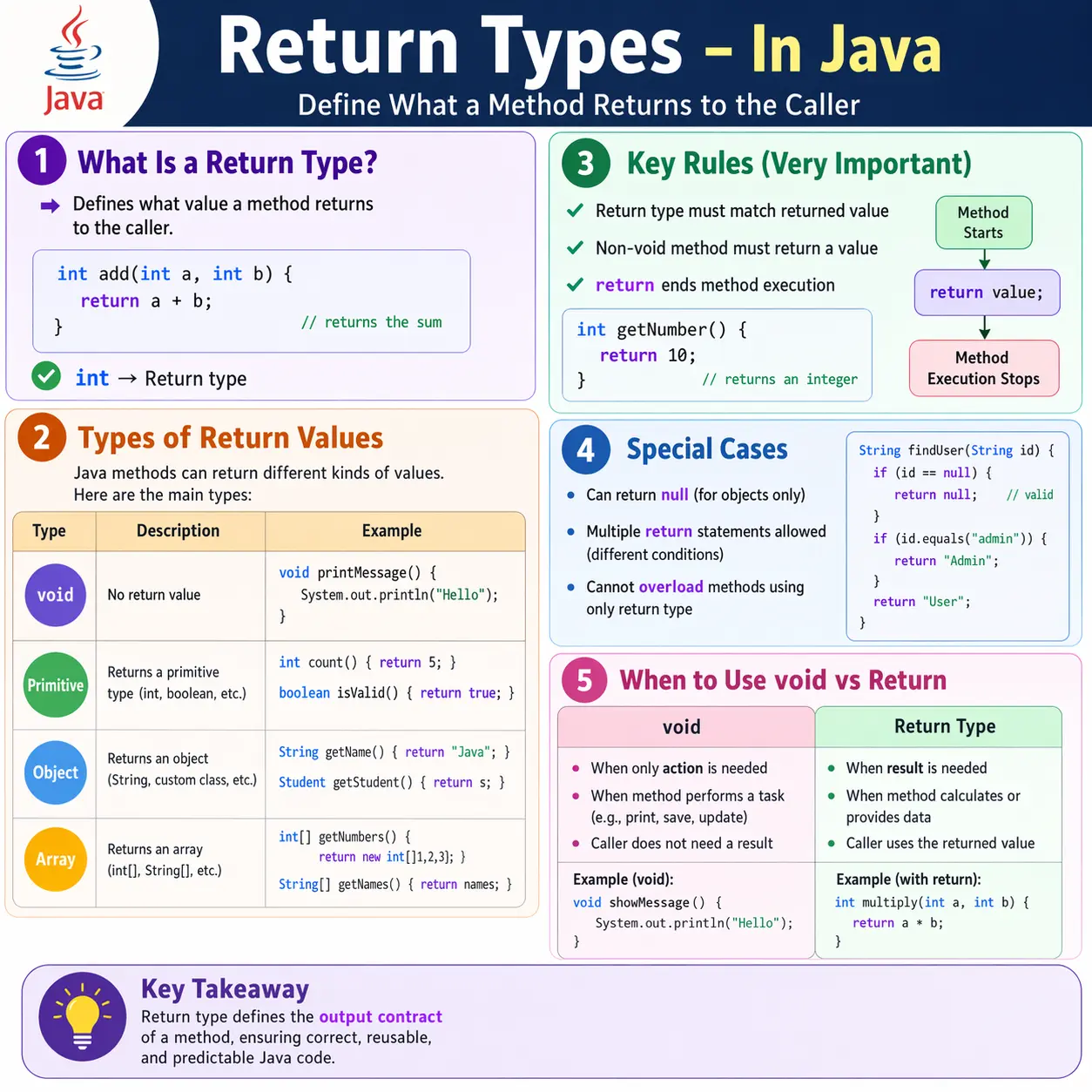
In practical software development, return types influence everything from API design to internal logic structuring. A well-chosen return type improves readability, enforces correctness, and enables reuse. Conversely, poor return type decisions can lead to confusion, bugs, and tightly coupled code. Because of this, return types are not just a syntactic requirement; they are a design decision.
What Is a Return Type?
A return type in Java specifies the type of value that a method sends back to the caller after execution. It is declared in the method signature and determines what kind of data the method produces.
Consider the following example:
int add(int a, int b) {
    return a + b;
}
Here, int is the return type. It indicates that the method will return an integer value. The return statement inside the method ensures that a value of the correct type is sent back to the caller.
If a method does not return any value, it must explicitly declare its return type as void. This distinction is critical, as Java enforces strict type checking at compile time.
General Syntax of Return Types
Every method in Java follows a standard pattern when it comes to return types:
returnType methodName(parameters) {
    return value;
}
The returnType defines what the method will output, while the return statement provides the actual value. The type of the returned value must match the declared return type, otherwise the code will not compile.
Why Return Types Matter
Return types play a crucial role in program design. They define the output of a method, making it clear what the method is responsible for producing. This clarity is essential for both developers and the compiler.
From a readability perspective, return types help developers understand how a method is used. For example, a method returning boolean clearly indicates a validation or condition check, while a method returning an object suggests data retrieval or construction.
Return types also enable chaining and composition. Methods that return values can be used as inputs to other methods, allowing complex logic to be built from simple components.
Types of Return Types in Java
Java supports a wide range of return types, each suited for different scenarios. Understanding these types is essential for effective method design.
Void Return Type
The void return type is used when a method performs an action but does not return any data. Such methods are typically used for operations like printing, logging, or updating state.
For example:
void displayMessage() {
    System.out.println("Hello");
}
This method executes a task but does not produce a value. While a return statement is optional in void methods, it can be used to exit the method early.
Primitive Return Types
Methods can return primitive data types such as int, double, boolean, or char. These are commonly used for calculations, validations, and simple data processing.
For example:
int getAge() {
    return 25;
}

boolean isValid() {
    return true;
}
Primitive return types are efficient and straightforward, making them suitable for performance-critical operations.
Object Return Types
Methods can also return objects, which allows them to provide more complex data structures. This is common in real-world applications where methods return domain objects, configuration data, or API responses.
For example:
String getName() {
    return "Java";
}

Employee getEmployee() {
    return new Employee();
}
Returning objects enables methods to encapsulate and transfer rich data.
Array Return Types
Arrays are often returned when multiple values need to be provided. This is useful for batch processing or when working with collections of data.
For example:
int[] getNumbers() {
    return new int[]{1, 2, 3};
}
Returning arrays allows methods to handle grouped data efficiently.
Class Type as Return Type
Methods can return instances of custom classes, enabling object-oriented design patterns. This is particularly useful in factory methods and service layers.
Calculator getCalculator() {
    return new Calculator();
}
This approach promotes encapsulation and abstraction.
Interface Return Type (Polymorphism)
One of the most powerful uses of return types is returning interfaces instead of concrete classes. This supports loose coupling and polymorphism.
ListgetList() { return new ArrayList<>(); }
Here, the method returns a List, but the actual object is an ArrayList. This design allows flexibility and easier maintenance.
Return Statement Rules
Java enforces strict rules for return statements, and understanding these rules is essential for writing correct code.
Return Type Must Match
The value returned by a method must match its declared return type. Any mismatch results in a compile-time error.
int getValue() {
    return "Java"; // Invalid
}
The correct version would be:
String getValue() {
    return "Java";
}
Every Non-void Method Must Return a Value
If a method declares a return type other than void, it must include a return statement.
int getNumber() {
    int x = 10;
    // Missing return → error
}
Correct implementation:
int getNumber() {
    return 10;
}
Multiple Return Statements Are Allowed
Methods can have multiple return statements, typically used in conditional logic.
int max(int a, int b) {
    if (a > b) {
        return a;
    }
    return b;
}
This improves readability and simplifies decision-making logic.
Return Ends Method Execution
Once a return statement is executed, the method terminates immediately. Any code after it is considered unreachable.
void test() {
    System.out.println("Start");
    return;
    // Unreachable code
}
Returning null
Methods that return objects can return null, indicating the absence of a value.
String getData() {
    return null;
}
While this is valid, it must be used carefully to avoid NullPointerException. Proper null handling is essential in robust applications.
Return Types and Method Overloading
Return types alone cannot differentiate overloaded methods. Method overloading requires different parameter lists.
int test() { }
double test() { } // Invalid
Valid overloading:
int test(int a) { }
double test(double a) { }
This rule ensures clarity and avoids ambiguity during method resolution.
Choosing Between void and Non-void
Deciding whether a method should return a value depends on its purpose. If the method performs an action without producing a result, void is appropriate. If the method computes or retrieves data, a return type should be used.
For example, a method that prints a message should use void, while a method that calculates a sum should return a value.
Real-World Design Considerations
In enterprise applications, return types are carefully chosen to align with design principles. Service methods often return domain objects or collections, while utility methods return primitives or simple types.
Returning interfaces instead of concrete classes is a common best practice, as it promotes flexibility and reduces dependency on specific implementations.
In API design, return types define the contract between the server and the client. A well-defined return type ensures consistent and predictable responses.
Return Types as Method Contracts
A return type should be understood as a contract, not only as a compiler requirement. When a method declares that it returns int, boolean, String, List, or a custom object, it is telling the caller what kind of result can be expected. The caller then writes code based on that promise. If the method name, behavior, and return type do not align, the code becomes confusing even if it compiles successfully.
For example, a method named isEligible should usually return boolean because the name reads like a yes-or-no question. A method named calculateTotal should return a number because it suggests a calculation result. A method named findCustomer may return a Customer object or a structure that represents absence. When return types match method names, code becomes easier to read and easier to use correctly.
This contract also supports teamwork. One developer can write a method, and another developer can call it without reading every line inside the method body. The return type, method name, and parameters provide enough information to understand the method's role. This is one reason well-designed methods make large Java applications maintainable. They reduce the need to inspect implementation details constantly.
Choosing void Carefully
The void return type is useful when a method performs an action rather than producing a value. Examples include printing a message, sending an email, saving a record, clearing a cache, or updating an object's internal state. In such cases, there may be no meaningful value to return. The success of the method may be represented by completion, exception handling, or state change.
However, void should not be used simply because it feels easy. If the caller needs to know the result of an operation, returning a value is often better. A method that validates input can return boolean. A method that processes a payment can return a response object. A method that attempts to find a record can return the record or a representation of absence. Returning useful information allows callers to make decisions without relying on hidden side effects.
Void methods can also be harder to test when they mix logic and output. A method that prints the result directly is less reusable than a method that returns the result and lets the caller decide how to display it. This does not mean void is wrong. It means void should be chosen when the method's true purpose is an action, not when a meaningful result is being ignored.
Boolean Return Types for Decisions
Boolean return types are ideal for methods that answer a clear yes-or-no question. Methods such as isValid, isActive, hasPermission, canRetry, and containsValue are easy to understand because their return type and name work together. When such a method returns true or false, the caller can use it directly in conditional logic.
Good boolean methods should avoid doing too much. A method named isValidEmail should validate an email and return the result. It should not unexpectedly save data, send messages, or modify unrelated state. Boolean methods are most readable when they are side-effect-light and focused on decision-making. This makes conditions in the calling code simple and expressive.
Boolean return types are also common in testing and automation. A utility method may return whether an element is displayed, whether text matches an expected value, whether a file exists, or whether test data is valid. Clear boolean return methods make test assertions easier to read. Instead of embedding complex logic inside every test, the test can call a well-named method and assert the returned result.
Primitive Return Types for Simple Results
Primitive return types are suitable when a method produces a simple numeric, character, or true/false result. Calculations often return int, long, double, or float. Validation checks return boolean. Character-processing methods may return char. These return types are lightweight and direct, making them useful for focused operations.
The main design concern with primitive return types is meaning. A method that returns int may represent count, index, age, status code, quantity, or score. The method name must clarify what the number means. A return type alone cannot tell the whole story. For example, findIndex returning int is clearer than getValue returning int when the method's purpose is to locate a position.
Primitive return types also require careful handling of special cases. A search method returning int may use -1 to indicate not found. A division method returning double must handle division by zero according to the requirement. A count method returning int should define whether invalid records are included. Simple types are easy to use, but the rules behind them must still be clear.
Object Return Types for Rich Data
Object return types are useful when a method needs to return more than a simple value. A method may return a Customer, Order, Employee, Response, ValidationResult, or ReportSummary object. These objects can carry multiple related fields and give the caller a structured result. This is common in real-world Java applications because business operations rarely produce only one isolated value.
For example, a login method might return a LoginResult object containing success status, user role, message, and token information. Returning only boolean may be too limited because the caller may need to know why login failed. Returning a meaningful object gives the program room to communicate richer results without using many separate return values.
Object return types also support clean domain modeling. Instead of returning raw strings or numbers everywhere, methods can return objects that represent real business concepts. This improves readability and reduces mistakes. A Money object, Address object, or TestResult object is often clearer than loosely connected primitive values. Return types can therefore improve both technical design and business clarity.
Returning Collections and Arrays
When a method needs to return multiple values of the same general kind, arrays or collections are common choices. Arrays are useful when the size is fixed or when a simple grouped result is enough. Collections such as List, Set, and Map are more flexible and are widely used in application development. They allow dynamic sizing and provide useful operations for data handling.
Returning an interface type such as List instead of ArrayList is a good design practice because it gives the method freedom to change the internal implementation later. The caller only depends on the behavior promised by the List interface. This reduces coupling. If the method later returns a LinkedList or an unmodifiable list, the caller may not need to change as long as the List contract is respected.
Collection return types should also communicate whether empty results are possible. In many cases, returning an empty list is better than returning null because callers can iterate safely without null checks. A method named getActiveUsers can return an empty list when no users are active. This is usually cleaner than returning null and forcing every caller to check for absence before looping.
Returning null and Safer Alternatives
Returning null is legal for object return types, but it should be used carefully. Null can represent absence, failure, not found, or not initialized, but it does not explain which meaning applies. If callers forget to check for null, NullPointerException can occur. This is why return-type design should define absence clearly.
There are several alternatives depending on the situation. For collections, returning an empty collection is often better. For search operations, Optional can be used in modern Java to indicate that a value may or may not be present. For operations with detailed outcomes, a result object can carry status and message fields. For invalid operations, throwing a meaningful exception may be appropriate.
The best choice depends on the method's contract. If absence is normal and expected, Optional or an empty collection may be clear. If absence means a serious error, an exception may be better. If the operation can fail for business reasons, a response object may be more expressive. The return type should help the caller handle the situation correctly.
Return Types and Exception Handling
Return types and exceptions both communicate outcomes, but they serve different purposes. A return value usually represents normal completion. An exception usually represents an error or abnormal condition. Mixing these ideas poorly can make code hard to understand. For example, returning null for every failure may hide important error details. Throwing exceptions for normal expected absence may make control flow noisy.
Consider a method that finds a user by ID. If the user may legitimately not exist, returning Optional or null with a clear contract may be acceptable. If the database connection fails, an exception is more appropriate because the operation could not be completed normally. The return type should describe normal outcomes, while exceptions should represent exceptional failure paths.
In API design, this distinction becomes important. A service method might return a response object that includes status, data, and message for business-level outcomes. Technical failures may still be handled through exceptions or error responses. Choosing return types thoughtfully helps separate expected business results from unexpected system failures.
Return Types and Method Chaining
Methods that return objects can support method chaining. This means the result of one method is immediately used to call another method. StringBuilder is a common example because append() returns the same builder object, allowing calls such as builder.append("A").append("B").append("C"). Method chaining can make code concise when each method returns an object suitable for the next call.
Chaining works best when the return type is predictable and the method names are clear. It is common in builder patterns, fluent APIs, stream operations, and configuration APIs. A method that returns this can allow repeated configuration calls on the same object. A method that returns a new transformed object can allow pipeline-style processing.
However, chaining should not reduce readability. Very long chains can be hard to debug because intermediate results are not named. If each step has important business meaning, assigning intermediate values may be clearer. Return types make chaining possible, but good design decides whether chaining improves or harms readability.
Return Types in Testing and Automation
Return types are very important in automation frameworks. A method that checks whether an element is visible may return boolean. A method that gets text from a page may return String. A method that collects all validation errors may return List<String>. A method that creates test data may return a custom object. These return types make test code easier to read and reuse.
For example, instead of writing Selenium element lookup logic in every test, a page object method can return the displayed message. The test can then compare the returned String with the expected value. A login method can return a page object representing the next page. This supports clean page object design because the return type communicates what happens after the action.
Return types also improve reporting utilities. A method that builds an execution summary can return a String. A method that analyzes results can return a TestSummary object. A method that loads data can return a collection of test cases. When return types are chosen well, automation code becomes modular rather than procedural and repetitive.
Return Type Design in Real Applications
Real applications rely heavily on return type design. Controller methods may return response objects. Service methods may return domain objects, result objects, or collections. Repository methods may return entities or optional values. Utility methods may return primitives or strings. Each layer has different needs, and return types should match those needs.
A service method that performs a business operation often needs to communicate more than success or failure. It may need to return generated IDs, messages, validation errors, updated objects, or next-step instructions. In such cases, a custom response class can be clearer than returning boolean or String. The return type becomes part of the business contract.
Choosing return types well reduces coupling. Returning interfaces, abstractions, or domain-specific result objects allows implementation details to remain hidden. Poor return types expose too much internal structure or force callers to understand details they should not need. Good return types make methods easier to call correctly.
Debugging Return Type Problems
Return type problems often appear as compile-time errors, which is helpful because Java catches many mistakes early. If a method declares int but returns String, the compiler rejects it. If a non-void method has a path that does not return a value, the compiler reports the issue. These errors are not obstacles; they protect the program from inconsistent method behavior.
Runtime issues usually happen around null returns, incorrect assumptions, or poorly defined contracts. A method may return null when the caller expects an object. A method may return an empty list when the caller expects at least one item. A method may return a general object that requires unsafe casting. Debugging such problems starts by checking the method contract and verifying whether all possible return paths are documented and handled.
Another common debugging area is multiple return statements. Multiple returns are allowed and often readable, but each path must return the correct type and expected meaning. If one branch returns a default value and another returns calculated data, the caller must be able to distinguish the outcomes if that matters. Clear return values reduce hidden logic errors.
Interview-Ready Explanation Strategy
In interviews, a strong answer should define return type as the type of value a method gives back to its caller. Then explain that void is used when no value is returned, while primitive, object, array, collection, class, and interface types can be returned depending on the method's purpose. This covers both syntax and practical usage.
Next, mention rules: a non-void method must return a value, the returned value must match the declared type, return ends method execution, and return type alone cannot overload a method. These points show that you understand Java's compile-time checks. Then add design insight: return types form a contract and should be chosen for clarity, correctness, and maintainability.
A practical example helps. A method named isValidEmail should return boolean. A method named getUser should return a User or Optional<User>. A method named getErrors can return List<String>. These examples show that the return type should match the method's responsibility. Interviewers value this because it connects language rules with real coding decisions.
Covariant Return Types at a High Level
Java also supports covariant return types in method overriding. This means an overriding method in a subclass can return a more specific type than the method declared in the parent class, as long as the returned type is compatible. This is useful because it allows subclasses to provide more precise return information while still following the parent method contract.
For example, a parent method may return Animal, while an overriding child method returns Dog. Since Dog is an Animal, the return type remains compatible. This feature improves flexibility in object-oriented design and is often discussed after learners understand basic return types, inheritance, and overriding. It shows that return types are connected not only to simple methods but also to polymorphism.
At a beginner level, the key point is simple: return types must follow Java's type rules, but those rules allow useful flexibility in inheritance. The returned value must still satisfy the method contract. Covariant return types make APIs more convenient without breaking compatibility with parent class references.
Common Beginner Mistakes
Beginners often forget to include return statements in non-void methods, leading to compilation errors. Another common mistake is returning the wrong data type, which violates the method contract.
Some developers mistakenly believe that return type alone can differentiate overloaded methods, which is not true. Others misuse null without proper checks, causing runtime exceptions.
Understanding these mistakes helps in writing cleaner and more reliable code.
Best Practices for Return Types
Effective use of return types involves clarity and consistency. Methods should return meaningful values that align with their purpose. Avoid returning overly complex structures when simpler alternatives suffice.
Use void only when no meaningful result is required. Prefer returning objects or collections when multiple values need to be conveyed.
When designing APIs, use interface-based return types to promote loose coupling. Always validate return values and handle null cases appropriately.
Interview Perspective
In interviews, return types are often used to test understanding of method design and execution flow. A concise answer should define a return type as the type of value a method returns.
A detailed answer should include different types of return values, rules for return statements, and the importance of matching return types with returned values. Discussing real-world usage and best practices demonstrates deeper knowledge.
Key Takeaway
Return types define the output and contract of a method. They ensure that methods behave predictably and integrate seamlessly with other parts of the program. Choosing the right return type is essential for clarity, correctness, and maintainability.
One-Line Insight
A return type defines what a method gives back, making it the core contract between method logic and its caller.
1. Method Returning int
class Demo {
static int add(int a, int b) {
return a + b;
}
public static void main(String[] args) {
System.out.println(add(5, 3));
}
}
Explanation
- Returns primitive value
- Output: 8
2. Method Returning double
class Demo {
static double divide(int a, int b) {
return (double) a / b;
}
public static void main(String[] args) {
System.out.println(divide(5, 2));
}
}
Explanation
- Explicit type casting
- Output: 2.5
3. Method Returning boolean
class Demo {
static boolean isEven(int n) {
return n % 2 == 0;
}
public static void main(String[] args) {
System.out.println(isEven(10));
}
}
Explanation
- Often used in conditions
- Output: true
4. Method Returning String
class Demo {
static String getTool() {
return "Selenium";
}
public static void main(String[] args) {
System.out.println(getTool());
}
}
Explanation
- Returns object
- Output: Selenium
5. Returning null
class Demo {
static String findName(boolean found) {
if (found) {
return "Java";
}
return null;
}
public static void main(String[] args) {
System.out.println(findName(false));
}
}
Explanation
- Valid for reference types
- Output: null
6. Method Returning Array
class Demo {
static int[] getNumbers() {
return new int[]{1, 2, 3};
}
public static void main(String[] args) {
int[] nums = getNumbers();
System.out.println(nums[0]);
}
}
Explanation
- Arrays are objects
- Output: 1
7. Method Returning Object
class Demo {
static StringBuilder getBuilder() {
return new StringBuilder("Hello");
}
public static void main(String[] args) {
System.out.println(getBuilder());
}
}
Explanation
- Returns mutable object
- Output: Hello
8. Method Returning Custom Object
class User {
String name;
User(String name) {
this.name = name;
}
}
class Demo {
static User getUser() {
return new User("Admin");
}
public static void main(String[] args) {
User u = getUser();
System.out.println(u.name);
}
}
Explanation
- Common in real projects
- Output: Admin
9. Method Returning Collection (List)
import java.util.*;
class Demo {
static List getTools() {
return Arrays.asList("Selenium", "Java");
}
public static void main(String[] args) {
System.out.println(getTools());
}
}
Explanation
- Preferred over arrays
- Output: [Selenium, Java]
10. Method Returning void
class Demo {
static void show() {
System.out.println("No return");
}
public static void main(String[] args) {
show();
}
}
Explanation
- No return value
- Output: No return
11. Returning Value From if-else
class Demo {
static String grade(int marks) {
if (marks >= 60) {
return "Pass";
} else {
return "Fail";
}
}
public static void main(String[] args) {
System.out.println(grade(70));
}
}
Explanation
- All paths must return
- Output: Pass
12. Multiple Return Statements
class Demo {
static int max(int a, int b) {
if (a > b) return a;
return b;
}
public static void main(String[] args) {
System.out.println(max(5, 9));
}
}
Explanation
- Only one return executes
- Output: 9
13. Return Type with Method Overloading
class Demo {
static int add(int a, int b) {
return a + b;
}
static double add(double a, double b) {
return a + b;
}
public static void main(String[] args) {
System.out.println(add(2, 3));
System.out.println(add(2.5, 3.5));
}
}
Explanation
- Return type alone cannot overload
- Output:
5
6.0
14. Return Type and Ternary Operator
class Demo {
static String check(int age) {
return age >= 18 ? "Adult" : "Minor";
}
public static void main(String[] args) {
System.out.println(check(16));
}
}
Explanation
- Clean conditional return
- Output: Minor
15. Returning Wrapper Class
class Demo {
static Integer square(int x) {
return x * x;
}
public static void main(String[] args) {
System.out.println(square(4));
}
}
Explanation
- Autoboxing applies
- Output: 16
16. Return Inside Loop
class Demo {
static int findFirstEven(int[] arr) {
for (int n : arr) {
if (n % 2 == 0) {
return n;
}
}
return -1;
}
public static void main(String[] args) {
System.out.println(findFirstEven(new int[]{1, 3, 6, 7}));
}
}
Explanation
- Exits method immediately
- Output: 6
17. Returning this
class Demo {
int x;
Demo set(int x) {
this.x = x;
return this;
}
public static void main(String[] args) {
Demo d = new Demo().set(10);
System.out.println(d.x);
}
}
Explanation
- Enables method chaining
- Output: 10
18. Returning Optional
import java.util.Optional;
class Demo {
static Optional getName(boolean found) {
return found ? Optional.of("Java") : Optional.empty();
}
public static void main(String[] args) {
System.out.println(getName(false));
}
}
Explanation
- Avoids null
- Output: Optional.empty
19. Illegal: Missing Return Statement
class Demo {
// static int test(int x) {
//     if (x > 0) return x;
// } // Compile-time error
}
Explanation
- All paths must return value
20. Interview Summary – Return Types
class Demo {
static int test(int x) {
return x + 10;
}
public static void main(String[] args) {
int result = test(5);
System.out.println(result);
}
}
Explanation
- Returned value must be used or stored
- Output: 15