Process vs Thread in Java
Process and Thread are fundamental concepts in operating systems and Java concurrency. A process represents an independent program in execution, while a thread represents a smaller unit of execution inside a process. Understanding this difference is essential before learning Java multithreading, synchronization, thread safety, performance tuning, and concurrency-related interview questions.
In everyday usage, we run many programs at the same time. A browser, code editor, music player, terminal, database server, and Java application can all run together. At the operating-system level, each running program is usually managed as a process. Inside a single process, multiple activities may still happen at the same time. A browser may render a page, download resources, run JavaScript, and respond to user input. A Java application may handle requests, write logs, perform background cleanup, and communicate with a database. These smaller execution paths are handled using threads.
The difference matters because processes and threads make different trade-offs. Processes provide stronger isolation because each process has its own memory and resources. Threads are lighter and faster because they share memory within the same process. Processes are safer when tasks must be separated. Threads are more efficient when tasks belong to the same application and need to cooperate. Good software design depends on choosing the right level of execution for the problem.
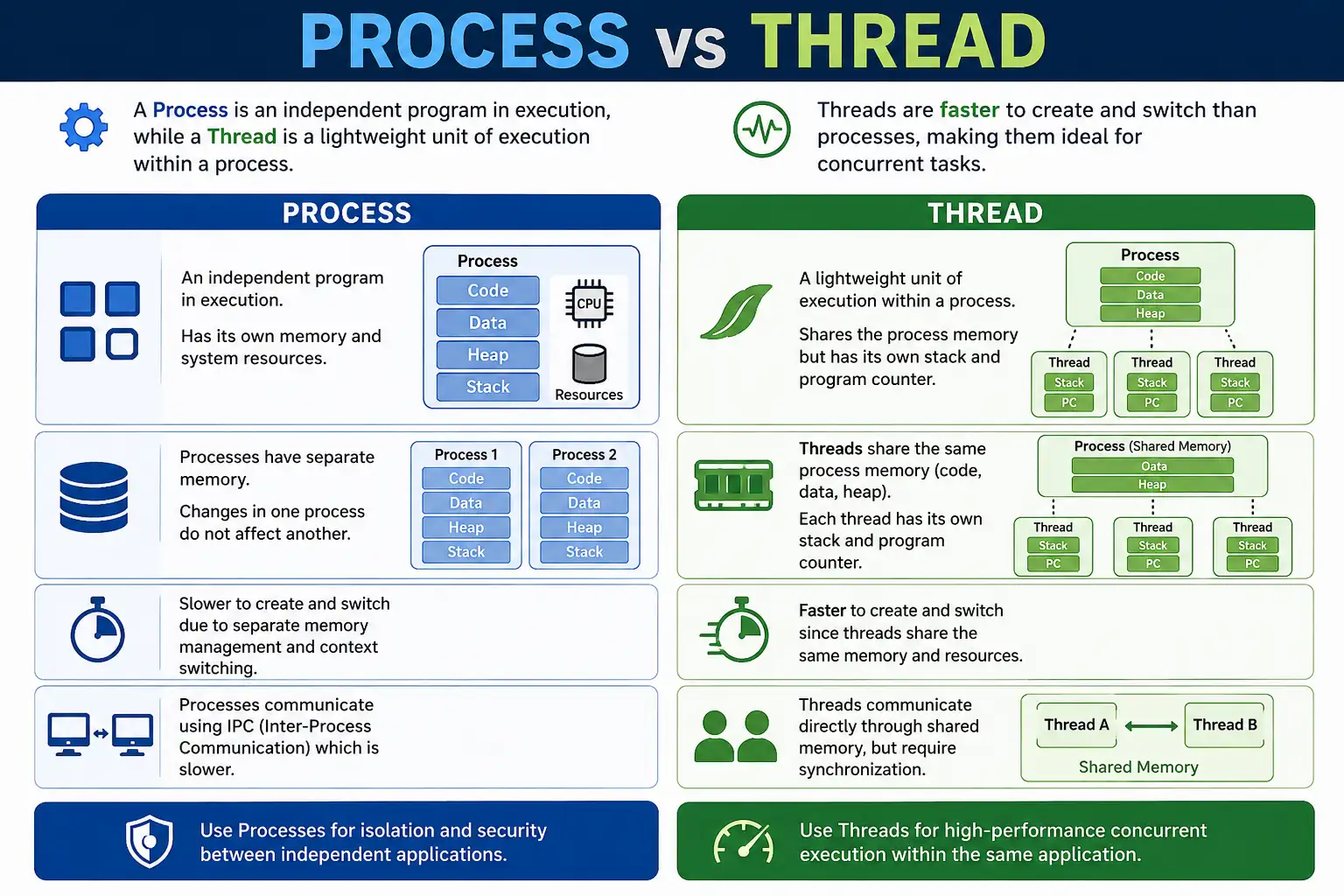
What Is a Process?
A process is an independent program in execution with its own memory space and system resources. When the operating system starts a program, it allocates resources for that program, loads the program code, creates a memory space, and begins execution. That running instance is called a process.
Key Characteristics of a Process
A process has separate memory, including its own heap, stack, code area, and data area. It also has operating-system resources such as file handles, environment information, security permissions, and process identifiers. Because a process owns an isolated execution environment, one process cannot directly access another process's variables by default.
This isolation makes processes more secure and robust. If one independent application crashes, other applications normally continue running. The cost is overhead. Creating a process is heavier than creating a thread, and switching between processes is usually slower because the operating system must switch larger execution contexts.
A simple real-world example is running Chrome, VS Code, and Spotify at the same time. Each application is a separate process or group of processes. They do not automatically share memory. If one application fails, it should not directly corrupt the memory of another unrelated application.
What Is a Thread?
A thread is a lightweight unit of execution within a process. Every process has at least one thread, often called the main thread. A process can create additional threads to perform multiple tasks concurrently. Threads inside the same process share the process's heap and resources, but each thread has its own stack, program counter, and execution path.
Key Characteristics of a Thread
Threads are lightweight compared to processes because they do not need a completely separate memory space. Creating a thread is faster, and switching between threads is generally cheaper than switching between processes. This makes threads useful for improving responsiveness and throughput inside one application.
The advantage of shared memory is also the source of risk. Because multiple threads can access the same objects, they can interfere with each other if synchronization is missing. Race conditions, stale data, deadlocks, and inconsistent state are thread-level problems that do not appear in the same way between isolated processes.
A Java application handling user interface events, background tasks, network calls, scheduled cleanup, and logging may use multiple threads inside the same JVM process. The threads cooperate within one application, but the developer must protect shared data correctly.
Relationship Between Process and Thread
Process
 |-- Thread-1
 |-- Thread-2
 |-- Thread-3
A process must have at least one thread because a program cannot execute without an execution path. Threads cannot exist independently of a process. They live inside a process and use the process's memory and resources. This relationship is the foundation for understanding Java multithreading: a Java program runs in a JVM process, and that process contains the main thread plus other application and JVM-managed threads.
The process provides the container. Threads provide execution inside that container. If the process ends, all threads inside it end. If one thread fails with an uncaught exception, the whole process does not necessarily terminate, but shared state may be affected depending on what the thread was doing.
Process vs Thread (Interview Favorite Table)
Interviews often ask for a direct comparison between process and thread. The table below summarizes the core differences, but a strong answer should also explain why those differences matter in real software design.
| Aspect | Process | Thread |
|---|---|---|
| Definition | Program in execution | Unit of execution |
| Memory | Separate memory | Shared memory |
| Communication | IPC required | Direct (shared memory) |
| Overhead | High | Low |
| Context switching | Slow | Fast |
| Failure impact | Isolated | Affects entire process |
| Creation time | High | Low |
| Security | High | Lower |
Communication
Process Communication
Processes do not share memory by default, so communication between processes requires inter-process communication, commonly called IPC. Examples include files, pipes, sockets, message queues, shared memory segments, and operating-system-specific communication mechanisms. IPC adds overhead, but it preserves isolation and can support communication across different programs or even different machines.
Thread Communication
Threads communicate more easily because they share the same process memory. One thread can write to an object
and another thread can read it. However, this convenience requires synchronization. Java provides tools such
as synchronized, locks, volatile variables, concurrent collections, wait/notify, and higher-level
concurrency utilities to make shared access safer.
Multitasking Types
Process-based Multitasking
Process-based multitasking means the operating system runs multiple processes concurrently. For example, the operating system may run a browser, an editor, a terminal, and a music player at the same time. Each process has its own memory and is scheduled by the operating system.
Thread-based Multitasking
Thread-based multitasking means multiple threads run within the same process. In Java, this is the basis of multithreading. A server may use separate threads to handle multiple client requests. A desktop application may use one thread for the user interface and another for background work. The tasks belong to the same application, so threads are often more efficient than separate processes.
Java Perspective (Important)
From a Java perspective, a Java application usually runs inside one JVM process. When you execute a Java
program, the operating system starts the JVM, and the JVM starts the main thread to run the
main() method. The JVM may also create internal threads for garbage collection, signal handling,
finalization, JIT compilation, and other runtime services.
Application code can create additional threads using Thread, Runnable,
Callable, executor services, parallel streams, or framework-managed thread pools. All these
threads still run inside the same JVM process unless the program explicitly starts another process.
System.out.println(Thread.currentThread().getName());
For a basic Java program, this prints main, showing that the main method itself runs on a thread.
This is often the first practical connection between Java code and the process-thread model.
When to Use Process vs Thread
Use Process When:
Use separate processes when strong isolation is needed. Independent applications, security-sensitive tasks, plugins that should not crash the main application, and workloads that require separate permissions are often better modeled as processes. Processes are heavier, but they provide a stronger boundary.
Use Thread When:
Use threads when tasks belong to the same application, need to share data, and benefit from concurrent execution. Web servers, background workers, asynchronous tasks, UI responsiveness, scheduled jobs, and parallel computations are typical thread-based use cases. Threads are efficient, but shared state must be designed carefully.
Common Beginner Misconceptions
One common misconception is thinking that threads have completely separate memory. Threads have their own stack, but they share the process heap. This is why two threads can read and modify the same static variable or object field. Another misconception is assuming processes are faster because they are more independent. In practice, processes are usually heavier to create and switch than threads.
Beginners also assume that using more threads always improves performance. This is not true. Too many threads can increase context switching, memory usage, synchronization overhead, and complexity. Threads help when there is real concurrency to exploit, such as waiting for I/O, handling multiple users, or using multiple CPU cores. They do not automatically make poor logic faster.
Another serious misconception is ignoring synchronization. Shared memory makes communication easy, but it also makes data corruption possible. If multiple threads update shared data without proper coordination, the result may be unpredictable.
Interview-Ready Answers
Short Answer
A process is an independent program in execution, while a thread is a lightweight execution unit within a process.
Detailed Answer
In Java and operating systems, a process has its own memory and resources, whereas threads exist within a process and share its memory. Threads are lightweight, faster to create, and enable concurrency, but failures in one thread can affect the entire process.
A strong interview answer should mention memory isolation, communication style, context switching, failure impact, and Java's JVM model. Processes communicate through IPC and provide stronger isolation. Threads communicate through shared memory and need synchronization.
Key Takeaway
Process means isolation, separate memory, and stronger safety boundaries. Thread means lightweight execution, shared memory, and faster cooperation inside one application. Use threads for efficient concurrency within a Java application and use processes when independence, security, or fault isolation matters more.
How Java Developers Should Think About the Choice
In real projects, the decision between process and thread is rarely made only from a textbook definition. Developers usually start by asking whether the work belongs inside the same application boundary. If tasks need to share domain objects, reuse the same configuration, participate in the same transaction flow, or respond as part of one service, threads or thread pools are usually appropriate. This is why Java web servers, schedulers, asynchronous jobs, and background workers are commonly thread-based.
If the work should be isolated because it is risky, independent, resource-heavy, or separately deployable, a separate process may be better. For example, a Java application may call an external image processor, launch a command-line utility, or communicate with another microservice. In those cases, the process boundary helps protect the main application. If the external process crashes, the Java process may still handle the failure and continue.
Another practical factor is resource management. Threads share the same heap, so a memory leak or uncontrolled task inside one application can affect other threads in that same process. Separate processes have separate memory, which makes resource boundaries clearer. On the other hand, separate processes require heavier startup, more monitoring, explicit communication, and more deployment coordination.
Modern Java applications often use both. A single service may run as one process and use many internal threads through an executor service. That service may also communicate with other processes over HTTP, messaging systems, or sockets. Understanding process vs thread helps developers reason about where work runs, how data is shared, how failures spread, and what kind of coordination is required.
Process vs Thread Examples and Concepts
The examples below connect the operating-system concept with Java code. Some examples are conceptual because process behavior is controlled by the operating system, while thread behavior is directly visible in Java code. Together, they show how execution units are created, how memory is shared or isolated, and why synchronization becomes important when threads are involved.
While reading these examples, keep the main distinction in mind. Starting a separate program creates another
process. Starting a Thread creates another execution path inside the same Java process. Both can
run concurrently, but they do not have the same memory model or cost.
1. What Is a Process (Conceptual Example)
When this Java program is launched from the command line, an IDE, or a build tool, the operating system starts a JVM process to run it. The program itself may be simple, but the running JVM is still a process from the operating-system point of view.
// Running this Java program creates a PROCESS
class Demo {
    public static void main(String[] args) {
        System.out.println("Java Program Running");
    }
}
Explanation
The operating system creates a process, assigns memory, and starts execution. This process is heavier than a thread because it owns a separate execution environment. If the same program is launched twice, two separate JVM processes are created.
2. What Is a Thread (Single Process, Multiple Threads)
This example creates a new thread inside the same Java process. The main thread starts another thread, so two execution paths exist within one JVM process.
class Demo {
    public static void main(String[] args) {
        Thread t = new Thread();
        t.start();
        System.out.println("Main Thread");
    }
}
Explanation
The thread runs inside the process that is already executing the Java program. It shares the same heap and
class metadata with the main thread. Because this particular thread has no custom task, it starts and
finishes quickly. In real programs, a thread normally receives work through a Runnable,
Callable, or executor service.
3. Process Creation Using Runtime.exec()
Java can also request the operating system to start another process. Runtime.exec() is one older
way to launch an external program from Java.
import java.io.*;

class Demo {
    public static void main(String[] args) throws Exception {
        Runtime.getRuntime().exec("notepad");
        System.out.println("New Process Started");
    }
}
Explanation
This launches a separate operating-system process. The new process does not share Java variables with the current JVM. Communication with it requires streams, files, sockets, or other IPC techniques. Starting a process is heavier than starting a thread, so it should be used when external execution or isolation is needed.
4. Process Creation Using ProcessBuilder
ProcessBuilder is the more flexible API for starting and configuring external processes. It can
set command arguments, environment variables, working directory, and stream handling.
import java.io.*;

class Demo {
    public static void main(String[] args) throws Exception {
        ProcessBuilder pb = new ProcessBuilder("notepad");
        pb.start();
    }
}
This still creates a separate process, not a Java thread. The difference is API control. ProcessBuilder is clearer for real applications that need to manage external commands.
5. Thread Creation Using Thread Class
A Java thread can be created by extending the Thread class and overriding its
run() method. Calling start() tells the JVM to begin a new thread of execution.
class MyThread extends Thread {
    public void run() {
        System.out.println("Thread Running");
    }

    public static void main(String[] args) {
        MyThread t = new MyThread();
        t.start();
    }
}
It is important to call start(), not run(), when a new thread is required. Calling
run() directly executes the method like a normal method call on the current thread.
6. Thread Creation Using Runnable
Implementing Runnable is often preferred because it separates the task from the thread object.
The Runnable describes what should run; the Thread provides the execution path.
class MyTask implements Runnable {
    public void run() {
        System.out.println("Runnable Thread");
    }

    public static void main(String[] args) {
        Thread t = new Thread(new MyTask());
        t.start();
    }
}
This approach is more flexible because the class can still extend another class if needed. It also fits well with executor services, where tasks are submitted to thread pools rather than manually creating threads.
7. Memory Difference (Process vs Thread)
This example uses a static variable to show shared memory between threads. Both threads can access and modify the same variable because they are running inside the same process.
class Demo {
    static int x = 10;

    public static void main(String[] args) {
        Thread t1 = new Thread(() -> x++);
        Thread t2 = new Thread(() -> x++);

        t1.start();
        t2.start();
    }
}
Explanation
Threads share the same heap, so shared variables are visible to multiple threads. Separate processes do not
directly share ordinary variables. If two separate JVM processes run this class, each process has its own
copy of x.
8. Inter-Thread Communication (Shared Data)
Threads can communicate through shared data, but shared updates must be protected. The example below increments a shared counter from two threads. It is simple enough for demonstration, but real shared updates usually need synchronization or atomic variables.
class Demo {
    static int count = 0;

    public static void main(String[] args) throws Exception {
        Thread t1 = new Thread(() -> count++);
        Thread t2 = new Thread(() -> count++);

        t1.start();
        t2.start();

        t1.join();
        t2.join();

        System.out.println(count);
    }
}
The join() calls make the main thread wait until both worker threads complete. Without waiting,
the main thread might print the counter before the other threads finish. This example also hints at race
conditions: count++ is not an atomic operation.
9. Inter-Process Communication (IPC) - Not Direct
Processes cannot communicate by directly reading each other's variables. They need an explicit communication mechanism approved by the operating system or runtime environment.
// Processes cannot directly share variables
// IPC uses files, sockets, pipes
Explanation
IPC is more complex than shared thread memory, but it provides isolation. This is why independent services often communicate using HTTP, sockets, queues, or files rather than sharing in-memory objects.
10. Context Switching Cost (Concept)
Context switching means the CPU stops executing one execution unit and resumes another. Switching between processes is generally more expensive than switching between threads because more memory and resource context must be changed.
Process: expensive context switching
Thread: lightweight context switching
This does not mean threads are free. Too many threads can still create heavy context-switching overhead. Efficient Java applications usually use thread pools instead of creating unlimited threads.
11. Thread Inside One Process
Every Java program starts execution on a thread. The default thread that runs main() is named
main.
class Demo {
    public static void main(String[] args) {
        System.out.println(Thread.currentThread().getName());
    }
}
Output
main
This example is small, but it is important. Even if a program does not explicitly create threads, it still runs on at least one thread inside the JVM process.
12. Multiple Threads in Same Process
Multiple threads can be started inside the same Java process. The exact order of output is not guaranteed because scheduling is controlled by the JVM and operating system.
class Demo {
    public static void main(String[] args) {
        new Thread(() -> System.out.println("Thread 1")).start();
        new Thread(() -> System.out.println("Thread 2")).start();
    }
}
This is the beginning of concurrent programming. Once multiple threads exist, developers must think about scheduling, shared state, synchronization, and lifecycle management.
13. Process Failure vs Thread Failure
Failure impact is one of the clearest design differences. If a thread throws an uncaught exception, that thread terminates. The process may continue if other non-daemon threads are still running.
class Demo {
    public static void main(String[] args) {
        Thread t = new Thread(() -> {
            int x = 10 / 0;
        });
        t.start();
        System.out.println("Main thread alive");
    }
}
Explanation
A single thread crash does not necessarily kill the entire process, but it can leave shared data incomplete or inconsistent. If the process itself crashes or is terminated, all threads inside that process stop.
14. Thread Shares Heap, Process Does Not
This example again shows shared heap behavior. One thread changes a static variable, and the change belongs to the same JVM process memory.
class Demo {
    static int x = 5;

    public static void main(String[] args) {
        new Thread(() -> {
            x = 10;
            System.out.println(x);
        }).start();
    }
}
If another thread reads x, it may observe the updated value depending on timing and memory
visibility rules. In serious concurrent code, shared variables require proper synchronization or atomic
constructs.
15. Performance Comparison (Concept)
Threads usually start faster than processes because they share process resources. Processes require more operating-system setup and separate memory management.
Thread: Faster startup
Process: Slower startup
However, performance should be measured in context. A separate process may still be the right choice if isolation, independent deployment, or failure containment is more important than startup cost.
16. Thread Communication via wait() / notify()
Java supports inter-thread coordination through monitor methods such as wait() and
notify(). These methods must be called while holding the object's monitor with
synchronized.
class Demo {
    static final Object lock = new Object();

    public static void main(String[] args) {
        Thread t = new Thread(() -> {
            synchronized (lock) {
                try {
                    lock.wait();
                } catch (Exception e) {}
                System.out.println("Thread Resumed");
            }
        });

        t.start();

        synchronized (lock) {
            lock.notify();
        }
    }
}
This example is simplified. Production code must handle timing issues carefully because a notification can be
missed if the waiting thread has not started waiting yet. Higher-level utilities such as
CountDownLatch, BlockingQueue, and executor services are often easier and safer.
17. Process Example vs Thread Example (Side-by-Side)
The side-by-side comparison shows the practical API difference. Starting an external program creates another process. Starting a Thread creates another execution path inside the current Java process.
// Process
Runtime.getRuntime().exec("notepad");

// Thread
new Thread(() -> System.out.println("Thread")).start();
The process has its own memory and lifecycle. The thread shares the current process memory and should be managed as part of the application's concurrency design.
18. Thread Safety Needed, Process Safety Built-In
Thread safety is required because threads share memory. Process isolation reduces accidental memory interference because processes do not directly share normal variables.
// Thread: synchronization needed
// Process: isolated memory
Process isolation does not eliminate all risks, but it creates a stronger boundary. Threaded applications must deliberately protect shared state.
19. Real-World Example
Browsers are often used as a simplified analogy. A browser may use processes for isolation and threads for internal work. Exact browser architecture varies, but the analogy helps explain the trade-off.
Browser: Process
Tabs: Threads
Modern browsers may use multiple processes for tabs as well, mainly for security and crash isolation. The broader lesson remains useful: processes give isolation, while threads provide lightweight concurrent work inside a process.
20. Interview Summary - Process vs Thread
A concise interview summary should cover memory, communication, overhead, and failure impact. The goal is not just to define terms, but to show that you understand the trade-offs.
Process: Independent execution unit
Thread: Lightweight execution unit inside process
Key Differences
| Feature | Process | Thread |
|---|---|---|
| Memory | Separate | Shared |
| Creation | Heavy | Light |
| Communication | IPC | Shared memory |
| Failure impact | Kills all | Single thread |
| Speed | Slower | Faster |