One-Dimensional Arrays
A one-dimensional array (commonly referred to as a 1D array) is one of the most fundamental data structures in Java. It provides a way to store multiple values of the same data type in a single, continuous block of memory. Unlike primitive variables that hold a single value, arrays allow developers to group related data together and access them efficiently using an index.
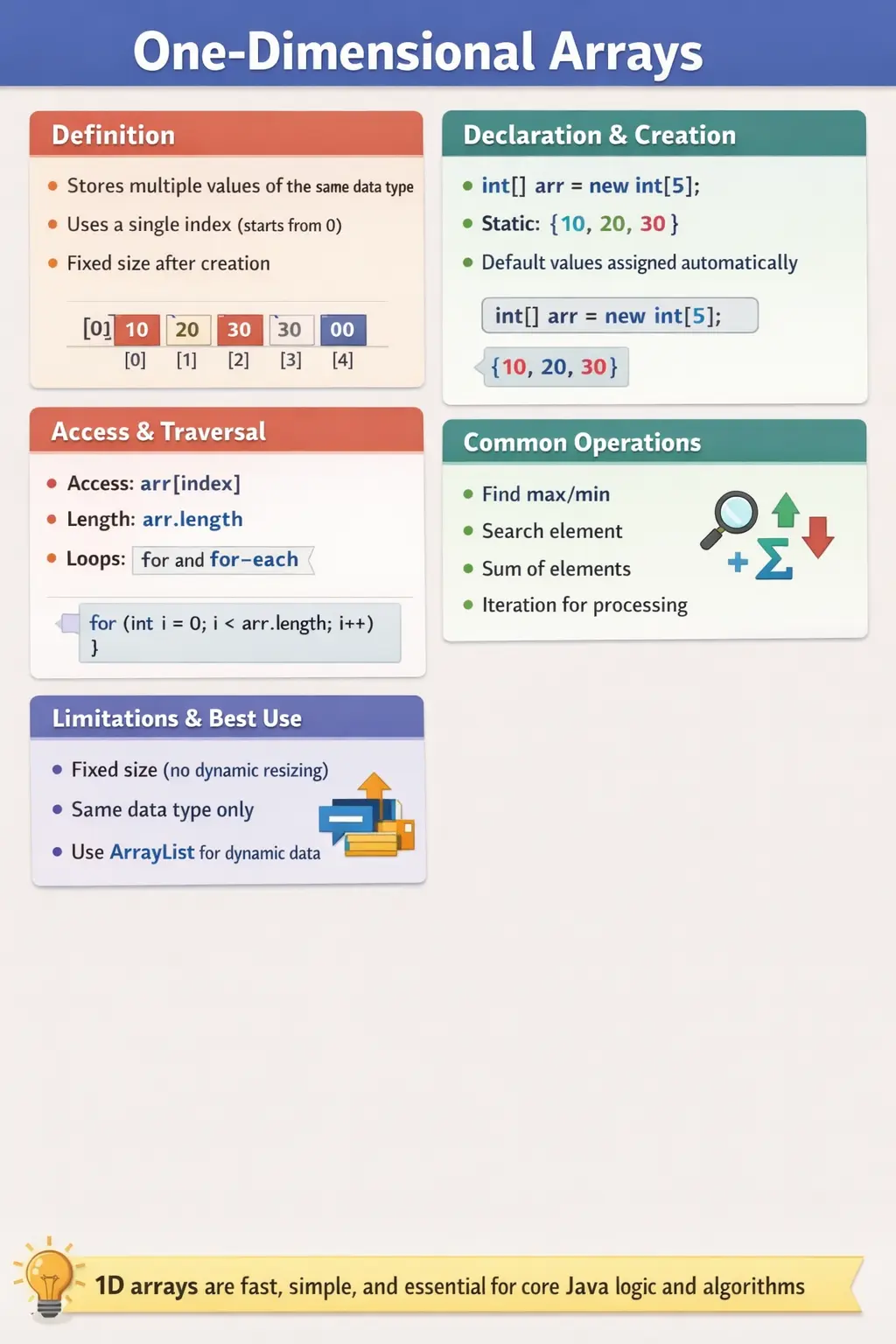
Understanding one-dimensional arrays is essential for anyone learning Java, as they form the basis for more advanced data structures such as multidimensional arrays, collections, and even algorithm design. From simple tasks like storing marks of students to complex operations like searching, sorting, and data processing, arrays play a critical role in both academic and real-world programming scenarios.
What Is a One-Dimensional Array?
A one-dimensional array is a linear data structure that stores elements sequentially in memory. Each element in the array is accessed using a single index, which starts from zero. This indexing mechanism is what allows fast and direct access to any element in the array.
Unlike dynamic data structures, arrays in Java have a fixed size. Once an array is created, its size cannot be changed. This characteristic makes arrays predictable in terms of memory usage but also introduces certain limitations.
All elements in an array must be of the same data type. This ensures type safety and efficient memory allocation. For example, an integer array can only store integers, and a string array can only store string references.
Because of their simplicity and performance efficiency, one-dimensional arrays are widely used in scenarios where the number of elements is known in advance and does not change frequently.
Why Arrays Are Important
Arrays solve a very practical problem in programming: managing multiple values efficiently. Without arrays, developers would need to create separate variables for each value, which quickly becomes impractical and unmanageable.
Arrays allow data to be stored in a structured and organized way. They enable iteration, which means performing operations on multiple elements using loops. This is especially useful in applications that require bulk data processing, such as calculating totals, averages, or performing transformations.
Another important advantage is performance. Arrays provide constant-time access (O(1)) to elements using an index. This makes them one of the fastest data structures for accessing data.
Arrays also serve as the foundation for more advanced structures. Understanding arrays is essential before moving on to collections like ArrayList, as many concepts such as indexing and traversal remain the same.
Declaration and Creation of Arrays
In Java, declaring an array involves specifying the data type followed by square brackets. This indicates that the variable will hold multiple values of that type.
There are two common ways to declare an array, but the industry-standard approach places the brackets next to the data type. This improves readability and consistency.
After declaration, the array must be instantiated. Instantiation involves allocating memory for the array using the new keyword. At this stage, the size of the array is defined, and memory is reserved for that number of elements.
Once created, the array is assigned default values. For numeric types, the default value is zero. For boolean, it is false. For objects, it is null. These default values ensure that the array is in a predictable state even before explicit initialization.
Array Initialization Techniques
Arrays can be initialized in two primary ways: static initialization and dynamic initialization.
Static initialization is used when the values are known at the time of declaration. In this approach, the array is created and initialized in a single step. This is concise and commonly used for small datasets or examples.
Dynamic initialization, on the other hand, involves creating the array first and then assigning values to each index individually. This approach is useful when values are generated at runtime or depend on user input.
Both methods are widely used in real-world applications, and choosing between them depends on the specific requirements of the program.
Accessing Array Elements
Accessing elements in a one-dimensional array is straightforward. Each element is accessed using its index, which starts from zero. This zero-based indexing is a standard convention in Java and many other programming languages.
Because arrays provide direct access to elements, retrieving a value is extremely fast. However, this also means that accessing an invalid index results in a runtime exception known as ArrayIndexOutOfBoundsException.
This exception occurs when the index is negative or exceeds the array’s size. Proper validation and careful loop design are essential to avoid such errors.
Understanding the length Property
Every array in Java has a built-in property called length. This property returns the total number of elements in the array. It is important to note that length is not a method but a property, so it is accessed without parentheses.
The length property is commonly used in loops to ensure that all elements are processed without exceeding the array boundaries. Using length instead of hardcoded values makes the code more flexible and less error-prone.
Traversing a One-Dimensional Array
Traversal is the process of accessing each element in the array. This is typically done using loops. The most common approach is the traditional for loop, which uses an index to iterate through the array.
The enhanced for-each loop provides an alternative approach. It eliminates the need for index management and improves readability. This loop is ideal for scenarios where elements need to be accessed sequentially without modification.
Traversal is a fundamental operation and forms the basis for many algorithms, including searching, sorting, and aggregation.
Performing Operations on Arrays
One-dimensional arrays are often used to perform various operations on data. Common tasks include finding the maximum or minimum value, calculating sums, and searching for specific elements.
Finding the maximum element involves iterating through the array and comparing each value with the current maximum. Searching involves checking each element until the desired value is found.
These operations highlight the practical use of arrays in problem-solving and algorithm design. They are also frequently asked in technical interviews.
Memory Representation of Arrays
From a conceptual standpoint, arrays are stored in contiguous memory locations. This means that all elements are placed next to each other in memory. A single reference variable points to the starting address of the array.
This contiguous storage is what enables fast access using indexes. However, it also explains why arrays have a fixed size. Since memory is allocated in one block, resizing the array would require reallocating memory, which is not supported directly.
Understanding this memory model helps explain both the strengths and limitations of arrays.
Limitations of One-Dimensional Arrays
Despite their advantages, arrays have certain limitations. The most significant limitation is their fixed size. Once created, the size cannot be changed, which makes arrays unsuitable for dynamic data.
Another limitation is that arrays can only store elements of the same type. This restricts flexibility in scenarios where different types of data need to be grouped together.
To overcome these limitations, Java provides collections such as ArrayList, which offer dynamic resizing and greater flexibility.
How One-Dimensional Arrays Fit into Java Fundamentals
One-dimensional arrays are important because they connect several core Java ideas in one simple structure. When a beginner learns variables, data types, loops, indexes, object references, and memory behavior separately, arrays bring those ideas together. An array variable stores a reference to an array object. The array object contains multiple slots. Each slot holds either a primitive value or a reference to an object, depending on the array type. This combination makes arrays a practical bridge between basic syntax and real programming logic.
For example, an int variable can store only one mark, salary, age, or count. An int array can store many related values under one name. This changes the way a developer thinks about data. Instead of writing separate variables such as mark1, mark2, mark3, and mark4, the developer can store all marks in a single marks array and process them with a loop. This is the beginning of scalable thinking in programming. The same operation can be applied repeatedly to many values without duplicating code.
This is also why arrays appear early in Java learning paths. They are simple enough for beginners to understand, but powerful enough to support real algorithms. Searching, sorting, counting, filtering, reversing, finding duplicates, calculating totals, and comparing values all become easier once arrays are understood properly. Even when developers later move to collections, streams, or frameworks, the thinking pattern learned from arrays remains useful.
Understanding Fixed Size in Practical Terms
The fixed size of an array is one of its most important characteristics. When an array is created, Java allocates enough memory for the number of elements requested. That size becomes part of the array object and cannot be changed. If an array is created with five elements, it will always have five positions. A developer can change the values stored in those positions, but cannot add a sixth position to the same array object.
This behavior is not a weakness in every situation. Fixed size is useful when the number of values is known in advance. For example, storing marks for five subjects, days of the week, months of the year, or fixed configuration values can be handled cleanly with arrays. The memory requirement is predictable, and direct index access is fast. In these cases, arrays are simple and efficient.
The limitation appears when the number of elements changes frequently. If a program is collecting user input until the user decides to stop, the final number of values may not be known at the beginning. If a program receives records from a database or API, the amount of data may vary. In such cases, collections such as ArrayList are usually more convenient because they can grow dynamically. A strong Java developer understands this tradeoff and chooses arrays when fixed-size indexed storage matches the problem.
Indexing and the Zero-Based Mindset
Zero-based indexing is one of the first concepts that feels unusual to many beginners. In everyday language, people usually count first, second, third, and fourth. In Java arrays, the first element is at index 0, the second element is at index 1, and the last element is at index length - 1. This rule applies consistently across arrays and many other Java APIs, so becoming comfortable with it is essential.
The reason zero-based indexing matters is not only syntax. It affects loop design and boundary thinking. A common loop pattern starts at 0 and continues while the index is less than array.length. This works because the largest valid index is one less than the length. If an array has five elements, valid indexes are 0, 1, 2, 3, and 4. The loop condition index < array.length naturally stops before index 5, which would be invalid.
Most ArrayIndexOutOfBoundsException errors come from misunderstanding this boundary. Using index <= array.length is a classic mistake because it allows the index to reach the length value itself. Another mistake is hardcoding a number that no longer matches the array size. The safest habit is to use the array's length property directly in traversal loops. This keeps the loop connected to the actual array size and reduces the chance of boundary errors when the data changes.
Primitive Arrays and Reference Arrays
One-dimensional arrays can store primitive values such as int, double, char, and boolean, or they can store references to objects such as String, Employee, Product, or Student. This distinction is important because it affects how values behave. In a primitive array, each slot contains the actual primitive value. In an object array, each slot contains a reference that points to an object, or null if no object has been assigned.
For example, an int array created with new int[3] contains three integer values initialized to 0. A String array created with new String[3] contains three null references by default. This means a developer can safely print nums[0] and get 0, but calling a method on names[0] before assigning a String object would cause a NullPointerException. Understanding default values prevents many beginner-level runtime errors.
Object arrays are widely used in real programs because applications often work with entities rather than isolated primitive values. An Employee array can store references to employee objects. A Product array can store products in a catalog. A TestCase array can store test case objects in an automation utility. The array still provides indexed storage, but the actual business data lives inside the objects referenced by each element.
Choosing Between for Loop and for-each Loop
Traversal is one of the most common array operations, and choosing the right loop makes the code easier to read. A traditional for loop is best when the index matters. If a program needs to update array elements, compare an element with the next element, traverse in reverse order, or print index positions, the traditional for loop provides full control. It exposes the index directly and allows precise movement through the array.
The enhanced for-each loop is best when the goal is simple read-only traversal. It lets the developer read each value without managing the index manually. This makes the code shorter and reduces off-by-one mistakes. For example, printing all names or calculating the sum of all values can be done clearly with a for-each loop. The code says, in effect, "for each value in this array, do this work."
However, a for-each loop should not be used when the index is required. It also should not be used when the program must replace array elements by position. Although the loop variable receives each value, assigning a new value to that loop variable does not replace the original array element for primitive values. To modify array contents, use an index-based loop so the assignment targets the actual array position.
Common Operations and Their Thinking Pattern
Most one-dimensional array problems follow a small number of thinking patterns. Aggregation problems combine values into a result, such as sum, average, count, maximum, or minimum. Searching problems look for a target value or condition. Transformation problems change each element or create a new array from existing values. Comparison problems examine relationships between elements, such as duplicates, sorted order, or neighboring values.
Understanding these patterns is more valuable than memorizing individual programs. To find a sum, start with a result variable such as total and add each element during traversal. To find a maximum, start with the first element and compare every other element against it. To search, inspect each element and stop when the target is found. To transform, either update each index directly or create a new array and store transformed values there.
This pattern-based thinking helps in interviews and real projects. When a new problem appears, the developer can classify it quickly. Is the problem asking to collect information, find something, modify values, or compare values? Once the category is clear, the loop structure becomes easier to design. Arrays are simple, but they teach this problem-solving discipline very effectively.
Arrays and Memory Behavior
In Java, an array is an object stored on the heap, and the array variable holds a reference to that object. This is true even for arrays of primitive types. When a method receives an array as an argument, it receives a copy of the reference, not a copy of the entire array. As a result, if the method modifies the array elements, the caller can see those changes because both references point to the same array object.
This behavior is useful but must be understood carefully. Passing an array to a method can be an efficient way to process data without copying it. At the same time, it means methods can accidentally change data owned by another part of the program. If a method is supposed to only read an array, it should not modify its elements. If modification is intentional, the method name and documentation should make that clear.
Array assignment also follows reference behavior. If one array variable is assigned to another, both variables refer to the same array object. Changing an element through one variable affects what is seen through the other variable. Developers who expect assignment to create a separate copy may be surprised. To create a real copy, Java provides approaches such as Arrays.copyOf, clone, or manual copying with a loop.
Handling Empty and Null Arrays
A strong array program handles both empty arrays and null references thoughtfully. An empty array is a valid array object with length 0. It contains no elements, but it can still be traversed safely because a loop using index < array.length will not execute. Empty arrays are often better than null values because they allow code to behave predictably without extra null checks.
A null array reference is different. It means the variable does not point to any array object. Accessing array.length or array[0] on a null reference causes NullPointerException. In real applications, null may appear when data is not initialized, an API returns no result incorrectly, or a method contract is unclear. Defensive code should either avoid returning null arrays or check for null before using the array.
Handling empty arrays is also important in calculations. Finding a sum from an empty array can reasonably return 0, but finding a maximum from an empty array has no meaningful result unless a business rule defines one. In such cases, the program should handle the condition explicitly rather than assuming at least one element exists. Good array logic respects the boundary between no data, one value, and many values.
Using Arrays in Methods
Arrays become more useful when combined with methods. A method can receive an array, process it, and return a result. For example, calculateTotal can accept an int array and return the sum. findLargest can accept an array and return the maximum value. containsValue can accept an array and target value and return true or false. This makes code reusable and easier to test.
When designing methods that accept arrays, the method should have a clear responsibility. A method that calculates a sum should not also print values and modify the array. Mixing responsibilities makes the method harder to reuse. It is better to keep one method for calculation, another for display, and another for transformation if needed. Arrays are simple structures, but method design still matters.
Return values also deserve attention. Some methods return a single result, such as a total or index. Some return a new array, such as a reversed or filtered result. Some modify the existing array directly. Each style is valid in the right context, but the method name should make the behavior obvious. Clear method contracts prevent confusion about whether the original array will be changed.
Arrays in Automation and Test Data
For learners preparing for testing, automation, or SDET roles, arrays are not just academic. Arrays can store test inputs, expected results, browser names, user roles, environment values, or sample data sets. A simple automation utility may loop through an array of credentials or form values and execute the same validation repeatedly. This demonstrates how programming structures support testing efficiency.
Arrays are also useful when explaining data-driven thinking. Instead of writing the same test logic multiple times with different input values, a tester can store values in an array and iterate through them. Although real automation frameworks may later use Excel files, JSON, databases, or data providers, the underlying idea is the same: separate data from repeated logic. Arrays make that concept easy to understand at the beginning.
In interview discussions, connecting arrays to test data can be valuable. It shows that the candidate understands not only syntax but also practical usage. For example, an array of invalid passwords can be used to validate password rules. An array of browser names can support cross-browser execution logic. An array of expected messages can support validation across multiple scenarios. These examples make the topic more realistic.
Testing and Debugging Array Code
Array code should be tested with boundary-focused data. The most important cases are an empty array, a single-element array, a normal multi-element array, and an array containing duplicate or extreme values depending on the problem. For searching, test when the value is first, middle, last, and absent. For maximum and minimum calculations, test negative values, equal values, and mixed values. These cases quickly reveal incorrect assumptions.
Debugging array problems usually starts with the index. If the program fails with ArrayIndexOutOfBoundsException, check the loop start value, loop condition, update expression, and any direct index access inside the loop body. If the result is wrong but no exception occurs, print or inspect the index, current element, and result variable during each iteration. Many array bugs become obvious when the developer sees how values change step by step.
Another useful debugging habit is to separate array traversal from business logic. First confirm that the loop visits the correct elements. Then confirm that the calculation or condition applied to each element is correct. This prevents confusion between iteration errors and logic errors. With practice, developers learn to identify whether the problem is caused by boundaries, initialization, comparison logic, or unintended modification.
Common Beginner Mistakes
Beginners often encounter issues when working with arrays. One of the most common mistakes is accessing invalid indexes, which leads to runtime exceptions. Another frequent error is confusing the length property with a method.
Forgetting to initialize arrays before use is another common issue. Additionally, off-by-one errors in loops can cause incorrect results or exceptions.
Understanding these pitfalls and practicing careful coding can help avoid such mistakes.
Arrays in Real-World Applications
In real-world applications, arrays are used in a wide range of scenarios. They are used to store data such as user inputs, sensor readings, and financial records. In algorithms, arrays are used for sorting, searching, and dynamic programming.
In automation testing, arrays can be used to store test data or iterate through multiple inputs. They are also used internally in many frameworks and libraries.
Their simplicity and efficiency make them a fundamental tool in software development.
Interview Perspective
From an interview perspective, one-dimensional arrays are a core topic. Candidates are often asked to explain their structure, operations, and limitations.
A concise answer would describe a 1D array as a fixed-size data structure that stores elements of the same type and allows indexed access.
A more detailed answer would include concepts such as memory allocation, default values, traversal techniques, and common operations.
Being able to solve problems using arrays, such as finding maximum values or searching elements, is also an important skill in interviews.
Key Takeaway
One-dimensional arrays are one of the simplest yet most powerful data structures in Java. They provide efficient storage, fast access, and a foundation for more complex data handling techniques.
By understanding how arrays are declared, initialized, and used, developers can build strong programming fundamentals. These fundamentals are essential for mastering advanced topics such as collections, algorithms, and system design.
In both interviews and real-world applications, a solid grasp of arrays is indispensable.
1. Declare and Initialize a One-Dimensional Array
int[] nums = {10, 20, 30, 40};
Explanation
- Declares an integer array.
- Stores multiple values of the same type.
- Index starts from 0.
2. Declare Array First, Initialize Later
int[] nums;
nums = new int[]{5, 10, 15};
Explanation
- Useful when initialization happens dynamically.
- Common in real applications.
3. Create Array with Fixed Size
int[] nums = new int[3];
nums[0] = 10;
nums[1] = 20;
nums[2] = 30;
Explanation
- Allocates memory for 3 elements.
- Default value for int is 0.
4. Access Array Elements Using Index
int[] nums = {10, 20, 30};
System.out.println(nums[0]);
System.out.println(nums[1]);
Explanation
- Accessed using index.
- Output: 10 20
5. Iterate Array Using for Loop
int[] nums = {10, 20, 30};
for (int i = 0; i < nums.length; i++) {
System.out.println(nums[i]);
}
Explanation
- Uses index-based iteration.
- .length prevents out-of-bounds errors.
6. Iterate Array Using Enhanced for-each Loop
int[] nums = {10, 20, 30};
for (int n : nums) {
System.out.println(n);
}
Explanation
- Cleaner syntax.
- Best for read-only traversal.
7. Find Length of One-Dimensional Array
int[] nums = {1, 2, 3, 4};
System.out.println(nums.length);
Explanation
- .length is a property (not a method).
- Output: 4
8. Sum of Array Elements
int[] nums = {1, 2, 3, 4};
int sum = 0;
for (int n : nums) {
sum += n;
}
System.out.println(sum);
Explanation
- Accumulates all elements.
- Output: 10
9. Find Maximum Element in Array
int[] nums = {5, 2, 9, 1};
int max = nums[0];
for (int n : nums) {
if (n > max) {
max = n;
}
}
System.out.println(max);
Explanation
- Initializes max with first element.
- Output: 9
10. Find Minimum Element in Array
int[] nums = {5, 2, 9, 1};
int min = nums[0];
for (int n : nums) {
if (n < min) {
min = n;
}
}
System.out.println(min);
Explanation
- Tracks smallest value.
- Output: 1
11. Search Element in Array (Linear Search)
int[] nums = {10, 20, 30};
int target = 20;
boolean found = false;
for (int n : nums) {
if (n == target) {
found = true;
break;
}
}
System.out.println(found);
Explanation
- Checks each element sequentially.
- Output: true
12. Count Even Numbers in Array
int[] nums = {1, 2, 3, 4, 5};
int count = 0;
for (int n : nums) {
if (n % 2 == 0) {
count++;
}
}
System.out.println(count);
Explanation
- Counts values matching a condition.
- Output: 2
13. Copy One Array to Another
int[] src = {1, 2, 3};
int[] dest = new int[src.length];
for (int i = 0; i < src.length; i++) {
dest[i] = src[i];
}
Explanation
- Manual array copy.
- Both arrays are independent.
14. Reverse a One-Dimensional Array
int[] nums = {1, 2, 3, 4};
for (int i = nums.length - 1; i >= 0; i--) {
System.out.println(nums[i]);
}
Explanation
- Traverses array backward.
- Output: 4 3 2 1
15. Modify Array Elements Using Index Loop
int[] nums = {1, 2, 3};
for (int i = 0; i < nums.length; i++) {
nums[i] = nums[i] * 2;
}
for (int n : nums) {
System.out.println(n);
}
Explanation
- Index loop allows modification.
- Output: 2 4 6
16. Default Values in One-Dimensional Array
int[] nums = new int[3];
String[] names = new String[2];
System.out.println(nums[0]);
System.out.println(names[0]);
Explanation
- int default → 0
- String default → null
17. Array Index Out of Bounds (Runtime Error)
int[] nums = {1, 2, 3};
// System.out.println(nums[3]); // Runtime Exception
Explanation
- Valid indices: 0 to length - 1
- Accessing beyond causes ArrayIndexOutOfBoundsException.
18. One-Dimensional Array of Strings
String[] langs = {"Java", "Python", "C"};
for (String lang : langs) {
System.out.println(lang);
}
Explanation
- Stores reference types.
- Common in configuration and test data.
19. One-Dimensional Array with User-Defined Objects
class Employee {
String name;
Employee(String name) {
this.name = name;
}
}
Employee[] emp = {
new Employee("John"),
new Employee("Alice")
};
for (Employee e : emp) {
System.out.println(e.name);
}
Explanation
- Very common real-world use case.
- Array holds object references.
20. Interview Summary Example (One-Dimensional Array)
int[] nums = {10, 20, 30};
for (int i = 0; i < nums.length; i++) {
System.out.println(nums[i]);
}
Explanation
- Demonstrates:
- Declaration
- Indexing
- Traversal
- Extremely common interview question.