Object Creation & Memory
Object creation and memory management explain how Java creates objects, where they are stored, and how references work at runtime. This topic is crucial for debugging, performance, interviews, and understanding JVM internals.
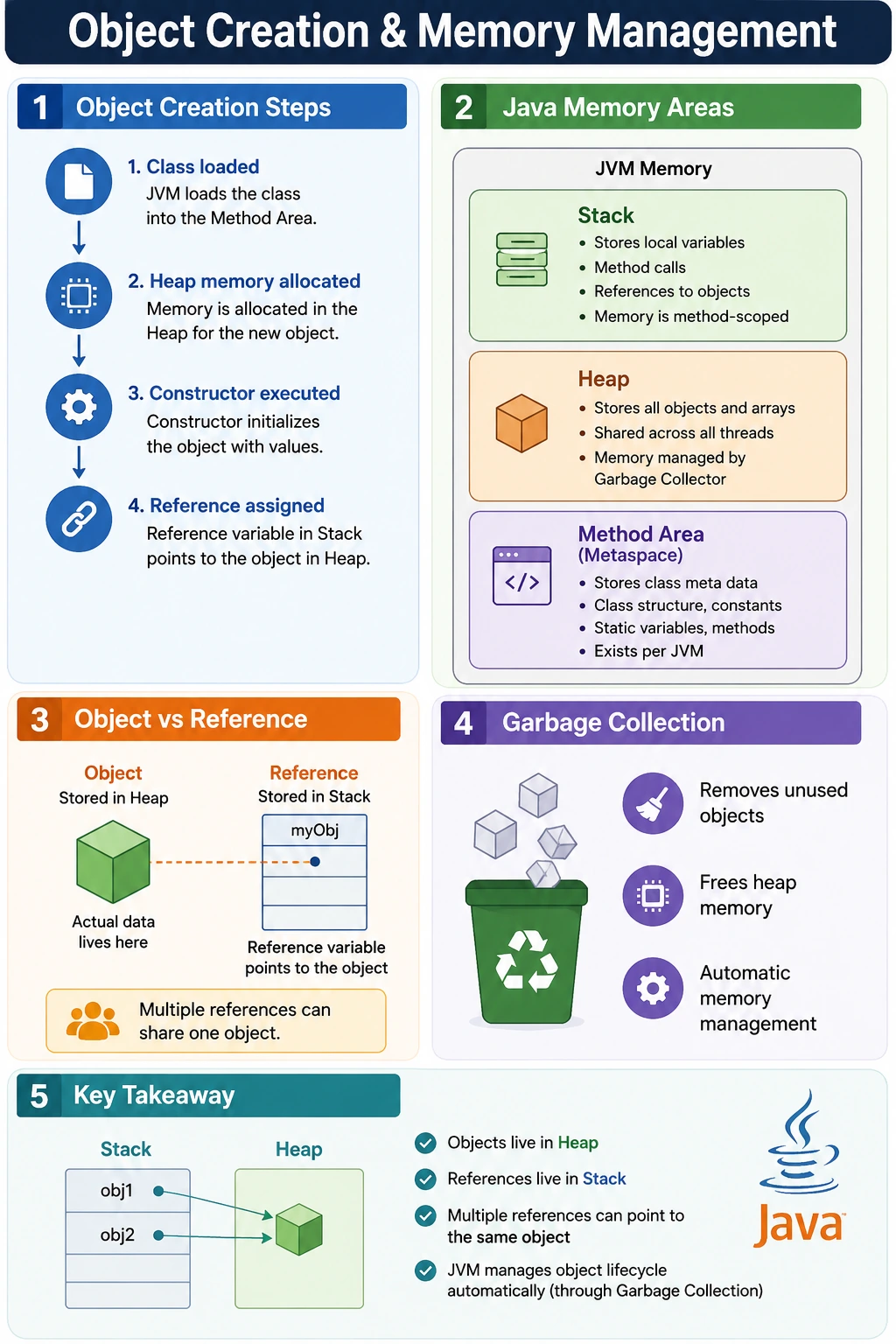
What Happens When an Object Is Created?
Object creation in Java begins when code uses the new keyword with a class constructor. A common example is:
Student s = new Student();
This single line contains several important ideas. Student is the class type. s is a reference variable. new Student() creates the object. The object is stored in heap memory, while the reference variable is stored in the current method's stack frame if it is a local variable. The reference does not contain the object itself; it contains a value that allows the program to reach the object.
Understanding this difference between the object and the reference is one of the most important parts of Java memory learning. Many beginners say "s is the object," but technically s is a reference variable. The object is the runtime entity created in heap memory. The reference variable is the handle used to access it.
Step-by-Step Object Creation Flow
When Student s = new Student(); executes, Java follows a controlled sequence. First, the JVM ensures that the Student class is loaded. If the class has not been loaded yet, the JVM loads the class metadata, method information, static members, and related runtime structures. This makes the class definition available for object creation.
Next, memory is allocated in the heap for the new Student object. The heap is the memory area where Java stores objects and their instance variables. If the Student class has fields such as name, age, and course, space is reserved for those fields inside the new object.
After allocation, instance variables receive default values. Numeric fields receive 0, boolean fields receive false, char fields receive the null character, and reference fields receive null unless field initializers provide other values. This default initialization happens before constructor logic runs, so every field has a predictable starting value.
Then the constructor executes. The constructor may assign meaningful values, validate input, or perform object setup. If the constructor is parameterized, values supplied by the caller are used during this step. Finally, the reference to the created object is assigned to the variable s. At that point, the program can use s to access the object.
Java Memory Areas
Java memory is commonly explained using three major areas: stack memory, heap memory, and method area or metaspace. The exact JVM implementation can be complex, but this model is enough for most learning, debugging, and interview discussions.
Stack Memory
Stack memory stores method calls, local variables, and reference variables declared inside methods. Each method call gets its own stack frame. When the method finishes, its stack frame is removed automatically. This makes stack memory fast and method-scoped.
Student s; // reference stored in stack when local
If s is declared inside main, the reference variable belongs to the stack frame of main. When main ends, that local variable disappears. If no other reference points to the object, the object may become eligible for garbage collection.
Heap Memory
Heap memory stores objects and their instance variables. Whenever new creates an object, that object is placed in the heap. Heap memory is shared across the application and managed by the garbage collector. Objects can live beyond the method that created them if references to those objects are stored or passed elsewhere.
new Student(); // object stored in heap
The heap is where object state exists. If a Student object has name and age fields, those values belong to the object in the heap. Different Student objects have separate heap memory for their instance variables.
Method Area and Metaspace
The method area, implemented as metaspace in modern JVMs, stores class-level information. This includes class metadata, method bytecode, static variables, and runtime constant pool information. When a class is loaded, its structure becomes available in this area. Objects are created from that class structure, but the class definition itself is not duplicated for every object.
This is why many objects can be created from one class. The class metadata describes the structure once, while each object has its own instance state in the heap. Static variables are associated with the class rather than individual objects, so they are shared.
Visualizing Stack and Heap
A useful mental picture separates the reference from the object:
Stack
-----------------
s  points to  Heap
              -----------------
              Student Object
              name = "John"
              age  = 20
The stack contains the local reference variable. The heap contains the actual object. The reference points from the stack to the heap object. If another reference variable is assigned the same reference value, both references point to the same object.
This model explains many Java behaviors. When an object field changes, the heap object changes. When a reference variable is reassigned, that variable points somewhere else, but the old object does not move. If no reference can reach the old object, it becomes eligible for garbage collection.
Object vs Reference
An object and a reference are not the same thing. The object is the data and behavior instance in heap memory. The reference is a variable that allows access to that object. This distinction is critical when multiple references point to one object.
Student s1 = new Student();
Student s2 = s1;
Only one object is created here. The second line does not create a new Student object. It copies the reference value from s1 into s2. Now both variables point to the same heap object. If the object is modified through s2, the change is visible through s1 because both references reach the same object.
This is also why Java method arguments involving objects can be confusing. Java passes a copy of the reference value. The method receives its own reference variable, but that copied reference can still point to the same object. The method can modify object content, but reassigning the parameter does not reassign the caller's reference.
Multiple Objects and State Isolation
When new is used twice, two separate objects are created:
Student s1 = new Student();
Student s2 = new Student();
Here, s1 and s2 point to different heap objects. Each object has its own copy of instance variables. Changing s1.name does not affect s2.name because the two references point to separate runtime entities. This is how Java can represent many independent objects from the same class.
This idea is important in real systems. An application may create thousands of User objects, Order objects, or TestCase objects. They share the same class structure, but each object stores its own data. A class defines the blueprint; objects hold the individual state.
Anonymous Objects
Java allows creating an object without assigning it to a reference variable:
new Student().display();
This is called an anonymous object. It is useful for one-time operations where the object does not need to be reused. The method display runs on the newly created object, but after the statement finishes, there may be no reference left to reach that object. If no reference exists, the object becomes eligible for garbage collection.
Anonymous objects should be used carefully. They can make short examples compact, but in real code, assigning an object to a reference variable is often clearer when the object will be used more than once, passed around, or inspected later.
Static vs Instance Memory Allocation
Static and instance members are stored and used differently. Instance variables belong to objects and are stored as part of each object in heap memory. Static variables belong to the class and are shared across all objects of that class.
class Test {
    static int x = 10;
    int y = 20;
}
| Member Type | Memory Location | Shared |
|---|---|---|
| Static variable | Method Area / Metaspace association | Yes |
| Instance variable | Heap, inside each object | No |
| Local variable | Stack | No |
If ten Test objects are created, each object has its own y value, but there is only one shared x value for the class. This is why static data must be used carefully. Shared mutable static data can create unexpected behavior because changes are visible across all object instances.
Garbage Collection
Java uses garbage collection to reclaim heap memory from objects that are no longer reachable. An object becomes eligible for garbage collection when no active reference can reach it. The programmer cannot explicitly delete an object in Java. Instead, the garbage collector runs automatically based on JVM decisions.
s = null; // object may become eligible for GC
Setting a reference to null does not immediately destroy the object. It only removes one path to the object. If no other references exist, the object becomes eligible for garbage collection. The garbage collector may reclaim it later, but the exact timing is not guaranteed.
This distinction is important for interviews. Eligible for garbage collection does not mean immediately collected. Java controls when garbage collection actually runs. Developers should write code that avoids unnecessary object retention rather than trying to force deletion.
Reference Reassignment
Reference reassignment is a common memory scenario:
Student s = new Student();
s = new Student();
The first line creates a Student object and assigns its reference to s. The second line creates another Student object and stores that new reference in s. After reassignment, s points to the second object. If no other reference points to the first object, the first object becomes eligible for garbage collection.
Nothing moves from one object to another automatically. Reassignment changes the reference variable, not the original object. This is a key difference between modifying object content and changing which object a reference points to.
References as Method Parameters
When an object reference is passed to a method, Java passes a copy of the reference value. The method parameter is a separate local variable, but it can point to the same heap object.
void change(Student s) {
    s.name = "Alex";
}
This method can change the object's name because the copied reference points to the same object. However, if the method assigns s = new Student(), that reassignment affects only the local parameter. The caller's reference remains unchanged. This is still call by value, because the reference value is copied.
This concept is essential for debugging. If object fields change after a method call, the method likely modified the shared object. If a caller's reference does not change after a method reassigns a parameter, that is expected Java behavior.
Object Lifetime
An object's lifetime begins when it is created and continues as long as it remains reachable. A local reference may disappear when a method ends, but the object can continue to live if another active reference exists. For example, if the object was added to a list that still exists, the list keeps it reachable.
Object lifetime is not always the same as variable lifetime. A local variable may be removed from the stack, while the object it once referenced may still exist in the heap through another reference. Conversely, an object may become eligible for garbage collection even though the class that created it remains loaded.
Understanding lifetime helps prevent memory leaks. In Java, a memory leak usually means objects remain reachable even though the application no longer needs them. Static collections, caches, listeners, and long-lived maps are common places where references are accidentally retained.
Default Values and Constructor Initialization
Default initialization and constructor initialization are separate stages. When heap memory is allocated, Java first gives instance variables predictable default values. This guarantees that fields never contain random memory. After that, field initializers and constructors can assign meaningful values. This order is one reason Java is safer than languages where uninitialized memory can contain unpredictable data.
For example, if a Student object has int age and String name, age initially becomes 0 and name initially becomes null. If the constructor assigns this.name = "John" and this.age = 20, those defaults are replaced. If the constructor does not assign them, the object keeps the default values. This is why constructors matter for object validity.
In interviews, it is useful to explain that memory allocation and initialization are not the same thing. Allocation reserves space. Default initialization gives safe starting values. Constructor execution applies class-specific initialization. Reference assignment lets the program access the finished object.
Memory Behavior in Method Calls
Method calls create stack frames. If a method declares local variables, those variables live in that method's stack frame. If the method creates objects, the objects live in heap memory. The local references to those objects live in the stack frame. When the method returns, local references disappear, but heap objects may continue to live if some other reference still points to them.
This explains a common scenario. A method creates an object and returns it. The local reference inside the method disappears when the method ends, but the returned reference is assigned to a variable in the caller. The object remains reachable through the caller's reference. Therefore, the object is not garbage collected just because the method that created it has finished.
On the other hand, if a method creates an object and does not return it, store it, or pass it somewhere that keeps a reference, the object may become unreachable after the method ends. In that case, it becomes eligible for garbage collection. This is why reachability, not method completion alone, determines object lifetime.
Memory and Strings
Strings introduce another important memory concept. String literals are stored in the string pool, while String objects created with new can be placed in the heap. For example, String s1 = "Java" uses the string pool, while String s2 = new String("Java") creates a new String object. This distinction is frequently tested because it combines object creation, references, and memory areas.
The string pool exists to reuse identical string literals and reduce memory usage. If two variables are assigned the same literal, they may point to the same pooled String object. But using new String creates a separate object even if the text content is the same. This is why == may behave differently from equals when comparing strings. The == operator checks reference identity, while equals checks content.
For this page, the main point is that not all reference variables point to ordinary newly created heap objects in the same way. Java has optimizations and special memory behavior for strings. Still, the reference principle remains: variables hold references, and objects or pooled values exist elsewhere in memory.
Memory, Performance, and Object Creation
Object creation is normal in Java, and modern JVMs are optimized for it. Developers should not avoid objects out of fear. However, unnecessary object creation can still affect performance in tight loops, high-volume systems, or memory-sensitive applications. Creating many temporary objects increases allocation pressure and may cause more garbage collection activity.
A practical example is creating objects repeatedly inside a loop when the same reusable object or value would be enough. Another example is using string concatenation inefficiently in repeated operations, where StringBuilder may be more appropriate. The right choice depends on readability, correctness, and measured performance impact.
Performance-aware Java programming does not mean manually managing memory. It means understanding object lifetimes, avoiding accidental retention, and choosing suitable data structures. Let the garbage collector manage memory, but do not create unnecessary pressure through careless design.
Debugging Memory-Related Issues
Many memory-related bugs are actually reference-related bugs. If changing one variable unexpectedly changes another object's data, check whether both references point to the same object. If an object does not seem to update, check whether the code reassigned a local reference instead of modifying the shared object. If memory usage keeps growing, check whether objects remain reachable through collections, caches, listeners, or static fields.
When debugging, draw the references. Write the variable names on one side and the heap objects on the other. Then draw which variable points to which object. This simple habit makes assignment, reassignment, method passing, and garbage collection eligibility much clearer.
In an IDE, object identity and references can be inspected while debugging. You can step through object creation, watch fields initialize, and observe how references change after assignment. This is especially useful for beginners because the memory model becomes visible instead of abstract.
Object Identity and Equality
Memory understanding also helps explain the difference between object identity and object equality. Identity asks whether two references point to the exact same object in memory. Equality asks whether two objects should be considered logically equal based on their content or business meaning. In Java, the == operator checks reference identity for objects. The equals method can be used to check logical equality when the class implements it properly.
For example, two separate Student objects may both contain the name "John" and age 20. They may be logically equal in the business sense, but they are still two different heap objects. The == operator returns false because the references point to different objects. If the Student class overrides equals to compare name and age, equals may return true.
This is why memory diagrams are useful for equality questions. If two variables point to one object, they have the same identity. If they point to two different objects with the same field values, they may be equal by content but not identical by reference.
Memory-Safe Design Habits
Good Java code does not require manual memory deletion, but it does require sensible object management. Create objects when they represent meaningful state or behavior. Avoid keeping references longer than necessary. Clear collections when data is no longer needed. Be careful with static fields because they can keep objects reachable for the lifetime of the class.
Use immutable objects when shared state could become risky. Immutable objects do not change after creation, so sharing references to them is safer. Strings, wrapper classes, and many date-time classes follow this style. For mutable objects, be clear about who owns the object and who is allowed to modify it.
In larger systems, memory-safe design also means avoiding accidental global state, uncontrolled caches, and listener registrations that are never removed. The garbage collector can reclaim unreachable objects, but it cannot reclaim objects that the application still references unnecessarily. Developers must manage reachability through good design.
Practical Interview Explanation Flow
For interviews, explain object creation in a clear sequence. Start with the new keyword. Say that the class is loaded if needed, heap memory is allocated, instance variables are default-initialized, the constructor runs, and a reference is assigned to a variable. Then explain that local references are stored in the stack, while objects live in the heap.
After that, explain reference behavior. Assigning one reference to another does not create a second object. It creates another reference to the same object. Reassigning a reference can make the old object eligible for garbage collection if no other reference reaches it. Passing an object to a method passes a copy of the reference value, so Java remains call by value.
This flow gives a complete answer without going too deep into JVM internals. It shows that you understand object creation, memory areas, reference behavior, and garbage collection at a practical level.
Common Beginner Mistakes
Many beginners confuse references with objects. A reference variable does not store the entire object. It stores a reference value that points to an object. Assigning one reference variable to another does not copy the object; it copies the reference. To create another object, new must be used again or an explicit copy mechanism must be implemented.
Another common mistake is forgetting the separation between stack and heap. Local variables and method calls are stack-related. Objects and instance variables are heap-related. Static class-level information is associated with method area or metaspace. This separation explains why local variables disappear when a method ends while heap objects may continue to exist.
Beginners also assume garbage collection runs immediately when a reference is set to null. It does not. The object may become eligible, but the JVM decides when collection occurs. Finally, creating unnecessary objects can hurt performance and memory usage, especially inside loops or frequently executed code.
Interview-Ready Answers
Short Answer
Object creation in Java involves allocating memory in the heap for the object and storing a reference to that object in a variable, often on the stack when the reference is local.
Detailed Answer
When an object is created in Java, the JVM ensures the class is loaded, allocates heap memory for the object, initializes instance variables with default values, executes the constructor, and assigns the resulting reference to a reference variable. Java memory is commonly explained using stack, heap, and method area or metaspace. Stack memory stores method calls and local variables, heap memory stores objects, and method area or metaspace stores class-level information. Garbage collection reclaims heap objects that are no longer reachable.
Object Creation & Memory Examples
1. Object Creation – Heap vs Stack
class Demo {
    int x;
}

class Test {
    public static void main(String[] args) {
        Demo d = new Demo();
        d.x = 10;
    }
}
Explanation
- d is the reference stored in stack
- new Demo() is the object stored in heap
2. Multiple Objects with Separate Heap Memory
class Demo {
    int x;
}

class Test {
    public static void main(String[] args) {
        Demo d1 = new Demo();
        Demo d2 = new Demo();

        d1.x = 10;
        d2.x = 20;

        System.out.println(d1.x);
        System.out.println(d2.x);
    }
}
Explanation
- Each object has its own heap memory
- Output:
10
20
3. Multiple References with Single Object
class Demo {
    int x;
}

class Test {
    public static void main(String[] args) {
        Demo d1 = new Demo();
        Demo d2 = d1;

        d2.x = 50;
        System.out.println(d1.x);
    }
}
Explanation
- d1 and d2 point to same heap object
- Output: 50
4. Object Becomes Eligible for Garbage Collection
class Demo {
    int x;
}

class Test {
    public static void main(String[] args) {
        Demo d = new Demo();
        d = null;
    }
}
Explanation
- Object has no reference
- Eligible for GC (not immediately destroyed)
5. Reassigning Reference and Old Object GC Eligibility
class Demo {
    int x;
}

class Test {
    public static void main(String[] args) {
        Demo d = new Demo();   // Object-1
        d = new Demo();        // Object-2
    }
}
Explanation
- Object-1 has no reference and is GC eligible
- Object-2 still alive
6. Object Created Inside Method
class Demo {
    int x;
}

class Test {
    static void create() {
        Demo d = new Demo();
        d.x = 10;
    }

    public static void main(String[] args) {
        create();
    }
}
Explanation
- Object created in heap
- Reference lost after method ends, so the object is GC eligible
7. Object Returned From Method
class Demo {
    int x;
}

class Test {
    static Demo create() {
        Demo d = new Demo();
        d.x = 100;
        return d;
    }

    public static void main(String[] args) {
        Demo ref = create();
        System.out.println(ref.x);
    }
}
Explanation
- Reference returned keeps object alive
- Output: 100
8. Object Passed as Method Parameter
class Demo {
    int x;
}

class Test {
    static void update(Demo d) {
        d.x = 30;
    }

    public static void main(String[] args) {
        Demo d = new Demo();
        update(d);
        System.out.println(d.x);
    }
}
Explanation
- Reference copy passed
- Same heap object modified
- Output: 30
9. Reassigning Parameter Reference
class Demo {
    int x;
}

class Test {
    static void update(Demo d) {
        d = new Demo();
        d.x = 99;
    }

    public static void main(String[] args) {
        Demo d = new Demo();
        d.x = 10;
        update(d);
        System.out.println(d.x);
    }
}
Explanation
- Reassignment affects local reference only
- Output: 10
10. Object Array – Memory Behavior
class Demo {
    int x;
}

class Test {
    public static void main(String[] args) {
        Demo[] arr = new Demo[2];
        arr[0] = new Demo();
        arr[1] = new Demo();

        arr[0].x = 1;
        arr[1].x = 2;

        System.out.println(arr[0].x + " " + arr[1].x);
    }
}
Explanation
- Array holds references in heap
- Each element points to object
- Output: 1 2
11. null Reference and Memory
class Demo {
    int x;
}

class Test {
    public static void main(String[] args) {
        Demo d = null;
        // d.x = 10; // NullPointerException
    }
}
Explanation
- null means no heap object is referenced
- Dereferencing causes exception
12. Object Creation Using Constructor Chain
class Demo {
    Demo() {
        this(10);
    }

    Demo(int x) {
        System.out.println(x);
    }

    public static void main(String[] args) {
        new Demo();
    }
}
Explanation
- Single object, multiple constructor calls
- Output: 10
13. Static Members Stored Separately
class Demo {
    static int a = 10;
    int b = 20;
}

class Test {
    public static void main(String[] args) {
        Demo d1 = new Demo();
        Demo d2 = new Demo();

        System.out.println(d1.b);
        System.out.println(d2.b);
        System.out.println(Demo.a);
    }
}
Explanation
- a belongs to method area association
- b belongs to per-object heap memory
- Output:
20
20
10
14. Static Block Execution (Class Loading)
class Demo {
    static {
        System.out.println("Class Loaded");
    }

    public static void main(String[] args) {
        new Demo();
        new Demo();
    }
}
Explanation
- Static block runs once
- Output:
Class Loaded
15. Instance Block Execution (Per Object)
class Demo {
    {
        System.out.println("Instance Block");
    }

    Demo() {
        System.out.println("Constructor");
    }

    public static void main(String[] args) {
        new Demo();
        new Demo();
    }
}
Explanation
- Runs for every object
- Output:
Instance Block
Constructor
Instance Block
Constructor
16. String Literal vs new Object (Memory)
class Test {
    public static void main(String[] args) {
        String s1 = "Java";
        String s2 = new String("Java");

        System.out.println(s1 == s2);
    }
}
Explanation
- s1 points to String Pool value
- s2 points to Heap object
- Output: false
17. Interned String Reference
class Test {
    public static void main(String[] args) {
        String s1 = "Java";
        String s2 = new String("Java").intern();

        System.out.println(s1 == s2);
    }
}
Explanation
- Both refer to pool
- Output: true
18. Object Life Cycle (Simplified)
class Demo {
    Demo() {
        System.out.println("Created");
    }
}

class Test {
    public static void main(String[] args) {
        Demo d = new Demo();
        d = null;
        System.out.println("Eligible for GC");
    }
}
Explanation
- Creation, usage, and then GC eligibility
- Output:
Created
Eligible for GC
19. Nested Object Creation
class Engine {}

class Car {
    Engine e = new Engine();
}

class Test {
    public static void main(String[] args) {
        Car c = new Car();
    }
}
Explanation
- Creating one object can create others
- All stored in heap
20. Interview Summary – Object Creation & Memory
class Demo {
    int x;
}

class Test {
    public static void main(String[] args) {
        Demo d1 = new Demo();
        Demo d2 = d1;
        d2.x = 40;

        System.out.println(d1.x);
    }
}
Explanation
- Reference copy, not object copy
- Output: 40
Key Takeaway
Objects live in the heap. References live in the stack. Classes live in the method area. Understanding object creation and memory flow is essential for efficient coding, debugging, and JVM-level clarity.