Nested if Statement
In any real-world software system, decision-making rarely happens in a single step. Most business logic is layered, where one condition must be satisfied before evaluating another. This hierarchical decision-making is where the nested if statement becomes essential in Java. It allows developers to model complex, dependent conditions in a structured and logical manner.
While simple if or if-else statements handle straightforward decisions, nested if statements enable step-by-step validation, ensuring that deeper conditions are evaluated only when higher-level conditions are met. This makes them particularly useful in scenarios involving validations, authorization checks, workflows, and business rules.
Understanding nested if statements is not just about syntax—it is about mastering how to structure logic in a way that is both correct and maintainable.
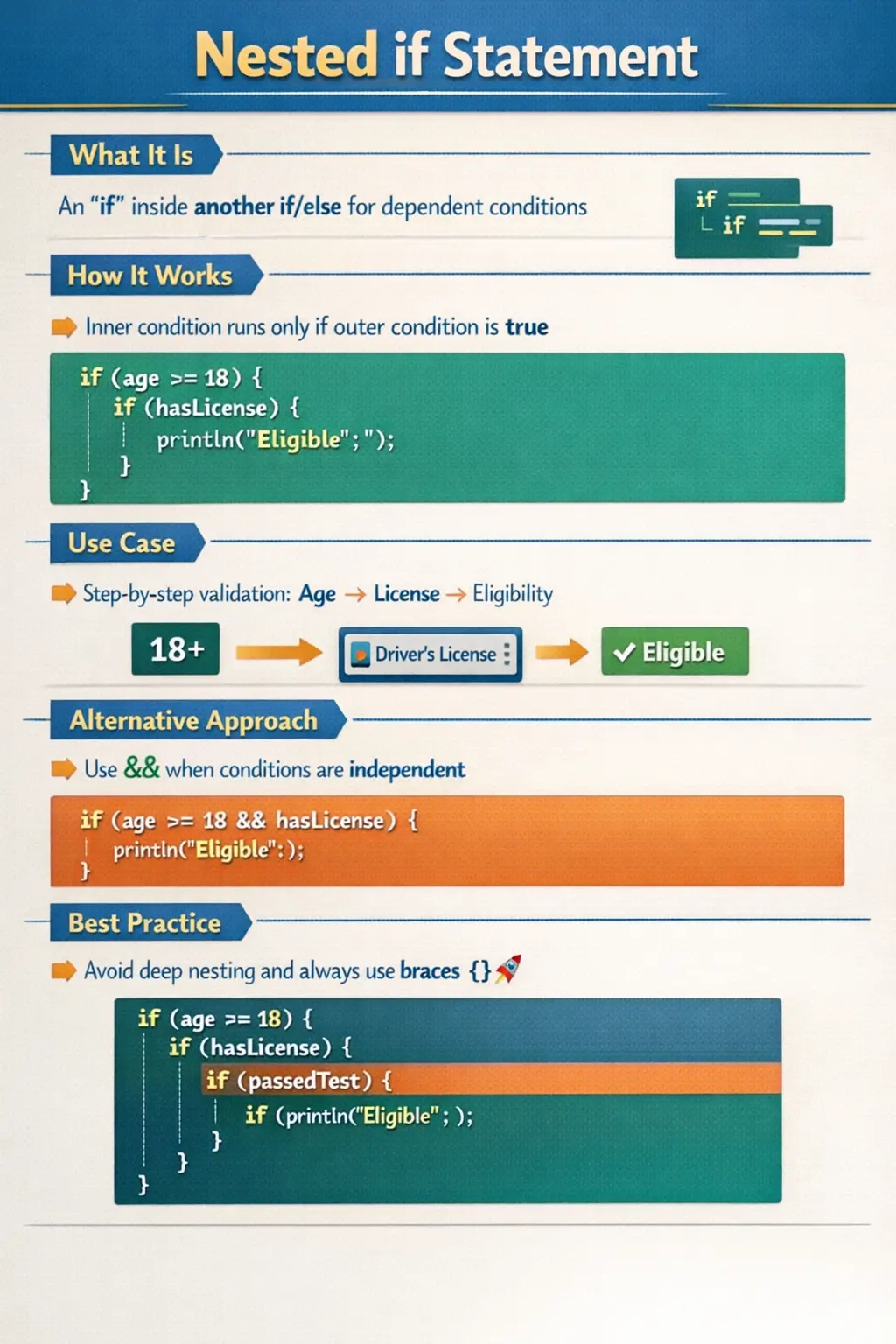
What Is a Nested if Statement?
A nested if statement is an if statement placed inside another if or else block. It represents a multi-level decision structure where the evaluation of one condition depends on the result of another.
In simpler terms, the outer condition acts as a gatekeeper. Only when the outer condition evaluates to true does the program proceed to evaluate the inner condition. This creates a dependency chain, ensuring that conditions are checked in a logical sequence.
This structure mirrors real-world decision-making. For example, a system may first check whether a user is authenticated before verifying their permissions. Without passing the first condition, the second condition becomes irrelevant.
Understanding the Execution Flow
The execution of a nested if statement follows a top-down approach. The outer condition is evaluated first. If it evaluates to false, the entire inner block is skipped. If it evaluates to true, the program moves to the inner condition and evaluates it.
This sequential evaluation ensures efficiency. Unnecessary checks are avoided because inner conditions are only evaluated when required. It also ensures logical correctness, as dependent conditions are not evaluated prematurely.
This behavior is particularly important in scenarios where evaluating a condition may involve resource-intensive operations or potential risks, such as database calls or division operations.
Basic Structure and Interpretation
The structure of a nested if statement is straightforward, but its interpretation requires careful attention. The outer if defines the primary condition, while the inner if defines a secondary condition that depends on the first.
When reading such code, it is helpful to think in terms of layers. The first layer determines whether the second layer is even relevant. This layered approach makes nested if statements suitable for modeling hierarchical logic.
For example, checking whether a person is eligible to drive involves first verifying age and then checking for a valid license. The second condition only makes sense if the first condition is satisfied.
Practical Example of Nested Conditions
Consider a scenario where a system determines whether a user can perform a specific action. The system must first verify that the user is logged in. Only after confirming authentication does it check whether the user has the required permissions.
This is a classic use case for nested if statements. The outer condition ensures that the user is authenticated, and the inner condition verifies authorization. This structure ensures that unauthorized users are not evaluated further, maintaining both security and efficiency.
Such patterns are common in enterprise applications, where multiple layers of validation are required before executing critical operations.
Nested if with else Blocks
Nested if statements often include else blocks to handle alternative outcomes. This allows the program to provide meaningful responses for different scenarios.
For instance, in a grading system, the program may first check whether a student has passed. If the student has passed, it then determines the grade based on score ranges. If the student has not passed, a different message is displayed.
This combination of nested if and else blocks enables comprehensive decision-making, covering multiple possibilities within a structured framework.
However, as the number of conditions increases, the structure can become complex. This is where careful design and readability considerations become important.
Real-World Business Logic Implementation
Nested if statements are widely used in business applications where decisions are inherently hierarchical. Consider an e-commerce platform that determines pricing based on user type and purchase history.
The system may first check whether the user is a registered member. If so, it then checks whether the user is eligible for a premium discount. Based on these conditions, different pricing strategies are applied.
Similarly, in banking systems, nested conditions are used to validate transactions. The system may check account status, balance availability, and transaction limits in a sequential manner.
These examples highlight how nested if statements map closely to real-world decision processes, making them a powerful tool for implementing business logic.
Nested if vs Logical Operators
One of the key considerations when using nested if statements is determining whether they are the most appropriate approach. In some cases, nested conditions can be replaced with logical operators such as AND.
When conditions are independent and can be evaluated together, using logical operators results in more concise code. However, when conditions are dependent, nested if statements provide better clarity and control.
For example, checking age and identity simultaneously can be done using a logical AND operator. But if identity verification should only occur after age validation, a nested structure is more appropriate.
Choosing the right approach depends on the relationship between conditions and the desired flow of execution.
The Else Binding Rule
One of the most important and often misunderstood aspects of nested if statements is the else binding rule. In Java, an else statement is always associated with the nearest unmatched if.
This can lead to unexpected behavior if braces are not used properly. Without braces, it may not be immediately clear which if statement the else belongs to, resulting in logical errors.
To avoid this confusion, it is considered a best practice to always use braces, even when they are not strictly required. This ensures that the structure of the code is explicit and unambiguous.
Understanding this rule is essential, especially in interviews, where such scenarios are commonly used to test a candidate’s attention to detail.
When to Use Nested if Statements
Nested if statements are most appropriate when conditions are dependent and must be evaluated in a specific order. They are ideal for step-by-step validation processes where each step depends on the success of the previous one.
They are also useful in implementing multi-level business rules, where decisions are made based on a hierarchy of conditions. In such cases, nested structures provide clarity and ensure that logic is executed correctly.
Additionally, nested if statements are suitable for scenarios where certain conditions should only be evaluated under specific circumstances, preventing unnecessary computation.
When to Avoid Nested if Statements
While nested if statements are powerful, they can become problematic when overused. Deeply nested structures can make code difficult to read and maintain, increasing the likelihood of errors.
In situations where conditions are independent, using logical operators or else-if ladders can simplify the code. Similarly, switch statements or design patterns may provide better alternatives for handling multiple conditions.
Refactoring complex nested structures into smaller methods or using descriptive variables can also improve readability. The goal is to balance functionality with maintainability.
Why Nested if Statements Exist
Nested if statements exist because not every condition in a program stands alone. Many checks are meaningful only after another check succeeds. If a user is not logged in, it may not make sense to check whether the user has administrator privileges. If an order is not valid, it may not make sense to check whether payment can be processed. If a file does not exist, it may not make sense to check whether the file content is formatted correctly. In each case, the second decision depends on the first decision.
This dependency is the real purpose of nesting. It is not simply a way to place one if statement inside another. It is a way to model a hierarchy of rules. The outer condition protects the inner condition from being evaluated too early. This makes the code safer, more efficient, and closer to the way the business decision is actually made.
When used well, nested if statements make decision flow explicit. They show that the program must pass through one layer before reaching the next. This is useful in validations, approvals, eligibility checks, permission checks, and staged workflows. The structure communicates that conditions are not equal in importance or order; some conditions are prerequisites for others.
Thinking of Nested if as a Decision Tree
A helpful way to understand nested if logic is to imagine a decision tree. The outer if statement is the first branch. If that condition is false, the program may stop that path or move to an else block. If it is true, the program moves deeper into the tree and evaluates the next condition. Each inner if represents another branch that narrows the decision further.
This decision-tree model is useful because it shows why order matters. The first condition should usually be the broadest or most basic requirement. Inner conditions should become more specific. For example, in a transaction flow, the program may first check whether the account is active, then whether the balance is sufficient, then whether the transaction limit is not exceeded. Each step depends on the previous one.
If the order is wrong, the code may become confusing or even unsafe. Checking transaction limits before verifying that the account exists may cause errors. Checking permissions before confirming authentication may expose unnecessary logic. A well-designed nested if structure starts with the prerequisite condition and moves gradually toward the final decision.
Nested if and Step-by-Step Validation
Step-by-step validation is one of the strongest use cases for nested if statements. In a validation flow, every condition may depend on earlier data being valid. For example, a registration form may first check whether an email value is provided. Only then should it check whether the email format is valid. After that, it may check whether the email is already registered. Each validation step assumes the previous step has passed.
This approach prevents unnecessary processing and avoids runtime errors. If the email value is missing, there is no point in checking its pattern or searching for it in a database. The program can respond immediately with a clear message. Nested if statements allow this kind of layered validation to be written directly.
However, validation code should remain readable. If too many levels are nested, the method becomes hard to follow. In such cases, guard conditions may be cleaner. A guard condition checks for an invalid state early and exits. The result is often flatter code. Nested if is useful when the dependent relationship is important to show, but guard clauses are often better when the goal is simply to reject invalid input quickly.
Nested if in Authentication and Authorization
Authentication and authorization are common examples where nested if statements reflect real-world security flow. Authentication answers the question, "Who is the user?" Authorization answers, "What is this user allowed to do?" Authorization should normally be checked only after authentication succeeds. This dependency makes nested logic natural.
A system may first check whether the user session exists. If the session is valid, it may then check whether the account is active. If the account is active, it may check whether the user has a required role. Only after these checks pass should the protected action execute. Each inner check becomes meaningful only because the outer check has already established a safer context.
This pattern improves both correctness and security. It prevents the application from performing unnecessary permission checks for unauthenticated users, and it makes the access path explicit. Still, in large systems, this logic is often moved into dedicated security frameworks or authorization services. The underlying idea remains the same: some decisions are layered and must occur in a controlled order.
Nested if in Business Workflows
Business workflows often require nested decisions because business processes usually have stages. A loan approval process may first verify basic eligibility, then evaluate credit score, then check income, then apply policy-specific rules. A shopping application may first confirm that the cart has items, then verify stock, then validate payment, then confirm shipping availability. These workflows are not flat; they progress through checkpoints.
Nested if statements can model such workflows clearly when the number of levels is modest. The outer condition represents the first gate, and each inner condition represents a deeper requirement. This makes the code align with the business process. A reviewer can follow the logic as a sequence of approvals or rejections.
The risk appears when business workflows become too large for direct nesting. If a method contains many levels of nested if statements, it becomes difficult to understand and test. At that point, the logic should usually be separated into smaller methods, workflow classes, or rule components. Nested if statements are a tool, not a complete architecture for complex decision systems.
Nested if vs Guard Clauses
Guard clauses are often used as an alternative to deep nested if statements. A guard clause checks for a condition that should stop execution early. For example, if input is null, return immediately. If the user is not authenticated, deny access immediately. If the order is empty, stop processing. After these guards, the main logic can continue without being wrapped inside several layers of indentation.
The main advantage of guard clauses is readability. They reduce nesting and keep the main flow visible. Instead of reading a method from the outside inward, the reader sees invalid cases handled first and then reads the normal path directly. This style is common in professional Java code because it keeps methods shorter and easier to maintain.
Nested if is still useful when the inner decision is conceptually part of the true branch of the outer decision. Guard clauses are useful when the outer condition is mainly a rejection condition. Choosing between them depends on which structure communicates the intent better. The best code is not always the shortest code; it is the code whose decision flow is easiest to understand.
Nested if vs Logical AND
Many nested if statements can technically be rewritten using the logical AND operator. For example, checking age first and identification second can be written as one condition with AND. If both conditions are simple and independent, this may be cleaner. The combined condition says that both requirements must be true for the block to execute.
But logical AND is not always the right replacement. If the second condition should only be evaluated after the first condition for business, safety, or performance reasons, nesting may communicate that dependency better. Short-circuit evaluation also prevents the second condition from running when the first is false, but the code may still be less expressive if the checks represent separate stages.
A useful rule is this: use logical AND when conditions are part of the same decision level; use nested if when one decision leads to another decision. This distinction helps keep code aligned with the real structure of the problem. Conditions that are siblings can often be combined. Conditions that are parent and child are often clearer when nested or extracted into staged methods.
Managing Else Blocks in Nested if
Else blocks become more challenging when if statements are nested. An else may belong to the inner if or the outer if depending on structure. Java follows the nearest unmatched if rule, but humans can easily misread the code when braces are missing or indentation is misleading. This is why braces are essential in nested conditional logic.
Each else block should clearly answer the failure case of the condition it belongs to. If the outer condition checks whether a user is logged in, the outer else should handle the not-logged-in case. If the inner condition checks whether the user has permission, the inner else should handle the no-permission case. Mixing these meanings makes the code confusing.
When several else blocks are needed, meaningful messages and focused branches become important. Each branch should represent a clear outcome. If a branch performs too many actions, consider extracting it into a method. This keeps the nested structure readable and prevents the business meaning from being buried inside long blocks.
Readability Problems Caused by Deep Nesting
Deep nesting is one of the most common readability problems in Java code. Every additional level increases indentation and mental load. The reader must remember all previous conditions to understand why the current line is executing. After three or four levels, even experienced developers can lose track of the flow.
Deep nesting also makes changes risky. Adding a new condition at the wrong level can alter behavior unexpectedly. Moving an else block can change which condition it belongs to. A small formatting mistake can create a serious logic defect. These risks increase when the nested code is long or when each branch contains multiple actions.
The solution is to refactor early. Use guard clauses, helper methods, meaningful boolean variables, or separate classes when needed. If a nested if structure is difficult to explain in plain language, it is probably difficult to maintain in code. The goal is to preserve the logic while reducing the burden on the reader.
Testing Nested if Logic
Nested if statements require careful testing because each level creates additional execution paths. Testing only the deepest successful path is not enough. Each outer failure path must also be tested. If the first condition fails, the inner condition should not run. If the first condition succeeds but the second fails, the correct inner failure behavior should occur. If all conditions succeed, the final action should happen.
For example, in an access-control flow, tests should cover unauthenticated users, authenticated users without permission, authenticated users with permission, inactive users, and any other meaningful path. This ensures that each branch behaves correctly and that the system does not accidentally allow or deny access in the wrong situations.
Boundary values are also important when nested if statements involve ranges. A grading system, age-based eligibility check, or transaction-limit rule should be tested below the boundary, at the boundary, and above the boundary. Nested logic often hides boundary mistakes because a later condition may not be reached unless earlier values are set correctly.
Debugging Nested if Statements
Debugging nested if statements starts with identifying which condition failed. Because inner blocks run only when outer blocks succeed, a failure deep inside the structure may actually be caused by an earlier condition. Developers should inspect the values used by each condition in order, starting from the outermost condition.
Logging can help when debugging complex flows, but logs should be meaningful. Instead of logging only "failed," log which rule failed and why. For example, "account inactive" is more useful than "access denied." Meaningful logs reduce debugging time and help testers report clearer defects.
A debugger is also useful for stepping through nested logic. By watching each condition evaluate, developers can confirm whether the program path matches the expected path. If the path is surprising, the issue may be incorrect data, wrong operator usage, misplaced braces, or a condition written at the wrong nesting level.
How to Explain Nested if in Interviews
In interviews, nested if questions usually test control-flow understanding and code-reading discipline. A strong explanation should define a nested if as an if statement placed inside another if or else block. Then explain that the inner condition is evaluated only when the outer condition allows execution to reach it.
It is also important to explain when nested if is useful. Mention dependent conditions, step-by-step validation, authentication followed by authorization, and multi-level business rules. This shows that you understand the practical reason for nesting rather than only the syntax.
Finally, discuss risks and best practices. Always use braces, avoid unnecessary deep nesting, consider logical operators when conditions are independent, and refactor complex logic into smaller methods. This gives an interview answer that is both technically correct and professionally mature.
Common Mistakes and Pitfalls
One of the most common mistakes with nested if statements is missing braces, which can lead to incorrect else binding. Another issue is excessive nesting, which reduces readability and makes debugging more challenging.
Developers may also misuse nested if statements for conditions that are not truly dependent, resulting in unnecessarily complex code. Confusion between nested if and logical operators is another frequent problem.
Understanding these pitfalls and adopting best practices helps prevent logical errors and ensures that code remains clear and maintainable.
Best Practices for Writing Nested if Statements
To use nested if statements effectively, it is important to follow certain best practices. Always use braces to define code blocks clearly and avoid ambiguity. Keep nesting levels as shallow as possible to maintain readability.
Use meaningful variable names and break complex conditions into smaller parts when necessary. Consider alternative approaches when nesting becomes too deep or complicated.
Regularly reviewing and refactoring code helps ensure that nested structures remain manageable and aligned with best practices.
Interview Perspective
Nested if statements are a common topic in interviews because they test a candidate’s understanding of control flow and logical structuring. Interviewers often focus on scenarios involving else binding, condition dependency, and code readability.
A strong answer should clearly explain that a nested if statement is used for dependent conditions and that the inner condition is evaluated only when the outer condition is true. Candidates should also demonstrate awareness of common pitfalls and best practices.
Providing real-world examples and discussing when to use or avoid nested structures can further strengthen the response.
Key Takeaway
Nested if statements are a powerful tool for implementing hierarchical decision-making in Java. They allow developers to model complex logic in a structured and logical manner, ensuring that conditions are evaluated in the correct sequence.
However, with this power comes responsibility. Overusing or misusing nested structures can lead to unreadable and error-prone code. By understanding their purpose, limitations, and best practices, developers can use nested if statements effectively to build robust and maintainable applications.
At their core, nested if statements reflect how real-world decisions are made—step by step, condition by condition—making them an essential concept in both programming and problem-solving.
1. Basic Nested if
int age = 20;
boolean hasID = true;
if (age >= 18) {
if (hasID) {
System.out.println("Entry allowed");
}
}
Explanation
- Outer if checks age.
- Inner if runs only if outer condition is true.
- No output if hasID is false.
2. Nested if with else
int age = 17;
boolean hasID = true;
if (age >= 18) {
if (hasID) {
System.out.println("Entry allowed");
} else {
System.out.println("ID required");
}
} else {
System.out.println("Underage");
}
Explanation
- Two-level decision making.
- Covers all possible paths.
3. Nested if for Range Validation
int marks = 78;
if (marks >= 0) {
if (marks <= 100) {
System.out.println("Valid marks");
}
}
Explanation
- Inner condition depends on outer validity check.
- Prevents invalid data usage.
4. Nested if with Multiple Conditions
int age = 25;
boolean hasLicense = true;
boolean hasCar = false;
if (age >= 18) {
if (hasLicense) {
if (hasCar) {
System.out.println("Can drive own car");
} else {
System.out.println("Can drive but no car");
}
}
}
Explanation
- Three-level nesting.
- Executes deepest block only when all conditions above are true.
5. Nested if vs Logical AND (&&)
int age = 22;
boolean hasLicense = true;
if (age >= 18) {
if (hasLicense) {
System.out.println("Eligible to drive");
}
}
Equivalent simplified version
if (age >= 18 && hasLicense) {
System.out.println("Eligible to drive");
}
Explanation
- Nested if is clearer for step-by-step logic.
- && is compact but less descriptive.
6. Nested if with User Authentication
String username = "admin";
String password = "1234";
if (username != null) {
if (password != null) {
System.out.println("Credentials provided");
}
}
Explanation
- Inner check depends on outer null check.
- Prevents runtime exceptions.
7. Nested if with Null Safety
String name = "Java";
if (name != null) {
if (name.length() > 3) {
System.out.println("Valid name");
}
}
Explanation
- Safe method call inside nested if.
- Common interview example.
8. Nested if in Loop
for (int i = 1; i <= 5; i++) {
if (i % 2 == 0) {
if (i > 2) {
System.out.println(i);
}
}
}
Explanation
- Outer if: even numbers.
- Inner if: greater than 2.
- Output: 4.
9. Nested if for Login Flow
boolean isLoggedIn = true;
boolean isEmailVerified = false;
if (isLoggedIn) {
if (isEmailVerified) {
System.out.println("Access granted");
} else {
System.out.println("Verify email");
}
} else {
System.out.println("Please login");
}
Explanation
- Real-world authentication logic.
- Clear hierarchical decision making.
10. Nested if for Maximum of Three Numbers
int a = 10, b = 20, c = 15;
if (a > b) {
if (a > c) {
System.out.println("a is largest");
} else {
System.out.println("c is largest");
}
} else {
if (b > c) {
System.out.println("b is largest");
} else {
System.out.println("c is largest");
}
}
Explanation
- Classic interview problem.
- Shows deep nesting and branching.
11. Nested if with Assignment Trap
int x = 5;
if (x > 0) {
if ((x = 10) > 5) {
System.out.println(x);
}
}
Explanation
- Assignment happens inside inner if.
- Legal but dangerous.
- Avoid in production code.
12. Nested if with Boolean Wrapper (Trap)
Boolean flag = null;
if (flag != null) {
if (flag) {
System.out.println("True");
}
}
Explanation
- Prevents auto-unboxing NullPointerException.
- Proper nested null check.
13. Nested if vs else if (Comparison)
int score = 65;
if (score >= 60) {
if (score >= 80) {
System.out.println("Excellent");
} else {
System.out.println("Good");
}
}
Better with else if
if (score >= 80) {
System.out.println("Excellent");
} else if (score >= 60) {
System.out.println("Good");
}
Explanation
- Nested if works but can be simplified.
- Prefer else if for ranges.
14. Nested if Without Braces (Bug)
int x = 10;
if (x > 5)
if (x > 8)
System.out.println("Greater than 8");
else
System.out.println("Less or equal to 8");
Explanation
- else binds to nearest if.
- Known as dangling else problem.
- Always use braces.
15. Correct Version with Braces
int x = 10;
if (x > 5) {
if (x > 8) {
System.out.println("Greater than 8");
} else {
System.out.println("Less or equal to 8");
}
}
Explanation
- Braces remove ambiguity.
- Code becomes predictable.
16. Nested if with Bitwise Check
int flags = 6; // 110
if ((flags & 2) != 0) {
if ((flags & 4) != 0) {
System.out.println("Both flags set");
}
}
Explanation
- Inner check depends on outer bit condition.
- Used in low-level logic.
17. Nested if in Method
void check(int age, boolean hasID) {
if (age >= 18) {
if (hasID) {
System.out.println("Approved");
} else {
System.out.println("ID missing");
}
}
}
Explanation
- Encapsulates nested logic inside method.
- Improves reuse.
18. Nested if vs Ternary (Readability)
int age = 17;
if (age >= 18) {
if (age >= 21) {
System.out.println("Full access");
} else {
System.out.println("Limited access");
}
}
Explanation
- Nested if is clearer than nested ternary.
- Prefer for complex decisions.
19. Nested if with break
for (int i = 1; i <= 5; i++) {
if (i % 2 == 0) {
if (i == 4) {
break;
}
System.out.println(i);
}
}
Explanation
- Inner if controls loop termination.
- Output: 2.
20. Interview Summary Example
int age = 20;
boolean hasID = false;
if (age >= 18) {
if (hasID) {
System.out.println("Allowed");
} else {
System.out.println("ID required");
}
} else {
System.out.println("Underage");
}
Explanation
- Demonstrates:
- Nested if
- else
- Real-world decision flow
- Very common interview scenario.