Multiple catch Blocks
Multiple catch blocks in Java allow a single try block to handle different exception types in
different ways. This is one of the most practical parts of Java exception handling because real failures do
not all mean the same thing. A calculation error, a null reference, an invalid array index, a missing file,
and a database failure may all interrupt program execution, but each one usually requires a different
response. Multiple catch blocks give developers the ability to separate those responses cleanly instead of
treating every failure as a generic problem.
This topic is also a common interview favorite because it connects exception handling, inheritance, compiler
rules, and execution flow. A candidate may know how to write a basic try-catch block, but
multiple catch blocks test whether they understand how Java chooses a handler, why catch order matters, and
why some catch blocks become unreachable. In real projects, these rules are not theoretical. Correct catch
ordering prevents bugs, improves diagnostics, and makes error recovery more meaningful.
The key idea is that one try block can be followed by several catch blocks. When an
exception occurs, Java does not run all of them. The JVM looks for the first compatible catch block from top
to bottom. That first matching block handles the exception, and the remaining catch blocks are skipped. This
means multiple catch blocks are not a sequence of checks that all execute. They are a prioritized list of
possible handlers.
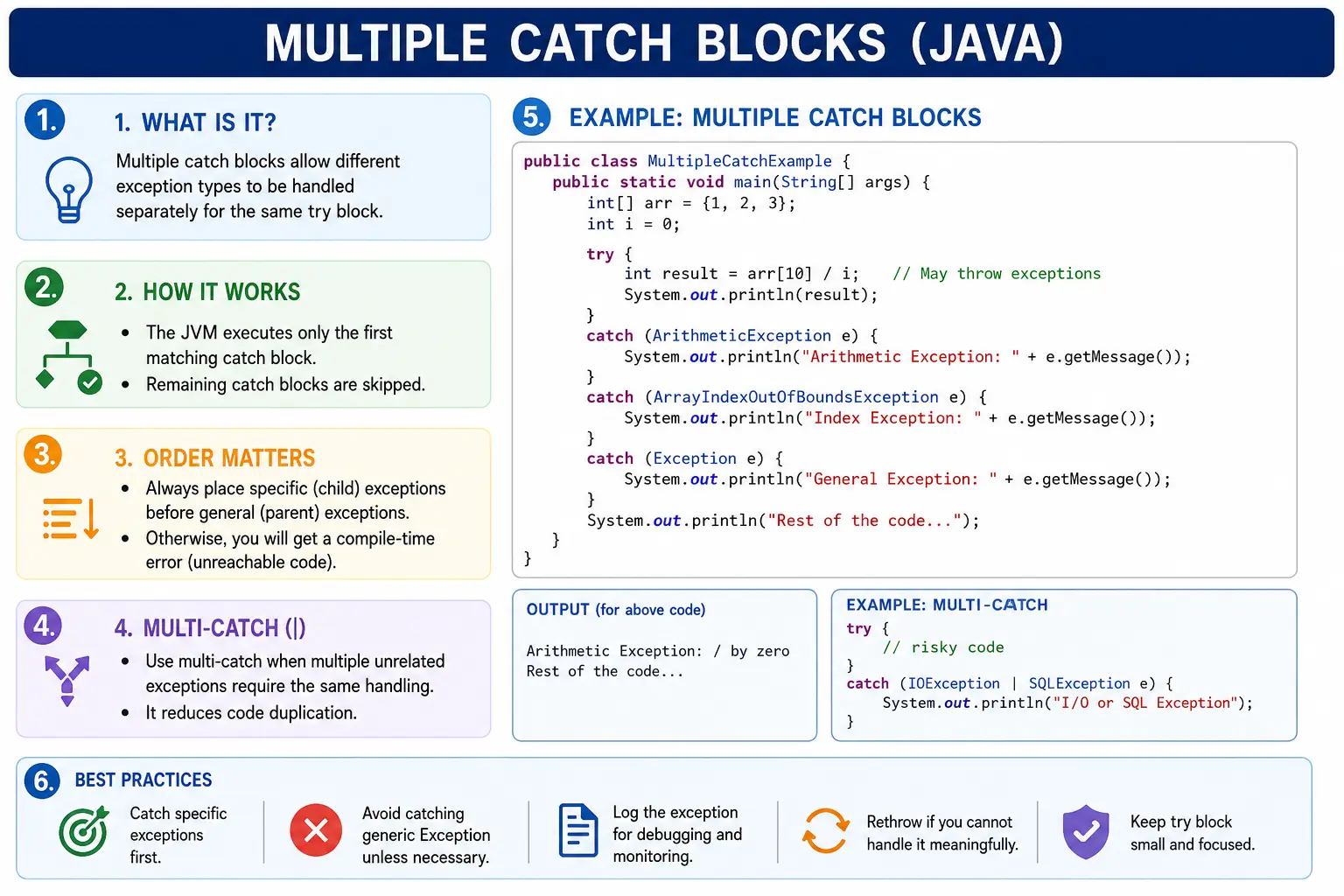
The value of multiple catch blocks is precision. Instead of writing one broad catch (Exception e)
block and printing the same message for every failure, the program can handle each failure according to its
meaning. A missing file can trigger a file-specific message. A number parsing issue can ask the user to enter
valid numeric input. A null reference can reveal an invalid object state during development. A database
issue can be logged and passed to a higher layer. This level of specificity is what makes exception handling
useful rather than merely defensive.
Why Multiple catch Blocks Are Needed
Multiple catch blocks are needed because different exceptions represent different causes and different risks. If a user enters text where a number is required, the program may recover by showing a validation message. If an array index is invalid, the issue may indicate a programming bug or incorrect loop boundary. If a file is missing, the application may ask the user to choose another file or create a default file. If all these situations are caught in one generic block, the program loses the ability to respond intelligently.
Precise handling also improves readability. When a developer reads separate catch blocks, they can quickly
understand what risks the code is prepared for. A catch (NumberFormatException e) block tells
the reader that parsing may fail. A catch (FileNotFoundException e) block tells the reader that
file availability is a concern. A generic catch block does not communicate that level of intent.
Multiple catch blocks also help avoid the habit of catching overly broad exceptions too early. Catching
Exception everywhere may appear to make the application safer, but it often hides defects and
weakens debugging. Specific catch blocks make error handling more honest. They show exactly which failures
the code expects and which failures should still propagate upward.
Basic Syntax
The syntax begins with a normal try block followed by two or more catch blocks.
Each catch block declares the exception type it can handle and defines the handling logic for that type. The
exception variable names can differ, but many developers use simple names such as e,
ex, or more descriptive names when needed.
try {
    // risky code
} catch (ExceptionType1 e1) {
    // handling logic for ExceptionType1
} catch (ExceptionType2 e2) {
    // handling logic for ExceptionType2
}
Only one matching catch block executes for a single thrown exception. Once Java finds a compatible catch
block, it executes that block and skips the rest of the catch blocks attached to the same try.
This is important because it means the order of catch blocks affects behavior. The most specific handlers
should appear first, and the more general handlers should appear later.
The try block should contain only the statements that belong to the same risk area. If the block
contains too much unrelated logic, a catch block may accidentally handle an exception from a statement it was
not meant to protect. Clean exception handling starts with focused try blocks and clear catch blocks.
Simple Example
In the following example, the try block contains two risky statements. The division by zero
occurs before the array access. Because the arithmetic exception happens first, Java immediately stops
executing the remaining statements in the try block and jumps to the matching
ArithmeticException catch block.
try {
    int[] arr = new int[3];
    int result = 10 / 0;
    System.out.println(arr[5]);
} catch (ArithmeticException e) {
    System.out.println("Arithmetic error");
} catch (ArrayIndexOutOfBoundsException e) {
    System.out.println("Array index error");
}
Output:
Arithmetic error
The array access statement is never reached in this run. This is a key point: the first exception stops
further execution inside the try block. Java does not collect all possible exceptions in the
block. It handles the first one that actually occurs.
Catch Block Execution Rules (Very Important)
1. Only One catch Executes
For one exception object, only one catch block executes. As soon as an exception is thrown, Java exits the
try block and searches for a matching handler. If it finds one, that catch block runs. After it
completes, control moves to the statement after the full try-catch structure. Java does not
return to the skipped statements inside the try block.
This rule has practical consequences. If several independent risky operations need separate handling and each
one should continue after failure, they may need separate try-catch structures or smaller
methods. Putting everything in one large try block can cause later operations to be skipped when
an earlier operation fails.
2. Catch Blocks Are Checked Top to Bottom
Java checks catch blocks in the order they are written. The first compatible catch block is chosen. A catch block is compatible if the thrown exception object is an instance of the declared exception type or one of its subclasses. This is why inheritance is central to multiple catch blocks.
Suppose a NullPointerException is thrown. A catch (NullPointerException e) block can
handle it. A catch (RuntimeException e) block can also handle it because
NullPointerException is a subclass of RuntimeException. A
catch (Exception e) block can also handle it because RuntimeException extends
Exception. If all three exist, the one that appears first and is compatible will execute.
Catch Ordering Rule (Interview Favorite)
Child exceptions must be caught before parent exceptions. This is one of the most important rules for multiple catch blocks. If a parent exception type appears first, it will catch the child exception before the child-specific block gets a chance. Java detects that the child block can never execute and reports a compile-time error for unreachable code.
Invalid order because the specific catch is unreachable
try {
    int x = 10 / 0;
} catch (Exception e) {
    System.out.println("Exception");
} catch (ArithmeticException e) {
    System.out.println("Arithmetic");
}
In this code, Exception appears before ArithmeticException. Since
ArithmeticException is a subclass of Exception, the first catch block can already
handle it. The second catch block is therefore unreachable.
Valid order with the specific catch first
try {
    int x = 10 / 0;
} catch (ArithmeticException e) {
    System.out.println("Arithmetic");
} catch (Exception e) {
    System.out.println("Exception");
}
This ordering is correct because Java first gives the specific handler an opportunity to run. If the thrown
exception is not an ArithmeticException but is another kind of Exception, then the
general catch block can still act as a fallback.
Multiple Catch with Related Exceptions
Related exceptions are exception classes that belong to the same inheritance chain. In such cases, catch ordering becomes especially important. The specific child class should appear first, followed by broader parent classes. This allows the program to provide detailed handling when possible while still keeping a general fallback for related failures.
try {
    String s = null;
    s.length();
} catch (NullPointerException e) {
    System.out.println("Null reference");
} catch (RuntimeException e) {
    System.out.println("Runtime issue");
}
Here, NullPointerException appears before RuntimeException. This is correct because
NullPointerException is more specific. If the order were reversed, the null-specific catch block
would become unreachable. The same rule applies to other related exception groups, such as
FileNotFoundException before IOException.
Multi-Catch (Java 7+) Alternative
Multiple catch blocks should not be confused with multi-catch. Multiple catch blocks use separate catch blocks for separate handling logic. Multi-catch, introduced in Java 7, allows one catch block to handle multiple unrelated exception types when the handling logic is the same.
try {
    int a = 10 / 0;
} catch (ArithmeticException | NullPointerException e) {
    System.out.println("Handled");
}
Multi-catch reduces duplication when the same response is appropriate for multiple failures. However, the exception types listed in a multi-catch must be unrelated. You cannot combine a parent exception and its child exception in the same multi-catch because the child type would be redundant. The exception variable in a multi-catch is also effectively final, which means it cannot be reassigned inside the catch block.
Multiple Catch vs Multi-Catch
The decision between multiple catch and multi-catch depends on the handling logic. If each exception needs a different message, recovery action, log context, or business response, use multiple catch blocks. If several unrelated exceptions should be handled in exactly the same way, multi-catch may be cleaner.
| Aspect | Multiple Catch | Multi-Catch |
|---|---|---|
| Handling logic | Separate per exception | Same logic |
| Readability | High (detailed) | Compact |
| Flexibility | More | Less |
| Java version | All | Java 7+ |
Designing Good Multiple catch Blocks
Good multiple catch design begins with understanding the operation being protected. The catch blocks should
reflect meaningful failure categories, not random exception names copied from an IDE suggestion. If a method
parses user input, then NumberFormatException may deserve a user-facing validation message. If a
method reads a file, FileNotFoundException and IOException may deserve different
handling. If a method calls a third-party service, one catch block may handle timeout failures while another
handles invalid response data.
The catch blocks should also be short. If a catch block grows large, move the handling into a separate method with a clear name. Long catch blocks are hard to read and often mix logging, recovery, business decisions, and cleanup in one place. Clean Java code treats exception handling as part of design, not as an afterthought added after compilation fails.
Specific Exceptions vs Generic Exception
A common beginner approach is to catch Exception immediately because it handles almost
everything. This approach makes code compile and prevents some crashes, but it also reduces clarity. A generic
catch block does not explain what failure is expected. It may catch defects that should not be hidden, such
as programming mistakes, invalid assumptions, or unexpected runtime errors.
Specific exceptions should be preferred when the code can respond differently to different failures.
catch (NumberFormatException e) communicates that invalid numeric input is expected.
catch (FileNotFoundException e) communicates that the file may be missing.
catch (SQLException e) communicates that database interaction may fail. A final
catch (Exception e) may still be useful at a boundary layer, but it should usually appear last
and should log enough information for diagnosis.
How Multiple catch Improves Diagnostics
Diagnostics means the ability to understand what went wrong after a failure occurs. Multiple catch blocks improve diagnostics because each block can record specific context. If an array access fails, the log can include the index and array size. If parsing fails, the log can include the original input value. If a file read fails, the log can include the file path. A generic catch block often loses this precision unless extra conditional checks are added inside it, which defeats the clarity of separate catch blocks.
Better diagnostics matter in production. A vague message such as "Exception occurred" may be enough for a small demo, but it is not enough for a real service. Production issues must be investigated quickly. Specific catch blocks make logs more searchable, reports more meaningful, and support work faster.
Multiple catch and Program Flow
Multiple catch blocks influence program flow by deciding how execution continues after failure. If a catch
block handles the exception and does not rethrow it, the program continues after the
try-catch statement. If the catch block throws another exception, returns from the method, or
exits the program, normal continuation does not happen. This means a catch block should be written with a
clear decision in mind.
Continuing after an exception is safe only when the program state is still valid. For example, if parsing one optional field fails, the program may use a default value and continue. But if loading a required account record fails, continuing as if the account exists would be dangerous. Multiple catch blocks should not only print messages; they should preserve correctness.
Use in Real Applications
In real Java applications, multiple catch blocks are common around operations that depend on external data or
external systems. File processing may handle FileNotFoundException differently from general
IOException. Input processing may handle NumberFormatException differently from
missing data. API clients may handle timeout errors differently from authentication failures. These
distinctions allow the application to respond in ways that match the business impact of the failure.
Consider a report-generation feature. If the report template is missing, the application may show an administrator-facing configuration error. If the user entered an invalid date range, the application may show a validation message. If the database query fails, the system may log the details and return a temporary service error. These are different failures, and multiple catch blocks help keep those responses separate and readable.
Relationship with finally
Multiple catch blocks can be followed by a finally block. The catch blocks handle different
exception types, while finally provides cleanup logic that should run after the try-catch flow.
This can include closing resources, releasing locks, or resetting temporary state. The finally
block is not a replacement for catch blocks; it serves a different purpose.
In modern Java, resource cleanup is often handled by try-with-resources, especially for streams,
files, and database resources. Even so, understanding how multiple catch blocks work with
finally is useful because it explains the complete exception-handling flow.
Interview Perspective
In interviews, a strong answer should mention that multiple catch blocks allow different exception types from
the same try block to be handled separately. It should also mention that Java checks catch blocks
from top to bottom, only one matching catch block executes, and child exception classes must come before
parent exception classes. These points show that you understand both the syntax and the execution model.
A practical interview answer can also compare multiple catch with multi-catch. Multiple catch is used when different exceptions require different handling. Multi-catch is used when multiple unrelated exceptions share the same handling logic. This comparison demonstrates real-world judgment rather than memorized syntax.
Multiple Catch Examples (1-20)
1. Basic Multiple catch Blocks
class Demo {
    public static void main(String[] args) {
        try {
            int a = 10 / 0;
        } catch (ArithmeticException e) {
            System.out.println("Arithmetic exception");
        } catch (Exception e) {
            System.out.println("Generic exception");
        }
    }
}
Output:
Arithmetic exception
2. Multiple catch with Different Exception Types
class Demo {
    public static void main(String[] args) {
        try {
            String s = null;
            s.length();
        } catch (ArithmeticException e) {
            System.out.println("Math error");
        } catch (NullPointerException e) {
            System.out.println("Null pointer");
        } catch (Exception e) {
            System.out.println("Other error");
        }
    }
}
Output:
Null pointer
3. Catch Order Matters (Specific to General)
class Demo {
    public static void main(String[] args) {
        try {
            int[] a = new int[2];
            a[5] = 10;
        } catch (ArrayIndexOutOfBoundsException e) {
            System.out.println("Array index error");
        } catch (Exception e) {
            System.out.println("General exception");
        }
    }
}
Output:
Array index error
4. Wrong Catch Order (Compile-Time Error)
class Demo {
    public static void main(String[] args) {
        try {
            int a = 10 / 0;
        }
        // catch (Exception e) {}
        // catch (ArithmeticException e) {} // unreachable code
    }
}
Explanation: Parent exception must always be last.
5. Multiple catch for Array and Null Issues
class Demo {
    public static void main(String[] args) {
        try {
            String[] a = new String[2];
            System.out.println(a[1].length());
        } catch (ArrayIndexOutOfBoundsException e) {
            System.out.println("Array error");
        } catch (NullPointerException e) {
            System.out.println("Null error");
        }
    }
}
Output:
Null error
6. Using Exception as Last Catch
class Demo {
    public static void main(String[] args) {
        try {
            int a = Integer.parseInt("abc");
        } catch (ArithmeticException e) {
            System.out.println("Math error");
        } catch (NumberFormatException e) {
            System.out.println("Number format error");
        } catch (Exception e) {
            System.out.println("Other error");
        }
    }
}
Output:
Number format error
7. Multiple catch with File Handling
import java.io.*;

class Demo {
    public static void main(String[] args) {
        try {
            new FileInputStream("test.txt");
        } catch (FileNotFoundException e) {
            System.out.println("File not found");
        } catch (IOException e) {
            System.out.println("IO error");
        }
    }
}
Output:
File not found
8. Multi-Catch (Java 7+ Alternative)
class Demo {
    public static void main(String[] args) {
        try {
            int[] a = new int[2];
            a[3] = 10;
        } catch (ArrayIndexOutOfBoundsException | NullPointerException e) {
            System.out.println("Array or Null exception");
        }
    }
}
Output:
Array or Null exception
9. Multiple catch with Inheritance
class Demo {
    public static void main(String[] args) {
        try {
            throw new RuntimeException();
        } catch (RuntimeException e) {
            System.out.println("Runtime exception");
        } catch (Exception e) {
            System.out.println("Exception");
        }
    }
}
Output:
Runtime exception
10. Same Exception Type Twice (Not Allowed)
class Demo {
    public static void main(String[] args) {
        try {
            int a = 10 / 0;
        }
        // catch (ArithmeticException e) {}
        // catch (ArithmeticException e) {} // duplicate catch
    }
}
Explanation: Duplicate catch blocks are not allowed.
11. Multiple catch with finally
class Demo {
    public static void main(String[] args) {
        try {
            int a = 10 / 0;
        } catch (NullPointerException e) {
            System.out.println("Null");
        } catch (ArithmeticException e) {
            System.out.println("Arithmetic");
        } finally {
            System.out.println("Finally block");
        }
    }
}
Output:
Arithmetic
Finally block
12. Nested try with Multiple catch
class Demo {
    public static void main(String[] args) {
        try {
            try {
                int a = 10 / 0;
            } catch (ArithmeticException e) {
                System.out.println("Inner catch");
            }
        } catch (Exception e) {
            System.out.println("Outer catch");
        }
    }
}
Output:
Inner catch
13. Multiple catch with Method Call
class Demo {
    static void test() {
        int[] a = new int[2];
        a[4] = 10;
    }

    public static void main(String[] args) {
        try {
            test();
        } catch (ArrayIndexOutOfBoundsException e) {
            System.out.println("Array error");
        } catch (Exception e) {
            System.out.println("General error");
        }
    }
}
Output:
Array error
14. Catching Checked and Unchecked Together
import java.io.*;

class Demo {
    public static void main(String[] args) {
        try {
            int a = 10 / 0;
            new FileInputStream("a.txt");
        } catch (ArithmeticException e) {
            System.out.println("Arithmetic");
        } catch (FileNotFoundException e) {
            System.out.println("File missing");
        }
    }
}
Output:
Arithmetic
15. Multiple catch with return
class Demo {
    static int test() {
        try {
            int a = 10 / 0;
            return 1;
        } catch (ArithmeticException e) {
            return 2;
        } catch (Exception e) {
            return 3;
        }
    }

    public static void main(String[] args) {
        System.out.println(test());
    }
}
Output:
2
16. Multiple catch with Custom Exception
class MyException extends Exception {}

class Demo {
    public static void main(String[] args) {
        try {
            throw new MyException();
        } catch (MyException e) {
            System.out.println("MyException caught");
        } catch (Exception e) {
            System.out.println("Exception caught");
        }
    }
}
Output:
MyException caught
17. Catching RuntimeException vs Exception
class Demo {
    public static void main(String[] args) {
        try {
            throw new NullPointerException();
        } catch (RuntimeException e) {
            System.out.println("Runtime");
        } catch (Exception e) {
            System.out.println("Exception");
        }
    }
}
Output:
Runtime
18. Multiple catch with No Exception Occurring
class Demo {
    public static void main(String[] args) {
        try {
            int a = 10 / 2;
        } catch (ArithmeticException e) {
            System.out.println("Arithmetic");
        } catch (Exception e) {
            System.out.println("Exception");
        }
    }
}
Output:
(no output)
19. Interview Trap: Parent in Middle
class Demo {
    public static void main(String[] args) {
        try {
            int a = 10 / 0;
        }
        // catch (Exception e) {}
        // catch (RuntimeException e) {} // unreachable
    }
}
Explanation: Parent (Exception) cannot appear before child (RuntimeException).
20. Interview Summary: Multiple catch Blocks
class Demo {
    public static void main(String[] args) {
        try {
            String s = null;
            s.length();
        } catch (NullPointerException e) {
            System.out.println("Null");
        } catch (Exception e) {
            System.out.println("Exception");
        }
        System.out.println("Program continues");
    }
}
Key Points:
- Order: child before parent
- Only one catch executes
- Parent exception must be last
- Improves precise error handling
Output:
Null
Program continues
Best Practices
The first best practice is to catch the most specific exception type that the code can handle meaningfully.
Specific catch blocks make intent clear and prevent unrelated failures from being handled incorrectly. A
NumberFormatException catch block should focus on invalid numeric input. A
FileNotFoundException catch block should focus on missing files. A SQLException
catch block should focus on database interaction. When each catch block has a clear purpose, the exception
handling code becomes easier to read, test, and maintain.
The second best practice is to place generic catch blocks only at the end and only when there is a real need
for a fallback. A final catch (Exception e) may be acceptable at application boundaries, such as
a controller, job runner, framework entry point, or service boundary where the application must convert any
unexpected failure into a controlled response. Inside core business logic, however, a generic catch often
hides defects that should be fixed directly.
The third best practice is to make the handling logic meaningful. Printing a message is enough for a learning example, but real applications usually need logging, recovery, rethrowing, or a business response. If the catch block cannot recover and cannot add useful context, it may be better to let the exception propagate. Good exception handling is not measured by how many exceptions are caught. It is measured by whether each catch block improves the behavior of the program.
The fourth best practice is to preserve diagnostic details. If a catch block logs an exception, it should log the exception object, not only the message. If it wraps an exception in a custom exception, it should pass the original exception as the cause. This preserves the stack trace and makes debugging possible. Losing the original cause is one of the fastest ways to make production issues difficult to investigate.
Choosing Between Separate catch Blocks and Shared Handling
When several exceptions can occur, the developer must decide whether they need separate handling or shared handling. Separate catch blocks are better when each exception has a different meaning. For example, invalid user input, missing configuration, and service timeout are different failures. They may require different messages, different logs, different metrics, and different recovery paths. In that case, separate catch blocks are more expressive than one combined handler.
Shared handling is better when the application response is genuinely the same. If two unrelated exception types both mean that a request cannot be processed and both require the same log message and same response, multi-catch may reduce duplication. The important point is not to use multi-catch only because it looks shorter. Shorter code is useful only when it remains clear. If combining exceptions hides important meaning, separate catch blocks are the better design.
Multiple catch and Exception Propagation
Multiple catch blocks do not prevent exception propagation unless a matching catch block handles the
exception. If none of the catch blocks match the thrown exception, the exception continues moving up the call
stack. This is why a try block with multiple catch blocks does not guarantee that every possible
failure is handled. It only handles the exception types listed in compatible catch blocks.
This behavior is useful because not every method should catch every exception. Some methods are too low-level to know the correct recovery action. A utility method may know how to parse a value, but it may not know whether invalid input should show a warning, reject a form, skip a record, or stop a batch job. In such cases, allowing the exception to propagate to a higher layer can produce better application design.
Handling Checked and Unchecked Exceptions Together
A single try block may contain code that can throw both checked and unchecked exceptions.
Checked exceptions are enforced by the compiler, while unchecked exceptions are not. Multiple catch blocks
can handle both categories, but the same ordering rule still applies. Specific exceptions should come first,
followed by broader parent types when needed.
For checked exceptions, the compiler forces the developer to either catch the exception or declare it with
throws. For unchecked exceptions, the developer chooses whether catching is useful. In many
cases, unchecked exceptions such as NullPointerException or IllegalArgumentException
are better prevented through validation and correct logic. Catching them may be useful at a boundary layer,
but catching them everywhere can hide programming mistakes.
Logging Strategy for Multiple catch Blocks
Logging should match the meaning of each catch block. A validation-related catch block may log at a lower level or may not need technical logging if the user can correct the input. A system or integration failure should usually be logged with enough context for support teams to investigate. A security-related failure may need careful logging that avoids exposing sensitive data.
Multiple catch blocks make this strategy easier because each failure type has its own place. The
FileNotFoundException catch can log the file path. The NumberFormatException catch
can log the field name and rejected value. The SQLException catch can log the operation name
without exposing confidential query details. This is much cleaner than one broad catch block filled with
conditional checks on exception types.
Common Interview Traps
The most common interview trap is placing catch (Exception e) before a child exception such as
ArithmeticException or NullPointerException. This causes unreachable code because
the parent catch already handles the child. Another trap is assuming that all catch blocks run. Only one
matching catch block runs for a single exception. A third trap is thinking that catch blocks are selected by
the exact type only. In reality, a parent catch can handle child exception objects because of inheritance.
Another frequent trap involves multi-catch. The exception types in a multi-catch must be unrelated. You
cannot write catch (Exception | IOException e) because IOException is already a
subclass of Exception. Interviewers use these examples to check whether candidates understand
exception hierarchy rather than only memorizing syntax.
Common Beginner Mistakes
Beginners often write catch blocks in the wrong order because they focus on the exception names rather than
the inheritance relationship. The correct mental model is specific first, general later. Another common
mistake is catching Exception too early. This may make the code compile, but it prevents
specific handlers from running and often hides the real failure type.
Some beginners also assume that all catch blocks are checked or executed after an exception occurs. Java does check them top to bottom, but it executes only the first compatible one. Others ignore the exception object completely, which removes useful details such as the message and stack trace. Empty catch blocks are especially harmful because they swallow failures silently. If a problem occurs, the application may continue with incorrect state and no evidence of what went wrong.
Interview-Ready Answers
Short Answer
Multiple catch blocks allow the same try block to handle different exception types separately.
Detailed Answer
In Java, multiple catch blocks can follow a try block to handle different exception types. When
an exception occurs, the JVM checks catch blocks from top to bottom and executes the first compatible block.
Catch blocks must be ordered from the most specific exception type to the most general exception type to
avoid unreachable code. This allows precise handling, clearer diagnostics, and better recovery logic.
Key Takeaway
Multiple catch blocks provide precise control over exception handling. They help Java programs respond differently to different failures, improve debugging, and avoid overly broad generic handling. The most important rule is to place child exceptions before parent exceptions. When used carefully, multiple catch blocks make error handling safer, clearer, and easier to maintain.