Method Parameters
Method parameters are central to how Java programs communicate data between different parts of an application. They transform methods from rigid, fixed-function blocks into flexible, reusable components capable of handling dynamic input. In practical software development, almost every meaningful method relies on parameters to accept data, process it, and produce outcomes. Whether you are building APIs, implementing business logic, or writing automation frameworks, java-method-parameters">method parameters play a critical role in controlling program flow and behavior.
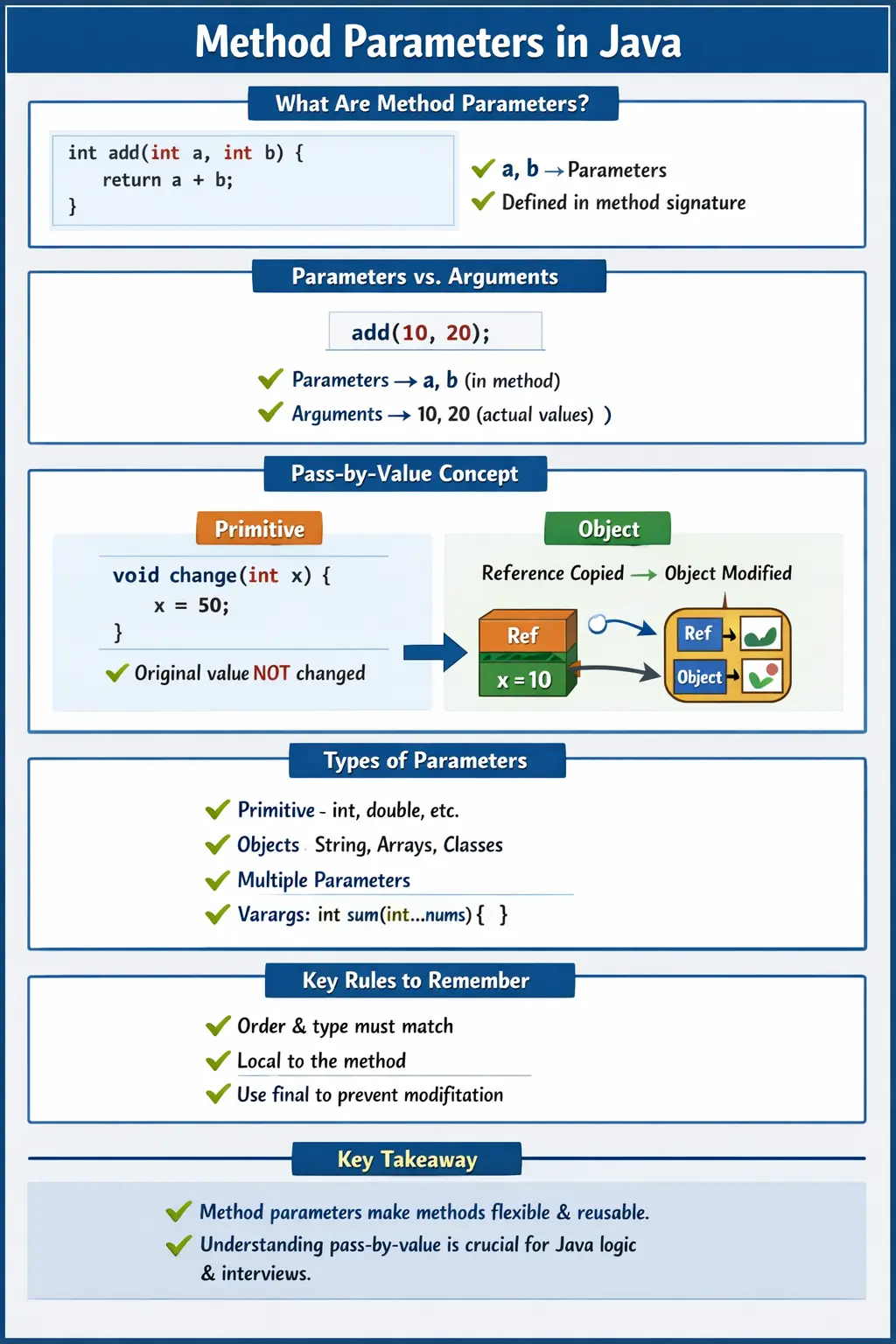
Understanding method parameters goes beyond syntax. It involves grasping how Java passes data, how scope is managed, how memory is handled, and how different data types behave when passed into methods. These concepts are frequently tested in interviews and are essential for writing predictable and bug-free code.
What Are Method Parameters?
Method parameters are variables declared in a method signature that receive values when the method is invoked. These variables act as placeholders for the actual data that will be supplied at runtime. Parameters exist only during the execution of the method and are destroyed once the method completes.
Consider a simple example:
int add(int a, int b) {
    return a + b;
}
In this method, a and b are parameters. They do not hold any value until the method is called. When the method is invoked, values are passed into these parameters, allowing the method to perform its computation.
Parameters make methods dynamic. Instead of hardcoding values inside a method, parameters allow the same method to work with different inputs, making it reusable across various scenarios.
Parameters vs Arguments
A common source of confusion is the distinction between parameters and arguments. While the terms are often used interchangeably in casual conversation, they have specific meanings in Java.
Parameters are the variables defined in the method declaration. Arguments are the actual values passed to the method when it is called.
For example:
add(10, 20);
Here, 10 and 20 are arguments, while a and b in the method definition are parameters.
Understanding this distinction is important, especially in interviews, as it reflects clarity in understanding how method calls work.
Purpose of Method Parameters
The primary purpose of method parameters is to enable data transfer into methods. Without parameters, methods would be limited to fixed logic, reducing their usefulness. Parameters allow methods to adapt to different inputs, making them versatile and powerful.
They also support modular programming. Instead of embedding logic with hardcoded values, developers can design generic methods that accept parameters and operate on them. This leads to cleaner code, better separation of concerns, and easier maintenance.
In real-world applications, parameters are used to pass user input, configuration values, database results, API responses, and more. They are the bridge between different layers of an application.
Types of Method Parameters in Java
Java supports various types of parameters, but the most important concept to understand is how values are passed. Java uses a pass-by-value mechanism for all parameter passing.
Pass by Value (Core Concept)
In Java, when a method is called, a copy of the argument value is passed to the parameter. This means that changes made to the parameter inside the method do not affect the original value outside the method.
Consider the following example:
void change(int x) {
    x = 50;
}

int a = 10;
change(a);
System.out.println(a); // Output: 10
Here, the value of a remains unchanged because a copy of its value was passed to the method.
This behavior is consistent across all primitive data types and is a fundamental rule in Java.
Object Reference Parameters (Still Pass by Value)
When objects are passed as parameters, the situation appears different but follows the same rule. Java still passes a copy of the reference, not the actual object.
For example:
void change(int[] arr) {
    arr[0] = 100;
}

int[] a = {10, 20};
change(a);
System.out.println(a[0]); // Output: 100
In this case, the array content is modified. This happens because the copied reference still points to the same object in memory. While the reference itself is copied, the object it refers to can be modified.
This distinction is critical. Java is always pass-by-value, but when dealing with objects, the value being passed is the reference, not the object itself.
Single vs Multiple Parameters
Methods can have a single parameter or multiple parameters depending on the requirement.
A method with a single parameter is straightforward and often used for simple operations:
void print(int x) {
    System.out.println(x);
}
A method with multiple parameters allows more complex interactions:
int add(int a, int b) {
    return a + b;
}
The number and type of parameters define the method’s signature and determine how the method is invoked.
Parameter Data Types
Java allows parameters of various data types, making methods highly flexible. Parameters can be primitive types such as int, double, or boolean, or they can be reference types such as arrays, strings, or objects.
For example:
void display(String name, int age) {
    System.out.println(name + " is " + age + " years old");
}
This method accepts both a string and an integer, demonstrating how multiple data types can be used together.
Passing arrays as parameters is also common, especially for bulk data processing:
void printArray(int[] arr) {
    for (int value : arr) {
        System.out.println(value);
    }
}
This allows methods to process collections of data efficiently.
Variable-Length Parameters (Varargs)
Java provides a feature called varargs, which allows methods to accept a variable number of arguments. This is useful when the exact number of inputs is not known in advance.
For example:
int sum(int... numbers) {
    int total = 0;
    for (int n : numbers) {
        total += n;
    }
    return total;
}
Here, the method can accept any number of integers, making it highly flexible.
Varargs are internally treated as arrays, and they simplify method calls by eliminating the need to explicitly create arrays.
Final Parameters
Parameters can be declared as final, which means their values cannot be modified inside the method.
void show(final int x) {
    // x cannot be reassigned
}
Using final parameters helps prevent accidental changes and improves code safety. It is particularly useful in complex methods where maintaining parameter integrity is important.
Parameter Order and Type Matching
The order and type of parameters in a method must match exactly with the arguments provided during method invocation.
For example:
void display(int id, String name) { }

display(101, "John"); // Correct
display("John", 101); // Compile-time error
This strict matching ensures type safety and prevents runtime errors.
Parameter Scope and Lifetime
Parameters have a limited scope. They exist only within the method in which they are defined and cannot be accessed outside of it.
Once the method execution is complete, the parameters are destroyed. This temporary lifecycle ensures that methods remain independent and do not interfere with each other.
Understanding scope is important for avoiding errors related to variable access and for writing clean, modular code.
Real-World Usage of Method Parameters
In real-world applications, method parameters are used extensively. For example, in web applications, parameters are used to pass user input from forms to backend logic. In APIs, parameters carry request data such as query parameters or request bodies.
In automation frameworks, parameters are used to pass test data into reusable methods. For instance, a login method may accept username and password as parameters, allowing the same method to be used for multiple test scenarios.
This flexibility is what makes parameters indispensable in modern software development.
Common Beginner Mistakes
Beginners often misunderstand how parameters work, especially the concept of pass-by-value. A common mistake is assuming that Java supports pass-by-reference, which it does not.
Another frequent error is expecting changes to primitive parameters to reflect in the caller. Since only copies are passed, such changes have no effect outside the method.
Confusing parameter order or types during method calls can lead to compilation errors. Additionally, improper use of method overloading can create ambiguity and unexpected behavior.
Understanding these pitfalls helps developers avoid common bugs and write more reliable code.
Best Practices for Using Method Parameters
Effective use of method parameters involves following certain best practices. Parameters should be minimal and meaningful, avoiding unnecessary complexity. Methods with too many parameters can become difficult to understand and maintain.
Using descriptive parameter names improves readability and makes the method’s purpose clearer. It is also important to validate parameter values when necessary to prevent invalid input from causing errors.
In some cases, grouping related parameters into objects can simplify method signatures and improve design.
Interview Perspective
In interviews, method parameters are often used to test a candidate’s understanding of Java fundamentals. A short answer should define parameters as variables that receive values when a method is called.
A more detailed explanation should include the concept of pass-by-value, the difference between primitive and reference types, and how parameters influence method behavior.
Candidates are often asked to explain why changes to primitive parameters do not affect the caller, while object modifications do. Demonstrating clarity in this area is a strong indicator of solid Java fundamentals.
Key Takeaway
Method parameters are essential for making Java methods flexible, reusable, and dynamic. They enable data to flow into methods, allowing logic to operate on varying inputs. Understanding how parameters work—especially Java’s pass-by-value mechanism—is crucial for writing correct and predictable programs.
One-Line Insight
Method parameters allow data to flow into methods, making code reusable and dynamic while relying on Java’s pass-by-value mechanism for predictable behavior.
1. Single Parameter Method
class Demo {
static void printNumber(int x) {
System.out.println(x);
}
public static void main(String[] args) {
printNumber(10);
}
}
Explanation
- x is a method parameter
- Value passed during call
- Output: 10
2. Multiple Parameters Method
class Demo {
static void add(int a, int b) {
System.out.println(a + b);
}
public static void main(String[] args) {
add(5, 7);
}
}
Explanation
- Parameters are comma-separated
- Order matters
- Output: 12
3. Parameter Order Matters
class Demo {
static void show(int a, String b) {
System.out.println(a + " " + b);
}
public static void main(String[] args) {
show(10, "Java");
// show("Java", 10); // Compile-time error
}
}
Explanation
- Parameter order must match method signature
- Strongly typed
4. Passing Literal Values as Parameters
class Demo {
static void greet(String name) {
System.out.println("Hello " + name);
}
public static void main(String[] args) {
greet("Selenium");
}
}
Explanation
- Direct literal passed
- Output: Hello Selenium
5. Passing Variables as Parameters
class Demo {
static void square(int n) {
System.out.println(n * n);
}
public static void main(String[] args) {
int x = 4;
square(x);
}
}
Explanation
- Variable value copied
- Output: 16
6. Parameter Reassignment (Primitive)
class Demo {
static void modify(int x) {
x = 100;
}
public static void main(String[] args) {
int a = 10;
modify(a);
System.out.println(a);
}
}
Explanation
- Java is call by value
- Original unchanged
- Output: 10
7. Parameter Modification (Object)
class Demo {
static void modify(StringBuilder sb) {
sb.append(" Java");
}
public static void main(String[] args) {
StringBuilder sb = new StringBuilder("Hello");
modify(sb);
System.out.println(sb);
}
}
Explanation
- Object content modified
- Output: Hello Java
8. Reassigning Object Parameter
class Demo {
static void modify(StringBuilder sb) {
sb = new StringBuilder("New");
}
public static void main(String[] args) {
StringBuilder sb = new StringBuilder("Old");
modify(sb);
System.out.println(sb);
}
}
Explanation
- Reference reassignment is local
- Output: Old
9. Passing Array as Parameter
class Demo {
static void printArray(int[] arr) {
for (int x : arr) {
System.out.print(x + " ");
}
}
public static void main(String[] args) {
int[] nums = {1, 2, 3};
printArray(nums);
}
}
Explanation
- Arrays are objects
- Output: 1 2 3
10. Modifying Array Parameter
class Demo {
static void change(int[] arr) {
arr[0] = 99;
}
public static void main(String[] args) {
int[] a = {1, 2, 3};
change(a);
System.out.println(a[0]);
}
}
Explanation
- Array content changes
- Output: 99
11. Passing null as Parameter
class Demo {
static void print(String s) {
System.out.println(s);
}
public static void main(String[] args) {
print(null);
}
}
Explanation
- null is valid for reference types
- Output: null
12. Null Parameter Causing Exception
class Demo {
static void length(String s) {
System.out.println(s.length());
}
public static void main(String[] args) {
// length(null); // NullPointerException
}
}
Explanation
- Calling method on null causes runtime exception
13. Method with Varargs Parameter
class Demo {
static void sum(int... nums) {
int total = 0;
for (int n : nums) {
total += n;
}
System.out.println(total);
}
public static void main(String[] args) {
sum(1, 2, 3);
sum(5, 10);
}
}
Explanation
- Varargs treated as array
- Output:
6
15
14. Varargs Must Be Last Parameter
class Demo {
static void test(String name, int... nums) {
System.out.println(name);
}
// static void test(int... nums, String name) ❌
}
Explanation
- Varargs must be last in method signature
15. Passing Expression as Parameter
class Demo {
static void show(int x) {
System.out.println(x);
}
public static void main(String[] args) {
show(5 + 3);
}
}
Explanation
- Expression evaluated before passing
- Output: 8
16. Parameter Shadowing Variable Name
class Demo {
static int x = 10;
static void show(int x) {
System.out.println(x);
}
public static void main(String[] args) {
show(20);
}
}
Explanation
- Parameter shadows class variable
- Output: 20
17. Using this with Parameters
class Demo {
int x;
Demo(int x) {
this.x = x;
}
void show() {
System.out.println(x);
}
public static void main(String[] args) {
Demo d = new Demo(10);
d.show();
}
}
Explanation
- this.x refers to instance variable
- Output: 10
18. Parameter Passing in Method Overloading
class Demo {
static void show(int x) {
System.out.println("int");
}
static void show(Integer x) {
System.out.println("Integer");
}
public static void main(String[] args) {
show(10);
}
}
Explanation
- Primitive preferred over wrapper
- Output: int
19. Autoboxing in Parameters
class Demo {
static void show(Integer x) {
System.out.println(x);
}
public static void main(String[] args) {
show(20);
}
}
Explanation
- int → Integer (autoboxing)
- Output: 20
20. Interview Summary – Method Parameters
class Demo {
static void test(int x, int[] arr) {
x = 50;
arr[0] = 99;
}
public static void main(String[] args) {
int a = 10;
int[] b = {1, 2};
test(a, b);
System.out.println(a);
System.out.println(b[0]);
}
}
Explanation
- Primitive unchanged
- Object modified
- Output:
10
99