Method Overloading
Method overloading is one of the most elegant features of Java that enables developers to write cleaner, more expressive, and reusable code. At its core, method overloading allows multiple methods to share the same name within the same class, provided their parameter lists differ. This capability reduces unnecessary method name variations and groups logically related operations under a single conceptual umbrella. In real-world systems, where APIs must be intuitive and flexible, method overloading plays a crucial role in improving developer experience and maintainability.
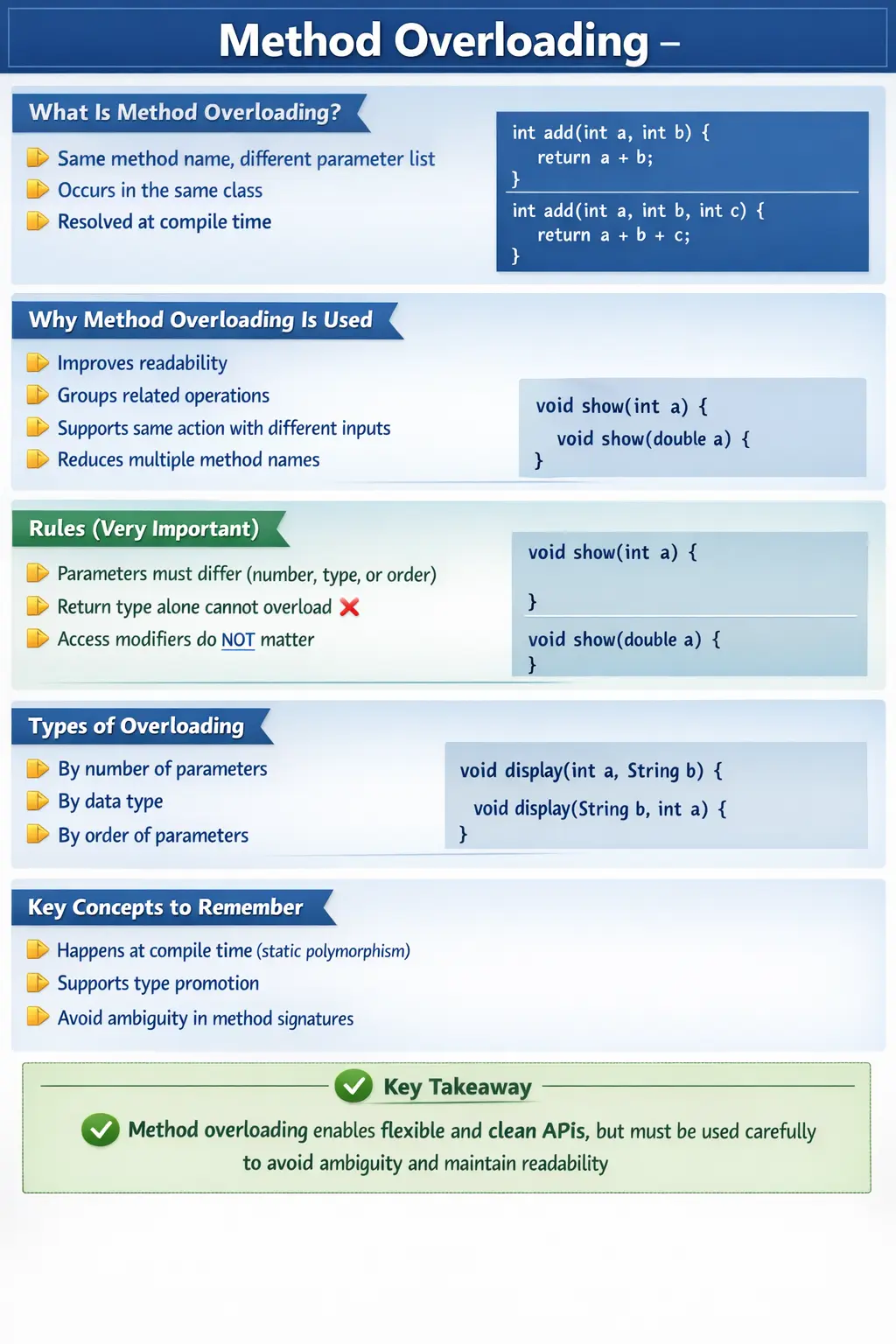
From an object-oriented programming perspective, method overloading is an example of compile-time polymorphism (also known as static polymorphism). The Java compiler determines which method to invoke based on the method signature at compile time, rather than at runtime. This early binding improves performance and ensures type safety before the program even runs.
What Is Method Overloading?
Method overloading is defined as the ability of a class to have more than one method with the same name but with different parameter lists. These differences can be in the number of parameters, their data types, or their order.
Consider the following example:
int add(int a, int b) {
    return a + b;
}

int add(int a, int b, int c) {
    return a + b + c;
}
Both methods are named add, but they differ in the number of parameters. When the method is called, the compiler determines which version to execute based on the arguments provided.
This design allows developers to express the same logical operation, addition in this case, without creating multiple method names like addTwoNumbers or addThreeNumbers. The result is cleaner and more intuitive code.
Why Method Overloading Is Used
Method overloading is not just a syntactic convenience; it serves several important design purposes. One of the primary benefits is improved readability. When related operations share the same name, the code becomes easier to understand because the intent is consistent across different use cases.
It also enhances reusability. Instead of writing separate methods for similar operations, developers can reuse the same method name with different parameter configurations. This reduces duplication and keeps the codebase concise.
Another advantage is flexibility. A single method name can handle different types of inputs, making APIs more versatile. For example, a print() method can handle strings, integers, or objects without requiring separate method names.
Finally, method overloading prevents what is often called “method name explosion,” where too many method names are created for similar operations. By consolidating them under a single name, the code remains organized and manageable.
Rules of Method Overloading
Understanding the rules of method overloading is essential, as Java enforces strict guidelines to ensure clarity and avoid ambiguity.
The most important rule is that the parameter list must be different. Overloading can occur by changing the number of parameters, the data types of parameters, or the order of parameters.
For example:
add(int a, int b)
add(int a, int b, int c)
add(double a, double b)
add(int a, double b)
Each of these methods is valid because the parameter list differs in some way.
A critical rule to remember is that the return type alone cannot differentiate overloaded methods. The following example is invalid:
int test() { }
double test() { } // Compile-time error
Even though the return types differ, the method signatures are considered identical because the parameter lists are the same.
Another important rule is that access modifiers do not affect overloading. Methods can have different access levels and still be overloaded:
public void show(int a) { }
private void show(double a) { }
This is perfectly valid because the parameter types are different.
Types of Method Overloading
Method overloading can be categorized based on how the parameter list differs.
One common type is overloading by the number of parameters. In this case, methods have the same name but accept a different number of arguments:
void display() { }
void display(int a) { }
Another type is overloading by data type. Here, methods differ in the type of parameters they accept:
void display(int a) { }
void display(String a) { }
A third type is overloading by the order of parameters. This occurs when the same data types are used but in a different sequence:
void display(int a, String b) { }
void display(String b, int a) { }
Each of these variations allows the compiler to distinguish between methods during compilation.
Method Overloading and Type Promotion
Java supports automatic type promotion, which can influence how overloaded methods are resolved. When an exact match is not found, the compiler may promote the argument to a compatible type.
For example:
void show(int a) {
    System.out.println("int");
}

void show(double a) {
    System.out.println("double");
}

show(10);    // calls show(int)
show(10.5);  // calls show(double)
If a method call does not exactly match a parameter type, Java attempts to find the closest match through type promotion. While this is convenient, it can sometimes lead to confusion if multiple methods are eligible.
Ambiguity in Method Overloading
Ambiguity occurs when the compiler cannot determine which overloaded method to call. This typically happens when multiple methods match equally well after type promotion.
For example:
void test(int a, double b) { }
void test(double a, int b) { }

test(10, 10); // Compile-time error
In this case, both methods are equally valid after type promotion, leading to ambiguity. The compiler cannot decide which method to invoke, resulting in an error.
Avoiding such ambiguous designs is an important best practice in method overloading.
Method Overloading with Objects and Strings
When dealing with object types, Java selects the most specific method available. This behavior is particularly noticeable when working with inheritance hierarchies.
Consider the following example:
void print(String s) {
    System.out.println("String");
}

void print(Object o) {
    System.out.println("Object");
}

print("Java"); // calls String version
Since String is more specific than Object, the corresponding method is chosen.
A similar concept applies when passing null:
void show(String s) {
    System.out.println("String");
}

void show(Object o) {
    System.out.println("Object");
}

show(null); // calls String version
Here, the compiler selects the most specific method, which is the one accepting String.
Overloading the main() Method
The main() method can also be overloaded in Java. However, the JVM always calls the standard entry point:
public static void main(String[] args)
Any overloaded versions of main() must be called explicitly from within the program:
public static void main(String[] args) {
    main(10);
}

public static void main(int a) {
    System.out.println("Overloaded main");
}
This demonstrates that overloading is possible, but the JVM does not use overloaded methods as entry points.
Compile-Time Polymorphism Explained
Method overloading is a classic example of compile-time polymorphism. The term “polymorphism” means “many forms,” and in this context, it refers to a single method name representing multiple implementations.
The key characteristic of compile-time polymorphism is that method resolution happens during compilation. The compiler determines which method to call based on the method signature and arguments.
This approach has performance advantages because the decision is made before runtime, eliminating the need for dynamic resolution. It also ensures type safety, as errors are detected early in the development process.
Method Signature and Compiler Decision-Making
To understand method overloading deeply, it is important to understand the idea of a method signature. In Java, a method signature includes the method name and parameter list. The parameter list includes the number of parameters, their types, and their order. The return type is not part of the signature for overloading purposes. This is why two methods with the same name and same parameters cannot be overloaded only by changing the return type.
When a method call is written, the compiler looks at the method name and the arguments provided. It then searches for the best matching method signature. If an exact match exists, that method is selected. If no exact match exists, Java may consider type promotion, boxing, varargs, or inheritance-based matching depending on the available methods. If more than one method is equally suitable, the call becomes ambiguous and compilation fails.
This compile-time selection is what makes overloading static polymorphism. The decision is made before the program runs. This is different from method overriding, where the actual method execution depends on the runtime object type. Overloading is about multiple signatures in the same class or inheritance context. Overriding is about subclass behavior replacing superclass behavior. Keeping this distinction clear is essential for interviews and real Java design.
Overloading as API Design
Method overloading is not only a language feature; it is also an API design tool. A well-designed API often gives developers multiple convenient ways to perform the same logical operation. For example, a logging method may accept only a message, a message with an exception, or a message with a severity level. The method name can remain log because the operation is conceptually the same. Only the input details change.
This makes APIs easier to discover and use. Instead of remembering several method names such as logMessage, logError, logWithLevel, and logWithException, the developer can look for one method name and choose the overload that fits the situation. Modern IDEs make this even easier by showing available overloads while typing. Good overloading improves the developer experience because related choices are grouped under one meaningful name.
However, API design with overloads requires discipline. Every overload should represent the same core operation. If methods share a name but do unrelated things, the API becomes misleading. A method named process should not mean validate in one overload, save in another overload, and print in a third overload. Overloading should reduce naming noise, not hide different responsibilities behind one vague name.
When Overloading Improves Readability
Overloading improves readability when the method name expresses a stable concept and the parameters represent natural variations. The add example is simple: adding two numbers and adding three numbers are both additions. The print example is also natural: printing an integer, string, or object is still printing. Constructors often use the same idea, allowing objects to be created with different levels of detail.
Readable overloading also keeps parameter differences obvious. If one overload accepts int and another accepts String, the distinction is clear. If one accepts two parameters and another accepts three, the difference is also clear. Problems begin when overloads differ in subtle ways that are easy to confuse, such as int and long, Integer and int, or two methods with the same types in different order but similar meaning. Such overloads may compile, but they can make the API harder to use correctly.
A good test is to ask whether a caller can predict which overload will run by simply reading the method call. If the answer is yes, the overload design is probably clear. If the caller must remember complicated type promotion rules, null behavior, or hidden conversions, the design may be too clever. Professional code usually benefits from obvious overloads more than clever overloads.
Type Promotion and Widening in Practice
Type promotion is one of the areas where method overloading becomes more interesting. Java can widen smaller primitive types to larger compatible types. For example, a byte can be promoted to short, int, long, float, or double depending on available methods. An int can be promoted to long, float, or double. This allows method calls to work even when an exact parameter type is not available.
For example, if a method show(double value) exists and the caller passes an int, Java can promote the int to double and call the method. This is convenient because developers do not need to write every possible primitive overload. At the same time, promotion can create surprises when multiple overloads exist. The compiler follows specific rules to choose the most appropriate method, but code that depends heavily on those rules may be harder for humans to read.
In beginner-friendly code, exact matches are easier to understand. If the method expects int, pass int. If it expects double, pass double. Type promotion is useful, but overload design should avoid forcing callers to guess which promotion path will be used. This is especially important in APIs where many developers will call the methods without studying the implementation.
Autoboxing, Unboxing, and Overloading
Java also supports autoboxing and unboxing, which can affect overloaded method resolution. Autoboxing converts a primitive value to its wrapper class, such as int to Integer. Unboxing converts a wrapper object back to its primitive value. When overloaded methods involve primitive and wrapper types, the compiler must decide which conversion is most appropriate.
For example, if both show(int value) and show(Integer value) exist, passing an int literal usually selects the primitive int version because it is the exact match. If only show(Integer value) exists, Java can box the int into an Integer. If multiple choices involve widening, boxing, or varargs, the rules become more complex. This is a common source of tricky interview questions.
In real code, avoid overload sets that create confusion between primitives and wrappers unless there is a strong reason. The difference between int and Integer may matter when null is possible, but it can also make method calls harder to reason about. If null handling is part of the requirement, make the contract clear. If not, simpler overloads are usually better.
Overloading and null Arguments
The null value can create interesting behavior in overloaded methods because null can match any reference type. If a class has show(String value) and show(Object value), then show(null) selects the String version because String is more specific than Object. This rule makes sense because every String is an Object, but not every Object is a String.
Ambiguity happens when null can match two unrelated reference types equally well. For example, if there are overloads for String and StringBuilder, a call with null may be ambiguous because neither type is more specific than the other. The compiler cannot choose safely, so it reports an error. The caller can resolve this by casting null to the intended type, but needing such casts is often a sign that the overload design may be confusing.
Null-related overload behavior is important for interviews, but in production code, clarity matters more than trickiness. If a method accepts null, document what it means. If null is not allowed, validate and fail clearly. Do not design overloads that make null calls surprising unless the API has a very strong reason.
Method Overloading vs Method Overriding
Method overloading and method overriding are often confused because both involve methods with the same name. The difference is fundamental. Overloading happens when methods have the same name but different parameter lists. It is resolved at compile time. Overriding happens when a subclass provides its own implementation of a method already defined in a superclass with the same signature. It is resolved at runtime through dynamic dispatch.
Overloading is about flexibility of inputs. Overriding is about specialization of behavior. A calculator class may overload add for different parameter types. A subclass may override calculateSalary to provide a different salary calculation for a specific employee type. Both are polymorphism-related concepts, but they solve different design problems.
In interviews, a strong answer clearly separates them. Overloading does not require inheritance, though overloaded methods can exist in inherited contexts. Overriding requires inheritance. Overloading cannot be based only on return type. Overriding may allow covariant return types under certain rules. Overloading is compile-time polymorphism. Overriding is runtime polymorphism.
Constructor Overloading
Constructor overloading is a practical form of overloading. A class can provide multiple constructors with different parameter lists so objects can be created in different ways. For example, an Employee class may have one constructor that accepts only a name, another that accepts name and department, and another that accepts name, department, and salary. The constructor selected depends on the arguments used during object creation.
This is useful because not every object is created with the same amount of information. Some values may be optional, defaulted, or added later. Constructor overloading gives callers convenient entry points while keeping object creation organized. It also avoids long constructors when only a few values are needed.
Constructor overloading should still remain clear. Too many constructors with similar parameter types can become confusing. For example, Employee(String name, String department) and Employee(String department, String name) would be a poor design because the order is easy to mix up. When object creation becomes complex, builder patterns or static factory methods may be clearer than many overloaded constructors.
Overloading in Java Libraries
Java libraries use method overloading extensively. System.out.println is a familiar example. It can print strings, integers, characters, booleans, floating-point values, objects, and more while keeping the same method name. This makes the API convenient because the operation is always printing, regardless of the input type.
Another common example is valueOf methods in wrapper classes and String. These methods accept different input types and convert them into the target representation. Overloading allows one method name to represent one concept: create or convert a value. The caller chooses the overload based on available input.
These library examples show why overloading exists. It makes APIs feel natural. Developers do not need to memorize many slightly different names for the same conceptual operation. They use one name and let the compiler select the correct version based on the argument list. This is the ideal use of method overloading.
Overloading in Testing and Automation
Method overloading is useful in testing and automation frameworks as well. A utility method named waitForElement may accept a locator only, a locator with timeout, or a locator with timeout and polling interval. A method named click may accept a WebElement, a By locator, or a string locator depending on framework design. The operation remains conceptually similar, but the caller has flexible input options.
Test data utilities can also use overloading. A method named createUser may create a default user, a user with a specific role, or a user with full custom details. Report utilities may overload log to accept plain messages, messages with status, or messages with exceptions. This can make automation code more expressive when overloads are designed carefully.
However, automation utilities should avoid overloads that hide very different behavior. If click(By locator) waits and retries but click(WebElement element) clicks immediately without wait, callers may be surprised. Overloaded methods should maintain consistent behavior. Different parameter options should not secretly change the core meaning of the operation.
Debugging Overload Resolution
When an overloaded method call behaves unexpectedly, start by checking the compile-time type of each argument. The compiler chooses the method based on declared types and available conversions, not on what the developer mentally intended. If a variable is declared as Object but contains a String object, overload resolution may choose the Object overload because the compile-time type is Object.
Next, check whether type promotion, boxing, unboxing, or varargs is involved. These conversions can change which method is selected. If the method call uses null, check whether multiple reference overloads are possible. If the compiler reports ambiguity, the overload set may need redesign or the call may need an explicit cast.
Debugging overloaded methods becomes easier when overloads are simple and distinct. Clear method names, obvious parameter differences, and limited reliance on conversion rules reduce confusion. If a developer repeatedly has to inspect overload resolution rules to understand normal application code, the design may be too complex.
Interview-Ready Explanation Strategy
A strong interview explanation should begin with the definition: method overloading means having multiple methods with the same name but different parameter lists. Then mention the valid differences: number of parameters, type of parameters, or order of parameters. Immediately add that return type alone cannot overload a method because it is not part of the method signature for overload resolution.
Next, explain that method overloading is compile-time polymorphism. The compiler decides which method to call based on the arguments passed. This gives early error detection and type safety. Then briefly mention type promotion and ambiguity to show deeper understanding. A small example using add(int, int) and add(int, int, int) is usually enough to demonstrate the basic concept.
Finally, connect overloading to real use. Say that overloading improves readability when related operations share the same method name. Examples include println, constructors, utility methods, and testing helper methods. Also mention that overloading should be used carefully because ambiguous or unrelated overloads reduce clarity. This balanced answer covers syntax, compiler behavior, design purpose, and best practices.
Design Guidelines for Clean Overloads
Clean overloads should feel like variations of one idea. If every overload answers the same conceptual question with different inputs, the design is usually strong. If overloads perform unrelated actions, the shared name becomes misleading. A method name is a promise to the caller, and every overloaded version should honor that promise.
Parameter order should remain consistent across overloads. If one method accepts name first and age second, another overload should not unexpectedly reverse that order unless the types make the call completely obvious. Inconsistent ordering increases the chance of passing valid values in the wrong places. This is especially risky when overloads use the same data types, such as multiple String parameters.
When overloads start becoming too many, consider whether a parameter object, builder, or separate method name would be clearer. Too many overloads can make an API look flexible but feel confusing. A small set of clear overloads is usually better than a large set of similar overloads that require constant documentation checks. Method overloading should simplify calling code, not transfer complexity to the caller.
Common Beginner Mistakes
Beginners often misunderstand the rules of method overloading. One of the most common mistakes is attempting to overload methods by changing only the return type, which is not allowed.
Another frequent error is confusing method overloading with method overriding. Overloading occurs within the same class, while overriding involves inheritance and runtime polymorphism.
Ambiguity is another common issue. Poorly designed overloaded methods can lead to compiler errors when the method call is unclear.
Developers may also misunderstand type promotion, leading to unexpected method calls. Overusing method overloading without clear distinctions can reduce readability rather than improve it.
Best Practices for Method Overloading
To use method overloading effectively, it is important to follow best practices. Methods should have a clear and logical relationship, sharing the same core purpose. Overloading should enhance readability, not complicate it.
Avoid creating ambiguous method signatures that rely heavily on type promotion. Ensure that each overloaded method is distinct and easily understandable.
Use consistent naming conventions and parameter ordering to maintain clarity. Overloading should simplify the API, not make it harder to use.
Interview Perspective
In interviews, method overloading is a frequently asked topic. A concise answer should define it as the ability to have multiple methods with the same name but different parameter lists.
A more detailed answer should explain the rules, including the importance of parameter differences and the fact that return type alone cannot be used for overloading. Candidates should also mention compile-time polymorphism and provide examples.
Discussing real-world use cases and common pitfalls demonstrates a deeper understanding and can set candidates apart.
Key Takeaway
Method overloading is a powerful feature that enables cleaner, more flexible, and more expressive code. By allowing multiple methods to share the same name, it simplifies APIs and improves readability. However, it must be used carefully to avoid ambiguity and maintain clarity.
One-Line Insight
Method overloading allows one method name to handle multiple input variations, enabling clean and flexible design through compile-time polymorphism.
1. Basic Method Overloading (Different Parameter Count)
class Demo {
static void add(int a, int b) {
System.out.println(a + b);
}
static void add(int a, int b, int c) {
System.out.println(a + b + c);
}
public static void main(String[] args) {
add(2, 3);
add(2, 3, 4);
}
}
Explanation
- Same method name
- Different number of parameters
- Output:
5
9
2. Overloading with Different Data Types
class Demo {
static void show(int a) {
System.out.println("int");
}
static void show(String a) {
System.out.println("String");
}
public static void main(String[] args) {
show(10);
show("Java");
}
}
Explanation
- Parameter type decides method
- Output:
int
String
3. Overloading with Different Parameter Order
class Demo {
static void test(int a, String b) {
System.out.println("int, String");
}
static void test(String b, int a) {
System.out.println("String, int");
}
public static void main(String[] args) {
test(10, "Java");
test("Java", 10);
}
}
Explanation
- Order matters
- Output:
int, String
String, int
4. Overloading with Same Parameters (❌ Not Allowed)
class Demo {
// static void show(int a) {}
// static int show(int a) {}  // Compile-time error
}
Explanation
- Return type alone cannot overload a method
5. Automatic Type Promotion in Overloading
class Demo {
static void show(long a) {
System.out.println("long");
}
public static void main(String[] args) {
show(10);
}
}
Explanation
- int promoted to long
- Output: long
6. Type Promotion Preference Order
class Demo {
static void show(long a) {
System.out.println("long");
}
static void show(double a) {
System.out.println("double");
}
public static void main(String[] args) {
show(10);
}
}
Explanation
- int → long preferred over double
- Output: long
7. Primitive vs Wrapper Overloading
class Demo {
static void show(int a) {
System.out.println("int");
}
static void show(Integer a) {
System.out.println("Integer");
}
public static void main(String[] args) {
show(10);
}
}
Explanation
- Primitive preferred over wrapper
- Output: int
8. Autoboxing in Overloading
class Demo {
static void show(Integer a) {
System.out.println("Integer");
}
public static void main(String[] args) {
show(10);
}
}
Explanation
- int → Integer (autoboxing)
- Output: Integer
9. Overloading with null Argument (Ambiguity)
class Demo {
static void show(String s) {
System.out.println("String");
}
static void show(Integer i) {
System.out.println("Integer");
}
public static void main(String[] args) {
// show(null); // Compile-time error (ambiguous)
}
}
Explanation
- null matches both reference types
- Causes ambiguity
10. Resolving null Ambiguity
class Demo {
static void show(String s) {
System.out.println("String");
}
static void show(Integer i) {
System.out.println("Integer");
}
public static void main(String[] args) {
show((String) null);
}
}
Explanation
- Explicit casting resolves ambiguity
- Output: String
11. Overloading with Varargs
class Demo {
static void show(int a) {
System.out.println("int");
}
static void show(int... a) {
System.out.println("varargs");
}
public static void main(String[] args) {
show(10);
}
}
Explanation
- Exact match preferred over varargs
- Output: int
12. Only Varargs Method
class Demo {
static void show(int... a) {
System.out.println(a.length);
}
public static void main(String[] args) {
show(1, 2, 3);
}
}
Explanation
- Varargs acts like array
- Output: 3
13. Overloading with Arrays vs Varargs
class Demo {
static void show(int[] a) {
System.out.println("array");
}
static void show(int... a) {
System.out.println("varargs");
}
public static void main(String[] args) {
show(new int[]{1, 2});
}
}
Explanation
- Array is more specific
- Output: array
14. Overloading Static Methods
class Demo {
static void run() {
System.out.println("no args");
}
static void run(int a) {
System.out.println("int arg");
}
public static void main(String[] args) {
run();
run(5);
}
}
Explanation
- Static methods can be overloaded
- Output:
no args
int arg
15. Overloading Non-Static Methods
class Demo {
void test() {
System.out.println("no args");
}
void test(String s) {
System.out.println(s);
}
public static void main(String[] args) {
Demo d = new Demo();
d.test();
d.test("Java");
}
}
Explanation
- Object-level overloading
- Output:
no args
Java
16. Overloading Constructors
class Demo {
Demo() {
System.out.println("default");
}
Demo(int a) {
System.out.println("parameterized");
}
public static void main(String[] args) {
new Demo();
new Demo(10);
}
}
Explanation
- Constructors can be overloaded
- Output:
default
parameterized
17. Overloading vs Overriding (Key Difference)
class A {
void show(int a) {}
}
class B extends A {
// void show(String s) {} // Overloading, not overriding
}
Explanation
- Overloading → compile-time
- Overriding → runtime
18. Method Overloading Resolution Priority
class Demo {
static void show(int a) {
System.out.println("int");
}
static void show(long a) {
System.out.println("long");
}
static void show(Integer a) {
System.out.println("Integer");
}
public static void main(String[] args) {
show(10);
}
}
Explanation
- Priority:
- 1. Exact match
- 2. Widening
- 3. Boxing
- Output: int
19. Invalid Overloading with Access Modifier Change
class Demo {
// public void test(int a) {}
// private void test(int a) {} // Not overloading
}
Explanation
- Access modifier change alone is invalid
20. Interview Summary – Method Overloading
class Demo {
static void show(int a) {
System.out.println("int");
}
static void show(long a) {
System.out.println("long");
}
public static void main(String[] args) {
show(5);
}
}
Explanation
- Compile-time binding
- Most specific match wins
- Output: int