Map Interface in Java
The Map interface is one of the most important parts of the Java Collections Framework. It
represents data as key-value pairs, where each key is associated with a value. A map is used when the program
needs to look up information by a meaningful identifier rather than by position. For example, an employee ID
can map to an employee name, a product code can map to a price, a username can map to a role, and a setting
name can map to a configuration value.
Unlike List and Set, Map does not extend the
Collection interface. This is a common interview point. Lists and sets store individual
elements, but maps store associations between keys and values. The key is the lookup handle, and the value is
the data connected to that key. This difference makes Map one of the most heavily used structures in
real-world Java applications.
The Map interface is a high-frequency interview topic because it connects many practical Java concepts: unique keys, duplicate values, hashing, sorting, insertion order, null handling, iteration, custom object keys, thread safety, and performance. A strong answer is not simply "Map stores key-value pairs." A strong answer explains how keys behave, which implementation to choose, and how maps are used in real project code.
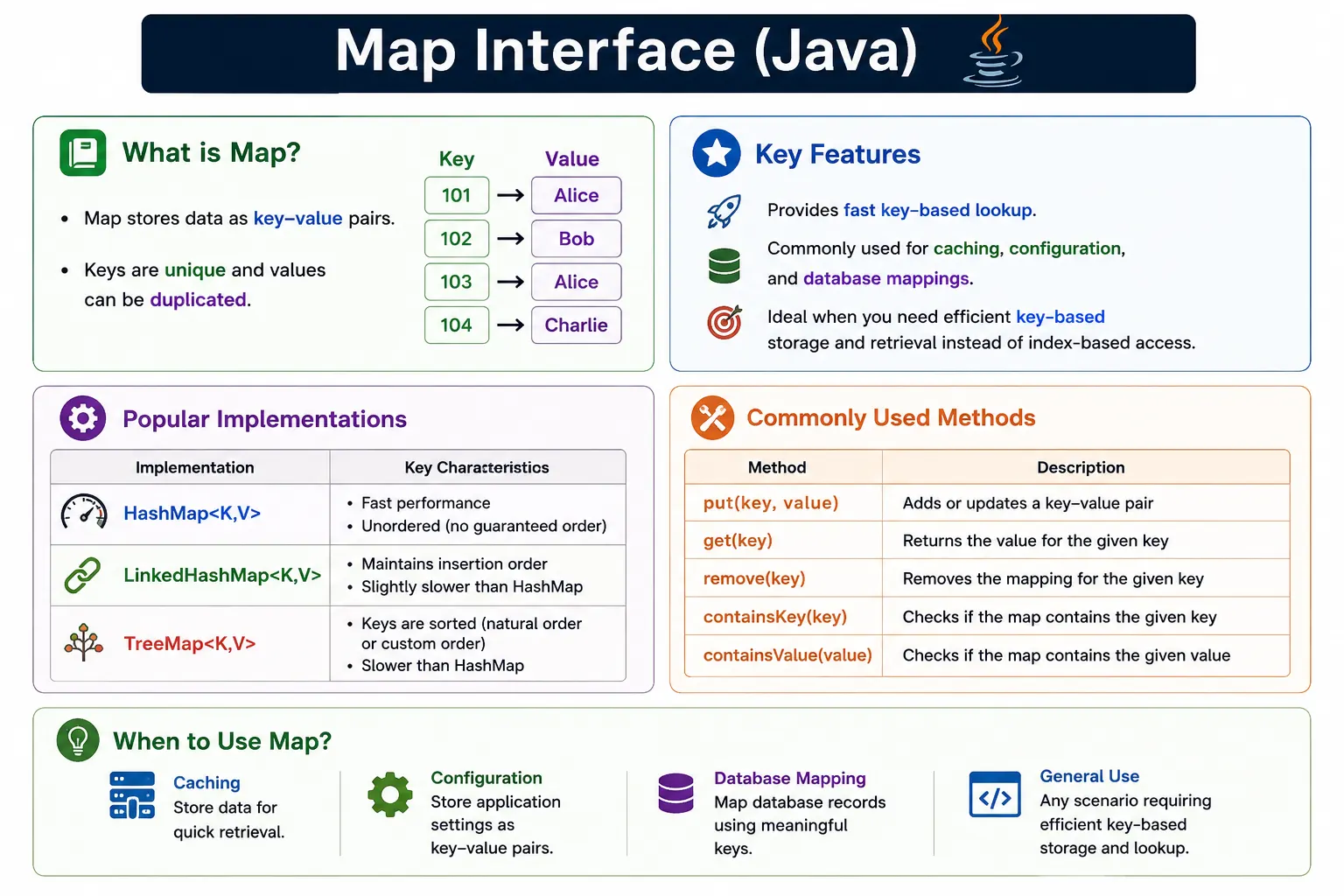
What Is the Map Interface?
Map is an interface in the java.util package that stores mappings between keys and
values. Each key in a map must be unique. If the same key is inserted again, the old value is replaced by the
new value. Values, however, do not need to be unique. Multiple keys can point to the same value.
A map does not provide index-based access. You do not retrieve the first value using index zero. Instead, you retrieve a value by supplying its key. This is why maps are useful for fast lookup. When the key is known, the value can usually be found directly without scanning an entire list.
Conceptually, a map represents a relationship. A student roll number maps to a student record. A country code maps to a country name. A request parameter name maps to a request parameter value. This relationship-based structure is why Map appears everywhere in backend services, frameworks, configuration systems, caches, and data processing code.
Map<Integer, String> map = new HashMap<>();
Why Map Is Needed
Map is needed because many problems are naturally key-based. If a program stores users in a list and needs to find a user by ID, it may have to scan the list until the matching ID is found. With a map, the ID can be the key and the user object can be the value. The lookup becomes direct and expressive.
Maps also make updates cleaner. If a product price changes, the product code can be used to replace the old price. If a configuration value is changed, the configuration name can be used as the key. If a cache stores previously calculated results, the input can act as the key and the calculated result can act as the value.
In real-world Java applications, maps are used for caching, configuration loading, database result mapping, grouping, counting, request handling, JSON-like structures, session attributes, header storage, and lookup tables. Whenever the question is "given this key, what is the value?", a map is usually the right structure to consider.
Map Hierarchy
Map has its own hierarchy. It is part of the Java Collections Framework, but it is not a subtype of
Collection. This design exists because a collection stores individual elements, while a map
stores key-value associations. The most commonly used implementations are HashMap,
LinkedHashMap, TreeMap, Hashtable, and
ConcurrentHashMap.
Map
 |-- HashMap
 |-- LinkedHashMap
 |-- TreeMap
 |-- Hashtable (legacy)
 |-- ConcurrentHashMap
The practical interview takeaway is clear: Map is separate from Collection. You can
still get collection-like views from a map using keySet, values, and
entrySet, but the map itself is not a collection of single elements.
Key Characteristics of Map
The first key characteristic of Map is key uniqueness. A map cannot contain two entries with the same key. If
the same key is used again with put, the new value replaces the old value. The second
characteristic is that values can be duplicated. Two different keys can point to the same value without any
problem.
The third characteristic is that ordering depends on implementation. HashMap does not guarantee
order, LinkedHashMap preserves insertion order, and TreeMap sorts entries by key.
The fourth characteristic is that null handling also depends on implementation. HashMap allows one null key
and multiple null values, while TreeMap generally does not allow null keys because keys must be compared.
A map is also not index-based. This distinction affects design. If the program needs ordered positional access, a list is likely better. If the program needs unique values without keys, a set may be better. If the program needs to associate one piece of data with another, Map is the correct abstraction.
Common Implementations of Map
HashMap
HashMap is the most commonly used Map implementation. It is hash-based, fast on average, and
does not guarantee iteration order. It allows one null key and multiple null values. HashMap is a strong
default when key-based lookup is needed and order does not matter.
Map<String, Integer> map = new HashMap<>();
LinkedHashMap
LinkedHashMap preserves insertion order while still providing hash-based lookup. It is useful
when output must be predictable, such as displaying configuration values, preserving request parameter order,
or writing deterministic tests. It is usually slightly heavier than HashMap because it tracks ordering.
Map<String, Integer> map = new LinkedHashMap<>();
TreeMap
TreeMap stores entries sorted by key. It is backed by a tree structure and is useful when sorted
keys or range-based operations are required. Because keys must be compared, TreeMap generally does not allow
null keys. It is slower than HashMap for simple lookup, but it provides automatic key ordering.
Map<String, Integer> map = new TreeMap<>();
Hashtable
Hashtable is a legacy synchronized map implementation. It does not allow null keys or null
values. Modern Java code usually prefers HashMap, ConcurrentHashMap, or explicit
synchronization approaches depending on the requirement. Hashtable is still useful to know for interviews and
legacy codebases, but it is rarely the first choice for new code.
Commonly Used Map Methods
Adding Elements
The put method adds or updates a mapping. If the key does not already exist, a new entry is
created. If the key already exists, the existing value is replaced. This behavior is central to understanding
Map.
map.put(1, "Java");
map.put(2, "Python");
Accessing Elements
The get method retrieves the value associated with a key. If the key is not found, the result is
usually null unless the map implementation or surrounding code handles missing keys differently.
map.get(1);
Removing Elements
The remove method deletes the mapping for a key. Once removed, the key no longer maps to its
previous value.
map.remove(2);
Checking Keys and Values
containsKey checks whether a key exists. containsValue checks whether a value
exists somewhere in the map. Key checks are typically faster than value checks in hash-based maps because the
structure is designed around keys.
map.containsKey(1);
map.containsValue("Java");
Iterating a Map
Iterating a map is slightly different from iterating a list or set because each element is a key-value
association. The most common and efficient approach is to iterate over entrySet, which gives
direct access to both the key and the value.
Using entrySet
for (Map.Entry<Integer, String> entry : map.entrySet()) {
    System.out.println(entry.getKey() + " " + entry.getValue());
}
This approach is preferred when both key and value are needed. It avoids repeatedly looking up each key to fetch its value.
Using keySet
Iterating over keySet is useful when only keys are needed. It can also be used to get values,
but calling get for every key is less direct than using entrySet.
for (Integer key : map.keySet()) {
    System.out.println(key + " " + map.get(key));
}
Duplicate Key Handling
A map does not allow duplicate keys. If the same key is inserted again, the old value is overwritten by the new value. No exception is thrown. This behavior makes sense because a key can map to only one current value at a time.
map.put(1, "Java");
map.put(1, "Python");

System.out.println(map); // {1=Python}
If overwriting is not desired, methods such as putIfAbsent can be used. This allows the program
to add a value only when the key is missing.
Map vs Collection
Map and Collection are different abstractions. A collection stores individual elements. A map stores relationships between keys and values. This is why Map does not extend Collection even though it belongs to the broader collections framework.
| Aspect | Map | Collection |
|---|---|---|
| Data format | Key-value | Single element |
| Duplicate keys | No | Depends |
| Index-based | No | List only |
| Interface | Separate | Root interface |
This difference guides collection choice. Use a list for ordered elements, a set for unique elements, and a map for key-based lookup. Choosing the right abstraction reduces extra code and makes the program easier to understand.
Performance Complexity
Performance depends on the implementation. HashMap usually provides average O(1) performance for get and put operations. LinkedHashMap is similar but maintains insertion order. TreeMap provides O(log n) operations because it keeps keys sorted in a tree structure.
| Implementation | get / put |
|---|---|
| HashMap | O(1) average |
| LinkedHashMap | O(1) |
| TreeMap | O(log n) |
These complexity values should be read with context. HashMap is generally best for fast lookup when order does not matter. LinkedHashMap is useful when predictable order matters. TreeMap is useful when sorted keys or range operations matter.
Choosing the Right Map Implementation
Choosing a map implementation should always start with the requirement. If the requirement is simply fast
key-based lookup and order does not matter, HashMap is usually the best default. It is widely
used, simple to understand, and efficient for most application code. Many services use HashMap for temporary
lookup tables, request-level grouping, and in-memory transformations.
If the requirement includes predictable iteration order, LinkedHashMap is usually the better
choice. It keeps entries in insertion order, which is useful for reports, configuration display, dropdown
generation, deterministic logs, and stable test output. The map still behaves like a key-value lookup
structure, but the iteration order becomes meaningful.
If the requirement includes sorted keys, TreeMap should be considered. TreeMap is useful when
entries must be processed alphabetically, numerically, chronologically, or by another key order. It also
supports range-related operations through navigable map behavior. The tradeoff is that simple get and put
operations are generally slower than HashMap.
Designing Good Map Keys
The quality of a map often depends on the quality of its keys. A good key should be stable, meaningful, and consistent. Strings, integers, enums, UUIDs, and immutable value objects are common key choices because they have reliable equality behavior. Mutable keys are risky because changing a key after insertion can make the entry difficult or impossible to find later.
When custom objects are used as keys in a hash-based map, equals and hashCode must
be implemented correctly. If two objects represent the same logical key, they should compare as equal and
produce the same hash code. For example, if a user ID uniquely identifies a user, equality should be based on
that ID. Without this rule, a HashMap may store logical duplicates or fail to retrieve values as expected.
For TreeMap, key design also involves comparison. Keys must either implement Comparable or be
used with a Comparator. The comparison rule determines both ordering and key uniqueness from the
TreeMap's perspective. A comparator that returns zero means the keys are treated as the same key.
Null Handling Across Maps
Null handling differs across map implementations. HashMap allows one null key and multiple null values. LinkedHashMap follows similar behavior. TreeMap generally does not allow null keys because it must compare keys to keep them sorted. Hashtable does not allow null keys or null values.
Even when null is technically allowed, it should be used carefully. A null value can mean "key exists but no
value is assigned," while a null result from get can also mean "key does not exist." This
ambiguity is why containsKey is sometimes needed before interpreting a null result. In
production code, clear null-handling rules prevent subtle bugs.
Map in Real Projects
Maps are used heavily in real Java projects because they model relationships directly. A service may map account IDs to account objects, product IDs to product details, role names to permissions, country codes to country names, or error codes to user-friendly messages. This makes lookup code concise and readable.
Maps are also common in data processing. A program can group records by category, count occurrences of words, build indexes for fast access, merge data from multiple sources, or cache expensive calculations. In automation and testing, maps are useful for storing test data by field name, comparing expected and actual values, and representing API request or response data at a simple conceptual level.
A map can improve both performance and clarity when used properly. Instead of repeatedly searching a list for a matching ID, the program can build a map once and perform direct lookups. This pattern is common in business applications where data from one source must be matched with data from another source.
Common Beginner Mistakes
A common beginner mistake is assuming every map preserves insertion order. HashMap does not guarantee order. If order matters, use LinkedHashMap for insertion order or TreeMap for sorted keys. Another mistake is using mutable objects as keys. If a key's fields change after insertion and those fields affect equality, the map may no longer be able to locate the entry correctly.
Developers also forget to override equals and hashCode for custom key classes.
Hash-based maps depend on these methods to find and compare keys. Another beginner mistake is using
Hashtable in new code without a reason. Modern alternatives are usually clearer and more flexible.
Iterating a map inefficiently is another frequent issue. If both key and value are needed, use
entrySet. Iterating keys and then calling get for every key is readable in small
examples, but it is not the best general habit.
Interview-Ready Answers
Short Answer
The Map interface stores data in key-value pairs where keys are unique.
Detailed Answer
In Java, the Map interface represents a mapping between keys and values. It does not extend the Collection interface and provides implementations such as HashMap, LinkedHashMap, and TreeMap, each offering different ordering and performance characteristics.
A complete interview answer should also mention that keys are unique, values can be duplicated, duplicate
keys replace old values, HashMap is unordered and fast on average, LinkedHashMap preserves insertion order,
and TreeMap sorts keys. For custom objects used as keys, correct equals and
hashCode implementations are essential.
Map Interface Examples
The following examples show the most common Map operations and implementation differences. They are written as small programs for learning, but the same patterns appear in services, automation frameworks, caching logic, configuration loading, and data transformation code.
1. Creating a Map using HashMap
This example creates a map using HashMap and stores two key-value pairs. The keys are integers, and the values are strings. The key can later be used to retrieve the corresponding value.
import java.util.*;

class Demo {
    public static void main(String[] args) {
        Map<Integer, String> map = new HashMap<>();
        map.put(1, "Java");
        map.put(2, "API");
        System.out.println(map);
    }
}
Output:
{1=Java, 2=API}
2. Map Does Not Allow Duplicate Keys
This example shows what happens when the same key is used twice. The second value replaces the first value.
The map still contains one entry for key 1, but the value becomes "Selenium".
import java.util.*;

class Demo {
    public static void main(String[] args) {
        Map<Integer, String> map = new HashMap<>();
        map.put(1, "Java");
        map.put(1, "Selenium"); // overwrite
        System.out.println(map);
    }
}
Output:
{1=Selenium}
3. Map Allows Duplicate Values
Values do not need to be unique. Two different keys can map to the same value. This is useful when multiple users share the same role, multiple products share the same category, or multiple statuses share the same display label.
import java.util.*;

class Demo {
    public static void main(String[] args) {
        Map<Integer, String> map = new HashMap<>();
        map.put(1, "Test");
        map.put(2, "Test");
        System.out.println(map);
    }
}
4. HashMap Allows One null Key
HashMap allows one null key and multiple null values. If another null key is inserted, it replaces the previous null-key mapping. This behavior is specific to HashMap-style implementations and should not be assumed for every map.
import java.util.*;

class Demo {
    public static void main(String[] args) {
        Map<String, String> map = new HashMap<>();
        map.put(null, "Value");
        map.put("A", null);
        System.out.println(map);
    }
}
Output:
{null=Value, A=null}
5. Accessing Value Using get()
The get method retrieves a value by key. If the key exists, the mapped value is returned. If the
key does not exist, the result is usually null.
import java.util.*;

class Demo {
    public static void main(String[] args) {
        Map<Integer, String> map = new HashMap<>();
        map.put(1, "Java");
        System.out.println(map.get(1));
    }
}
Output:
Java
6. Checking Key and Value Existence
containsKey checks whether a key exists, while containsValue checks whether a value
exists somewhere in the map. Key checks are generally more important in map-based design because keys are the
lookup mechanism.
import java.util.*;

class Demo {
    public static void main(String[] args) {
        Map<Integer, String> map = Map.of(1, "A", 2, "B");
        System.out.println(map.containsKey(1));
        System.out.println(map.containsValue("B"));
    }
}
Output:
true
true
7. Iterating Map Using entrySet() (Most Common)
Iterating with entrySet is the preferred approach when both keys and values are needed. Each
entry gives direct access to the key and its mapped value.
import java.util.*;

class Demo {
    public static void main(String[] args) {
        Map<Integer, String> map = Map.of(1, "Java", 2, "API");
        for (Map.Entry<Integer, String> e : map.entrySet()) {
            System.out.println(e.getKey() + " -> " + e.getValue());
        }
    }
}
8. Iterating Using keySet()
keySet returns a set view of all keys. This is useful when the program needs to process only
keys or when it needs to check which identifiers are present.
import java.util.*;

class Demo {
    public static void main(String[] args) {
        Map<Integer, String> map = Map.of(1, "A", 2, "B");
        for (Integer key : map.keySet()) {
            System.out.println(key + " = " + map.get(key));
        }
    }
}
9. Iterating Using values()
values returns a collection view of the map's values. Values may contain duplicates because map
uniqueness applies to keys, not values.
import java.util.*;

class Demo {
    public static void main(String[] args) {
        Map<Integer, String> map = Map.of(1, "X", 2, "Y");
        for (String value : map.values()) {
            System.out.println(value);
        }
    }
}
10. LinkedHashMap Maintains Insertion Order
LinkedHashMap preserves the order in which entries were inserted. This is useful when map output must be predictable, such as configuration display or deterministic test assertions.
import java.util.*;

class Demo {
    public static void main(String[] args) {
        Map<Integer, String> map = new LinkedHashMap<>();
        map.put(2, "B");
        map.put(1, "A");
        System.out.println(map);
    }
}
Output:
{2=B, 1=A}
11. TreeMap Sorted by Keys
TreeMap sorts entries by key. The entries are inserted as 3, 1, and 2, but the output is ordered by keys as 1, 2, and 3.
import java.util.*;

class Demo {
    public static void main(String[] args) {
        Map<Integer, String> map = new TreeMap<>();
        map.put(3, "C");
        map.put(1, "A");
        map.put(2, "B");
        System.out.println(map);
    }
}
Output:
{1=A, 2=B, 3=C}
12. TreeMap Does Not Allow null Key
TreeMap generally does not allow null keys because keys must be compared for sorting. A null key cannot be compared using normal natural ordering.
import java.util.*;

class Demo {
    public static void main(String[] args) {
        Map<Integer, String> map = new TreeMap<>();
        // map.put(null, "X"); // NullPointerException
    }
}
13. putIfAbsent()
putIfAbsent adds a value only when the key is not already present. In this example, key
1 keeps its original value, while key 2 is added.
import java.util.*;

class Demo {
    public static void main(String[] args) {
        Map<Integer, String> map = new HashMap<>();
        map.put(1, "Java");
        map.putIfAbsent(1, "API");
        map.putIfAbsent(2, "API");
        System.out.println(map);
    }
}
Output:
{1=Java, 2=API}
14. replace() Method
The replace method updates the value for an existing key. It is useful when the program wants to
modify a mapping only if the key is already present.
import java.util.*;

class Demo {
    public static void main(String[] args) {
        Map<Integer, String> map = new HashMap<>();
        map.put(1, "Java");
        map.replace(1, "Selenium");
        System.out.println(map);
    }
}
Output:
{1=Selenium}
15. remove(key, value) (Conditional Remove)
Conditional remove deletes the entry only when both key and value match. The first remove call has no effect because the value does not match. The second call removes the entry because both key and value match.
import java.util.*;

class Demo {
    public static void main(String[] args) {
        Map<Integer, String> map = new HashMap<>();
        map.put(1, "Java");
        map.remove(1, "API"); // no effect
        map.remove(1, "Java"); // removed
        System.out.println(map);
    }
}
Output:
{}
16. computeIfAbsent()
computeIfAbsent creates a value only when the key is missing. This is useful for lazy
initialization, grouping, caching, and building collections inside a map.
import java.util.*;

class Demo {
    public static void main(String[] args) {
        Map<Integer, String> map = new HashMap<>();
        map.computeIfAbsent(1, k -> "Generated");
        System.out.println(map);
    }
}
17. Sorting Map by Key Using TreeMap
A HashMap can be copied into a TreeMap when sorted-key output is required. The original map may be unordered, but the TreeMap arranges entries by key.
import java.util.*;

class Demo {
    public static void main(String[] args) {
        Map<Integer, String> map = new HashMap<>();
        map.put(2, "B");
        map.put(1, "A");
        Map<Integer, String> sorted = new TreeMap<>(map);
        System.out.println(sorted);
    }
}
18. Custom Object as Key (equals & hashCode)
Custom objects used as keys must implement equals and hashCode correctly. In this
example, two User objects with the same ID are treated as the same key, so the map size remains one.
import java.util.*;

class User {
    int id;
    User(int id) { this.id = id; }

    public boolean equals(Object o) {
        return this.id == ((User) o).id;
    }

    public int hashCode() {
        return id;
    }
}

class Demo {
    public static void main(String[] args) {
        Map<User, String> map = new HashMap<>();
        map.put(new User(1), "Admin");
        map.put(new User(1), "Admin");
        System.out.println(map.size());
    }
}
Output:
1
19. Thread-Safe Map
A regular HashMap is not synchronized. If multiple threads share and modify the same map, a synchronized map
or a concurrent implementation such as ConcurrentHashMap should be considered.
import java.util.*;

class Demo {
    public static void main(String[] args) {
        Map<String, String> map =
            Collections.synchronizedMap(new HashMap<>());
        map.put("A", "Safe");
        System.out.println(map);
    }
}
20. Interview Summary for Map Interface
This final example reinforces the basic map structure: each entry has a key and a value. In interviews, use this simple idea as the foundation, then explain implementation differences and key uniqueness.
import java.util.*;

class Demo {
    public static void main(String[] args) {
        Map<Integer, String> map = new HashMap<>();
        map.put(1, "Key");
        map.put(2, "Value");
        System.out.println(map);
    }
}
Key Points
- Stores key-value pairs
- Keys are unique
- Values can be duplicated
- HashMap: fast and unordered
- LinkedHashMap: insertion order
- TreeMap: sorted keys
Key Takeaway
Use Map when fast key-based lookup is required. Choosing the correct implementation directly affects performance, ordering, and scalability.