List Interface in Java
The List interface is one of the most important interfaces in the Java Collections Framework. It
represents an ordered collection of elements, also called a sequence. A list remembers the order in which
elements are stored, allows duplicate values, and supports index-based access. These three characteristics
make List one of the most frequently used collection types in Java programs.
Lists are useful whenever data has a meaningful sequence. A list can represent student names in entry order, products in a shopping cart, test steps in execution order, search results shown to a user, log messages in chronological order, or rows retrieved from a database. In all of these examples, order matters. The first element, second element, and last element are not just random positions; they communicate meaning.
The List interface is also an important interview topic because it connects several practical
Java concepts: interfaces, implementations, generics, insertion order, duplicates, indexing, iteration,
sorting, mutability, and performance. A strong understanding of List helps developers choose
between ArrayList, LinkedList, and legacy classes such as Vector, and
it also helps avoid common mistakes such as unsafe removal during iteration or using a list when uniqueness is
required.
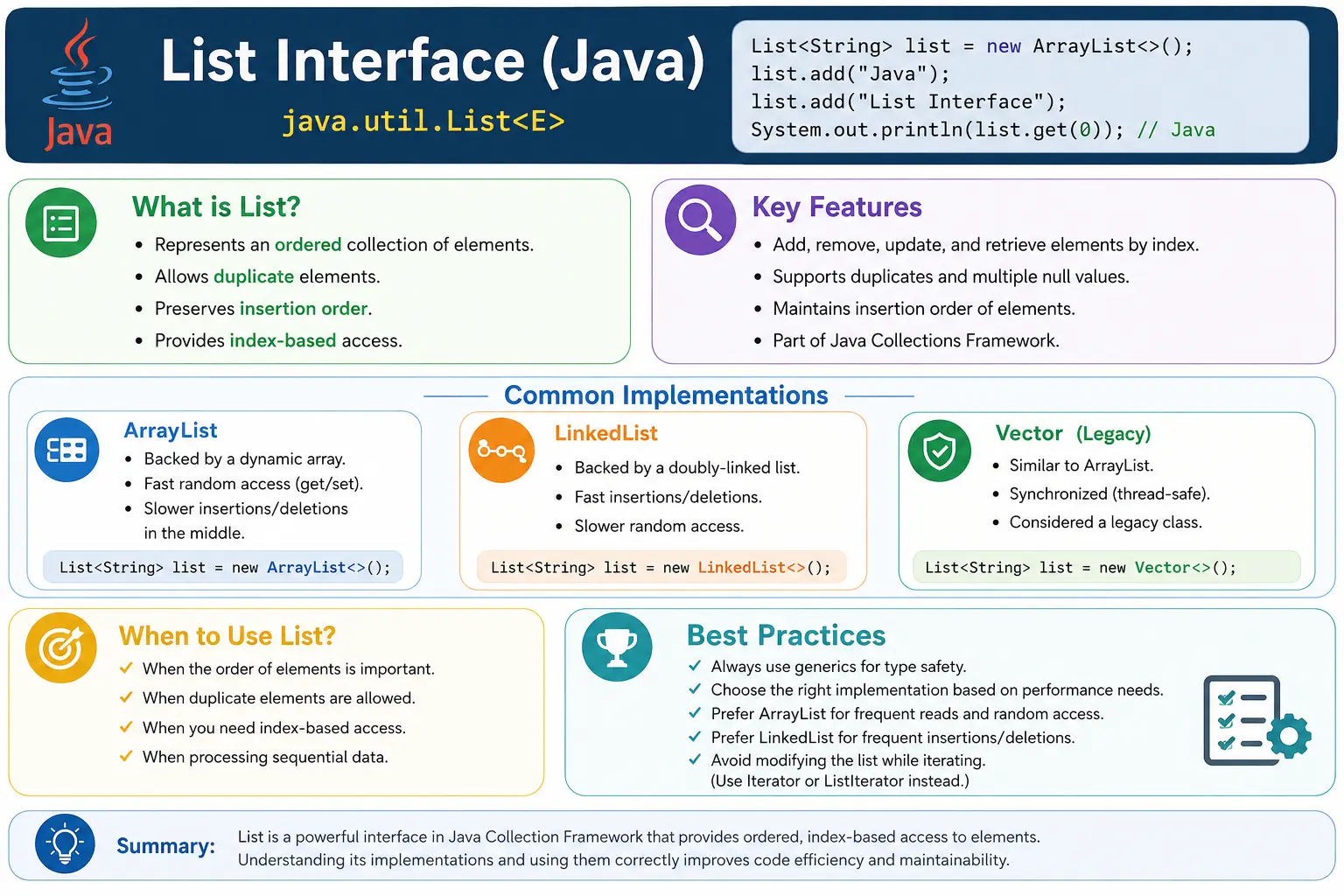
What Is the List Interface?
The List interface is a contract that defines how an ordered collection should behave. It
belongs to the java.util package and extends the Collection interface. Because it is
an interface, List does not provide one fixed internal storage mechanism. Instead, classes such
as ArrayList, LinkedList, and Vector implement the interface in
different ways.
A list is ordered, which means elements have a defined position. When values are added to an
ArrayList one after another, the list stores them in that sequence unless the code inserts,
removes, or rearranges elements. A list also allows duplicates. If the same value is added twice, both
occurrences can remain in the list. This is different from a Set, which is designed to prevent
duplicates.
The most recognizable feature of List is index-based access. The first element is at index
0, the second element is at index 1, and so on. This makes lists convenient when a
program needs to get, update, insert, or remove elements by position.
List<String> list = new ArrayList<>();
Position in Collection Hierarchy
In the Java Collections Framework hierarchy, List is a specialized form of
Collection, and Collection extends Iterable. This means lists inherit
common collection behavior and can also be used in enhanced for-each loops. The main implementations learners
usually study first are ArrayList, LinkedList, and Vector.
Iterable
   |-- Collection
        |-- List
             |-- ArrayList
             |-- LinkedList
             |-- Vector
This hierarchy explains why a list can use methods from Collection, such as add,
remove, contains, size, and isEmpty, while also providing
list-specific methods such as get, set, indexOf, and
listIterator.
Key Characteristics of List
The first key characteristic of a list is order preservation. If values are inserted in the order A, B, and C, a list normally returns them in that same order. This makes lists suitable for workflows where sequence matters, such as display order, execution order, ranking, history, or user-entered values.
The second characteristic is duplicate support. Lists do not enforce uniqueness. A list may contain the same value multiple times because each occurrence has its own position. This is useful when duplicate values are meaningful, such as repeated items, repeated test results, duplicate words in a sentence, or repeated transactions that must remain visible.
The third characteristic is positional access. List methods allow code to retrieve, replace, insert, or remove
elements by index. This makes lists flexible, but it also requires care. Accessing an invalid index causes an
IndexOutOfBoundsException. Developers should always ensure that an index is within the valid
range from 0 to size() - 1.
Most common list implementations allow null values, including multiple null values. However, some special lists may reject nulls, especially immutable or framework-specific lists. It is better to check the behavior of the implementation being used rather than assuming every list behaves identically.
Common Implementations of List
The List interface has multiple implementations because different internal structures are better
for different tasks. The most common implementations are ArrayList, LinkedList, and
Vector. In modern Java, ArrayList is usually the default choice unless there is a
specific reason to choose another implementation.
1. ArrayList
ArrayList is backed by a dynamic array. It is efficient for random access because retrieving an
element by index is usually fast. It is a strong choice when the application frequently reads elements,
appends elements at the end, or iterates through data in order.
The tradeoff is insertion or deletion in the middle. When an element is inserted or removed from the middle of
an ArrayList, elements after that position may need to shift. For small lists this rarely
matters, but for large lists with frequent middle modifications, it can affect performance.
List<Integer> list = new ArrayList<>();
2. LinkedList
LinkedList is backed by linked nodes. Each node points to neighboring nodes. This structure can
make insertions and deletions efficient when the position is already known, and LinkedList also
supports queue and deque-style operations.
However, random access by index is slower than ArrayList because the list must traverse nodes to
reach the requested position. For many everyday use cases, ArrayList performs better and is
simpler. LinkedList should be chosen when its specific behavior fits the problem.
List<Integer> list = new LinkedList<>();
3. Vector
Vector is a legacy list implementation. It is synchronized, which means many of its methods are
thread-safe at the method level. Because of this synchronization, it can be slower than
ArrayList in single-threaded scenarios. Modern Java code rarely chooses Vector for
new development unless maintaining older code or meeting a specific compatibility need.
When thread safety is required, modern concurrent collections or carefully designed synchronization are often
better choices. It is still important to know Vector for interviews because it appears in many
comparison questions.
Important Methods of List Interface
The List interface provides methods for adding, accessing, updating, removing, searching, and
iterating elements. Some methods come from Collection, while others are specific to
List. The list-specific methods are mainly related to positional access.
Adding Elements
list.add("Java");
list.add(1, "Python");
Accessing Elements
String value = list.get(0);
Updating Elements
list.set(0, "C++");
Removing Elements
list.remove(1);        // by index
list.remove("Java");  // by value
Searching Elements
list.contains("Java");
list.indexOf("Java");
list.lastIndexOf("Java");
The method indexOf returns the first matching position, while lastIndexOf returns
the last matching position. These methods matter because lists allow duplicates. If a value appears multiple
times, the first and last occurrence may be different.
Iterating a List
Lists can be iterated in several ways. The enhanced for-each loop is the simplest option when reading every
element in order. An Iterator is useful when safe removal is needed during traversal.
ListIterator is specific to lists and supports bidirectional traversal, allowing movement forward
and backward.
Using for-each loop
for (String s : list) {
    System.out.println(s);
}
Using Iterator
Iterator<String> it = list.iterator();
while (it.hasNext()) {
    System.out.println(it.next());
}
Using ListIterator (Bidirectional)
ListIterator<String> li = list.listIterator();
List Allows Duplicate Elements
Duplicate support is one of the defining features of List. The list does not ask whether an
equal value already exists before adding a new element. Each element is stored at a position. This means two
equal values can exist at different indexes.
List<String> list = new ArrayList<>();
list.add("Java");
list.add("Java");
System.out.println(list); // [Java, Java]
- Duplicates are allowed
- Order is preserved
List vs Set
List and Set are both collection interfaces, but they solve different problems. A
list is used when order, duplicates, or index-based access matter. A set is used when uniqueness matters. If
a program must prevent duplicate values, a set is usually a better fit. If a program must preserve a sequence
with repeated values, a list is better.
| Aspect | List | Set |
|---|---|---|
| Order | Preserved | Not guaranteed |
| Duplicates | Allowed | Not allowed |
| Index access | Yes | No |
| Common use | Sequence data | Unique data |
When to Use List
Use a List when order matters, duplicates are valid, index-based access is useful, or the data
naturally represents a sequence. Lists are common for display data, ordered inputs, search results, report
rows, commands, logs, form fields, test steps, and any workflow where position carries meaning.
A list is not ideal when the main requirement is uniqueness. It is also not always ideal for frequent
membership checks in very large datasets because searching a list may require scanning elements. In those
cases, a Set or Map may be more appropriate.
List and Generics
Lists are commonly used with generics. A List<String> stores strings, while a
List<Integer> stores integers. Generics improve type safety by allowing the compiler to
detect incorrect element types before runtime. Without generics, code may require casting and may fail later
with a ClassCastException.
Generics also make method signatures more expressive. A method returning List<User> tells
callers exactly what type of elements they will receive. This clarity is important in real applications where
lists are passed between layers, APIs, services, repositories, and tests.
List and Mutability
Not every list can be modified. A list created with new ArrayList<>() is mutable, which
means elements can be added, removed, and updated. A list returned by List.of is unmodifiable.
A list created with Arrays.asList has a fixed size, so existing elements can be changed but new
elements cannot be added or removed.
This distinction is a common source of beginner confusion. The variable type may be List, but
the actual object determines what operations are supported. If code needs a fully mutable list from an array
or fixed-size list, it can create a new ArrayList from that data.
List and Performance
Performance depends on the list implementation and the operation being performed. ArrayList is
usually efficient for reading by index and adding at the end. Insertions and removals in the middle can be
more expensive because elements may shift. LinkedList can be useful for certain insertions and
queue-style operations, but random access by index is slower.
In interviews, it is better to explain performance in practical terms rather than memorizing only isolated complexity labels. Ask what operation happens most often: reading by index, appending, inserting in the middle, removing, searching, sorting, or iterating. The right list implementation depends on the dominant behavior.
List in Real Projects
Lists appear everywhere in real Java projects. A backend service may return a list of products, orders, accounts, transactions, or notifications. A UI layer may display a list of options. A reporting module may produce a list of rows. A test automation framework may store a list of test data values, page elements, failed validations, or executed steps.
Lists also communicate intent in APIs. A method returning List<Order> tells callers that
the result has sequence and may contain duplicates. If uniqueness is required, returning a Set
would communicate a different contract. Choosing the correct collection type helps make code self-explanatory.
List and Safe Iteration
One important rule is to avoid structurally modifying a list while iterating with an enhanced for-each loop.
Removing an element directly from the list during such iteration can cause
ConcurrentModificationException. If elements must be removed while traversing, use an
Iterator and its remove method, or collect items to remove after iteration.
Safe iteration is important in production code because list modifications often happen inside validation, filtering, cleanup, and transformation logic. A bug in iteration can appear only with certain data conditions, making it difficult to reproduce. Knowing the correct removal pattern avoids this class of problem.
ArrayList vs LinkedList
ArrayList and LinkedList are the two most discussed implementations of the
List interface. Both preserve order, allow duplicates, and support the same List
methods, but their internal structures are different. ArrayList uses a resizable array, while
LinkedList uses linked nodes. That internal difference affects performance and practical usage.
ArrayList is usually better for general-purpose list usage. It is fast for reading elements by
index, efficient for iteration, and simple for appending elements at the end. Most application lists are read
and iterated more often than they are modified in the middle, so ArrayList fits many real-world
cases well.
LinkedList can be useful when list behavior is combined with queue or deque behavior, such as
adding and removing from the beginning or end. However, it is not automatically faster for every insertion or
deletion. If the code first has to search for a position, traversal cost still matters. This is why
interview answers should avoid saying "LinkedList is always better for insertion." The correct answer depends
on where the insertion happens and how the position is found.
List and Null Values
Many list implementations allow null values. For example, an ArrayList can contain one or more
null elements. Since lists allow duplicates, multiple null values are also possible. This can be useful in
some situations, but it can also introduce bugs if the code assumes every element is non-null.
Null handling should be intentional. If a list represents required business values, allowing null may hide
data-quality problems. If a list is built from optional inputs or incomplete external data, null checks may be
necessary during processing. Methods such as contains, indexOf, and
remove can work with null in common list implementations, but business logic should still decide
whether null values are acceptable.
Immutable lists created with List.of do not allow null elements. This is another reason to
understand the actual implementation or factory method being used. The variable type may be
List, but behavior such as null acceptance depends on the concrete list object.
Understanding subList
The subList method returns a view of a portion of the original list. It does not always create a
completely independent copy. This is a useful but sometimes surprising behavior. Changes made through the
sublist can affect the original list, and structural changes to the original list can make the sublist invalid
for further use.
The method uses a start index that is inclusive and an end index that is exclusive. For example,
list.subList(1, 3) includes elements at indexes 1 and 2, but not index 3. This follows the same
common range style used by many Java APIs. Beginners often make off-by-one mistakes with this method, so it
is important to remember the exclusive end index.
If an independent list is required, create a new list from the sublist, such as
new ArrayList<>(list.subList(1, 3)). That separates the new list from the original data.
This distinction matters in production code where accidental changes to shared lists can create subtle
defects.
Sorting Lists
Lists are commonly sorted because they preserve order. Java provides several ways to sort a list.
Collections.sort(list) sorts a list using natural order, which means the elements must be
comparable. Numbers sort numerically, strings sort lexicographically, and custom objects require a natural
ordering through Comparable if no comparator is supplied.
Custom sorting is usually done with a Comparator. A comparator defines how two elements should
be compared for a specific sorting requirement. For example, users may be sorted by name, age, registration
date, or account status. The same list of objects can be sorted in different ways by using different
comparators.
Sorting modifies many mutable lists in place. If the original order must be preserved, create a copy before sorting. This is especially important when the insertion order has business meaning, such as user-defined priority, original search result ranking, or step execution order.
List as a Method Parameter or Return Type
In API design, it is common to use List as a parameter or return type instead of a specific
implementation such as ArrayList. This follows the principle of programming to an interface. If a
method only requires list behavior, it should not force callers to provide an ArrayList. A caller
may have another list implementation that still satisfies the method's needs.
Returning List also communicates behavior. It tells callers that the result is ordered and may
contain duplicates. If the method returned Set, callers would expect uniqueness. If it returned
Collection, callers would not expect index-based access. Choosing the return type carefully makes
the API clearer.
Developers should also consider whether returned lists should be mutable. If a class returns an internal
mutable list directly, outside code can modify the class's internal state. Returning an unmodifiable list or a
defensive copy can protect encapsulation. This is a practical design point that connects List
with object-oriented programming principles.
List in Coding Interviews
Lists are heavily used in coding interview problems because they are simple, flexible, and expressive. Problems involving ordered data, duplicates, searching, reversing, sorting, merging, filtering, and transformation often use lists. A list may store input values, intermediate results, or final answers.
Common patterns include iterating through a list, using two pointers, checking neighboring values, building a
result list, sorting before processing, and converting between arrays and lists. Interviewers also ask about
the difference between ArrayList and LinkedList, the behavior of
Arrays.asList, the meaning of List.of, and the difference between removing by index
and removing by value.
A strong interview explanation should connect behavior to use case. Use List when order matters,
duplicates are acceptable, and index operations are needed. Use Set when uniqueness matters. Use
Map when lookup by key matters. This reasoning shows that you understand collection selection,
not just syntax.
Common Beginner Mistakes
Beginners often use List even when uniqueness is required. This forces manual duplicate checks
and makes the code less clear. If duplicates are not allowed, a Set should be considered. Another
common mistake is assuming ArrayList is best for every operation. It is an excellent default
choice, but frequent middle insertions or removals may require more thought.
Another mistake is ignoring generics and using raw lists. Raw lists allow mixed element types and can lead to
runtime casting errors. Beginners also modify lists incorrectly during iteration, misunderstand
Arrays.asList, and use Vector unnecessarily in modern code.
Interview Perspective
In interviews, a strong answer should define List as an ordered collection that allows duplicate
elements and supports index-based access. It should mention that List extends
Collection and belongs to java.util. Common implementations include
ArrayList, LinkedList, and Vector.
A stronger answer compares implementations. ArrayList is usually preferred for fast random
access and general use. LinkedList is backed by linked nodes and supports deque-like operations.
Vector is synchronized and legacy. Mentioning duplicate support, insertion order,
ListIterator, and the remove(int) versus remove(Object) trap shows
practical understanding.
Interview-Ready Answers
Short Answer
The List interface represents an ordered collection that allows duplicate elements.
Detailed Answer
In Java, the List interface extends the Collection interface and represents an ordered collection with positional access. It allows duplicate elements and provides index-based operations. Common implementations include ArrayList, LinkedList, and Vector. ArrayList is commonly used for fast random access, while LinkedList is useful for specific insertion, deletion, and deque-style behavior.
List Interface Examples
1. Creating a List Using ArrayList
import java.util.*;

class Demo {
    public static void main(String[] args) {
        List<String> list = new ArrayList<>();
        list.add("Java");
        list.add("API");
        System.out.println(list);
    }
}
Output
[Java, API]
2. List Allows Duplicate Elements
import java.util.*;

class Demo {
    public static void main(String[] args) {
        List<String> list = new ArrayList<>();
        list.add("Test");
        list.add("Test");
        System.out.println(list);
    }
}
Output
[Test, Test]
3. List Maintains Insertion Order
import java.util.*;

class Demo {
    public static void main(String[] args) {
        List<Integer> list = new ArrayList<>();
        list.add(3);
        list.add(1);
        list.add(2);
        System.out.println(list);
    }
}
Output
[3, 1, 2]
4. Accessing Elements Using Index
import java.util.*;

class Demo {
    public static void main(String[] args) {
        List<String> list = Arrays.asList("A", "B", "C");
        System.out.println(list.get(1));
    }
}
Output
B
5. Modifying Elements Using set()
import java.util.*;

class Demo {
    public static void main(String[] args) {
        List<String> list = new ArrayList<>(Arrays.asList("Java", "API"));
        list.set(1, "Selenium");
        System.out.println(list);
    }
}
Output
[Java, Selenium]
6. Removing Elements by Index
import java.util.*;

class Demo {
    public static void main(String[] args) {
        List<String> list = new ArrayList<>(Arrays.asList("A", "B", "C"));
        list.remove(1);
        System.out.println(list);
    }
}
Output
[A, C]
7. Removing Elements by Value
import java.util.*;

class Demo {
    public static void main(String[] args) {
        List<String> list = new ArrayList<>(Arrays.asList("A", "B", "C"));
        list.remove("B");
        System.out.println(list);
    }
}
Output
[A, C]
8. remove(int) vs remove(Object) (Interview Trap)
import java.util.*;

class Demo {
    public static void main(String[] args) {
        List<Integer> list = new ArrayList<>(Arrays.asList(10, 20, 30));
        list.remove(1);          // removes index 1
        // list.remove(Integer.valueOf(20)); // removes value
        System.out.println(list);
    }
}
Output
[10, 30]
9. Iterating List Using for-each
import java.util.*;

class Demo {
    public static void main(String[] args) {
        List<String> list = Arrays.asList("X", "Y", "Z");
        for (String s : list) {
            System.out.println(s);
        }
    }
}
10. Iterating Using Iterator
import java.util.*;

class Demo {
    public static void main(String[] args) {
        List<Integer> list = Arrays.asList(1, 2, 3);
        Iterator<Integer> it = list.iterator();
        while (it.hasNext()) {
            System.out.println(it.next());
        }
    }
}
11. Iterating Forward & Backward Using ListIterator
import java.util.*;

class Demo {
    public static void main(String[] args) {
        List<String> list = Arrays.asList("A", "B", "C");
        ListIterator<String> it = list.listIterator();

        while (it.hasNext()) {
            System.out.print(it.next() + " ");
        }

        while (it.hasPrevious()) {
            System.out.print(it.previous() + " ");
        }
    }
}
Output
A B C C B A
12. Checking Element Existence
import java.util.*;

class Demo {
    public static void main(String[] args) {
        List<String> list = Arrays.asList("Java", "API");
        System.out.println(list.contains("Java"));
    }
}
Output
true
13. Getting List Size
import java.util.*;

class Demo {
    public static void main(String[] args) {
        List<Integer> list = Arrays.asList(1, 2, 3, 4);
        System.out.println(list.size());
    }
}
Output
4
14. subList() Example
import java.util.*;

class Demo {
    public static void main(String[] args) {
        List<Integer> list = Arrays.asList(10, 20, 30, 40);
        List<Integer> sub = list.subList(1, 3);
        System.out.println(sub);
    }
}
Output
[20, 30]
15. Arrays.asList() Limitation (Fixed Size)
import java.util.*;

class Demo {
    public static void main(String[] args) {
        List<String> list = Arrays.asList("A", "B");
        // list.add("C"); // UnsupportedOperationException
        System.out.println(list);
    }
}
16. Converting Array to List
import java.util.*;

class Demo {
    public static void main(String[] args) {
        String[] arr = {"Java", "API"};
        List<String> list = Arrays.asList(arr);
        System.out.println(list);
    }
}
17. Converting List to Array
import java.util.*;

class Demo {
    public static void main(String[] args) {
        List<String> list = Arrays.asList("A", "B");
        Object[] arr = list.toArray();
        System.out.println(arr.length);
    }
}
18. Sorting a List
import java.util.*;

class Demo {
    public static void main(String[] args) {
        List<Integer> list = Arrays.asList(3, 1, 2);
        Collections.sort(list);
        System.out.println(list);
    }
}
Output
[1, 2, 3]
19. List.of() (Immutable List in Java 9+)
import java.util.*;

class Demo {
    public static void main(String[] args) {
        List<String> list = List.of("A", "B");
        System.out.println(list);
        // list.add("C"); // UnsupportedOperationException
    }
}
20. Interview Summary: List Interface
import java.util.*;

class Demo {
    public static void main(String[] args) {
        List<String> list = new ArrayList<>();
        list.add("Ordered");
        list.add("Duplicate");
        list.add("Duplicate");
        System.out.println(list);
    }
}
Key Points
- Ordered collection
- Allows duplicates
- Index-based access
- Implementations: ArrayList, LinkedList, Vector
- ListIterator supports bidirectional traversal
Key Takeaway
Use List when order and duplicates matter. Choosing the right implementation (ArrayList vs LinkedList) is critical for performance and scalability.