LinkedList in Java
LinkedList is a doubly linked list implementation in the Java Collections Framework. It
implements both the List and Deque interfaces, which makes it more flexible than a
simple list. It can behave like an ordered list, a queue, a deque, or a stack-style structure depending on the
methods used. This dual role is one of the main reasons LinkedList appears frequently in Java
interviews.
Unlike ArrayList, which stores elements in a resizable internal array, LinkedList
stores elements as connected nodes. Each node contains the element data and references to neighboring nodes.
Because nodes are linked together, inserting or removing at the beginning and end can be efficient. However,
accessing an element by index is slower because the list must move from node to node until it reaches the
requested position.
Understanding LinkedList is not just about remembering that it is a linked structure. The real
skill is knowing when that structure helps and when it does not. Many beginners assume
LinkedList is always faster for insertions and deletions, but performance depends on where the
operation happens and whether the target node is already known. A mature explanation compares access pattern,
modification pattern, memory overhead, and queue/deque requirements.
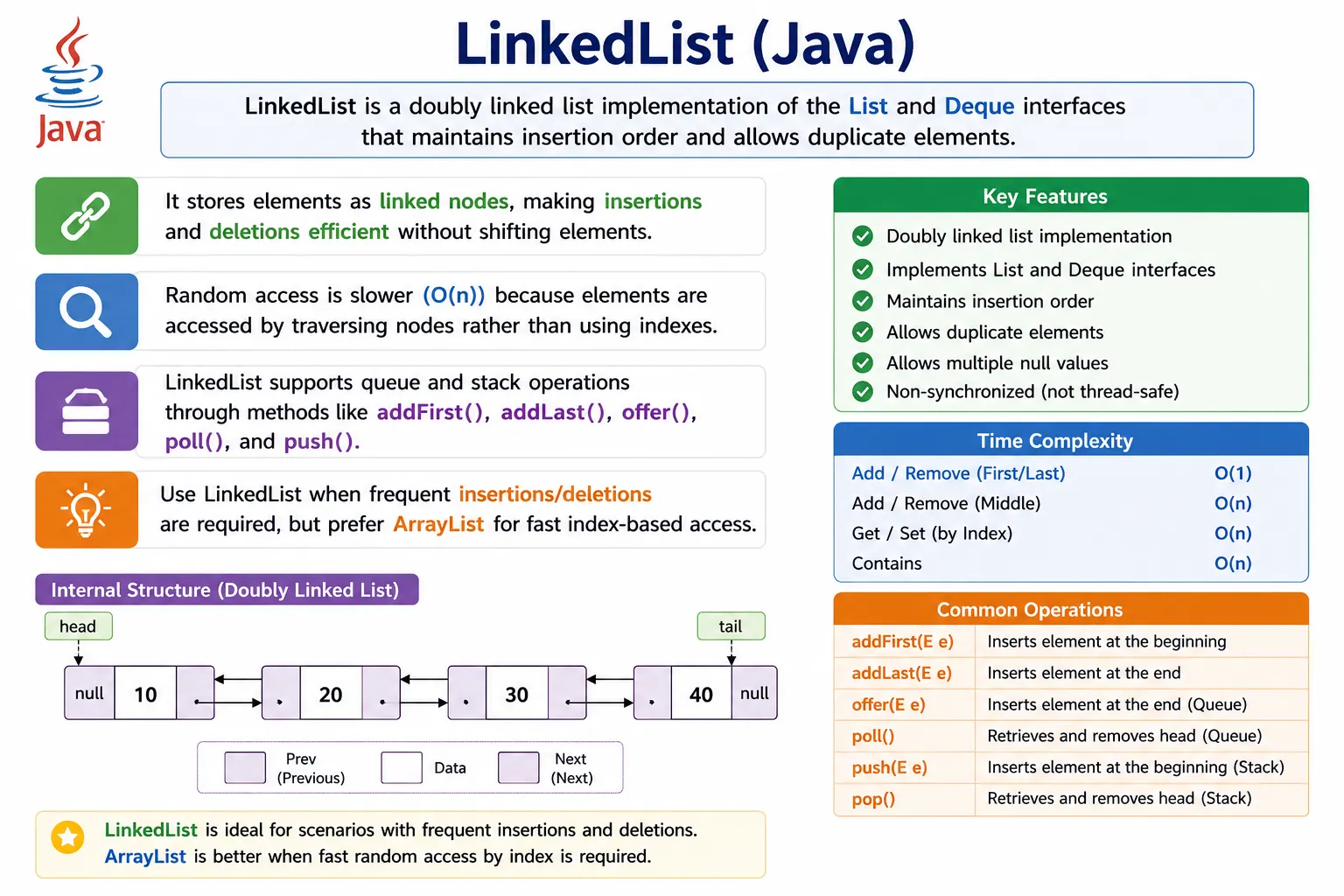
What Is LinkedList?
LinkedList is a class in the java.util package that stores elements in insertion
order and allows duplicate values. Because it implements List, it supports list behavior such as
add, get, remove, and iteration. Because it implements
Deque, it also supports methods such as addFirst, addLast,
removeFirst, removeLast, offer, poll, peek,
push, and pop.
A linked list is useful when data must be frequently added or removed from the ends of the structure, or when
queue and deque behavior is needed. It is less suitable when the application repeatedly accesses elements by
index, because index access requires traversal. This is the central tradeoff: LinkedList is
flexible for structural changes and deque operations, but weaker for random access.
LinkedList<String> list = new LinkedList<>();
Position in Collection Hierarchy
LinkedList has an interesting position in the collection hierarchy because it belongs to both the
list family and the deque family. As a List, it represents an ordered sequence that allows
duplicates. As a Deque, it supports insertion and removal from both ends. This allows one class
to support multiple data-structure patterns.
Iterable
   |-- Collection
        |-- List
        |    |-- LinkedList
        |-- Deque
             |-- LinkedList
In practice, the reference type should match the behavior needed. If a method only needs list behavior, it can
use List<T>. If it needs queue or deque behavior, Deque<T> may be a
better reference type. This keeps APIs focused and avoids exposing unnecessary operations.
Key Characteristics of LinkedList
The defining characteristic of LinkedList is node-based storage. Each element is stored inside a
node, and each node maintains links to the previous and next nodes. This makes insertion and deletion
structurally different from ArrayList. Instead of shifting many elements in an array, a linked
list can adjust node references.
The benefit of this structure is most visible at the beginning or end of the list. Adding or removing the first or last element can be efficient because the list keeps references to both ends. The limitation is random access. To reach element 500, the list must traverse through nodes until it reaches that position. There is no direct array-style jump to an index.
LinkedList also uses more memory per element than ArrayList because each node stores
extra references. This overhead matters when the list is very large. Choosing LinkedList should
therefore be based on behavior, not only on the idea that insertion and deletion are fast.
How LinkedList Works Internally
Internally, Java's LinkedList is a doubly linked list. A node contains three main parts: the
stored element, a reference to the previous node, and a reference to the next node. The list also maintains
references to the first and last nodes, allowing efficient operations at both ends.
prev <- [data] -> next
When a new node is inserted, the neighboring references are adjusted. When a node is removed, the surrounding nodes are linked to each other. This means the list does not need to shift a block of elements as an array would. However, finding the node may still require traversal. This is why insertion and deletion are not automatically fast in every scenario.
The internal node structure also explains the memory tradeoff. Every stored value requires not only the value reference, but also previous and next references. For small lists this overhead usually does not matter. For very large lists, it can become significant compared with an array-backed list.
Creating a LinkedList
A LinkedList can be created with its default constructor. It starts empty and grows as elements
are added. Since LinkedList implements multiple interfaces, the variable can be declared as
LinkedList, List, Deque, or Queue depending on the
intended use.
LinkedList<Integer> list = new LinkedList<>();
If the code needs list-specific methods such as get(index), a List reference may be
appropriate. If the code needs addFirst, removeLast, push, or
poll, a Deque reference communicates the purpose more clearly.
Commonly Used LinkedList Methods
LinkedList supports ordinary list operations and deque operations. Standard list methods include
adding, removing, accessing, searching, and iterating elements. Deque methods make it useful for queue-like
and stack-like workflows.
Adding Elements
list.add(10);
list.addFirst(5);
list.addLast(20);
Removing Elements
list.remove();        // first element
list.removeFirst();
list.removeLast();
Accessing Elements
list.get(0);
list.getFirst();
list.getLast();
Queue / Deque Operations
list.offer(30);
list.poll();
list.peek();
These methods allow LinkedList to support FIFO and LIFO behavior. FIFO means first-in,
first-out, which is queue-like behavior. LIFO means last-in, first-out, which is stack-like behavior. This
flexibility is one of the main practical advantages of LinkedList.
Iterating a LinkedList
A LinkedList can be iterated using a for-each loop, an Iterator, or a
ListIterator. For sequential traversal, iteration is natural and efficient enough for many use
cases. For index-heavy loops, however, repeated calls to get(i) can be inefficient because each
call may require traversal.
for (Integer i : list) {
    System.out.println(i);
}
Performance Complexity (Important)
Performance is the main reason LinkedList is compared with ArrayList. Access by
index is slower because nodes must be traversed. Adding or removing at the beginning or end is efficient.
Adding or removing in the middle can be efficient only after the location is reached; finding that location
still takes time.
| Operation | Time Complexity |
|---|---|
| get(index) | O(n) |
| add/remove (beginning) | O(1) |
| add/remove (middle) | O(n) |
| search | O(n) |
LinkedList vs ArrayList (Key Interview Comparison)
LinkedList and ArrayList both implement List, but their internal
structures are different. ArrayList is backed by a dynamic array, so it is strong for random
access and iteration. LinkedList is backed by nodes, so it is strong for operations at the ends
and useful for deque behavior.
| Aspect | LinkedList | ArrayList |
|---|---|---|
| Internal structure | Doubly linked list | Dynamic array |
| Random access | Slow | Fast |
| Insertion/deletion | Fast | Slow (middle) |
| Memory usage | Higher | Lower |
| Use case | Frequent modifications | Frequent reads |
The interview-safe answer is not that one is always better. ArrayList is usually preferred for
general list usage because most applications read and iterate more often than they insert in the middle.
LinkedList is useful when queue, deque, or frequent end modifications are central to the
requirement.
Thread Safety
LinkedList is not synchronized and is not thread-safe for concurrent modification. If multiple
threads modify the same list at the same time without coordination, the result can be inconsistent or unsafe.
This is similar to ArrayList. Thread safety must be handled intentionally when shared mutable
lists are involved.
Possible alternatives include wrapping the list with Collections.synchronizedList or using a
concurrent collection such as ConcurrentLinkedDeque when deque-style concurrent behavior is
required. The correct choice depends on whether the application needs list semantics, deque semantics, or
high-concurrency behavior.
When to Use LinkedList
Use LinkedList when the application benefits from deque behavior, frequent additions or removals
at the beginning or end, or stack and queue operations. It can be useful for processing tasks, buffering
values, maintaining ordered work items, or modeling workflows where elements are consumed from one end and
added to another.
It can also be useful when the code performs sequential traversal and structural modifications through an
iterator. The important point is that the access pattern should fit the linked structure. If most operations
are sequential and end-based, LinkedList can be a reasonable choice.
When NOT to Use LinkedList
Avoid LinkedList when the application frequently accesses elements by index. Repeated
get(i) calls can become expensive because each call may traverse nodes. For index-heavy
operations, ArrayList is usually a better fit.
LinkedList is also not ideal when memory is tight because each node stores extra references. For
large read-heavy lists, ArrayList is often more memory-efficient and faster in practice. In many
modern applications, ArrayList remains the default list implementation, while
LinkedList is chosen for specific deque or modification-heavy patterns.
Common Beginner Mistakes
A common beginner mistake is using LinkedList for random access as if it were an
ArrayList. Calling get(i) repeatedly inside a loop can be inefficient. Another
mistake is assuming LinkedList is always faster because insertion and deletion sound cheaper.
The cost of finding the insertion point still matters.
Beginners also ignore memory overhead. Each node stores extra references, so a linked list can use more memory
than an array-backed list. Another mistake is using LinkedList in shared multi-threaded code
without synchronization. Like most common collections, it requires care when multiple threads modify it.
LinkedList and Deque Behavior
One of the strongest reasons to use LinkedList is that it implements Deque.
Deque stands for double-ended queue. It allows elements to be added, removed, or inspected from
both the front and the back. This makes LinkedList more than a simple list implementation.
As a queue, LinkedList can use offer, poll, and peek.
As a stack-like structure, it can use push and pop. As a deque, it can use
addFirst, addLast, removeFirst, and removeLast. These
methods make intent clearer than using only generic list operations.
LinkedList and Memory Overhead
Memory overhead is a practical tradeoff of linked structures. In an ArrayList, elements are
stored in an internal array. In a LinkedList, each element is wrapped in a node object with
references to neighboring nodes. This means a linked list needs additional memory beyond the stored element
references.
For small lists, the difference may not matter. For very large lists, the overhead can become meaningful.
Memory usage can also affect cache locality and real-world performance. This is one reason
LinkedList is not automatically faster than ArrayList even when modifications are
involved.
LinkedList in Real Projects
In real projects, LinkedList is less common than ArrayList for ordinary list
storage, but it still has useful roles. It may appear in task queues, navigation history, ordered processing
pipelines, simple stack behavior, or algorithms that naturally operate from both ends of a sequence. Its
value is strongest when the code uses it as a deque rather than as a random-access list.
Test automation code may use linked lists less often, but the concept still matters in interviews and data
structure reasoning. A tester or automation engineer writing Java should understand why list choice affects
performance, even if most framework code uses ArrayList by default.
Interview Perspective
In interviews, a strong answer should define LinkedList as a doubly linked list implementation
that implements both List and Deque. It maintains insertion order, allows
duplicates, allows null values, and supports queue and stack-style operations. The answer should also explain
that random access is slower than ArrayList.
A stronger answer explains the tradeoff: LinkedList stores elements as nodes with previous and
next references, so it avoids element shifting but requires traversal for index access and uses extra memory.
It is useful for deque operations and specific modification patterns, not as a universal replacement for
ArrayList.
Queue Methods: offer, poll, and peek
When LinkedList is used as a queue, methods such as offer, poll, and
peek are preferred because they clearly describe queue behavior. offer adds an
element to the queue, poll retrieves and removes the head element, and peek
retrieves the head element without removing it. These names communicate intent better than using only generic
list methods.
The queue-style methods are also safer in some situations because they return special values instead of
throwing exceptions for certain empty-queue operations. For example, poll returns
null if the queue is empty, while methods such as removeFirst may throw an
exception. This distinction matters when designing robust processing logic.
In real code, choosing between exception-based methods and null-returning methods depends on expectation. If
an empty structure is normal, poll and peek can be convenient. If an empty structure
represents a programming error, exception-based methods may make the problem visible earlier.
Stack Behavior with LinkedList
LinkedList can also behave like a stack through push and pop. A stack
follows last-in, first-out behavior. The most recently added element is removed first. This pattern appears in
parsing, undo operations, expression evaluation, and certain algorithmic problems.
Although LinkedList supports stack behavior, modern Java often recommends ArrayDeque
for stack and deque operations because it is usually more efficient. Still, understanding
LinkedList stack behavior is valuable because it demonstrates how the class implements
Deque and why it is more flexible than a simple list.
LinkedList and Null Values
LinkedList allows null values, including multiple null values. Since it is a list, duplicates are
allowed, and null can appear at different positions. This behavior can be convenient when representing missing
or optional data, but it can also lead to errors if the code assumes every element is non-null.
Null values require careful handling during iteration, comparison, sorting, and method calls. If a list may contain null, code should check for null before calling methods on each element. In business applications, it is often better to prevent invalid nulls from entering the list rather than handling them repeatedly later.
Safe Removal While Iterating
Removing elements while iterating is a common operation and a common source of mistakes. If a developer uses a
for-each loop and directly calls list.remove, Java may throw a
ConcurrentModificationException. This is fail-fast behavior that protects the iteration from
unexpected structural changes.
The safer approach is to use an Iterator and call iterator.remove after identifying
the element that should be removed. Another approach is to collect values to remove in a separate collection
and remove them after traversal. Java also provides methods such as removeIf for predicate-based
removal.
This rule applies to many collection types, not only LinkedList. It is especially important in
filtering, cleanup, validation, and test data preparation logic where elements are commonly removed based on a
condition.
Converting LinkedList to Other Collections
A LinkedList can be converted into an ArrayList, array, set, or another collection
type when the required behavior changes. For example, if data was collected as a linked list for deque
processing but later needs fast index-based access, creating a new ArrayList from it may be
useful. If duplicates should be removed, converting to a Set may be appropriate.
Conversion should be intentional because the target collection may change behavior. A set removes duplicates.
A tree-based set sorts elements. An array fixes the size. An ArrayList provides faster random
access. The conversion should match the next operation the application needs to perform.
LinkedList and API Design
In method signatures, it is usually better to depend on an interface rather than the concrete
LinkedList class. If a method needs ordered list behavior, use List<T>. If a
method needs deque behavior, use Deque<T>. If a method only needs queue behavior, use
Queue<T>. This communicates the method's real requirement and gives callers flexibility.
Returning LinkedList directly from an API can overexpose implementation details. If callers only
need list behavior, returning List is clearer. If callers need both-end operations, returning
Deque is clearer. Good API design reveals behavior, not unnecessary internal choices.
LinkedList in Coding Interviews
LinkedList is a common interview topic because it connects Java collection usage with data
structure fundamentals. Interviewers may ask how it differs from ArrayList, why random access is
slower, what a doubly linked node contains, and how it supports queue and stack operations. They may also ask
when LinkedList is a better choice and when it is not.
A strong interview response avoids exaggerated claims. Do not say that LinkedList is always
faster for insertion and deletion. Say that it avoids array shifting, but locating the position may still
require traversal. Say that it is useful for deque operations and certain modification-heavy patterns, while
ArrayList is often better for read-heavy and index-heavy workloads.
LinkedList vs ArrayDeque
Since LinkedList implements Deque, it is often compared with
ArrayDeque. Both can be used for queue and stack-style operations, but their internal structures
differ. LinkedList uses nodes with previous and next references. ArrayDeque uses a
resizable array-based structure optimized for deque operations.
In many modern Java applications, ArrayDeque is preferred when the requirement is purely stack or
queue behavior. It usually has better memory locality and lower per-element overhead than
LinkedList. However, LinkedList remains useful to understand because it combines
List and Deque behavior in one class and clearly demonstrates linked-node data
structure concepts.
A practical interview answer can say that LinkedList is valid for deque operations, but
ArrayDeque is often the better modern choice for stack or queue implementations when list
behavior is not required. This shows awareness of both API capability and real-world performance tradeoffs.
ListIterator with LinkedList
ListIterator is useful with LinkedList because it supports bidirectional traversal.
A normal Iterator moves forward. A ListIterator can move forward with
next and backward with previous. It can also report indexes and support controlled
modifications during traversal.
This matters when a workflow needs to inspect neighboring elements, move backward after moving forward, or
modify a list while maintaining iterator consistency. Although not every application needs
ListIterator, knowing it demonstrates deeper understanding of the List interface and
the kinds of traversal patterns Java supports.
Performance Misconceptions
The biggest misconception about LinkedList is that it is always faster than
ArrayList for insertion and deletion. The more accurate statement is that once the target node is
known, changing links can be efficient. But if the program must first locate the position by index or search,
traversal still costs time. The total operation may not be faster than using an ArrayList.
Another misconception is that theoretical complexity always predicts real performance perfectly. In practice,
memory layout, CPU cache behavior, object allocation, garbage collection, and list size can affect results.
ArrayList often performs very well because its elements are stored in a compact array structure.
LinkedList has extra node objects and pointer traversal, which can be costly in real systems.
This does not mean LinkedList is useless. It means it should be selected for the right access
pattern. The best collection choice comes from the actual workload: how often the code reads by index, adds at
the ends, removes during traversal, searches, iterates, or needs deque behavior.
Designing with Interfaces
Because LinkedList implements several interfaces, developers should choose the reference type
carefully. If code declares LinkedList<String>, it exposes the concrete implementation.
If code declares List<String>, it says the code needs ordered list behavior. If code
declares Deque<String>, it says the code needs double-ended queue behavior.
This improves maintainability. A method that accepts Deque<Task> can work with
LinkedList today and ArrayDeque tomorrow. A method that accepts
List<Task> can work with ArrayList or LinkedList. Programming to
interfaces keeps the design flexible and communicates the intended operations more clearly.
LinkedList Examples
1. Creating a LinkedList
import java.util.*;

class Demo {
    public static void main(String[] args) {
        LinkedList<String> list = new LinkedList<>();
        list.add("Java");
        list.add("Selenium");
        System.out.println(list);
    }
}
Output
[Java, Selenium]
2. LinkedList Allows Duplicates
import java.util.*;

class Demo {
    public static void main(String[] args) {
        LinkedList<Integer> list = new LinkedList<>();
        list.add(10);
        list.add(10);
        System.out.println(list);
    }
}
Output
[10, 10]
3. Maintains Insertion Order
import java.util.*;

class Demo {
    public static void main(String[] args) {
        LinkedList<Integer> list = new LinkedList<>();
        list.add(3);
        list.add(1);
        list.add(2);
        System.out.println(list);
    }
}
Output
[3, 1, 2]
4. Accessing Elements Using Index (Slower than ArrayList)
import java.util.*;

class Demo {
    public static void main(String[] args) {
        LinkedList<String> list = new LinkedList<>(Arrays.asList("A", "B", "C"));
        System.out.println(list.get(1));
    }
}
Output
B
5. Adding Element at First Position
import java.util.*;

class Demo {
    public static void main(String[] args) {
        LinkedList<Integer> list = new LinkedList<>();
        list.add(10);
        list.addFirst(5);
        System.out.println(list);
    }
}
Output
[5, 10]
6. Adding Element at Last Position
import java.util.*;

class Demo {
    public static void main(String[] args) {
        LinkedList<Integer> list = new LinkedList<>();
        list.add(10);
        list.addLast(20);
        System.out.println(list);
    }
}
Output
[10, 20]
7. Removing First Element
import java.util.*;

class Demo {
    public static void main(String[] args) {
        LinkedList<String> list = new LinkedList<>(Arrays.asList("A", "B", "C"));
        list.removeFirst();
        System.out.println(list);
    }
}
Output
[B, C]
8. Removing Last Element
import java.util.*;

class Demo {
    public static void main(String[] args) {
        LinkedList<String> list = new LinkedList<>(Arrays.asList("A", "B", "C"));
        list.removeLast();
        System.out.println(list);
    }
}
Output
[A, B]
9. LinkedList as a Queue (FIFO)
import java.util.*;

class Demo {
    public static void main(String[] args) {
        LinkedList<Integer> queue = new LinkedList<>();
        queue.offer(10);
        queue.offer(20);
        System.out.println(queue.poll());
        System.out.println(queue);
    }
}
Output
10
[20]
10. LinkedList as a Stack (LIFO)
import java.util.*;

class Demo {
    public static void main(String[] args) {
        LinkedList<Integer> stack = new LinkedList<>();
        stack.push(10);
        stack.push(20);
        System.out.println(stack.pop());
        System.out.println(stack);
    }
}
Output
20
[10]
11. Iterating Using for-each Loop
import java.util.*;

class Demo {
    public static void main(String[] args) {
        LinkedList<String> list = new LinkedList<>(Arrays.asList("X", "Y", "Z"));
        for (String s : list) {
            System.out.println(s);
        }
    }
}
12. Iterating Using Iterator
import java.util.*;

class Demo {
    public static void main(String[] args) {
        LinkedList<Integer> list = new LinkedList<>(Arrays.asList(1, 2, 3));
        Iterator<Integer> it = list.iterator();
        while (it.hasNext()) {
            System.out.println(it.next());
        }
    }
}
13. Iterating Forward & Backward Using ListIterator
import java.util.*;

class Demo {
    public static void main(String[] args) {
        LinkedList<String> list = new LinkedList<>(Arrays.asList("A", "B", "C"));
        ListIterator<String> it = list.listIterator();

        while (it.hasNext()) {
            System.out.print(it.next() + " ");
        }
        while (it.hasPrevious()) {
            System.out.print(it.previous() + " ");
        }
    }
}
Output
A B C C B A
14. Removing Element While Iterating (Safe Way)
import java.util.*;

class Demo {
    public static void main(String[] args) {
        LinkedList<Integer> list = new LinkedList<>(Arrays.asList(1, 2, 3));
        Iterator<Integer> it = list.iterator();
        while (it.hasNext()) {
            if (it.next() == 2) {
                it.remove();
            }
        }
        System.out.println(list);
    }
}
Output
[1, 3]
15. LinkedList Size
import java.util.*;

class Demo {
    public static void main(String[] args) {
        LinkedList<String> list = new LinkedList<>(Arrays.asList("A", "B", "C"));
        System.out.println(list.size());
    }
}
Output
3
16. Checking Element Existence
import java.util.*;

class Demo {
    public static void main(String[] args) {
        LinkedList<String> list = new LinkedList<>(Arrays.asList("Java", "API"));
        System.out.println(list.contains("Java"));
    }
}
Output
true
17. Converting LinkedList to ArrayList
import java.util.*;

class Demo {
    public static void main(String[] args) {
        LinkedList<String> linkedList = new LinkedList<>(Arrays.asList("A", "B"));
        ArrayList<String> arrayList = new ArrayList<>(linkedList);
        System.out.println(arrayList);
    }
}
Output
[A, B]
18. LinkedList vs ArrayList (Insertion Performance)
import java.util.*;

class Demo {
    public static void main(String[] args) {
        LinkedList<Integer> list = new LinkedList<>();
        list.add(0, 100); // fast insertion
        System.out.println(list);
    }
}
Explanation
Insert/delete faster than ArrayList
Random access slower
19. LinkedList Is Not Thread-Safe
import java.util.*;

class Demo {
    public static void main(String[] args) {
        LinkedList<String> list = new LinkedList<>();
        list.add("Not Thread Safe");
        System.out.println(list);
    }
}
Explanation
Use Collections.synchronizedList() if needed
20. Interview Summary: LinkedList
import java.util.*;

class Demo {
    public static void main(String[] args) {
        LinkedList<String> list = new LinkedList<>();
        list.add("Doubly");
        list.add("Linked");
        list.add("List");
        System.out.println(list);
    }
}
Key Points
- Doubly linked list
- Faster insert/delete
- Slower random access
- Implements List and Deque
- Allows duplicates and maintains order
Interview-Ready Answers
Short Answer
LinkedList is a doubly linked list implementation of the List interface.
Detailed Answer
In Java, LinkedList implements both List and Deque interfaces. It stores elements as nodes with previous and next references, allowing fast insertion and deletion but slower random access compared to ArrayList.
Key Takeaway
Use LinkedList when modification speed matters more than access speed. Choose wisely based on access pattern and performance needs.