LinkedHashSet in Java
LinkedHashSet is an implementation of the Set interface that combines the
uniqueness guarantee of HashSet with predictable insertion-order iteration. It is used when an
application must store unique elements, but the order in which those elements were first added still matters.
This makes LinkedHashSet a practical middle ground between the speed-focused HashSet and the
sorted-order behavior of TreeSet.
In many real programs, removing duplicates is not enough. The original sequence of values may also carry
meaning. A user may upload tags in a specific order, a report may collect categories as they are encountered,
or a test may validate that search filters appear without duplicates while still following the expected
display sequence. In these cases, LinkedHashSet is often the cleanest collection choice because
it keeps the first occurrence of every value and preserves that first-seen order during iteration.
LinkedHashSet is also a common interview topic because it exposes an important design tradeoff. It is more predictable than HashSet because iteration order is stable, but it usually has slightly more memory overhead because it maintains linking information internally. A strong answer explains not only that LinkedHashSet preserves insertion order, but also why it does so and when that extra behavior is worth using.
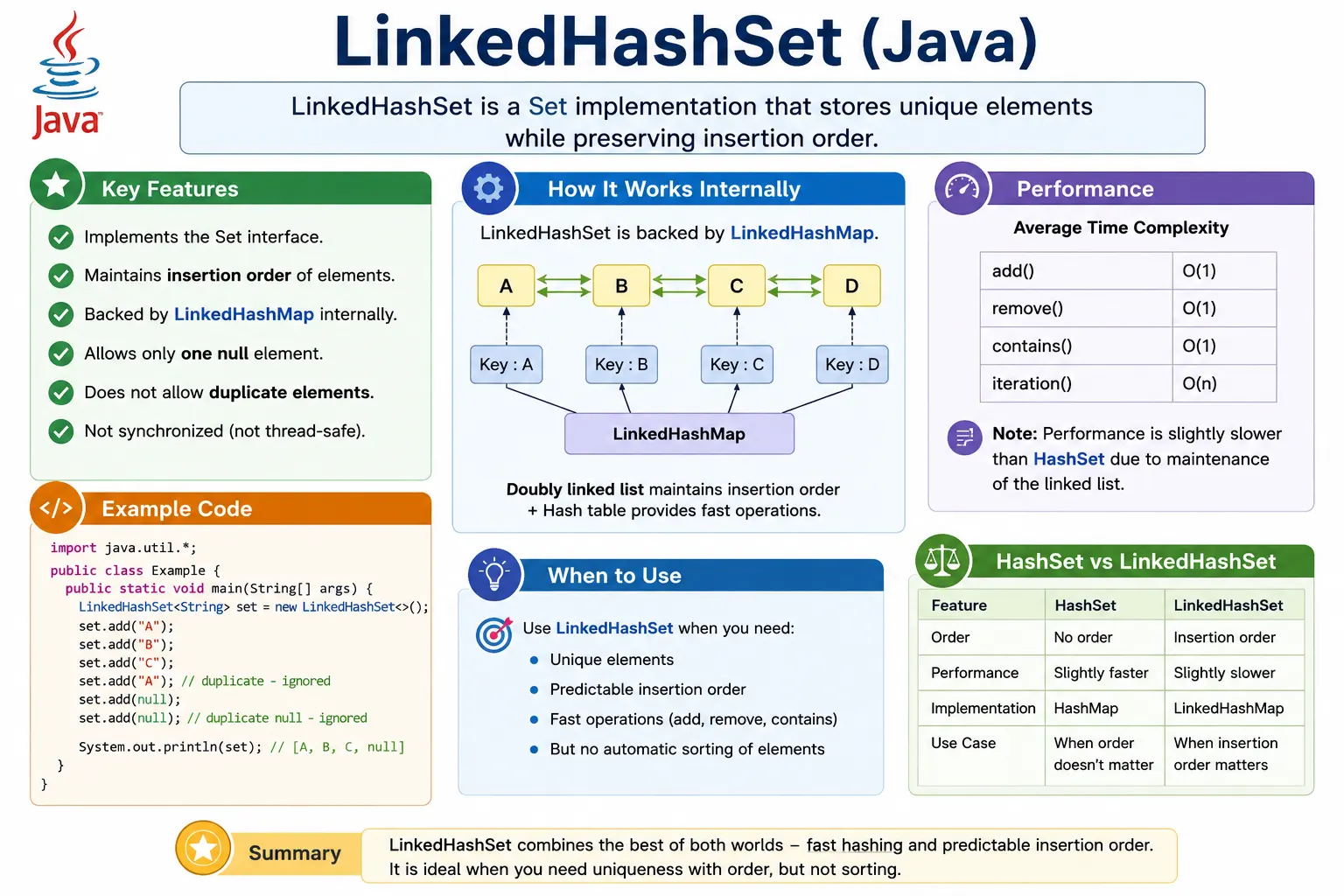
What Is LinkedHashSet?
LinkedHashSet is a class in the java.util package. It implements the
Set interface, which means it does not allow duplicate elements. Its special feature is that it
maintains insertion order. If values are added as "B", "A", and
"C", iteration will return them in that same order.
This behavior is different from HashSet, which does not guarantee any iteration order. It is
also different from TreeSet, which sorts elements rather than preserving insertion order.
LinkedHashSet is useful when the application needs unique values and predictable iteration, but not sorted
order.
LinkedHashSet allows at most one null element. Adding null more than once does not create multiple null entries because the set contract still applies. Like other set implementations, it does not provide index-based access. It is built for uniqueness and iteration, not for retrieving values by position.
Set<String> set = new LinkedHashSet<>();
Declaring the variable as Set and creating it as LinkedHashSet is a common style.
It communicates that the program depends on set behavior while still choosing insertion-order preservation as
the concrete implementation detail.
Position in Collection Hierarchy
LinkedHashSet belongs to the Java Collections Framework. It sits under Set, which sits under
Collection, which sits under Iterable. This means LinkedHashSet can be used in
enhanced for-each loops and supports common collection operations such as add, remove, contains, size, and
clear.
Iterable
   |-- Collection
        |-- Set
             |-- LinkedHashSet
The hierarchy explains the contract. As a set, LinkedHashSet must reject duplicates. As a linked hash-based implementation, it also maintains a predictable traversal order. This combination is what separates it from a plain HashSet.
How LinkedHashSet Works Internally
Internally, LinkedHashSet is backed by a LinkedHashMap. Like HashSet, it uses hashing for fast
add, remove, and contains operations. The elements are stored as keys in the internal map. In addition to the
hash table structure, the linked map maintains a doubly linked list that records insertion order.
This internal design is the reason LinkedHashSet can provide both uniqueness and predictable iteration. The hash table helps locate elements quickly, while the linked structure remembers the order in which elements were inserted. A simple way to think about it is that LinkedHashSet behaves like HashSet plus insertion-order tracking.
HashMap + LinkedList = LinkedHashSet
The expression above is only a conceptual shortcut. More precisely, LinkedHashSet uses LinkedHashMap-style behavior internally. The key interview point is that uniqueness comes from hashing and equality, while order preservation comes from the linked structure.
Key Characteristics of LinkedHashSet
The first key characteristic is insertion-order iteration. LinkedHashSet remembers the order in which unique elements were added. If a duplicate is added later, it is ignored and does not change the original position of the existing element. This point matters when using LinkedHashSet to remove duplicates from an ordered list.
The second characteristic is uniqueness. LinkedHashSet is still a set, so duplicate elements are not stored.
The third characteristic is performance. Basic operations such as add, remove, and
contains are generally O(1) on average, similar to HashSet. However, LinkedHashSet is usually
slightly slower and uses slightly more memory because it maintains order information.
The fourth characteristic is that it is not synchronized by default. If multiple threads modify the same LinkedHashSet at the same time, external synchronization or another thread-safe collection approach is needed.
Creating a LinkedHashSet
Creating a LinkedHashSet is straightforward. The no-argument constructor creates an empty set that will store unique values in insertion order. This is the most common way to start when no initial collection is already available.
LinkedHashSet<Integer> set = new LinkedHashSet<>();
LinkedHashSet can also be created from another collection. That pattern is especially useful when converting a list into a duplicate-free collection while preserving the order of first occurrence.
Commonly Used Methods
LinkedHashSet uses the common Set and Collection methods. The add method inserts a value only if
it is not already present. The remove method deletes a value. The contains method
checks membership. The size method returns the number of unique elements.
set.add(10);
set.add(20);
set.add(10); // duplicate ignored

set.remove(20);
set.contains(10);
set.size();
These methods behave similarly to HashSet, but iteration remains different because LinkedHashSet returns values in insertion order. That single difference often makes LinkedHashSet the better choice for user-facing output, reports, deterministic tests, and readable logs.
Order Preservation Example
The following example shows the main reason to choose LinkedHashSet. The elements are printed in the same order in which they were added. If a duplicate is added, it is ignored without disturbing the original position of the existing value.
LinkedHashSet<String> set = new LinkedHashSet<>();
set.add("Java");
set.add("Python");
set.add("C++");

System.out.println(set);
Output:
[Java, Python, C++]
This makes LinkedHashSet very useful for data cleanup. If a list contains repeated values and the final output should follow the original sequence, LinkedHashSet removes duplicates without rearranging the surviving elements.
Performance Complexity
LinkedHashSet provides good performance for common operations. Add, remove, and contains are usually O(1) on average because hashing is still used internally. Iteration is O(n) because every element must be visited.
Compared with HashSet, LinkedHashSet has extra overhead because it maintains links between entries. Compared with TreeSet, it is usually faster for basic operations because it does not maintain sorted tree order. This is why LinkedHashSet is often described as a balanced choice: predictable order without sorting cost.
| Operation | Time Complexity |
|---|---|
| add | O(1) |
| remove | O(1) |
| contains | O(1) |
| iteration | O(n) |
Null Handling
LinkedHashSet allows one null element. If null is added more than once, only the first null is stored. This follows the same uniqueness rule used for every other value. The difference is that null, if inserted first, will also appear first during iteration because insertion order is preserved.
set.add(null);
Null support should not be treated as a reason to use null casually. In business applications, null often represents missing or invalid data. If null is not meaningful for the domain, it should be rejected before it enters the collection. If it is allowed, the rest of the code should handle it explicitly.
LinkedHashSet vs HashSet vs TreeSet
LinkedHashSet is often compared with HashSet and TreeSet because all three implement the Set interface. HashSet is best when uniqueness and speed matter but order does not. LinkedHashSet is best when uniqueness and insertion order both matter. TreeSet is best when uniqueness and sorted order are required.
The choice should be driven by the business requirement. If an application needs to display unique selected filters in the order the user selected them, LinkedHashSet is more appropriate than HashSet. If the same filters must always appear alphabetically, TreeSet may be better. If the values are used only for internal lookup and order is irrelevant, HashSet is usually enough.
| Feature | HashSet | LinkedHashSet | TreeSet |
|---|---|---|---|
| Order | No guarantee | Insertion | Sorted |
| Performance | Fastest | Slightly slower | Slowest |
| Null allowed | One | One | No |
| Internal DS | HashMap | LinkedHashMap | Tree |
When to Use LinkedHashSet
Use LinkedHashSet when uniqueness is required and insertion order must be preserved. This is the classic scenario: remove duplicates, but keep the order in which values first appeared. It is also useful when fast membership checking is needed and deterministic iteration makes the output easier to test, log, or display.
Practical examples include removing duplicate menu items while keeping the configured order, collecting unique validation messages in the order they were detected, storing selected filters in the order a user applied them, and preserving unique steps in a generated workflow. In each case, order is not sorted order; it is insertion order.
When Not to Use LinkedHashSet
Do not use LinkedHashSet when sorted order is required. LinkedHashSet preserves insertion order; it does not sort elements. If sorting is part of the requirement, use TreeSet or sort the values separately. Do not use LinkedHashSet when memory overhead must be minimized and order does not matter. In that case, HashSet is simpler and usually slightly lighter.
LinkedHashSet is also not appropriate when duplicates are meaningful. If the application needs to know how many times a value appeared, use a list or a map-based frequency counter. LinkedHashSet will keep only one copy and discard repetition information.
LinkedHashSet in Real Projects
LinkedHashSet appears in real projects whenever data needs to be unique but still displayed or processed in a predictable order. A common example is a web application that receives a list of selected categories from a user interface. The same category may be submitted more than once due to repeated clicks, browser behavior, or duplicate request data. Converting the submitted values into a LinkedHashSet removes duplicates while keeping the user's first selected order.
Another practical use case is report generation. A report may gather section names, column labels, or filter values from multiple sources. If those values are stored in a HashSet, the final output order may be unpredictable. If they are stored in a TreeSet, the output may be sorted but no longer reflect the business sequence. LinkedHashSet preserves the order in which the report logic encountered each unique value, which often produces more natural output.
Test automation also benefits from LinkedHashSet. Suppose a page displays a list of unique messages or menu items. A tester may want to verify both uniqueness and order. A HashSet can confirm uniqueness, but it cannot preserve the expected order for comparison. A LinkedHashSet can support both checks. This makes test failures easier to understand because the collection output remains deterministic.
Deterministic Iteration and Testing
Deterministic iteration means that the same input sequence produces the same iteration sequence. This matters in tests, logs, API responses, and generated files. HashSet can be perfectly valid for internal lookup, but its iteration order should not be used as a stable output format. If a test compares ordered output generated from a HashSet, the test may become fragile even when the business logic is correct.
LinkedHashSet helps avoid that problem. It gives the developer a clear rule: the first time a value appears, its position is recorded; later duplicate attempts are ignored. This makes the collection especially useful when cleaning data before displaying it. Users often expect cleaned data to retain familiar order rather than being rearranged unexpectedly.
Equality Rules Still Matter
LinkedHashSet preserves insertion order, but it does not change how uniqueness is decided. Like HashSet, it
relies on hashCode and equals for hash-based uniqueness. For built-in types such as
String, Integer, and other wrapper classes, these methods are already implemented
appropriately. For custom objects, developers must define equality based on the fields that represent logical
identity.
If two customer objects have the same customer ID, the business may consider them duplicates. LinkedHashSet
will not know that unless the class implements equals and hashCode using the
customer ID. Without those methods, the set may store both objects because they are different object
references in memory. This is why LinkedHashSet questions often lead into equality-contract questions during
interviews.
Memory and Design Tradeoff
LinkedHashSet uses more memory than HashSet because it maintains ordering links in addition to hash-based storage. In many business applications, this extra overhead is small compared with the benefit of stable iteration. In memory-sensitive or extremely large data processing systems, however, the extra cost should be considered carefully.
The best design decision is requirement-driven. If the only requirement is "store unique values quickly," HashSet is usually enough. If the requirement is "store unique values and keep first-seen order," LinkedHashSet is the better fit. If the requirement is "store unique values in sorted order," TreeSet should be considered. The collection should express the rule clearly so future developers can understand why it was chosen.
Common Beginner Mistakes
A common beginner mistake is assuming LinkedHashSet sorts values because its output is predictable. It does not sort. It preserves the order of insertion. If values are inserted as B, A, and C, iteration returns B, A, and C. That is predictable, but it is not alphabetical or natural sorting.
Another mistake is using LinkedHashSet when HashSet is sufficient. If the code never depends on iteration
order, HashSet may be the better choice. Beginners also sometimes ignore the importance of
equals and hashCode. LinkedHashSet prevents duplicates using the same equality
rules as hash-based collections, so custom objects still require correct equality implementation.
A third mistake is using mutable objects as elements and then changing the fields used in equality. This can make a value difficult to find or remove later. Values stored in hash-based sets should have stable equality behavior while they remain in the collection.
Interview-Ready Answers
Short Answer
LinkedHashSet is a Set implementation that maintains insertion order.
Detailed Answer
In Java, LinkedHashSet extends HashSet and uses a LinkedHashMap internally to store unique elements while preserving insertion order. It provides average constant-time performance for add, remove, and contains operations, allows at most one null element, does not allow duplicates, and is useful when deterministic iteration order is required.
Practical Interview Perspective
In interviews, the most important LinkedHashSet point is the combination of uniqueness and insertion order. A strong explanation mentions that it is backed by LinkedHashMap, uses hashing for lookup, and maintains a linked structure to preserve insertion order. It should also compare clearly with HashSet and TreeSet.
If asked when to use it, answer with a requirement-based example: use LinkedHashSet when duplicates must be removed but first-occurrence order must remain. If asked about performance, explain that it is usually close to HashSet for basic operations, but slightly slower and heavier because it stores ordering information.
LinkedHashSet Examples
The following examples show the most common LinkedHashSet behaviors. Each example focuses on one idea: creation, insertion order, duplicate handling, null handling, iteration, removal, list conversion, custom object equality, thread safety, and set operations.
1. Creating a LinkedHashSet
This example creates a LinkedHashSet and adds two different values. Since both values are unique, both are stored. The printed order follows the insertion order.
import java.util.*;

class Demo {
    public static void main(String[] args) {
        LinkedHashSet<String> set = new LinkedHashSet<>();
        set.add("Java");
        set.add("API");
        System.out.println(set);
    }
}
Output:
[Java, API]
2. Maintains Insertion Order
This is the core LinkedHashSet behavior. The values are added as B, A, and C, and they are printed in that same sequence. A HashSet would not provide this guarantee.
import java.util.*;

class Demo {
    public static void main(String[] args) {
        LinkedHashSet<String> set = new LinkedHashSet<>();
        set.add("B");
        set.add("A");
        set.add("C");
        System.out.println(set);
    }
}
Output:
[B, A, C]
3. Does Not Allow Duplicates
LinkedHashSet is still a set, so duplicate values are ignored. The second attempt to add 10 does
not create another entry. The original position of 10 remains unchanged.
import java.util.*;

class Demo {
    public static void main(String[] args) {
        LinkedHashSet<Integer> set = new LinkedHashSet<>();
        set.add(10);
        set.add(10);
        set.add(20);
        System.out.println(set);
    }
}
Output:
[10, 20]
4. Allows One null
LinkedHashSet allows one null element. If null is added first, it appears first during iteration. Adding null again is ignored because it is a duplicate.
import java.util.*;

class Demo {
    public static void main(String[] args) {
        LinkedHashSet<String> set = new LinkedHashSet<>();
        set.add(null);
        set.add(null);
        set.add("Java");
        System.out.println(set);
    }
}
Output:
[null, Java]
5. Iterating Using for-each Loop
A for-each loop is the simplest way to iterate over a LinkedHashSet. Because insertion order is preserved, this loop visits values in the order they were added or in the order they appeared in the source collection.
import java.util.*;

class Demo {
    public static void main(String[] args) {
        LinkedHashSet<String> set =
                new LinkedHashSet<>(Arrays.asList("X", "Y", "Z"));
        for (String s : set) {
            System.out.println(s);
        }
    }
}
6. Iterating Using Iterator
An Iterator gives explicit control over traversal. It is useful when the program needs to remove elements safely during iteration or when a more manual traversal style is required.
import java.util.*;

class Demo {
    public static void main(String[] args) {
        LinkedHashSet<Integer> set =
                new LinkedHashSet<>(Arrays.asList(1, 2, 3));
        Iterator<Integer> it = set.iterator();
        while (it.hasNext()) {
            System.out.println(it.next());
        }
    }
}
7. Removing Elements
Removing a value from LinkedHashSet works like removing from other sets. If the value exists, it is removed. The remaining values keep their relative insertion order.
import java.util.*;

class Demo {
    public static void main(String[] args) {
        LinkedHashSet<String> set =
                new LinkedHashSet<>(Arrays.asList("A", "B", "C"));
        set.remove("B");
        System.out.println(set);
    }
}
Output:
[A, C]
8. Removing While Iterating (Safe Way)
When removing values during iteration, use the iterator's remove method. Modifying the set
directly while iterating can cause a concurrent modification problem. The iterator is designed to handle this
pattern safely.
import java.util.*;

class Demo {
    public static void main(String[] args) {
        LinkedHashSet<Integer> set =
                new LinkedHashSet<>(Arrays.asList(1, 2, 3));
        Iterator<Integer> it = set.iterator();
        while (it.hasNext()) {
            if (it.next() == 2) {
                it.remove();
            }
        }
        System.out.println(set);
    }
}
Output:
[1, 3]
9. Checking Element Existence
The contains method checks whether a value is already present. Since LinkedHashSet is hash-based,
membership checking is generally fast on average. This makes it useful for validation and duplicate
detection.
import java.util.*;

class Demo {
    public static void main(String[] args) {
        LinkedHashSet<String> set =
                new LinkedHashSet<>(Arrays.asList("Java", "API"));
        System.out.println(set.contains("Java"));
    }
}
Output:
true
10. Converting List to LinkedHashSet (Remove Duplicates + Order)
This is one of the most practical LinkedHashSet examples. The original list contains duplicate
1 values. Converting it to a LinkedHashSet removes the duplicate while preserving the order of
first occurrence: 3, then 1, then 2.
import java.util.*;

class Demo {
    public static void main(String[] args) {
        List<Integer> list = Arrays.asList(3, 1, 1, 2);
        LinkedHashSet<Integer> set = new LinkedHashSet<>(list);
        System.out.println(set);
    }
}
Output:
[3, 1, 2]
This pattern is useful in reports, dropdown values, test data cleanup, and any workflow where duplicates should be removed without rearranging the user's original sequence.
11. Converting LinkedHashSet to List
Sometimes a program needs set behavior first and list behavior later. Converting LinkedHashSet to a list
keeps the unique values in insertion order and then allows index-based access through the resulting
ArrayList.
import java.util.*;

class Demo {
    public static void main(String[] args) {
        LinkedHashSet<String> set =
                new LinkedHashSet<>(Arrays.asList("A", "B"));
        List<String> list = new ArrayList<>(set);
        System.out.println(list);
    }
}
12. size() and isEmpty()
The size method returns the number of unique elements currently stored. The
isEmpty method checks whether the set has no elements. These methods are often used before
conditional processing or validation.
import java.util.*;

class Demo {
    public static void main(String[] args) {
        LinkedHashSet<String> set = new LinkedHashSet<>();
        System.out.println(set.isEmpty());
        set.add("Java");
        System.out.println(set.size());
    }
}
Output:
true
1
13. LinkedHashSet vs HashSet (Order Comparison)
This comparison shows why LinkedHashSet exists. Both collections store unique values, but HashSet does not guarantee insertion order. LinkedHashSet does. The exact HashSet output may vary, so the key lesson is the difference in ordering guarantees.
import java.util.*;

class Demo {
    public static void main(String[] args) {
        Set<String> h = new HashSet<>();
        h.add("B");
        h.add("A");

        Set<String> l = new LinkedHashSet<>();
        l.add("B");
        l.add("A");

        System.out.println(h);
        System.out.println(l);
    }
}
Output:
[A, B]
[B, A]
14. Using Custom Objects (Without equals & hashCode)
Custom objects need proper equality rules. In this example, two User objects have the same ID,
but the class does not override equals and hashCode. Java treats them as separate
objects, so both are stored.
class User {
    int id;
    User(int id) { this.id = id; }
}

import java.util.*;

class Demo {
    public static void main(String[] args) {
        LinkedHashSet<User> set = new LinkedHashSet<>();
        set.add(new User(1));
        set.add(new User(1));
        System.out.println(set.size());
    }
}
Output:
2
This is often a business defect in real systems. If the user ID is supposed to define uniqueness, the class must communicate that rule through its equality methods.
15. Custom Objects with equals() & hashCode()
Here the User class defines equality based on ID. Now LinkedHashSet recognizes that both objects
represent the same logical user and stores only one of them.
class User {
    int id;
    User(int id) { this.id = id; }

    public boolean equals(Object o) {
        return this.id == ((User)o).id;
    }

    public int hashCode() {
        return id;
    }
}

import java.util.*;

class Demo {
    public static void main(String[] args) {
        LinkedHashSet<User> set = new LinkedHashSet<>();
        set.add(new User(1));
        set.add(new User(1));
        System.out.println(set.size());
    }
}
Output:
1
LinkedHashSet preserves insertion order, but uniqueness still depends on equals and
hashCode. This is why the same custom-object rules that apply to HashSet also apply here.
16. LinkedHashSet Internal Behavior (Concept)
This conceptual example summarizes the internal behavior. A LinkedHashSet stores unique keys through a LinkedHashMap-style structure. That gives it hashing-based lookup and linked iteration order.
LinkedHashSet<String> set = new LinkedHashSet<>();
set.add("Java");
Explanation
- Backed by LinkedHashMap
- Maintains insertion order
- Slightly slower than HashSet
The slight overhead is the price paid for predictable order. In many applications, that price is worth it because stable iteration makes output easier to reason about and tests easier to write.
17. Thread-Safe LinkedHashSet
LinkedHashSet is not synchronized by default. If multiple threads need to access and modify the same set, a synchronized wrapper can be used. More advanced concurrent choices may be better depending on the usage pattern, but this example shows the common wrapper approach.
import java.util.*;

class Demo {
    public static void main(String[] args) {
        Set<String> set =
            Collections.synchronizedSet(new LinkedHashSet<>());
        set.add("Safe");
        System.out.println(set);
    }
}
18. addAll() for Union While Preserving Order
The addAll method adds values from another collection. Since the target is a LinkedHashSet,
duplicates are ignored and new values are appended after existing values. This creates a union while
preserving the order of first insertion.
import java.util.*;

class Demo {
    public static void main(String[] args) {
        LinkedHashSet<Integer> s1 =
                new LinkedHashSet<>(Arrays.asList(1, 2));
        LinkedHashSet<Integer> s2 =
                new LinkedHashSet<>(Arrays.asList(2, 3));
        s1.addAll(s2);
        System.out.println(s1);
    }
}
Output:
[1, 2, 3]
19. retainAll() for Intersection While Preserving Order
The retainAll method keeps only values that also exist in another collection. With
LinkedHashSet, the remaining values keep their original relative insertion order. This is useful when
comparing groups while keeping predictable output.
import java.util.*;

class Demo {
    public static void main(String[] args) {
        LinkedHashSet<Integer> s1 =
                new LinkedHashSet<>(Arrays.asList(1, 2, 3));
        LinkedHashSet<Integer> s2 =
                new LinkedHashSet<>(Arrays.asList(2, 3, 4));
        s1.retainAll(s2);
        System.out.println(s1);
    }
}
Output:
[2, 3]
20. Interview Summary for LinkedHashSet
This final example reinforces the main behavior: values are unique and iteration follows insertion order.
Adding "Unique" twice still stores it once, and it remains after "Ordered" because
that is the order of first insertion.
import java.util.*;

class Demo {
    public static void main(String[] args) {
        LinkedHashSet<String> set = new LinkedHashSet<>();
        set.add("Ordered");
        set.add("Unique");
        set.add("Unique");
        System.out.println(set);
    }
}
Key Points
- No duplicates
- Maintains insertion order
- Allows one null
- Backed by LinkedHashMap
- Slightly slower than HashSet
Key Takeaway
Use LinkedHashSet when you need unique elements with predictable insertion-order iteration. It
is especially useful for removing duplicates from ordered data without changing the order of first
occurrence. It is usually close to HashSet in performance, but slightly heavier because it maintains linked
ordering information. If order does not matter, use HashSet. If sorted order is required, use
TreeSet. LinkedHashSet is the right choice when uniqueness and stable iteration order both
matter.