LinkedHashMap in Java
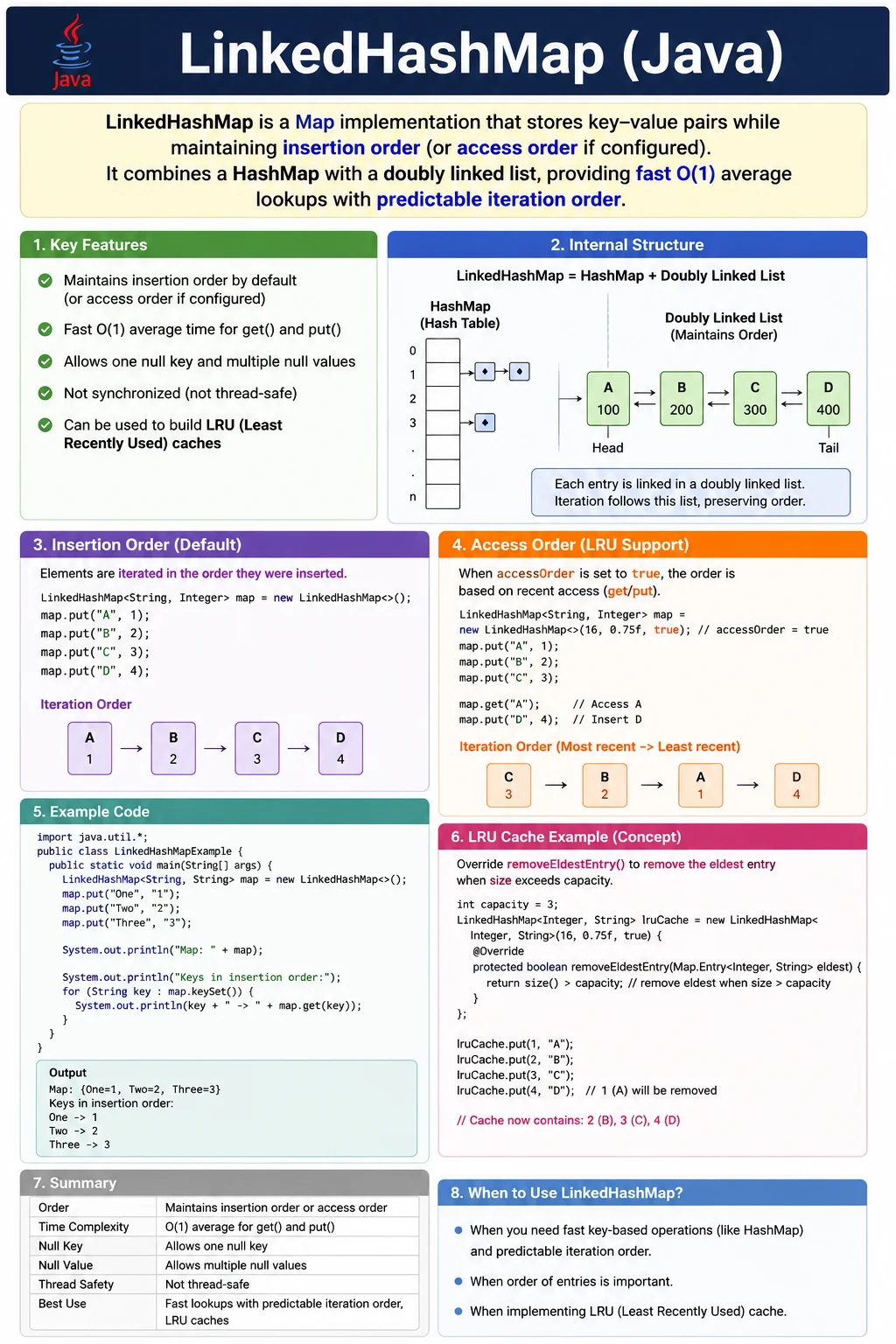
LinkedHashMap is an implementation of the Map interface that maintains predictable
iteration order while still offering fast key-based access. It combines the hash-table behavior of
HashMap with a linked structure that remembers order. This makes LinkedHashMap useful when an
application needs both lookup performance and stable iteration.
A normal HashMap is excellent when order does not matter, but its iteration order is not
guaranteed. A TreeMap sorts keys, but sorting has a cost and may not match the order required by
the business. LinkedHashMap fills the space between them. It can preserve insertion order by default, and it
can also be configured to maintain access order, which makes it useful for LRU cache-style behavior.
LinkedHashMap is a high-frequency interview topic because it connects multiple practical ideas: key-value storage, hashing, insertion order, access order, doubly linked entries, null handling, performance tradeoffs, and cache design. A strong explanation should make clear that LinkedHashMap is not a sorted map. It is a map with predictable iteration order.
What Is LinkedHashMap?
LinkedHashMap is a class in the java.util package. It extends
HashMap and stores entries as key-value pairs. Like every map, keys must be unique and values
can be duplicated. If the same key is inserted again, the value for that key is replaced.
The special feature of LinkedHashMap is order. By default, it preserves insertion order, meaning entries are iterated in the order in which they were first inserted. It can also be created in access-order mode, where entries move when they are accessed. This access-order behavior is the foundation for simple LRU cache implementations.
LinkedHashMap allows one null key and multiple null values, similar to HashMap. It does not provide sorted
keys. If sorted key order is required, TreeMap is the appropriate implementation.
Map<Integer, String> map = new LinkedHashMap<>();
Position in Map Hierarchy
LinkedHashMap is part of the Map hierarchy and extends HashMap. This is why it supports the familiar HashMap operations while adding predictable iteration order. The hierarchy also explains why LinkedHashMap remains hash-based rather than tree-based.
Map
 |-- HashMap
      |-- LinkedHashMap
Since LinkedHashMap extends HashMap, it inherits the core map behavior: key uniqueness, value replacement for duplicate keys, average constant-time lookup, and null handling similar to HashMap.
Key Characteristics of LinkedHashMap
The first key characteristic is predictable iteration order. LinkedHashMap can iterate entries in insertion
order or access order, depending on how it is constructed. The second characteristic is fast key-based
access. It still uses hashing internally, so get, put, and remove are
generally O(1) on average.
The third characteristic is that LinkedHashMap has slightly more overhead than HashMap. It maintains linked references between entries, so it uses additional memory and performs a little extra work during updates. The fourth characteristic is that it is not synchronized by default. Shared concurrent modification requires synchronization or a concurrent design.
How LinkedHashMap Works Internally
LinkedHashMap uses hash-table storage for fast key lookup and also maintains a doubly linked list of entries for ordered iteration. Each entry is connected to the entry before it and the entry after it. This linked structure is what lets LinkedHashMap walk through entries in a predictable sequence.
A simple conceptual formula is: HashMap behavior plus a doubly linked list equals LinkedHashMap behavior. The hash table helps find entries quickly by key. The linked list preserves the chosen iteration order.
This design explains the tradeoff. LinkedHashMap is usually close to HashMap in lookup performance, but it needs extra memory for the linked references. That overhead is often worth it when deterministic iteration is part of the requirement.
Order Types in LinkedHashMap
LinkedHashMap supports two order modes: insertion order and access order. Understanding the difference is important for interviews and real project design.
Insertion Order
Insertion order is the default behavior. Entries are iterated in the order in which their keys were first inserted. Updating the value for an existing key does not move that key to the end.
LinkedHashMap<Integer, String> map = new LinkedHashMap<>();

map.put(1, "Java");
map.put(2, "Python");
map.put(3, "C++");
System.out.println(map);
Output:
{1=Java, 2=Python, 3=C++}
The output preserves the original insertion order. This makes LinkedHashMap useful for reports, menu generation, configuration display, and deterministic test output.
Access Order
Access order is enabled by using the constructor with the third argument set to true. In this
mode, entries move toward the end when they are accessed. This behavior is used to track recently used and
least recently used entries.
LinkedHashMap<Integer, String> map =
    new LinkedHashMap<>(16, 0.75f, true);

map.get(1);
Access order is the reason LinkedHashMap is commonly associated with LRU cache examples. The least recently used entry appears near the beginning, making it possible to remove old entries automatically.
Commonly Used LinkedHashMap Methods
LinkedHashMap supports the same common methods as HashMap. The put method adds or updates an
entry. The get method retrieves a value by key. The remove method deletes an entry.
The containsKey method checks whether a key exists, and size returns the number of
mappings.
map.put(1, "Java");
map.get(1);
map.remove(2);
map.containsKey(1);
map.size();
The method names are familiar because LinkedHashMap is a Map implementation. The important difference is not the method set, but the iteration behavior.
LRU Cache Using LinkedHashMap
One of the most famous LinkedHashMap use cases is a simple LRU cache. LRU means least recently used. The idea
is that when the cache becomes too large, the entry that has not been used for the longest time should be
removed first. LinkedHashMap supports this pattern through access-order mode and the
removeEldestEntry method.
class LRUCache<K, V> extends LinkedHashMap<K, V> {
    private final int capacity;
    LRUCache(int capacity) {
        super(capacity, 0.75f, true);
        this.capacity = capacity;
    }
    protected boolean removeEldestEntry(Map.Entry<K, V> eldest) {
        return size() > capacity;
    }
}
This is frequently asked in interviews because it demonstrates both collection knowledge and design thinking.
The constructor enables access order by passing true, and removeEldestEntry decides
when the oldest entry should be removed.
Null Handling
LinkedHashMap follows HashMap-style null handling. It allows one null key and multiple null values. If a null key is inserted again, the old null-key value is replaced because keys must be unique.
map.put(null, "Java");   // allowed
map.put(1, null);       // allowed
Null values should still be used carefully. A null returned from get can mean either that the
key is missing or that the key exists with a null value. Use containsKey when that distinction
matters.
Performance Complexity
LinkedHashMap usually provides O(1) average performance for put, get, and
remove, similar to HashMap. Iteration is O(n) because each entry must be visited. The difference
is that LinkedHashMap iteration follows a predictable order.
The extra linked-list maintenance adds slight overhead in memory and updates. This is the price paid for order preservation. In many applications, the overhead is small compared with the value of stable output.
| Operation | Time Complexity |
|---|---|
| put | O(1) average |
| get | O(1) |
| remove | O(1) |
| iteration | O(n) |
If order does not matter, HashMap is usually lighter. If predictable order matters, LinkedHashMap is often worth the small additional cost.
LinkedHashMap vs HashMap vs TreeMap
HashMap, LinkedHashMap, and TreeMap all store key-value pairs, but they optimize for different behavior. HashMap focuses on fast unordered lookup. LinkedHashMap adds predictable insertion or access order. TreeMap keeps keys sorted.
The correct implementation depends on the requirement. If a system only needs lookup by key, HashMap is often enough. If a system must display entries in the order they were added, LinkedHashMap is better. If a system must display entries sorted by key, TreeMap is the right direction.
| Feature | HashMap | LinkedHashMap | TreeMap |
|---|---|---|---|
| Order | No guarantee | Insertion / access | Sorted |
| Performance | Fastest | Slightly slower | Slower |
| Null key | One | One | No |
| Internal DS | Hash table | Hash table + list | Red-Black Tree |
When to Use LinkedHashMap
Use LinkedHashMap when insertion order matters, when predictable iteration is required, or when access-order behavior is needed. It is useful for deterministic output, stable test assertions, report generation, configuration display, and simple LRU cache designs.
LinkedHashMap is also useful when data is built step by step and the final output should reflect that sequence. For example, a report builder may add sections in business order, or a request parser may preserve the order in which parameters were processed.
When Not to Use LinkedHashMap
Do not use LinkedHashMap when sorted keys are required. It preserves insertion or access order, not sorted order. Use TreeMap for sorted key behavior. Do not use LinkedHashMap when order does not matter and memory usage should be minimal. In that situation, HashMap is usually simpler.
LinkedHashMap is also not automatically thread-safe. If multiple threads update the same map, use synchronization or a concurrent design. For a highly concurrent cache, a dedicated caching library or ConcurrentHashMap-based solution may be more appropriate.
Common Beginner Mistakes
A common beginner mistake is assuming LinkedHashMap sorts entries. It does not. It preserves insertion order by default, or access order when configured. Sorting is TreeMap's job. Another mistake is ignoring the access-order constructor and trying to build LRU behavior manually.
Beginners also sometimes use LinkedHashMap unnecessarily when HashMap is sufficient. If order is never used, the extra linked structure provides no benefit. Finally, developers may forget that LinkedHashMap is not thread-safe by default.
Interview-Ready Answers
Short Answer
LinkedHashMap is a HashMap implementation that maintains insertion or access order.
Detailed Answer
In Java, LinkedHashMap extends HashMap and maintains a doubly linked list of entries, allowing predictable iteration order. It supports insertion-order and access-order modes and is commonly used to implement LRU caches while still providing constant-time performance.
LinkedHashMap in Real Projects
LinkedHashMap appears in real projects wherever predictable key-value output matters. Configuration modules may preserve the order in which settings are loaded. Reporting modules may preserve the order in which sections are added. API tooling may preserve field order for readability. Test automation may use LinkedHashMap to compare expected and actual values without unpredictable ordering noise.
Access-order LinkedHashMap is especially useful for simple cache demonstrations. When a value is accessed, it moves toward the end of the map. The least recently used entry remains near the beginning, which makes it easy to evict when capacity is exceeded.
Insertion Order in Practical Terms
Insertion order means the first time a key is inserted, its position is recorded. If the same key is inserted again with a new value, the value changes but the key's original position remains the same. This behavior is important when LinkedHashMap is used to produce stable output. Updating a value should not unexpectedly move the entry unless access-order mode is being used.
This makes LinkedHashMap useful for workflows where business order is built step by step. For example, a validation engine may add field errors in the order fields are processed. A report builder may add sections in the order they should appear. A tutorial or menu generator may add navigation items in a defined sequence. HashMap cannot safely represent that order, while LinkedHashMap can.
Access Order in Practical Terms
Access order is less commonly used than insertion order, but it is highly important in interviews. In
access-order mode, operations such as get can move an entry toward the end of the linked order.
This means the beginning of the map represents entries that have not been accessed recently.
This behavior is useful for cache-like structures. If a cache has limited capacity, it should keep recently
used items and remove items that have not been used for a while. LinkedHashMap can support this idea with
access order and removeEldestEntry. For production-grade caching, teams often use specialized
libraries, but LinkedHashMap remains a clear learning example.
Key Design Still Matters
LinkedHashMap preserves order, but it is still hash-based. That means custom keys require correct
equals and hashCode implementations. If two objects represent the same logical key,
they should compare as equal and produce the same hash code. Otherwise, the map may store logical duplicates
or fail to retrieve expected values.
Stable keys are also important. If a key object's fields change after insertion and those fields affect equality or hash code, the map may not be able to locate the entry correctly. This is why immutable keys are preferred. Strings, enums, numeric IDs, UUIDs, and immutable value objects are usually safer choices than mutable objects.
Deterministic Output and Testing
Deterministic output is one of the main reasons developers choose LinkedHashMap. A HashMap may contain the correct entries but print them in an unpredictable order. That can make logs harder to read, reports harder to compare, and tests more fragile. LinkedHashMap keeps the output stable when insertion order is meaningful.
In automated tests, this can reduce unnecessary failures. If expected data is stored in a LinkedHashMap and actual data is also produced in the same order, comparisons become clearer. When a test fails, the difference is easier to inspect because the entries appear in a predictable sequence.
Memory and Design Tradeoff
LinkedHashMap uses more memory than HashMap because each entry participates in the linked order. It stores additional references that connect entries together. This is the cost of predictable iteration. In most business applications, that cost is acceptable when order matters. In very large maps or memory-sensitive systems, the overhead should be considered.
The design decision should be requirement-driven. If the only requirement is key lookup, HashMap is usually enough. If the requirement includes predictable order, LinkedHashMap is the better fit. If the requirement is sorted keys, TreeMap is more appropriate. Good collection choice makes the code communicate its purpose without extra explanation.
LRU Cache Behavior Explained
The LRU cache pattern is one of the strongest reasons LinkedHashMap is discussed in interviews. A cache keeps recently used data so the application can avoid recomputing or reloading it. But a cache cannot grow forever. When it reaches its capacity, it needs a rule for deciding which entry to remove. LRU removes the entry that was least recently used.
Access-order LinkedHashMap supports that idea naturally. Every time an entry is read, it moves toward the end
of the iteration order. Entries near the beginning are older from an access perspective. By overriding
removeEldestEntry, a custom LinkedHashMap can remove the oldest entry whenever the map becomes
larger than the allowed capacity.
This is not always enough for production-grade caching. Real caches may need expiration time, size-based eviction, statistics, concurrency control, and integration with application lifecycle rules. Still, LinkedHashMap is an excellent learning tool because it shows how access order and eviction logic work together.
Concurrency Considerations
LinkedHashMap is not synchronized by default. If one thread builds a LinkedHashMap and then shares it as read-only data, that can be safe with proper publication. The risk appears when multiple threads modify the same map at the same time. Concurrent modification can lead to inconsistent behavior or runtime failures.
A synchronized wrapper can help for simple cases, but it does not automatically make every compound operation safe. For example, checking whether a key exists and then inserting a value is a two-step operation unless guarded properly. In highly concurrent systems, a different design may be needed. This is why developers should not choose LinkedHashMap for shared mutable caches without understanding the concurrency requirement.
Choosing Between Map Implementations
The easiest way to choose among map implementations is to ask what kind of order is required. If no order is required, choose HashMap. If insertion order or access order is required, choose LinkedHashMap. If sorted key order is required, choose TreeMap. If concurrent updates are required, consider ConcurrentHashMap or a purpose-built concurrent cache.
This decision should be made deliberately because it affects behavior that users and tests may observe. A map used for internal lookup may work perfectly as a HashMap. A map used to produce a visible report may need LinkedHashMap. A map used to show alphabetically sorted keys may need TreeMap. The same key-value data can require different implementations depending on how it is used.
LinkedHashMap Examples
The following examples show the most common LinkedHashMap behaviors: creation, insertion order, duplicate key updates, null handling, iteration, access order, LRU cache behavior, conditional updates, custom keys, thread safety, and performance tradeoffs.
1. Creating a LinkedHashMap
This example creates a LinkedHashMap and inserts two entries. The entries are printed in insertion order.
import java.util.*;

class Demo {
    public static void main(String[] args) {
        LinkedHashMap<Integer, String> map = new LinkedHashMap<>();
        map.put(1, "Java");
        map.put(2, "API");
        System.out.println(map);
    }
}
Output
{1=Java, 2=API}
2. Maintains Insertion Order
LinkedHashMap preserves the order in which keys were first inserted. The keys are inserted as 3, 1, and 2, and the output follows that same sequence.
import java.util.*;

class Demo {
    public static void main(String[] args) {
        LinkedHashMap<Integer, String> map = new LinkedHashMap<>();
        map.put(3, "C");
        map.put(1, "A");
        map.put(2, "B");
        System.out.println(map);
    }
}
Output
{3=C, 1=A, 2=B}
3. Duplicate Key Overwrites Value (Order Preserved)
When an existing key is inserted again, the value is replaced. In insertion-order mode, updating the value does not move the key to a new position.
import java.util.*;

class Demo {
    public static void main(String[] args) {
        LinkedHashMap<Integer, String> map = new LinkedHashMap<>();
        map.put(1, "Java");
        map.put(1, "Selenium");
        System.out.println(map);
    }
}
Output
{1=Selenium}
4. Allows One null Key and Multiple null Values
LinkedHashMap allows one null key and multiple null values, just like HashMap. The null key participates in insertion order like any other key.
import java.util.*;

class Demo {
    public static void main(String[] args) {
        LinkedHashMap<String, String> map = new LinkedHashMap<>();
        map.put(null, "A");
        map.put("X", null);
        map.put("Y", null);
        System.out.println(map);
    }
}
Output
{null=A, X=null, Y=null}
5. Iterating Using entrySet()
entrySet is the best iteration approach when both keys and values are needed. In LinkedHashMap,
this iteration follows the configured order.
import java.util.*;

class Demo {
    public static void main(String[] args) {
        LinkedHashMap<Integer, String> map = new LinkedHashMap<>();
        map.put(1, "A");
        map.put(2, "B");

        for (Map.Entry<Integer, String> e : map.entrySet()) {
            System.out.println(e.getKey() + " -> " + e.getValue());
        }
    }
}
6. Iterating Using keySet()
keySet iterates only over keys. The keys appear in insertion order unless the map was configured
for access order.
import java.util.*;

class Demo {
    public static void main(String[] args) {
        LinkedHashMap<Integer, String> map = new LinkedHashMap<>();
        map.put(10, "X");
        map.put(20, "Y");

        for (Integer k : map.keySet()) {
            System.out.println(k);
        }
    }
}
7. Iterating Using values()
values returns values in the same order as their associated entries. Values can still be
duplicated because map uniqueness applies to keys.
import java.util.*;

class Demo {
    public static void main(String[] args) {
        LinkedHashMap<Integer, String> map = new LinkedHashMap<>();
        map.put(1, "Java");
        map.put(2, "API");

        for (String v : map.values()) {
            System.out.println(v);
        }
    }
}
8. Difference Between HashMap and LinkedHashMap
This example shows the ordering difference. HashMap output should not be relied upon, while LinkedHashMap preserves insertion order.
import java.util.*;

class Demo {
    public static void main(String[] args) {
        Map<Integer, String> h = new HashMap<>();
        h.put(2, "B");
        h.put(1, "A");

        Map<Integer, String> l = new LinkedHashMap<>();
        l.put(2, "B");
        l.put(1, "A");

        System.out.println(h);
        System.out.println(l);
    }
}
Output
{1=A, 2=B}
{2=B, 1=A}
9. Access-Order LinkedHashMap
In access-order mode, reading entries changes their order. After keys 1 and 2 are accessed, they move toward the end, leaving key 3 as the least recently accessed entry.
import java.util.*;

class Demo {
    public static void main(String[] args) {
        LinkedHashMap<Integer, String> map =
            new LinkedHashMap<>(16, 0.75f, true);

        map.put(1, "A");
        map.put(2, "B");
        map.put(3, "C");

        map.get(1);
        map.get(2);

        System.out.println(map);
    }
}
Output
{3=C, 1=A, 2=B}
This behavior is different from normal insertion-order mode. It is designed for use cases where recent access should affect iteration order.
10. LinkedHashMap as LRU Cache
This example uses access-order mode and removeEldestEntry to keep only the most recently used
entries. After key 1 is accessed, key 2 becomes the eldest entry and is removed when key 3 is added.
import java.util.*;

class LRUCache extends LinkedHashMap<Integer, String> {
    private final int capacity;

    LRUCache(int capacity) {
        super(capacity, 0.75f, true);
        this.capacity = capacity;
    }

    protected boolean removeEldestEntry(Map.Entry<Integer, String> eldest) {
        return size() > capacity;
    }

    public static void main(String[] args) {
        LRUCache cache = new LRUCache(2);
        cache.put(1, "A");
        cache.put(2, "B");
        cache.get(1);
        cache.put(3, "C");
        System.out.println(cache);
    }
}
Output
{1=A, 3=C}
11. putIfAbsent() with LinkedHashMap
putIfAbsent adds a value only if the key is missing. The existing value for key 1 is preserved,
while key 2 is added.
import java.util.*;

class Demo {
    public static void main(String[] args) {
        LinkedHashMap<Integer, String> map = new LinkedHashMap<>();
        map.put(1, "Java");
        map.putIfAbsent(1, "API");
        map.putIfAbsent(2, "API");
        System.out.println(map);
    }
}
Output
{1=Java, 2=API}
12. replace() Method
replace updates the value for an existing key. It is useful when the code should not create a
new key accidentally.
import java.util.*;

class Demo {
    public static void main(String[] args) {
        LinkedHashMap<Integer, String> map = new LinkedHashMap<>();
        map.put(1, "Java");
        map.replace(1, "Selenium");
        System.out.println(map);
    }
}
13. Conditional remove()
Conditional remove deletes the entry only when both key and value match. This helps avoid removing a mapping that has changed since it was last checked.
import java.util.*;

class Demo {
    public static void main(String[] args) {
        LinkedHashMap<Integer, String> map = new LinkedHashMap<>();
        map.put(1, "Java");
        map.remove(1, "API");   // no effect
        map.remove(1, "Java");  // removed
        System.out.println(map);
    }
}
14. Custom Object as Key (equals & hashCode Required)
Custom keys require correct equals and hashCode methods. LinkedHashMap is
hash-based, so the same key design rules used for HashMap also apply here.
class User {
    int id;
    User(int id) { this.id = id; }

    public boolean equals(Object o) {
        return this.id == ((User)o).id;
    }

    public int hashCode() {
        return id;
    }
}

import java.util.*;

class Demo {
    public static void main(String[] args) {
        LinkedHashMap<User, String> map = new LinkedHashMap<>();
        map.put(new User(1), "Admin");
        map.put(new User(1), "Admin");
        System.out.println(map.size());
    }
}
Output
1
15. LinkedHashMap Is Not Thread-Safe
A plain LinkedHashMap is not synchronized. It is appropriate for local or single-threaded use, but shared concurrent updates need protection.
import java.util.*;

class Demo {
    public static void main(String[] args) {
        LinkedHashMap<String, String> map = new LinkedHashMap<>();
        map.put("A", "Not Thread Safe");
        System.out.println(map);
    }
}
16. Thread-Safe LinkedHashMap
A synchronized wrapper can provide basic thread-safe access. For highly concurrent systems, evaluate whether a concurrent map or caching library is more suitable.
import java.util.*;

class Demo {
    public static void main(String[] args) {
        Map<String, String> map =
            Collections.synchronizedMap(new LinkedHashMap<>());
        map.put("A", "Safe");
        System.out.println(map);
    }
}
17. Converting HashMap to LinkedHashMap
A HashMap can be copied into a LinkedHashMap, but the copied order follows the source map's iteration order, not necessarily the original insertion order used to build the HashMap.
import java.util.*;

class Demo {
    public static void main(String[] args) {
        Map<Integer, String> hashMap = new HashMap<>();
        hashMap.put(2, "B");
        hashMap.put(1, "A");

        LinkedHashMap<Integer, String> linked =
            new LinkedHashMap<>(hashMap);

        System.out.println(linked);
    }
}
18. LinkedHashMap Size & Empty Check
The isEmpty and size methods work as they do in other maps. Size counts unique
keys, not the number of put attempts.
import java.util.*;

class Demo {
    public static void main(String[] args) {
        LinkedHashMap<Integer, String> map = new LinkedHashMap<>();
        System.out.println(map.isEmpty());
        map.put(1, "Java");
        System.out.println(map.size());
    }
}
Output
true
1
19. Performance Note (Concept)
LinkedHashMap is slightly slower and heavier than HashMap because it maintains a linked order. The benefit is predictable iteration.
LinkedHashMap<Integer, String> map = new LinkedHashMap<>();
Explanation
- Slightly slower than HashMap
- Extra memory for doubly-linked list
- Predictable iteration order
20. Interview Summary for LinkedHashMap
This final example summarizes the core behavior: LinkedHashMap stores key-value pairs and preserves predictable iteration order.
import java.util.*;

class Demo {
    public static void main(String[] args) {
        LinkedHashMap<Integer, String> map = new LinkedHashMap<>();
        map.put(1, "Ordered");
        map.put(2, "KeyValue");
        System.out.println(map);
    }
}
Key Points
- Maintains insertion or access order
- Allows one null key
- Backed by HashMap + Linked List
- Used for LRU cache
- Not thread-safe by default
Key Takeaway
Use LinkedHashMap when you need fast key-based lookup plus predictable iteration order. It is
best suited for insertion-order output, access-order behavior, deterministic tests, ordered reports, and
simple LRU cache patterns. If order does not matter, HashMap is usually lighter. If sorted keys
are required, TreeMap is the better choice.