JVM vs JRE vs JDK
Understanding JVM, JRE, and JDK is foundational to Core Java and a very common interview topic. They represent execution, runtime, and development layers of Java.
These three terms appear early in almost every Java learning path because they explain how Java code moves from a source file written by a developer to a running application on an operating system. Many beginners use the terms interchangeably, but they are not the same. The JVM is the execution engine. The JRE is the runtime package needed to run Java applications. The JDK is the complete development kit needed to write, compile, debug, document, and run Java applications.
The distinction matters in interviews and in real project work. If a machine needs only to run an existing
Java application, it needs a runtime environment. If a developer needs to compile source code, use tools
such as javac, inspect bytecode, generate documentation, or debug code, the JDK is required.
If the question is about how bytecode is executed, memory is managed, and garbage collection happens, the
focus is the JVM.
Java's famous platform independence also depends on understanding these layers. Java source code is compiled into bytecode, and bytecode is platform independent. But the JVM that runs that bytecode is platform dependent because it must interact with a specific operating system and hardware architecture. This is the practical meaning behind "Write Once, Run Anywhere": the same bytecode can run on different systems as long as each system has a compatible JVM.
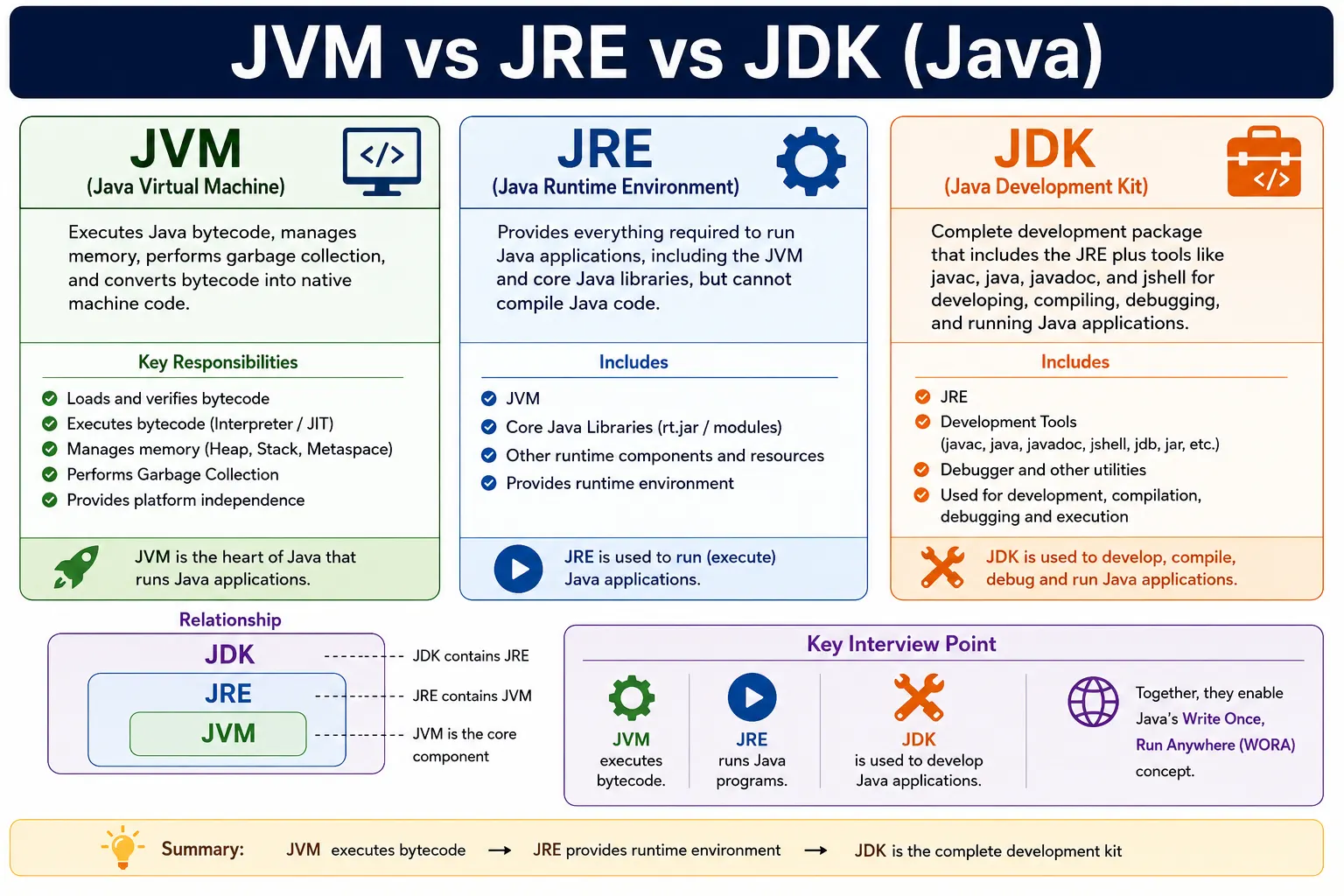
High-Level Difference (One-Line)
- JVM → Runs Java bytecode
- JRE → Provides runtime environment
- JDK → Provides tools to develop Java applications
A simple way to remember the relationship is to think in layers. The JVM is the innermost execution layer. The JRE wraps the JVM with the class libraries and supporting files needed to run programs. The JDK wraps the JRE with developer tools such as the compiler and debugging utilities. So when you install a JDK, you get what is needed to develop and run Java applications. When you install only a JRE, you get what is needed to run applications, but not the full development toolset.
This one-line distinction is enough for a short answer, but a strong interview answer should explain the
execution flow as well. A developer writes a .java file. The JDK compiler converts it into a
.class file containing bytecode. The JVM loads and executes that bytecode using the runtime
libraries available through the JRE.
JVM (Java Virtual Machine)
What Is JVM?
The JVM is an abstract machine that executes Java bytecode. It enables platform independence by converting bytecode into native machine instructions.
The JVM is called a virtual machine because it behaves like a machine for Java bytecode, even though it is implemented as software. Java programs are not compiled directly into Windows, Linux, or macOS machine code at the source compilation stage. They are compiled into bytecode, which is a platform-neutral instruction format understood by the JVM. The JVM then takes responsibility for running that bytecode on the actual operating system.
This design separates Java programs from the underlying platform. A Java compiler does not need to generate a different executable for every operating system. Instead, the same bytecode can be distributed, and the JVM implementation for each platform handles the final execution details. This is why the JVM is central to Java's portability story.
The JVM is also responsible for many runtime services that developers rely on every day. It loads classes, verifies bytecode safety, manages memory, runs garbage collection, handles threads, supports exception handling, and optimizes frequently executed code using Just-In-Time compilation. When Java applications perform well and run safely across platforms, much of that behavior is because of JVM responsibilities.
Responsibilities
- Loads bytecode (ClassLoader)
- Verifies bytecode (Bytecode Verifier)
- Executes bytecode (Interpreter / JIT Compiler)
- Manages memory (Heap, Stack, Metaspace)
- Handles Garbage Collection
Class loading is the process of finding and loading the required .class files when a Java
program runs. The ClassLoader subsystem loads application classes, library classes, and platform classes as
needed. This is why Java applications can load many classes dynamically during execution rather than
loading everything at startup.
Bytecode verification is a safety step. Before bytecode is executed, the JVM checks that it follows rules that protect runtime integrity. For example, bytecode should not perform illegal memory access or violate type safety. This verification layer is one reason Java is considered safer than languages that expose raw memory access more directly.
Execution happens through interpretation and JIT compilation. The interpreter can execute bytecode instruction by instruction. The JIT compiler identifies frequently executed code paths and compiles them into native machine instructions for better performance. This combination lets Java start running bytecode while still optimizing hot code over time.
Memory management is another key JVM responsibility. Objects are stored primarily in the heap. Method calls use stack frames. Class metadata is stored in Metaspace in modern JVMs. The garbage collector identifies objects that are no longer reachable and reclaims memory automatically. Developers still need to write memory-conscious code, but they do not manually free memory the way they would in some lower-level languages.
Key Point
- JVM is platform-dependent
- JVM exists inside JRE
.java → javac → .class (bytecode) → JVM → OS
The key interview trap is that the JVM is platform dependent even though Java bytecode is platform independent. A Windows JVM is built for Windows. A Linux JVM is built for Linux. A macOS JVM is built for macOS. Each JVM understands the same Java bytecode format but translates and executes it in a way that fits its host platform.
The JVM is included as part of a runtime environment. In normal installation terms, you do not usually install only a standalone JVM for everyday Java use. You install a JRE or JDK package that includes a JVM along with other required components. This is why saying "JVM exists inside JRE" is a useful simplified explanation.
JRE (Java Runtime Environment)
What Is JRE?
The JRE provides the runtime environment required to run Java applications, but not to develop them.
The JRE is what a system needs when the goal is to run Java applications that have already been compiled.
It includes the JVM plus the standard Java class libraries and supporting runtime files. These libraries are
essential because even a simple Java program depends on classes such as String,
System, collections, exceptions, I/O classes, and many other parts of the Java platform.
Think of the JRE as the environment that makes execution possible. The JVM executes bytecode, but Java
applications also need standard APIs. A program that uses ArrayList, HashMap,
Thread, Optional, or file handling relies on runtime libraries. The JRE provides
those libraries along with the JVM.
What JRE Contains
- JVM
- Core Java libraries (java.lang, java.util, etc.)
- Supporting files
The JRE does not include development tools such as javac. That is why a machine with only a
JRE can run a compiled Java program but cannot compile Java source code. If you try to compile a
.java file with only a JRE, the compiler will not be available. This distinction is one of the
easiest ways to separate JRE from JDK in interviews.
In older deployment models, production servers or end-user machines often installed a JRE because they did not need development tools. Modern Java distributions and deployment practices have changed over time, and many environments now package runtimes differently, but the conceptual distinction remains important: JRE is for running; JDK is for developing.
Can You Compile Code with JRE?
- ❌ No
- ✔ You can run Java programs
- ❌ You cannot compile Java programs
Use Case
- End users
- Production servers (runtime only)
A typical end user does not write Java source code. They only need the application to run. In that case, a runtime environment is enough. A production server may also only need runtime components if code is compiled elsewhere through a build pipeline. However, development machines, CI systems, and build servers need the JDK because they must compile and package code.
JDK (Java Development Kit)
What Is JDK?
The JDK is a complete Java development package that includes tools for developing, compiling, debugging, and running Java applications.
The JDK is the package developers install when they want to build Java software. It contains the runtime
environment plus tools needed during development. The most important tool is javac, the Java
compiler, which converts source code into bytecode. Without the JDK, you cannot compile ordinary Java
source files from the command line.
The JDK also includes tools that support understanding, documenting, testing, and debugging Java programs.
javadoc generates API documentation from source comments. javap can inspect
compiled class files. jshell allows interactive experimentation with Java code. Debuggers,
profilers, and other utilities may also be part of a JDK distribution or closely associated development
tooling.
What JDK Contains
- JRE
- Development tools:
- javac (compiler)
- java (launcher)
- javadoc
- javap
- jshell
- Debuggers and profilers
Can You Run Java Programs with JDK?
- ✔ Yes
- ✔ Can compile and run
Because the JDK includes the runtime layer, it can run Java programs as well as compile them. This is why developers typically install the JDK rather than only a JRE. A developer writes code, compiles it, runs it, debugs it, and repeats that cycle many times. The JDK supports the full development workflow.
In interviews, avoid saying the JDK is only the compiler. The compiler is a key part of it, but the JDK is a larger development kit. It includes the JRE and multiple tools. Saying "JDK equals compiler" is an incomplete answer.
Relationship Between JVM, JRE, and JDK
JDK
 └── JRE
      └── JVM
- ✔ JVM is part of JRE
- ✔ JRE is part of JDK
The nested relationship is the easiest way to remember the three terms. The JVM is the execution engine. The JRE includes that execution engine plus the runtime libraries required by Java programs. The JDK includes the JRE plus tools required by developers. In other words, every JDK includes runtime capability, but every runtime environment does not necessarily include development tools.
This nested view also explains why installing a JDK usually lets you both compile and run Java programs. The compiler comes from the development toolset, while the runtime launcher and JVM are available through the runtime layer. The layers work together but serve different purposes.
JVM vs JRE vs JDK (Interview Table)
| Aspect | JVM | JRE | JDK |
|---|---|---|---|
| Full form | Java Virtual Machine | Java Runtime Environment | Java Development Kit |
| Purpose | Executes bytecode | Runs Java programs | Develops Java programs |
| Contains JVM | ✔ | ✔ | ✔ |
| Contains libraries | ❌ | ✔ | ✔ |
| Contains compiler | ❌ | ❌ | ✔ |
| Used by | OS | End users | Developers |
The table is useful because it separates purpose from contents. The JVM's purpose is execution. The JRE's purpose is runtime support. The JDK's purpose is development. The JVM does not contain the compiler. The JRE does not contain the compiler. The JDK contains development tools and also includes what is needed to run Java applications.
One wording detail matters: the JVM is not literally "used by the OS" in the same way a developer uses the JDK. More precisely, the JVM runs as a platform-specific process on the operating system and executes Java bytecode. The operating system provides resources such as memory, threads, file access, and native services that the JVM uses.
Compilation & Execution Flow (Interview Favorite)
Developer
  ↓
Write .java file
  ↓
javac (JDK)
  ↓
.class (bytecode)
  ↓
JVM (inside JRE)
  ↓
Machine code (OS)
The compilation and execution flow is a favorite interview question because it shows the entire Java
lifecycle. The developer starts with source code in a .java file. The javac
compiler, which belongs to the JDK, checks the source code and produces a .class file. That
class file contains bytecode, not native machine code.
At runtime, the JVM loads the bytecode, verifies it, and executes it. The interpreter can execute bytecode directly, and the JIT compiler can optimize frequently executed sections into native machine instructions. The result is that Java code can be compiled once into bytecode and then executed by JVMs on different platforms.
This flow also explains why compilation and execution are separate steps. Compilation checks source syntax
and creates bytecode. Execution runs bytecode in the JVM. A JRE can perform the execution step, but it
cannot perform the source compilation step because it lacks javac.
Platform Dependency Clarification (Common Trap)
- Java language → Platform independent
- Bytecode → Platform independent
- JVM → Platform dependent
- JRE/JDK → Platform dependent
✔ This is how Java achieves Write Once, Run Anywhere
The phrase platform independent is often misunderstood. Java source code and bytecode are portable across platforms, but actual execution always happens on a platform-specific JVM. That JVM knows how to interact with the host operating system. Therefore, Java achieves platform independence by standardizing bytecode and providing JVM implementations for different platforms.
JRE and JDK downloads are platform dependent because they include a JVM and native tools for a specific operating system and processor architecture. A Windows JDK is not the same binary package as a Linux JDK. But both can compile Java source into standard bytecode, and both can run compatible bytecode through their own JVMs.
Common Interview Traps
- ❌ JVM ≠ JRE
- ❌ JRE cannot compile code
- ❌ JDK is not just a compiler
- ✔ JVM is not a physical machine
The most common trap is saying that JVM and JRE are the same. They are related, but not identical. The JVM
executes bytecode. The JRE provides the JVM plus libraries and runtime support. Another trap is saying the
JRE can compile programs. It cannot. Compilation requires the JDK because javac is a
development tool.
Another mistake is thinking that the JVM is platform independent. The bytecode is platform independent, but each JVM implementation is platform specific. This is exactly why Java can run across systems: the same bytecode is interpreted or compiled by different JVMs built for different platforms.
Interview-Ready Answers
Short Answer
JVM runs bytecode, JRE provides the runtime environment, and JDK provides development tools.
Detailed Answer
In Java, JVM is responsible for executing bytecode and managing memory, JRE provides the runtime environment including JVM and core libraries, and JDK is a complete development kit that includes JRE along with tools like the compiler and debugger used to develop Java applications.
A stronger interview answer should also mention the relationship between them: JDK contains JRE, and JRE contains JVM. You can compile and run programs with the JDK. You can run compiled programs with the JRE. The JVM executes the bytecode and manages runtime services such as class loading, memory, and garbage collection.
Key Takeaway
JVM executes. JRE runs. JDK develops. Mastering this distinction is essential for Core Java interviews and real-world Java development.
Once you understand these three layers, many other Java topics become easier. Java architecture, command line compilation, class loading, bytecode, garbage collection, memory areas, and platform independence all connect back to JVM, JRE, and JDK. These are not just definitions to memorize; they explain how Java applications are built and executed.
JVM Internals in Practical Terms
For beginner and interview purposes, you do not need to know every internal JVM implementation detail, but you should understand the major responsibilities. The class loader finds class files and loads them into the JVM. The bytecode verifier checks that the bytecode is valid and safe. The execution engine runs the bytecode. The memory areas hold objects, method calls, class metadata, and runtime data. The garbage collector reclaims memory from objects that are no longer reachable.
The heap is where most objects live. When you create an object with new, memory is allocated
for that object on the heap. The stack is used for method calls and local variables. Each thread has its own
stack. Metaspace stores class metadata. Understanding these areas helps when learning topics such as stack
overflow, heap memory errors, garbage collection tuning, and performance analysis.
The JIT compiler is another important JVM concept. Java bytecode may initially be interpreted, but code that runs frequently can be compiled into native machine instructions for faster execution. This means Java performance is not simply "interpreted and slow." Modern JVMs are sophisticated runtimes that optimize code while the application runs.
JRE in Deployment Scenarios
The JRE is easiest to understand from a deployment perspective. If an application is already compiled and packaged, the machine running it needs runtime support. That includes the JVM and standard libraries. In older desktop Java usage, users often installed a JRE so Java applications could run without installing development tools.
In server-side Java, runtime environments may be packaged with the application, installed separately, or provided through containers and build images depending on the deployment model. The naming and packaging details can vary across modern Java distributions, but the conceptual layer is the same: runtime components are required for execution, while development tools are required for building.
If a production machine does not need to compile source code, it does not conceptually need the full development kit. However, many teams still use JDK-based images or installations for operational reasons, tooling, diagnostics, or consistency. In interviews, keep the answer conceptual unless the interviewer asks about modern packaging details.
JDK in Development Workflow
The JDK supports the full developer workflow. When you install a JDK and set environment variables such as
JAVA_HOME and update your PATH, command line tools such as javac and
java become available. IDEs also rely on a configured JDK to compile code, run tests, inspect
source, and launch applications.
Build tools such as Maven and Gradle also use the JDK. They compile source code, run unit tests, package applications, generate documentation, and sometimes run annotation processors. If the build environment has only runtime support and no compiler, Java source compilation will fail. This is why CI/CD pipelines need an appropriate JDK version.
The JDK version matters because language features and APIs evolve. Code using newer language features must be compiled with a JDK that supports those features. Runtime compatibility also matters. Developers should align source compatibility, target bytecode level, dependencies, and runtime environment according to the project's deployment needs.
Real-World Troubleshooting Examples
Many beginner setup issues are really JVM, JRE, or JDK confusion. If the command javac is not
recognized, the system may not have a JDK installed or the JDK's bin directory may not be on
the PATH. If java works but javac does not, that usually means runtime
support exists but development tools are missing or not configured.
Version mismatch is another common issue. A class compiled with a newer JDK may fail on an older runtime with an unsupported class version error. This happens because the older JVM does not understand the bytecode level produced by the newer compiler. The fix is to use a compatible runtime or compile for the target version when appropriate.
Memory-related errors also connect back to the JVM. An OutOfMemoryError points to JVM memory
management and heap configuration, not the JDK compiler. Stack overflow, garbage collection pauses, and
class loading errors are runtime concerns handled within or around the JVM. Knowing which layer is involved
helps troubleshoot efficiently.
How to Explain It in Interviews
A clear interview explanation can start with the nested relationship: JDK contains JRE, and JRE contains JVM. Then explain the role of each layer. JVM executes bytecode. JRE provides the runtime environment, including JVM and libraries. JDK provides the development tools, including the compiler, and also includes the runtime environment.
After that, explain the flow. Source code in a .java file is compiled by javac
into bytecode in a .class file. The JVM loads and executes that bytecode. This bytecode can run
on different platforms because each platform has its own JVM implementation. This shows you understand both
the tools and the architecture.
Finally, mention the common traps. JRE cannot compile. JVM is not the same as JRE. JDK is more than just
javac. JVM is platform dependent, while bytecode is platform independent. These points make
your answer interview-ready and practical.
Memory Management and Garbage Collection Layer
Memory management belongs primarily to the JVM layer. When a Java program creates objects, the JVM manages where those objects live and when unused memory can be reclaimed. This is one of the major differences between Java and languages where developers manually allocate and free memory. Java developers still need to avoid memory leaks caused by holding unnecessary references, but they do not directly release object memory with a manual free operation.
The heap is the main area for objects. If an application creates too many live objects or holds references
longer than necessary, the heap may become full and produce OutOfMemoryError. The stack is used
for method calls and local execution frames. If recursive calls go too deep, the program may produce
StackOverflowError. These errors are JVM runtime concerns, not compiler concerns.
Garbage collection is the JVM process that identifies unreachable objects and reclaims their memory. Different JVM implementations and versions may offer different garbage collectors and tuning options. For beginner interviews, it is enough to know that garbage collection is automatic memory cleanup performed by the JVM, and it is part of Java's runtime behavior.
Class Loading and Runtime Linking
Class loading is another important JVM responsibility. Java applications are made of many classes, and they are not always loaded all at once. The JVM loads classes when they are needed. This makes Java applications flexible and supports large applications, libraries, frameworks, and dynamic loading patterns.
After loading, the JVM links and initializes classes. Linking includes verification, preparation, and resolution. Verification checks bytecode safety. Preparation allocates required class-level structures. Resolution connects symbolic references to actual classes, methods, and fields. Initialization runs static initializers and assigns static fields. These details explain why class loading errors can happen at runtime even after code has compiled.
Common runtime errors such as ClassNotFoundException and NoClassDefFoundError
relate to this layer. They usually mean the JVM cannot find or load a class that the program needs at
runtime. Understanding class loading helps developers diagnose classpath, dependency, packaging, and
deployment issues.
Command Line Perspective
From the command line, the difference between JDK and JRE becomes very concrete. The command
javac Hello.java uses the Java compiler from the JDK to compile source code. The command
java Hello launches the Java application using the runtime launcher and JVM. If
javac is missing but java is present, the system likely has runtime capability but
not the compiler available on the path.
Developers often configure JAVA_HOME to point to the installed JDK directory. Build tools and
IDEs use this path to find the compiler and runtime tools. The system PATH usually includes
the JDK's bin directory so commands such as java and javac can run
from any terminal location. Incorrect environment setup is a common beginner issue.
In professional projects, the command line view also matters in CI/CD systems. A build agent needs a JDK to compile code and run tests. A runtime image may only need what is necessary to execute the packaged application. Understanding the distinction helps when configuring local development, build pipelines, and deployment environments.
Version Compatibility Between JDK and JVM
Java version compatibility is closely related to these concepts. A newer JDK can compile source code using newer language features and produce class files with a newer bytecode version. An older JVM may not be able to run those class files. That is why developers sometimes see errors about unsupported class file versions.
For example, if code is compiled for a newer Java version but deployed to an older runtime, execution may fail even though compilation succeeded on the developer's machine. The solution is to align the runtime version with the compiled bytecode or configure the compiler to target a compatible version when the code and dependencies allow it.
This is why teams define Java version standards for projects. They decide which JDK version developers should use, which bytecode target the build should produce, and which JVM version production will run. Without that alignment, "works on my machine" problems become common.
JVM, JRE, and JDK in IDEs
IDEs such as IntelliJ IDEA, Eclipse, and VS Code Java extensions rely on a configured JDK for development. The IDE may use the JDK to compile code, run applications, execute tests, provide code analysis, and attach a debugger. Even if the IDE hides command line details, the same layers are still involved.
When an IDE project has the wrong JDK configured, errors can appear in different ways. The compiler may not recognize a language feature. The application may run with a different Java version than expected. Tests may pass locally but fail in CI if the JDK versions differ. Knowing the JVM/JRE/JDK relationship helps diagnose these setup problems.
Most modern Java developers work through IDEs and build tools rather than manually running every command, but the underlying architecture remains the same. The source code is compiled by JDK tools, the bytecode is executed by the JVM, and runtime libraries support the application while it runs.
Practical Comparison for Beginners
If you are only learning Java on your own machine, install a JDK. That gives you the compiler, runtime, and development tools needed to practice. If you install only a runtime package, you may be able to run existing Java applications, but you will quickly run into problems when trying to compile examples.
If you are explaining the difference to a beginner, use a simple analogy. The JVM is the engine that executes Java bytecode. The JRE is the environment that contains the engine and the parts needed to run. The JDK is the workshop that contains the runtime plus tools to build the application. This analogy is not perfect, but it helps separate execution, runtime, and development.
For interviews, move from analogy back to exact terms. JVM executes bytecode and manages runtime behavior.
JRE includes JVM and libraries to run Java programs. JDK includes JRE and tools such as javac
to develop Java programs. That concise explanation is usually enough, and the deeper details can be added
when follow-up questions arrive.