Java Architecture (JVM, JRE, JDK)
Java architecture explains how Java programs are written, compiled, and executed across different environments. The concepts of JVM, JRE, and JDK form the foundation of Java’s platform independence. Understanding this architecture is essential for real-time projects, debugging production issues, performance tuning, and answering interview questions confidently.
Java’s ability to run the same program on multiple operating systems is not magic—it is the result of this well-designed architecture.
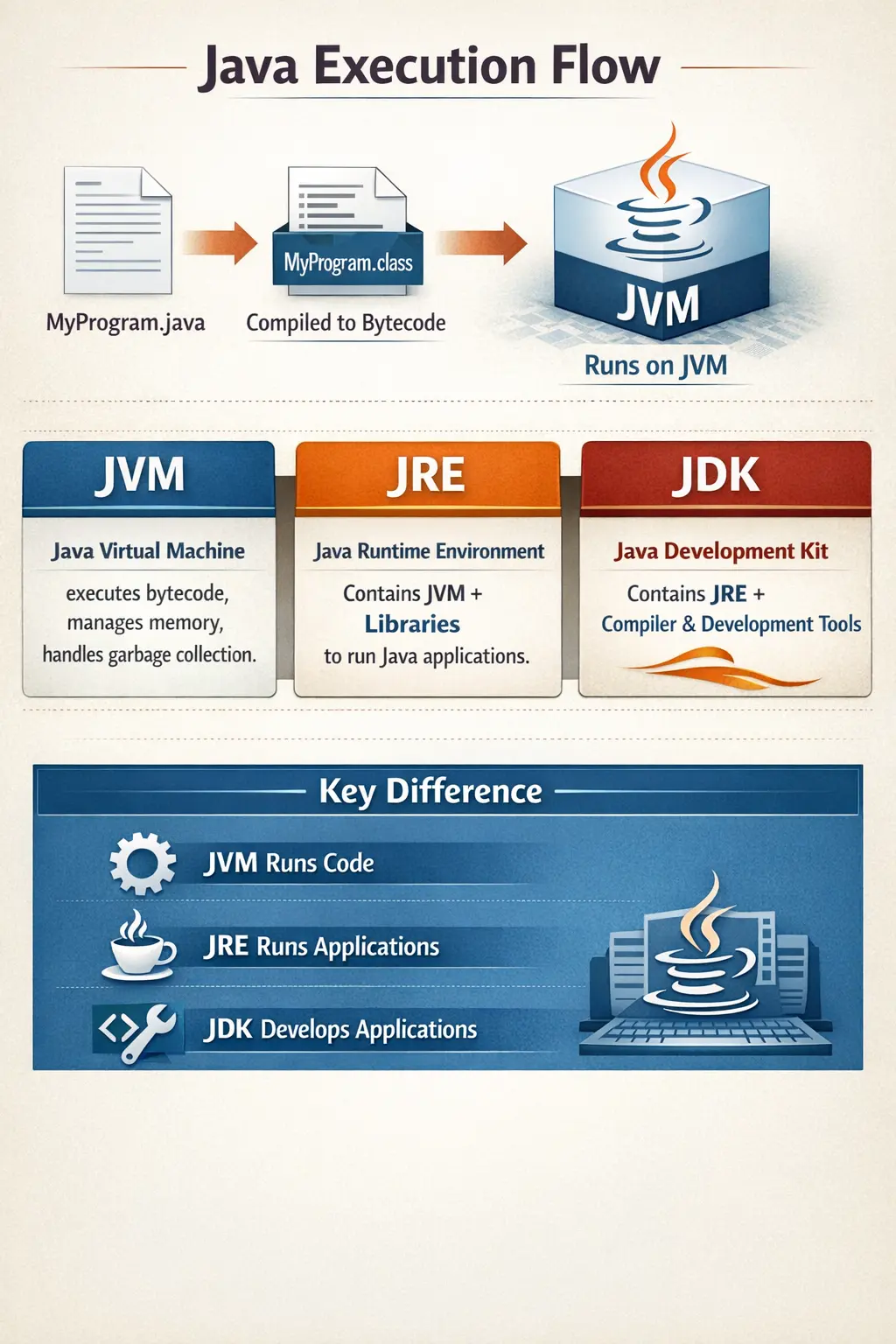
Why Java Architecture Matters
Java architecture matters because it explains the main reason Java can run across different environments without changing the source code. Developers often hear the phrase Write Once, Run Anywhere, but that idea becomes meaningful only when JVM, JRE, JDK, bytecode, class loading, memory management, and execution flow are understood together. Java does not run directly like a native executable created for one operating system. Instead, Java source code is compiled into bytecode, and the JVM executes that bytecode in a controlled runtime environment.
This architecture is important not only for theory but also for real project work. When a Java application fails in production, a developer or tester may need to understand classpath problems, memory errors, runtime version mismatches, garbage collection behavior, or bytecode compatibility. When a Selenium automation framework runs locally but fails on a CI server, the issue may involve JDK installation, Java version, environment variables, dependencies, or runtime configuration. Understanding Java architecture makes troubleshooting more systematic.
The Big Picture of Java Execution
A Java program begins as human-readable source code. The developer writes instructions in a .java file using Java syntax. This source code cannot be executed directly by the operating system. It must first be compiled by the Java compiler, javac. The compiler checks syntax, type rules, method calls, class references, and other compile-time conditions. If compilation succeeds, it produces a .class file containing bytecode.
Bytecode is the central bridge in Java architecture. It is not tied to Windows, Linux, macOS, x86, or ARM in the same way native machine code is. Bytecode is designed for the JVM. When the program runs, the JVM loads the class files, verifies bytecode safety, prepares memory, executes instructions, manages objects, and interacts with the operating system. This separation between source code, bytecode, and runtime execution gives Java its portability and controlled execution model.
Source Code, Compiler, and Bytecode
The Java compiler plays a major role in architecture because it transforms source code into bytecode. Compilation is not only a conversion step; it also catches many errors early. If a variable is used incorrectly, a method call has the wrong arguments, a class is missing, or a type mismatch exists, the compiler reports the problem before execution. This compile-time checking improves reliability because many mistakes are caught before runtime.
The generated bytecode is stored in .class files. These files contain instructions that the JVM understands. The same bytecode can be executed by JVM implementations on different operating systems. This is why Java is called platform independent at the bytecode level. The source code is compiled once, and the bytecode becomes the portable form of the program. The JVM is responsible for converting that portable form into actual execution on the current machine.
JVM as the Heart of Java Architecture
The Java Virtual Machine is the heart of Java architecture because it executes bytecode and provides the runtime services needed by Java programs. Without the JVM, compiled Java bytecode has no execution environment. The JVM loads classes, verifies bytecode, manages runtime memory, executes code, handles garbage collection, supports threads, and interacts with native operating system resources when needed.
The JVM is also the reason Java can offer a controlled execution environment. Java programs do not directly manage raw memory addresses in the way some lower-level languages do. The JVM sits between the Java program and the operating system. This layer improves portability, security, memory management, and runtime monitoring. For developers and testers, the JVM is not just a theoretical component. JVM behavior affects performance, memory usage, startup time, garbage collection, thread behavior, and production stability.
The Important Distinction: JVM Is Platform Dependent
A common beginner mistake is saying that the JVM is platform independent. The correct understanding is more precise. Java bytecode is platform independent, but the JVM itself is platform dependent. A JVM built for Windows is different from a JVM built for Linux or macOS because each JVM must communicate with its own operating system and hardware. However, all compatible JVMs understand the same bytecode specification.
This distinction is important in interviews and real projects. The same .class file can run on different operating systems because each system has a JVM implementation that knows how to execute that bytecode. The portability comes from the bytecode and JVM contract, not from one universal JVM binary running everywhere. In simple terms, bytecode is portable; JVM implementations are platform specific.
Class Loader Subsystem in Detail
The Class Loader subsystem is responsible for loading class files into JVM memory when they are needed. Java applications often contain many classes, and not all of them need to be loaded immediately at startup. The class loader loads classes dynamically during runtime. This supports flexibility and efficient memory usage. Frameworks also rely heavily on class loading to discover and load application classes, libraries, plugins, and configuration-based components.
Java class loading follows a delegation model. The Bootstrap Class Loader loads core Java classes. The Extension or Platform Class Loader handles platform-level libraries depending on Java version. The Application Class Loader loads application classes from the classpath or module path. Delegation helps avoid duplicate loading and protects core classes from being replaced accidentally by application classes. This contributes to security and consistency.
Bytecode Verification and Security
Before bytecode is executed, the JVM verifies it. Bytecode verification checks whether the code follows JVM rules and does not perform unsafe operations. The verifier checks type safety, stack usage, valid control flow, proper method calls, and other structural rules. This prevents corrupted or malicious bytecode from breaking the runtime environment.
Bytecode verification is one reason Java became suitable for networked applications. In earlier web and distributed environments, code might come from different sources. A runtime that blindly executed code could create security risks. Java’s verifier adds a safety checkpoint before execution. While modern application security requires many additional practices, bytecode verification remains an important architectural protection.
Runtime Data Areas Overview
The JVM organizes memory into several runtime data areas. These areas have different responsibilities and lifecycles. Understanding them helps developers and testers analyze memory errors, performance issues, stack traces, and runtime behavior. The major areas include the Method Area, Heap, Stack, Program Counter Register, and Native Method Stack. Some areas are shared across threads, while others are created per thread.
This memory model is important because many production issues are memory-related. An OutOfMemoryError may involve heap exhaustion, excessive class metadata, or resource leaks. A StackOverflowError usually relates to method call depth, often from recursion. Thread issues may involve stack usage, synchronization, or blocking. Knowing JVM memory areas gives technical professionals a better way to diagnose problems instead of guessing.
Method Area and Class Metadata
The Method Area stores class-level information loaded by the JVM. This includes class metadata, method information, field information, runtime constant pool data, and static variables. When a class is loaded, the JVM stores information about that class in this area so that it can be used during execution. In modern JVM implementations, the exact internal structure has evolved, but the conceptual role remains important.
Static variables are associated with the class rather than individual objects. This is why they are stored with class-level data rather than inside each object. Understanding this helps beginners distinguish between instance variables, local variables, and static variables. It also helps explain why static state can affect the entire application and why careless static usage can create testing and concurrency problems.
Heap Memory and Object Storage
The Heap is the runtime memory area where objects are stored. When a Java program creates an object using new, that object is allocated on the heap. Instance variables live inside the object on the heap. The heap is shared by all threads, which means multiple parts of a program may reference the same object. This shared nature is powerful but also requires care in multithreaded applications.
Garbage collection primarily manages heap memory. When objects are no longer reachable from active references, the garbage collector can reclaim their memory. Heap issues are common in large applications. If too many objects are created, references are retained unnecessarily, or large data structures grow without control, the application may face memory pressure. Heap understanding is essential for debugging OutOfMemoryError and performance bottlenecks.
Stack Memory and Method Execution
Each thread has its own JVM stack. The stack stores method call frames. When a method is called, a new frame is pushed onto the stack. That frame contains local variables, intermediate calculations, and return information. When the method finishes, its frame is removed. This stack-based structure explains why local variables are short-lived and tied to method execution.
Stack memory is also connected to recursion and method depth. If a method calls itself repeatedly without a proper stopping condition, stack frames continue to accumulate until the JVM throws StackOverflowError. Understanding the stack helps developers read stack traces. A stack trace shows the chain of method calls that led to an exception, which is essential for debugging Java applications and automation failures.
Program Counter Register and Native Method Stack
The Program Counter Register stores the address or position of the current instruction being executed by a thread. Since Java supports multithreading, each thread needs its own execution position. The PC register helps the JVM manage instruction flow for each thread independently. Although developers rarely interact with it directly, it is part of the JVM execution model.
The Native Method Stack supports execution of native methods, which are methods written in languages other than Java, often C or C++. Java can interact with native code through mechanisms such as JNI. Native methods are useful when Java needs to access platform-specific features or existing native libraries. This area reminds us that Java is portable, but it can still interact with lower-level system functionality when required.
Execution Engine
The Execution Engine is the part of the JVM that actually runs bytecode. It reads bytecode instructions and executes them. Early JVM execution relied more heavily on interpretation, where instructions were processed step by step. Interpretation is simple and portable, but it may not be the fastest approach for frequently executed code. Modern JVMs improve this through Just-In-Time compilation.
The Execution Engine works with runtime memory, class metadata, and thread information. It must manage method calls, object access, arithmetic operations, branching, synchronization, exception handling, and interaction with native code. Although developers do not manually control the execution engine, its behavior affects application performance. This is why JVM tuning and profiling matter in large systems.
Interpreter and JIT Compiler
The interpreter executes bytecode instruction by instruction. This allows Java programs to start and run without ahead-of-time native compilation. However, repeatedly interpreting the same frequently used code can be inefficient. The Just-In-Time compiler improves performance by identifying hot code paths and compiling them into optimized native machine code at runtime.
JIT compilation allows Java to balance portability and performance. The bytecode remains portable, but the JVM can optimize execution for the current machine while the program runs. This is why modern Java applications can achieve strong performance despite running through a virtual machine. The JVM continuously collects runtime information and can optimize based on actual usage patterns.
Garbage Collection in Java Architecture
Garbage collection is a major part of JVM architecture. It automatically reclaims memory from objects that are no longer reachable. This reduces the need for manual memory management and prevents many common memory errors. Developers do not explicitly free objects; the JVM determines when unused objects can be removed from heap memory.
Garbage collection improves safety, but it does not eliminate the need for good memory practices. If an application keeps references to objects unnecessarily, those objects remain reachable and cannot be collected. This can lead to memory leaks even in Java. Understanding garbage collection helps developers design better applications and helps testers and support engineers interpret memory-related failures.
JRE as the Runtime Environment
The Java Runtime Environment provides everything needed to run a Java application. It includes the JVM and standard class libraries required during execution. If a user only wants to run an already compiled Java application, development tools are not necessary. The JRE provides the runtime foundation.
In older Java installation discussions, the JRE was commonly described as the package installed on machines that only needed to run Java programs. The important concept remains that runtime and development responsibilities are different. Running Java requires the runtime environment. Writing and compiling Java requires development tools. This separation helps explain why JRE and JDK are not the same.
JDK as the Development Kit
The Java Development Kit is used by developers to create Java applications. It includes the runtime environment plus tools such as the compiler, launcher, debugger, documentation generator, archive tool, and other utilities. Without the JDK, a developer cannot compile .java source files into .class bytecode using standard Java tools.
In practical development, installing the JDK is the normal choice. IDEs, build tools, and CI pipelines usually depend on a JDK. Maven and Gradle builds need Java tools to compile, test, package, and run applications. Test automation projects written in Java also require the JDK for development and build execution. The JDK is therefore the complete toolkit for Java development.
JDK, JRE, and JVM Relationship
The relationship is easiest to remember as a hierarchy: JDK contains JRE, and JRE contains JVM. The JVM executes bytecode. The JRE provides the JVM and runtime libraries to run Java applications. The JDK provides the JRE plus development tools to create and compile Java applications. Each layer has a clear role.
This relationship is one of the most common Java interview topics because it tests whether the candidate understands Java’s execution model. Saying that JVM, JRE, and JDK are the same is incorrect. They are connected, but they solve different problems. JVM is execution, JRE is runtime, and JDK is development.
Real Project Example: Developer Machine and Server
In a real project, a developer machine usually has the JDK installed. The developer writes Java code, compiles it, runs tests, generates documentation, packages the application, and debugs failures. The JDK is required because the machine is used for development. An IDE such as IntelliJ IDEA or Eclipse also uses the JDK to build and run Java projects.
A server that only runs the finished application may not need the same development tools. It needs the runtime components required to execute the compiled application. In modern deployments, container images and cloud environments often package exactly the runtime needed. The principle remains the same: development environments require development tools, while runtime environments need execution support.
Java Architecture in Selenium Automation
Java architecture is useful for Selenium automation engineers as well. A Selenium framework written in Java uses the JDK during development and build execution. The Java compiler compiles test classes, page object classes, utilities, listeners, and framework components into bytecode. The JVM then executes the tests. Build tools such as Maven or Gradle coordinate compilation, dependency resolution, and test execution.
CI servers such as Jenkins also rely on Java architecture. If the wrong JDK version is configured, tests may fail before execution. If environment variables such as JAVA_HOME are incorrect, builds may break. If memory settings are too low, large test suites may fail with memory errors. Understanding JVM, JDK, and runtime configuration helps automation engineers debug such issues faster.
Common Architecture-Related Errors
Many Java errors become easier to understand when architecture is clear. A compilation error usually occurs before bytecode is generated. A ClassNotFoundException or NoClassDefFoundError often involves class loading or classpath issues. An OutOfMemoryError points to memory pressure, often heap-related. A StackOverflowError usually points to excessive method calls, commonly due to recursion. Unsupported class version errors usually indicate a Java version mismatch between compile time and runtime.
These errors are common in real projects. Beginners may try random fixes, but a structured understanding of architecture helps identify the likely cause. If a class cannot be loaded, check dependencies and classpath. If bytecode version is unsupported, check JDK versions. If heap memory is exhausted, check object usage and JVM memory settings. Architecture knowledge turns debugging into a logical process.
Interview-Ready Understanding of Java Architecture
In interviews, Java architecture can be explained as the model by which Java source code is compiled into bytecode and executed by the JVM. The JVM loads, verifies, and executes bytecode while managing memory and garbage collection. The JRE provides the JVM and runtime libraries needed to run Java applications. The JDK provides the JRE plus development tools such as javac, java, javadoc, jar, and jdb.
A strong answer should also mention that bytecode is platform independent, but JVM implementations are platform dependent. The same bytecode can run on different systems because each system has its own compatible JVM. This is the correct explanation behind Java’s platform independence. Adding memory areas such as heap, stack, method area, and execution engine details makes the answer stronger for technical interviews.
High-Level Java Architecture Flow
The execution lifecycle of a Java program follows a structured process:
- A developer writes Java source code in a .java file.
- The Java compiler (javac) compiles the source code into bytecode (.class file).
- The bytecode is executed by the Java Virtual Machine (JVM).
- The JVM interacts with the Operating System and underlying hardware.
This separation between compilation and execution is what enables portability.
1. JVM (Java Virtual Machine)
The JVM is the core component of Java architecture. It is responsible for executing Java bytecode. Without the JVM, Java programs cannot run.
The JVM performs several critical responsibilities:
- Loads class files into memory
- Verifies bytecode for security
- Executes bytecode instructions
- Manages memory
- Handles garbage collection
The JVM acts as an abstraction layer between Java applications and the operating system.
Internal Components of the JVM
Class Loader Subsystem
The Class Loader loads .class files into memory. It ensures classes are loaded only once and follows a delegation hierarchy:
- Bootstrap Class Loader
- Extension Class Loader
- Application Class Loader
This mechanism prevents duplicate class loading and enhances security by controlling how classes are introduced into memory.
Bytecode Verifier
Before execution, bytecode is verified to ensure it is safe and valid. The verifier checks that:
- There is no illegal memory access
- Stack operations are valid
- Code follows Java language rules
This protects the system from malicious or corrupted code.
Runtime Data Areas (Memory Structure)
The JVM divides memory into different runtime data areas:
- Method Area stores class metadata and static variables.
- Heap stores objects and instance variables.
- Stack stores method calls and local variables.
- Program Counter (PC) Register tracks the current instruction being executed.
- Native Method Stack supports native (non-Java) code execution.
Understanding these areas helps diagnose issues such as OutOfMemoryError, StackOverflowError, and performance bottlenecks.
Execution Engine
The Execution Engine runs the bytecode. It includes:
- An interpreter that executes bytecode line by line.
- A Just-In-Time (JIT) compiler that converts frequently executed bytecode into native machine code.
The JIT compiler improves runtime performance by optimizing repeated instructions.
Important JVM Point
The JVM is platform dependent. Each operating system has its own JVM implementation. However, the bytecode remains the same across platforms. This distinction is crucial for interviews.
2. JRE (Java Runtime Environment)
The JRE provides the environment required to run Java applications.
The JRE includes:
- The JVM
- Core Java class libraries such as java.lang and java.util
- Supporting runtime files
The JRE allows users to execute Java programs but does not include development tools.
The JRE can:
- Run Java applications
- Execute compiled bytecode
The JRE cannot:
- Compile .java files
This means end users only need the JRE to run Java-based applications.
3. JDK (Java Development Kit)
The JDK is used by developers to build and compile Java applications.
The JDK includes:
- The JRE
- The Java compiler (javac)
- Development tools such as:
- javac – compiler
- java – application launcher
- javadoc – documentation generator
- jar – packaging tool
- jdb – debugger
Without the JDK, you cannot develop or compile Java programs.
Relationship Between JVM, JRE, and JDK
The hierarchy can be visualized as:
JDK
 └── JRE
   └── JVM
- JVM executes bytecode.
- JRE runs Java applications.
- JDK develops Java applications.
This layered structure clearly separates development from runtime responsibilities.
Comparison Summary
| Component | Purpose | Contains | Used By |
|---|---|---|---|
| JVM | Executes bytecode | Execution engine & memory | System |
| JRE | Runs Java apps | JVM + libraries | End users |
| JDK | Develops Java apps | JRE + tools | Developers |
Real-Time Example
In a real-world scenario:
- A developer machine has the JDK installed.
- A QA or production server may only require the JRE.
- The JVM runs the application in each environment.
For example:
- Writing Selenium automation requires the JDK.
- Running automation tests on a CI server may only require the runtime environment.
This separation reduces installation overhead and improves deployment flexibility.
Common Mistakes by Beginners
- Thinking JVM and JRE are the same
- Believing the JRE can compile Java code
- Assuming the JVM itself is platform independent
- Ignoring memory areas when debugging performance issues
Understanding these distinctions is important for both interviews and real-world troubleshooting.
Interview-Ready Explanation
Short Answer
JVM executes Java bytecode, JRE provides the runtime environment, and JDK provides tools to develop Java applications.
Detailed Answer
Java architecture consists of JVM, JRE, and JDK. The JVM executes bytecode and manages memory. The JRE includes the JVM and required libraries to run Java applications. The JDK includes the JRE along with development tools such as the compiler and debugger to build Java programs.
Key Takeaway
Java’s platform independence is achieved by compiling source code into bytecode and executing it through the JVM. The JRE and JDK clearly separate runtime and development responsibilities, making Java scalable, portable, and suitable for enterprise environments.