Iterators in Java
Iterators in Java provide a standard, safe, and uniform way to traverse elements of a collection one by one. They are part of the Java Collections Framework and appear frequently in interviews because they connect collection traversal, safe removal, internal cursor movement, and concurrent modification behavior. A beginner may think an iterator is only another way to write a loop, but in real Java programming it solves a deeper problem: how can code move through different collection types without depending on their internal structure?
Collections such as ArrayList, LinkedList, HashSet, TreeSet, Queue, and other implementations store data in different ways. Some are index based, some are linked, some are hash based, and some are sorted internally. If every traversal depended on the internal storage model, Java code would become tightly coupled to a specific collection implementation. Iterator avoids that problem by providing a common cursor-style interface. The code asks whether another element exists, retrieves it, and moves forward without needing to know how the collection is organized internally.
Iterators are also important because they define the correct way to remove elements while traversing a collection. Removing directly from a collection while a loop is running can cause skipped elements, inconsistent behavior, or ConcurrentModificationException. Iterator provides a controlled remove method that works with the iterator's current position. This makes it one of the safest tools for filtering or cleaning a collection during traversal.
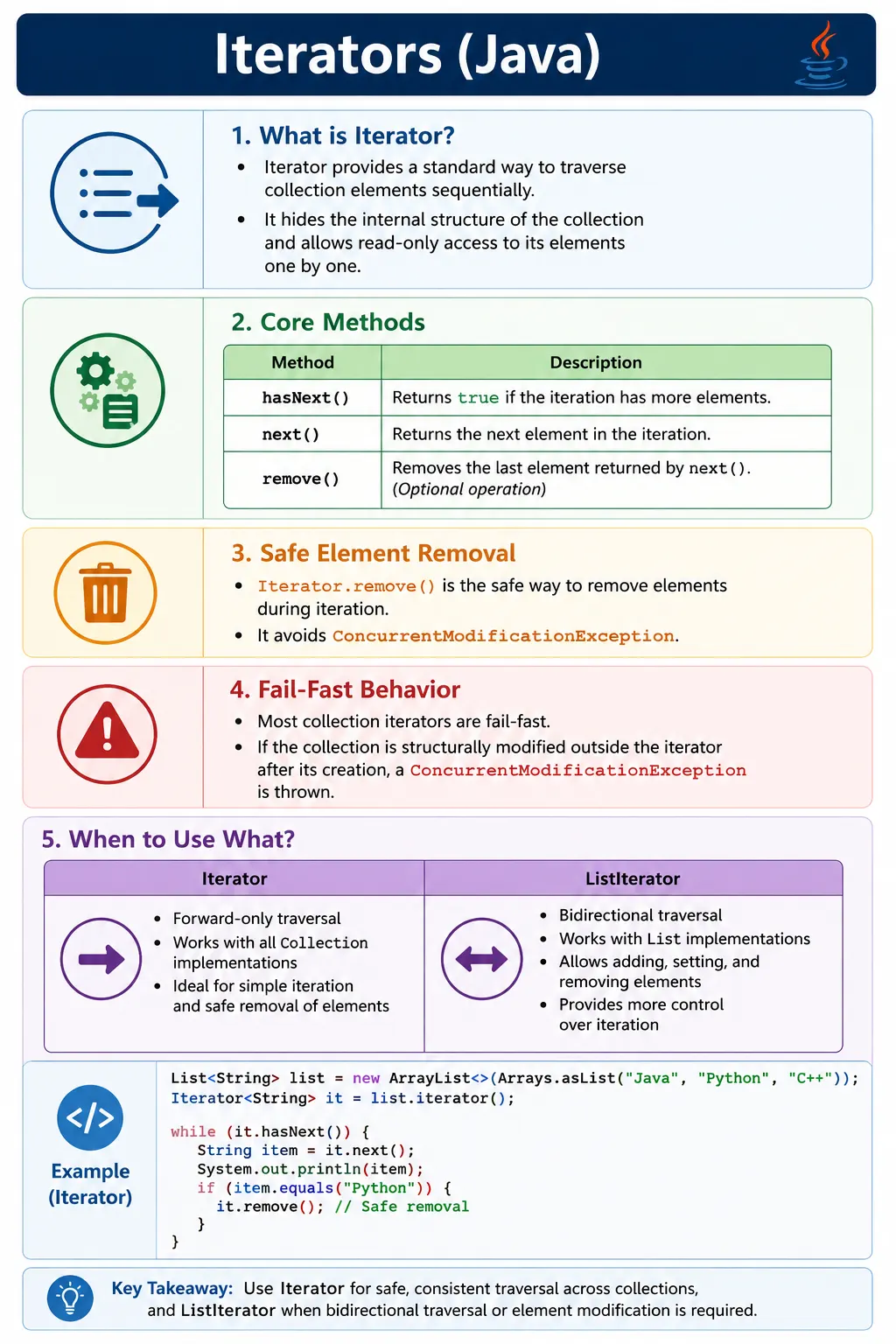
What Is an Iterator?
An Iterator is an object used to traverse a collection sequentially without exposing the collection's
internal structure. It acts like a cursor that starts before the first element. Each call to
next() returns the next element and moves the cursor forward. The method hasNext()
checks whether another element is available before the program tries to read it.
Iterator<E> iterator = collection.iterator();
The Iterator interface belongs to the java.util package. It works with the Collection hierarchy,
which means it can be used with lists, sets, queues, and many other collection implementations. It is
forward-only, so a basic Iterator cannot move backward. If backward traversal is needed for a List, Java
provides a related interface called ListIterator.
The key idea is abstraction. Iterator lets code traverse a collection without asking whether the collection is backed by an array, a linked structure, a hash table, or a tree. That makes traversal code simpler, more reusable, and less dependent on a specific implementation.
Why Iterators Are Needed
Iterators are needed because not all collections can or should be traversed with indexes. An ArrayList has
index positions, so a traditional for loop can access elements with get(i). A
HashSet, however, has no meaningful index. A TreeSet stores elements in sorted order, not insertion order. A
Queue represents processing order rather than random access. Iterator gives all these collections a common
traversal mechanism.
Iterators also reduce index-based mistakes. Beginners often write loops with incorrect boundaries, skip
elements after removal, or accidentally access invalid indexes. Iterator replaces index management with a
simpler pattern: check hasNext(), then call next(). The loop continues until there
are no more elements.
Another major purpose is polymorphism. A method can accept a Collection<String> and use an
iterator without caring whether the actual object is an ArrayList, LinkedList, HashSet, or TreeSet. This is a
practical example of programming to an interface, which is one of the strengths of the Java Collections
Framework.
Iterator Interface (Core Methods)
The Iterator interface is intentionally small. Its core methods are enough to support sequential traversal and controlled removal. Because the API is small, it is easy to learn, but the correct usage rules still matter.
public interface Iterator<E> {
    boolean hasNext();
    E next();
    void remove();
}
The hasNext() method returns true when another element is available. The next()
method returns that element and advances the iterator. The remove() method removes the last
element returned by next(). This means remove() cannot be called before
next(), and it cannot be called twice for the same returned element.
These rules are important in interviews because they reveal whether someone understands that an iterator has state. It remembers its current cursor position and the last element returned. It is not just a helper object around a loop.
Basic Iterator Example
A basic iterator loop follows a predictable structure. First, the collection creates an iterator. Then the
loop checks whether another element exists. If it does, the element is retrieved using next().
This continues until the collection has been fully traversed.
List<String> list = new ArrayList<>();
list.add("Java");
list.add("Python");
Iterator<String> it = list.iterator();
while (it.hasNext()) {
    System.out.println(it.next());
}
This example prints each element sequentially. It works because hasNext() protects the loop from
calling next() when no element remains. If next() is called after the iterator is
exhausted, Java throws NoSuchElementException. For that reason, the normal pattern is always to
use hasNext() before next().
How Iterator Works (Execution Flow)
The execution flow of an iterator begins when iterator() is called on a collection. This method
returns an iterator object connected to that collection. The iterator is positioned before the first element,
not on the first element. The first call to next() moves the cursor forward and returns the
first value.
Each iteration cycle normally starts with hasNext(). If it returns true, the program calls
next(). Internally, the iterator returns the current element and advances its cursor. When all
elements have been returned, hasNext() returns false and the loop stops.
This cursor model explains why iterator removal works differently from direct collection removal. The iterator knows which element was last returned, so it can remove that exact element safely and update its internal state. Directly changing the collection bypasses the iterator and can make the iterator's view inconsistent.
Removing Elements Using Iterator (Important)
Safe removal is one of the most important reasons to use an iterator. If you need to remove elements while
traversing a collection, using Iterator.remove() is the correct pattern for standard mutable
collections.
Iterator<String> it = list.iterator();
while (it.hasNext()) {
    String val = it.next();
    if (val.equals("Java")) {
        it.remove(); // safe removal
    }
}
In this example, the iterator first returns an element using next(). If the value matches the
removal condition, remove() removes that returned element from the underlying collection. This
avoids the common problem of modifying the collection directly while an iterator is active.
Directly calling list.remove() inside a for-each loop is unsafe for most standard collections
and commonly results in ConcurrentModificationException. The exception exists to detect
structural modifications that happen outside the iterator's control.
Iterator vs for-each Loop
The enhanced for-each loop is simpler and more readable when you only need to visit elements. Internally, it
uses an iterator for collections. However, for-each does not expose the iterator object, so it does not allow
safe removal using Iterator.remove().
| Aspect | Iterator | for-each |
|---|---|---|
| Direction | Forward only | Forward only |
| Removal | Yes | No |
| Flexibility | High | Simple |
| Internal working | Explicit | Uses Iterator internally |
Use for-each when traversal is read-only and the logic is simple. Use Iterator when you need explicit cursor control, safe removal, or a uniform pattern that works across collection implementations. The decision is not about which syntax looks shorter; it is about whether the loop needs control over the traversal process.
Iterator vs ListIterator (Preview)
ListIterator is a specialized iterator for List implementations. It can move forward and
backward, and it can add or replace elements during traversal. A normal Iterator is more general because it
works with all Collection types, but it is more limited in direction and modification features.
| Feature | Iterator | ListIterator |
|---|---|---|
| Direction | Forward only | Bidirectional |
| Add elements | No | Yes |
| Replace elements | No | Yes |
| Works with | All Collections | List only |
The trade-off is scope. Iterator is universal for collections, while ListIterator is list-specific. If a method receives a general Collection, Iterator is the natural choice. If the method specifically works with a List and needs backward movement or in-place replacement, ListIterator is more suitable.
Fail-Fast Iterators (Very Important)
Most iterators returned by standard non-concurrent collections are fail-fast. A fail-fast iterator attempts to detect structural modification of the collection after the iterator has been created. Structural modification means adding or removing elements in a way that changes the collection's size or structure, unless the change is made through the iterator's own remove method.
for (String s : list) {
    list.add("C++"); // ConcurrentModificationException
}
Fail-fast behavior is designed to reveal bugs early. It does not make collections thread-safe, and it should not be treated as a guaranteed concurrency control mechanism. Instead, it warns the programmer that the collection was changed in a way that invalidates the iterator's expected traversal.
This topic is heavily asked in interviews because it combines collection internals with practical coding
mistakes. A strong answer should mention that fail-fast iterators commonly throw
ConcurrentModificationException when a collection is structurally modified during iteration
outside the iterator.
Fail-Safe Iterators (Contrast)
Fail-safe is a common interview term used to describe iterators from certain concurrent collections. These iterators do not throw ConcurrentModificationException in the same way as fail-fast iterators. Some work on a snapshot copy, while others are weakly consistent and can tolerate concurrent changes.
CopyOnWriteArrayList is a classic example. Its iterator works on a snapshot of the list at the
time the iterator was created. If the list is modified later, the iterator continues traversing the old
snapshot. ConcurrentHashMap provides iterators that are designed for concurrent access and do
not fail immediately when updates happen.
The benefit is safer concurrent traversal. The cost depends on the collection. Copy-on-write structures can be expensive for frequent writes because updates create new copies. Therefore, fail-safe style iteration is useful in the right context but should not be selected blindly.
Iterator with Set and Map
Set
A Set can be traversed with an iterator even though it does not provide index-based access. The order depends on the Set implementation. HashSet does not guarantee order, LinkedHashSet follows insertion order, and TreeSet follows sorted order.
Iterator<Integer> it = set.iterator();
Map (via entrySet)
Map does not directly implement Collection, so it does not provide a direct collection-style iterator over
key-value pairs. The best practice is to iterate over entrySet(), because each entry contains
both the key and the value.
Iterator<Map.Entry<Integer, String>> it =
        map.entrySet().iterator();
Iterating through entries is usually more efficient and clearer than iterating through keys and repeatedly
calling get(key). It also expresses the intent directly: the loop is processing mappings, not
just keys.
Common Beginner Mistakes
The most common beginner mistake is modifying a collection directly during iteration. This often happens in a
for-each loop when the programmer tries to remove matching elements with list.remove(value). For
standard mutable collections, the safer approach is to use an explicit iterator and call
iterator.remove() after next() returns the matching element.
Another mistake is forgetting the hasNext() check. Calling next() repeatedly without
checking can lead to NoSuchElementException. Beginners also call remove() before
calling next(), which causes IllegalStateException, because no returned element is
available to remove.
A Map-related mistake is trying to create an iterator directly from a Map as if it were a Collection. The
correct approach is to use keySet(), values(), or preferably
entrySet() depending on what data the loop needs.
Interview-Ready Answers
Short Answer
An iterator is used to traverse elements of a collection one by one.
Detailed Answer
In Java, an Iterator provides a uniform way to traverse collections. It supports forward-only traversal and allows safe removal of elements during iteration. Most iterators are fail-fast and throw ConcurrentModificationException if the collection is modified structurally during traversal.
A stronger interview answer should also compare Iterator with for-each and ListIterator. For-each is simpler but does not expose safe removal. ListIterator is more powerful but works only with List implementations. Iterator is the general-purpose cursor for Java collections and is the correct choice when controlled traversal is required across different collection types.
How to Think About Iterators in Real Projects
In real projects, iterators are often hidden behind higher-level code, but the concept remains important. Frameworks, utility libraries, streams, enhanced loops, and collection APIs all depend on traversal rules. Understanding Iterator helps developers reason about why certain removals fail, why for-each behaves a certain way, and why concurrent collections use different iteration behavior.
A practical use case is filtering a mutable list in place. If a list contains invalid records and the program must remove them while scanning, Iterator gives a safe and readable solution. Another use case is processing a Set without assuming an index. Iterator makes that possible without caring whether the Set is hash based, insertion ordered, or sorted.
Iterators are also useful when writing reusable methods. A method that receives a Collection can use Iterator and work with many implementations. This avoids writing separate traversal logic for ArrayList, LinkedList, HashSet, and TreeSet. That is the real power of Iterator: it supports generic, implementation-independent traversal.
Iterator Examples (Quick Reference)
The examples below show the most common iterator patterns used in coding practice and interviews. The code samples are intentionally small so the behavior is easy to see. After each concept, focus on the rule being demonstrated rather than memorizing the exact variable names.
1. Basic Iterator with ArrayList
This example shows the standard iterator loop. The iterator is created from the list, hasNext()
checks whether another element exists, and next() retrieves each value.
import java.util.*;

class Demo {
    public static void main(String[] args) {
        List<String> list = Arrays.asList("A", "B", "C");
        Iterator<String> it = list.iterator();
        while (it.hasNext()) {
            System.out.println(it.next());
        }
    }
}
Although an ArrayList can also be traversed by index, Iterator makes the traversal style consistent with other collection types. This matters when the same logic may later work with a different Collection implementation.
2. Iterator is One-Way (Forward Only)
A basic Iterator moves only forward. It does not provide a previous() method. If backward
movement is required, use ListIterator with a List.
import java.util.*;

class Demo {
    public static void main(String[] args) {
        Iterator<Integer> it = Arrays.asList(1, 2).iterator();
        it.next();
        // it.previous(); // Not available
    }
}
This limitation keeps Iterator simple and general. It can work across collections that may not support meaningful backward traversal.
3. Safe Removal Using Iterator.remove()
This is one of the most important patterns. The element is removed through the iterator after it is returned
by next(). The iterator can keep its internal cursor consistent because it controls the removal.
import java.util.*;

class Demo {
    public static void main(String[] args) {
        List<Integer> list = new ArrayList<>(Arrays.asList(1, 2, 3));
        Iterator<Integer> it = list.iterator();
        while (it.hasNext()) {
            if (it.next() == 2) {
                it.remove();
            }
        }
        System.out.println(list);
    }
}
Output:
[1, 3]
This approach is useful for removing invalid records, expired entries, or unwanted values from a mutable collection while scanning it.
4. Removing Without Iterator (Fail-Fast)
This example shows what should be avoided. Directly modifying a collection during enhanced for-loop traversal can trigger fail-fast behavior.
import java.util.*;

class Demo {
    public static void main(String[] args) {
        List<Integer> list = new ArrayList<>(Arrays.asList(1, 2, 3));
        for (Integer i : list) {
            // list.remove(i); // ConcurrentModificationException
        }
    }
}
The enhanced for-loop hides the iterator. Because the programmer cannot call the iterator's remove method, direct collection removal should be avoided in this pattern.
5. Iterator with HashSet
HashSet does not provide index-based access, so Iterator is a natural way to traverse it. The iteration order is not guaranteed because HashSet is based on hashing.
import java.util.*;

class Demo {
    public static void main(String[] args) {
        Set<String> set = new HashSet<>(Arrays.asList("A", "B"));
        Iterator<String> it = set.iterator();
        while (it.hasNext()) {
            System.out.println(it.next());
        }
    }
}
If output order matters, choose LinkedHashSet for insertion order or TreeSet for sorted order. Iterator follows the order provided by the collection implementation.
6. Iterator with Map (entrySet())
When traversing a Map, entrySet() is usually the clearest option because each iteration gives
access to both key and value.
import java.util.*;

class Demo {
    public static void main(String[] args) {
        Map<Integer, String> map = Map.of(1, "A", 2, "B");
        Iterator<Map.Entry<Integer, String>> it =
                map.entrySet().iterator();
        while (it.hasNext()) {
            Map.Entry<Integer, String> e = it.next();
            System.out.println(e.getKey() + "=" + e.getValue());
        }
    }
}
This is a best-practice interview answer for Map traversal. It avoids extra lookups and clearly represents that the loop is working with key-value mappings.
7. ListIterator - Forward Traversal
ListIterator extends the traversal idea for List implementations. It can move forward like a normal Iterator, but it also supports additional operations.
import java.util.*;

class Demo {
    public static void main(String[] args) {
        List<String> list = Arrays.asList("A", "B", "C");
        ListIterator<String> it = list.listIterator();
        while (it.hasNext()) {
            System.out.println(it.next());
        }
    }
}
When used in forward direction, ListIterator looks similar to Iterator. Its extra value appears when backward traversal, adding, or replacing elements is needed.
8. ListIterator - Backward Traversal
ListIterator can start at a specific position. Passing list.size() places it after the last
element, allowing backward traversal with hasPrevious() and previous().
import java.util.*;

class Demo {
    public static void main(String[] args) {
        List<String> list = Arrays.asList("A", "B", "C");
        ListIterator<String> it = list.listIterator(list.size());
        while (it.hasPrevious()) {
            System.out.println(it.previous());
        }
    }
}
This feature is not available in a normal Iterator. It exists because List has a defined sequence that can be navigated in both directions.
9. Modifying Elements Using ListIterator.set()
ListIterator can replace the last returned element using set(). This is useful when values must
be updated during traversal without changing the size of the list.
import java.util.*;

class Demo {
    public static void main(String[] args) {
        List<String> list = new ArrayList<>(Arrays.asList("Java", "API"));
        ListIterator<String> it = list.listIterator();
        while (it.hasNext()) {
            if (it.next().equals("API")) {
                it.set("Selenium");
            }
        }
        System.out.println(list);
    }
}
Output:
[Java, Selenium]
The key point is that set() updates an existing element. It does not add a new element and does
not remove one. It is list-specific behavior.
10. Adding Elements Using ListIterator.add()
ListIterator can also add elements during traversal. The new element is inserted at the iterator's current position according to ListIterator rules.
import java.util.*;

class Demo {
    public static void main(String[] args) {
        List<String> list = new ArrayList<>(Arrays.asList("A", "C"));
        ListIterator<String> it = list.listIterator();
        while (it.hasNext()) {
            if (it.next().equals("A")) {
                it.add("B");
            }
        }
        System.out.println(list);
    }
}
Output:
[A, B, C]
This is another reason ListIterator is more flexible than Iterator. A normal Iterator supports removal but does not support adding or replacing elements.
11. Iterator vs ListIterator
This compact comparison is often enough for an interview summary. Iterator is general and forward-only. ListIterator is list-specific and supports more movement and modification options.
Iterator<?> it;        // One direction, remove only
ListIterator<?> lit;   // Two direction, add/set/remove
Choose Iterator for general Collection traversal. Choose ListIterator when the collection is definitely a List and the code needs bidirectional navigation or element replacement.
12. Iterator on LinkedList
LinkedList can be traversed with Iterator just like ArrayList. The traversal code remains the same even though the internal structure is different.
import java.util.*;

class Demo {
    public static void main(String[] args) {
        LinkedList<Integer> list =
                new LinkedList<>(Arrays.asList(1, 2, 3));
        Iterator<Integer> it = list.iterator();
        while (it.hasNext()) {
            System.out.println(it.next());
        }
    }
}
This demonstrates the abstraction benefit again. Iterator hides whether the list is array based or node based, allowing the same traversal pattern to work with both.
13. Calling remove() Before next() (Illegal)
Iterator removal depends on the last element returned by next(). If remove() is
called before any element is returned, there is nothing for the iterator to remove.
import java.util.*;

class Demo {
    public static void main(String[] args) {
        Iterator<Integer> it =
                Arrays.asList(1, 2).iterator();
        // it.remove(); // IllegalStateException
    }
}
This mistake is common in interviews because it checks whether you understand iterator state. The correct
sequence is next() first, then remove() if removal is needed.
14. Multiple remove() Calls Without next()
A second remove call without another call to next() is also illegal. Each successful
remove() must correspond to one element returned by next().
import java.util.*;

class Demo {
    public static void main(String[] args) {
        List<Integer> list = new ArrayList<>(Arrays.asList(1, 2));
        Iterator<Integer> it = list.iterator();
        it.next();
        it.remove();
        // it.remove(); // IllegalStateException
    }
}
This rule prevents accidental repeated removal of the same cursor position. It also keeps iterator behavior predictable while the underlying collection changes.
15. Fail-Fast Behavior (Structural Modification)
This example shows fail-fast behavior caused by modifying the collection after the iterator is created. The iterator expects the collection structure to remain consistent unless changes happen through the iterator.
import java.util.*;

class Demo {
    public static void main(String[] args) {
        List<Integer> list = new ArrayList<>(Arrays.asList(1, 2));
        Iterator<Integer> it = list.iterator();
        list.add(3); // structural modification
        // it.next(); // ConcurrentModificationException
    }
}
The exception usually appears when the iterator tries to continue traversal and detects that the collection has changed unexpectedly. This is why fail-fast behavior is often described as a bug-detection mechanism.
16. Fail-Safe Example (CopyOnWriteArrayList)
CopyOnWriteArrayList demonstrates snapshot-style iteration. The iterator sees the elements that existed when the iterator was created. Later changes to the list do not affect that iterator's traversal.
import java.util.*;
import java.util.concurrent.*;

class Demo {
    public static void main(String[] args) {
        List<Integer> list =
                new CopyOnWriteArrayList<>(Arrays.asList(1, 2));
        Iterator<Integer> it = list.iterator();
        list.add(3); // allowed
        while (it.hasNext()) {
            System.out.println(it.next());
        }
    }
}
Output:
1
2
The output does not include 3 because the iterator is reading the earlier snapshot. This behavior is helpful when reads are frequent and writes are rare, but it may be costly when many writes occur.
17. Iterator with TreeSet
TreeSet stores elements in sorted order. Its iterator follows that sorted order, even if the values were inserted in a different sequence.
import java.util.*;

class Demo {
    public static void main(String[] args) {
        Set<Integer> set = new TreeSet<>(Arrays.asList(3, 1, 2));
        Iterator<Integer> it = set.iterator();
        while (it.hasNext()) {
            System.out.println(it.next());
        }
    }
}
Output:
1
2
3
This example shows that an iterator does not create its own ordering rule. It follows the traversal order defined by the collection implementation.
18. Iterator with Queue
A Queue can also provide an iterator. The exact traversal order depends on the Queue implementation. For a LinkedList used as a queue, iteration follows its sequence.
import java.util.*;

class Demo {
    public static void main(String[] args) {
        Queue<String> q = new LinkedList<>(Arrays.asList("A", "B"));
        Iterator<String> it = q.iterator();
        while (it.hasNext()) {
            System.out.println(it.next());
        }
    }
}
Queue processing often uses methods such as poll() or remove(), but Iterator is
useful when the program needs to inspect elements without necessarily consuming them.
19. Common Interview Trap
Removing elements with an index loop can skip elements because removal shifts later elements left. This is a logic bug even when no exception is thrown.
for (int i = 0; i < list.size(); i++) {
    // list.remove(i); // Skips elements
}
Correct:
Iterator<?> it = list.iterator();
while (it.hasNext()) {
    it.next();
    it.remove();
}
Iterator removal avoids this index-shifting problem because the iterator manages the cursor position. This is one of the cleanest answers when asked how to remove elements during traversal.
20. Interview Summary - Iterators
For interviews, keep the summary precise. Iterator is a universal cursor for collections. It supports forward traversal, safe removal, and implementation-independent looping. ListIterator is a more powerful list-only alternative.
Iterator<?> it;
Key Points
- Universal cursor for collections
- Forward-only (Iterator)
- Bidirectional (ListIterator)
- Safe removal via remove()
- Fail-fast by default
Key Takeaway
Iterators provide safe, consistent traversal across Java collections. They allow code to move through elements without depending on indexes or internal storage. Use Iterator when you need controlled traversal, safe removal, and code that works across different collection implementations.
The most important rules are simple: call hasNext() before next(), call
remove() only after next(), and avoid modifying the collection directly while a
standard iterator is active. Once these rules are clear, Iterator becomes one of the most reliable tools in
the Java Collections Framework.