Inter-Thread Communication in Java
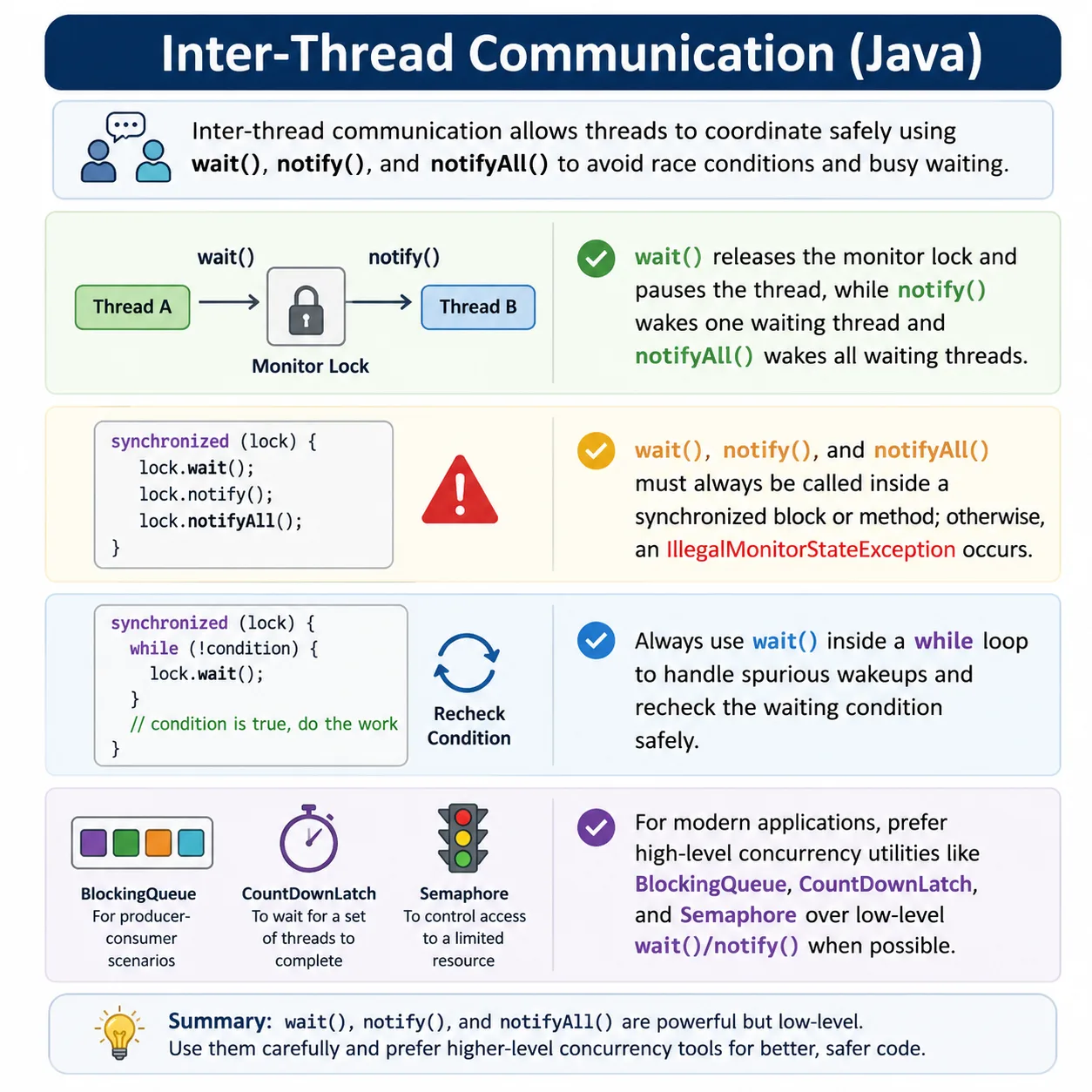
Inter-thread communication in Java allows multiple threads to coordinate and cooperate when working on shared data. It is primarily achieved using the wait(), notify(), and notifyAll() methods of the Object class, in conjunction with synchronization. This is a very high-frequency interview topic, especially with producer–consumer scenarios.
Multithreading is not only about running tasks at the same time. In real applications, threads often depend on one another. One thread may produce data while another consumes it. One thread may wait until a file is downloaded, a queue has an item, a flag becomes true, or a background setup step is complete. Without a safe communication mechanism, threads either guess, poll repeatedly, or access shared data at the wrong time.
Inter-thread communication solves this coordination problem. It allows one thread to pause until a condition
becomes true and another thread to signal that the condition may have changed. In Java's low-level monitor
model, this coordination is handled using wait(), notify(), and
notifyAll() together with synchronized. The waiting thread releases the lock while
it waits, and the notifying thread signals waiting threads after changing shared state.
This topic is important because it sits between basic synchronization and modern concurrency utilities. If a
developer understands wait and notify, they can understand why higher-level tools such as
BlockingQueue, CountDownLatch, Semaphore, and
CyclicBarrier exist. In production code, those higher-level tools are often preferred, but the
wait/notify model remains the foundation for many interview questions and concurrency concepts.
Why Threads Need to Communicate
Threads need communication when the correct execution of one thread depends on a state change made by another thread. Suppose a consumer thread should read data only after a producer thread has written it. If the consumer reads too early, it may get missing, old, or invalid data. If the consumer repeatedly checks in a loop without waiting, it wastes CPU cycles. If it sleeps for a fixed time, it may still wake up too early or wait longer than necessary.
Inter-thread communication provides a more precise design. The consumer waits while the data is unavailable. The producer updates the data and sends a signal. The consumer wakes up, rechecks the condition, and continues only when the condition is truly satisfied. This is condition-based coordination, and it is much safer than guessing with sleep statements or busy loops.
This pattern appears in many real systems. A logging thread waits for log messages. A worker thread waits for jobs in a queue. A test execution thread waits for setup to complete. A reporting thread waits for test results. A background service waits for a shutdown signal. In every case, the threads are not merely sharing memory; they are cooperating around a changing condition.
The Condition-Based Waiting Model
The most important idea in inter-thread communication is the condition. A thread should not wait simply because it wants to pause. It should wait because a specific condition is currently false. For example, "buffer has data" may be false for a consumer, while "buffer has free space" may be false for a producer. The condition determines whether the thread should proceed or wait.
A condition is usually represented by shared state: a boolean flag, a counter, a queue size, a turn number,
or an availability marker. This shared state must be protected by synchronization because multiple threads
read and update it. The waiting thread checks the condition while holding the lock. If the condition is not
satisfied, it calls wait(), which releases the lock and suspends the thread.
When another thread changes the shared state, it calls notify() or notifyAll().
That signal does not mean the waiting thread can immediately continue. It means the waiting thread may try
again. The thread must re-acquire the lock and recheck the condition. This rechecking step is why
wait() should almost always be used inside a while loop.
Why wait, notify, and notifyAll Belong to Object
A common question is why wait(), notify(), and notifyAll() are methods
of Object rather than methods of Thread. The reason is that communication is tied
to an object's monitor lock. Threads do not wait in isolation; they wait on a specific object's monitor.
Another thread must notify on that same monitor.
Since every Java object has an intrinsic monitor lock, every object can act as a coordination point. A thread synchronizes on an object, checks a condition protected by that object, and then waits on that object if the condition is false. Another thread synchronizes on the same object, changes the condition, and notifies on that same object.
This is why the lock object must be chosen carefully. Calling wait() on one object and
notify() on another object will not coordinate the same waiting threads. The monitor object is
the meeting point. If threads do not use the same meeting point, the signal will not reach the intended
waiters.
Why Inter-Thread Communication Is Needed
Without coordination, threads may:
- Run in the wrong order
- Waste CPU cycles (busy waiting)
- Read inconsistent data
- Cause race conditions
Goal: Enable threads to pause, resume, and signal each other safely.
Core Methods for Inter-Thread Communication
All belong to java.lang.Object:
| Method | Purpose |
|---|---|
| wait() | Releases lock and waits |
| notify() | Wakes up one waiting thread |
| notifyAll() | Wakes up all waiting threads |
Important Rule (Interview Favorite)
wait(), notify(), and notifyAll() must be called inside a synchronized context.
Otherwise: IllegalMonitorStateException
How wait() Works
- Causes the current thread to release the monitor lock
- Thread enters WAITING or TIMED_WAITING state
- Thread resumes only after:
- notify() / notifyAll()
- Re-acquiring the lock
synchronized (lock) {
    lock.wait();
}
How notify() Works
- Wakes one arbitrary waiting thread
- Does not release the lock immediately
- Lock is released only after synchronized block exits
synchronized (lock) {
    lock.notify();
}
How notifyAll() Works
- Wakes all waiting threads
- Threads compete to re-acquire the lock
- Safer when multiple conditions exist
synchronized (lock) {
    lock.notifyAll();
}
Thread State Transitions
| Method | State Change |
|---|---|
| wait() | RUNNABLE → WAITING |
| notify() | WAITING → BLOCKED |
| Lock acquired | BLOCKED → RUNNABLE |
Classic Example: Producer–Consumer Problem
Shared Resource
class SharedBuffer {
    private int data;
    private boolean available = false;

    synchronized void produce(int value) throws InterruptedException {
        while (available) {
            wait();
        }
        data = value;
        available = true;
        System.out.println("Produced: " + value);
        notify();
    }

    synchronized int consume() throws InterruptedException {
        while (!available) {
            wait();
        }
        available = false;
        System.out.println("Consumed: " + data);
        notify();
        return data;
    }
}
✔ Uses while, not if
✔ Avoids spurious wakeups
Why while Is Used Instead of if (Very Important)
- Threads may wake up without condition being true
- Multiple threads may be notified
- while rechecks condition
while (!condition) {
    wait();
}
wait() vs sleep() (Common Interview Trap)
| Aspect | wait() | sleep() |
|---|---|---|
| Releases lock | ✔ Yes | ❌ No |
| Called on | Object | Thread |
| Used for | Coordination | Pause |
| Requires synchronized | ✔ Yes | ❌ No |
notify() vs notifyAll()
| Aspect | notify() | notifyAll() |
|---|---|---|
| Threads awakened | One | All |
| Performance | Better | Slower |
| Safety | Risky | Safer |
| Use case | Single-condition | Multiple conditions |
Common Mistakes
- Calling wait() outside synchronized block
- Using if instead of while
- Using notify() when multiple threads wait
- Synchronizing on wrong object
- Forgetting condition flags
Best Practices (Production-Grade)
- Always use wait() in a while loop
- Prefer notifyAll() for correctness
- Keep synchronized blocks small
- Clearly define condition variables
- Consider java.util.concurrent alternatives
Modern Alternatives (Preview)
Instead of low-level wait/notify:
- BlockingQueue
- CountDownLatch
- CyclicBarrier
- Semaphore
✔ Safer
✔ Easier to maintain
✔ Preferred in enterprise code
Interview-Ready Answers
Short Answer
Inter-thread communication allows threads to coordinate using wait, notify, and notifyAll.
Detailed Answer
In Java, inter-thread communication is achieved using wait(), notify(), and notifyAll() methods of the Object class. These methods allow threads to release locks, wait for conditions, and signal other threads, enabling safe coordination and avoiding busy waiting in multithreaded programs.
Key Takeaway
wait() releases the lock.
notify() signals waiting threads.
notifyAll() ensures correctness.
Inter-thread communication is powerful but error-prone—use it carefully or prefer high-level concurrency utilities.
Producer-Consumer as the Classic Example
The producer-consumer problem is the classic example because it clearly shows why coordination is needed. A producer creates data and places it in a shared buffer. A consumer removes data from that buffer. If the buffer is empty, the consumer should wait. If the buffer is full, the producer should wait. Both threads are active parts of the same workflow, but they cannot run blindly.
A single-item buffer is the simplest version. The buffer has one value and a boolean flag indicating whether a value is available. The producer waits while the flag says data is already available. The consumer waits while the flag says no data is available. When the producer creates a value, it changes the flag and notifies waiting threads. When the consumer consumes the value, it changes the flag back and notifies waiting threads.
The important point is that the flag and the data must be protected by the same lock. The condition check, state update, and notification must be coordinated. If the flag is checked without synchronization or notification happens without changing the condition safely, the program can miss signals, read stale values, or wake threads at the wrong time.
Why while Is Used Instead of if
Using while around wait() is one of the most important rules in Java inter-thread
communication. A waiting thread can wake up even if the condition it needs is still false. This can happen
because of spurious wakeups, because another thread consumed the condition first, or because
notifyAll() woke several threads and only one of them can proceed.
An if statement checks the condition only once. After the thread wakes up, it continues without
checking again. That is unsafe. A while loop checks the condition before waiting and again after
waking. If the condition is still false, the thread waits again. This makes the code correct even when wakeups
happen for reasons other than the desired condition becoming true.
while (!condition) {
    lock.wait();
}
Interviewers often ask this because it separates memorized syntax from real understanding. The answer is not only "because of spurious wakeups." The deeper reason is that notification is only a signal to recheck the condition. It is not a guarantee that the condition is true.
Missed Signals and Condition Flags
A missed signal happens when a notification occurs before a thread begins waiting. Since
notify() does not store a signal for future waiters, a later thread that calls
wait() may wait forever. This is why condition variables are essential. The waiting decision
should be based on shared state, not only on whether a notification has arrived.
For example, if a ready flag is already true, the waiting thread should not call
wait() at all. It should proceed. If the flag is false, it should wait. The notifying thread
changes the flag to true and then notifies. This combination of condition state plus notification prevents
the design from depending on perfect timing.
This is also why wait/notify code must be carefully reviewed. If the condition flag is missing, updated
outside the lock, or checked with if instead of while, the code may work in simple
tests but fail under concurrency.
notify vs notifyAll in Real Design
The notify() method wakes one arbitrary thread waiting on the same monitor. It can be efficient
because it wakes only one thread. However, it can also be risky when multiple kinds of threads or multiple
conditions use the same lock. The wrong thread may wake up, find that its condition is still false, and go
back to waiting while another thread that could proceed remains asleep.
The notifyAll() method wakes all waiting threads on the monitor. They do not all run at once.
They compete to re-acquire the lock, and each one rechecks its condition. This can be slower because more
threads wake up, but it is often safer when multiple conditions are involved. Correctness is usually more
important than saving a small wakeup cost.
A practical rule is to use notify() only when the design clearly has a single condition and any
waiting thread can proceed. Use notifyAll() when multiple conditions exist, when different types
of threads wait on the same object, or when correctness is more important than micro-optimization.
wait vs sleep
The difference between wait() and sleep() is another frequent interview trap.
Calling sleep() pauses the current thread for a period of time, but it does not release any lock
the thread holds. If a thread sleeps inside synchronized code, other threads waiting for that same lock remain
blocked.
Calling wait() is different. It must be called by a thread that owns the object's monitor, and
it releases that monitor while waiting. This allows another thread to enter synchronized code on the same
object, change the condition, and call notify() or notifyAll(). That release of the
lock is what makes wait useful for coordination.
Sleep is useful for delaying a thread. Wait is useful for coordination around a condition. Replacing wait with sleep often creates fragile code because the program begins to depend on guessed timing rather than actual state changes.
Modern Alternatives to Low-Level wait and notify
Low-level wait/notify is powerful, but it is easy to get wrong. Modern Java provides higher-level utilities
that express common coordination patterns more clearly. BlockingQueue is ideal for many
producer-consumer workflows because producers can put items into a queue and consumers can take items without
writing manual wait/notify logic.
CountDownLatch is useful when one or more threads must wait until a certain number of events
have occurred. CyclicBarrier is useful when a group of threads must meet at a common point.
Semaphore controls access to a limited number of permits. These utilities are often easier to
read and less error-prone than custom monitor code.
In enterprise code, prefer these higher-level tools when they match the problem. Still, learning wait/notify is valuable because it explains the foundation. When a developer understands the lower-level pattern, they can choose higher-level utilities with better judgment instead of treating them as magic.
Designing the Shared Object Correctly
The most reliable wait/notify designs usually place the shared data, the condition flag, and the synchronized methods inside the same class. This keeps the coordination rule close to the data it protects. A buffer class, for example, should not expose its internal flag and ask outside code to decide when to wait or notify. The buffer itself should know when it is empty, when it is full, and which operation is allowed to continue.
This style also makes the code easier to reason about. A reader can open one class and see the complete
coordination contract. The producer calls a method such as produce(), and the consumer calls a
method such as consume(). The calling code does not need to manage low-level locking directly.
That separation reduces mistakes because the waiting rules are not scattered across the application.
A good shared object should protect every access to the shared state. It is not enough to synchronize only the
method that calls wait(). The method that changes the condition and calls
notifyAll() must also synchronize on the same monitor. If one method uses synchronized code and
another method updates the state without the lock, the program no longer has a reliable happens-before
relationship, and other threads may observe stale or inconsistent data.
Lock Ownership and Monitor Discipline
Monitor discipline means using one lock consistently for one protected state. If a thread waits on
lockA, another thread must notify on lockA. Notifying on
lockB will not wake threads waiting on a different object. This sounds simple, but it is a
common reason beginners create code that appears correct by reading the method names but fails at runtime.
The same discipline applies to condition checks. The condition should be checked while holding the same lock used for waiting. The condition should be modified while holding that same lock. Notification should happen after modifying the condition and before leaving the synchronized block. This order makes the notification meaningful because waiting threads wake up and see a state that was changed under the correct monitor.
It is also important to keep synchronized blocks focused. Long-running operations, network calls, file I/O, or expensive computations should not normally be performed while holding a monitor lock. The longer a lock is held, the longer other threads may be blocked. A clean design updates shared state inside the synchronized section and performs unrelated work outside it whenever possible.
Reading Thread States During Debugging
Debugging inter-thread communication becomes easier when thread states are interpreted correctly. A thread in
WAITING is usually waiting because it called wait(), join(), or a
similar coordination method without a timeout. A thread in TIMED_WAITING is waiting with a time
limit, such as timed wait() or sleep(). A thread in BLOCKED is trying
to enter synchronized code but cannot acquire the monitor yet.
These distinctions are useful when investigating hangs. If a thread is waiting forever, check whether the expected notification can happen. If a thread is blocked, check which other thread owns the lock and why it is holding it for so long. If many threads are blocked on the same monitor, the synchronized section may be too large, or one thread may have entered a path that never releases the lock because of a long-running operation.
Thread dumps are often used in real production analysis. Even without memorizing every thread dump format, a tester or developer should understand the meaning of waiting, blocked, and runnable states. Inter-thread communication problems rarely fail like ordinary syntax errors. They often appear as hangs, intermittent failures, missing output, incomplete processing, or test cases that pass only on some machines.
How to Explain the Flow Step by Step
A clear explanation of inter-thread communication should describe the full journey. First, a thread enters a
synchronized block and checks a condition. If the condition is not satisfied, it calls wait().
At that moment, it releases the monitor lock and moves into a waiting state. Because the lock is released,
another thread can enter synchronized code on the same object.
Next, the second thread changes the shared condition. For example, it may place data into a buffer or mark a
task as completed. After changing the condition, it calls notify() or
notifyAll(). The waiting thread is now eligible to continue, but it still cannot run inside the
synchronized block until it re-acquires the monitor. Once it gets the lock again, it rechecks the condition in
the while loop and proceeds only if the condition is truly satisfied.
This step-by-step explanation is useful in interviews because it includes every important detail: the condition, the lock, the release of the lock, the notification, the re-acquisition of the lock, and the condition recheck. Missing any of these details usually leads to an incomplete understanding of how Java coordination works.
Practical Review Checklist
When reviewing wait/notify code, start by identifying the monitor object. Then confirm that every
wait(), notify(), and notifyAll() call uses that same object from
inside synchronized code. Next, identify the condition variable. If there is no clear condition, the design is
suspicious because notifications alone should not be treated as stored events.
After that, check whether waiting is done in a while loop. Confirm that the condition is updated
before notification, and confirm that the code can still work if more than one thread is waiting. If different
conditions share the same monitor, notifyAll() is usually the safer choice. Finally, look for
unnecessary work inside synchronized blocks, because performance issues and deadlocks often begin with locks
being held longer than needed.
This checklist is useful for manual testers too. If a multithreaded feature freezes or behaves inconsistently, the tester can ask focused questions: Which condition is the thread waiting for? What event changes that condition? Which thread sends the notification? Is the notification tied to the same lock? These questions help the team move from vague statements like "the application is stuck" to a more useful investigation.
Inter-Thread Communication in Testing and Automation
Inter-thread communication also appears in testing and automation work. Parallel tests may need to wait for a setup thread to prepare data. A reporting thread may wait until test execution produces results. A log listener may wait for entries. A file watcher may wait for a download to complete. These are all coordination problems.
Poor coordination in test automation often appears as flaky behavior. A test may pass when the environment is fast and fail when it is slow. Developers may add arbitrary sleeps, but sleeps only hide the timing problem. A better design waits for a condition: file exists, record is created, API status is ready, queue contains an item, or setup flag is true.
The same principle applies in Selenium tests. Waiting for a fixed number of seconds is weaker than waiting for a meaningful condition. Although Selenium waits are not the same as Java object monitor waits, the design mindset is similar: do not guess timing; wait for the condition that actually matters.
Interview-Ready Explanation
A short interview answer can be: inter-thread communication allows threads to coordinate using
wait(), notify(), and notifyAll(). A thread waits when a condition is
false, and another thread notifies after changing the condition.
A detailed answer should add that these methods belong to Object and must be called from a
synchronized context because they operate on the object's monitor lock. The wait() method
releases the lock and suspends the thread. The notify() method wakes one waiting thread, while
notifyAll() wakes all waiting threads. The notified thread cannot continue until it re-acquires
the lock.
A strong answer should also mention that wait() should be used inside a while loop
to recheck the condition after waking. It should explain that notifyAll() is often safer than
notify() when multiple conditions exist, and that high-level utilities such as
BlockingQueue and CountDownLatch are preferred in many real projects.
Inter-Thread Communication Examples (Interview Pack)
1. Basic wait() and notify()
class Demo {
    static final Object lock = new Object();

    public static void main(String[] args) {
        Thread t1 = new Thread(() -> {
            synchronized (lock) {
                try {
                    System.out.println("Thread waiting");
                    lock.wait();
                    System.out.println("Thread resumed");
                } catch (Exception e) {}
            }
        });

        Thread t2 = new Thread(() -> {
            synchronized (lock) {
                System.out.println("Notifier");
                lock.notify();
            }
        });

        t1.start();
        t2.start();
    }
}
2. wait() Releases Lock, sleep() Does NOT
class Demo {
    static final Object lock = new Object();

    public static void main(String[] args) {
        new Thread(() -> {
            synchronized (lock) {
                try {
                    lock.wait();
                } catch (Exception e) {}
            }
        }).start();
    }
}
Key Point
- wait() → releases monitor
- sleep() → keeps monitor
3. Illegal Monitor State (Interview Trap)
class Demo {
    public static void main(String[] args) throws Exception {
        Object lock = new Object();
        // lock.wait(); // ❌ IllegalMonitorStateException
    }
}
Rule: wait() / notify() must be inside synchronized.
4. Producer–Consumer (Single Item)
class Store {
    int item;
    boolean available = false;

    synchronized void produce(int value) throws Exception {
        while (available) wait();
        item = value;
        available = true;
        notify();
    }

    synchronized int consume() throws Exception {
        while (!available) wait();
        available = false;
        notify();
        return item;
    }
}
5. Producer–Consumer with Threads
class Demo {
    public static void main(String[] args) {
        Store store = new Store();

        new Thread(() -> {
            try { store.produce(10); } catch (Exception e) {}
        }).start();

        new Thread(() -> {
            try { System.out.println(store.consume()); } catch (Exception e) {}
        }).start();
    }
}
6. Why while Instead of if (Spurious Wakeup)
while (!condition) {
    wait();
}
Explanation:
- Thread may wake up without notify
- Always re-check condition
7. notify() vs notifyAll()
class Demo {
    synchronized void resumeOne() {
        notify();     // wakes one thread
    }

    synchronized void resumeAll() {
        notifyAll();  // wakes all waiting threads
    }
}
8. Multiple Waiting Threads + notifyAll()
class Demo {
    static final Object lock = new Object();

    public static void main(String[] args) {
        Runnable task = () -> {
            synchronized (lock) {
                try {
                    lock.wait();
                    System.out.println(Thread.currentThread().getName());
                } catch (Exception e) {}
            }
        };

        new Thread(task, "T1").start();
        new Thread(task, "T2").start();

        synchronized (lock) {
            lock.notifyAll();
        }
    }
}
9. Ordered Execution (T1 → T2 → T3)
class Order {
    int turn = 1;

    synchronized void run(int myTurn) throws Exception {
        while (turn != myTurn) wait();
        System.out.println("Thread " + myTurn);
        turn++;
        notifyAll();
    }
}

class Demo {
    public static void main(String[] args) {
        Order o = new Order();

        new Thread(() -> { try { o.run(1); } catch (Exception e) {} }).start();
        new Thread(() -> { try { o.run(2); } catch (Exception e) {} }).start();
        new Thread(() -> { try { o.run(3); } catch (Exception e) {} }).start();
    }
}
10. Inter-Thread Communication with Shared Flag
class Flag {
    boolean ready = false;

    synchronized void waitForSignal() throws Exception {
        while (!ready) wait();
        System.out.println("Signal received");
    }

    synchronized void sendSignal() {
        ready = true;
        notify();
    }
}
11. Using join() as Communication
class Demo {
    public static void main(String[] args) throws Exception {
        Thread worker = new Thread(() -> {
            try { Thread.sleep(300); } catch (Exception e) {}
            System.out.println("Worker done");
        });

        worker.start();
        worker.join();
        System.out.println("Main continues");
    }
}
12. Missed Signal Problem (Bad Design)
// notify happens before wait → signal lost
Fix
- Use condition variable + while
- Or higher-level concurrency APIs
13. wait(long timeout)
class Demo {
    synchronized void timedWait() throws Exception {
        wait(500);
        System.out.println("Timed wait over");
    }
}
14. Multiple Conditions on Same Lock (Complex Case)
class Resource {
    boolean readReady = false;
    boolean writeReady = false;

    synchronized void read() throws Exception {
        while (!readReady) wait();
        System.out.println("Reading");
    }

    synchronized void write() throws Exception {
        while (!writeReady) wait();
        System.out.println("Writing");
    }
}
15. Inter-Thread Communication Using volatile (Simple Signal)
class Signal implements Runnable {
    volatile boolean running = true;

    public void run() {
        while (running) {}
        System.out.println("Stopped");
    }

    public static void main(String[] args) {
        Signal s = new Signal();
        new Thread(s).start();
        s.running = false;
    }
}
16. Why wait/notify Are Low-Level
- Error-prone
- Easy to deadlock
- Hard to maintain
Interview Tip: Prefer BlockingQueue, CountDownLatch.
17. Replacing wait/notify with BlockingQueue
import java.util.concurrent.*;

class Demo {
    public static void main(String[] args) throws Exception {
        BlockingQueue<Integer> q = new ArrayBlockingQueue<>(1);

        new Thread(() -> {
            try { q.put(10); } catch (Exception e) {}
        }).start();

        System.out.println(q.take());
    }
}
18. Inter-Thread Communication Using CountDownLatch
import java.util.concurrent.*;

class Demo {
    public static void main(String[] args) throws Exception {
        CountDownLatch latch = new CountDownLatch(1);

        new Thread(() -> {
            System.out.println("Waiting");
            try { latch.await(); } catch (Exception e) {}
            System.out.println("Resumed");
        }).start();

        Thread.sleep(300);
        latch.countDown();
    }
}
19. Common Interview Trap
notify(); // called outside synchronized → ❌ IllegalMonitorStateException
20. Interview Summary – Inter-Thread Communication
- wait()
- notify()
- notifyAll()
- join()
Key Points
- Must hold monitor lock
- wait() releases lock
- Use while, not if
- notifyAll() safer than notify
- Prefer high-level concurrency APIs in real projects