Inheritance
Inheritance is one of the central ideas in object-oriented programming, and in Java it is the mechanism that allows one class to build on the structure and behavior of another class. When a class inherits from another class, the new class can reuse accessible fields and methods from the existing class instead of defining the same logic again. The existing class is commonly called the parent class, superclass, or base class. The new class is called the child class, subclass, or derived class. This relationship helps developers model real-world hierarchies, reduce repeated code, and extend existing behavior in a controlled way.
In Java, inheritance is created with the extends keyword. A subclass extends a superclass, which
means the subclass receives the accessible members of the superclass and can add its own members on top of
them. This is why inheritance is often described as an "IS-A" relationship. If Dog extends
Animal, then a dog is an animal. If SavingsAccount extends Account,
then a savings account is an account. This relationship is powerful, but it must be used carefully because
it connects classes closely. Good inheritance design is not just about reusing code; it is about representing
a meaningful conceptual relationship.
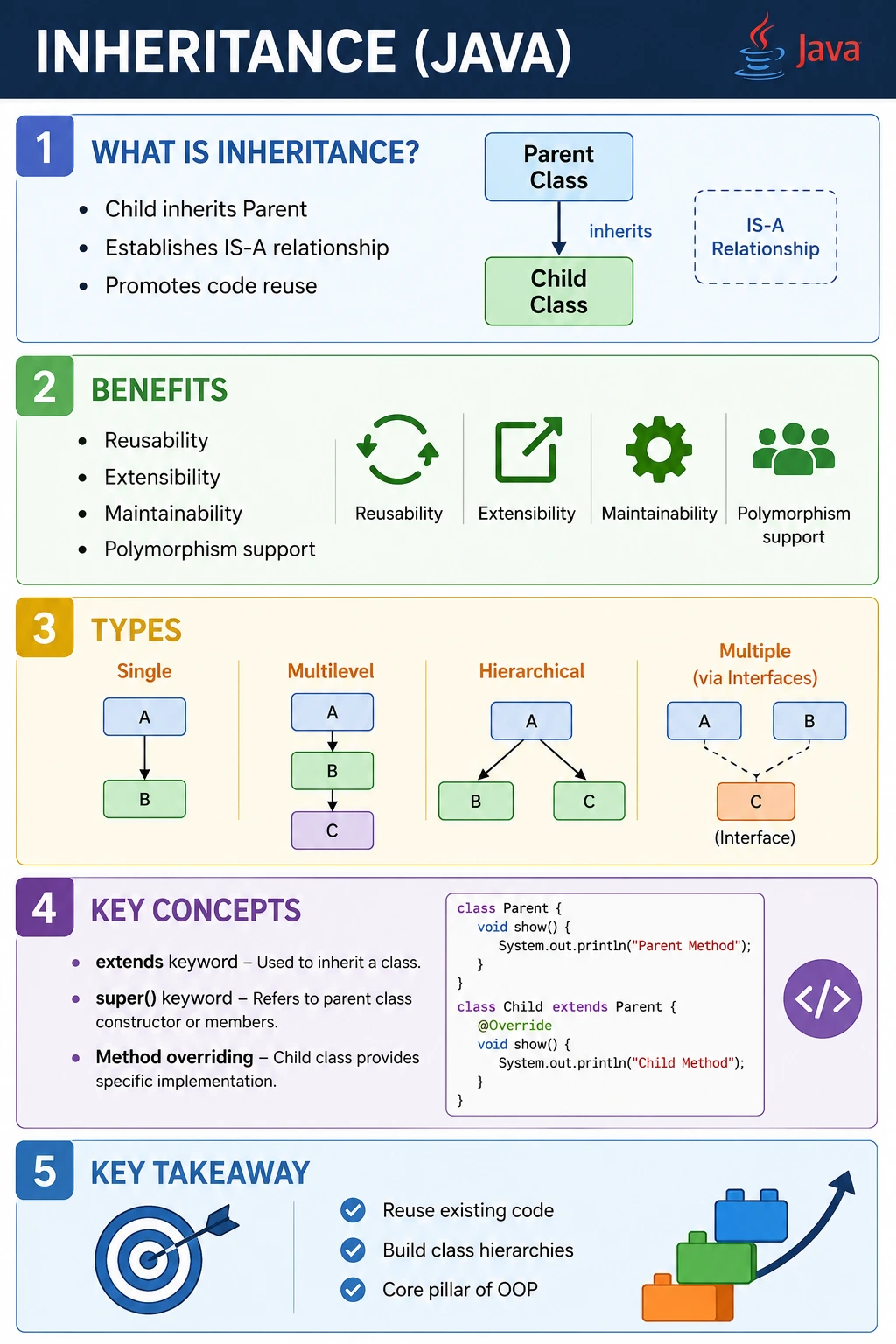
Inheritance is also a high-frequency Java interview topic because it connects directly to polymorphism,
method overriding, constructor chaining, access modifiers, the super keyword, field hiding, and
runtime method dispatch. A developer who understands inheritance properly can explain not only how to write
class B extends A, but also what happens when a child object is referenced by a parent variable,
why constructors are not inherited, why private members are not directly accessible, and why Java does not
support multiple inheritance through classes. These details are important because inheritance affects both
code structure and runtime behavior.
What Is Inheritance?
Inheritance means that one class acquires the accessible properties and behaviors of another class. In practical Java terms, this means a child class can use non-private methods and fields defined in its parent class as if they are part of the child class. The child class can also define additional fields and methods that are specific to its own responsibility. This allows common behavior to live in one place while specific behavior is added in specialized classes.
For example, consider a general Vehicle class. It may contain common behavior such as
start(), stop(), and move(). A Car class and a
Bike class may both share those behaviors, but each may also have specific behavior of its own.
Instead of copying the same methods into every class, Java allows those classes to inherit common behavior
from the parent class. This keeps the design easier to maintain because a common change can be made in one
superclass instead of being repeated across multiple classes.
The key point is that inheritance should describe a natural relationship. A subclass should be a specialized
form of the superclass. If that relationship is not true, inheritance may make the code harder to understand
instead of easier. A Car is a Vehicle, so inheritance makes sense. A
Car has an Engine, but it is not an engine, so composition is usually a better
design for that relationship. This difference between "is a" and "has a" is one of the most important
design judgments in object-oriented programming.
class Parent {
    int x = 10;
}

class Child extends Parent {
    int y = 20;
}
In this example, Child extends Parent. The child class has its own variable
y, and it also has access to the inherited variable x because x is not
private. Conceptually, Java treats the child object as an extended version of the parent object. The child
object contains the parent portion and the child-specific portion together. That is why a child object can be
used in many places where a parent type is expected.
Why Inheritance Is Important
The first obvious benefit of inheritance is code reuse. If several classes share the same behavior, that behavior can be placed in a superclass and reused by all child classes. This reduces duplication and makes future changes simpler. When common logic is copied into many classes, every correction must be applied in many places. Inheritance centralizes the shared logic so the system remains easier to maintain.
Inheritance also supports extensibility. A developer can create a new subclass that reuses existing behavior while adding new behavior for a specific case. This is common in frameworks and libraries. A framework may provide a general base class, and application developers extend that class to add project-specific behavior. The base class provides structure, while subclasses provide specialization. This pattern allows code to grow without constantly modifying existing classes.
Another major reason inheritance matters is polymorphism. Polymorphism allows a parent reference to point to
a child object. When overridden methods are called, Java can choose the child implementation at runtime. This
enables flexible designs where code can work with a general type while the actual behavior depends on the
specific object. For example, a method may accept an Animal reference, but at runtime the object
may be a Dog, Cat, or Bird. Each subclass can provide its own version
of a method such as sound().
Inheritance also makes software models easier to understand when the domain itself has a hierarchy. In a
banking application, Account may be the parent class, while SavingsAccount,
CurrentAccount, and LoanAccount are child classes. In an employee management
system, Employee may be the parent class, while Manager,
Developer, and Tester are specialized child classes. When the code structure
mirrors the business structure, the system becomes easier to reason about.
Basic Syntax
Java uses the extends keyword to define class inheritance. The subclass name appears first,
followed by extends, followed by the superclass name. A class can extend only one class directly.
This restriction is deliberate because allowing a class to inherit implementation from multiple parent
classes can create ambiguity when two parents define the same method or field.
class SubClass extends SuperClass {
    // additional members
}
The superclass should contain behavior that is genuinely common to all subclasses. The subclass should contain behavior that is specific to that specialized type. If every subclass constantly overrides most of the superclass behavior, the hierarchy is probably poorly designed. Good inheritance makes common behavior common and specialized behavior specialized.
Example: Simple Inheritance
The simplest way to understand inheritance is to start with a parent class that defines one general behavior
and a child class that adds one specific behavior. In the following example, Animal defines the
common action eat(). The Dog class extends Animal and adds
bark(). When a Dog object is created, it can call both methods because it owns
bark() and inherits eat().
class Animal {
    void eat() {
        System.out.println("Animal eats");
    }
}

class Dog extends Animal {
    void bark() {
        System.out.println("Dog barks");
    }
}

public class Test {
    public static void main(String[] args) {
        Dog d = new Dog();
        d.eat();   // inherited
        d.bark();  // own method
    }
}
This example demonstrates the basic reuse benefit. The Dog class does not need to rewrite the
eat() method because it receives that method from Animal. If another class such as
Cat also extends Animal, it can reuse the same method too. In larger applications,
this same idea helps teams avoid repeated business logic across many related classes.
Types of Inheritance in Java
1. Single Inheritance
Single inheritance means one child class inherits from one parent class. This is the most common and most
straightforward inheritance form in Java. It keeps the relationship easy to understand because there is a
direct line from child to parent. When you see class B extends A, you know that B
receives accessible members from A.
class B extends A { }
Status: Supported in Java.
2. Multilevel Inheritance
Multilevel inheritance means a class inherits from a class that already inherits from another class. This
creates a chain. In the structure A, B, and C, class
B extends A, and class C extends B. As a result,
C can access eligible members from both B and A. This is useful when
each level adds a meaningful layer of specialization.
class A { }
class B extends A { }
class C extends B { }
Status: Supported in Java.
Multilevel inheritance should not be stretched too far. Very deep inheritance chains can make code difficult to trace because behavior may come from several levels above the current class. A small, meaningful hierarchy is useful. A long chain used only to share scattered code becomes a maintenance problem.
3. Hierarchical Inheritance
Hierarchical inheritance means multiple child classes inherit from the same parent class. This is common when
several specialized classes share a common base. For example, Car, Truck, and
Bike may all extend Vehicle. Each child class reuses common vehicle behavior while
defining its own specific details.
class A { }
class B extends A { }
class C extends A { }
Status: Supported in Java.
4. Multiple Inheritance (Classes)
class C extends A, B { } // Not allowed
Multiple inheritance through classes means one class directly inherits from more than one parent class. Java does not allow this. A Java class can extend only one class directly. This avoids ambiguity when two parent classes contain methods with the same signature or state with conflicting meaning. Java supports multiple type inheritance through interfaces instead, where a class can implement more than one interface.
Status: Not supported using classes. It is achieved using interfaces.
extends Keyword
The extends keyword is the language feature that declares inheritance between two classes. It
tells the compiler that the subclass should receive eligible members from the superclass. It also establishes
type compatibility. A subclass object can be assigned to a superclass reference because the child is treated
as a specialized version of the parent.
This type compatibility is a major reason inheritance is more than code reuse. It allows APIs to be written
against general parent types while still accepting specialized child objects. For example, a method can
receive an Animal parameter and work with any class that extends Animal. This
creates flexible code because the method does not need separate overloads for every child type.
At the same time, extends should not be used just because two classes share a few methods. If
there is no true parent-child relationship, inheritance creates a misleading design. In Java, a misleading
hierarchy often becomes painful when requirements change, because child classes are forced to carry behavior
they do not actually need.
What Is Inherited and What Is Not
A child class inherits accessible members from its parent class. Public members are inherited and accessible from anywhere. Protected members are inherited and can be accessed inside subclasses, even from different packages. Default members, also called package-private members, are accessible only when the subclass is in the same package as the parent class. Private members are not directly inherited in the usable sense because they cannot be accessed directly from the child class.
This does not mean private data disappears from the object. If a parent class has private fields, those fields still exist inside the parent portion of the child object. However, the child class cannot access them directly by name. The child must use public or protected methods provided by the parent class, such as getters, setters, or protected helper methods. This is how inheritance works together with encapsulation: subclasses can reuse behavior without breaking the parent class's data protection.
Constructors are not inherited. A constructor belongs to the class in which it is declared, and its purpose
is to initialize objects of that exact class. When a child object is created, Java still executes a parent
constructor first, but the child class does not inherit the parent constructor as a callable member. The child
constructor either calls super() implicitly or calls a specific parent constructor explicitly.
Constructor Behavior in Inheritance
Constructor execution is one of the most important details to understand in inheritance. When a child object
is created, Java must initialize the parent part of the object before initializing the child part. Therefore,
the parent constructor runs first, followed by the child constructor. If the child constructor does not
explicitly call a parent constructor, Java inserts a call to super() automatically as the first
statement.
class A {
    A() {
        System.out.println("A constructor");
    }
}

class B extends A {
    B() {
        System.out.println("B constructor");
    }
}
Output:
A constructor
B constructor
In this example, creating an object of class B first executes the constructor of class
A. Only after the parent initialization is complete does Java run the constructor body of
B. This order is logical because the child class may depend on fields or setup provided by the
parent class.
If the parent class has only a parameterized constructor and no no-argument constructor, the child class must
explicitly call the parent constructor using super(arguments). Otherwise, the compiler tries to
insert super(), but no matching no-argument constructor exists. This is a common beginner error
and an important interview point.
super Keyword (Preview)
The super keyword refers to the immediate parent class portion of the current object. It is used
mainly in two situations: calling a parent class constructor and accessing a parent class method or field
when the child class has overridden or hidden a member with the same name. In constructors,
super() or super(arguments) must be the first statement because parent
initialization must happen before child initialization.
super.methodName();
super();
When used with methods, super helps a child class extend parent behavior instead of completely
replacing it. For example, a child method can call super.show() to execute the parent
implementation and then add child-specific logic afterward. This is useful when the parent behavior remains
valid but needs to be enhanced.
Method Overriding (Preview)
Method overriding occurs when a child class provides its own implementation of a method already defined in the parent class. The method name, parameter list, and compatible return type must match the parent method. Overriding is one of the main ways inheritance supports polymorphism. The parent class defines a general contract, and child classes provide specific behavior.
class Animal {
    void sound() {
        System.out.println("Animal sound");
    }
}

class Dog extends Animal {
    void sound() {
        System.out.println("Dog barks");
    }
}
If a parent reference points to a child object and an overridden method is called, Java executes the child version at runtime. This behavior is known as dynamic method dispatch. It allows code to be written in terms of the parent type while still producing child-specific behavior. This is a foundational idea behind many object-oriented designs.
How Inheritance Works at Runtime
At runtime, a child object is still one object, but it contains the inherited parent portion along with the
child-specific portion. When a Dog object is created from a class that extends
Animal, Java does not create two separate objects. It creates one object whose structure
includes the fields defined by Animal and the fields defined by Dog. This is why
inherited methods can operate on parent state and child methods can operate on child state within the same
object.
Method calls are resolved differently depending on whether the method is an instance method, a static method, or a field access. Overridden instance methods are resolved at runtime based on the actual object type. This means a parent reference can call a child implementation if the object is really a child object. Static methods, however, are not overridden in the same way. They are hidden and resolved using the reference type or class name. Fields are also resolved based on the reference type, not the runtime object type. These distinctions explain why Java interviews often include examples involving method overriding, method hiding, field hiding, upcasting, and downcasting.
Upcasting is usually safe because every child object is also a valid parent type. If Dog
extends Animal, assigning a Dog object to an Animal reference is
natural. Downcasting requires more care because not every Animal object is a Dog.
If the object was originally created as a Dog, a downcast back to Dog can work. If
the object was created only as an Animal, forcing it into a Dog reference causes a
runtime error. The instanceof operator is commonly used to check the actual runtime type before
downcasting.
Choosing Inheritance in Real Projects
In real projects, inheritance should be chosen for clarity, not just convenience. A good superclass captures common behavior that is stable across all subclasses. A good subclass adds or specializes behavior without violating the meaning of the superclass. If a subclass must disable inherited methods, ignore inherited fields, or constantly work around parent behavior, the hierarchy is probably wrong. This kind of design can lead to fragile code because changes in the parent class may unexpectedly break child classes.
A practical example is a payment system. A general Payment class may define common properties
such as amount, currency, and status. Specialized classes such as CardPayment and
UpiPayment may extend it if they are genuinely payment types and share common lifecycle
behavior. But a PaymentGateway should not extend Payment, because a gateway is not
a payment. It is a service that processes a payment. That relationship should be modeled with composition.
This distinction matters because object-oriented code is read by humans before it is executed by machines. A clear hierarchy helps new developers understand the domain quickly. A forced hierarchy creates questions: why does this class inherit this method, why is this field here, and why does this subclass override almost everything? Good inheritance reduces those questions by making the relationship obvious.
Inheritance vs Composition (Design Insight)
Inheritance is powerful, but it is not always the best design choice. Composition means one class contains
another class as a field and delegates work to it. Inheritance represents an IS-A relationship, while
composition represents a HAS-A relationship. For example, a Car is a Vehicle, so
inheritance may be reasonable. A Car has an Engine, so composition is more natural.
| Aspect | Inheritance | Composition |
|---|---|---|
| Relationship | IS-A | HAS-A |
| Coupling | Tight | Loose |
| Flexibility | Less | More |
Inheritance creates tighter coupling because a subclass depends on the structure and behavior of its superclass. Changes in the superclass can affect all subclasses. Composition is usually more flexible because one object can use another object without becoming a subtype of it. This is why many experienced developers say to prefer composition unless there is a clear and stable IS-A relationship.
A practical way to decide is to ask whether the child class should be usable everywhere the parent class is expected. If the answer is yes, inheritance may be appropriate. If the answer is no, composition is usually safer. This question protects the design from unnatural hierarchies and avoids fragile code.
Inheritance Examples and Rules (Quick Reference)
1. Basic Single Inheritance
class A {
    void show() {
        System.out.println("Class A");
    }
}

class B extends A {
    public static void main(String[] args) {
        B b = new B();
        b.show();
    }
}
Explanation: B inherits methods of A.
Output: Class A
2. Inheriting Variables
class A {
    int x = 10;
}

class B extends A {
    public static void main(String[] args) {
        B b = new B();
        System.out.println(b.x);
    }
}
Explanation: Instance variables are inherited.
Output: 10
3. Method Overriding (Runtime Polymorphism)
class A {
    void show() {
        System.out.println("Parent");
    }
}

class B extends A {
    void show() {
        System.out.println("Child");
    }

    public static void main(String[] args) {
        A a = new B();
        a.show();
    }
}
Explanation: Method resolved at runtime.
Output: Child
4. Overriding Rules (Same Signature)
class A {
    void test() {}
}

class B extends A {
    // void test(int x) {}  // Overloading, not overriding
}
Explanation: Signature must be same for overriding.
5. Using super to Access Parent Method
class A {
    void show() {
        System.out.println("A");
    }
}

class B extends A {
    void show() {
        super.show();
        System.out.println("B");
    }

    public static void main(String[] args) {
        new B().show();
    }
}
Explanation: super calls parent method.
Output:
A
B
6. Constructor Execution Order
class A {
    A() {
        System.out.println("A constructor");
    }
}

class B extends A {
    B() {
        System.out.println("B constructor");
    }

    public static void main(String[] args) {
        new B();
    }
}
Explanation: Parent constructor executes first.
Output:
A constructor
B constructor
7. Parameterized Parent Constructor
class A {
    A(int x) {
        System.out.println(x);
    }
}

class B extends A {
    B() {
        super(10);
    }

    public static void main(String[] args) {
        new B();
    }
}
Explanation: Explicit super() required.
Output: 10
8. Multilevel Inheritance
class A {
    void a() { System.out.println("A"); }
}

class B extends A {
    void b() { System.out.println("B"); }
}

class C extends B {
    public static void main(String[] args) {
        C c = new C();
        c.a();
        c.b();
    }
}
Explanation: Chain inheritance.
Output:
A
B
9. Hierarchical Inheritance
class A {
    void show() {
        System.out.println("A");
    }
}

class B extends A {}
class C extends A {}

class Test {
    public static void main(String[] args) {
        new B().show();
        new C().show();
    }
}
Explanation: One parent, multiple children.
Output:
A
A
10. Multiple Inheritance with Classes
class A {}
class B {}

// class C extends A, B {}  // Not allowed
Explanation: Java does not support multiple inheritance with classes.
11. Multiple Inheritance via Interfaces
interface A {
    void a();
}

interface B {
    void b();
}

class C implements A, B {
    public void a() { System.out.println("A"); }
    public void b() { System.out.println("B"); }

    public static void main(String[] args) {
        C c = new C();
        c.a();
        c.b();
    }
}
Explanation: Achieved using interfaces.
Output:
A
B
12. Inheritance with final Method
class A {
    final void show() {
        System.out.println("Final Method");
    }
}

class B extends A {
    // void show() {}  // Cannot override
}
Explanation: final methods cannot be overridden.
13. final Class Cannot Be Inherited
final class A {}

// class B extends A {}  // Compile-time error
Explanation: final prevents inheritance.
14. Method Hiding (Static Methods)
class A {
    static void show() {
        System.out.println("A");
    }
}

class B extends A {
    static void show() {
        System.out.println("B");
    }

    public static void main(String[] args) {
        A.show();
        B.show();
    }
}
Explanation: Static methods are hidden, not overridden.
Output:
A
B
15. Field Hiding
class A {
    int x = 10;
}

class B extends A {
    int x = 20;

    public static void main(String[] args) {
        A a = new B();
        System.out.println(a.x);
    }
}
Explanation: Variables resolved at compile time.
Output: 10
16. Upcasting (Implicit)
class A {
    void show() {
        System.out.println("A");
    }
}

class B extends A {}

class Test {
    public static void main(String[] args) {
        A a = new B();  // upcasting
        a.show();
    }
}
Explanation: Child object referenced by parent.
Output: A
17. Downcasting (Explicit)
class A {}

class B extends A {
    void test() {
        System.out.println("B method");
    }
}

class Test {
    public static void main(String[] args) {
        A a = new B();
        B b = (B) a;
        b.test();
    }
}
Explanation: Explicit cast required.
Output: B method
18. Invalid Downcasting
class A {}
class B extends A {}

class Test {
    public static void main(String[] args) {
        A a = new A();
        // B b = (B) a; // Runtime ClassCastException
    }
}
Explanation: Object must actually be child type.
19. instanceof with Inheritance
class A {}
class B extends A {}

class Test {
    public static void main(String[] args) {
        A a = new B();
        System.out.println(a instanceof B);
    }
}
Explanation: Runtime type check.
Output: true
20. Interview Summary – Inheritance
class A {
    void show() {
        System.out.println("A");
    }
}

class B extends A {
    void show() {
        System.out.println("B");
    }

    public static void main(String[] args) {
        A obj = new B();
        obj.show();
    }
}
Explanation: IS-A relationship, method overriding, runtime polymorphism.
Output: B
Common Beginner Mistakes
A common beginner mistake is using inheritance whenever two classes share some code. Shared code alone is
not enough reason to create a parent-child relationship. If the child class is not truly a specialized form
of the parent class, the design becomes misleading. For example, a ReportPrinter should not
extend Report just because both are related to reporting. A printer uses a report; it is not a
report. Composition would communicate that relationship more clearly.
Another frequent mistake is trying to access private parent members directly from the child class. Private fields belong to the parent implementation and are intentionally hidden. The correct approach is to expose controlled access through methods when access is needed. This preserves encapsulation and prevents child classes from depending on internal details that may change later.
Constructor behavior also causes confusion. New developers sometimes think constructors are inherited like
methods. They are not. A child constructor must ensure that an appropriate parent constructor is called.
When the parent has a no-argument constructor, Java can call it implicitly. When the parent has only
parameterized constructors, the child must call one explicitly with super(arguments).
Overusing inheritance is another design problem. Deep inheritance trees may look organized at first, but they can make behavior difficult to trace. If a method result depends on logic spread across four or five parent levels, maintenance becomes slow and error-prone. In practical Java projects, shallow and meaningful hierarchies are usually easier to maintain than deep abstract structures.
Developers also confuse inheritance with interfaces. A class extends another class when it wants to inherit implementation and state. A class implements an interface when it promises to provide certain behavior. Interfaces are better for defining capability across unrelated classes. Inheritance is better for sharing a real base identity and common implementation.
Interview-Ready Answers
Short Answer
Inheritance allows one Java class to acquire accessible fields and methods from another class using the
extends keyword. It supports code reuse, represents IS-A relationships, and enables method
overriding and runtime polymorphism.
Detailed Answer
In Java, inheritance is achieved using the extends keyword, allowing a subclass to reuse
accessible members of a superclass and add specialized behavior. Java supports single inheritance,
multilevel inheritance, and hierarchical inheritance through classes, but it does not support multiple
inheritance using classes. Multiple inheritance of type is achieved through interfaces. Inheritance is
important because it reduces duplication, improves extensibility, and enables polymorphism through method
overriding. However, it should be used only when a true IS-A relationship exists, because inheritance creates
tighter coupling between parent and child classes.
A strong interview answer should also mention constructor execution and access rules. Constructors are not inherited, but the parent constructor always executes before the child constructor. Public, protected, and same-package default members may be accessible depending on visibility, while private members cannot be accessed directly from the subclass. If the child class overrides a parent method, Java resolves the method call at runtime based on the actual object type. This runtime method resolution is the foundation of polymorphism in Java.
Key Takeaway
Inheritance is a powerful Java feature for building hierarchical relationships, reusing common behavior, and enabling polymorphism. It allows a subclass to extend a superclass and specialize behavior while keeping common logic in one place. At the same time, inheritance should be used with design discipline. The best use of inheritance is not simply to avoid duplicate code, but to express a clear and stable IS-A relationship. When that relationship is real, inheritance makes code easier to understand and extend. When it is forced, it creates tight coupling and design rigidity. A good Java developer knows both how inheritance works and when inheritance is the right choice.