import Statement in Java
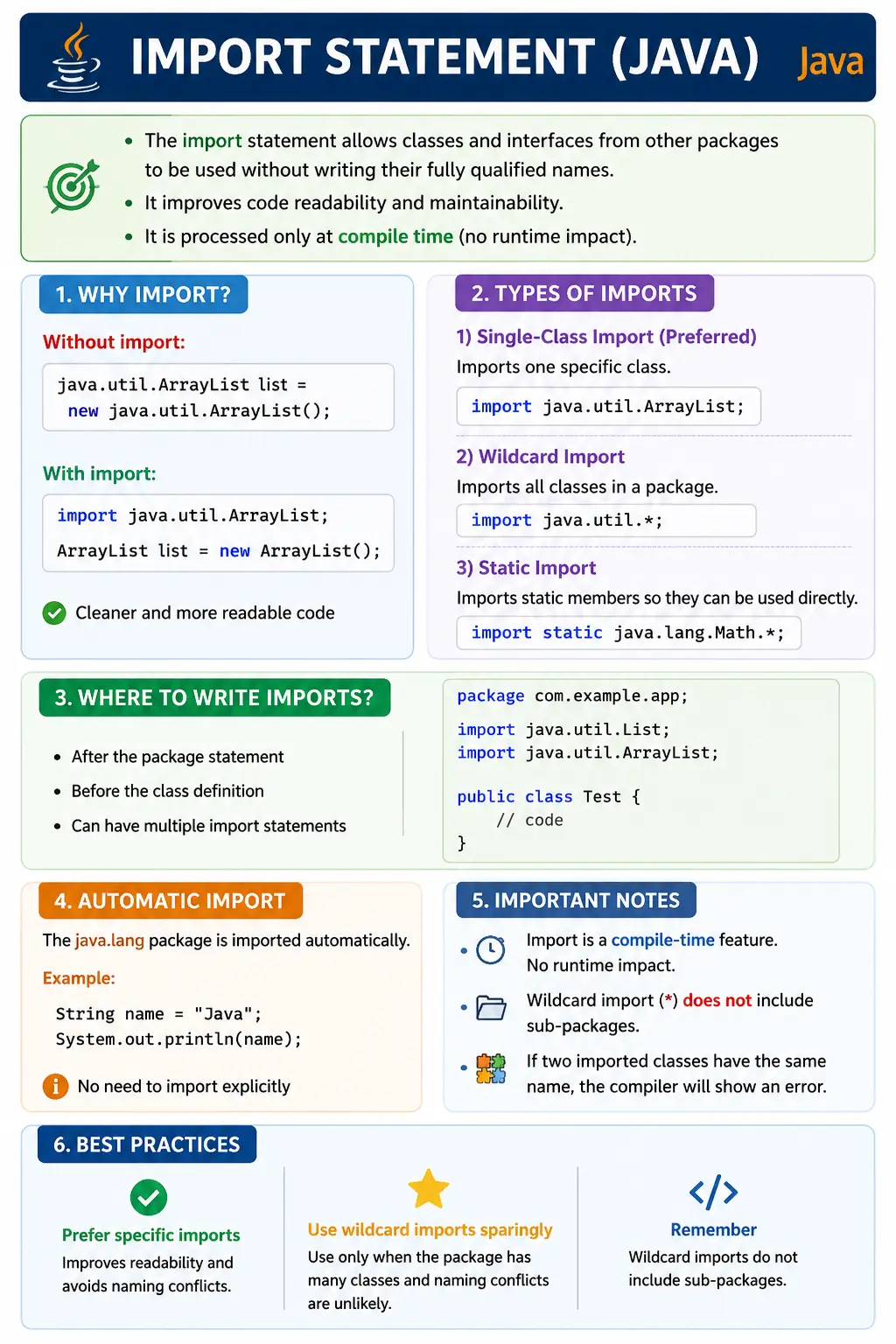
The import statement in Java is used to make classes, interfaces, enums, annotations, and static
members from other packages available in the current source file without repeatedly writing their fully
qualified names. It is one of the first package-related concepts Java learners encounter because almost every
useful program needs classes from packages such as java.util, java.io,
java.time, or a developer-created package.
An import statement does not copy code into a file, load a class at runtime by itself, or increase program
performance. Its purpose is mainly readability and name resolution at compile time. It tells the compiler
which class should be understood when the source file uses a simple class name such as ArrayList
instead of the full name java.util.ArrayList. This makes Java code shorter, clearer, and easier
to maintain.
Understanding imports is important because Java is built around packages. Built-in packages provide standard library classes, and user-defined packages organize application code. The import statement is the bridge that allows one source file to use types from another package conveniently. It is also a common interview topic because it connects several practical areas: package structure, access modifiers, wildcard imports, static imports, name conflicts, and compile-time behavior.
What Is the import Statement?
The import statement is a source-code instruction that allows a Java file to refer to classes
from other packages using short names. If a class is in a different package and is public, it can usually be
used by importing it. Without an import, the programmer must use the fully qualified name every time the class
is referenced.
For example, ArrayList belongs to the java.util package. A Java file can use
java.util.ArrayList directly, but that becomes repetitive. By writing
import java.util.ArrayList; at the top of the file, the code can simply use
ArrayList. The compiler then knows which class the name refers to.
Import statements are not a replacement for access modifiers. A class must still be accessible. If a class is package-private in another package, importing it will not make it accessible. Imports help the compiler resolve names, but they do not override Java's visibility rules.
import packageName.ClassName;
Why import Is Needed
Imports are needed because fully qualified names can make code noisy. Java package names are intentionally
descriptive, but that also means they can become long. Writing java.util.ArrayList once is fine.
Writing it repeatedly across many lines makes the code harder to scan. The import statement removes that
repetition while preserving the meaning.
Without import:
java.util.ArrayList list = new java.util.ArrayList();
With import:
import java.util.ArrayList;
ArrayList list = new ArrayList();
The second version is cleaner and more readable. The import statement appears once near the top of the file, and the rest of the code can focus on the logic. This is especially helpful when a class is used many times or when several classes from different packages appear in the same source file.
Imports also make code easier to refactor and review. A developer can look at the import section and quickly understand which external classes the file depends on. Modern IDEs often organize imports automatically, remove unused imports, and warn when two imports create ambiguity.
Where import Statement Is Written
Import statements are written near the top of a Java source file. If the file has a package declaration, the package statement must come first. Import statements come after the package declaration and before the class, interface, enum, or annotation declaration. This order is part of Java syntax and must be followed.
package com.example.app;
import java.util.List;
import java.util.ArrayList;
public class Test { }
Comments may appear before or between these sections, but executable Java declarations must follow the proper order. A source file can have many imports, but they all belong before the main type declaration. Imports are file-specific. Importing a class in one Java file does not automatically make it imported in another Java file.
Types of import Statements
Java supports normal imports and static imports. Normal imports bring type names into scope, while static imports bring static members into scope. Within normal imports, developers commonly distinguish between single-class imports and wildcard imports. Each has a different impact on readability.
1. Single-Class Import
A single-class import imports one specific class or interface from a package. This is the most commonly recommended style in many codebases because it is explicit. Readers can see exactly which types the source file uses.
import java.util.ArrayList;
Single-class imports help avoid ambiguity. If a file imports java.util.ArrayList, there is no
doubt about which ArrayList is meant. This clarity is valuable in large projects where many
packages and libraries may be used together.
2. Wildcard Import
A wildcard import imports all accessible types directly inside a package. It uses an asterisk after the
package name. For example, import java.util.*; allows the file to use classes such as
ArrayList, HashMap, List, and Set without importing each
one individually.
import java.util.*;
A wildcard import does not import sub-packages. This is an important interview point. If the code imports
java.util.*, it does not automatically import java.util.concurrent.*. Classes in
sub-packages need separate imports. Wildcard imports may be convenient in examples, but explicit imports are
often clearer in production code.
3. Static Import
A static import is different from a normal import. It imports static members of a class, such as constants or static methods. After a static import, the code can use the member name directly without qualifying it with the class name.
import static java.lang.Math.sqrt;
double r = sqrt(16);
Static imports are useful for well-known constants and utility methods, but they should be used carefully. Overusing static imports can make code harder to understand because readers may not immediately know which class provides a method or constant. Used sparingly, they can make mathematical formulas, test assertions, or constants easier to read.
Automatic Import (java.lang)
The java.lang package is automatically imported into every Java source file. This is why common
classes such as String, System, Math, Object,
Exception, and wrapper classes can be used without writing an import statement.
String s = "Java";
System.out.println(s);
This automatic import exists because java.lang contains the most fundamental language support
classes. However, only java.lang receives this special treatment. Classes from
java.util, java.io, java.time, and other packages generally need
explicit import statements unless fully qualified names are used.
import vs Fully Qualified Name
An import statement and a fully qualified name are two ways to refer to a class from another package. They do not change the actual class being used. The difference is how the source code expresses the reference. Imports make the rest of the code shorter. Fully qualified names make individual references explicit.
| Aspect | import | Fully Qualified Name |
|---|---|---|
| Readability | High | Low |
| Usage | Preferred | Rare |
| Scope | Whole file | Single usage |
| Performance | Same | Same |
Imports do not improve or reduce runtime performance. They are resolved by the compiler as part of source code name resolution. At runtime, the JVM still loads classes based on their actual class names and classpath availability. This is a common beginner misconception: imports are about code readability and compilation, not memory usage or execution speed.
Fully qualified names are still useful in specific cases. If two packages contain classes with the same simple name, a fully qualified name can remove ambiguity. It can also make a rare dependency obvious when a class is used only once. In normal code, however, imports are preferred for readability.
Import and Name Conflicts (Interview Favorite)
Name conflicts happen when two imported packages contain classes with the same simple name. A classic example
is Date, which exists in both java.util and java.sql. If both are
imported and the code simply writes Date, the compiler cannot know which one is intended.
import java.util.Date;
import java.sql.Date;
This creates a compile-time ambiguity. The usual solution is to import one class and use the fully qualified name for the other, or use fully qualified names for both if that makes the code clearer.
Solution 1: Use Fully Qualified Name
java.util.Date d = new java.util.Date();
Solution 2: Import One, Qualify the Other
import java.util.Date;
java.sql.Date d2 = new java.sql.Date();
Multiple Imports in a File
A Java file can contain multiple import statements. The compiler does not require a special order for imports, but teams often follow conventions for readability. A common style is to group standard Java imports, third-party imports, project imports, and static imports in a consistent order.
import java.util.List;
import java.util.Map;
Modern IDEs can organize imports automatically. They can remove unused imports, expand wildcard imports, sort import groups, and add missing imports when a class name is used. Even so, developers should understand the underlying rules because import problems often appear during command-line compilation, build failures, or code reviews.
Importing User-Defined Packages
Import statements work the same way for user-defined packages as they do for built-in packages. If a team
creates a utility class in com.mycompany.util, another class can import it and use its simple
name. The imported class must be public if it is used from a different package.
import com.mycompany.util.MathUtil;
This is how large Java projects connect their own modules. A controller may import a service class, a service may import a repository interface, and a test class may import a page object or helper class. Imports reveal dependencies between packages, so they are also useful during design review.
Import and Access Control
Importing a class does not automatically give permission to use it. Java access modifiers still apply. A public class in another package can be imported and used. A package-private class in another package cannot be used, even if an import statement is written. The compiler will reject the access because the class is not visible outside its package.
The same principle applies to members. A public class may contain private, protected, public, and package-private members. Importing the class only makes the class name easier to write. It does not make private methods or fields accessible. This distinction is important in interviews because it separates name resolution from access control.
Import and Classpath
Another important point is that an import statement does not make a library available by itself. The class being imported must already be available to the compiler through the JDK, project source, classpath, module path, or build tool dependencies. If a project writes an import for a class from an external library but the library is not added to the project, compilation will fail.
For example, importing a Selenium class requires the Selenium library to be present as a dependency. Importing
a JDK class such as java.util.List works because the JDK provides it. Importing a project class
works if the source or compiled class is part of the build. The import statement only names the dependency; it
does not install or download it.
Import Organization in Real Projects
Import organization may seem minor, but it affects code readability. A clean import section helps readers see what a file depends on. Unused imports create noise. Wildcard imports can hide exactly which classes are being used. Conflicting imports can produce confusing compile errors. For this reason, many teams configure IDEs and build checks to keep imports clean.
In professional codebases, imports often reveal whether a class is doing too much. If a simple model class has imports from web controllers, database drivers, date/time APIs, file APIs, and multiple business packages, it may indicate mixed responsibilities. A focused class usually has focused imports. This makes import review a small but useful part of code quality.
Static Import Best Practices
Static imports should be used with intention. They are helpful when the static member is well known or when
repeated class qualification makes code less readable. Mathematical methods from Math, constants
used in formulas, and assertion methods in test code are common examples. In those cases, static import can
make the code read more naturally.
Static imports become harmful when they hide the origin of methods or constants. If a file statically imports many methods from several utility classes, readers may struggle to know where each method comes from. That can make debugging and maintenance harder. The best practice is to use static imports sparingly and avoid making the code look as if methods exist locally when they actually come from several external classes.
Same Package Classes and import
Classes in the same package do not need to import each other. If two classes belong to
com.app.service, one class can refer to the other by simple name as long as the referenced class
is accessible. This is because classes in the same package already share the same namespace. Import is mainly
needed when the referenced class is in a different package.
This rule helps explain why package design matters. If several classes collaborate closely, placing them in the same package can reduce import noise and allow controlled package-private access. For example, a public service class and its internal helper class may live in the same package. The public class can use the helper without import, while outside packages cannot access the helper if it has default access.
However, classes should not be placed in the same package only to avoid writing imports. Package placement should reflect responsibility, not typing convenience. If two classes belong to different areas of the application, they should remain in separate packages even if that requires import statements. Clear design is more important than minimizing the number of imports.
How IDEs Handle Imports
Modern Java IDEs such as IntelliJ IDEA, Eclipse, and Visual Studio Code can manage imports automatically. When a developer types a class name, the IDE can suggest the correct import. If a class has multiple possible matches, the IDE usually shows a list so the developer can choose the intended class. This is helpful, but it also means developers should pay attention to which package they select.
Automatic import is convenient, but it can occasionally add the wrong class. For example, a developer may
intend to use java.util.List but accidentally import another List from a different
library. The code may fail to compile or behave differently than expected. Checking the import section is a
simple way to catch this kind of mistake.
IDEs can also remove unused imports and format import order. This keeps source files clean. Many teams enable import cleanup before commit or as part of formatting rules. Clean imports reduce code review noise because reviewers can focus on meaningful changes instead of unused or inconsistent import statements.
Import and External Libraries
Importing classes from external libraries is common in real projects. A test automation project may import Selenium classes, TestNG annotations, JUnit assertions, REST client classes, reporting classes, and utility libraries. A backend project may import Spring, Hibernate, logging, JSON processing, or database-related classes. The import syntax looks the same whether the class comes from the JDK, the project itself, or an external dependency.
The difference is availability. JDK classes are available with the installed Java platform. Project classes are available when they are part of the same source set or compiled output. External library classes are available only when the library is added as a dependency through Maven, Gradle, a manually added JAR, or another build configuration. If the dependency is missing, the import will fail even if the statement is spelled correctly.
This is why developers should not treat an import error as only a syntax problem. Sometimes the class name is correct but the dependency is missing. Sometimes the dependency is present but the wrong version is used. Sometimes the import points to the wrong package because a library changed its package names. Understanding imports helps developers diagnose these build issues more quickly.
Import Statements in Testing and Automation
Java-based testing work uses imports constantly. A Selenium test may import WebDriver,
WebElement, browser driver classes, wait utilities, and locator classes. A TestNG test may
import annotations such as @Test, @BeforeMethod, and assertion methods. A JUnit
test may import test annotations and static assertion helpers.
Static imports are especially common in test code because assertions read naturally when imported statically.
For example, a test may use assertEquals or assertTrue directly instead of writing
the full class name every time. This can improve readability when the source of the assertion methods is
clear and consistent across the project.
At the same time, test projects can become messy if imports are not managed carefully. Automation code often combines JDK classes, framework classes, page objects, utilities, and test data helpers. Clean imports help maintain the framework as it grows. They also help identify when a test class depends on too many framework layers, which may indicate that the test is doing more than it should.
Import Readability and Code Quality
The import section of a Java file is a small but useful signal of code quality. A focused class usually has a focused set of imports. A class with many unrelated imports may be handling too many responsibilities. For example, if a single class imports database classes, web classes, file classes, date classes, payment classes, reporting classes, and test utilities, it may be doing too much.
Import review can also reveal architectural problems. A lower-level package importing a higher-level package may indicate reversed dependency direction. A domain model importing UI classes may indicate that business objects are tied too closely to presentation logic. A utility class importing business services may indicate that the utility package is no longer truly reusable. These issues are not caused by imports, but imports make them visible.
Because of this, experienced developers often glance at imports before reading the full class. Imports show the class's dependencies and provide a quick preview of what the class is likely to do. Keeping imports clean supports readability, reviewability, and long-term maintainability.
Common Beginner Mistakes
Beginners often forget to import classes from packages other than java.lang. This usually
appears when using ArrayList, HashMap, Scanner, File, or
LocalDate for the first time. The error message may say the symbol cannot be found. Adding the
correct import fixes the name resolution problem.
Another common mistake is assuming wildcard imports include sub-packages. import java.util.*;
does not import java.util.concurrent.ExecutorService. The sub-package must be imported
separately. Beginners also confuse normal imports and static imports. A normal import brings a class name into
scope, while a static import brings static members into scope.
Some learners believe imports affect runtime memory usage or performance. They do not. Unused imports may make code messy and may trigger warnings, but they do not load classes just because the import exists. The compiler uses imports to resolve names while compiling the source file.
Interview Perspective
In interviews, a strong answer should define import as a statement used to access classes and
interfaces from other packages without writing fully qualified names. It should mention that imports improve
readability, are processed at compile time, and do not affect runtime performance. It should also mention
that java.lang is imported automatically.
A stronger answer includes practical rules: imports come after the package statement and before the class declaration, wildcard imports do not import sub-packages, static imports import static members rather than classes, and name conflicts can be resolved using fully qualified names. These points show real coding experience and help avoid common traps.
Interview-Ready Answers
Short Answer
The import statement allows access to classes from other packages without using fully qualified names.
Detailed Answer
In Java, the import statement is used to make classes and interfaces from other packages available in the
current source file. It improves code readability and is processed at compile time. The java.lang
package is imported automatically. Import does not override access modifiers, does not include sub-packages
when wildcard syntax is used, and does not affect runtime performance.
Import Statement Examples (1 to 20)
1. Importing a Single Class
import java.util.ArrayList;

class Demo {
    public static void main(String[] args) {
        ArrayList<Integer> list = new ArrayList<>();
        list.add(10);
        System.out.println(list);
    }
}
Explanation
- Imports only ArrayList
- Most recommended style
2. Importing Multiple Classes Explicitly
import java.util.ArrayList;
import java.util.HashMap;

class Demo {
    public static void main(String[] args) {
        ArrayList<String> list = new ArrayList<>();
        HashMap<Integer, String> map = new HashMap<>();
        System.out.println("OK");
    }
}
3. Wildcard Import (*)
import java.util.*;

class Demo {
    public static void main(String[] args) {
        List<Integer> list = new ArrayList<>();
        Set<Integer> set = new HashSet<>();
        System.out.println(list + " " + set);
    }
}
Explanation
- Imports all public classes in the package
- Does not include sub-packages
4. Wildcard Import Does NOT Import Sub-Packages
import java.util.*;
// import java.util.concurrent.*; // needed separately

class Demo {
    public static void main(String[] args) {
        System.out.println("Compile error if concurrent classes used");
    }
}
5. Fully Qualified Name (No import)
class Demo {
    public static void main(String[] args) {
        java.util.ArrayList<String> list = new java.util.ArrayList<>();
        System.out.println(list);
    }
}
Explanation
- Avoids import
- Used to resolve name conflicts
6. Import Conflict: Same Class Name
import java.util.Date;
import java.sql.Date; // conflict

class Demo {
    public static void main(String[] args) {
        // Date d = new Date(); // ambiguous
    }
}
7. Resolving Import Conflict Using Fully Qualified Name
import java.util.Date;

class Demo {
    public static void main(String[] args) {
        Date d1 = new Date();
        java.sql.Date d2 = new java.sql.Date(System.currentTimeMillis());
        System.out.println(d1);
        System.out.println(d2);
    }
}
8. Static Import: Single Member
import static java.lang.Math.sqrt;

class Demo {
    public static void main(String[] args) {
        System.out.println(sqrt(25));
    }
}
Output
5.0
9. Static Import: Multiple Members
import static java.lang.Math.max;
import static java.lang.Math.min;

class Demo {
    public static void main(String[] args) {
        System.out.println(max(10, 20));
        System.out.println(min(10, 20));
    }
}
10. Static Wildcard Import
import static java.lang.Math.*;

class Demo {
    public static void main(String[] args) {
        System.out.println(pow(2, 3));
        System.out.println(abs(-10));
    }
}
11. Static Import from User-Defined Class
package util;

public class Constants {
    public static final int TIMEOUT = 30;
}

import static util.Constants.TIMEOUT;

class Demo {
    public static void main(String[] args) {
        System.out.println(TIMEOUT);
    }
}
12. Importing User-Defined Package Class
import com.app.util.MathUtil;

class Demo {
    public static void main(String[] args) {
        System.out.println(MathUtil.add(2, 3));
    }
}
13. Importing Same Package Classes (Not Required)
package com.demo;

class A {}

class B {
    A a; // no import needed
}
Explanation
- Classes in the same package do not need import
14. java.lang Package: No Import Needed
class Demo {
    public static void main(String[] args) {
        String s = "Java";
        System.out.println(s.length());
    }
}
Explanation
- java.lang is auto-imported
15. Import Order (Convention)
import java.util.*;             // standard library
import com.app.util.Helper;     // user-defined
import static java.lang.Math.*; // static imports
Explanation
- Improves readability
- Follow industry standards
16. Importing Interface
import java.util.List;

class Demo {
    public static void main(String[] args) {
        List<String> list;
    }
}
17. Importing Abstract Class
import java.util.AbstractList;

class Demo {
    public static void main(String[] args) {
        System.out.println("Abstract class imported");
    }
}
18. Import Is Compile-Time Only
import java.util.ArrayList;

class Demo {
    public static void main(String[] args) {
        System.out.println("Import has no runtime impact");
    }
}
Explanation
- Imports do not affect runtime behavior
19. Common Interview Trap
import java.util.*;

class Demo {
    public static void main(String[] args) {
        // Scanner sc; // OK
        // File f;     // File is in java.io, not java.util
    }
}
20. Interview Summary: import Statement
import java.util.List;
import static java.lang.Math.PI;

class Demo {
    public static void main(String[] args) {
        System.out.println(PI);
    }
}
Key Points
- Used to access classes without full names
- Wildcard does not include sub-packages
- static import imports members, not classes
- java.lang needs no import
- Import happens at compile time only
Key Takeaway
import improves readability, not performance. Use specific imports for clarity and avoid wildcard imports unless justified.