if-else Statement
Decision-making lies at the heart of every programming language, and in Java, the if-else statement is one of the most fundamental constructs used to control program flow. It allows a program to choose between two alternative execution paths based on a condition, making it indispensable for implementing real-world logic.
Whether it is validating user input, enforcing business rules, controlling application flow, or handling different system states, the if-else statement plays a central role. Understanding it deeply is not just important for beginners but also critical for writing clean, maintainable, and correct code in professional environments.
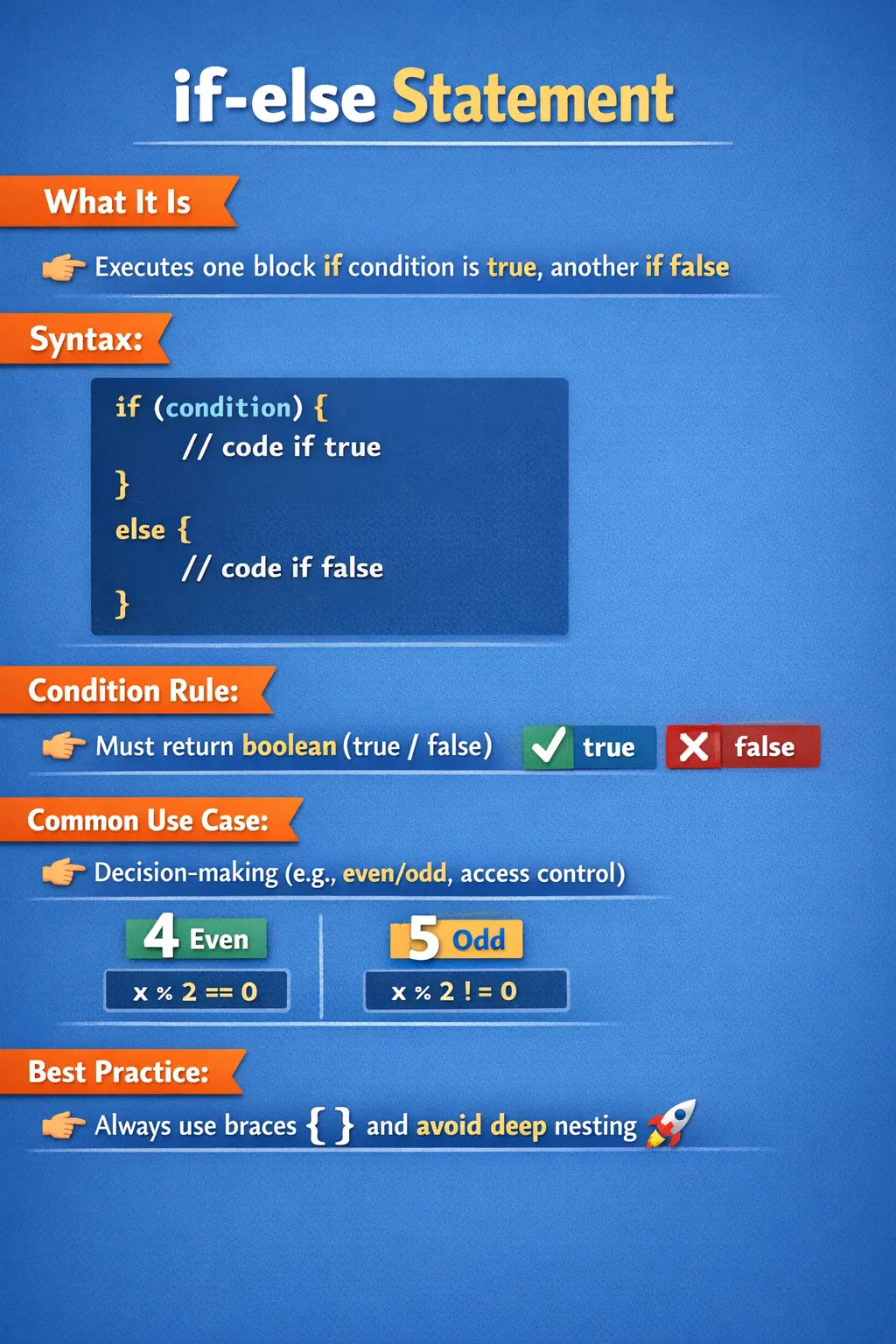
Understanding the Role of if-else in Programming
At a conceptual level, software systems constantly make decisions. A banking application checks whether a user has sufficient balance before processing a transaction. An e-commerce system determines whether a product is in stock before allowing checkout. A login system verifies credentials before granting access.
All of these scenarios involve evaluating a condition and choosing one path over another. The if-else statement provides a structured way to implement this decision-making logic.
Unlike a simple if statement, which executes code only when a condition is true, the if-else statement ensures that one of two paths is always executed. This makes it particularly useful when handling mutually exclusive outcomes.
What Is the if-else Statement?
The if-else statement in Java is a conditional control structure that evaluates a boolean expression and executes one block of code if the condition is true and another block if the condition is false.
It ensures that the program handles both possible outcomes of a condition, making logic explicit and predictable. This dual-path execution is what distinguishes if-else from a standalone if statement.
In its simplest form, the if-else statement provides clarity by clearly defining what should happen in both success and failure scenarios.
Basic Syntax and Execution Flow
The structure of the if-else statement is straightforward, but its execution depends entirely on the evaluation of the condition.
When the program encounters an if-else statement, it first evaluates the condition inside the parentheses. If the condition evaluates to true, the block associated with the if statement is executed. If the condition evaluates to false, the block associated with the else statement is executed.
This guarantees that exactly one block of code runs, ensuring deterministic behavior.
For example, when checking whether a number is even or odd, the condition determines which message is displayed. The program evaluates the modulus operation and executes the corresponding block accordingly.
Importance of Boolean Conditions
One of the most important rules of the if-else statement in Java is that the condition must evaluate to a boolean value. This is a strict requirement enforced by the Java compiler.
Unlike some other programming languages that allow non-boolean expressions, Java requires explicit boolean conditions. This design choice improves code clarity and reduces ambiguity.
Relational operators such as greater than, less than, and equality checks are commonly used to form conditions. Logical operators such as AND and OR are often used to combine multiple conditions.
Ensuring that conditions are clear and meaningful is essential for writing maintainable code. Poorly written conditions can lead to logical errors that are difficult to debug.
Real-World Use of if-else Logic
In real-world applications, the if-else statement is rarely used in isolation. It is often part of larger workflows that involve multiple validations and decision points.
Consider an authentication system. The application must check whether the username exists, whether the password matches, and whether the account is active. Each of these checks may involve its own if-else logic.
Similarly, in a payment processing system, conditions determine whether a transaction is approved, declined, or flagged for review. These decisions are based on multiple factors, all implemented using conditional logic.
The versatility of the if-else statement makes it suitable for handling a wide range of scenarios, from simple validations to complex business rules.
The Role of Braces and Code Structure
While Java allows omission of braces when only one statement is present, this practice is generally discouraged. Using braces consistently improves readability and prevents logical errors.
In larger codebases, conditions often evolve over time. What starts as a single statement may later expand into multiple lines. Without braces, such changes can introduce subtle bugs that are difficult to detect.
Using braces also makes the structure of the code clearer, especially when dealing with nested conditions. It visually separates different blocks and helps developers understand the flow of execution.
Combining Conditions with Logical Operators
The power of the if-else statement increases significantly when combined with logical operators. These operators allow multiple conditions to be evaluated together, enabling more complex decision-making.
For example, access to a system may depend on both age and possession of valid identification. In such cases, logical AND ensures that both conditions must be satisfied.
Similarly, logical OR can be used when at least one condition must be true. This is common in role-based access systems where different roles may grant access.
Understanding how logical operators work, including their short-circuit behavior, is essential for writing efficient and safe conditions.
Nested if-else Statements
In many scenarios, decisions are not binary but hierarchical. This is where nested if-else statements come into play.
A nested if-else structure allows one condition to be evaluated within another. This is useful when decisions depend on multiple levels of criteria.
For example, a grading system may first check whether a student has passed and then determine the grade based on score ranges. Each level of decision builds upon the previous one.
While nested conditions provide flexibility, excessive nesting can reduce readability. It is important to structure nested logic carefully and consider alternative approaches when complexity increases.
if-else vs Ternary Operator
The ternary operator is often compared with the if-else statement because it provides a compact way to express conditional logic. However, the two are not interchangeable in all scenarios.
The ternary operator is best suited for simple conditions where a value needs to be assigned based on a boolean expression. It improves conciseness but can reduce readability when overused.
The if-else statement, on the other hand, is more suitable for complex logic involving multiple statements or side effects. It provides clarity and structure, making it easier to understand and maintain.
Choosing between the two depends on the complexity of the condition and the need for readability.
Why if-else Is Different from a Simple if
A simple if statement checks whether a condition is true and executes a block only in that case. If the condition is false, nothing special happens and the program continues. The if-else statement extends this idea by defining both outcomes clearly. It says what should happen when the condition is true and what should happen when the condition is false. This makes the flow more complete and easier to reason about.
This difference matters in real applications because many decisions require a response in both directions. If a login attempt succeeds, the user should move forward. If it fails, the user should receive feedback. If a payment is approved, the order should be confirmed. If it is declined, the system should explain the rejection or stop the transaction safely. In these cases, doing nothing on the false path would create an incomplete experience.
The if-else structure also helps communicate intention. When another developer reads the code, the presence of an else block shows that the false case was considered deliberately. This reduces ambiguity. It is not left to the reader to wonder whether the false case was intentionally ignored or accidentally forgotten. Good decision-making code should make both the chosen path and the rejected path visible when both are important.
Thinking in Terms of Two Outcomes
The most useful way to understand if-else is to think in terms of two mutually exclusive outcomes. A condition cannot be both true and false at the same time. When Java evaluates the condition, exactly one block is selected. The if block runs when the condition is true. The else block runs when the condition is false. After that block completes, execution continues after the entire if-else structure.
This makes if-else ideal for decisions such as valid or invalid, allowed or denied, pass or fail, active or inactive, available or unavailable, and eligible or ineligible. These are binary decisions where the program must make a clear choice. The value of if-else is not only that it executes code, but that it represents a clear decision model in the program.
When a decision is not truly binary, developers should be careful. Sometimes a problem appears to have two outcomes at first but later grows into several outcomes. For example, payment status may start as approved or declined, but later include pending, failed, under review, or cancelled. In such cases, a simple if-else may no longer express the business reality well. The structure should match the actual decision being modeled.
Designing Meaningful if-else Conditions
The condition inside an if-else statement should be meaningful enough that the reader can understand the decision without excessive mental effort. A condition is not just a technical expression; it is the rule that separates one path from another. If the condition is unclear, both branches become harder to trust.
A good condition often reads like a yes-or-no question. Is the user authenticated? Is the account active? Is the order amount greater than the minimum required value? Is the input valid? When conditions are written this way, the if block naturally represents the yes path, and the else block represents the no path. This makes the code easier to read and easier to test.
For complex decisions, it is often better to calculate the condition separately using a well-named boolean variable or method. A variable named hasSufficientBalance is more readable than a long expression involving multiple account fields. A method named canPlaceOrder() is easier to understand than a large combination of stock, payment, address, and user-status checks inside one pair of parentheses. The compiler does not require this style, but maintainable code benefits from it.
Flow of Execution in Detail
When Java reaches an if-else statement, it first evaluates the condition. The condition may be a boolean variable, a comparison, a logical expression, or a method call that returns boolean. Once the result is known, Java selects one branch. It does not execute both branches. It does not evaluate the else block first. The condition controls the selection, and the selected block executes from top to bottom.
After the selected block finishes, Java continues with the next statement after the if-else structure. This is important when reading code because variables modified inside one branch may affect later statements. If both branches assign a value to the same variable, the code after the if-else can use that variable knowing that one assignment definitely happened. This is a common pattern when a program must calculate a result differently depending on a condition.
However, developers must also be careful with variable scope. A variable declared inside the if block is available only inside that block. A variable declared inside the else block is available only inside the else block. If a value is needed after the if-else, the variable should be declared before the structure and assigned inside the branches. Understanding this scope behavior prevents common compilation errors and improves the design of conditional code.
Using if-else for Validation Logic
Validation is one of the clearest use cases for if-else. A program receives input, checks whether it satisfies a condition, and then either accepts or rejects it. For example, a registration form may check whether an email is present and properly formatted. If it is valid, the registration process can continue. Otherwise, the program should return an error message and stop the invalid data from moving further into the system.
In validation logic, the else branch is just as important as the if branch. Many beginners write code only for the successful case and forget to handle invalid input properly. This can result in confusing behavior, silent failures, or later errors in the workflow. A strong validation block clearly defines what happens when the data is valid and what happens when it is not valid.
Validation conditions should also be ordered carefully. Basic checks should happen before dependent checks. For example, check whether a value exists before checking its length or pattern. This prevents runtime errors and makes the validation flow easier to understand. The if-else statement gives developers precise control over this sequence of checks.
Using if-else for Business Rules
Business rules often appear as if-else logic because they define what the system should do under different conditions. A discount may apply if the customer belongs to a specific membership level. A loan application may be approved if the applicant meets income and credit criteria. A support ticket may be escalated if it remains unresolved beyond a defined time. These are not merely technical decisions; they represent business policies.
When if-else statements implement business rules, the code should be written in a way that preserves the meaning of the rule. If the condition is difficult to understand, the business behavior becomes difficult to verify. This is why meaningful method names and variables are so useful. They allow the code to express the business decision clearly instead of exposing every low-level comparison directly.
Business rules also change frequently. A threshold may be adjusted, a new eligibility condition may be added, or a rule may vary by region. If conditional logic is scattered across the application, such changes become risky. Keeping business decisions well-structured and readable reduces maintenance cost and helps prevent accidental behavior changes.
if-else and Error Handling
The if-else statement is often used to detect and handle expected error conditions. Not every problem requires an exception. Sometimes the program can check for an invalid state and respond gracefully. For example, if a requested file does not exist, the application may show a message. If a cart is empty, the checkout button may remain disabled. If an account is locked, the login flow may stop with a clear explanation.
This kind of defensive programming improves reliability. Instead of allowing invalid conditions to cause failures later, the program identifies them early and chooses an appropriate path. The if branch may handle the valid state, while the else branch handles the invalid state. In other cases, the if branch may detect the invalid state and return early, while the rest of the method handles the normal path.
The key is to avoid using if-else as a replacement for proper exception handling when exceptional failures truly occur. Conditional logic is best for expected decisions that are part of normal program behavior. Exceptions are better for unexpected or exceptional situations. Understanding the difference helps developers design cleaner and more reliable code.
Avoiding Deep if-else Chains
A long chain of if-else-if statements can be valid, but it can also become difficult to maintain. When many branches are added, the reader must understand the order of every condition and how each branch excludes the others. A small change in one condition can affect later conditions. This becomes especially risky when the branches represent business rules.
One way to reduce complexity is to use early returns for invalid or special cases. Another is to extract conditions into methods with clear names. For some problems, a switch statement may be more readable, especially when comparing one value against several known constants. In larger systems, polymorphism, strategy patterns, maps of handlers, or rule engines may be better than a large conditional chain.
The important point is not that if-else chains are always bad. They are useful for small and clear decision sets. The problem is using them beyond the point where they remain understandable. Good developers recognize when conditional logic should be simplified or redesigned.
if-else and Code Readability
Readability matters because most code is maintained longer than it is originally written. An if-else statement that seems obvious to the original developer may confuse someone else later if the condition is too dense or the branches are too large. Clean conditional code should reveal the decision quickly.
A good practice is to keep each branch focused. If the if block contains many unrelated actions, the decision becomes harder to understand. If the else block does something completely different from what the condition suggests, the code becomes surprising. Each branch should represent a clear outcome of the condition.
Formatting also matters. Braces, indentation, spacing, and consistent structure help the reader see where each branch begins and ends. These details may look small, but they reduce mistakes during maintenance. In professional Java development, clarity is not optional decoration; it is part of correctness.
Testing if-else Logic
Every if-else statement creates at least two execution paths, and both should be tested when the logic matters. Testing only the if branch leaves the else behavior unverified. Testing only the else branch leaves the successful path unverified. A complete test approach considers both outcomes and verifies that the program responds correctly in each case.
Conditions involving boundaries require special attention. If a rule checks whether marks are greater than or equal to 35, test values below 35, exactly 35, and above 35. If a rule checks whether a user is eligible based on age, test the age just below the threshold, at the threshold, and above it. Boundary-focused testing often reveals mistakes such as using greater than instead of greater than or equal to.
For compound conditions, testers and developers should consider meaningful combinations. If access requires both active status and valid permission, test active with permission, active without permission, inactive with permission, and inactive without permission where relevant. This ensures that the if-else logic handles realistic variations rather than only the simplest happy path.
Debugging if-else Problems
When if-else logic behaves unexpectedly, the first step is to inspect the condition. Many bugs come from assumptions about what the condition evaluates to. Logging or debugging the values used in the condition often reveals the problem quickly. A variable may contain a different value than expected, a string comparison may be wrong, or a boolean method may return false because of hidden validation rules.
The second step is to check the order of conditions. In an if-else-if chain, Java evaluates conditions from top to bottom and executes the first matching branch. If a broad condition appears before a specific condition, the specific condition may never be reached. This is common in range checks, grading logic, pricing rules, and category selection.
The third step is to check braces and indentation. Missing braces can make code appear visually different from how Java actually executes it. If a statement is outside the intended block, it may run every time instead of only under a condition. This is why consistent braces are recommended even when Java allows a single unbraced statement.
How to Explain if-else in Interviews
In interviews, a strong explanation of if-else should begin with the basic definition: it evaluates a boolean condition and executes one of two blocks depending on whether the condition is true or false. From there, explain that exactly one branch runs and that Java requires the condition to produce a boolean value.
A practical answer should also include examples. You can explain login success versus failure, pass versus fail, eligible versus ineligible, or payment approved versus declined. These examples show that you understand how if-else applies to real application logic, not just syntax.
Finally, mention best practices. Always use braces, keep conditions readable, avoid deep nesting, extract complex rules into methods, and test both branches. This kind of answer demonstrates both beginner-level correctness and professional-level coding judgment.
Common Pitfalls and Mistakes
Despite its simplicity, the if-else statement is a common source of errors, especially for beginners. One of the most frequent mistakes is using the assignment operator instead of the equality operator in conditions.
Another common issue is forgetting to use braces, which can lead to unintended execution paths. Deep nesting is also a problem, as it makes code harder to read and maintain.
Writing overly complex conditions without breaking them into smaller parts can introduce logical errors. It is often better to simplify conditions and use intermediate variables for clarity.
Understanding these pitfalls and avoiding them is essential for writing robust code.
Best Practices for Using if-else
To use the if-else statement effectively, certain best practices should be followed. Conditions should be clear and meaningful, avoiding unnecessary complexity. Code blocks should be properly structured with braces to enhance readability.
It is also important to keep logic simple and avoid deep nesting. When conditions become too complex, refactoring into smaller methods or using alternative structures can improve maintainability.
Using descriptive variable names and adding comments where necessary can further enhance clarity. These practices not only improve code quality but also make it easier for others to understand and maintain the code.
if-else in Large-Scale Applications
In enterprise applications, the if-else statement is often part of larger decision-making frameworks. It may be used in combination with design patterns, configuration-driven logic, or rule engines.
For example, instead of hardcoding multiple conditions, some systems use configuration files or databases to define rules dynamically. This reduces the need for complex if-else chains and improves flexibility.
However, even in such systems, the fundamental concept of conditional logic remains the same. The if-else statement serves as the building block for more advanced constructs.
Interview Perspective
From an interview perspective, the if-else statement is a foundational topic that tests a candidate’s understanding of control flow and logical reasoning.
A strong answer should clearly explain that the if-else statement evaluates a boolean condition and executes one of two code blocks based on the result. Candidates should also demonstrate understanding of condition rules, logical operators, and common pitfalls.
Discussing real-world use cases and best practices can further strengthen the response and show practical knowledge.
Key Takeaway
The if-else statement is one of the most essential constructs in Java, enabling programs to make decisions and handle different scenarios effectively. It provides a clear and structured way to manage alternative execution paths, making code predictable and maintainable.
Mastering the if-else statement goes beyond understanding syntax. It involves writing clear conditions, structuring code properly, and applying logic thoughtfully in real-world scenarios.
As one of the building blocks of programming, the if-else statement lays the foundation for more advanced concepts and is indispensable for writing reliable and efficient Java applications.
1. Basic if–else
int age = 16;
if (age >= 18) {
System.out.println("Adult");
} else {
System.out.println("Minor");
}
Explanation
- If condition is true, if block executes.
- Otherwise, else block executes.
2. if–else with Boolean Variable
boolean isActive = false;
if (isActive) {
System.out.println("Account active");
} else {
System.out.println("Account inactive");
}
Explanation
- Boolean variable directly controls flow.
- No comparison with == true needed.
3. if–else with Relational Operator
int marks = 40;
if (marks >= 35) {
System.out.println("Pass");
} else {
System.out.println("Fail");
}
Explanation
- Relational expression evaluated first.
- Common academic / interview example.
4. if–else with Logical AND (&&)
int age = 25;
boolean hasLicense = true;
if (age >= 18 && hasLicense) {
System.out.println("Can drive");
} else {
System.out.println("Cannot drive");
}
Explanation
- Both conditions must be true.
- Uses short-circuit evaluation.
5. if–else with Logical OR (||)
boolean isAdmin = false;
boolean isManager = true;
if (isAdmin || isManager) {
System.out.println("Access granted");
} else {
System.out.println("Access denied");
}
Explanation
- Executes if block if any one condition is true.
6. if–else with NOT Operator (!)
boolean isBlocked = true;
if (!isBlocked) {
System.out.println("User allowed");
} else {
System.out.println("User blocked");
}
Explanation
- ! negates the condition.
- Improves readability in many cases.
7. if–else with Arithmetic Expression
int a = 10;
int b = 20;
if (a + b > 25) {
System.out.println("Sum is greater than 25");
} else {
System.out.println("Sum is 25 or less");
}
Explanation
- Expression evaluated first.
- Result used in condition.
8. if–else Inside Loop
for (int i = 1; i <= 5; i++) {
if (i % 2 == 0) {
System.out.println(i + " is even");
} else {
System.out.println(i + " is odd");
}
}
Explanation
- if–else executes for each iteration.
- Very common real-world pattern.
9. Nested if–else
int age = 20;
boolean hasID = false;
if (age >= 18) {
if (hasID) {
System.out.println("Entry allowed");
} else {
System.out.println("ID required");
}
} else {
System.out.println("Underage");
}
Explanation
- Inner if–else runs only when outer condition is true.
- Useful for multi-level checks.
10. if–else if–else vs Nested if–else
int score = 68;
if (score >= 90) {
System.out.println("Grade A");
} else if (score >= 75) {
System.out.println("Grade B");
} else if (score >= 60) {
System.out.println("Grade C");
} else {
System.out.println("Fail");
}
Explanation
- Cleaner alternative to nested if–else.
- First matching block executes.
11. if–else with Method Call
int a = 10;
int b = 20;
if (Math.max(a, b) == b) {
System.out.println("b is greater");
} else {
System.out.println("a is greater");
}
Explanation
- Method executes first.
- Result controls the flow.
12. if–else with Assignment (Valid but Risky)
int x = 5;
if ((x = 10) > 7) {
System.out.println(x);
} else {
System.out.println("Less");
}
Explanation
- Assignment happens before comparison.
- Works, but can cause bugs.
- Avoid in production code.
13. if–else with Null Safety
String name = null;
if (name != null) {
System.out.println(name.length());
} else {
System.out.println("Name is null");
}
Explanation
- Prevents NullPointerException.
- Always check null first.
14. Wrong Order Causing Exception
String name = null;
// if (name.length() > 3) {
//     System.out.println("Valid");
// } else {
//     System.out.println("Invalid");
// }
Explanation
- Calling method on null causes runtime exception.
- Must check null before using the object.
15. if–else with Wrapper Class
Integer value = 10;
if (value == 10) {
System.out.println("Matched");
} else {
System.out.println("Not matched");
}
Explanation
- Wrapper is unboxed to primitive.
- Comparison happens on primitive values.
16. if–else with Boolean Wrapper (Trap)
Boolean flag = null;
// if (flag) {
//     System.out.println("True");
// } else {
//     System.out.println("False");
// }
Explanation
- Auto-unboxing null causes NullPointerException.
- Must use null-safe checks.
17. Safe Boolean Wrapper Handling
Boolean flag = null;
if (Boolean.TRUE.equals(flag)) {
System.out.println("True");
} else {
System.out.println("False or null");
}
Explanation
- Null-safe comparison.
- Recommended best practice.
18. if–else vs Ternary (Readability)
int temp = 30;
if (temp > 25) {
System.out.println("Hot");
} else {
System.out.println("Cool");
}
Explanation
- Clearer than ternary for multi-step logic.
- Preferred for maintainability.
19. Missing Braces Bug (Interview Favorite)
int x = 3;
if (x > 5)
System.out.println("Greater");
else
System.out.println("Smaller");
System.out.println("Always executed");
Explanation
- Only first statement belongs to else.
- Second println runs always.
- Always use braces {}.
20. Interview Summary Example
int a = 15;
int b = 10;
if (a > b) {
System.out.println("a is greater");
} else {
System.out.println("b is greater or equal");
}
Explanation
- Classic if–else comparison.
- Frequently asked in interviews.