How Java Works (Compilation & Execution Flow)
Understanding how Java works internally is essential for mastering platform independence, diagnosing runtime errors, and explaining performance behavior in real-world projects. Java follows a structured two-step model: compilation and execution. This separation allows Java programs to run on multiple platforms without modification while maintaining performance and security.
Why Understanding Java Execution Matters
Understanding how Java works is important because Java is not executed in the same way as a simple native program. A Java program passes through multiple stages before the user sees output. The source code is written by the developer, checked and compiled by the Java compiler, converted into bytecode, loaded by the JVM, verified for safety, executed by the execution engine, optimized by the JIT compiler, and supported by memory management and garbage collection. Each stage has a purpose, and each stage can produce different kinds of errors.
This knowledge is useful in real projects because many Java issues are not solved by looking only at source code. A program may compile but fail at runtime. A test automation suite may work on one machine but fail on a CI server. A production application may start successfully but later run out of heap memory. A class may exist in the project but still fail to load because of a dependency or classpath issue. When developers and testers understand Java’s compilation and execution flow, they can troubleshoot problems logically instead of guessing.
The Two-Stage Java Model
Java uses a two-stage model: compilation followed by execution. In the compilation stage, source code is converted into bytecode. In the execution stage, the JVM runs that bytecode. This is different from languages that compile directly into platform-specific native binaries. It is also different from languages that are interpreted directly from source code without a separate bytecode compilation stage. Java combines both ideas: it compiles first, then executes through a managed runtime.
This model is the foundation of Java’s platform independence. The compiled bytecode is not tied to a specific operating system. Instead, each operating system has its own JVM implementation capable of executing the same bytecode. The JVM provides the bridge between portable bytecode and platform-specific execution. This is why a Java program compiled on one system can run on another compatible system without changing the source code.
Source Code Is Human-Readable, Not Directly Executable
Java source code is written in .java files. These files contain human-readable instructions that follow Java syntax. Developers write classes, methods, variables, control statements, loops, object creation logic, exception handling, and other program behavior. Although this source code is meaningful to developers, the operating system cannot execute it directly. It must first be translated into a format the Java runtime understands.
This is why compilation is required. The compiler acts as the first quality gate. It checks whether the Java code follows language rules. If a semicolon is missing, a variable type is incorrect, a method is called with the wrong arguments, or a class reference cannot be resolved, compilation fails. These compile-time checks prevent many basic errors from reaching runtime. This makes Java more reliable than purely dynamic execution models where many mistakes are discovered only while the program is running.
What javac Really Does
The javac compiler converts Java source code into bytecode. It does more than simply translate text. It performs syntax checking, type checking, access checking, method signature validation, class dependency checking, and structural validation. If the source code violates Java rules, the compiler reports errors and no valid class file is produced. This gives developers immediate feedback before execution begins.
When compilation succeeds, the output is a .class file. This class file contains bytecode instructions, metadata about the class, method information, field information, and constant pool data. The class file is not meant to be read by humans in normal development. It is meant to be loaded and executed by the JVM. The most important point is that bytecode is portable. It is not native machine code for Windows, Linux, macOS, x86, or ARM. It is JVM-level instruction code.
Bytecode as the Portable Middle Layer
Bytecode is the key to understanding how Java works. It sits between source code and machine code. Source code is written by humans. Machine code is executed by hardware. Bytecode is an intermediate representation designed for the JVM. This design gives Java flexibility. The same bytecode can be executed on different platforms as long as a compatible JVM exists for each platform.
This portable middle layer also supports security and optimization. Before bytecode runs, the JVM can verify it. During execution, the JVM can interpret it or compile frequently used parts into native code. This means Java can combine portability, safety, and performance. Without bytecode, Java would either need to compile separately for every platform or rely on direct source interpretation. Bytecode gives Java a balanced execution model.
Starting a Java Program
When a Java program is started using the java command, the JVM begins the runtime process. For a simple command such as java Hello, the JVM looks for the compiled Hello class and then looks for the main method. The main method is the entry point of a standard Java application. If the class file is missing, the classpath is wrong, or the main method is not defined correctly, the program cannot start.
This explains many beginner errors. A compilation error happens before a class file is created. A runtime startup error may happen because the class exists in the wrong location, the classpath is incorrect, or the JVM cannot find the required main method. Understanding the difference between compilation and execution helps developers interpret error messages correctly. Not every Java error has the same cause or occurs at the same stage.
Class Loading During Execution
Java does not necessarily load every class at the beginning of execution. The JVM uses the Class Loader subsystem to load classes when they are needed. This allows Java applications to be flexible and efficient. The class loader finds class files, loads bytecode into memory, and prepares classes for use. Core Java classes, library classes, and application classes may be loaded by different class loaders according to a delegation model.
Class loading is important in real projects because many runtime errors are related to missing or mismatched classes. A ClassNotFoundException may occur when a class is not available in the expected classpath. A NoClassDefFoundError may occur when a class was available during compilation but missing during runtime. Dependency version conflicts can also create class loading problems. Understanding this stage helps developers and automation engineers debug build and runtime failures.
Bytecode Verification Before Execution
After classes are loaded, bytecode verification ensures that the bytecode is safe and valid. The verifier checks whether instructions follow JVM rules, whether stack usage is correct, whether type safety is maintained, and whether the bytecode avoids illegal memory access. This verification step protects the JVM and the operating system from invalid or malicious code.
Bytecode verification is one reason Java is considered secure. Java programs do not get unrestricted low-level access to memory. The runtime checks the bytecode before execution and ensures that it follows the defined execution model. This is especially important in networked and enterprise environments where applications may include many libraries and dependencies. Verification adds a safety layer between compiled code and runtime execution.
Execution Engine: Running the Program
Once bytecode is loaded and verified, the JVM’s Execution Engine runs it. The execution engine is responsible for converting bytecode instructions into actions the machine can perform. It handles method calls, object operations, arithmetic, branching, exception handling, synchronization, and interaction with runtime memory. This is where the program actually executes.
The execution engine uses both interpretation and JIT compilation. The interpreter can execute bytecode instruction by instruction. This allows the program to start and run without first converting all bytecode into native machine code. However, interpreting the same code repeatedly can be slower. That is where the JIT compiler becomes important. Java performance depends on this cooperation between interpreter and runtime compiler.
Interpreter and JIT Working Together
The interpreter reads bytecode and executes it step by step. This is simple, reliable, and flexible. But if a method or loop runs many times, interpreting the same instructions repeatedly is inefficient. The JVM monitors execution and identifies frequently used code paths, often called hot spots. The JIT compiler then converts those hot bytecode sections into optimized native machine code for the current platform.
This is why saying Java is purely interpreted is incorrect. Java source code is compiled to bytecode before execution, and frequently executed bytecode can be compiled again into native code during runtime. This layered approach allows Java to remain portable while still achieving strong performance. In long-running server applications, JIT optimization can significantly improve speed after the JVM has observed runtime behavior.
Runtime Memory Management
During execution, the JVM manages memory through structured runtime data areas. The Heap stores objects. The Stack stores method call frames and local variables for each thread. The Method Area stores class-level metadata and static information. The Program Counter Register tracks the current instruction for each thread. The Native Method Stack supports native code execution. Each area has a different purpose.
Understanding these memory areas helps explain common Java errors. OutOfMemoryError often relates to heap pressure or excessive memory usage. StackOverflowError usually occurs when method calls become too deep, often due to uncontrolled recursion. Confusing local variables, instance variables, and static variables becomes easier to avoid when the JVM memory model is understood. Runtime memory is not just theory; it affects debugging and performance.
Heap, Stack, and Object Lifecycle
Objects created with new are stored on the heap. References to those objects may be stored in local variables, instance variables, static variables, or collections. When a method is called, its local variables and execution frame are stored on the stack for the current thread. When the method finishes, its stack frame is removed. The object on the heap may continue to exist if some reachable reference still points to it.
This distinction is important for understanding garbage collection. An object becomes eligible for garbage collection only when it is no longer reachable from active references. If a collection, static variable, or long-lived object still holds a reference, the garbage collector cannot remove it. This is why Java can still have memory leaks even though memory is managed automatically. The JVM handles cleanup, but developers must avoid retaining unnecessary references.
Garbage Collection During Execution
Garbage collection is the JVM process that removes unused objects from heap memory. Developers do not manually free memory as they would in some lower-level languages. Instead, the JVM identifies objects that are no longer reachable and reclaims their memory. This reduces many memory management errors and improves application safety.
Garbage collection also affects performance. When memory usage grows, the JVM may spend time identifying and cleaning unused objects. Modern garbage collectors are highly optimized, but poor object usage can still create performance issues. Applications that create too many temporary objects, retain large data structures, or misuse static references may experience memory pressure. Understanding garbage collection helps developers write more efficient Java programs.
JVM Interaction with the Operating System
The JVM runs as a process on the operating system. The Java program does not directly communicate with hardware for most operations. Instead, Java code calls JVM services and standard libraries, the JVM interacts with the operating system, and the operating system interacts with hardware. File access, network communication, thread scheduling, memory allocation, and process management all involve this layered interaction.
This layer is what makes Java portable but not independent of runtime installation. A machine needs a compatible Java runtime to execute bytecode. The JVM implementation handles operating-system-specific details. This is why Java bytecode can remain the same while JVM binaries differ across Windows, Linux, and macOS. The application is portable because the runtime layer absorbs platform differences.
Compilation Errors vs Runtime Errors
One of the most useful practical distinctions is the difference between compilation errors and runtime errors. Compilation errors occur when javac cannot produce bytecode because the source code violates Java rules. Examples include syntax mistakes, type mismatches, missing imports, inaccessible members, or incorrect method signatures. These errors must be fixed before the program can run.
Runtime errors occur after the program starts. Examples include null pointer access, array index mistakes, class loading failures, file not found errors, database connection failures, timeouts, memory exhaustion, and unhandled exceptions. A program can compile successfully and still fail at runtime because runtime depends on data, environment, dependencies, user actions, and external systems. Understanding Java flow helps identify whether a problem belongs to compilation, loading, verification, execution, or runtime environment.
How Java Works in Maven and CI/CD
In real projects, Java execution is often managed by build tools such as Maven or Gradle. These tools compile source code, download dependencies, run tests, package artifacts, and execute plugins. Underneath, they still rely on the JDK, compiler, classpath, bytecode, and JVM. A Maven test command may look simple, but internally it triggers Java compilation and test execution through the JVM.
In CI/CD pipelines, the same flow continues on build servers. If the wrong Java version is configured, the build may fail. If dependencies are missing, class loading may fail. If tests require too much memory, the JVM may throw memory errors. If environment variables such as JAVA_HOME are wrong, tools may not find the JDK. Understanding how Java works makes CI troubleshooting much easier.
How Java Works in Selenium Automation
Selenium automation written in Java follows the same compilation and execution flow. Test classes, page object classes, utility classes, listeners, configuration readers, and reporting classes are written as Java source files. The compiler converts them into bytecode. TestNG or JUnit starts test execution through the JVM. Selenium libraries are loaded as dependencies, and browser commands are sent during runtime.
This helps explain automation failures. A syntax mistake in a page object is a compilation problem. A missing Selenium dependency is a build or classpath problem. A NoSuchElementException is a runtime automation problem. A memory error during a large suite may be a JVM configuration issue. A test that works locally but fails in CI may involve runtime environment differences. Java execution knowledge helps automation engineers classify failures accurately.
Common Misconceptions About How Java Works
A common misconception is that Java is fully interpreted. Java is compiled into bytecode first, and then the JVM executes that bytecode using interpretation and JIT compilation. Another misconception is that bytecode runs directly on the operating system. Bytecode runs on the JVM, and the JVM interacts with the operating system. A third misconception is that the JVM is platform independent. The JVM is platform dependent; bytecode is platform independent.
Beginners also confuse compilation errors with runtime errors. If code has syntax mistakes, the compiler reports them before execution. If code compiles but fails due to invalid data, missing files, null references, or unavailable classes, the issue occurs during runtime. Understanding these distinctions improves debugging, interview answers, and real project troubleshooting.
Interview-Ready Understanding of Java Flow
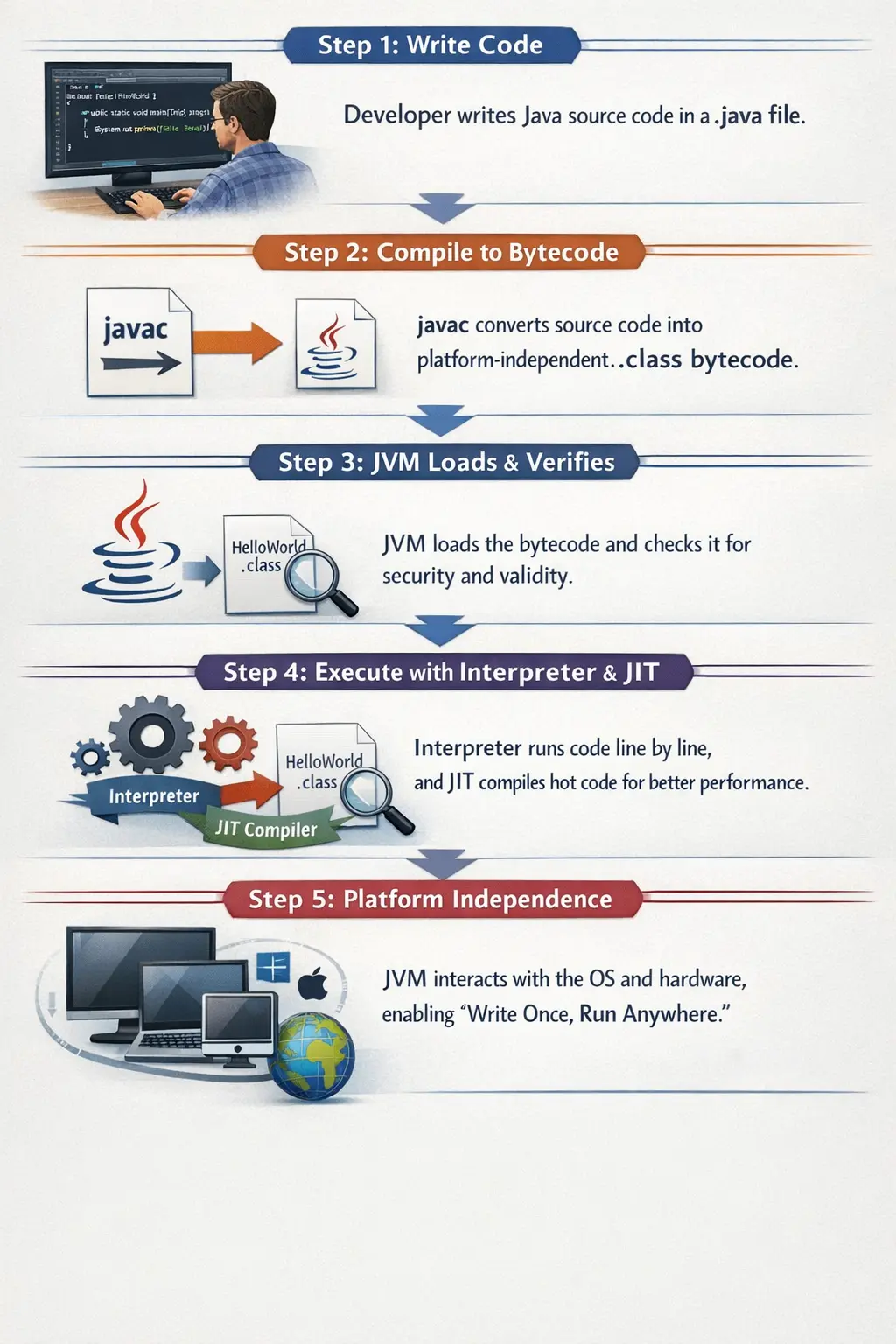
In interviews, Java execution can be explained as a structured flow. A developer writes source code in a .java file. The javac compiler compiles it into bytecode stored in a .class file. The JVM loads the class, verifies bytecode for safety, and executes it using the interpreter and JIT compiler. During execution, the JVM manages memory, handles garbage collection, and interacts with the operating system and hardware.
A strong answer should also explain why this flow matters. Bytecode enables platform independence. Bytecode verification improves security. JIT compilation improves performance. Runtime memory areas and garbage collection support managed execution. This complete explanation shows that Java is not just compiled or interpreted; it uses a layered architecture designed for portability, safety, and performance.
High-Level Execution Flow
The lifecycle of a Java program follows these stages:
- Write Java source code (.java)
- Compile source code into bytecode (.class)
- Load bytecode into the JVM
- Verify bytecode for safety
- Execute bytecode using the interpreter and JIT compiler
- JVM interacts with the Operating System and hardware
Each stage plays a specific role in ensuring Java’s portability and reliability.
Step 1: Writing Java Source Code
A developer writes Java code in a text file with a .java extension. The code must follow strict Java syntax rules.
At this stage, the source code is platform dependent because it is plain text that has not yet been compiled into bytecode.
Example:
public class Hello {
    public static void main(String[] args) {
        System.out.println("Hello Java");
    }
}
This file is human-readable but not executable by the operating system.
Step 2: Compilation Using javac
The Java compiler (javac) compiles the .java file into bytecode.
During compilation, the compiler performs:
- Syntax checking
- Type checking
- Validation of structure (missing semicolons, brackets, etc.)
If errors are found, compilation fails. If successful, the output is a .class file containing bytecode. The most important concept here is that bytecode is platform independent. It is not machine code tied to a specific operating system or CPU.
Step 3: Class Loading
When the program is executed using:
java Hello
the JVM starts and loads the required classes into memory using the Class Loader Subsystem.
There are three main types of class loaders:
- Bootstrap Class Loader loads core Java classes.
- Extension Class Loader loads extension libraries.
- Application Class Loader loads user-defined classes.
This mechanism ensures correct loading order and prevents unauthorized class replacement, which improves security and stability.
Step 4: Bytecode Verification
Before execution, the JVM verifies the bytecode.
The verifier ensures:
- No illegal memory access
- Stack integrity
- Valid and safe instructions
This step prevents malicious or corrupted code from executing. It is one of the key reasons Java is considered secure.
Step 5: Execution by the JVM
Execution is handled by the Execution Engine, which consists of two main components.
Interpreter
The interpreter reads bytecode instruction by instruction and converts it into machine-level instructions. It is simple and reliable but slower when the same code runs repeatedly.
JIT (Just-In-Time) Compiler
The JIT compiler identifies frequently executed code segments known as hot spots. It converts these bytecode sections into native machine code and caches them for reuse.
This optimization significantly improves performance and explains why Java applications can approach native execution speed. Java is therefore not purely interpreted. It combines interpretation and compilation dynamically at runtime.
Step 6: Runtime Memory Management
During execution, the JVM manages memory using structured runtime areas:
- Heap stores objects.
- Stack stores method calls and local variables.
- Method Area stores class metadata.
- PC Register tracks the current instruction.
- Native Method Stack handles native code execution.
The Garbage Collector (GC) automatically removes unused objects from the heap, preventing memory leaks and reducing crashes.
Proper understanding of these memory areas helps explain errors such as OutOfMemoryError and StackOverflowError.
Step 7: Interaction with Operating System and Hardware
The JVM communicates with the operating system, and the operating system communicates with hardware. Because only the JVM is platform specific, the same bytecode behaves consistently across systems.
This architecture enables Java’s core principle:
Write Once, Run Anywhere.
Conceptual Execution Flow
The process can be summarized conceptually as:
Hello.java
↓ (javac)
Hello.class (Bytecode)
↓
Class Loader
↓
Bytecode Verifier
↓
Execution Engine
 ├─ Interpreter
 └─ JIT Compiler
↓
Operating System
↓
Hardware
Summary of Responsibilities
- Source Code Stage produces the .java file.
- Compilation stage produces the .class file.
- Class Loading stage loads classes into memory.
- Verification stage ensures security.
- Execution stage converts bytecode into machine code.
- Memory Management stage optimizes execution using GC.
Common Beginner Mistakes
Many beginners misunderstand Java’s internal process. Common misconceptions include:
- Believing Java is fully interpreted
- Thinking bytecode runs directly on the operating system
- Ignoring the role of the JIT compiler
- Confusing compilation errors with runtime errors
- Not understanding garbage collection behavior
Interview-Ready Explanation
Short Answer:
Java works by compiling source code into platform-independent bytecode, which is executed by the JVM using both an interpreter and a JIT compiler.
Detailed Answer:
Java source code is compiled by javac into bytecode. The JVM loads and verifies this bytecode, then executes it using an interpreter and JIT compiler. During execution, the JVM manages memory and interacts with the operating system, enabling portability, security, and performance.
Key Takeaway
Java separates compilation and execution. By converting source code into bytecode and running it through the JVM, Java achieves portability, security, and high performance across platforms.